Solved My System's (Desktop) TOP burning after gaming ...

fahadhum

New member
Member
VIP
Local time
6:05 AM
Messages
201
Location
Doha Qatar
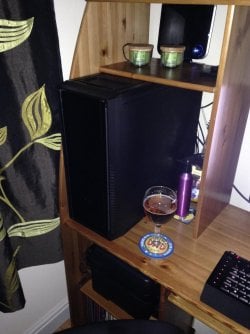
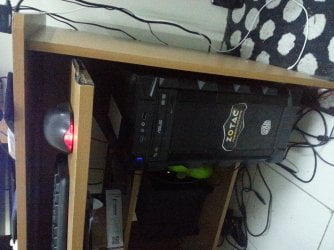
Ok.This is kind of hard to explain but i will try my best.So,basically just today while i was done playing a game on my system (Which is a pretty capable ASSEMBLED RIG ) , i noticed the wood on top of my System was burning .Curious, i looked down (My system is setup like this as shown in the attached picture) & I put my palm on the top of my system.It was burning.And after i came back from dinner , i checked the temperature .It was fine.

Now,the specs of my System are as follows :

Processor : Intel (R) Core (TM) i7 -4790 CPU @ 3.60GHz 3.60 GHz
RAM : 16 GB
Motherboard : Gigabyte H97-D3H
Graphics Card : Zotac Nvidia Gforce GTX 960 2 GB

And again , this was assembled.The guy who made this system for me assured me that he is installing all the essential hardware componenets to support heaviest of the heavy Games.Regarding the cooling , he said that apart from the regular fan that he installed in my system.He also said , that i can install an extra fan for extra cooling but i didn't installed it as he said that , this much cooling would be enough.

I have dealt with SYSTEM OVERHEAT WHILE GAMING issues before with my Laptop but a simple FIX from youtube , allowed me play with some Processor temperature settings in Power Plan.And,to make it completely BURN-FREE , i was using a BIG Portable fan that i used to switched on , whenever i was gonna play some games.

Now,this issue of my SYSTEM's top side burning.Could this be due to the improper installing/assembling of my system's HARDWARE by the shop guy or perhaps i am overreacting.Or MAY BE , the place where i have placed my system (Under the table , as shown in the attached Picture) is preventing it from any Ventilation..

What are your suggestions..I am ready to try anything to make this burning go away...
 

Attachments
  • My System's Setup.jpg
    My System's Setup.jpg
    775.3 KB · Views: 5

My Computer My Computer

At a glance

Windows 7 Home Premium 64 biti716 GBNvidia GFORCE GTX 960 2 GB
Computer type
PC/Desktop
Computer Manufacturer/Model Number
Asus
OS
Windows 7 Home Premium 64 bit
CPU
i7
Motherboard
Gigabyte H97-D3H
Memory
16 GB
Graphics Card(s)
Nvidia GFORCE GTX 960 2 GB
Screen Resolution
1280*720
Cooling
CORSAIR Liquid Fan + One Built in FAN
Antivirus
Avast Free Anti Virus 2015
Browser
Google Chrome
You have to monitor your CPU and GPU temps during gaming.

No way should the top of your PC be getting hot.

Where is the Power Supply located in that case ? Is it getting hot ?
 

My Computer My Computer

At a glance

Windows 10 Pro x64Intel Core i7 6700KGSkill TridentZ RGB 16GB 3600 16-16-16-36EVGA GTX 980 Ti SC x2
Computer type
PC/Desktop
Computer Manufacturer/Model Number
Skylake Special #666
OS
Windows 10 Pro x64
CPU
Intel Core i7 6700K
Motherboard
Asus Sabertooth Z170 Mark 1
Memory
GSkill TridentZ RGB 16GB 3600 16-16-16-36
Graphics Card(s)
EVGA GTX 980 Ti SC x2
Sound Card
Realtek High Definition
Monitor(s) Displays
AOC G2460PG
Screen Resolution
1920 x 1080 144Hz
Hard Drives
Samsung 860 Pro 256GB, Seagate Barracuda 4TB x2
PSU
EVGA 1000 P2, EVGA White Custom Braided Cables
Case
Corsair Vengeance C70 Gunmetal Black
Cooling
Corsair H100i v2, Corsair ML120 x2, Thermal Grizzly Kryonaut
Keyboard
Logitech G910 Orion Spectrum
Mouse
Logitech G700s
Internet Speed
Verizon Fios Quantum Gateway 75/75
Antivirus
Windows Defender, Malwarebytes Free 3.8.3
Browser
Chrome
Other Info
Corsair SP120 x4, LG Blu-ray Drive, Durabrand HT-395 100 Watt Dolby Digital Amp, Corsair H2100 Wireless 7.1 Headset
You have to monitor your CPU and GPU temps during gaming.

No way should the top of your PC be getting hot.

Where is the Power Supply located in that case ? Is it getting hot ?

Ok.I will install CPU-Z (or Similar software ) for monitering the temperatures.

The Power supply's wire socket is located on the bottom of my System's back ...I am not sure about the exact location of the power supply inside of my system's case.I am not very knowledgable with Computer's hardware.I can do one thing though.If you like , i can open my system's case and take pictures of the inside from different angles for you.

I am worried .I felt the heat comming from my system's TOP and touching my mouse which i was holding.So,imagine the heat.I wonder what's causing this.I bought this system just 3 months ago :confused:
 

My Computer My Computer

At a glance

Windows 7 Home Premium 64 biti716 GBNvidia GFORCE GTX 960 2 GB
Computer type
PC/Desktop
Computer Manufacturer/Model Number
Asus
OS
Windows 7 Home Premium 64 bit
CPU
i7
Motherboard
Gigabyte H97-D3H
Memory
16 GB
Graphics Card(s)
Nvidia GFORCE GTX 960 2 GB
Screen Resolution
1280*720
Cooling
CORSAIR Liquid Fan + One Built in FAN
Antivirus
Avast Free Anti Virus 2015
Browser
Google Chrome
I'd venture that picture needs to be rotated 90° to give an accurate situation. If so the right and possibly left sides are too close to the framework of the desk to allow proper airflow.
 

My Computer My Computer

At a glance

Windows 7 Ultimate 64-bit, Windows 8.1 64-bit...
Computer type
PC/Desktop
Computer Manufacturer/Model Number
Customs, Dell, Gateway, HP, Toshiba, Acer, ASUS
OS
Windows 7 Ultimate 64-bit, Windows 8.1 64-bit, Mac OS X 10.10, Linux Mint 17, Windows 10 Pro TP
Keyboard
Microsoft
Mouse
Microsoft
The front and back of the PC look fine to me for ventilation, there`s no vent holes on the right hand side of any computer I know of, so that should not be an issue.

Are there fans at the front and back, are they working OK ?

And no way should the wood where the keyboard is get hot from the mouse, that is just crazy.

You have to find out exactly what`s getting hot during gaming.

CPUz does not show temps. Use Speccy.

No way should the parts you`ve used to build that PC be getting hot.
 

My Computer My Computer

At a glance

Windows 10 Pro x64Intel Core i7 6700KGSkill TridentZ RGB 16GB 3600 16-16-16-36EVGA GTX 980 Ti SC x2
Computer type
PC/Desktop
Computer Manufacturer/Model Number
Skylake Special #666
OS
Windows 10 Pro x64
CPU
Intel Core i7 6700K
Motherboard
Asus Sabertooth Z170 Mark 1
Memory
GSkill TridentZ RGB 16GB 3600 16-16-16-36
Graphics Card(s)
EVGA GTX 980 Ti SC x2
Sound Card
Realtek High Definition
Monitor(s) Displays
AOC G2460PG
Screen Resolution
1920 x 1080 144Hz
Hard Drives
Samsung 860 Pro 256GB, Seagate Barracuda 4TB x2
PSU
EVGA 1000 P2, EVGA White Custom Braided Cables
Case
Corsair Vengeance C70 Gunmetal Black
Cooling
Corsair H100i v2, Corsair ML120 x2, Thermal Grizzly Kryonaut
Keyboard
Logitech G910 Orion Spectrum
Mouse
Logitech G700s
Internet Speed
Verizon Fios Quantum Gateway 75/75
Antivirus
Windows Defender, Malwarebytes Free 3.8.3
Browser
Chrome
Other Info
Corsair SP120 x4, LG Blu-ray Drive, Durabrand HT-395 100 Watt Dolby Digital Amp, Corsair H2100 Wireless 7.1 Headset
I'd venture that picture needs to be rotated 90° to give an accurate situation. If so the right and possibly left sides are too close to the framework of the desk to allow proper airflow.

Not necessarily if the cooling inside the case is set up properly, mine reaches 55°C on the CPU while gaming and my GPU always tops at 80°C and it's situated here.
IMG_0916.jpg
I think the OP needs to open the case up and take some photos so we can have a look at his fan set up.
 

My Computer My Computer

At a glance

W7 Pro x64 SP1 | W10 Pro IP x64 | W8.1 Pro x6...i7-4790k @ 4GHz (4.4GHz Boost)16GB DDR3 Kingston HyperX Fury @ 1600MHz CL 9...EVGA GTX 980 Classified
Computer type
PC/Desktop
Computer Manufacturer/Model Number
Custom Build
OS
W7 Pro x64 SP1 | W10 Pro IP x64 | W8.1 Pro x64 VM | Linux Mint VM
CPU
i7-4790k @ 4GHz (4.4GHz Boost)
Motherboard
ASUS Sabertooth Z87 (BIOS Rev 2004)
Memory
16GB DDR3 Kingston HyperX Fury @ 1600MHz CL 9-9-9-27
Graphics Card(s)
EVGA GTX 980 Classified
Sound Card
Realtek Onboard
Monitor(s) Displays
Samsung S27D390
Screen Resolution
1920 x 1080
Hard Drives
240GB Intel 520 Series SSD |
Samsung 850 EVO 120GB SSD |
2TB WD Caviar Black |
2TB WD Caviar Green
PSU
Corsair HX850-80 Gold Modular
Case
Cooler Master Silencio 650
Cooling
Corsair H80i w/2 x Corsair SP120 | 2 x 120mm Noctua NF-S12B
Keyboard
Microsoft Sidewinder X4
Mouse
Gigabyte M6900 optical
Internet Speed
152mb
Antivirus
F-Secure
Browser
Firefox 38.0
Other Info
Backup Rig: Win 7 Pro 64-bit | AMD A10-5800k | ASUS F2A85-V Pro | 8GB Samsung DDR3 @1600MHz | 120GB Toshiba SDD | 2TB Seagate HDD | Cooler Master Silencio 550
I never did like a tower inside a closure. Make sure you have plenty of room between the back of the case and the desk. Other you will block exhaust from the rear of the case.

Better yet. Try just moving the case out from under the desk and monitor the temps.
 

My Computer My Computer

At a glance

Windows 10 Pro. 64/ version 1709 Windows 7 Pr...Intel i7-6800K @ 4.3Corsair Platinum 16 gig @2400EVGA GTX 1070 OC
Computer type
PC/Desktop
Computer Manufacturer/Model Number
Home made Desktop
OS
Windows 10 Pro. 64/ version 1709 Windows 7 Pro/64
CPU
Intel i7-6800K @ 4.3
Motherboard
ASUS X-99 Deluxe II
Memory
Corsair Platinum 16 gig @2400
Graphics Card(s)
EVGA GTX 1070 OC
Monitor(s) Displays
Asus 27" LED LCD/VE278Q
Screen Resolution
1920-1080 or 1280-720 HDMI
Hard Drives
INTEL SSD 730-240 Gb Sata 3.0/
PSU
EVGA Platium 1200W
Case
Phanteks Luxe Tempered Glass 8 fans/ one radiator
Cooling
XSPC/ Water Cooled CPU
Keyboard
Das 4 Professional
Mouse
Logitech M705/MX Anywhere 2-S
Internet Speed
100 mbits
Antivirus
Microsoft Security Essentials/ Malwarebytes Premium 3.0/ SAS
Browser
I.E. 11 default/Firefox/ ISP Time Warner Cable/Spectrum
Other Info
LG BluRay Burner/
Sound system-KLipsch-THX/
Icy Dock ssd Hot Swap bays.
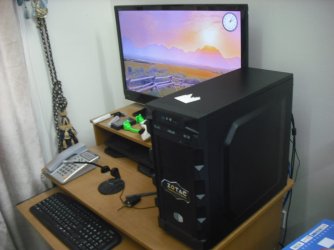
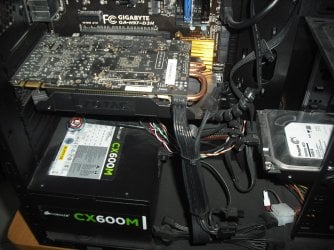
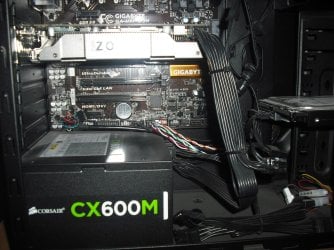
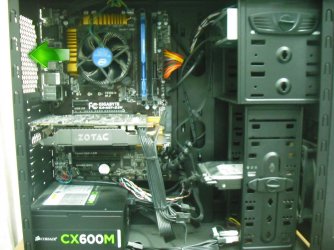
Alrite guys.I read all of your suggestions and i just opened my RIG up and took some pictures ( Kindly ,See the attached pictures ) for y'all to see , what my RIG's inside looks like.

Also,i changed my RIG's position on my cpmputer table ( Kindly , See the attached Pictures )

What do y'all think .....

NOTE: I actually took a lot of pictures , including the backside and the right side of my RIG but i can only upload 5 pictures in sevenforums.So , if you need to see the back side (Where all the wires/ports are hooked).Please let me know ....

Thank you guys for helping me,i am so grateful for this website and you all.You are the best :)
 

Attachments

  • My New Setup 2.JPG
    My New Setup 2.JPG
    107.5 KB · Views: 3
  • Inside 4.JPG
    Inside 4.JPG
    278.4 KB · Views: 4
  • Inside 3.JPG
    Inside 3.JPG
    238.8 KB · Views: 3
  • Inside 2.JPG
    Inside 2.JPG
    251.6 KB · Views: 3
  • Inside 1.JPG
    Inside 1.JPG
    188.1 KB · Views: 7

My Computer My Computer

At a glance

Windows 7 Home Premium 64 biti716 GBNvidia GFORCE GTX 960 2 GB
Computer type
PC/Desktop
Computer Manufacturer/Model Number
Asus
OS
Windows 7 Home Premium 64 bit
CPU
i7
Motherboard
Gigabyte H97-D3H
Memory
16 GB
Graphics Card(s)
Nvidia GFORCE GTX 960 2 GB
Screen Resolution
1280*720
Cooling
CORSAIR Liquid Fan + One Built in FAN
Antivirus
Avast Free Anti Virus 2015
Browser
Google Chrome
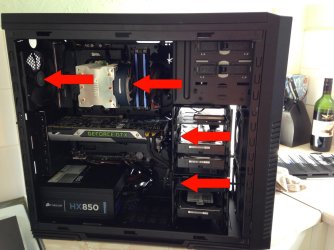
Gaming on a 4790 with the stock cooler isn't ideal. My recommendations would be to fit an aftermarket cooler (any triple copper heatpipe cooler will be better than the stock cooler) and fit a fan at the rear of the case (highlighted below) to extract the air and increase airflow through the case, at the moment there isn't any really If The guy who built the system for you assured you he installed all the essential hardware componenets to support the heaviest of the heavy Games then never go back to him for any computer work.
Inside 1.jpg
 

My Computer My Computer

At a glance

W7 Pro x64 SP1 | W10 Pro IP x64 | W8.1 Pro x6...i7-4790k @ 4GHz (4.4GHz Boost)16GB DDR3 Kingston HyperX Fury @ 1600MHz CL 9...EVGA GTX 980 Classified
Computer type
PC/Desktop
Computer Manufacturer/Model Number
Custom Build
OS
W7 Pro x64 SP1 | W10 Pro IP x64 | W8.1 Pro x64 VM | Linux Mint VM
CPU
i7-4790k @ 4GHz (4.4GHz Boost)
Motherboard
ASUS Sabertooth Z87 (BIOS Rev 2004)
Memory
16GB DDR3 Kingston HyperX Fury @ 1600MHz CL 9-9-9-27
Graphics Card(s)
EVGA GTX 980 Classified
Sound Card
Realtek Onboard
Monitor(s) Displays
Samsung S27D390
Screen Resolution
1920 x 1080
Hard Drives
240GB Intel 520 Series SSD |
Samsung 850 EVO 120GB SSD |
2TB WD Caviar Black |
2TB WD Caviar Green
PSU
Corsair HX850-80 Gold Modular
Case
Cooler Master Silencio 650
Cooling
Corsair H80i w/2 x Corsair SP120 | 2 x 120mm Noctua NF-S12B
Keyboard
Microsoft Sidewinder X4
Mouse
Gigabyte M6900 optical
Internet Speed
152mb
Antivirus
F-Secure
Browser
Firefox 38.0
Other Info
Backup Rig: Win 7 Pro 64-bit | AMD A10-5800k | ASUS F2A85-V Pro | 8GB Samsung DDR3 @1600MHz | 120GB Toshiba SDD | 2TB Seagate HDD | Cooler Master Silencio 550
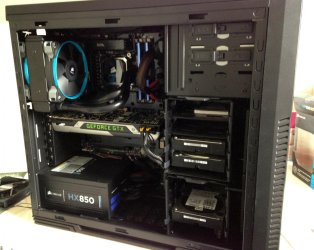
You need something like this:
Airflow 1.jpg
 

My Computer My Computer

At a glance

W7 Pro x64 SP1 | W10 Pro IP x64 | W8.1 Pro x6...i7-4790k @ 4GHz (4.4GHz Boost)16GB DDR3 Kingston HyperX Fury @ 1600MHz CL 9...EVGA GTX 980 Classified
Computer type
PC/Desktop
Computer Manufacturer/Model Number
Custom Build
OS
W7 Pro x64 SP1 | W10 Pro IP x64 | W8.1 Pro x64 VM | Linux Mint VM
CPU
i7-4790k @ 4GHz (4.4GHz Boost)
Motherboard
ASUS Sabertooth Z87 (BIOS Rev 2004)
Memory
16GB DDR3 Kingston HyperX Fury @ 1600MHz CL 9-9-9-27
Graphics Card(s)
EVGA GTX 980 Classified
Sound Card
Realtek Onboard
Monitor(s) Displays
Samsung S27D390
Screen Resolution
1920 x 1080
Hard Drives
240GB Intel 520 Series SSD |
Samsung 850 EVO 120GB SSD |
2TB WD Caviar Black |
2TB WD Caviar Green
PSU
Corsair HX850-80 Gold Modular
Case
Cooler Master Silencio 650
Cooling
Corsair H80i w/2 x Corsair SP120 | 2 x 120mm Noctua NF-S12B
Keyboard
Microsoft Sidewinder X4
Mouse
Gigabyte M6900 optical
Internet Speed
152mb
Antivirus
F-Secure
Browser
Firefox 38.0
Other Info
Backup Rig: Win 7 Pro 64-bit | AMD A10-5800k | ASUS F2A85-V Pro | 8GB Samsung DDR3 @1600MHz | 120GB Toshiba SDD | 2TB Seagate HDD | Cooler Master Silencio 550
:ditto:

I would definitely agree on the fan situation, you only have one fan pushing in from the front of your case, a rear exhaust fan will help move air through the pc while an after market cpu cooler would be even better especially with an I7.

You've obviously spent a bit of money on a good system you don't want to ruin it with over heat for the sake of a few fans
 

My Computer My Computer

At a glance

Win7 Ultimate X64Intel i5 3570K8GB DDR3 1600Onboard
Computer type
PC/Desktop
Computer Manufacturer/Model Number
Pauly Special
OS
Win7 Ultimate X64
CPU
Intel i5 3570K
Motherboard
Gigabyte Z77X-DS3H
Memory
8GB DDR3 1600
Graphics Card(s)
Onboard
Sound Card
Onboard
Screen Resolution
1280x1024
Hard Drives
Samsung 840 Evo SSD (OS)
1TB Spinner (Data)
PSU
800W Arctic
Case
Cooler Master
Cooling
3x120mm Fans
Keyboard
MS Wireless
Mouse
MS Wireless
Internet Speed
20M
Is it possible to put 2 120mm fans in the front of that case, instead of just the 1 fan ?

I`m shocked whoever built it did not put an exhaust fan on it :eek:

That`s your problem.

Gav, post a pic of your current setup showing your H80, so he can get a great idea :)
 

My Computer My Computer

At a glance

Windows 10 Pro x64Intel Core i7 6700KGSkill TridentZ RGB 16GB 3600 16-16-16-36EVGA GTX 980 Ti SC x2
Computer type
PC/Desktop
Computer Manufacturer/Model Number
Skylake Special #666
OS
Windows 10 Pro x64
CPU
Intel Core i7 6700K
Motherboard
Asus Sabertooth Z170 Mark 1
Memory
GSkill TridentZ RGB 16GB 3600 16-16-16-36
Graphics Card(s)
EVGA GTX 980 Ti SC x2
Sound Card
Realtek High Definition
Monitor(s) Displays
AOC G2460PG
Screen Resolution
1920 x 1080 144Hz
Hard Drives
Samsung 860 Pro 256GB, Seagate Barracuda 4TB x2
PSU
EVGA 1000 P2, EVGA White Custom Braided Cables
Case
Corsair Vengeance C70 Gunmetal Black
Cooling
Corsair H100i v2, Corsair ML120 x2, Thermal Grizzly Kryonaut
Keyboard
Logitech G910 Orion Spectrum
Mouse
Logitech G700s
Internet Speed
Verizon Fios Quantum Gateway 75/75
Antivirus
Windows Defender, Malwarebytes Free 3.8.3
Browser
Chrome
Other Info
Corsair SP120 x4, LG Blu-ray Drive, Durabrand HT-395 100 Watt Dolby Digital Amp, Corsair H2100 Wireless 7.1 Headset
13.jpg
 

My Computer My Computer

At a glance

W7 Pro x64 SP1 | W10 Pro IP x64 | W8.1 Pro x6...i7-4790k @ 4GHz (4.4GHz Boost)16GB DDR3 Kingston HyperX Fury @ 1600MHz CL 9...EVGA GTX 980 Classified
Computer type
PC/Desktop
Computer Manufacturer/Model Number
Custom Build
OS
W7 Pro x64 SP1 | W10 Pro IP x64 | W8.1 Pro x64 VM | Linux Mint VM
CPU
i7-4790k @ 4GHz (4.4GHz Boost)
Motherboard
ASUS Sabertooth Z87 (BIOS Rev 2004)
Memory
16GB DDR3 Kingston HyperX Fury @ 1600MHz CL 9-9-9-27
Graphics Card(s)
EVGA GTX 980 Classified
Sound Card
Realtek Onboard
Monitor(s) Displays
Samsung S27D390
Screen Resolution
1920 x 1080
Hard Drives
240GB Intel 520 Series SSD |
Samsung 850 EVO 120GB SSD |
2TB WD Caviar Black |
2TB WD Caviar Green
PSU
Corsair HX850-80 Gold Modular
Case
Cooler Master Silencio 650
Cooling
Corsair H80i w/2 x Corsair SP120 | 2 x 120mm Noctua NF-S12B
Keyboard
Microsoft Sidewinder X4
Mouse
Gigabyte M6900 optical
Internet Speed
152mb
Antivirus
F-Secure
Browser
Firefox 38.0
Other Info
Backup Rig: Win 7 Pro 64-bit | AMD A10-5800k | ASUS F2A85-V Pro | 8GB Samsung DDR3 @1600MHz | 120GB Toshiba SDD | 2TB Seagate HDD | Cooler Master Silencio 550
Gaming on a 4790 with the stock cooler isn't ideal. My recommendations would be to fit an aftermarket cooler (any triple copper heatpipe cooler will be better than the stock cooler) and fit a fan at the rear of the case (highlighted below) to extract the air and increase airflow through the case, at the moment there isn't any really If The guy who built the system for you assured you he installed all the essential hardware componenets to support the heaviest of the heavy Games then never go back to him for any computer work.

Hmmm Thank you Mr. RIP Gary.I will need to go again to the shop guy for computer work.You know why, he did told me that , he can install an EXTRA FAN (if i like) for extra cooling.Now, considering your recommendation of installing an extra aftermarket cooler,i will now definetly will be in need of an extra cooler.So,i am gonna go to the shop again.The fan will cost some bucks but i am willing to bear this expense.I can not afford to burn my newly bought rig.

You know something,i will be showing him this picture of yours with the green arrow to the shop guy just to gave him an idea of how this should look like.
 

My Computer My Computer

At a glance

Windows 7 Home Premium 64 biti716 GBNvidia GFORCE GTX 960 2 GB
Computer type
PC/Desktop
Computer Manufacturer/Model Number
Asus
OS
Windows 7 Home Premium 64 bit
CPU
i7
Motherboard
Gigabyte H97-D3H
Memory
16 GB
Graphics Card(s)
Nvidia GFORCE GTX 960 2 GB
Screen Resolution
1280*720
Cooling
CORSAIR Liquid Fan + One Built in FAN
Antivirus
Avast Free Anti Virus 2015
Browser
Google Chrome
:ditto:

I would definitely agree on the fan situation, you only have one fan pushing in from the front of your case, a rear exhaust fan will help move air through the pc while an after market cpu cooler would be even better especially with an I7.

You've obviously spent a bit of money on a good system you don't want to ruin it with over heat for the sake of a few fans

Thank you Sir for your suggestion

...I am just waiting for some free time out of my schedule to take my RIG to the shop guy again.I just have to install that EXTRA FAN that he asked me about.As you said , i can't afford to ruin my rig for the sake of few fans.I don't mind how many fans it would take ...
 

My Computer My Computer

At a glance

Windows 7 Home Premium 64 biti716 GBNvidia GFORCE GTX 960 2 GB
Computer type
PC/Desktop
Computer Manufacturer/Model Number
Asus
OS
Windows 7 Home Premium 64 bit
CPU
i7
Motherboard
Gigabyte H97-D3H
Memory
16 GB
Graphics Card(s)
Nvidia GFORCE GTX 960 2 GB
Screen Resolution
1280*720
Cooling
CORSAIR Liquid Fan + One Built in FAN
Antivirus
Avast Free Anti Virus 2015
Browser
Google Chrome
Is it possible to put 2 120mm fans in the front of that case, instead of just the 1 fan ?

I`m shocked whoever built it did not put an exhaust fan on it :eek:

That`s your problem.

Gav, post a pic of your current setup showing your H80, so he can get a great idea :)

:confused: So,the guy who built / assembled this really forgot something essential to put (as you just said about an exaust fan) ?

He told me before making the RIG , specifically what kind of hardware components he would be installing and everything for the cooling as well ..And he looked confident in assuring me that , he is gonna make sure that this RIG handles all the HEAVY gaming with utmost capability...
Hmmm Well , i gotta have that extra fan now from him .Although i wonder , where is he gonna install it.I don't mind wherever he puts it ..I will just tell him to install 1 or two fans if possible ....
 

My Computer My Computer

At a glance

Windows 7 Home Premium 64 biti716 GBNvidia GFORCE GTX 960 2 GB
Computer type
PC/Desktop
Computer Manufacturer/Model Number
Asus
OS
Windows 7 Home Premium 64 bit
CPU
i7
Motherboard
Gigabyte H97-D3H
Memory
16 GB
Graphics Card(s)
Nvidia GFORCE GTX 960 2 GB
Screen Resolution
1280*720
Cooling
CORSAIR Liquid Fan + One Built in FAN
Antivirus
Avast Free Anti Virus 2015
Browser
Google Chrome
You need something like this:

:shock: Is it really possible to install that many fans in my RIG as well ...WOW..
I will show this picture to the shop guy and if you suggest . i will ask him if it's possible to install more fans (As shown in your picture )
 
Last edited:

My Computer My Computer

At a glance

Windows 7 Home Premium 64 biti716 GBNvidia GFORCE GTX 960 2 GB
Computer type
PC/Desktop
Computer Manufacturer/Model Number
Asus
OS
Windows 7 Home Premium 64 bit
CPU
i7
Motherboard
Gigabyte H97-D3H
Memory
16 GB
Graphics Card(s)
Nvidia GFORCE GTX 960 2 GB
Screen Resolution
1280*720
Cooling
CORSAIR Liquid Fan + One Built in FAN
Antivirus
Avast Free Anti Virus 2015
Browser
Google Chrome

My Computer My Computer

At a glance

Windows 7 Home Premium 64 biti716 GBNvidia GFORCE GTX 960 2 GB
Computer type
PC/Desktop
Computer Manufacturer/Model Number
Asus
OS
Windows 7 Home Premium 64 bit
CPU
i7
Motherboard
Gigabyte H97-D3H
Memory
16 GB
Graphics Card(s)
Nvidia GFORCE GTX 960 2 GB
Screen Resolution
1280*720
Cooling
CORSAIR Liquid Fan + One Built in FAN
Antivirus
Avast Free Anti Virus 2015
Browser
Google Chrome
From post #1

And again , this was assembled.The guy who made this system for me assured me that he is installing all the essential hardware componenets to support heaviest of the heavy Games.

If that statement is accurate I would recommend changing system builders.

The cpu cooling for heavy Games needs to be more that a stock cpu cooler.

Could you post a website showing the exact case you have.
I didn't know one could buy a case without at least 1 exhaust fan.
I would like to have more information on the case.

As hot as your system has been I would be surprise that damage hasn't already been done.
 

My Computer My Computer

At a glance

Windows 10 Pro. 64/ version 1709 Windows 7 Pr...Intel i7-6800K @ 4.3Corsair Platinum 16 gig @2400EVGA GTX 1070 OC
Computer type
PC/Desktop
Computer Manufacturer/Model Number
Home made Desktop
OS
Windows 10 Pro. 64/ version 1709 Windows 7 Pro/64
CPU
Intel i7-6800K @ 4.3
Motherboard
ASUS X-99 Deluxe II
Memory
Corsair Platinum 16 gig @2400
Graphics Card(s)
EVGA GTX 1070 OC
Monitor(s) Displays
Asus 27" LED LCD/VE278Q
Screen Resolution
1920-1080 or 1280-720 HDMI
Hard Drives
INTEL SSD 730-240 Gb Sata 3.0/
PSU
EVGA Platium 1200W
Case
Phanteks Luxe Tempered Glass 8 fans/ one radiator
Cooling
XSPC/ Water Cooled CPU
Keyboard
Das 4 Professional
Mouse
Logitech M705/MX Anywhere 2-S
Internet Speed
100 mbits
Antivirus
Microsoft Security Essentials/ Malwarebytes Premium 3.0/ SAS
Browser
I.E. 11 default/Firefox/ ISP Time Warner Cable/Spectrum
Other Info
LG BluRay Burner/
Sound system-KLipsch-THX/
Icy Dock ssd Hot Swap bays.
From post #1

And again , this was assembled.The guy who made this system for me assured me that he is installing all the essential hardware componenets to support heaviest of the heavy Games.

If that statement is accurate I would recommend changing system builders.

The cpu cooling for heavy Games needs to be more that a stock cpu cooler.

Could you post a website showing the exact case you have.
I didn't know one could buy a case without at least 1 exhaust fan.
I would like to have more information on the case.

As hot as your system has been I would be surprise that damage hasn't already been done.

I do not know of any website that could show my case description.However,i have a link which lists my Hardware Drivers & Info (I wonder if it's helpful to you) Here it is...

GIGABYTE - Motherboard - Socket 1150 - GA-H97-D3H (rev. 1.0)

I wonder if you have seen my attached pictures of my SYSTEM's CASE INSIDE , from different angles.May be,that will help you find the information that you are looking for.If you want additional photos of any specific hardware component,please let me know so that i can open up my RIG and take the snaps for you...
 

My Computer My Computer

At a glance

Windows 7 Home Premium 64 biti716 GBNvidia GFORCE GTX 960 2 GB
Computer type
PC/Desktop
Computer Manufacturer/Model Number
Asus
OS
Windows 7 Home Premium 64 bit
CPU
i7
Motherboard
Gigabyte H97-D3H
Memory
16 GB
Graphics Card(s)
Nvidia GFORCE GTX 960 2 GB
Screen Resolution
1280*720
Cooling
CORSAIR Liquid Fan + One Built in FAN
Antivirus
Avast Free Anti Virus 2015
Browser
Google Chrome
Back
Top