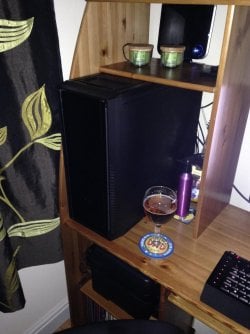
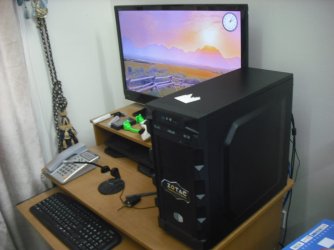
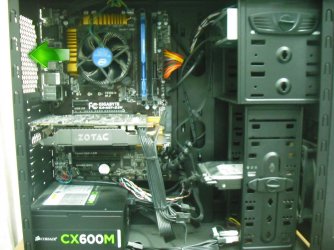
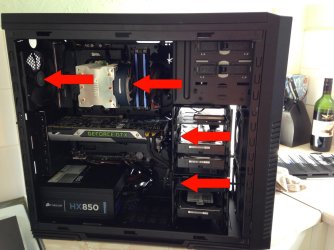
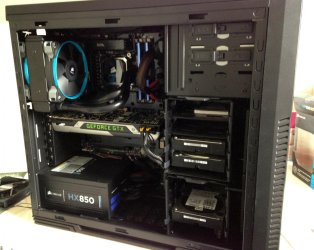
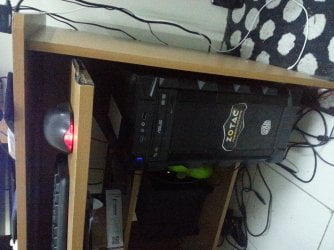
Ok.This is kind of hard to explain but i will try my best.So,basically just today while i was done playing a game on my system (Which is a pretty capable ASSEMBLED RIG ) , i noticed the wood on top of my System was burning .Curious, i looked down (My system is setup like this as shown in the attached picture) & I put my palm on the top of my system.It was burning.And after i came back from dinner , i checked the temperature .It was fine.
Now,the specs of my System are as follows :
Processor : Intel (R) Core (TM) i7 -4790 CPU @ 3.60GHz 3.60 GHz
RAM : 16 GB
Motherboard : Gigabyte H97-D3H
Graphics Card : Zotac Nvidia Gforce GTX 960 2 GB
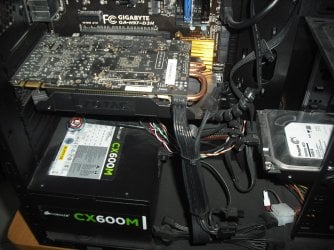
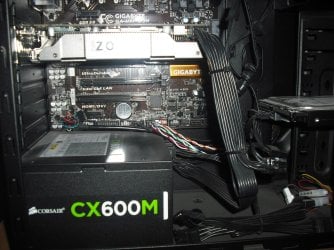
And again , this was assembled.The guy who made this system for me assured me that he is installing all the essential hardware componenets to support heaviest of the heavy Games.Regarding the cooling , he said that apart from the regular fan that he installed in my system.He also said , that i can install an extra fan for extra cooling but i didn't installed it as he said that , this much cooling would be enough.
I have dealt with SYSTEM OVERHEAT WHILE GAMING issues before with my Laptop but a simple FIX from youtube , allowed me play with some Processor temperature settings in Power Plan.And,to make it completely BURN-FREE , i was using a BIG Portable fan that i used to switched on , whenever i was gonna play some games.
Now,this issue of my SYSTEM's top side burning.Could this be due to the improper installing/assembling of my system's HARDWARE by the shop guy or perhaps i am overreacting.Or MAY BE , the place where i have placed my system (Under the table , as shown in the attached Picture) is preventing it from any Ventilation..
What are your suggestions..I am ready to try anything to make this burning go away...
Now,the specs of my System are as follows :
Processor : Intel (R) Core (TM) i7 -4790 CPU @ 3.60GHz 3.60 GHz
RAM : 16 GB
Motherboard : Gigabyte H97-D3H
Graphics Card : Zotac Nvidia Gforce GTX 960 2 GB
And again , this was assembled.The guy who made this system for me assured me that he is installing all the essential hardware componenets to support heaviest of the heavy Games.Regarding the cooling , he said that apart from the regular fan that he installed in my system.He also said , that i can install an extra fan for extra cooling but i didn't installed it as he said that , this much cooling would be enough.
I have dealt with SYSTEM OVERHEAT WHILE GAMING issues before with my Laptop but a simple FIX from youtube , allowed me play with some Processor temperature settings in Power Plan.And,to make it completely BURN-FREE , i was using a BIG Portable fan that i used to switched on , whenever i was gonna play some games.
Now,this issue of my SYSTEM's top side burning.Could this be due to the improper installing/assembling of my system's HARDWARE by the shop guy or perhaps i am overreacting.Or MAY BE , the place where i have placed my system (Under the table , as shown in the attached Picture) is preventing it from any Ventilation..
What are your suggestions..I am ready to try anything to make this burning go away...
Attachments
My Computer
At a glance
Windows 7 Home Premium 64 biti716 GBNvidia GFORCE GTX 960 2 GB
- Computer type
- PC/Desktop
- Computer Manufacturer/Model Number
- Asus
- OS
- Windows 7 Home Premium 64 bit
- CPU
- i7
- Motherboard
- Gigabyte H97-D3H
- Memory
- 16 GB
- Graphics Card(s)
- Nvidia GFORCE GTX 960 2 GB
- Screen Resolution
- 1280*720
- Cooling
- CORSAIR Liquid Fan + One Built in FAN
- Antivirus
- Avast Free Anti Virus 2015
- Browser
- Google Chrome