IE8 Desktop Icons Moving

cjrokke

New member
Not sure if this is the right forum, but it is the only one I could find that seemed to be right.

Anyways, Every time I reboot my computer, my IE8 icons (regular and x64 edition) move down one space pushing anything below them already with them.

Any ideas on what is causing this/how I can fix it?

Thanks
 

My Computer

Computer Manufacturer/Model Number
Me
OS
Windows 7 Ultimate x64 Retail Veraion
CPU
AMD Phenom x4 9950
Motherboard
ASUS M2N32 SLI Deluxe Wifi Edition
Memory
6 GB Corsair
Graphics Card(s)
Nvidia GTX 260
Monitor(s) Displays
Dual Acer x213w
Hard Drives
Dual 1 TB Hitachi Internal Drives
750 GB Seagate External Drive
PSU
Thermaltake Toughpower 500 W
Case
Thermaltake Kandalf w/ LCS
Cooling
Liquified
Not sure if this is the right forum, but it is the only one I could find that seemed to be right.

Anyways, Every time I reboot my computer, my IE8 icons (regular and x64 edition) move down one space pushing anything below them already with them.

Any ideas on what is causing this/how I can fix it?

Thanks

cjr

how about a screenshot and the specs of your computer?

thanks ken
 

My Computer

Computer Manufacturer/Model Number
HP Pavillion dv-7 1005 Tx
OS
Win 8 Release candidate 8400
CPU
[email protected]
Memory
4 gigs
Graphics Card(s)
Nvidia 9600M
Sound Card
HD built-in
Monitor(s) Displays
17" Wxga
Screen Resolution
1440x900
Cooling
none
Internet Speed
45Mb down 5Mb up
My specs are
System Manufacturer/Model Number Me
OS Windows 7 Ultimate x64 Retail Veraion
CPU AMD Phenom x4 9950
Motherboard ASUS M2N32 SLI Deluxe Wifi Edition
Memory 6 GB Corsair
Graphics Card Nvidia GTX 260
Monitor(s) Displays Dual Acer x213w
PSU Thermaltake Toughpower 500 W
Case Thermaltake Kandalf w/ LCS
Cooling Liquified
Hard Drives Dual 1 TB Hitachi Internal Drives 750 GB Seagate External Drive

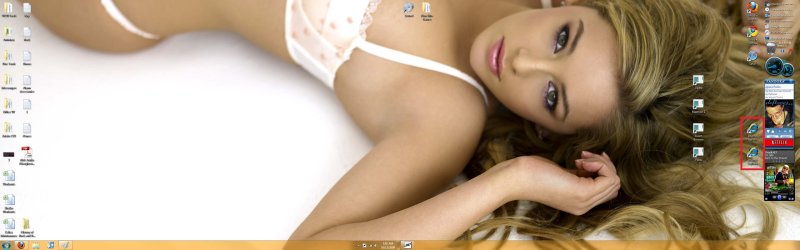
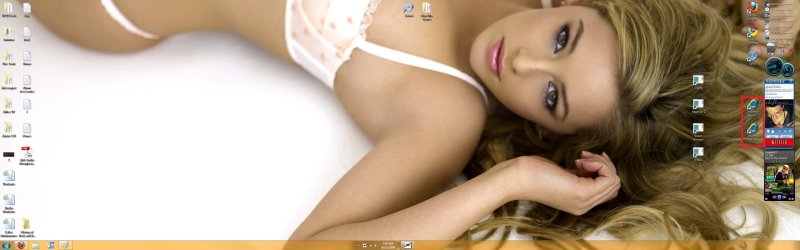
This is what it looks like before a reboot:
2.jpg

and after a reboot, it will look like this:
1.jpg

They will continue to move down and eventually get behind my gadgets if I dont fix them every time.
 

Attachments

  • 1.jpg
    1.jpg
    603.8 KB · Views: 212
  • 2.jpg
    2.jpg
    603.5 KB · Views: 512

My Computer

Computer Manufacturer/Model Number
Me
OS
Windows 7 Ultimate x64 Retail Veraion
CPU
AMD Phenom x4 9950
Motherboard
ASUS M2N32 SLI Deluxe Wifi Edition
Memory
6 GB Corsair
Graphics Card(s)
Nvidia GTX 260
Monitor(s) Displays
Dual Acer x213w
Hard Drives
Dual 1 TB Hitachi Internal Drives
750 GB Seagate External Drive
PSU
Thermaltake Toughpower 500 W
Case
Thermaltake Kandalf w/ LCS
Cooling
Liquified
Just a quick note, I rebooted again right now and tried moving the icons around and I noticed that they move while staying one above the other

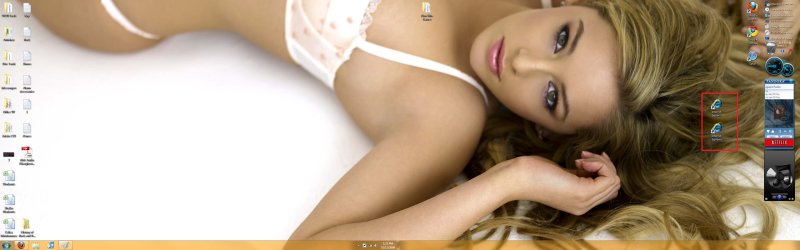
Here is another before and after to show what I mean:
Before:
1.jpg
After:
2.jpg
 

Attachments

  • 1.jpg
    1.jpg
    580.4 KB · Views: 581
  • 2.jpg
    2.jpg
    581.2 KB · Views: 325

My Computer

Computer Manufacturer/Model Number
Me
OS
Windows 7 Ultimate x64 Retail Veraion
CPU
AMD Phenom x4 9950
Motherboard
ASUS M2N32 SLI Deluxe Wifi Edition
Memory
6 GB Corsair
Graphics Card(s)
Nvidia GTX 260
Monitor(s) Displays
Dual Acer x213w
Hard Drives
Dual 1 TB Hitachi Internal Drives
750 GB Seagate External Drive
PSU
Thermaltake Toughpower 500 W
Case
Thermaltake Kandalf w/ LCS
Cooling
Liquified
Picture

How can I concentrate on your problem with that picture? Please post the entire shot and any more :p
 

My Computer

OS
win 7
NICE WALLPAPER! ;)

try to fix it this way.....
1. position your IE icons
2. right click on desktop > Personalize
3. when you see the theemes....click "save theme" below and give your theme a name

...thats it....now they should be as they are :) Actually the position is saved automatically, be sure that you are not logged in as "guest"
 

My Computer

OS
Windows 7 Ultimate x64
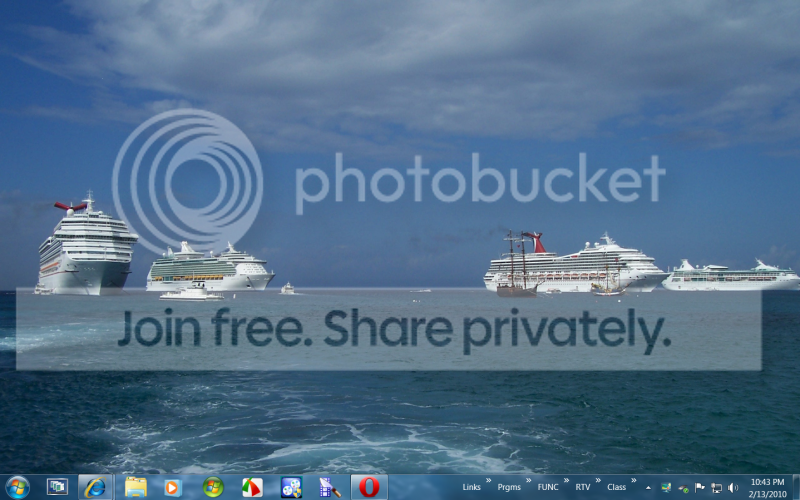
To avoid this problem, I parked some of my shortcuts in Rocket Dock and others in Toolbars on the taskbar. Works a lot better and they do not get scrambled - plus I can sort them in any order I like. The added advantage is a clean and uncluttered desktop.

2010-02-13_2243.png
 

My Computer

Computer Manufacturer/Model Number
HP, Dell, Gateway, Toshiba - 4 laptops and 2 desktops
OS
Vista, Windows7, Mint Mate, Zorin, Windows 8
CPU
from 1.6GHz Duo to i7
Monitor(s) Displays
2x HP w2207
Hard Drives
5x HDD, 7x SSD, 12x Externals
Keyboard
with trackball - no mices
Mouse
Trackball mice
Internet Speed
DSL 6000
You can customize your taskbar, find more out here: Change how buttons appear on the taskbar.

Cheers,
Tara
Windows Outreach Team

Tara, this is all nice, but there is just too little space on the taskbar to do any of that. If you look at my desktop picture, I have about 50 items hidden behind those toolbars and another dozen are in the hidden Rocket Dock. How do you figure I fit those on the taskbar.
In Vista, I keep most of those in Quick Launch and in an application launcher in the sidebar plus I have the toolbar on top of my screen that I create by pushing a folder with shortcuts to the top. But since you put away with Quick Launch, the sidebar and the ability to make a toolbar (dock) on the top, I had to help myself with the taskbars and the Rocket dock.
In Win7 32bit, I could at least tweak the Vista sidebar in and my gadgets (e.g. AppLauncher) still work. But in Win7 64bit, those gadgets refuse to work - even the weatherbug does not work.
 

My Computer

Computer Manufacturer/Model Number
HP, Dell, Gateway, Toshiba - 4 laptops and 2 desktops
OS
Vista, Windows7, Mint Mate, Zorin, Windows 8
CPU
from 1.6GHz Duo to i7
Monitor(s) Displays
2x HP w2207
Hard Drives
5x HDD, 7x SSD, 12x Externals
Keyboard
with trackball - no mices
Mouse
Trackball mice
Internet Speed
DSL 6000
You can customize your taskbar, find more out here: Change how buttons appear on the taskbar.

Cheers,
Tara
Windows Outreach Team

Tara, this is all nice, but there is just too little space on the taskbar to do any of that. If you look at my desktop picture, I have about 50 items hidden behind those toolbars and another dozen are in the hidden Rocket Dock. How do you figure I fit those on the taskbar.
In Vista, I keep most of those in Quick Launch and in an application launcher in the sidebar plus I have the toolbar on top of my screen that I create by pushing a folder with shortcuts to the top. But since you put away with Quick Launch, the sidebar and the ability to make a toolbar (dock) on the top, I had to help myself with the taskbars and the Rocket dock.
In Win7 32bit, I could at least tweak the Vista sidebar in and my gadgets (e.g. AppLauncher) still work. But in Win7 64bit, those gadgets refuse to work - even the weatherbug does not work.


you have found a good solution...and yes I can confirm, not all gadgets are working with Win7 x64........but maybe just because of the runtime libraries? :huh:
 

My Computer

OS
Windows 7 Ultimate x64
I will check whether the gadgets work if I tweak the sidebar in the x86 program files of the 64bit Win7. I tweaked the default program files which are 64bit.
 

My Computer

Computer Manufacturer/Model Number
HP, Dell, Gateway, Toshiba - 4 laptops and 2 desktops
OS
Vista, Windows7, Mint Mate, Zorin, Windows 8
CPU
from 1.6GHz Duo to i7
Monitor(s) Displays
2x HP w2207
Hard Drives
5x HDD, 7x SSD, 12x Externals
Keyboard
with trackball - no mices
Mouse
Trackball mice
Internet Speed
DSL 6000
Back
Top