How to disable automatic restore point creation

betaupsilon

New member
Local time
10:09 AM
Messages
179
Thanks for answers. Also, I found out that turning off System Protection is important if you don't want automatic creation of System Restore Points. Here is how:

http://www.sevenforums.com/tutorials/330-system-protection-turn-off.html

I know this is a bit old, but if others follow qrajber93 they will find that turning off system protection will delete all previous restore points, even the ones he created manually.

I just tried the Task Scheduler per the previous suggestion through the Computer MGT console from Control Panels & it appears you need to delete all of the triggers to disble automatic restore points. I also changed the Security Options per the attached screenshot
 

Attachments

  • Capture.JPG
    Capture.JPG
    96.4 KB · Views: 1
Last edited by a moderator:

My Computer My Computer

Computer type
PC/Desktop
OS
Windows 7 Home Prem 32 bit
I know of no good reason not to have Restore Points. They can come in very handy along with proper backups.
 

My Computer My Computer

Computer type
PC/Desktop
Computer Manufacturer/Model Number
Home made Desktop
OS
Windows 10 Pro. 64/ version 1709 Windows 7 Pro/64
CPU
Intel i7-6800K @ 4.3
Motherboard
ASUS X-99 Deluxe II
Memory
Corsair Platinum 16 gig @2400
Graphics Card(s)
EVGA GTX 1070 OC
Monitor(s) Displays
Asus 27" LED LCD/VE278Q
Screen Resolution
1920-1080 or 1280-720 HDMI
Hard Drives
INTEL SSD 730-240 Gb Sata 3.0/
PSU
EVGA Platium 1200W
Case
Phanteks Luxe Tempered Glass 8 fans/ one radiator
Cooling
XSPC/ Water Cooled CPU
Keyboard
Das 4 Professional
Mouse
Logitech M705/MX Anywhere 2-S
Internet Speed
100 mbits
Antivirus
Microsoft Security Essentials/ Malwarebytes Premium 3.0/ SAS
Browser
I.E. 11 default/Firefox/ ISP Time Warner Cable/Spectrum
Other Info
LG BluRay Burner/
Sound system-KLipsch-THX/
Icy Dock ssd Hot Swap bays.
I know of no good reason not to have Restore Points. They can come in very handy along with proper backups.

I am not getting rid of restore pts. Just choosing to execute them manually & not automatically. It would be nice to have RESTORE PTS at meaningful points in time. Making restore points every 24 hours means others will be written over which may be undesirable.
 

My Computer My Computer

Computer type
PC/Desktop
OS
Windows 7 Home Prem 32 bit
Thanks for answers. Also, I found out that turning off System Protection is important if you don't want automatic creation of System Restore Points. Here is how:

http://www.sevenforums.com/tutorials/330-system-protection-turn-off.html

I know this is a bit old, but if others follow qrajber93 they will find that turning off system protection will delete all previous restore points, even the ones he created manually.

I just tried the Task Scheduler per the previous suggestion through the Computer MGT console from Control Panels & it appears you need to delete all of the triggers to disble automatic restore points. I also changed the Security Options per the attached screenshot

The method above does not work when installing software. I need to install a number of drivers for LabVIEW. If RESTORE PTS are created for each of these drivers then all of my previous RESTORE PTS will be written over.

What else can I do to disable to avoid this? This is a WIN7 HOME machine so GROUP POLICY settings I do not think are an option.
 

My Computer My Computer

Computer type
PC/Desktop
OS
Windows 7 Home Prem 32 bit
You can disable that task. Restore points aren't deleted if you do it. But why do you want to disable it????

  • Restore points will be created anyway when install windows updates, uninstall/install software.
Restore points are automatically created by System Restore daily (only if no restore point has been created last 7 days) and when System Restore detects the beginning of a change to your computer, such as when you install a program or a driver.

Why do you want to disable it?

Any possibiity to disable RESTORE PTS when installing software. I have a number of drivers to install for LabVIEW. One restore point should suffice. I do not need 50 individual restore points. I would like to retain restore points that already exist. Installing these drivers will wipe out the old points.
 

My Computer My Computer

Computer type
PC/Desktop
OS
Windows 7 Home Prem 32 bit
Last edited:

My Computer My Computer

Computer type
Laptop
Computer Manufacturer/Model Number
ASUS
OS
Microsoft Windows 7 Home Premium 64-bit 7601 Multiprocessor Free Service Pack 1
CPU
AMD C-60 APU with Radeon(tm) HD Graphics
Motherboard
ASUSTeK COMPUTER INC. X501U
Memory
4.00 GB
Graphics Card(s)
AMD Radeon HD 6290 Graphics
Sound Card
(1) AMD High Definition Audio Device (2) Realtek High Defi
Screen Resolution
1366 x 768 x 32 bits (4294967296 colors) @ 60 Hz
Hard Drives
Hitachi HTS545050A7E380 SATA Disk Device
Antivirus
Comodo CIS & FW, SecureAplus App Whitelisting, Threatfire
Browser
Cyberfox 64bit, Opera 64bit, Airfox
Other Info
Spy-The-Spy, HitmanPro.Alert, Norton Connect Safe, MJRegWatcher, BitDefender TrafficLight, Voodoo Shield, Zemana AntiMalware
I know of no good reason not to have Restore Points. They can come in very handy along with proper backups.

I am not getting rid of restore pts. Just choosing to execute them manually & not automatically. It would be nice to have RESTORE PTS at meaningful points in time. Making restore points every 24 hours means others will be written over which may be undesirable.

This is not going to work and restore points are not being created every 24 hours in Windows 7 - that was in Vista.

If you want full control, I recommend images.
 

My Computer My Computer

Computer Manufacturer/Model Number
HP, Dell, Gateway, Toshiba - 4 laptops and 2 desktops
OS
Vista, Windows7, Mint Mate, Zorin, Windows 8
CPU
from 1.6GHz Duo to i7
Monitor(s) Displays
2x HP w2207
Hard Drives
5x HDD, 7x SSD, 12x Externals
Keyboard
with trackball - no mices
Mouse
Trackball mice
Internet Speed
DSL 6000
When I was using System Restore (currently I keep it disabled and make regular system image backups) I found this software very useful:

For managing system restore points and how often they're created:

System Restore Manager

For one click creation of system restore points on demand:

Quick Restore Point Maker

(Create an elevated shortcut to the executable and pin the shortcut to your start menu)

Also see tutorial here:

Restore Point Automatic Creation - Disable in Windows

Your suggestions do not address my question. I can use TASK SCHEDULER to change SYS PROTECTION, but it does not disable RESTORE PTS when installing software. That is the function I need. Unless you know specifically that the tools you list do what I am asking this question is still OPEN.
 

My Computer My Computer

Computer type
PC/Desktop
OS
Windows 7 Home Prem 32 bit
This is not going to work and restore points are not being created every 24 hours in Windows 7 - that was in Vista.

If you want full control, I recommend images.

Are you saying I cannot disable RESTORE PTS when installing software without turning off SYS PROTECTION?
 

My Computer My Computer

Computer type
PC/Desktop
OS
Windows 7 Home Prem 32 bit
Okay let see if we can understand things better.

1. Why do you want to disable Restore Point?

2. What is having Restore Points causing problems with on your system?
 

My Computer My Computer

Computer type
PC/Desktop
Computer Manufacturer/Model Number
Home made Desktop
OS
Windows 10 Pro. 64/ version 1709 Windows 7 Pro/64
CPU
Intel i7-6800K @ 4.3
Motherboard
ASUS X-99 Deluxe II
Memory
Corsair Platinum 16 gig @2400
Graphics Card(s)
EVGA GTX 1070 OC
Monitor(s) Displays
Asus 27" LED LCD/VE278Q
Screen Resolution
1920-1080 or 1280-720 HDMI
Hard Drives
INTEL SSD 730-240 Gb Sata 3.0/
PSU
EVGA Platium 1200W
Case
Phanteks Luxe Tempered Glass 8 fans/ one radiator
Cooling
XSPC/ Water Cooled CPU
Keyboard
Das 4 Professional
Mouse
Logitech M705/MX Anywhere 2-S
Internet Speed
100 mbits
Antivirus
Microsoft Security Essentials/ Malwarebytes Premium 3.0/ SAS
Browser
I.E. 11 default/Firefox/ ISP Time Warner Cable/Spectrum
Other Info
LG BluRay Burner/
Sound system-KLipsch-THX/
Icy Dock ssd Hot Swap bays.
The way I understood it the OP wants to do a 'selective' restore point creation - that is he wants to create restore points himself but does not want the system to create restore points. I think that is not possible. That's why I recommended images that he can control himself.
 

My Computer My Computer

Computer Manufacturer/Model Number
HP, Dell, Gateway, Toshiba - 4 laptops and 2 desktops
OS
Vista, Windows7, Mint Mate, Zorin, Windows 8
CPU
from 1.6GHz Duo to i7
Monitor(s) Displays
2x HP w2207
Hard Drives
5x HDD, 7x SSD, 12x Externals
Keyboard
with trackball - no mices
Mouse
Trackball mice
Internet Speed
DSL 6000
Taking manual control of system restore points

Okay well the software that I linked allows you to control most aspects of system restore and allows you to create a system restore point on demand.

What it doesn't do, as you correctly pointed out, is disable automatic restore point creation when installing software.

My thoughts:

Most experienced members rely on regular system image backups rather than system restore.

The only way that I can think of to get the control over system restore that you require is to take manual control of system restore point creation and deletion. That means keeping system restore disabled and remembering to enable it when you need to create a system restore point. So you create your system restore point for the day - then disable system restore and install all the software that you want without creating any further restore points.

If I personally wanted manual control over system restore points I'd use UVK to enable system restore, manually ceate a restore point, then disable system restore and delete any unwanted system restore points - all achieved in just a few clicks.

Let us know if you think this method might be suitable or if you need more info.

UVK - System Restore.jpg
 
Last edited:

My Computer My Computer

Computer type
Laptop
Computer Manufacturer/Model Number
ASUS
OS
Microsoft Windows 7 Home Premium 64-bit 7601 Multiprocessor Free Service Pack 1
CPU
AMD C-60 APU with Radeon(tm) HD Graphics
Motherboard
ASUSTeK COMPUTER INC. X501U
Memory
4.00 GB
Graphics Card(s)
AMD Radeon HD 6290 Graphics
Sound Card
(1) AMD High Definition Audio Device (2) Realtek High Defi
Screen Resolution
1366 x 768 x 32 bits (4294967296 colors) @ 60 Hz
Hard Drives
Hitachi HTS545050A7E380 SATA Disk Device
Antivirus
Comodo CIS & FW, SecureAplus App Whitelisting, Threatfire
Browser
Cyberfox 64bit, Opera 64bit, Airfox
Other Info
Spy-The-Spy, HitmanPro.Alert, Norton Connect Safe, MJRegWatcher, BitDefender TrafficLight, Voodoo Shield, Zemana AntiMalware
Re: Your Windows 7 Home Premium Edition.

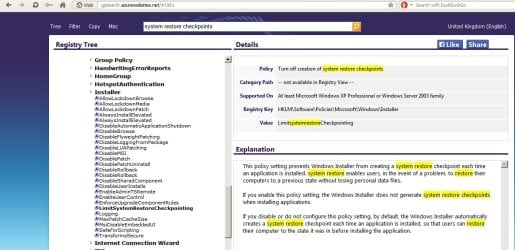
Digging around I find this advice for Vista Business, Ultimate, and Enterprise editions so I wonder if it applies to higher editions of Windows 7 too. It disables system restore point creation when an installer runs. Maybe other users could check? I can tell you that it doesn't seem to apply to Home Premium. I use Home Premium.

System Restore Point - Disable for Application Install

Here's what I get when I navigate to the setting mentioned on my Windows 7 Home Premuim machine:

How to disable automatic restore point creation.jpg

Funny how it mentions XP. Perhaps you could test and see if it works for you. These Group Policy settings are hit and miss in Home Premium. Some stick and some don't. Note: It is not recommended to install Group Policy Editor in Home Premium and doing so may the license terms. In any case some settings work and some don't. I had reason to install it to block attachments from opening if onboard AV fails to scan them. By default Windows Home Premium allows a user to open such attachments even if they haven't been scanned.

See here (old article) for a few reasons why many of us prefer not to use system restore.

System Restore and System File Protection - scroll down to the system restore heading. Mostly the advice still applies.
 

My Computer My Computer

Computer type
Laptop
Computer Manufacturer/Model Number
ASUS
OS
Microsoft Windows 7 Home Premium 64-bit 7601 Multiprocessor Free Service Pack 1
CPU
AMD C-60 APU with Radeon(tm) HD Graphics
Motherboard
ASUSTeK COMPUTER INC. X501U
Memory
4.00 GB
Graphics Card(s)
AMD Radeon HD 6290 Graphics
Sound Card
(1) AMD High Definition Audio Device (2) Realtek High Defi
Screen Resolution
1366 x 768 x 32 bits (4294967296 colors) @ 60 Hz
Hard Drives
Hitachi HTS545050A7E380 SATA Disk Device
Antivirus
Comodo CIS & FW, SecureAplus App Whitelisting, Threatfire
Browser
Cyberfox 64bit, Opera 64bit, Airfox
Other Info
Spy-The-Spy, HitmanPro.Alert, Norton Connect Safe, MJRegWatcher, BitDefender TrafficLight, Voodoo Shield, Zemana AntiMalware
More Digging:

Group Policy Search for appropriate registry setting to adjust states that no registry settings are available:

GPS_ Turn off creation of System Restore checkpoints.jpg

However I subsequently found this. You could try it (create a system restore point first :) )

https://msdn.microsoft.com/en-us/library/aa369758(v=vs.85).aspx

Set value to 1 and see what happens. It probably won't have any effect in Windows 7 but you never know until you try it. If the setting is going to stick - test only after a reboot.
 
Last edited:

My Computer My Computer

Computer type
Laptop
Computer Manufacturer/Model Number
ASUS
OS
Microsoft Windows 7 Home Premium 64-bit 7601 Multiprocessor Free Service Pack 1
CPU
AMD C-60 APU with Radeon(tm) HD Graphics
Motherboard
ASUSTeK COMPUTER INC. X501U
Memory
4.00 GB
Graphics Card(s)
AMD Radeon HD 6290 Graphics
Sound Card
(1) AMD High Definition Audio Device (2) Realtek High Defi
Screen Resolution
1366 x 768 x 32 bits (4294967296 colors) @ 60 Hz
Hard Drives
Hitachi HTS545050A7E380 SATA Disk Device
Antivirus
Comodo CIS & FW, SecureAplus App Whitelisting, Threatfire
Browser
Cyberfox 64bit, Opera 64bit, Airfox
Other Info
Spy-The-Spy, HitmanPro.Alert, Norton Connect Safe, MJRegWatcher, BitDefender TrafficLight, Voodoo Shield, Zemana AntiMalware
Back
Top