Solved Bios showing HDD in windows bot priority and not SSD?

kazuya2015

New member
Local time
7:29 PM
Messages
24
Hello
I think this is the right section to post this in? if not I apologize

I upgraded to an SSD
Installed windows and some drivers, then reconnected my HDD to format but my pc booted from the HDD and not the SSD.
Sata is in AHCI, HDD was disconnected during windows install on SSD

Long story short; I formatted the HDD and I am booting from SSD, changed bios boot order to do this.
Bios boot order:
  1. CD drive
  2. SSD
  3. HDD
  4. Windows boot priority (in brackets it has my HDD model)

I cant help but think somethings not right? because why should my bios display Windows boot priority and have my HDD as the default boot drive? Before I changed the order, the windows boot priority would always be first in boot order.

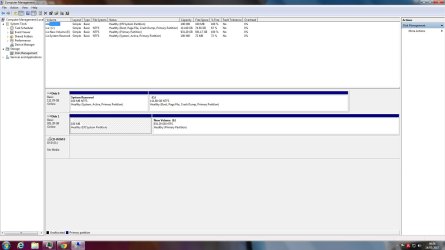
If it helps, I have included a SS of computer managment

Thanks in advanced
 

Attachments
  • Untitled.jpg
    Untitled.jpg
    116.9 KB · Views: 15

My Computer My Computer

At a glance

Windows 7 Home Premium x64Intel Core i5 4670KG.Skill RipjawsX 8GBMSI GeForce GTX 770 Lightning
Computer type
PC/Desktop
Computer Manufacturer/Model Number
custom build
OS
Windows 7 Home Premium x64
CPU
Intel Core i5 4670K
Motherboard
GIGABYTE Z87X-UD4H
Memory
G.Skill RipjawsX 8GB
Graphics Card(s)
MSI GeForce GTX 770 Lightning
Hard Drives
Samsung 120 GB 850 EVO
Samsung 500 GB 850 EVO
Seagate 1TB Barracuda
PSU
Corsair 750W CS750M
Case
Corsair Carbide 300R
Cooling
Corsair Hydro Series H80i
Hello kazuya2015. Welcome to the forum.

Everything looks normal in your screenshot. The one thing that stands out is that on the 1TB drive you have initialized that disk GPT (based upon the presence of the EFI System Partition).
If the SSD was initialized MBR (looks like it) then that may explain the problem.

Systems that support UEFI require that in systems with mixed format disks that the boot partition must reside on a GPT disk. Other hard disks for data can be either MBR or GPT.
So it is possible (I'm assuming the Z87X has UEFI BIOS) that the system is defaulting to the GPT disk by design.

The solution would be to wipe the SSD and then initialize it GPT (requiring a reinstall on Windows and Programs), or wiping and reinitializing the spinner as MBR (backing up data and replacing it afterward).

If you have or can borrow a data drive that is already a MBR drive you could switch it for the 1TB to test this before doing all the work.
 

My Computer My Computer

At a glance

Windows 7 64 Bit Home Premium SP1i7-3820GSkill F3-14900CL9Q - 16GBEVGA GeForce GTX660 - Driver 352.86
Computer type
PC/Desktop
Computer Manufacturer/Model Number
Home Built - Jan 2013
OS
Windows 7 64 Bit Home Premium SP1
CPU
i7-3820
Motherboard
Asus P9X79-PRO - Bios 4608
Memory
GSkill F3-14900CL9Q - 16GB
Graphics Card(s)
EVGA GeForce GTX660 - Driver 352.86
Sound Card
On board Realtek ALC898
Monitor(s) Displays
Acer S271HL
Screen Resolution
1920 x 1080
Hard Drives
#1- Samsung 840 Pro Series
#2- Western Digital WD1002FAEX Sata3 Black
#3- Western Digital WD1002FAEX Sata3 Black
PSU
Corsair CMPSU-850TX-V2 - 850 watt (by Seasonic)
Case
Corsair Obsidian 550D
Cooling
Standard 3 120mm case fans, Cooler Master Hyper 212 EVO
Keyboard
MS KC-0405
Mouse
Intellimouse 5-button
Internet Speed
56 Mbits/Sec (on a good day)
Antivirus
Avast & Malwarebytes
Browser
Firefox
Other Info
Asus DVD - DRW-24B1ST 24X
Sorry for the late reply I had to Google what mbr/gpt meant

Just wondering how would I select to mbr or gpt it didn't have me the option when I installed windows on my ssd
 

My Computer My Computer

At a glance

Windows 7 Home Premium x64Intel Core i5 4670KG.Skill RipjawsX 8GBMSI GeForce GTX 770 Lightning
Computer type
PC/Desktop
Computer Manufacturer/Model Number
custom build
OS
Windows 7 Home Premium x64
CPU
Intel Core i5 4670K
Motherboard
GIGABYTE Z87X-UD4H
Memory
G.Skill RipjawsX 8GB
Graphics Card(s)
MSI GeForce GTX 770 Lightning
Hard Drives
Samsung 120 GB 850 EVO
Samsung 500 GB 850 EVO
Seagate 1TB Barracuda
PSU
Corsair 750W CS750M
Case
Corsair Carbide 300R
Cooling
Corsair Hydro Series H80i
I upgraded to an SSD
I assume this is a 120GB SSD?


Installed windows and some drivers,
Appears perfectly normal successful, with 100MB "system reserved" as "active" in your screenshot.

Everything looks like it should have worked just fine if you were still operating with SSD only (i.e. HDD disconnected temporarily as you indicated).


then reconnected my HDD
This is the original spinner provided when you bought the machine? Pre-loaded with Win7?

And you now really just wanted to delete all partitions including the pre-loaded Windows environment, and re-purpose the drive completely as a "data" drive? Reasonable goal.


to format
by "to format" do you really mean "delete all pre-existing partitions and create one or more new partitions, for data"?


but my pc booted from the HDD and not the SSD.
What makes you think that??

According to your screenshot, the Windows C-partition is on the SSD, not on the HDD. So I'm guessing it is the newly installed SSD version of Win7 which is running.

And this suggests to me that you actually did boot to the "system reserved" partition on the SSD, which then moved on to the Win7 you installed on the second partition of the SSD. And that's how you now show that second partition on SSD as C.

Whatever is on the HDD is not important at the moment, in my opinion. The un-lettered UEFI version of "system reserved" doesn't seem relevant, in my opinion, nor does the "new volume" partition currently showing as E.

So why do you think you have any problem? I don't know how you created "new volume" on the HDD, but I would say you're actually running booting to the "active" system reserved partition on SSD, and then using Win7 from SSD (now appearing as C, as it should).


I would simply re-check your BIOS settings boot sequence. No question you SHOULD have the SSD as 1st in that list of drives. Either remove the HDD entirely from the boot sequence list, or at worst just have it second. But with SSD shown first in your BIOS boot sequence list, there's no question the "system reserved" partition (marked "active") created by your install of Win7 onto the SSD while the HDD was temporarily disconnected is where the BIOS is starting, leading to Win7 in the second partition of the SSD exactly as you want.

Then, just use Partition Wizard to delete the two partitions currently on the HDD (however you got them created or received them). And then use Partition Wizard to create your one or more "data" partitions on the HDD as you planned, if that's what you'd planned.

Incidentally, Partition Wizard will also show whether your drives are partitioned using MBR or GPT, if you're wanting confirmation.

I see no problems, other than the leftover "UEFI system reserved" on the HDD.
 

My Computer My Computer

At a glance

Windows 7 Pro x64 (1), Win7 Pro X64 (2)i5-3350p 3.1Ghz/6MB-cache (1); E8400 3.0Ghz/6...8GB PC3-12800 DDR3 (1); 4GB PC3-10600 DDR3 (2)ATI HD7750 (1), (see TV cards); ATI R7 250 (2)
Computer type
PC/Desktop
Computer Manufacturer/Model Number
Home-built, two systems (1) and (2)
OS
Windows 7 Pro x64 (1), Win7 Pro X64 (2)
CPU
i5-3350p 3.1Ghz/6MB-cache (1); E8400 3.0Ghz/6MB-cache (2)
Motherboard
ASUS P8Z77-V Pro (1); ASUS P5Q3 (2)
Memory
8GB PC3-12800 DDR3 (1); 4GB PC3-10600 DDR3 (2)
Graphics Card(s)
ATI HD7750 (1), (see TV cards); ATI R7 250 (2)
Sound Card
Realtek ALC892 HD Audio (1); Realtek ALC1200 HD Audio (2)
Monitor(s) Displays
Eizo HD2441W LCD, Eizo S2433W (1); Eizo 24" S2433W (2)
Screen Resolution
1920x1200, 1920x1200 (1); 1920x1200 (2)
Hard Drives
(1) 1TB SATA-II (7200RPM), 2x2TB SATA-III (7200RPM), 250GB SATA-III (10000RPM) for OS; 2x2TB external USB 3.0

(2) 320GB SATA-II (7200RPM), 750GB SATA-II (7200RPM), 150GB SATA-II (10000RPM) for OS; 2TB external USB 3.0
PSU
Nesteq ECS-6001 600W (1); Nesteq ECS-5001 500W (2)
Case
Acousti-Case 360 (1) and (2)
Cooling
Noctua NH-U12P SE2 for CPU, 2x120mm case fans (1) and (2)
Keyboard
IBM PS/2 (1) and (2)
Mouse
Logitech MX Revolution wireless (1); Microsoft wired (2)
Internet Speed
100mbps down / 10mbps up
Antivirus
Microsoft Security Essentials; Malwarebyte Anti-Malware Pro
Browser
Firefox
Other Info
Ceton InfiniTV 4-tuner cablecard-enabled TV card as well as Hauppauge HVR-2250 OTA/ATSC 2-tuner TV card in (1), running under Win7 WMC
Sorry for the late reply I had to Google what mbr/gpt meant

Just wondering how would I select to mbr or gpt it didn't have me the option when I installed windows on my ssd

No, if you installed Windows directly onto a raw drive you would not get the option. That option comes up when you first install a new drive and it comes up in Windows. And it only comes up on new, raw, unformatted drives.

Let us know what you want to do and we can help you with the step by step.
 

My Computer My Computer

At a glance

Windows 7 64 Bit Home Premium SP1i7-3820GSkill F3-14900CL9Q - 16GBEVGA GeForce GTX660 - Driver 352.86
Computer type
PC/Desktop
Computer Manufacturer/Model Number
Home Built - Jan 2013
OS
Windows 7 64 Bit Home Premium SP1
CPU
i7-3820
Motherboard
Asus P9X79-PRO - Bios 4608
Memory
GSkill F3-14900CL9Q - 16GB
Graphics Card(s)
EVGA GeForce GTX660 - Driver 352.86
Sound Card
On board Realtek ALC898
Monitor(s) Displays
Acer S271HL
Screen Resolution
1920 x 1080
Hard Drives
#1- Samsung 840 Pro Series
#2- Western Digital WD1002FAEX Sata3 Black
#3- Western Digital WD1002FAEX Sata3 Black
PSU
Corsair CMPSU-850TX-V2 - 850 watt (by Seasonic)
Case
Corsair Obsidian 550D
Cooling
Standard 3 120mm case fans, Cooler Master Hyper 212 EVO
Keyboard
MS KC-0405
Mouse
Intellimouse 5-button
Internet Speed
56 Mbits/Sec (on a good day)
Antivirus
Avast & Malwarebytes
Browser
Firefox
Other Info
Asus DVD - DRW-24B1ST 24X
So why do you think you have any problem?


I believe he is seeing this as the problem:

Bios boot order:
  1. CD drive
  2. SSD
  3. HDD
  4. Windows boot priority (in brackets it has my HDD model)
 

My Computer My Computer

At a glance

Windows 7 64 Bit Home Premium SP1i7-3820GSkill F3-14900CL9Q - 16GBEVGA GeForce GTX660 - Driver 352.86
Computer type
PC/Desktop
Computer Manufacturer/Model Number
Home Built - Jan 2013
OS
Windows 7 64 Bit Home Premium SP1
CPU
i7-3820
Motherboard
Asus P9X79-PRO - Bios 4608
Memory
GSkill F3-14900CL9Q - 16GB
Graphics Card(s)
EVGA GeForce GTX660 - Driver 352.86
Sound Card
On board Realtek ALC898
Monitor(s) Displays
Acer S271HL
Screen Resolution
1920 x 1080
Hard Drives
#1- Samsung 840 Pro Series
#2- Western Digital WD1002FAEX Sata3 Black
#3- Western Digital WD1002FAEX Sata3 Black
PSU
Corsair CMPSU-850TX-V2 - 850 watt (by Seasonic)
Case
Corsair Obsidian 550D
Cooling
Standard 3 120mm case fans, Cooler Master Hyper 212 EVO
Keyboard
MS KC-0405
Mouse
Intellimouse 5-button
Internet Speed
56 Mbits/Sec (on a good day)
Antivirus
Avast & Malwarebytes
Browser
Firefox
Other Info
Asus DVD - DRW-24B1ST 24X
I believe he is seeing this as the problem:
Bios boot order:
  1. CD drive
  2. SSD
  3. HDD
  4. Windows boot priority (in brackets it has my HDD model)
I don't know what item 4 means. But I contend it's not relevant.

The boot sequence is run down in exactly that order: 1, 2, 3, 4, etc., looking for an "active" partition or a bootable removable device (e.g. from a bootable CD/DVD that's inserted at the moment).

It's not going to go to 2 unless there's no bootable CD inserted. And it's not going to go to 3 unless there's no "active" partition found on the SSD... but there is, so booting initiates from that partition (i.e. 100MB "system reserved" from the just newly installed Win7 on the SSD).

Then, only if the SSD actually didn't have an "active" partition would 3 (HDD) be examined looking for an "active" partition. And then only finally, if all three of these earlier items failed to discover something to boot from, would 4 be used. I don't know what "Windows boot priority" means, or how it somehow contains the HDD itself... unless this is something inherent in the new UEFI BIOS logic and factory pre-installs, which I'm not familiar with).

My feeling in any case is that 4 will not even come into the story unless 1, 2 and 3 fail to produce something to boot from, which is NOT GOING TO HAPPEN since the SSD (2) has an "active" partition on it. That's where true booting came from in my opinion, and is further confirmed by the Windows partition on the SSD getting lettered as C. That's exactly what would be expected if the "system reserved" on the SSD was used, to boot the Win7 system partition also on the SSD from this installation-to-SSD process.

I still see nothing wrong, and no concern for item 4. Again, I suspect it's something new that's possible when you have a new UEFI BIOS.
 

My Computer My Computer

At a glance

Windows 7 Pro x64 (1), Win7 Pro X64 (2)i5-3350p 3.1Ghz/6MB-cache (1); E8400 3.0Ghz/6...8GB PC3-12800 DDR3 (1); 4GB PC3-10600 DDR3 (2)ATI HD7750 (1), (see TV cards); ATI R7 250 (2)
Computer type
PC/Desktop
Computer Manufacturer/Model Number
Home-built, two systems (1) and (2)
OS
Windows 7 Pro x64 (1), Win7 Pro X64 (2)
CPU
i5-3350p 3.1Ghz/6MB-cache (1); E8400 3.0Ghz/6MB-cache (2)
Motherboard
ASUS P8Z77-V Pro (1); ASUS P5Q3 (2)
Memory
8GB PC3-12800 DDR3 (1); 4GB PC3-10600 DDR3 (2)
Graphics Card(s)
ATI HD7750 (1), (see TV cards); ATI R7 250 (2)
Sound Card
Realtek ALC892 HD Audio (1); Realtek ALC1200 HD Audio (2)
Monitor(s) Displays
Eizo HD2441W LCD, Eizo S2433W (1); Eizo 24" S2433W (2)
Screen Resolution
1920x1200, 1920x1200 (1); 1920x1200 (2)
Hard Drives
(1) 1TB SATA-II (7200RPM), 2x2TB SATA-III (7200RPM), 250GB SATA-III (10000RPM) for OS; 2x2TB external USB 3.0

(2) 320GB SATA-II (7200RPM), 750GB SATA-II (7200RPM), 150GB SATA-II (10000RPM) for OS; 2TB external USB 3.0
PSU
Nesteq ECS-6001 600W (1); Nesteq ECS-5001 500W (2)
Case
Acousti-Case 360 (1) and (2)
Cooling
Noctua NH-U12P SE2 for CPU, 2x120mm case fans (1) and (2)
Keyboard
IBM PS/2 (1) and (2)
Mouse
Logitech MX Revolution wireless (1); Microsoft wired (2)
Internet Speed
100mbps down / 10mbps up
Antivirus
Microsoft Security Essentials; Malwarebyte Anti-Malware Pro
Browser
Firefox
Other Info
Ceton InfiniTV 4-tuner cablecard-enabled TV card as well as Hauppauge HVR-2250 OTA/ATSC 2-tuner TV card in (1), running under Win7 WMC
We will wait for the OP to confirm. But I think he/she is fully aware of the boot sequencing and I don't believe he is having a problem starting Windows. I believe he just wants to know why the Windows Boot Priority is set to the HDD and not the SSD.

Got any ideas?
 

My Computer My Computer

At a glance

Windows 7 64 Bit Home Premium SP1i7-3820GSkill F3-14900CL9Q - 16GBEVGA GeForce GTX660 - Driver 352.86
Computer type
PC/Desktop
Computer Manufacturer/Model Number
Home Built - Jan 2013
OS
Windows 7 64 Bit Home Premium SP1
CPU
i7-3820
Motherboard
Asus P9X79-PRO - Bios 4608
Memory
GSkill F3-14900CL9Q - 16GB
Graphics Card(s)
EVGA GeForce GTX660 - Driver 352.86
Sound Card
On board Realtek ALC898
Monitor(s) Displays
Acer S271HL
Screen Resolution
1920 x 1080
Hard Drives
#1- Samsung 840 Pro Series
#2- Western Digital WD1002FAEX Sata3 Black
#3- Western Digital WD1002FAEX Sata3 Black
PSU
Corsair CMPSU-850TX-V2 - 850 watt (by Seasonic)
Case
Corsair Obsidian 550D
Cooling
Standard 3 120mm case fans, Cooler Master Hyper 212 EVO
Keyboard
MS KC-0405
Mouse
Intellimouse 5-button
Internet Speed
56 Mbits/Sec (on a good day)
Antivirus
Avast & Malwarebytes
Browser
Firefox
Other Info
Asus DVD - DRW-24B1ST 24X
We will wait for the OP to confirm. But I think he/she is fully aware of the boot sequencing and I don't believe he is having a problem starting Windows. I believe he just wants to know why the Windows Boot Priority is set to the HDD and not the SSD.

Got any ideas?
I honestly don't know what "Windows boot Priority" is and can't find a clear description of what it is or how it get set/modified. I'm going to guess it is related to the initial Win7 install with UEFI (rather than Legacy) BIOS specified, and the fact that the pre-loaded Windows on HDD came with what is shown as 100MB "EFI system partition". I know, that's just spouting a lot of words, but I honestly am not an expert here.

It may still show the HDD in "windows boot priority" because there's still that EFI system partition on that HDD drive, which still points to the second partition on the HDD as where Windows lives... per that "EFI system partition".

I'm going to speculate that if Partition Wizard is used to simply delete the existing partitions on the HDD (since they're not needed any longer, as the SSD is where the new operational Win7 lives going forward into the future), that this fourth entry in the boot sequence might disappear completely, or maybe it will change to point to the SSD, or maybe not.

I must confess, I honestly don't know much about UEFI BIOS machines, as I have none and my laptop is set to "legacy BIOS" to make Win7 install on it easy and simple.

Perhaps some other expert on UEFI BIOS could explain what "Windows boot priority" is, what created that entry in the BIOS boot sequence list, and how (if at all) a user can modify or delete that fourth entry using what tools or techniques, and if doing so will cause harm or be harmless/corrective? We already know the machine is booting from the SSD, which is 2nd. But I agree, having the mysterious 4th item really should be understood better than we do.

I plead ignorance.
 

My Computer My Computer

At a glance

Windows 7 Pro x64 (1), Win7 Pro X64 (2)i5-3350p 3.1Ghz/6MB-cache (1); E8400 3.0Ghz/6...8GB PC3-12800 DDR3 (1); 4GB PC3-10600 DDR3 (2)ATI HD7750 (1), (see TV cards); ATI R7 250 (2)
Computer type
PC/Desktop
Computer Manufacturer/Model Number
Home-built, two systems (1) and (2)
OS
Windows 7 Pro x64 (1), Win7 Pro X64 (2)
CPU
i5-3350p 3.1Ghz/6MB-cache (1); E8400 3.0Ghz/6MB-cache (2)
Motherboard
ASUS P8Z77-V Pro (1); ASUS P5Q3 (2)
Memory
8GB PC3-12800 DDR3 (1); 4GB PC3-10600 DDR3 (2)
Graphics Card(s)
ATI HD7750 (1), (see TV cards); ATI R7 250 (2)
Sound Card
Realtek ALC892 HD Audio (1); Realtek ALC1200 HD Audio (2)
Monitor(s) Displays
Eizo HD2441W LCD, Eizo S2433W (1); Eizo 24" S2433W (2)
Screen Resolution
1920x1200, 1920x1200 (1); 1920x1200 (2)
Hard Drives
(1) 1TB SATA-II (7200RPM), 2x2TB SATA-III (7200RPM), 250GB SATA-III (10000RPM) for OS; 2x2TB external USB 3.0

(2) 320GB SATA-II (7200RPM), 750GB SATA-II (7200RPM), 150GB SATA-II (10000RPM) for OS; 2TB external USB 3.0
PSU
Nesteq ECS-6001 600W (1); Nesteq ECS-5001 500W (2)
Case
Acousti-Case 360 (1) and (2)
Cooling
Noctua NH-U12P SE2 for CPU, 2x120mm case fans (1) and (2)
Keyboard
IBM PS/2 (1) and (2)
Mouse
Logitech MX Revolution wireless (1); Microsoft wired (2)
Internet Speed
100mbps down / 10mbps up
Antivirus
Microsoft Security Essentials; Malwarebyte Anti-Malware Pro
Browser
Firefox
Other Info
Ceton InfiniTV 4-tuner cablecard-enabled TV card as well as Hauppauge HVR-2250 OTA/ATSC 2-tuner TV card in (1), running under Win7 WMC
The EFI System Partition - Extensible Firmware Interface System Partition (ESP) - contains the NTLDR, HAL, Boot.txt, and other files that are needed to boot the system, such as drivers.

The Windows Boot Priority allows multiple Windows versions and OS's to be installed on different hard drives and allows the user to select which Windows installation is the Priority system to start first.

Windows places the HAL, loader, and other files that are needed to boot the operating system in the ESP.

For UEFI systems, the boot drive must contain an ESP, an MSR (optional), and at least one basic data partition that contains the operating system. Only one ESP should exist on a system even if multiple operating systems are installed on that system.

More here:
https://msdn.microsoft.com/en-us/library/windows/hardware/dn640535(v=vs.85).aspx
 

My Computer My Computer

At a glance

Windows 7 64 Bit Home Premium SP1i7-3820GSkill F3-14900CL9Q - 16GBEVGA GeForce GTX660 - Driver 352.86
Computer type
PC/Desktop
Computer Manufacturer/Model Number
Home Built - Jan 2013
OS
Windows 7 64 Bit Home Premium SP1
CPU
i7-3820
Motherboard
Asus P9X79-PRO - Bios 4608
Memory
GSkill F3-14900CL9Q - 16GB
Graphics Card(s)
EVGA GeForce GTX660 - Driver 352.86
Sound Card
On board Realtek ALC898
Monitor(s) Displays
Acer S271HL
Screen Resolution
1920 x 1080
Hard Drives
#1- Samsung 840 Pro Series
#2- Western Digital WD1002FAEX Sata3 Black
#3- Western Digital WD1002FAEX Sata3 Black
PSU
Corsair CMPSU-850TX-V2 - 850 watt (by Seasonic)
Case
Corsair Obsidian 550D
Cooling
Standard 3 120mm case fans, Cooler Master Hyper 212 EVO
Keyboard
MS KC-0405
Mouse
Intellimouse 5-button
Internet Speed
56 Mbits/Sec (on a good day)
Antivirus
Avast & Malwarebytes
Browser
Firefox
Other Info
Asus DVD - DRW-24B1ST 24X

My Computer My Computer

At a glance

Windows 7 Home Premium x64Intel Core i5 4670KG.Skill RipjawsX 8GBMSI GeForce GTX 770 Lightning
Computer type
PC/Desktop
Computer Manufacturer/Model Number
custom build
OS
Windows 7 Home Premium x64
CPU
Intel Core i5 4670K
Motherboard
GIGABYTE Z87X-UD4H
Memory
G.Skill RipjawsX 8GB
Graphics Card(s)
MSI GeForce GTX 770 Lightning
Hard Drives
Samsung 120 GB 850 EVO
Samsung 500 GB 850 EVO
Seagate 1TB Barracuda
PSU
Corsair 750W CS750M
Case
Corsair Carbide 300R
Cooling
Corsair Hydro Series H80i
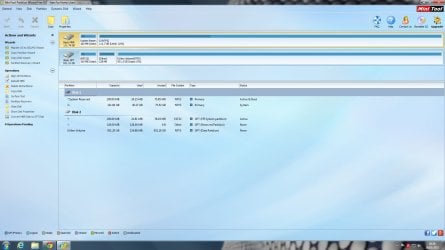
I installed that partition tool dsperber mentioned to check MBR/GPT

and you was right TVeblen the ssd is MBR and HDD is GPT!
I haven't reinstalled like you said yet, just trying to get a better understanding of the MBR/GPT.
Just reading through the link you posted!

here is a SS from the partition tool could come in handy
 

Attachments

  • Untitled2.jpg
    Untitled2.jpg
    127.3 KB · Views: 4

My Computer My Computer

At a glance

Windows 7 Home Premium x64Intel Core i5 4670KG.Skill RipjawsX 8GBMSI GeForce GTX 770 Lightning
Computer type
PC/Desktop
Computer Manufacturer/Model Number
custom build
OS
Windows 7 Home Premium x64
CPU
Intel Core i5 4670K
Motherboard
GIGABYTE Z87X-UD4H
Memory
G.Skill RipjawsX 8GB
Graphics Card(s)
MSI GeForce GTX 770 Lightning
Hard Drives
Samsung 120 GB 850 EVO
Samsung 500 GB 850 EVO
Seagate 1TB Barracuda
PSU
Corsair 750W CS750M
Case
Corsair Carbide 300R
Cooling
Corsair Hydro Series H80i
A quick read through and I think I may have to install windows on my HDD to convert the SSD to GPT drive?
https://technet.microsoft.com/library/cc725671.aspx

I'm going to carry on reading this to see if theres any other possible solutions............
 

My Computer My Computer

At a glance

Windows 7 Home Premium x64Intel Core i5 4670KG.Skill RipjawsX 8GBMSI GeForce GTX 770 Lightning
Computer type
PC/Desktop
Computer Manufacturer/Model Number
custom build
OS
Windows 7 Home Premium x64
CPU
Intel Core i5 4670K
Motherboard
GIGABYTE Z87X-UD4H
Memory
G.Skill RipjawsX 8GB
Graphics Card(s)
MSI GeForce GTX 770 Lightning
Hard Drives
Samsung 120 GB 850 EVO
Samsung 500 GB 850 EVO
Seagate 1TB Barracuda
PSU
Corsair 750W CS750M
Case
Corsair Carbide 300R
Cooling
Corsair Hydro Series H80i
The conversion to GPT is normally destructive to the disk's file system.
However I seem to recall that Partition Wizard has a tool to do the conversion, but I can't recall if that is destructive also. Since you have PW you might check that out.

Another idea, although I have never tried this, is to make a disk image of your current System Reserved and C drive, then wipe the drive clean using Diskpart, then initialize the disk GPT (or use the PW tool with out the Diskpart part), then restore the image to the new GPT drive.

Using the Diskpart Clean command will erase the MBR file table, then when you hook the drive up to a PC running Windows you will get a window asking you to initialize it - either MBR or GPT. This whole process takes some time. Just converting the drive to GPT using PW would be faster.
 

My Computer My Computer

At a glance

Windows 7 64 Bit Home Premium SP1i7-3820GSkill F3-14900CL9Q - 16GBEVGA GeForce GTX660 - Driver 352.86
Computer type
PC/Desktop
Computer Manufacturer/Model Number
Home Built - Jan 2013
OS
Windows 7 64 Bit Home Premium SP1
CPU
i7-3820
Motherboard
Asus P9X79-PRO - Bios 4608
Memory
GSkill F3-14900CL9Q - 16GB
Graphics Card(s)
EVGA GeForce GTX660 - Driver 352.86
Sound Card
On board Realtek ALC898
Monitor(s) Displays
Acer S271HL
Screen Resolution
1920 x 1080
Hard Drives
#1- Samsung 840 Pro Series
#2- Western Digital WD1002FAEX Sata3 Black
#3- Western Digital WD1002FAEX Sata3 Black
PSU
Corsair CMPSU-850TX-V2 - 850 watt (by Seasonic)
Case
Corsair Obsidian 550D
Cooling
Standard 3 120mm case fans, Cooler Master Hyper 212 EVO
Keyboard
MS KC-0405
Mouse
Intellimouse 5-button
Internet Speed
56 Mbits/Sec (on a good day)
Antivirus
Avast & Malwarebytes
Browser
Firefox
Other Info
Asus DVD - DRW-24B1ST 24X
Sorry for the very late reply
I tried to get someone to connect my ssd to their computer and covert my ssd with partition wizard (partition wizard is destructive). Would of been so much simpler but his not really willing to understand or help...

Making a disk image? Sounds complicated but I'm always up for learning something new...
OOr should I just install Windows on hdd (no updates or drivers) then use PW or disk part on the ssd?
I still haven't played witcher 3 T_T
 

My Computer My Computer

At a glance

Windows 7 Home Premium x64Intel Core i5 4670KG.Skill RipjawsX 8GBMSI GeForce GTX 770 Lightning
Computer type
PC/Desktop
Computer Manufacturer/Model Number
custom build
OS
Windows 7 Home Premium x64
CPU
Intel Core i5 4670K
Motherboard
GIGABYTE Z87X-UD4H
Memory
G.Skill RipjawsX 8GB
Graphics Card(s)
MSI GeForce GTX 770 Lightning
Hard Drives
Samsung 120 GB 850 EVO
Samsung 500 GB 850 EVO
Seagate 1TB Barracuda
PSU
Corsair 750W CS750M
Case
Corsair Carbide 300R
Cooling
Corsair Hydro Series H80i
Or should I just install Windows on hdd (no updates or drivers) then use PW or disk part on the ssd?

Or...
If you are willing to just do a fresh, clean install of Windows 7, why not just clean the SSD, Format it GPT, and then just do the fresh installation?

The create and restore a Disk Image solution was offered only in the case that you wanted to preserve the current installation. If that is unnecessary then it would be far easier and more reliable to do it the other way.
 

My Computer My Computer

At a glance

Windows 7 64 Bit Home Premium SP1i7-3820GSkill F3-14900CL9Q - 16GBEVGA GeForce GTX660 - Driver 352.86
Computer type
PC/Desktop
Computer Manufacturer/Model Number
Home Built - Jan 2013
OS
Windows 7 64 Bit Home Premium SP1
CPU
i7-3820
Motherboard
Asus P9X79-PRO - Bios 4608
Memory
GSkill F3-14900CL9Q - 16GB
Graphics Card(s)
EVGA GeForce GTX660 - Driver 352.86
Sound Card
On board Realtek ALC898
Monitor(s) Displays
Acer S271HL
Screen Resolution
1920 x 1080
Hard Drives
#1- Samsung 840 Pro Series
#2- Western Digital WD1002FAEX Sata3 Black
#3- Western Digital WD1002FAEX Sata3 Black
PSU
Corsair CMPSU-850TX-V2 - 850 watt (by Seasonic)
Case
Corsair Obsidian 550D
Cooling
Standard 3 120mm case fans, Cooler Master Hyper 212 EVO
Keyboard
MS KC-0405
Mouse
Intellimouse 5-button
Internet Speed
56 Mbits/Sec (on a good day)
Antivirus
Avast & Malwarebytes
Browser
Firefox
Other Info
Asus DVD - DRW-24B1ST 24X
yeah that will work, to be honest I didn't fully set up my pc after upgrading to an ssd because of this wierd windows boot manager thing

just one question, when you say clean the ssd and re install do you mean just put the windows cd in and install like that?
also should I do anything to the hdd? safe to leave the partitions on it, EFI partition etc
 

My Computer My Computer

At a glance

Windows 7 Home Premium x64Intel Core i5 4670KG.Skill RipjawsX 8GBMSI GeForce GTX 770 Lightning
Computer type
PC/Desktop
Computer Manufacturer/Model Number
custom build
OS
Windows 7 Home Premium x64
CPU
Intel Core i5 4670K
Motherboard
GIGABYTE Z87X-UD4H
Memory
G.Skill RipjawsX 8GB
Graphics Card(s)
MSI GeForce GTX 770 Lightning
Hard Drives
Samsung 120 GB 850 EVO
Samsung 500 GB 850 EVO
Seagate 1TB Barracuda
PSU
Corsair 750W CS750M
Case
Corsair Carbide 300R
Cooling
Corsair Hydro Series H80i
I also don't really understand exactly what is meant by "4. Windows Boot priority".

Re: the GPT/MBR issue. I believe you can convert (non destructively) to GPT but it appears messy to me and I've never wanted to try it. There is nothing wrong with MBR for drives <= 2TB. Your 1TB HDD seems empty so why not unallocate it, initialize it MBR and format it (NTFS primary). Then leave your SSD MBR.
 

My Computer My Computer

At a glance

Windows 7x64 Home Premium SP1Intel i7 2600kG.Skill Ripjaws (DDR3-1600) 2x4GBNvidia GeForce GTS 450; Intel HD Graphics 300...
Computer type
PC/Desktop
Computer Manufacturer/Model Number
Own build
OS
Windows 7x64 Home Premium SP1
CPU
Intel i7 2600k
Motherboard
ASUS P8Z68 Deluxe
Memory
G.Skill Ripjaws (DDR3-1600) 2x4GB
Graphics Card(s)
Nvidia GeForce GTS 450; Intel HD Graphics 3000(GT2+)
Monitor(s) Displays
Dell Ultrasharp IPS panel U2311H, Samsung SyncMaster P2350
Screen Resolution
1920x1080
Hard Drives
Samsung 850 Pro SSD 256GB, Samsung SSD 840 120GB, Seagates 1TB Barracuda ST31000528AS x2
PSU
Seasonic M12II 520W
Case
Lian Li Lancool PC-K60
Cooling
Case: 1x120mm, 3x140mm CPU: Hyper 212+
Keyboard
Logitech MK520 (wireless)
Mouse
Logitech MK520
Internet Speed
6-7 Mbps
Antivirus
Norton Security Premium, Malwarebytes on 2 (MSE on 3rd PC)
Browser
FireFox
Other Info
Audio: Logitech Z523 2.1
I also don't really understand exactly what is meant by "4. Windows Boot priority".

Re: the GPT/MBR issue. I believe you can convert (non destructively) to GPT but it appears messy to me and I've never wanted to try it. There is nothing wrong with MBR for drives <= 2TB. Your 1TB HDD seems empty so why not unallocate it, initialize it MBR and format it (NTFS primary). Then leave your SSD MBR.

The machine won't boot because Windows must be on a GPT disk in a mixed disk system. Either all drives must be MBR, or the SSD must be GPT also.

You will only experience the Windows Boot Manager option (Windows Boot Priority) on a UEFI system.
 

My Computer My Computer

At a glance

Windows 7 64 Bit Home Premium SP1i7-3820GSkill F3-14900CL9Q - 16GBEVGA GeForce GTX660 - Driver 352.86
Computer type
PC/Desktop
Computer Manufacturer/Model Number
Home Built - Jan 2013
OS
Windows 7 64 Bit Home Premium SP1
CPU
i7-3820
Motherboard
Asus P9X79-PRO - Bios 4608
Memory
GSkill F3-14900CL9Q - 16GB
Graphics Card(s)
EVGA GeForce GTX660 - Driver 352.86
Sound Card
On board Realtek ALC898
Monitor(s) Displays
Acer S271HL
Screen Resolution
1920 x 1080
Hard Drives
#1- Samsung 840 Pro Series
#2- Western Digital WD1002FAEX Sata3 Black
#3- Western Digital WD1002FAEX Sata3 Black
PSU
Corsair CMPSU-850TX-V2 - 850 watt (by Seasonic)
Case
Corsair Obsidian 550D
Cooling
Standard 3 120mm case fans, Cooler Master Hyper 212 EVO
Keyboard
MS KC-0405
Mouse
Intellimouse 5-button
Internet Speed
56 Mbits/Sec (on a good day)
Antivirus
Avast & Malwarebytes
Browser
Firefox
Other Info
Asus DVD - DRW-24B1ST 24X
just one question, when you say clean the ssd and re install do you mean just put the windows cd in and install like that?

No, you will need to wipe the drive to make it unallocated so that you would be prompted to initialize it GPT the next time it is recognized in Windows. You can use Windows DISKPART utility to do this task.
Alternately, you could use Partition Wizard to delete all partitions (deleting all data) and then convert it to a GPT disk.
Then you can install Windows from DVD or USB stick onto the fresh, clean, GPT disk.

also should I do anything to the hdd? safe to leave the partitions on it, EFI partition etc

You can leave the HDD alone. However, you should disconnect it while installing Windows on the SSD.

You will also want to delete the C: drive, Windows partition from that drive as soon as you are sure the SSD is booting and operating as expected. If you have 2 Active partitions and 2 Windows installations existing at the same time that could cause new boot problems.
 

My Computer My Computer

At a glance

Windows 7 64 Bit Home Premium SP1i7-3820GSkill F3-14900CL9Q - 16GBEVGA GeForce GTX660 - Driver 352.86
Computer type
PC/Desktop
Computer Manufacturer/Model Number
Home Built - Jan 2013
OS
Windows 7 64 Bit Home Premium SP1
CPU
i7-3820
Motherboard
Asus P9X79-PRO - Bios 4608
Memory
GSkill F3-14900CL9Q - 16GB
Graphics Card(s)
EVGA GeForce GTX660 - Driver 352.86
Sound Card
On board Realtek ALC898
Monitor(s) Displays
Acer S271HL
Screen Resolution
1920 x 1080
Hard Drives
#1- Samsung 840 Pro Series
#2- Western Digital WD1002FAEX Sata3 Black
#3- Western Digital WD1002FAEX Sata3 Black
PSU
Corsair CMPSU-850TX-V2 - 850 watt (by Seasonic)
Case
Corsair Obsidian 550D
Cooling
Standard 3 120mm case fans, Cooler Master Hyper 212 EVO
Keyboard
MS KC-0405
Mouse
Intellimouse 5-button
Internet Speed
56 Mbits/Sec (on a good day)
Antivirus
Avast & Malwarebytes
Browser
Firefox
Other Info
Asus DVD - DRW-24B1ST 24X
Back
Top