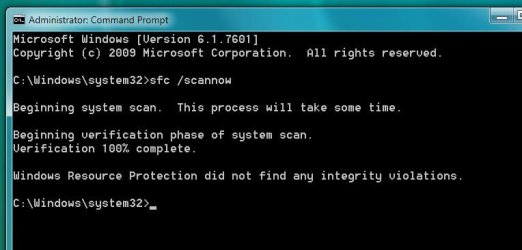
Why does "core" empty window appear on my desktop from time to time?
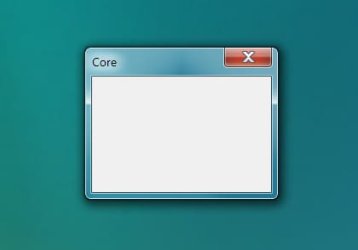
From time to time, unpredictably, I get a small empty window appearing on my desktop with the word "core" in the top left corner. You can see the window in the attached files.
Checking in task manager, "coresync" seems to be using 100% of memory
I have to shut the computer down to get rid of the process. I believe it may have something to do with Adobe's Creative Cloud desktop app but I don't what it is. My CC version is 2.0.0.74 (the latest). I am using CC's File Sync.
I am running Windows 7 Pro 64bit OS on my machine and the system appears stable. I am using Photoshop CC 2014 64bit and Dreamweaver CS3. My machine specs are:
CPU 3770K ; an Asus P8Z77-V Deluxe motherboard; 32Gb Crucial DDR memory; a Crucial 256Gb SSD for the OS and programs; x2 Samsung 512Gb 840 Pro SSDs for data; an Asus GTX660 graphics card.
The problem just started out of the blue. I am not aware of changing anything. I have researched this in Adobe's forums and Googling have not been able to find an answer.
Can anyone help me with this please? What does it mean if an empty window appears?
Thanks
From time to time, unpredictably, I get a small empty window appearing on my desktop with the word "core" in the top left corner. You can see the window in the attached files.
Checking in task manager, "coresync" seems to be using 100% of memory
I have to shut the computer down to get rid of the process. I believe it may have something to do with Adobe's Creative Cloud desktop app but I don't what it is. My CC version is 2.0.0.74 (the latest). I am using CC's File Sync.
I am running Windows 7 Pro 64bit OS on my machine and the system appears stable. I am using Photoshop CC 2014 64bit and Dreamweaver CS3. My machine specs are:
CPU 3770K ; an Asus P8Z77-V Deluxe motherboard; 32Gb Crucial DDR memory; a Crucial 256Gb SSD for the OS and programs; x2 Samsung 512Gb 840 Pro SSDs for data; an Asus GTX660 graphics card.
The problem just started out of the blue. I am not aware of changing anything. I have researched this in Adobe's forums and Googling have not been able to find an answer.
Can anyone help me with this please? What does it mean if an empty window appears?
Thanks
Attachments

My Computer
- OS
- Windows 7 Ultimate x64
- CPU
- 2600K
- Motherboard
- Asus P8P67 Deluxe
- Memory
- 16Gb Corsair Vengeance LP
- Graphics Card(s)
- Sapphire HD 6870 Vapor-X
- Sound Card
- Asus Xonar Essence STX
- Monitor(s) Displays
- NEC 2490/2
- Hard Drives
- Intel M SSD 160Gb
WD x2 300GB Velociraptors
- PSU
- Corsair AX850w
- Case
- Nexus Prominent 5
- Cooling
- cpu: BeQuiet Dark Rock Advanced and x3 case fans




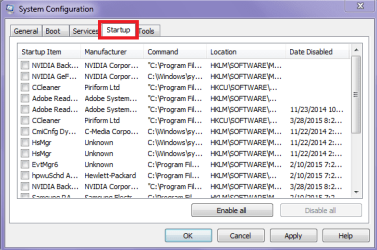
 for me too - good advice. Oh and look at what you are starting up in msconfig > Start up tab see pic (I keep mine all unticked)