What don't you like about Windows 7?

Status
Not open for further replies.
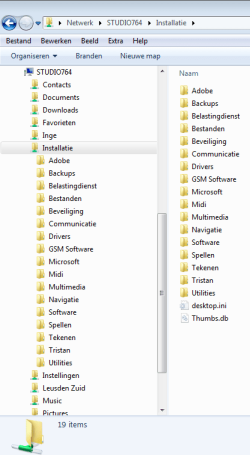
With my photos and video folders, I have quite a few sub-folders. I have to keep scrolling the left pane to find a nested folder.

In XP, this wasn't necessary. The selected folder expanded down from the top of the pane. In 7, the selected folder expands from the bottom of the pane - not revealing the sub-folders within it.

I have tested a number of file managers over the years, even paid for some, but have always returned to Explorer. This one issue may force me to another manager.

Before I clicked Submit, I opened the 7-Zip manager just to check something out - and it froze up a couple of times.

I should neg rep MS ;-)
 
I can't be negative just yet. I'll wait after a week from the release date to see the updates/upgrades/firmware and I'll report back if I seriously dislike anything with the system.


So far, the installation is a breeze, the performance is quite an upgrade from vista. I like the new features, kind of wished there were more features involved.
I'm impressed. 95% satisfied =]
 

My Computer My Computer

At a glance

Windows 7 Professional (build 7600)4GB installed (2.99GB usable)
Computer Manufacturer/Model Number
HP Pavillion DV6626us Laptop Computer
OS
Windows 7 Professional (build 7600)
Memory
4GB installed (2.99GB usable)
Monitor(s) Displays
1
Screen Resolution
1280x800
Hard Drives
160 GB
Mouse
Logitech wireless VX revolution
Nothing, its good and some more features can be added to make it better
 

My Computer My Computer

At a glance

Windows 8.1u1 x64i3DDR3 6GBNvidia 410
Computer type
Laptop
Computer Manufacturer/Model Number
Sony Vaio VPCEH25EN
OS
Windows 8.1u1 x64
CPU
i3
Memory
DDR3 6GB
Graphics Card(s)
Nvidia 410
Screen Resolution
1366*768
Hard Drives
Toshiba 1TB
Internet Speed
Dial Up 56kbps
video drivers issues.. since the first release of windows 7 i've experienced a lot of BSODs regarding vga problems. if this could be fixedwould be great
 

My Computer My Computer

At a glance

7 Ultimate x64 RTM 7600.16385AMD Phenom 9550 @ 2.20ghz4x2GB DDR2 Patriot Viper 800mhzGeForce 9400 GT 512MB
Computer Manufacturer/Model Number
HP a6720f
OS
7 Ultimate x64 RTM 7600.16385
CPU
AMD Phenom 9550 @ 2.20ghz
Motherboard
Asus M2N78-LA
Memory
4x2GB DDR2 Patriot Viper 800mhz
Graphics Card(s)
GeForce 9400 GT 512MB
Sound Card
Onboard Realtek Hi-Definition ALC 888S chipset
Monitor(s) Displays
Samsung P2370HD 23" 1080P HDTV
Screen Resolution
1920x1080
Hard Drives
Western Digital 640GB; Samsung 1 TB; WD 500GB; Seagate Portable 250gb;
Keyboard
Logitech LX310 Wireless Internet Keyboard
Mouse
Logitech LX310 Wireless Laser Mouse
Internet Speed
7Mbps/384Kbps
With my photos and video folders, I have quite a few sub-folders. I have to keep scrolling the left pane to find a nested folder.

In XP, this wasn't necessary. The selected folder expanded down from the top of the pane. In 7, the selected folder expands from the bottom of the pane - not revealing the sub-folders within it.

I have tested a number of file managers over the years, even paid for some, but have always returned to Explorer. This one issue may force me to another manager.

Before I clicked Submit, I opened the 7-Zip manager just to check something out - and it froze up a couple of times.

I should neg rep MS ;-)

Really strange.

Here a screenshot.

I clicked on the arrow left of the "installatie" folder and it jumped up to show every sub-folder in it.

expl.PNG

This is default behavior on all my machines.
 

My Computer My Computer

At a glance

Win7 Build 7600 x86Pentium II 300MHz32mb EDO RAMDiamond Viper
OS
Win7 Build 7600 x86
CPU
Pentium II 300MHz
Motherboard
Asus
Memory
32mb EDO RAM
Graphics Card(s)
Diamond Viper
Sound Card
Soundblaster 16
Monitor(s) Displays
14" AOC CRT 16K color
Screen Resolution
800x600
Hard Drives
300mb Quantum fireball
PSU
110 Watts
Cooling
Passive
Keyboard
Trust Ergonomic
Mouse
Generic
Internet Speed
256K u 128K d
yes, but if you click a folder on the right pane, what happens then?

(PS belated congrats for guru badge!)
 

My Computer My Computer

At a glance

ultimate 64 sp1i5 2500K [email protected]8 gigs GSkill Ripjaws 1600amd hd6950
Computer Manufacturer/Model Number
mickey megabyte 1234
OS
ultimate 64 sp1
CPU
i5 2500K [email protected]
Motherboard
MSI P67A-GD53
Memory
8 gigs GSkill Ripjaws 1600
Graphics Card(s)
amd hd6950
Sound Card
creative x-fi gamer
Monitor(s) Displays
samsung 24"
Screen Resolution
1920x1080
Hard Drives
ocz vertex 2e 60 gig, samsung f3 1tb, buffalo 2tb ext
PSU
antec 550
Case
antec three hundred
Cooling
i'm a cooling fan
Keyboard
saitek eclipse ii
Mouse
logitech g3
Internet Speed
about 4 Mbps
Other Info
i love win7
yes, but if you click a folder on the right pane, what happens then?

(PS belated congrats for guru badge!)

When I click on a folder? It gets selected and turns blue.

thanks for the belated congrats.
 

My Computer My Computer

At a glance

Win7 Build 7600 x86Pentium II 300MHz32mb EDO RAMDiamond Viper
OS
Win7 Build 7600 x86
CPU
Pentium II 300MHz
Motherboard
Asus
Memory
32mb EDO RAM
Graphics Card(s)
Diamond Viper
Sound Card
Soundblaster 16
Monitor(s) Displays
14" AOC CRT 16K color
Screen Resolution
800x600
Hard Drives
300mb Quantum fireball
PSU
110 Watts
Cooling
Passive
Keyboard
Trust Ergonomic
Mouse
Generic
Internet Speed
256K u 128K d
That my network adapter won't work correctly on it :(
 

My Computer My Computer

At a glance

Windows 7 Ultimate
OS
Windows 7 Ultimate
That my network adapter won't work correctly on it :(

We would gladly help correct your problem, if you took the time to completly fill out your system specs...
 

My Computer My Computer

At a glance

64-bit Windows 8.1 ProCore(TM) i5 CPU 4330 Haswell @ 3.20GHz12.00 GBIntel(R) HD Graphics
Computer type
PC/Desktop
Computer Manufacturer/Model Number
LENOVO K450 @3.0GHZ
OS
64-bit Windows 8.1 Pro
CPU
Core(TM) i5 CPU 4330 Haswell @ 3.20GHz
Motherboard
LENOVO
Memory
12.00 GB
Graphics Card(s)
Intel(R) HD Graphics
Sound Card
Intel HD integtrated
Monitor(s) Displays
HP 25' ISP Monitor
Screen Resolution
1900/1020
Hard Drives
(1) ST1000DM003-1CH162 (2) Generic STORAGE DEVICE USB Device (3) Generic STORAGE DEVICE USB Device
Internet Speed
100mb down/10mb up
On the bar chose organize -> folder and search options

Uncheck "automatically unfold ......"

That solves it
Chuckle. Yes, that does solve "it", but does not address the "issue".

I understand what soc9 is describing. I sincerely hope that this nuisance is addressed in a Service Pack.

??? joke?? :D

It stops the automatic placement of the selected item at the BOTTOM of the tree pane. hence solves it.

What more is needed for it to be addressed? A stamp? :sarc:

j/k

Well thanks for the info, that appears to have fixed the auto placement problem :)

Beats me why that would be a default setting - as it's incredibly annoying - and while [yes] I did go look for solutions [25 yrs of IT has taught me how to do that!!], the "automatically expand to current folder" option gives absolutely NO indication of resulting behavior in its verbiage. :p

Other than that, thanks.. MS did a pretty good job on this OS, tho' I'm still running into compatibility issues with stuff that ran on XP 64 just fine.
 

My Computer My Computer

At a glance

Win7 x64 Ultimate
OS
Win7 x64 Ultimate
I'm objective, not biased. It's a big change for nothing in my opinion, just for "keep the market going".
 

My Computer My Computer

At a glance

XP
OS
XP
Biased and comfortably retired. And that was my objective.

Any bias or anti-bias notwithstanding, MS hit a home run with Windows 7. It doesn't matter what the strike count was. We fail to understand the game when we do not look at the big picture.

Ever notice how some owners are perennial losers and some are repeat champions?
 
Biased and comfortably retired. And that was my objective.

Any bias or anti-bias notwithstanding, MS hit a home run with Windows 7. It doesn't matter what the strike count was. We fail to understand the game when we do not look at the big picture.

Ever notice how some owners are perennial losers and some are repeat champions?

Considering plastic area in pacific, the size of about Texas I prefer to be objective.
 

My Computer My Computer

At a glance

XP
OS
XP
Although i like the new features i have seen on Windows 7, i think that the code could be gutted a bit. The system requirements for my current OS (linux) is 256 MB of RAM and 4 GB of disk space and it can do most of the stuff i saw on Windows 7. Yes, it may be a little more complicated at times, but it works great, free, and i don't need as high of a system rating to run the same type of programs.

So the end result of my opinion, It looks great and they got their heads in a good spot, now i feel that they should work with the lower end of things and gut some of the code to lower the system requirements. I feel that if they do this, windows 7 sales will sky rocket.

Thats just my 2 cents on this.
[edit] If windows 7 wasn't such a resource hog, i would recommend it and buy it myself! It would be the only operating system i have ever boughten that did not come with any of my computers!
 

My Computer My Computer

At a glance

Kubuntu 9.10 & Vista home basicIntel Celeron 900 -> 2.20Ghz, 800 fsb3 GB DDR2 SDRAM
Computer Manufacturer/Model Number
Dell Inspiron 1545
OS
Kubuntu 9.10 & Vista home basic
CPU
Intel Celeron 900 -> 2.20Ghz, 800 fsb
Memory
3 GB DDR2 SDRAM
Hard Drives
160 GB SATA
Keyboard
laptop, DELL
Mouse
Wireless gigaware -> LOVE IT
Although i like the new features i have seen on Windows 7, i think that the code could be gutted a bit. The system requirements for my current OS (linux) is 256 MB of RAM and 4 GB of disk space and it can do most of the stuff i saw on Windows 7. Yes, it may be a little more complicated at times, but it works great, free, and i don't need as high of a system rating to run the same type of programs.

So the end result of my opinion, It looks great and they got their heads in a good spot, now i feel that they should work with the lower end of things and gut some of the code to lower the system requirements. I feel that if they do this, windows 7 sales will sky rocket.

Thats just my 2 cents on this.
[edit] If windows 7 wasn't such a resource hog, i would recommend it and buy it myself! It would be the only operating system i have ever boughten that did not come with any of my computers!


Read my lips :D

"keep the market going"

http://www.iamanidiot.com/http://www.iamanidiot.com/
 

My Computer My Computer

At a glance

XP
OS
XP
[edit] If windows 7 wasn't such a resource hog, i would recommend it and buy it myself! It would be the only operating system i have ever boughten that did not come with any of my computers!
Calling Windows 7 a resource hog would be an incorrect assessment.

Using resources to there fullest does not make it inefficient or a hog. Taking those abundant resources you so graciously installed in your computer and making use of every last drops improves efficiency. Using free RAM as a cache frees up the computer from having to wait for extra I/O jobs to the HDD. Running task while the computer is idle (i.e., no user applications are running in the foreground), keeps the CPU working instead of wasting time and electricity keeping your room heated.

Now get this, ready for the shock of your life? When you require the maximum resources from your computer, aka some video game perhaps. Windows will give it everything! Well behaves low priority task will be kicked out of the way, and ignored until that foreground application is done. RAM will be freed but the absolute minimum (about 50 MB for the kernel). The complete opposite of a resource hog. For Windows 7 (or Vista) to be a resource hog, it must starve applications of resources, it must consume everything and never leg go. Windows and its services do not hog resources. Third-party services and application, however, do (Sadly).
 

My Computer My Computer

At a glance

Windows 10 Pro (x64)Intel Core i7-3930K (3.2GHz - 4.5GHz)4x Samsung 4GB PC3-12800 DDR3 (16GB 1600MHz)Nvidia Geforce GTX 690
Computer type
PC/Desktop
Computer Manufacturer/Model Number
Alienware Aurora ALX R4
OS
Windows 10 Pro (x64)
CPU
Intel Core i7-3930K (3.2GHz - 4.5GHz)
Motherboard
Alienware Aurora-R4 x79
Memory
4x Samsung 4GB PC3-12800 DDR3 (16GB 1600MHz)
Graphics Card(s)
Nvidia Geforce GTX 690
Sound Card
SteelSeries Siberia Elite
Monitor(s) Displays
Dell UltraSharp U3011
Screen Resolution
2560x1600
Hard Drives
Samsung 850 Pro 256 GB, Seagate 1TB Desktop Hybrid HDD, 2x Western Digital 4TB Green HDD
PSU
875W Some Dell PSU <.<
Case
Alienware Aurora ALX
Cooling
Custom Liquid Cooling (EK CPU & GPU blocks) dual EK 480RAD
Keyboard
Logitech G710+ Mechanical
Mouse
Logitech G700s
Internet Speed
Verizon Fios (50 mbps average)
Other Info
Server: Intel NUC D54250WYK: i5-4250U, 16GB, 256 GB mSATA, Windows Server 2012 R2
Calling Windows 7 a resource hog would be an incorrect assessment.

Well, if you can tell me why all of a sudden you need at least 1GB of RAM and (most of all) 13GB of HDD space, then you can talk about incorrect.
 

My Computer My Computer

At a glance

XP
OS
XP
Status
Not open for further replies.
Back
Top