

- Local time
- 3:18 PM
- Messages
- 231
SYSTEM REPAIR DISC 6/2015
NOTE: My C: drive is a 256 GB SSD.
I made a System Repair Disc on a new blank DVD-RW in accordance with instructions. I then tested it (in case I needed it). It did not produce a list of tools to repair the machine which is what I believe is the purpose of the disc. Nothing helped.
It has 4 files: boot, efi, sources, bootmgr.efi
I started the computer three times with the disc in the tray, each time rapidly pressing a key before the GIGABYTE initial screen appeared. Here are the results:
DELETE KEY
Black and white screen with two offerings :
Windows 7 Boot manager,
A memory check. I chose the latter and a long memory check was carried out, result successful. I booted Windows.
------------------------------------------------------
F12 KEY
Black and white screen offering:
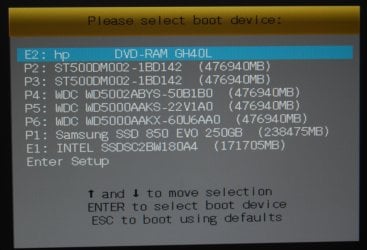
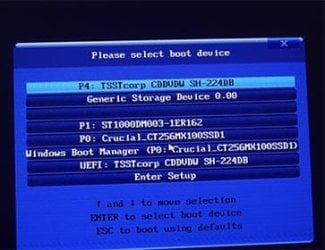
Please select boot device [7 offered]:
P4: TSSTCORP CDDV SH-224DB
Generic Storage Device 0_00
P1: ST10000DM003-1ER162
P0: Crucial_CT256MX100SSDI
Windows Boot Manager (P0: Crucial_CT256MX100SSDI
UEFI: Test corp CDDVDW SH-224DB
Enter Setup
On earlier tests I had chosen each of the first 6 but got no selection of repair tools.
This time I chose Enter Setup:
A Multicoloured screen with:
GIGABYTE UEFI BIOS
MIT System Info BIOS Features Peripherals Power Management Save and Exit
When clicked on, each produced a screen full of settings etc. I exited without saving. Windows started normally
----------------------------------------------------------
F8 KEY
Windows started normally.
Is my System Repair Disc working as it should? If so, what use is it? If not, what can I do?
Thanks.
NOTE: My C: drive is a 256 GB SSD.
I made a System Repair Disc on a new blank DVD-RW in accordance with instructions. I then tested it (in case I needed it). It did not produce a list of tools to repair the machine which is what I believe is the purpose of the disc. Nothing helped.
It has 4 files: boot, efi, sources, bootmgr.efi
I started the computer three times with the disc in the tray, each time rapidly pressing a key before the GIGABYTE initial screen appeared. Here are the results:
DELETE KEY
Black and white screen with two offerings :
Windows 7 Boot manager,
A memory check. I chose the latter and a long memory check was carried out, result successful. I booted Windows.
------------------------------------------------------
F12 KEY
Black and white screen offering:
Please select boot device [7 offered]:
P4: TSSTCORP CDDV SH-224DB
Generic Storage Device 0_00
P1: ST10000DM003-1ER162
P0: Crucial_CT256MX100SSDI
Windows Boot Manager (P0: Crucial_CT256MX100SSDI
UEFI: Test corp CDDVDW SH-224DB
Enter Setup
On earlier tests I had chosen each of the first 6 but got no selection of repair tools.
This time I chose Enter Setup:
A Multicoloured screen with:
GIGABYTE UEFI BIOS
MIT System Info BIOS Features Peripherals Power Management Save and Exit
When clicked on, each produced a screen full of settings etc. I exited without saving. Windows started normally
----------------------------------------------------------
F8 KEY
Windows started normally.
Is my System Repair Disc working as it should? If so, what use is it? If not, what can I do?
Thanks.
My Computer
At a glance
Windows 7 Home Premium 64bitIntel Pentium Edition G3220 3.0 GHz8 GB DDR3 1600 MHz DIMMNot Known
- Computer type
- PC/Desktop
- Computer Manufacturer/Model Number
- Gigabyte ATX case with 500 W power supply GZ-M1
- OS
- Windows 7 Home Premium 64bit
- CPU
- Intel Pentium Edition G3220 3.0 GHz
- Motherboard
- Gigabyte Socket 1150 MicroATX Mot Ultra Durable, GA-H81M-S2H
- Memory
- 8 GB DDR3 1600 MHz DIMM
- Graphics Card(s)
- Not Known
- Sound Card
- Not known
- Monitor(s) Displays
- Samsung LS24D590 23.6"
- Screen Resolution
- 1920 x 1080
- Hard Drives
- 256 GB Solid State Drive (C: on which Windows 7 is installed)-
1 TB internal conventional HD (X:)-
Two WD "Elements" " 2TB USB drives as backups
- PSU
- 500 W
- Case
- Gigabyte ATX case
- Cooling
- Several fans!
- Keyboard
- Accuratus 301 USB Compact, white.
- Mouse
- Microsoft Basic Optical Mouse v2.0, two-button, tethered
- Internet Speed
- 10 to 12 Mb per second
- Antivirus
- Kaspersky Internet Security 2016, Malwarebytes (paid)
- Browser
- Firefox (ocassionally Safari)
- Other Info
- The 256 GB SSD (C:) also has Adobe Photoshop CS6 and InDesign CS6, MS Office, Adobe Lightroom, and other small programs.



 ) I get folders: Intel, Perflogs, Program Files, Program files (x86), Users, Windows. Opening these (Perflogs denied access) I cannot find anything to show the presence of a partition of any sort but I am not expert enough to be absolutely sure.

