Solved AeroPeek grayed out after graphics driver update

NoobNeeds

New member
Local time
11:01 PM
Messages
5
Location
Started in Nuketown.
Hi people,

maybe someone of you can help me out here. My problem is the latest graphics driver for my Nvidia GeForce GTX 750 Ti. After installing it Aero Peek Effects stopped to function and is shown as a grayed out option in task properties.

I followed your tutorial here but nothing changed. My WEI score is refreshed, stopping and restarting services didn't help even if the run as supposed to and all visual effects are enabled.

Do you guys have any other ideas or solutions?


NoobNeeds


Edit:

Found some interesting things. When I quit some games I played in fullscreen Aero Peek sometimes reverts to normal, sometimes not.

Furthermore I seem to have a problem with my windows not being dockable to the left side of the screen. Moving my mouse with or without window past the left end of my screen results in both vanishing to a place no one knows about. As if the desktop/screen "thinks" it has more place it should usually have. Funny about all this is that it's only happening from top to 2/3 of the screen. On the bottom 1/3 part of the screen my mouse stops normally but windows are still not dockable.

My screen looks normal though. Docking my windows to top works and shows them how they should look.
 
Last edited:

My Computer My Computer

Computer type
PC/Desktop
Computer Manufacturer/Model Number
Custom
OS
Windows 7 x64 SP1
CPU
Intel QuadCore i5-4590 @ 3.30GHz
Motherboard
Asus H81M-Plus
Memory
8GB DDR3 1600MHz
Graphics Card(s)
Nvidia GeForce GTX 750 Ti 2GB (Driver: Game-ready 353.06)
Sound Card
Realtek ALC887 On-board / CSB Audigy SE 7.1 HD 3.0
Monitor(s) Displays
Sharp TV
Screen Resolution
Full HD (1920 x 1080p)
Case
Custom
Keyboard
Razer BlackWidow Ultimate
Mouse
Razer Taipan
Have you searched on the new driver to see if others are having the same issue? It could be a regression in the driver. In which case I would revert to the previous driver until they fix it.
 

My Computer My Computer

Computer Manufacturer/Model Number
HP Media Center
OS
Windows 7 32 bit
CPU
AMD 5200+ dual core
Memory
2 GB
Graphics Card(s)
NVidia GeForce 6150SE 128 MB
Monitor(s) Displays
CRT
Screen Resolution
1280x1024
Hard Drives
500 GB Sata internal :

SIIG USB 3.0 docking stations w/WD Caviar Black 6 Gb/s drives
Keyboard
PS/2
Mouse
PS/2 Wheel Mouse
Other Info
SIIG USB 3.0 PCIexpress card.
Yes, I did. Other guys doesn't seem to have this issue. Typing in google "game ready" "aero peek" didn't help anything.
 

My Computer My Computer

Computer type
PC/Desktop
Computer Manufacturer/Model Number
Custom
OS
Windows 7 x64 SP1
CPU
Intel QuadCore i5-4590 @ 3.30GHz
Motherboard
Asus H81M-Plus
Memory
8GB DDR3 1600MHz
Graphics Card(s)
Nvidia GeForce GTX 750 Ti 2GB (Driver: Game-ready 353.06)
Sound Card
Realtek ALC887 On-board / CSB Audigy SE 7.1 HD 3.0
Monitor(s) Displays
Sharp TV
Screen Resolution
Full HD (1920 x 1080p)
Case
Custom
Keyboard
Razer BlackWidow Ultimate
Mouse
Razer Taipan
Do you see any phantom screens in Screen Resolution or NVidia control panel?
 

My Computer My Computer

Computer type
PC/Desktop
Computer Manufacturer/Model Number
Custom Build
OS
Windows 7 Ultimate x64 SP1
CPU
AMD Phenom 2 1090T
Motherboard
Gigabyte GA-890FXA-UD5
Memory
2x8GB Kingston HyperX Fury Black 1600Mhz Unganged
Graphics Card(s)
MSI GTX 970 Gaming 4G
Sound Card
Realtek On-Board HD 7.1 Audio / Logitech G35
Monitor(s) Displays
3xAcer GD245HQ
Screen Resolution
1920x1080
Hard Drives
Samsung 850 Pro 512GB SSD - OS /
WD Caviar Black SATA 3 - 1 TBx2 - Dynamic RAID 0 /
WD Caviar Green SATA 2 - 640GBx2 - Dynamic RAID 0 /
WD Caviar Green SATA 2 - 640GB - Internal Backup /
Seagate Barracude SATA 3 - 3TB - External Backup/ Sync
PSU
HighPower 1000W
Case
Cooler Master HAF 932
Cooling
Noctua NH-D14
Keyboard
Logitech G19
Mouse
Logitech G500
Internet Speed
100/4 Mbit Cable (100GB quota)
Antivirus
ZoneAlarm Extreme Security / MBAM Pro / MBAE Free / SAS Free
Browser
IE 11 - Firefox - Chrome
Other Info
Logitech F710/ G27/ G940/ Z5500 // TrackIR 5 // Nvidia 3D Surround Vision
No but thanks to you I found something of interest. Switching to Duplicate or Extend fix the issue as long as I stay in those modes. Switching back reverts the problem.

If anyone can make something out of it: I run a desktop computer with 1 TV connected through an DVI to HDMI adapter.
 

My Computer My Computer

Computer type
PC/Desktop
Computer Manufacturer/Model Number
Custom
OS
Windows 7 x64 SP1
CPU
Intel QuadCore i5-4590 @ 3.30GHz
Motherboard
Asus H81M-Plus
Memory
8GB DDR3 1600MHz
Graphics Card(s)
Nvidia GeForce GTX 750 Ti 2GB (Driver: Game-ready 353.06)
Sound Card
Realtek ALC887 On-board / CSB Audigy SE 7.1 HD 3.0
Monitor(s) Displays
Sharp TV
Screen Resolution
Full HD (1920 x 1080p)
Case
Custom
Keyboard
Razer BlackWidow Ultimate
Mouse
Razer Taipan
Alright if you wish to further investigate.

Does it detect the phantom screen if you click "detect" in Screen Resolution?
Any second monitor in Device Manager?
Try using the other DVI port, if there is one?
Did you have another monitor before?

It is possible one of the other ports on GPU think there is a display attached. And it is smaller as detected as generic(?)
 

My Computer My Computer

Computer type
PC/Desktop
Computer Manufacturer/Model Number
Custom Build
OS
Windows 7 Ultimate x64 SP1
CPU
AMD Phenom 2 1090T
Motherboard
Gigabyte GA-890FXA-UD5
Memory
2x8GB Kingston HyperX Fury Black 1600Mhz Unganged
Graphics Card(s)
MSI GTX 970 Gaming 4G
Sound Card
Realtek On-Board HD 7.1 Audio / Logitech G35
Monitor(s) Displays
3xAcer GD245HQ
Screen Resolution
1920x1080
Hard Drives
Samsung 850 Pro 512GB SSD - OS /
WD Caviar Black SATA 3 - 1 TBx2 - Dynamic RAID 0 /
WD Caviar Green SATA 2 - 640GBx2 - Dynamic RAID 0 /
WD Caviar Green SATA 2 - 640GB - Internal Backup /
Seagate Barracude SATA 3 - 3TB - External Backup/ Sync
PSU
HighPower 1000W
Case
Cooler Master HAF 932
Cooling
Noctua NH-D14
Keyboard
Logitech G19
Mouse
Logitech G500
Internet Speed
100/4 Mbit Cable (100GB quota)
Antivirus
ZoneAlarm Extreme Security / MBAM Pro / MBAE Free / SAS Free
Browser
IE 11 - Firefox - Chrome
Other Info
Logitech F710/ G27/ G940/ Z5500 // TrackIR 5 // Nvidia 3D Surround Vision
Roll back to the previous driver.
 

My Computer My Computer

Computer type
PC/Desktop
Computer Manufacturer/Model Number
Skylake Special #666
OS
Windows 10 Pro x64
CPU
Intel Core i7 6700K
Motherboard
Asus Sabertooth Z170 Mark 1
Memory
GSkill TridentZ RGB 16GB 3600 16-16-16-36
Graphics Card(s)
EVGA GTX 980 Ti SC x2
Sound Card
Realtek High Definition
Monitor(s) Displays
AOC G2460PG
Screen Resolution
1920 x 1080 144Hz
Hard Drives
Samsung 860 Pro 256GB, Seagate Barracuda 4TB x2
PSU
EVGA 1000 P2, EVGA White Custom Braided Cables
Case
Corsair Vengeance C70 Gunmetal Black
Cooling
Corsair H100i v2, Corsair ML120 x2, Thermal Grizzly Kryonaut
Keyboard
Logitech G910 Orion Spectrum
Mouse
Logitech G700s
Internet Speed
Verizon Fios Quantum Gateway 75/75
Antivirus
Windows Defender, Malwarebytes Free 3.8.3
Browser
Chrome
Other Info
Corsair SP120 x4, LG Blu-ray Drive, Durabrand HT-395 100 Watt Dolby Digital Amp, Corsair H2100 Wireless 7.1 Headset
Does it detect the phantom screen if you click "detect" in Screen Resolution?
Truth! It does. Shows my graphic card in drop-down and says "Another display not detected".

Any second monitor in Device Manager?
Only one entry: PnP. Properties shows my graphic card.

Try using the other DVI port, if there is one?
DVI-end is connected to graphic card and TV only got 3 HDMI-inputs. Tried them all. No change.

Did you have another monitor before?
Yeah, I did. Probably helps to mention that the issue persists on this 2nd monitor.

It is possible one of the other ports on GPU think there is a display attached. And it is smaller as detected as generic(?)
Is plausible. Probably my card thinks there's a second device running.

Option in Screen Resolution for Multiple Displays is "No display detected" but I can switch to "Try to connect anyways on: VGA". Strange... because there never ever was anything connected through VGA on my graphic card or computer.

What exactly do you mean by smaller? Screen Resolution is set on 1920x1080 as grayed out option.
Smaller on top of Screen Resolution near "Detect"? Yes. Display 2 is smaller than Display 1.
The phantom screen on-desktop: Yes. As stated above.

Roll back to the previous driver.
I'll take that route as last option, thanks.
 

My Computer My Computer

Computer type
PC/Desktop
Computer Manufacturer/Model Number
Custom
OS
Windows 7 x64 SP1
CPU
Intel QuadCore i5-4590 @ 3.30GHz
Motherboard
Asus H81M-Plus
Memory
8GB DDR3 1600MHz
Graphics Card(s)
Nvidia GeForce GTX 750 Ti 2GB (Driver: Game-ready 353.06)
Sound Card
Realtek ALC887 On-board / CSB Audigy SE 7.1 HD 3.0
Monitor(s) Displays
Sharp TV
Screen Resolution
Full HD (1920 x 1080p)
Case
Custom
Keyboard
Razer BlackWidow Ultimate
Mouse
Razer Taipan
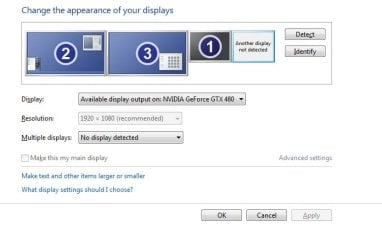
Another display not detected is same as what I get too, that's normal. It just shows the unplugged port.

Any chance there is a driver for the TV? Check the website of vendor. (not sure if this would help, but still..)

I meant the DVI-end, are there 2 DVI ports on the GPU? Try the other DVI port.

Do you have another monitor to plug in? From a friend or neighbor? Maybe you just need to disable that phantom one once plugged in.

Funny about all this is that it's only happening from top to 2/3 of the screen. On the bottom 1/3 part of the screen my mouse stops normally but windows are still not dockable.

What I meant as a smaller screen, probably doesn't have a driver for it and hence has a smaller resolution.

Option in Screen Resolution for Multiple Displays is "No display detected" but I can switch to "Try to connect anyways on: VGA". Strange... because there never ever was anything connected through VGA on my graphic card or computer.

This is normal too. Here is how mine looks like.

screen resolution window.jpg
 

My Computer My Computer

Computer type
PC/Desktop
Computer Manufacturer/Model Number
Custom Build
OS
Windows 7 Ultimate x64 SP1
CPU
AMD Phenom 2 1090T
Motherboard
Gigabyte GA-890FXA-UD5
Memory
2x8GB Kingston HyperX Fury Black 1600Mhz Unganged
Graphics Card(s)
MSI GTX 970 Gaming 4G
Sound Card
Realtek On-Board HD 7.1 Audio / Logitech G35
Monitor(s) Displays
3xAcer GD245HQ
Screen Resolution
1920x1080
Hard Drives
Samsung 850 Pro 512GB SSD - OS /
WD Caviar Black SATA 3 - 1 TBx2 - Dynamic RAID 0 /
WD Caviar Green SATA 2 - 640GBx2 - Dynamic RAID 0 /
WD Caviar Green SATA 2 - 640GB - Internal Backup /
Seagate Barracude SATA 3 - 3TB - External Backup/ Sync
PSU
HighPower 1000W
Case
Cooler Master HAF 932
Cooling
Noctua NH-D14
Keyboard
Logitech G19
Mouse
Logitech G500
Internet Speed
100/4 Mbit Cable (100GB quota)
Antivirus
ZoneAlarm Extreme Security / MBAM Pro / MBAE Free / SAS Free
Browser
IE 11 - Firefox - Chrome
Other Info
Logitech F710/ G27/ G940/ Z5500 // TrackIR 5 // Nvidia 3D Surround Vision
Any chance there is a driver for the TV?
No, there is none.

I meant the DVI-end, are there 2 DVI ports on the GPU? Try the other DVI port.
No, all ports my GPU got are HDMI, VGA and DVI-I.

But tell you what. I solved this damn problem!! Thanks to your guidance and googling around I found out additional graphic drivers cause the screens/adapter to misbehave. In my case this is some EZ Display driver I didn't know I had on system. Installed through some 3rd party tool I once used to stream content to TV. Send it to hell and everything works fine now.

The 2nd VGA screen from my graphic card still exists but doesn't cause weird behavior now. As you said, it's normal.

If in future anyone encounters such a problem, remember to ask them this first. Could be solved easily, really.

Well, thanks for all your support! You're a lifetime saver ;)
 

My Computer My Computer

Computer type
PC/Desktop
Computer Manufacturer/Model Number
Custom
OS
Windows 7 x64 SP1
CPU
Intel QuadCore i5-4590 @ 3.30GHz
Motherboard
Asus H81M-Plus
Memory
8GB DDR3 1600MHz
Graphics Card(s)
Nvidia GeForce GTX 750 Ti 2GB (Driver: Game-ready 353.06)
Sound Card
Realtek ALC887 On-board / CSB Audigy SE 7.1 HD 3.0
Monitor(s) Displays
Sharp TV
Screen Resolution
Full HD (1920 x 1080p)
Case
Custom
Keyboard
Razer BlackWidow Ultimate
Mouse
Razer Taipan
Nice :) glad you sorted that one.
 

My Computer My Computer

Computer type
PC/Desktop
Computer Manufacturer/Model Number
Custom Build
OS
Windows 7 Ultimate x64 SP1
CPU
AMD Phenom 2 1090T
Motherboard
Gigabyte GA-890FXA-UD5
Memory
2x8GB Kingston HyperX Fury Black 1600Mhz Unganged
Graphics Card(s)
MSI GTX 970 Gaming 4G
Sound Card
Realtek On-Board HD 7.1 Audio / Logitech G35
Monitor(s) Displays
3xAcer GD245HQ
Screen Resolution
1920x1080
Hard Drives
Samsung 850 Pro 512GB SSD - OS /
WD Caviar Black SATA 3 - 1 TBx2 - Dynamic RAID 0 /
WD Caviar Green SATA 2 - 640GBx2 - Dynamic RAID 0 /
WD Caviar Green SATA 2 - 640GB - Internal Backup /
Seagate Barracude SATA 3 - 3TB - External Backup/ Sync
PSU
HighPower 1000W
Case
Cooler Master HAF 932
Cooling
Noctua NH-D14
Keyboard
Logitech G19
Mouse
Logitech G500
Internet Speed
100/4 Mbit Cable (100GB quota)
Antivirus
ZoneAlarm Extreme Security / MBAM Pro / MBAE Free / SAS Free
Browser
IE 11 - Firefox - Chrome
Other Info
Logitech F710/ G27/ G940/ Z5500 // TrackIR 5 // Nvidia 3D Surround Vision
Back
Top