Solved USB Ports Corrupted After Graphics Driver Update

boweasel

New member
Power User
Local time
5:15 AM
Messages
678
Had a BSOD problem the other day and I posted to the forum:
http://www.sevenforums.com/bsod-help-support/383034-2-separate-atikm-ag-bsod-errors.html

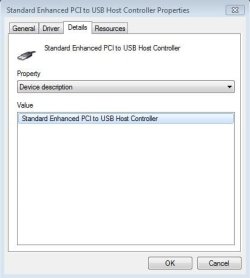
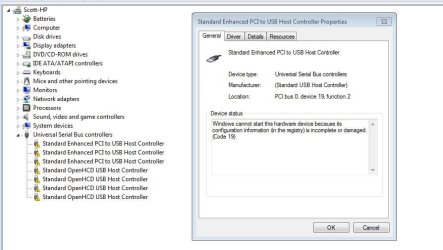
As part of the solution I was encouraged to download and install the latest graphics driver. Unfortunately, that driver install somehow messed up my USB Controllers - every device listed (and there's 7 of them) display a little yellow triangle with an exclamation point. Right-clicking on any of those 7 items gives me the following.

And the 2 TB external HDD (which I depend on mightily) is, right now, useless on this machine.

Update - I've now followed the steps in this tutorial USB Driver - General Fix for Problems and not only did it not fix my USB problem, but I've now lost my network printer. Sigh...
 

Attachments
  • Capture4.JPG
    Capture4.JPG
    59.2 KB · Views: 1
Last edited:

My Computer My Computer

Computer type
Laptop
OS
Windows 7 home premium 64 bit
CPU
AMD K10
Motherboard
Hewlett-Packard 1444 (Socket S1G4)
Memory
3.00GB Dual-Channel DDR3 @ 532MHz
Graphics Card(s)
ATI AMD M880G with ATI Mobility Radeon HD 4250 (HP)
Sound Card
Realtek
Screen Resolution
1366 x 768
Hard Drives
465GB Western Digital
Antivirus
MSE
Ok. First of all...

1. Go to the HP website and download the proper graphics drivers, the chipset drivers, and the USB drivers (may be in the chipset drivers) for your laptop.
2. Uninstall the graphics driver you currently have installed.
3. Reinstall the chipset drivers.
4. Reinstall the USB drivers.
5. Reinstall the proper HP graphics drivers.
6. Reboot

That will hopefully clear up the problem.

The problem that you are having stems from the fact that the generic graphic drivers that you get from the AMD website are not made for your HP laptop. These drivers also (usually) include a USB driver, that is (guess what?) probably incompatible with your hardware as well, and that is what has borked your USB ports.

Try those things and please post back any success or failures so we can help more.
 

My Computer My Computer

Computer type
PC/Desktop
Computer Manufacturer/Model Number
Mellon Labs (custom build)
OS
Win 7 Pro x64/Win 10 Pro x64 dual boot
CPU
AMD FX 8350 Vishera @ 4200
Motherboard
ASUS M5A97 R2.0
Memory
16 GB Mushkin Blackline DDR3-2400 @ 1866 (9-10-10-10-31)
Graphics Card(s)
XFX Radeon R9 280 Double D Black Edition
Sound Card
Realtek HD Audio on MB. Sounds great.
Monitor(s) Displays
Acer 24", Acer 22"
Screen Resolution
3840 x 1080
Hard Drives
1 x Mushkin Chronos 120 GB SSD (Win 10)
1 x Samsung 850 EVO 250 GB SSD (Win 7)
1 x WD 1TB SATA Blue
1 x WD 1TB SATA Green
PSU
Corsair TX-750
Case
CoolerMaster HAF 912+
Cooling
Coolermaster Seidon 240M Liquid AIO. 6 case fans
Keyboard
Logitech G710+
Mouse
Logitech G500s
Internet Speed
Much better since I got fiber, but still way overpriced.
Antivirus
MSE, Malware Bytes for scanning
Browser
Firefox
Other Info
Corsair VOID USB headphones.

A Mellon Labs X-1 - LCD Smartie driven system status display.

Brought to you by the letter E
That graphics driver was from HP. I'm not sure why that wasn't mentioned. But that is what I found odd, a driver from HP for that machine causing this.

I had him uninstall that driver and let windows find and install a driver on reboot.

I don't see any chipset drivers either or USB drivers from HP.

HP Software and Driver Downloads for HP Printers, Laptops, Desktops and More | HP® Customer Support

The other thread is here,

http://www.sevenforums.com/bsod-help-support/383034-2-separate-atikm-ag-bsod-errors.html
 

My Computer My Computer

Computer type
PC/Desktop
Computer Manufacturer/Model Number
Self Built
OS
Win 10 Pro x64
CPU
Intel I5-2500K @3.3GHz
Motherboard
Asrock P67 Extreme4
Memory
16GB G.Skill Ripjaws X (4x4GB)
Graphics Card(s)
EVGA GeForce 750 Ti SC 2GB
Sound Card
ASUS Xonar DG 5.1 Channels 24-bit 96KHz PCI Interface Sound
Monitor(s) Displays
auria eq2367
Screen Resolution
1920 x 1080
Hard Drives
250GB Samsung 850 EVO SSD
1TB WD Blue
1TB Hitachi
PSU
SeaSonic X 650W 80 Plus Gold
Case
Corsair Obsidian 750D
Cooling
Corsair H60, Three 140mm case fans
Keyboard
Logitech Wireless Keyboard K520
Mouse
Logitech Wireless Mouse M310
Internet Speed
Wave Broadband ~ 100 dn 5 up
Antivirus
Windows Defender, Malwarebytes Premium
Browser
Edge, IE11, Chrome
Other Info
Laptop specs: HP g7-1365dx /
CPU: AMD A6-3420M APU with Radeon(tm) HD Graphics /
RAM: Crucial 8Gb (2x4Gb) /
SSD: Crucial M4-CT128M4SSD2 ATA Device/ FW 000F /
GFX: AMD Radeon HD 6520G /
OS: Windows 10 Pro x64
Ok. First of all...

1. Go to the HP website and download the proper graphics drivers, the chipset drivers, and the USB drivers (may be in the chipset drivers) for your laptop.
2. Uninstall the graphics driver you currently have installed.
3. Reinstall the chipset drivers.
4. Reinstall the USB drivers.
5. Reinstall the proper HP graphics drivers.
6. Reboot

That will hopefully clear up the problem.

The problem that you are having stems from the fact that the generic graphic drivers that you get from the AMD website are not made for your HP laptop. These drivers also (usually) include a USB driver, that is (guess what?) probably incompatible with your hardware as well, and that is what has borked your USB ports.

Try those things and please post back any success or failures so we can help more.
Before I attempt to undertake your suggestions it's only fair to point out that the graphics driver I downloaded, was downloaded from the HP Drivers & Downloads site. I'm unsure how you got the impression that it was some generic driver I got from an AMD website.
 

My Computer My Computer

Computer type
Laptop
OS
Windows 7 home premium 64 bit
CPU
AMD K10
Motherboard
Hewlett-Packard 1444 (Socket S1G4)
Memory
3.00GB Dual-Channel DDR3 @ 532MHz
Graphics Card(s)
ATI AMD M880G with ATI Mobility Radeon HD 4250 (HP)
Sound Card
Realtek
Screen Resolution
1366 x 768
Hard Drives
465GB Western Digital
Antivirus
MSE
Sorry, my assumption was incorrect as I missed the original thread and jumped to a conclusion. It's late. My bad.

The reason I did make the assumption was that AMD has a tendency to include USB drivers with its graphics drivers. Installing those would have likely caused the issue that you're experiencing.

I would still try reinstalling the chipset and USB drivers from HP though. At this point, it can't really hurt, and you might get lucky and have it cure the corruption in the registry.
 

My Computer My Computer

Computer type
PC/Desktop
Computer Manufacturer/Model Number
Mellon Labs (custom build)
OS
Win 7 Pro x64/Win 10 Pro x64 dual boot
CPU
AMD FX 8350 Vishera @ 4200
Motherboard
ASUS M5A97 R2.0
Memory
16 GB Mushkin Blackline DDR3-2400 @ 1866 (9-10-10-10-31)
Graphics Card(s)
XFX Radeon R9 280 Double D Black Edition
Sound Card
Realtek HD Audio on MB. Sounds great.
Monitor(s) Displays
Acer 24", Acer 22"
Screen Resolution
3840 x 1080
Hard Drives
1 x Mushkin Chronos 120 GB SSD (Win 10)
1 x Samsung 850 EVO 250 GB SSD (Win 7)
1 x WD 1TB SATA Blue
1 x WD 1TB SATA Green
PSU
Corsair TX-750
Case
CoolerMaster HAF 912+
Cooling
Coolermaster Seidon 240M Liquid AIO. 6 case fans
Keyboard
Logitech G710+
Mouse
Logitech G500s
Internet Speed
Much better since I got fiber, but still way overpriced.
Antivirus
MSE, Malware Bytes for scanning
Browser
Firefox
Other Info
Corsair VOID USB headphones.

A Mellon Labs X-1 - LCD Smartie driven system status display.

Brought to you by the letter E

My Computer My Computer

Computer type
PC/Desktop
Computer Manufacturer/Model Number
Self Built
OS
Win 10 Pro x64
CPU
Intel I5-2500K @3.3GHz
Motherboard
Asrock P67 Extreme4
Memory
16GB G.Skill Ripjaws X (4x4GB)
Graphics Card(s)
EVGA GeForce 750 Ti SC 2GB
Sound Card
ASUS Xonar DG 5.1 Channels 24-bit 96KHz PCI Interface Sound
Monitor(s) Displays
auria eq2367
Screen Resolution
1920 x 1080
Hard Drives
250GB Samsung 850 EVO SSD
1TB WD Blue
1TB Hitachi
PSU
SeaSonic X 650W 80 Plus Gold
Case
Corsair Obsidian 750D
Cooling
Corsair H60, Three 140mm case fans
Keyboard
Logitech Wireless Keyboard K520
Mouse
Logitech Wireless Mouse M310
Internet Speed
Wave Broadband ~ 100 dn 5 up
Antivirus
Windows Defender, Malwarebytes Premium
Browser
Edge, IE11, Chrome
Other Info
Laptop specs: HP g7-1365dx /
CPU: AMD A6-3420M APU with Radeon(tm) HD Graphics /
RAM: Crucial 8Gb (2x4Gb) /
SSD: Crucial M4-CT128M4SSD2 ATA Device/ FW 000F /
GFX: AMD Radeon HD 6520G /
OS: Windows 10 Pro x64
Have a skim through Any USB device's (except USB keys) drivers not being installed and let's try a couple things

See post #3 in that thread. Click on any of your controllers and tell me if any upper and/or lower class filters are there and if so , which ones. Then
  1. Navigate to C:\Windows\System32\DriverStore\FileRepository
  2. Scroll down and look for folder names starting with usb.inf. If you find more then one, select the folder with the most recent date
  3. Copy usb.inf and usb.pnf to your C:\Windows\inf folder
  4. Reboot. Are controllers still an issue? If yes, try right click select Update Driver
 

My Computer My Computer

Computer type
PC/Desktop
Computer Manufacturer/Model Number
Dell Optiplex 360 and Optiplex 755
OS
Desk 1: Win 7 Pro x32; Desk 2: Windows 10 x64
Hard Drives
500GB Crucial SSD in both Desktops
Other Info
Buffalo 6TB NAS, Raid 1
I would still try reinstalling the chipset and USB drivers from HP though. At this point, it can't really hurt, and you might get lucky and have it cure the corruption in the registry.

There aren't any chipset or USB drivers listed,

HP Software and Driver Downloads for HP Printers, Laptops, Desktops and More | HP® Customer Support
Missed that too. I'm obviously too tired and sleepy to do this right, so I think I'll exit the thread and leave it to the pros.

Night all.
 

My Computer My Computer

Computer type
PC/Desktop
Computer Manufacturer/Model Number
Mellon Labs (custom build)
OS
Win 7 Pro x64/Win 10 Pro x64 dual boot
CPU
AMD FX 8350 Vishera @ 4200
Motherboard
ASUS M5A97 R2.0
Memory
16 GB Mushkin Blackline DDR3-2400 @ 1866 (9-10-10-10-31)
Graphics Card(s)
XFX Radeon R9 280 Double D Black Edition
Sound Card
Realtek HD Audio on MB. Sounds great.
Monitor(s) Displays
Acer 24", Acer 22"
Screen Resolution
3840 x 1080
Hard Drives
1 x Mushkin Chronos 120 GB SSD (Win 10)
1 x Samsung 850 EVO 250 GB SSD (Win 7)
1 x WD 1TB SATA Blue
1 x WD 1TB SATA Green
PSU
Corsair TX-750
Case
CoolerMaster HAF 912+
Cooling
Coolermaster Seidon 240M Liquid AIO. 6 case fans
Keyboard
Logitech G710+
Mouse
Logitech G500s
Internet Speed
Much better since I got fiber, but still way overpriced.
Antivirus
MSE, Malware Bytes for scanning
Browser
Firefox
Other Info
Corsair VOID USB headphones.

A Mellon Labs X-1 - LCD Smartie driven system status display.

Brought to you by the letter E
I would still try reinstalling the chipset and USB drivers from HP though. At this point, it can't really hurt, and you might get lucky and have it cure the corruption in the registry.

There aren't any chipset or USB drivers listed,

HP Software and Driver Downloads for HP Printers, Laptops, Desktops and More | HP® Customer Support
Missed that too. I'm obviously too tired and sleepy to do this right, so I think I'll exit the thread and leave it to the pros.

Night all.

You don't have to leave. I just thought I'd point that out. It was a good suggestion.
 

My Computer My Computer

Computer type
PC/Desktop
Computer Manufacturer/Model Number
Self Built
OS
Win 10 Pro x64
CPU
Intel I5-2500K @3.3GHz
Motherboard
Asrock P67 Extreme4
Memory
16GB G.Skill Ripjaws X (4x4GB)
Graphics Card(s)
EVGA GeForce 750 Ti SC 2GB
Sound Card
ASUS Xonar DG 5.1 Channels 24-bit 96KHz PCI Interface Sound
Monitor(s) Displays
auria eq2367
Screen Resolution
1920 x 1080
Hard Drives
250GB Samsung 850 EVO SSD
1TB WD Blue
1TB Hitachi
PSU
SeaSonic X 650W 80 Plus Gold
Case
Corsair Obsidian 750D
Cooling
Corsair H60, Three 140mm case fans
Keyboard
Logitech Wireless Keyboard K520
Mouse
Logitech Wireless Mouse M310
Internet Speed
Wave Broadband ~ 100 dn 5 up
Antivirus
Windows Defender, Malwarebytes Premium
Browser
Edge, IE11, Chrome
Other Info
Laptop specs: HP g7-1365dx /
CPU: AMD A6-3420M APU with Radeon(tm) HD Graphics /
RAM: Crucial 8Gb (2x4Gb) /
SSD: Crucial M4-CT128M4SSD2 ATA Device/ FW 000F /
GFX: AMD Radeon HD 6520G /
OS: Windows 10 Pro x64
Have a skim through Any USB device's (except USB keys) drivers not being installed and let's try a couple things


See post #3 in that thread. Click on any of your controllers and tell me if any upper and/or lower class filters are there and if so , which ones. Then
  1. Navigate to C:\Windows\System32\DriverStore\FileRepository
  2. Scroll down and look for folder names starting with usb.inf. If you find more then one, select the folder with the most recent date
  3. Copy usb.inf and usb.pnf to your C:\Windows\inf folder
  4. Reboot. Are controllers still an issue? If yes, try right click select Update Driver
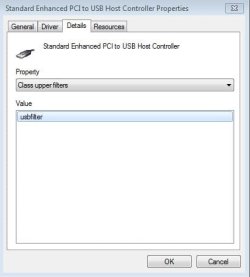
All 7 of my USB controllers have class upper filters. None seem to have class lower filters. The value for all of them is usbfilter. And what does that have to do with the 4 step process you've suggested? I'll await your reply on the filter situation before I proceed.
 

My Computer My Computer

Computer type
Laptop
OS
Windows 7 home premium 64 bit
CPU
AMD K10
Motherboard
Hewlett-Packard 1444 (Socket S1G4)
Memory
3.00GB Dual-Channel DDR3 @ 532MHz
Graphics Card(s)
ATI AMD M880G with ATI Mobility Radeon HD 4250 (HP)
Sound Card
Realtek
Screen Resolution
1366 x 768
Hard Drives
465GB Western Digital
Antivirus
MSE
Just a thought, but do you have any recent restore points dated prior to replacing the graphics driver?
 

My Computer My Computer

Computer type
PC/Desktop
Computer Manufacturer/Model Number
Custom Build
OS
W7 Pro x64 SP1 | W10 Pro IP x64 | W8.1 Pro x64 VM | Linux Mint VM
CPU
i7-4790k @ 4GHz (4.4GHz Boost)
Motherboard
ASUS Sabertooth Z87 (BIOS Rev 2004)
Memory
16GB DDR3 Kingston HyperX Fury @ 1600MHz CL 9-9-9-27
Graphics Card(s)
EVGA GTX 980 Classified
Sound Card
Realtek Onboard
Monitor(s) Displays
Samsung S27D390
Screen Resolution
1920 x 1080
Hard Drives
240GB Intel 520 Series SSD |
Samsung 850 EVO 120GB SSD |
2TB WD Caviar Black |
2TB WD Caviar Green
PSU
Corsair HX850-80 Gold Modular
Case
Cooler Master Silencio 650
Cooling
Corsair H80i w/2 x Corsair SP120 | 2 x 120mm Noctua NF-S12B
Keyboard
Microsoft Sidewinder X4
Mouse
Gigabyte M6900 optical
Internet Speed
152mb
Antivirus
F-Secure
Browser
Firefox 38.0
Other Info
Backup Rig: Win 7 Pro 64-bit | AMD A10-5800k | ASUS F2A85-V Pro | 8GB Samsung DDR3 @1600MHz | 120GB Toshiba SDD | 2TB Seagate HDD | Cooler Master Silencio 550
<snip>
Click on any of your controllers and tell me if any upper and/or lower class filters are there and if so , which ones. Then
  1. Navigate to C:\Windows\System32\DriverStore\FileRepository
  2. Scroll down and look for folder names starting with usb.inf. If you find more then one, select the folder with the most recent date
  3. Copy usb.inf and usb.pnf to your C:\Windows\inf folder
  4. Reboot. Are controllers still an issue? If yes, try right click select Update Driver
All 7 of my USB controllers have class upper filters. None seem to have class lower filters. The value for all of them is usbfilter. And what does that have to do with the 4 step process you've suggested? I'll await your reply on the filter situation before I proceed.
There are many ways drivers can become corrupted. The two different things I asked you to do, check on 2 methods that can cause corruption - IMO both warranted consistent the symptoms and data your provided

That said, right click the controller you checked up class upper/lower filters. Click Properties select Driver tab. Click Driver Details button. Is usbfilter.inf listed?

Next check if you can recover a Restore point (as Boozad suggested). Good to check before moving on to anything else
 
Last edited:

My Computer My Computer

Computer type
PC/Desktop
Computer Manufacturer/Model Number
Dell Optiplex 360 and Optiplex 755
OS
Desk 1: Win 7 Pro x32; Desk 2: Windows 10 x64
Hard Drives
500GB Crucial SSD in both Desktops
Other Info
Buffalo 6TB NAS, Raid 1
There are many ways drivers can become corrupted. The two different things I asked you to do, check on 2 methods that can cause corruption - IMO both warranted consistent the symptoms and data your provided
I appreciate any help I can get on this, ComputerGeek, but you are very difficult to understand. I don't even know exactly what the sentence above means.
That said, right click the controller you checked up class upper/lower filters. Click Properties select Driver tab. Click Driver Details button. Is usbfilter.inf listed?
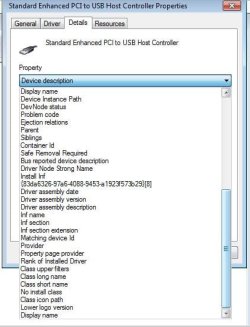
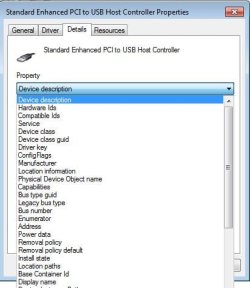
Let me expand on my previous post, since you likewise seem to have difficulty understanding me. All 7 of the items listed in Device Manager under the umbrella of Universal Serial Bus controllers have yellow triangles next to them. If I right click on any of them, then left click Properties and then click on the Details tab I am presented with screenshot 1. From that screen I can click on the pulldown arrow under the heading Property and see screenshot 2. If I then scroll to class upper filters and click on it I get screenshot 3. That process is identical for all 7 of the listed USB controllers. Clicking (Driver) Details button by itself never displays anything called usbfilter.inf.
Next check if you can recover a Restore point (as Boozad suggested). Good to check before moving on to anything else
I wonder why Boozad's one line post takes up the entire page....
At any rate, after derekimo suggested updating to the latest graphics driver from HP, I manually set a restore point labeled Before Graphics Driver Update. I was giving myself a figurative pat on the back for being so smart before I found out today that the restore point is now gone. The only one available is an Automatic Restore Point set by Windows yesterday (12:37 PM, 10/08). Even Show More Restore Points fails to change anything. (Two little Blue Screens - in hindsight I really could have lived with that...).
 

Attachments

  • Capture5.JPG
    Capture5.JPG
    23.6 KB · Views: 24
  • Capture6.JPG
    Capture6.JPG
    40.8 KB · Views: 24
  • Capture7.JPG
    Capture7.JPG
    22.1 KB · Views: 24

My Computer My Computer

Computer type
Laptop
OS
Windows 7 home premium 64 bit
CPU
AMD K10
Motherboard
Hewlett-Packard 1444 (Socket S1G4)
Memory
3.00GB Dual-Channel DDR3 @ 532MHz
Graphics Card(s)
ATI AMD M880G with ATI Mobility Radeon HD 4250 (HP)
Sound Card
Realtek
Screen Resolution
1366 x 768
Hard Drives
465GB Western Digital
Antivirus
MSE
My sincere apology for my mangled and typo'd last post. My bad! :o

That process is identical for all 7 of the listed USB controllers. Clicking (Driver) Details button by itself never displays anything called usbfilter.inf.
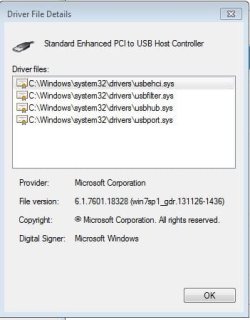
That was another typo: I wanted you to look for usbfilter.sys when you hit the (Driver tab) Details button. Could you give me a screen shot of what (Driver tab) Details button does show?
 

My Computer My Computer

Computer type
PC/Desktop
Computer Manufacturer/Model Number
Dell Optiplex 360 and Optiplex 755
OS
Desk 1: Win 7 Pro x32; Desk 2: Windows 10 x64
Hard Drives
500GB Crucial SSD in both Desktops
Other Info
Buffalo 6TB NAS, Raid 1
Once again, I'm not sure if we're operating on the same wavelength. In the previous post, the second screenshot shows you the expanded values of the Property setting under Details. That screenshot only shows the bottom half of the pulldown selections. This screenshot shows the top half. If I'm not understanding what you're asking for, I apologize. I'm doing the best I can.

Oh wait, I'm sorry, you're asking about the Driver tab, followed by the Driver Details box. I thought we were still on the Details tab. Each of the 7 items has usbfilter.sys listed under Driver File Details
 

Attachments

  • Capture8.JPG
    Capture8.JPG
    33.4 KB · Views: 24
  • Capture9.JPG
    Capture9.JPG
    27.6 KB · Views: 24

My Computer My Computer

Computer type
Laptop
OS
Windows 7 home premium 64 bit
CPU
AMD K10
Motherboard
Hewlett-Packard 1444 (Socket S1G4)
Memory
3.00GB Dual-Channel DDR3 @ 532MHz
Graphics Card(s)
ATI AMD M880G with ATI Mobility Radeon HD 4250 (HP)
Sound Card
Realtek
Screen Resolution
1366 x 768
Hard Drives
465GB Western Digital
Antivirus
MSE
Yes. We're now in sync. It's your second screen shot in your last post i wanted to see. The symptoms you described and snapshots in your first post are consistent with problems with class filters. So that's what I'm trying to check first.

Think of "filters" (short for "driver filters") as add-on parts for drivers. A filter is added to a device driver to extend driver functionality. There are filters from Microsoft but MS filters are never the problem. It's filters from 3rd party vendors that (sometimes) prove problematic. You're showing a "class" filter for device class=USB so Windows applies that filter ("adds" it on) to all drivers for devices in that class (your USB controllers). If your class filter is buggy that single file can be what's causing all your USB controller drivers to fail

Your class upper filter usbfilter is from AMD! It's probably installed as part of your graphics driver. Here's an easy way to check who it's from
> Go back to the (Driver tab) Details button display (you show in your lower snapshot)
> Click on each of the four files to see the file Provider. I believe you'll find usbfilter.sys is from AMD.
  1. Do regedit preparation: Create a restore point and backup your registry
  2. Run regedit and navigate to
    HKEY_LOCAL_MACHINE\SYSTEM\CurrentControlSet\Control\Class\{36FC9E60-C465-11CF-8056-444553540000}
  3. You can also backup the single key so you can also restore it later if you choose
  4. You should see an entry for UpperFilters with value usbfilter. Delete the entry. Reboot.
  5. Do the controllers reinstall on their own? If not, right click the controller and select Update Driver
Any luck?
 

My Computer My Computer

Computer type
PC/Desktop
Computer Manufacturer/Model Number
Dell Optiplex 360 and Optiplex 755
OS
Desk 1: Win 7 Pro x32; Desk 2: Windows 10 x64
Hard Drives
500GB Crucial SSD in both Desktops
Other Info
Buffalo 6TB NAS, Raid 1
I'm ready to do the regedit and I did create a restore point, but since my last manually set point disappeared, I wanted to check this one. Sure enough, the new one is there, but the one that Windows automatically set yesterday is gone. Now I'm concerned that as part of this registry tweak Windows will create a new RP, and I'll lose the one I just created. At any rate, it's a worry that I only seem to be able to only keep one accessible RP.
 

My Computer My Computer

Computer type
Laptop
OS
Windows 7 home premium 64 bit
CPU
AMD K10
Motherboard
Hewlett-Packard 1444 (Socket S1G4)
Memory
3.00GB Dual-Channel DDR3 @ 532MHz
Graphics Card(s)
ATI AMD M880G with ATI Mobility Radeon HD 4250 (HP)
Sound Card
Realtek
Screen Resolution
1366 x 768
Hard Drives
465GB Western Digital
Antivirus
MSE
Your problem with restore points seems a whole other problem :( But the regedit i outline is pretty straight forward (just make sure the UpperFilter value equals usbfilter and you will have the right entry) So probably only the registry backup of the single registry key is probably all that's needed as you know your way around 'puters and not likely to delete the wrong keys.

But even though my gut feel is the one UpperFilter delete shouldn't cause any terrible problems... it's always good to be safe. Computers can sometimes do just the opposite of what we expect!

p.s.
All 7 of my USB controllers have class upper filters. None seem to have class lower filters. The value for all of them is usbfilter. And what does that have to do with the 4 step process you've suggested?
Oh. And to answer your original question: My question about filters has nothing to do with the 4 steps i provided.

At that point in time I thought it might have been one of two problems: either class filters or driver installation file corruption. I wasn't sure which was more likely so included instruction for both as didn't think the sum total was too much work.

But once you found a class filter that seemed the likelier of the two
 

My Computer My Computer

Computer type
PC/Desktop
Computer Manufacturer/Model Number
Dell Optiplex 360 and Optiplex 755
OS
Desk 1: Win 7 Pro x32; Desk 2: Windows 10 x64
Hard Drives
500GB Crucial SSD in both Desktops
Other Info
Buffalo 6TB NAS, Raid 1
I backed up the registry key and then checked the space allocated to Restore. The slider was all the way to the left - another mystery - it wasn't set like that last time I checked, although admittedly, that was a few years ago. I moved the slider to the right, performed your registry delete and
EUREKA!
The USB controllers have divested themselves of the yellow triangles. I plugged in the external drive and it's back in all its glory.

Thank you for jumping in on what was originally a BSOD issue! I cannot wait to mark this 'solved'.​
 

My Computer My Computer

Computer type
Laptop
OS
Windows 7 home premium 64 bit
CPU
AMD K10
Motherboard
Hewlett-Packard 1444 (Socket S1G4)
Memory
3.00GB Dual-Channel DDR3 @ 532MHz
Graphics Card(s)
ATI AMD M880G with ATI Mobility Radeon HD 4250 (HP)
Sound Card
Realtek
Screen Resolution
1366 x 768
Hard Drives
465GB Western Digital
Antivirus
MSE
Wooo-Hoooo! You're most welcome. Glad you fixed your controllers! Glad I was able to help!

Here's the post play addendum:
I kept trying to imagine a scenario where this AMD graphics driver needed a hook into the USB controllers to support its functional features. I came up blank. So I tried searching online. Attached something I found
  1. The attachment defines h/w configs where usbfilter applies. Does it apply to your h/w spec? (i'm a s/w not a h/w guy.) So if you have any question the about the h/w i invite others to jump in to answer
  2. Navigate to C:\Windows\System32\drivers. Right click Properties->Detals tab. Take a snapshot and post it. Out of curioiusity and for the record let's see the driver version and date for the file
 

Attachments

My Computer My Computer

Computer type
PC/Desktop
Computer Manufacturer/Model Number
Dell Optiplex 360 and Optiplex 755
OS
Desk 1: Win 7 Pro x32; Desk 2: Windows 10 x64
Hard Drives
500GB Crucial SSD in both Desktops
Other Info
Buffalo 6TB NAS, Raid 1
Back
Top