Solved Ethernet Cable not detected. Local Area Connection not visible.

DrewO

New member
Local time
11:05 AM
Messages
10
I've looked around quite a bit to find a solution to my problem and am out of luck.
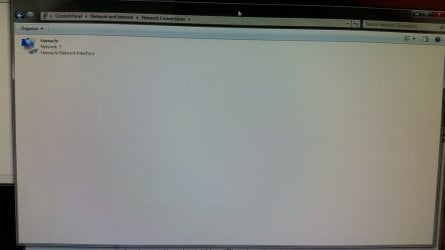
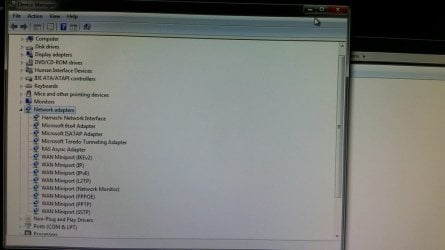
I will start this off by saying my computer has run perfectly fine for a good three years. Earlier today there was a bad storm that caused a short power outage. Upon regaining power, I booted up my computer to discover that I am unable to connect to the Internet on my computer alone. My phone can connect through wi-fi, my Xbox can connect through an ethernet cable. My PC is the only one with the issue. I have tried different ethernet cables, but none are recognized. The LED does not light up in the back.
I've tried all remedies that have worked in the past for me, when it comes to loss of connection. Below I will try to provide images captured by my phone (sadly cannot provide screenshots) that may, hopefully assist.
 

Attachments
  • 20150610_020223_zpsk3vhvp4t.jpg
    20150610_020223_zpsk3vhvp4t.jpg
    66.5 KB · Views: 2
  • 20150610_020239_zpseds1nx29.jpg
    20150610_020239_zpseds1nx29.jpg
    46.9 KB · Views: 3
  • 20150610_020302_zpskulj2qr2.jpg
    20150610_020302_zpskulj2qr2.jpg
    60.1 KB · Views: 3
Last edited:

My Computer My Computer

At a glance

Windows 7 Home Premium 64bitIntel i7-2600KnVidia GeForce GTX 570
Computer type
PC/Desktop
OS
Windows 7 Home Premium 64bit
CPU
Intel i7-2600K
Motherboard
Gigabyte GA-Z68A-D3H-B3
Graphics Card(s)
nVidia GeForce GTX 570
Hard Drives
Seagate Barracuda 7200RPM 1TB model #ST31000524AS
Browser
Mozilla Firefox
Hi DrewO,

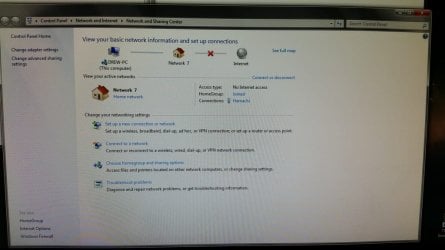
Looking at those images, your computer has connected fine, you're just not getting the signal from the outside.

Please could you list the way your computer connects to the internet, for example:

MY PC > Ethernet Cable > Router > Modem (Phone Line)

Also please could you go to Control Panel > Network and Internet > See Full Map - Screenshot this and upload it. Post back with your results.

Thanks,

MistUnleashed
 
Last edited:

My Computer My Computer

At a glance

Windows 7 Ultimate x64Intel Core i7 Socket 1156 LGACorsair Dominator 4GB DDR3Gainward GTX 460
Computer type
PC/Desktop
Computer Manufacturer/Model Number
Custom Build
OS
Windows 7 Ultimate x64
CPU
Intel Core i7 Socket 1156 LGA
Motherboard
Asus P7P55D-E LX
Memory
Corsair Dominator 4GB DDR3
Graphics Card(s)
Gainward GTX 460
Monitor(s) Displays
Acer V243HL
Screen Resolution
1920x1080
Hard Drives
Western Digital 1TB HDD
PSU
Antec TruePower 650W
Case
Antec 300
Cooling
Thermalrite CPU Cooler
Antivirus
Avast Anti-Virus
Hi,

Curious about "Xbox can connect through an ethernet cable". Are you using a different port on your router for the Xbox and a different one for the machine that has connection problems? Try switching them out to see if the problem is with one of you router ports.
 

My Computer My Computer

At a glance

Windows 7 Home 64-bit
Computer type
PC/Desktop
OS
Windows 7 Home 64-bit
Sorry for the delayed response. I went ahead and uninstalled Hamachi, as it was a bit misleading. It automatically creates a network of its own and is used to connect to other people, not the internet.
So as of now, I am unable to connect to anything, my "Full Map" is simply "This computer is not connected to the network."
My set up is My PC > Ethernet Cable > router / modem.
I have an ARRIS / Motorola SURFboard SBG6580. It is both a router and modem in one.
I have tried using different ethernet cables, including the one connected to the xbox. I have tried all of my ports on the router. The Xbox can connect through any of them, however my PC can not connect through any of them.

Also, through uninstalling Hamachi and not having a "network" to fall back on, when trying to use Network Adaptor troubleshooting, it tells me that I need to install a driver for my network adaptor (being unable to connect through internet, I am unable to attempt to search for a driver update). I attempted to uninstall and reinstall the driver through my MOBO's CD that came with it, and I am getting the same result.

Could it be that my network adaptor needs to be replaced?
 

My Computer My Computer

At a glance

Windows 7 Home Premium 64bitIntel i7-2600KnVidia GeForce GTX 570
Computer type
PC/Desktop
OS
Windows 7 Home Premium 64bit
CPU
Intel i7-2600K
Motherboard
Gigabyte GA-Z68A-D3H-B3
Graphics Card(s)
nVidia GeForce GTX 570
Hard Drives
Seagate Barracuda 7200RPM 1TB model #ST31000524AS
Browser
Mozilla Firefox
Thanks for the response DrewO.

Please try this:


  1. Start > Run > cmd (Run as administrator)
  2. In cmd type: SET DEVMGR_SHOW_NONPRESENT_DEVICES=1
  3. Close cmd
  4. Start > Type: devmgmt.msc > Hit Enter
  5. In Device Manager > View > Show Hidden Devices
Now you will be able to see every driver that has been installed onto the computer. Go through every sub-section deleting the drivers for things that you no longer own (an old keyboard driver, old phone driver etc). DON'T delete anything you are not familiar with, if you're unsure, post a screenshot and we'll help you.


After deleting the unused drivers restart your computer and attempt to connect to the internet again.


Let me know what happens.
 

My Computer My Computer

At a glance

Windows 7 Ultimate x64Intel Core i7 Socket 1156 LGACorsair Dominator 4GB DDR3Gainward GTX 460
Computer type
PC/Desktop
Computer Manufacturer/Model Number
Custom Build
OS
Windows 7 Ultimate x64
CPU
Intel Core i7 Socket 1156 LGA
Motherboard
Asus P7P55D-E LX
Memory
Corsair Dominator 4GB DDR3
Graphics Card(s)
Gainward GTX 460
Monitor(s) Displays
Acer V243HL
Screen Resolution
1920x1080
Hard Drives
Western Digital 1TB HDD
PSU
Antec TruePower 650W
Case
Antec 300
Cooling
Thermalrite CPU Cooler
Antivirus
Avast Anti-Virus
I tried the cmd edit, then went in to my device manager and it didn't appear as if anything changed.
I had it set to show all hidden and don't see any newer drivers that appeared.
I looked through all sub-sections and couldn't see unused or old drivers to be deleted.
 

My Computer My Computer

At a glance

Windows 7 Home Premium 64bitIntel i7-2600KnVidia GeForce GTX 570
Computer type
PC/Desktop
OS
Windows 7 Home Premium 64bit
CPU
Intel i7-2600K
Motherboard
Gigabyte GA-Z68A-D3H-B3
Graphics Card(s)
nVidia GeForce GTX 570
Hard Drives
Seagate Barracuda 7200RPM 1TB model #ST31000524AS
Browser
Mozilla Firefox
I tried the cmd edit, then went in to my device manager and it didn't appear as if anything changed.
I had it set to show all hidden and don't see any newer drivers that appeared.
I looked through all sub-sections and couldn't see unused or old drivers to be deleted.

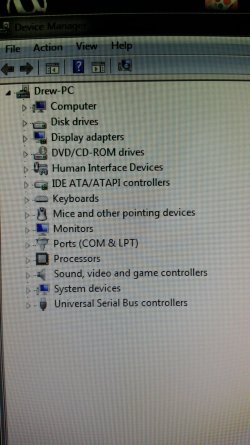
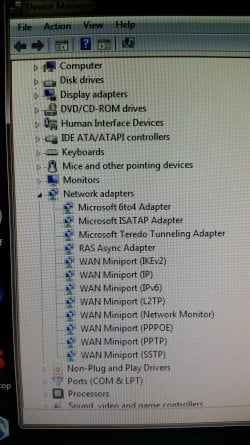
Can you post a screenshot of BEFORE and AFTER selecting 'Show Hidden' with the sub-section Network expanded.

Thanks
 

My Computer My Computer

At a glance

Windows 7 Ultimate x64Intel Core i7 Socket 1156 LGACorsair Dominator 4GB DDR3Gainward GTX 460
Computer type
PC/Desktop
Computer Manufacturer/Model Number
Custom Build
OS
Windows 7 Ultimate x64
CPU
Intel Core i7 Socket 1156 LGA
Motherboard
Asus P7P55D-E LX
Memory
Corsair Dominator 4GB DDR3
Graphics Card(s)
Gainward GTX 460
Monitor(s) Displays
Acer V243HL
Screen Resolution
1920x1080
Hard Drives
Western Digital 1TB HDD
PSU
Antec TruePower 650W
Case
Antec 300
Cooling
Thermalrite CPU Cooler
Antivirus
Avast Anti-Virus
Do a system restore to get back Hamachi.

I'm think you might have done this but did you reset your combo router/modem?
 

My Computer My Computer

At a glance

Windows 7 Home 64-bit
Computer type
PC/Desktop
OS
Windows 7 Home 64-bit
Do a system restore to get back Hamachi.

Hamachi isn't relevant to this problem. The OP is trying to fix his Network Card/Ethernet Port as its obviously not enabling.
 

My Computer My Computer

At a glance

Windows 7 Ultimate x64Intel Core i7 Socket 1156 LGACorsair Dominator 4GB DDR3Gainward GTX 460
Computer type
PC/Desktop
Computer Manufacturer/Model Number
Custom Build
OS
Windows 7 Ultimate x64
CPU
Intel Core i7 Socket 1156 LGA
Motherboard
Asus P7P55D-E LX
Memory
Corsair Dominator 4GB DDR3
Graphics Card(s)
Gainward GTX 460
Monitor(s) Displays
Acer V243HL
Screen Resolution
1920x1080
Hard Drives
Western Digital 1TB HDD
PSU
Antec TruePower 650W
Case
Antec 300
Cooling
Thermalrite CPU Cooler
Antivirus
Avast Anti-Virus
Here's the before and after images.
 

Attachments

  • 20150610_123104_zpscoqdeqag.jpg
    20150610_123104_zpscoqdeqag.jpg
    442.8 KB · Views: 0
  • 20150610_123146_zpssg5g6sxn.jpg
    20150610_123146_zpssg5g6sxn.jpg
    414.4 KB · Views: 0

My Computer My Computer

At a glance

Windows 7 Home Premium 64bitIntel i7-2600KnVidia GeForce GTX 570
Computer type
PC/Desktop
OS
Windows 7 Home Premium 64bit
CPU
Intel i7-2600K
Motherboard
Gigabyte GA-Z68A-D3H-B3
Graphics Card(s)
nVidia GeForce GTX 570
Hard Drives
Seagate Barracuda 7200RPM 1TB model #ST31000524AS
Browser
Mozilla Firefox
Do a system restore to get back Hamachi.

Hamachi isn't relevant to this problem. The OP is trying to fix his Network Card/Ethernet Port as its obviously not enabling.

No disrespect but I didn't say it was related to his problem. Just inferred if he wants to get Hamachi back he can do a system restore.

I'll butt out and let you figure it out.
 

My Computer My Computer

At a glance

Windows 7 Home 64-bit
Computer type
PC/Desktop
OS
Windows 7 Home 64-bit
Ah Sorry HelloItsMeAgain, I thought you were telling him to reinstall Hamachi!

Just misread your post that's all, we're all here to pitch in :)
 
Last edited:

My Computer My Computer

At a glance

Windows 7 Ultimate x64Intel Core i7 Socket 1156 LGACorsair Dominator 4GB DDR3Gainward GTX 460
Computer type
PC/Desktop
Computer Manufacturer/Model Number
Custom Build
OS
Windows 7 Ultimate x64
CPU
Intel Core i7 Socket 1156 LGA
Motherboard
Asus P7P55D-E LX
Memory
Corsair Dominator 4GB DDR3
Graphics Card(s)
Gainward GTX 460
Monitor(s) Displays
Acer V243HL
Screen Resolution
1920x1080
Hard Drives
Western Digital 1TB HDD
PSU
Antec TruePower 650W
Case
Antec 300
Cooling
Thermalrite CPU Cooler
Antivirus
Avast Anti-Virus

My Computer My Computer

At a glance

Windows 7 Ultimate x64Intel Core i7 Socket 1156 LGACorsair Dominator 4GB DDR3Gainward GTX 460
Computer type
PC/Desktop
Computer Manufacturer/Model Number
Custom Build
OS
Windows 7 Ultimate x64
CPU
Intel Core i7 Socket 1156 LGA
Motherboard
Asus P7P55D-E LX
Memory
Corsair Dominator 4GB DDR3
Graphics Card(s)
Gainward GTX 460
Monitor(s) Displays
Acer V243HL
Screen Resolution
1920x1080
Hard Drives
Western Digital 1TB HDD
PSU
Antec TruePower 650W
Case
Antec 300
Cooling
Thermalrite CPU Cooler
Antivirus
Avast Anti-Virus
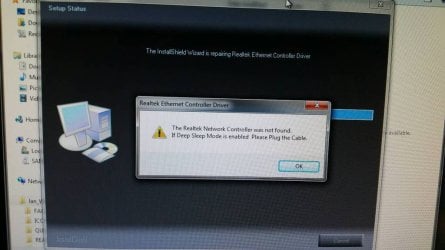
I managed to install both of them, however an error popped up. Image below.
Regardless, I went ahead and restarted my computer and same results. Nothing new is in the device manager.

I also checked to see if my network adaptor was enabled in the BIOS, and it is. However, it still isn't being displayed in my device manager.
 

Attachments

  • 1433956311360_zpshgsbjkal.jpg
    1433956311360_zpshgsbjkal.jpg
    66.3 KB · Views: 0

My Computer My Computer

At a glance

Windows 7 Home Premium 64bitIntel i7-2600KnVidia GeForce GTX 570
Computer type
PC/Desktop
OS
Windows 7 Home Premium 64bit
CPU
Intel i7-2600K
Motherboard
Gigabyte GA-Z68A-D3H-B3
Graphics Card(s)
nVidia GeForce GTX 570
Hard Drives
Seagate Barracuda 7200RPM 1TB model #ST31000524AS
Browser
Mozilla Firefox
I managed to install both of them, however an error popped up. Image below.
Regardless, I went ahead and restarted my computer and same results. Nothing new is in the device manager.

I also checked to see if my network adaptor was enabled in the BIOS, and it is. However, it still isn't being displayed in my device manager.

Apparently this is a common problem: Reviving Dead Ethernet Ports [Lnx2Mac's Blog]

I would suggest following the instructions on the site, DONT re-flash your BIOS though as it suggests - Could ruin your board if its not done right!

Let me know what you think.
 

My Computer My Computer

At a glance

Windows 7 Ultimate x64Intel Core i7 Socket 1156 LGACorsair Dominator 4GB DDR3Gainward GTX 460
Computer type
PC/Desktop
Computer Manufacturer/Model Number
Custom Build
OS
Windows 7 Ultimate x64
CPU
Intel Core i7 Socket 1156 LGA
Motherboard
Asus P7P55D-E LX
Memory
Corsair Dominator 4GB DDR3
Graphics Card(s)
Gainward GTX 460
Monitor(s) Displays
Acer V243HL
Screen Resolution
1920x1080
Hard Drives
Western Digital 1TB HDD
PSU
Antec TruePower 650W
Case
Antec 300
Cooling
Thermalrite CPU Cooler
Antivirus
Avast Anti-Virus
I may have the answer!

Copied from another forum:

In your BIOS setup program, under Integrated Peripherals there are two settings to be concerned about.

Onboard H/W LAN - Should be set to enabled.
If it is not set to enabled, change the value.

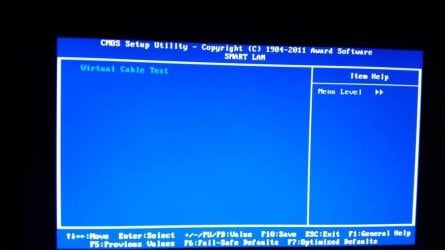
Smart LAN - This is a cable diagnostic of the LAN port. If the LAN setting is set to enabled, open the Smart LAN option.

Without a cable connected the values should read;

Code:
Start detecting at Port.....
Part1-2 Status = Open / Length = 0m
Part3-6 Status = Open / Length = 0m
Part4-5 Status = Open / Length = 0m
Part7-8 Status = Open / Length = 0m
With a cable connected, the value should read out similar to:

Code:
Start detecting at Port..... 
Link Detected --> 100Mbps
Cable Length= 30m

Source: [SOLVED] Motherboard Ethernet port not working. - Page 2 - Tech Support Forum
 
Last edited:

My Computer My Computer

At a glance

Windows 7 Ultimate x64Intel Core i7 Socket 1156 LGACorsair Dominator 4GB DDR3Gainward GTX 460
Computer type
PC/Desktop
Computer Manufacturer/Model Number
Custom Build
OS
Windows 7 Ultimate x64
CPU
Intel Core i7 Socket 1156 LGA
Motherboard
Asus P7P55D-E LX
Memory
Corsair Dominator 4GB DDR3
Graphics Card(s)
Gainward GTX 460
Monitor(s) Displays
Acer V243HL
Screen Resolution
1920x1080
Hard Drives
Western Digital 1TB HDD
PSU
Antec TruePower 650W
Case
Antec 300
Cooling
Thermalrite CPU Cooler
Antivirus
Avast Anti-Virus
I haven't followed through with everything on the first link, but I'm attempting the Smart LAN test and this is what follows (images below). I'm unsure if I'm to wait for it to start, or I start it myself, but nothing appears to happen on this screen.
 

Attachments

  • 1433958114983_zpsajuccspk.jpg
    1433958114983_zpsajuccspk.jpg
    66.8 KB · Views: 1
  • 1433958118353_zpsighdxgsh.jpg
    1433958118353_zpsighdxgsh.jpg
    36.6 KB · Views: 0

My Computer My Computer

At a glance

Windows 7 Home Premium 64bitIntel i7-2600KnVidia GeForce GTX 570
Computer type
PC/Desktop
OS
Windows 7 Home Premium 64bit
CPU
Intel i7-2600K
Motherboard
Gigabyte GA-Z68A-D3H-B3
Graphics Card(s)
nVidia GeForce GTX 570
Hard Drives
Seagate Barracuda 7200RPM 1TB model #ST31000524AS
Browser
Mozilla Firefox
I haven't followed through with everything on the first link, but I'm attempting the Smart LAN test and this is what follows (images below). I'm unsure if I'm to wait for it to start, or I start it myself, but nothing appears to happen on this screen.

Hit Enter, Go For It!

Good Luck :)
 

My Computer My Computer

At a glance

Windows 7 Ultimate x64Intel Core i7 Socket 1156 LGACorsair Dominator 4GB DDR3Gainward GTX 460
Computer type
PC/Desktop
Computer Manufacturer/Model Number
Custom Build
OS
Windows 7 Ultimate x64
CPU
Intel Core i7 Socket 1156 LGA
Motherboard
Asus P7P55D-E LX
Memory
Corsair Dominator 4GB DDR3
Graphics Card(s)
Gainward GTX 460
Monitor(s) Displays
Acer V243HL
Screen Resolution
1920x1080
Hard Drives
Western Digital 1TB HDD
PSU
Antec TruePower 650W
Case
Antec 300
Cooling
Thermalrite CPU Cooler
Antivirus
Avast Anti-Virus
I am hitting enter and nothing happens :(
 

My Computer My Computer

At a glance

Windows 7 Home Premium 64bitIntel i7-2600KnVidia GeForce GTX 570
Computer type
PC/Desktop
OS
Windows 7 Home Premium 64bit
CPU
Intel i7-2600K
Motherboard
Gigabyte GA-Z68A-D3H-B3
Graphics Card(s)
nVidia GeForce GTX 570
Hard Drives
Seagate Barracuda 7200RPM 1TB model #ST31000524AS
Browser
Mozilla Firefox
I am hitting enter and nothing happens :(

Does Left Key/Right Key do anything? Up/Down?

Try get it to select 'Virtual Cable Test'.
 

My Computer My Computer

At a glance

Windows 7 Ultimate x64Intel Core i7 Socket 1156 LGACorsair Dominator 4GB DDR3Gainward GTX 460
Computer type
PC/Desktop
Computer Manufacturer/Model Number
Custom Build
OS
Windows 7 Ultimate x64
CPU
Intel Core i7 Socket 1156 LGA
Motherboard
Asus P7P55D-E LX
Memory
Corsair Dominator 4GB DDR3
Graphics Card(s)
Gainward GTX 460
Monitor(s) Displays
Acer V243HL
Screen Resolution
1920x1080
Hard Drives
Western Digital 1TB HDD
PSU
Antec TruePower 650W
Case
Antec 300
Cooling
Thermalrite CPU Cooler
Antivirus
Avast Anti-Virus
Back
Top