Back up from 7232, and restore to RTM?

BCXtreme

New member
Guru
Local time
11:50 PM
Messages
872
Location
Virginia, United States
Hey,

I was just wondering, when I get my retail Windows 7 RTM next week, will I be able to do a Windows Backup "system image" of my current 7232 installations, and then restore it to the new 7600 clean installations?

- Phil
 

My Computer My Computer

At a glance

Windows 7 Home Premium x64Intel Core i7-2600 @3.40GHz8.00GB DDR3NVIDIA GeForce GTX 555 w/1.0GB RAM
Computer Manufacturer/Model Number
Alienware X51
OS
Windows 7 Home Premium x64
CPU
Intel Core i7-2600 @3.40GHz
Memory
8.00GB DDR3
Graphics Card(s)
NVIDIA GeForce GTX 555 w/1.0GB RAM
Monitor(s) Displays
BenQ XL2420TX
Screen Resolution
1920x1080@120Hz
Hard Drives
1TB
PSU
330-watt
Keyboard
Logitech Wireless Illuminated Keyboard K800
Mouse
Razer Orochi
Internet Speed
Campus Internet
Im not sure what exactly you are wanting to do?? A clean install is what you want to do...really... you can run the easy transfer program and import your documents, settings etc, but you will have to reinstall your apps... Correct me if you are trying to do something different...
 

My Computer My Computer

At a glance

64-bit Windows 8.1 ProCore(TM) i5 CPU 4330 Haswell @ 3.20GHz12.00 GBIntel(R) HD Graphics
Computer type
PC/Desktop
Computer Manufacturer/Model Number
LENOVO K450 @3.0GHZ
OS
64-bit Windows 8.1 Pro
CPU
Core(TM) i5 CPU 4330 Haswell @ 3.20GHz
Motherboard
LENOVO
Memory
12.00 GB
Graphics Card(s)
Intel(R) HD Graphics
Sound Card
Intel HD integtrated
Monitor(s) Displays
HP 25' ISP Monitor
Screen Resolution
1900/1020
Hard Drives
(1) ST1000DM003-1CH162 (2) Generic STORAGE DEVICE USB Device (3) Generic STORAGE DEVICE USB Device
Internet Speed
100mb down/10mb up
What I really want to do is to somehow do a clean install, and then restore my apps from a backup of some type. 95% of what's on my computer is programs and program files, and thus it takes a loooong time to rebuild the system manually. I was hoping there was a way to back that stuff up and restore it.

I can create a system image using Windows Backup, which can then restore the entire computer (apps and all) if something happened to the OS ... but I'm not sure if that works across builds (7232 > 7600).
 
Last edited:

My Computer My Computer

At a glance

Windows 7 Home Premium x64Intel Core i7-2600 @3.40GHz8.00GB DDR3NVIDIA GeForce GTX 555 w/1.0GB RAM
Computer Manufacturer/Model Number
Alienware X51
OS
Windows 7 Home Premium x64
CPU
Intel Core i7-2600 @3.40GHz
Memory
8.00GB DDR3
Graphics Card(s)
NVIDIA GeForce GTX 555 w/1.0GB RAM
Monitor(s) Displays
BenQ XL2420TX
Screen Resolution
1920x1080@120Hz
Hard Drives
1TB
PSU
330-watt
Keyboard
Logitech Wireless Illuminated Keyboard K800
Mouse
Razer Orochi
Internet Speed
Campus Internet
What I really want to do is to somehow do a clean install, and then restore my apps from a backup of some type. 95% of what's on my computer is programs and program files, and thus it takes a loooong time to rebuild the system manually. I was hoping there was a way to back that stuff up and restore it.

I can create a system image using Windows Backup, which can then restore the entire computer (apps and all) if something happened to the OS ... but I'm not sure if that works across builds (7232 > 7600).

BCX

Yeah I know its a PITA, but ms recommends as do most of us. you can use the easy treansfer wizard. You cant back it up and restore it because it would overwrite the new systeem. Its also in different places.

Sure backup good, if you reestore you then have this OS not RTM.

Hope this helps

Ken
 

My Computer My Computer

At a glance

Win 8 Release candidate 8400[email protected]4 gigsNvidia 9600M
Computer Manufacturer/Model Number
HP Pavillion dv-7 1005 Tx
OS
Win 8 Release candidate 8400
CPU
[email protected]
Memory
4 gigs
Graphics Card(s)
Nvidia 9600M
Sound Card
HD built-in
Monitor(s) Displays
17" Wxga
Screen Resolution
1440x900
Cooling
none
Internet Speed
45Mb down 5Mb up
Hi,

If you restore the image of 7232 - it will overwrite the 7600 partition and you will have the 7232 again.

Sorry, you need to reinstall all your apps. on 7600.

You can use Windows easy transfer to get data , windows settings and program settings across - that's all.
 

My Computers My Computers

  • At a glance

    7 X64i5 84002x8gb 3200mhz
    Computer type
    PC/Desktop
    OS
    7 X64
    CPU
    i5 8400
    Motherboard
    gigabyte b365m ds3h
    Memory
    2x8gb 3200mhz
    Hard Drives
    various
    PSU
    pure power 11 400w cm
    Case
    Coolermaster
    Cooling
    cryorig m9i
  • At a glance

    7x64g54008gb ddr4 2400
    Computer type
    PC/Desktop
    OS
    7x64
    CPU
    g5400
    Motherboard
    ga b365m ds3h
    Memory
    8gb ddr4 2400
    PSU
    xfx pro 450w
Sorry, but what you are trying to do is not possible... You will have to reinstall your apps..
 

My Computer My Computer

At a glance

64-bit Windows 8.1 ProCore(TM) i5 CPU 4330 Haswell @ 3.20GHz12.00 GBIntel(R) HD Graphics
Computer type
PC/Desktop
Computer Manufacturer/Model Number
LENOVO K450 @3.0GHZ
OS
64-bit Windows 8.1 Pro
CPU
Core(TM) i5 CPU 4330 Haswell @ 3.20GHz
Motherboard
LENOVO
Memory
12.00 GB
Graphics Card(s)
Intel(R) HD Graphics
Sound Card
Intel HD integtrated
Monitor(s) Displays
HP 25' ISP Monitor
Screen Resolution
1900/1020
Hard Drives
(1) ST1000DM003-1CH162 (2) Generic STORAGE DEVICE USB Device (3) Generic STORAGE DEVICE USB Device
Internet Speed
100mb down/10mb up
This is what you want. Do the easy transfer. Store it on another pc or a drive. Then do a clean install. Install all your programs back then run the easy transfer. All back to how you want it. Thats how its working. Someone should correct me if I am wrong.
Form MS
Windows Easy Transfer is an application designed to help people move their important files, user accounts, and application settings from their old PC to a new PC. The new version of Windows Easy Transfer for Windows 7 comes with improvements based on feedback received from Windows Vista customers. I wanted to take a closer look at these improvements . More
A Look at Improvements to Windows Easy Transfer for Windows 7 - Windows Experience Blog - The Windows Blog
 

My Computer My Computer

At a glance

Windows 7 Ulti. x64AMD Phenom 8450 triple-core 2.10 ghz4GBATI Radion HD 3200
Computer Manufacturer/Model Number
Gateway GT5692
OS
Windows 7 Ulti. x64
CPU
AMD Phenom 8450 triple-core 2.10 ghz
Memory
4GB
Graphics Card(s)
ATI Radion HD 3200
Monitor(s) Displays
Gateway FPD1775W
Screen Resolution
1280x720
Hard Drives
465.6613 Gibibytes
This is what you want. Do the easy transfer. Store it on another pc or a drive. Then do a clean install. Install all your programs back then run the easy transfer. All back to how you want it. Thats how its working. Someone should correct me if I am wrong.
Form MS
Windows Easy Transfer is an application designed to help people move their important files, user accounts, and application settings from their old PC to a new PC. The new version of Windows Easy Transfer for Windows 7 comes with improvements based on feedback received from Windows Vista customers. I wanted to take a closer look at these improvements . More
A Look at Improvements to Windows Easy Transfer for Windows 7 - Windows Experience Blog - The Windows Blog

OK, I guess that's the best way to do it then. So Easy Transfer will backup/restore Outlook accounts/settings and stuff like that?
 

My Computer My Computer

At a glance

Windows 7 Home Premium x64Intel Core i7-2600 @3.40GHz8.00GB DDR3NVIDIA GeForce GTX 555 w/1.0GB RAM
Computer Manufacturer/Model Number
Alienware X51
OS
Windows 7 Home Premium x64
CPU
Intel Core i7-2600 @3.40GHz
Memory
8.00GB DDR3
Graphics Card(s)
NVIDIA GeForce GTX 555 w/1.0GB RAM
Monitor(s) Displays
BenQ XL2420TX
Screen Resolution
1920x1080@120Hz
Hard Drives
1TB
PSU
330-watt
Keyboard
Logitech Wireless Illuminated Keyboard K800
Mouse
Razer Orochi
Internet Speed
Campus Internet
OK, I guess that's the best way to do it then. So Easy Transfer will backup/restore Outlook accounts/settings and stuff like that?

Yes.. also Internet favorites, Firefox bookmarks, set up mail accounts in Outlook, WLM custom emoticons and winks and the like.. but you will have to reinstall all your apps..
 

My Computer My Computer

At a glance

Windows 7 x64 Ultimate SP1Core i7-2630QM6 GB DDR3Nvidia GT 540M / Intel HD 3000 - Optimus swit...
Computer Manufacturer/Model Number
Asus N73SV
OS
Windows 7 x64 Ultimate SP1
CPU
Core i7-2630QM
Motherboard
Intel HM 65
Memory
6 GB DDR3
Graphics Card(s)
Nvidia GT 540M / Intel HD 3000 - Optimus switching
Sound Card
HD Audio (Intel Azalia/Realtek) ALC269
Monitor(s) Displays
LED flat panel
Screen Resolution
1920 x 1080
Hard Drives
2x Seagate Momentus 640 GB - 1,28 TB in total
Internet Speed
4 MB/256 kbps
Other Info
External HDs

WD Elements 1,5 TB
WD MyBook 500 GB
So I'm going to assume that everything in the AppData folders will be backed up as well? Cause I have a few games and stuff that save things to that folder....
 

My Computer My Computer

At a glance

Windows 7 Home Premium x64Intel Core i7-2600 @3.40GHz8.00GB DDR3NVIDIA GeForce GTX 555 w/1.0GB RAM
Computer Manufacturer/Model Number
Alienware X51
OS
Windows 7 Home Premium x64
CPU
Intel Core i7-2600 @3.40GHz
Memory
8.00GB DDR3
Graphics Card(s)
NVIDIA GeForce GTX 555 w/1.0GB RAM
Monitor(s) Displays
BenQ XL2420TX
Screen Resolution
1920x1080@120Hz
Hard Drives
1TB
PSU
330-watt
Keyboard
Logitech Wireless Illuminated Keyboard K800
Mouse
Razer Orochi
Internet Speed
Campus Internet
Give it a dummy run and find out what it offers to backup.

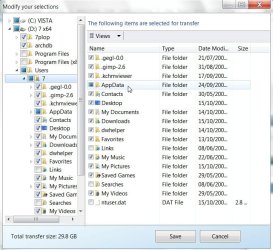
Select Customise>Advanced and you get this:

WET-2009-10-15_033701.jpg


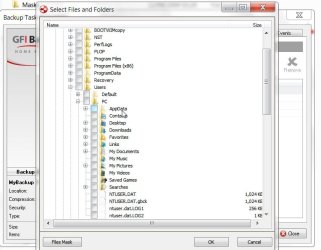
The free GFI does similar - also lets you backup email, user setiings ( inc. browser profiles, etc), and Registry keys:

GFI-2009-10-15_034015.jpg

GFI Backup Home Edition - Freeware

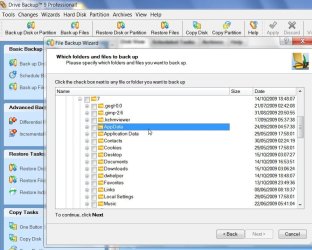
Or if you have something like Paragon Brive Backup Pro - backup anything you like - including Documents and settings, and Appdata

DB9FOL-2009-10-15_035134.jpg
 

My Computers My Computers

  • At a glance

    7 X64i5 84002x8gb 3200mhz
    Computer type
    PC/Desktop
    OS
    7 X64
    CPU
    i5 8400
    Motherboard
    gigabyte b365m ds3h
    Memory
    2x8gb 3200mhz
    Hard Drives
    various
    PSU
    pure power 11 400w cm
    Case
    Coolermaster
    Cooling
    cryorig m9i
  • At a glance

    7x64g54008gb ddr4 2400
    Computer type
    PC/Desktop
    OS
    7x64
    CPU
    g5400
    Motherboard
    ga b365m ds3h
    Memory
    8gb ddr4 2400
    PSU
    xfx pro 450w
Back
Top