Restore to Dissimilar Hardware

linuxlad

New member
Local time
1:02 AM
Messages
10
I have been using Win7 since 2011 and I always keep an Acronis backup image and have not had the particular issue for which I'm inquiring about in case that scenario occurs and either the backup image does not work with the universal restore option or for any other reason.

Say for example that the current system mainboard dies and I use the current installation with all the software and custom settings and configurations that I want to keep without doing a new fresh clean install so I install the drive to a completely different/dissimilar hardware system or restore from the Acronis backup image with the universal restore but it will still not boot even when using all the command repair options including StartRep and it will still not boot up...this was never an issue with Xp/2003-Srv since it had the option to do an in-place-upgrade-repair during the boot-up from the disc and maintained 99% of installed programs/configurations intact and worked from any hardware to any dissimilar hardware whether the universal restore worked or not, so my question is how can a similar restore option be successful with Win7 and maintain all the programs/configurations intact without a clean installation?

I have done some research through the years and I have yet to find any success with this particular scenario and apparently, no OS version after Windows XP/2003 is able to do this successfully since MS removed the option for the OS's to do an in-place-upgrade-repair by "simply" using the boot-up disc/USB. If there is some option that I'm not aware of, then it will probably require several hoops to accomplish a successful dissimilar hardware restore with everything intact.
 

My Computer

Computer type
PC/Desktop
OS
Windows 7 64-bit Ultimate
I have successfully taken a hard disk with Windows 10 on it, out of one PC and put it in another PC and it booted up and after a time to settle in, it ran OK. The secret, I found, was that both motherboards had AMD cpu's on them. I'm not sure that Win-7 would ever do that.

But that's more of an exception to the rule, than the Rule itself.
Now, if you're afraid of loosing your data, don't rely on clones or backups of your entire OS. (or your C: partition) That may not work on a new motherboard.
What you need is a backup of your data itself.

I keep all my own important stuff, in folders that are easy to just copy to a USB Flash Drive or External Storage Drive. I can do that quickly using a DOS batch file, and XCOPY.
Then if I have to Re-Install my OS, or go to a new OS, I can just copy those folders to the new OS and I'm pretty much back in business.

Good Luck!
TM :cool:
 

My Computer

Computer type
PC/Desktop
Computer Manufacturer/Model Number
Various
OS
Win 7 Pro, SP1, x86, Win-11/Pro/64
CPU
AMD
Motherboard
Various
Memory
8GB Crucial
Graphics Card(s)
Various
Sound Card
OnBoard
Monitor(s) Displays
Acer 21.5"
Hard Drives
Crucial SSD, 500 GB
PSU
OEM
Case
SFF Slim Line Case
Cooling
OEM
Keyboard
eMachines
Mouse
Logitech Wireless
Internet Speed
varies
Antivirus
Windows Defender/Super Anti-Spyware
Browser
Firefox
Last edited:

My Computers

System One System Two

  • Computer type
    PC/Desktop
    OS
    7 X64
    CPU
    i5 8400
    Motherboard
    gigabyte b365m ds3h
    Memory
    2x8gb 3200mhz
    Hard Drives
    various
    PSU
    pure power 11 400w cm
    Case
    Coolermaster
    Cooling
    cryorig m9i
  • Computer type
    PC/Desktop
    OS
    7x64
    CPU
    g5400
    Motherboard
    ga b365m ds3h
    Memory
    8gb ddr4 2400
    PSU
    xfx pro 450w
THe problem is it may deactivate
 

My Computer

Computer type
PC/Desktop
OS
win 8 32 bit
@TM, yeah, I always backup but this concern is just about restoring a system intact to a completely dissimilar hardware and maintain most installed programs with configurations/settings.
SIW2, thanks, the "Adjust OS to boot on new hardware" via the Linux method is similar to the Acronis universal restore but with the advantage that it does not rely on an already saved backup image or cloning. This may still not work; however, I will test it by moving a drive from a desktop with an AMD to a laptop with an Intel and vice versa. I have several different hardware configurations that I can test RK14 with.

O&O appears to be a competitive imaging backup/restore tool similar to Acronis as well which has a restore to different hardware feature; this still relies on a backup image/disk cloning and may still fail as it has done so with Acronis universal restore.

The quickest and simplest is that the OS is able to boot up to the desktop without using or relying on any other tools that may also fail of which Linux is 99% capable of doing regardless of how dissimilar the hardware is, however, the 2nd next best option is without having to go through so many hoops by simply using the install disk at boot like with XP which has always been 100 percent reliable every time regardless of how different and how old/new the hardware was.
 

My Computer

Computer type
PC/Desktop
OS
Windows 7 64-bit Ultimate
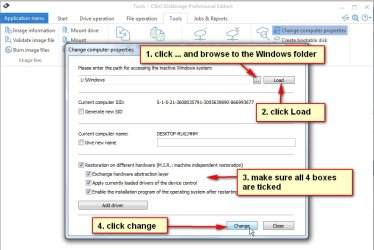
The O&O module can be run against any installation. It isn't tied to O&O image restore.


With paragon RK14 and O&O, the module must be run after the os is on the new machine.
E.G transfer hard disk from one machine to another.
Then use paragon or O&O bootable media to adjust before trying to boot into windows on the new machine.

O&Oadjust.jpg


O&Oadjust2.jpg
 

My Computers

System One System Two

  • Computer type
    PC/Desktop
    OS
    7 X64
    CPU
    i5 8400
    Motherboard
    gigabyte b365m ds3h
    Memory
    2x8gb 3200mhz
    Hard Drives
    various
    PSU
    pure power 11 400w cm
    Case
    Coolermaster
    Cooling
    cryorig m9i
  • Computer type
    PC/Desktop
    OS
    7x64
    CPU
    g5400
    Motherboard
    ga b365m ds3h
    Memory
    8gb ddr4 2400
    PSU
    xfx pro 450w
Aah, I see, so the O&O module can be used the same way as the RK14; that is good, I will test with both of them.

What about windows activation, will it require re-activation? I never had any activation issues with XP-Corporate since it never required it.
 

My Computer

Computer type
PC/Desktop
OS
Windows 7 64-bit Ultimate
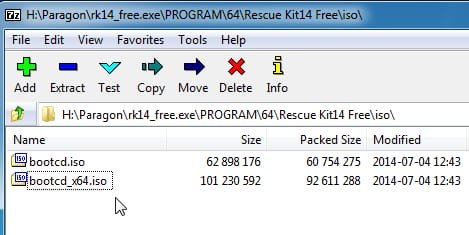
The paragon linux iso can be extracted with 7-zip as an alternative to installing the entire paragon program and getting it to run its own media creation process.

rk14-isofiles.jpg
 

My Computers

System One System Two

  • Computer type
    PC/Desktop
    OS
    7 X64
    CPU
    i5 8400
    Motherboard
    gigabyte b365m ds3h
    Memory
    2x8gb 3200mhz
    Hard Drives
    various
    PSU
    pure power 11 400w cm
    Case
    Coolermaster
    Cooling
    cryorig m9i
  • Computer type
    PC/Desktop
    OS
    7x64
    CPU
    g5400
    Motherboard
    ga b365m ds3h
    Memory
    8gb ddr4 2400
    PSU
    xfx pro 450w
Yes, windows 7 will need a valid license for the machine.

That is entirely separate from adjust to different harware.

In the event of mobo failure, a simple call to MS is usually all that is required to activate windows on the new mobo. Wait till an operator answers, and they will give a long code to activate. If asked how many machines it is being used on, the correct answer is one.

You can get the freefone number for your region by typing slui 4 in start search box. Might as well make a note of it now.

Alternatively, on oem machines ( Lenovo, dell, acer, hp etc.. ), there might be a slic table in the bios that entitles windows 7. Anything newer than 2016/early 2017 is unlikely to have that slic table and will require a free and easy call to MS.
 

My Computers

System One System Two

  • Computer type
    PC/Desktop
    OS
    7 X64
    CPU
    i5 8400
    Motherboard
    gigabyte b365m ds3h
    Memory
    2x8gb 3200mhz
    Hard Drives
    various
    PSU
    pure power 11 400w cm
    Case
    Coolermaster
    Cooling
    cryorig m9i
  • Computer type
    PC/Desktop
    OS
    7x64
    CPU
    g5400
    Motherboard
    ga b365m ds3h
    Memory
    8gb ddr4 2400
    PSU
    xfx pro 450w
Thanks, I had already extracted the iso.

Yeah, some of the equipment are OEM and everything I have is no newer than 2013,... lol, yeah I'm still using old hardware, but they still run great.

Thanks, I'm using the current version on a Lenovo e220s since 2012 which is the one that I would ever use on the different hardware.
 

My Computer

Computer type
PC/Desktop
OS
Windows 7 64-bit Ultimate
some of the equipment are OEM and everything I have is no newer than 2013

Probably have a slic 2.1 table in bios, in which case there is slp activation, like this:

dell-oem.jpg

Or 7oeminstaller can do it automatically, the third one listed here
 

My Computers

System One System Two

  • Computer type
    PC/Desktop
    OS
    7 X64
    CPU
    i5 8400
    Motherboard
    gigabyte b365m ds3h
    Memory
    2x8gb 3200mhz
    Hard Drives
    various
    PSU
    pure power 11 400w cm
    Case
    Coolermaster
    Cooling
    cryorig m9i
  • Computer type
    PC/Desktop
    OS
    7x64
    CPU
    g5400
    Motherboard
    ga b365m ds3h
    Memory
    8gb ddr4 2400
    PSU
    xfx pro 450w
Back
Top