Solved Drive became Unallocated and not having much luck recoverying

Louiscar

New member
Local time
10:24 PM
Messages
70
Location
Brighton
Hi,
I've followed other threads on this but can't get to my exact problem so far so hopefully some of you may have some ideas.

The drive is a 1TB WD in an external usb box (currently it's connected internally as I try to recover).
It became unallocated automatically I didn't do anything other than turn the box on yesterday to find the drive missing.

I Have so far done the following:

1) Run Partition Wizard quick scan - no partition found
2) Run Easyus quick scan - no partition found
3) Testdisk deepscan - currently 70% through but nothing is indicated yet

In between the first failures I ran Testdisk file recovery. This found about 9000 files and named them with non-original filenames and no folder structure so it's going to be nightmare to sort out.
So I'm back to trying to recover the partition - I can't understand why it can't find any partition information but can find the data.

It's a bit worrying that the disk became unallocated, I don't think this has ever happened to me in all the time I've had a pc which is a very long time.

Does anyone have an idea what I can try assuming this current deepscan is going to fail - I presume it is since I expect a partition should at least be found early in the scan if it's going to appear at all.

If the worst comes to the worst I can recover some important files and figure out what their filenames should be but as there is a lot of stuff which has more complex folder structures I would have to ignore these as it's just not practical to even try. Best solution would be to get that partition back and then hopefully try to find out if the drive is problematic - that seems to be ok healthwise from my initial tests.

Maybe there are some steps you guys would do that I am not familiar with, anything would help at this stage before I give up and format.
 

My Computer My Computer

At a glance

Windows 7 ultimate 64biti7 92012GBMSI R7
Computer type
PC/Desktop
Computer Manufacturer/Model Number
Home Brew
OS
Windows 7 ultimate 64bit
CPU
i7 920
Motherboard
Asus P6 Deluxe
Memory
12GB
Graphics Card(s)
MSI R7
Hard Drives
Crucial M550 512GB SSD
WD 2TB Black
WD 1TB Black
WD 1TB Blue
Toshiba 2TB
Hitachi 1TB
Case
HAF 960
Cooling
Corsair H80 Water
Browser
Firefox
Hey there. Jumanji is the guru in data recovery in these forums. I will bet he will ask you the exact model of that external drive as it is possible that model has hardware encryption going on. So, try partition wizard quick scan within the enclosure. If you are patient, run the scan and post screenshot of results here. Don't apply anything.

Also provide a Disk Management screnshot, both internal and attached to enclosure. http://www.sevenforums.com/tutorials/274797-disk-management-post-screen-capture-image.html

http://www.sevenforums.com/tutorials/9733-screenshots-files-upload-post-seven-forums.html
 

My Computer My Computer

At a glance

Windows 7 Ultimate x64 SP1AMD Phenom 2 1090T2x8GB Kingston HyperX Fury Black 1600Mhz Unga...MSI GTX 970 Gaming 4G
Computer type
PC/Desktop
Computer Manufacturer/Model Number
Custom Build
OS
Windows 7 Ultimate x64 SP1
CPU
AMD Phenom 2 1090T
Motherboard
Gigabyte GA-890FXA-UD5
Memory
2x8GB Kingston HyperX Fury Black 1600Mhz Unganged
Graphics Card(s)
MSI GTX 970 Gaming 4G
Sound Card
Realtek On-Board HD 7.1 Audio / Logitech G35
Monitor(s) Displays
3xAcer GD245HQ
Screen Resolution
1920x1080
Hard Drives
Samsung 850 Pro 512GB SSD - OS /
WD Caviar Black SATA 3 - 1 TBx2 - Dynamic RAID 0 /
WD Caviar Green SATA 2 - 640GBx2 - Dynamic RAID 0 /
WD Caviar Green SATA 2 - 640GB - Internal Backup /
Seagate Barracude SATA 3 - 3TB - External Backup/ Sync
PSU
HighPower 1000W
Case
Cooler Master HAF 932
Cooling
Noctua NH-D14
Keyboard
Logitech G19
Mouse
Logitech G500
Internet Speed
100/4 Mbit Cable (100GB quota)
Antivirus
ZoneAlarm Extreme Security / MBAM Pro / MBAE Free / SAS Free
Browser
IE 11 - Firefox - Chrome
Other Info
Logitech F710/ G27/ G940/ Z5500 // TrackIR 5 // Nvidia 3D Surround Vision
Thanks for the reply.

As indicated I have done a quick scan with partition wizard. Nothing turned up so the window where a partition would normally appear remained blank all the way to the end of the scan.

The drive in question: WDC WD1002FAEX-00Z3A0

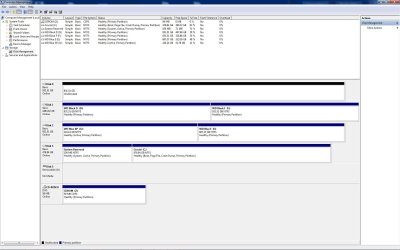
I am waiting for Testdisk to finish its deepscan so uploading attachements of Diskmanagment and current scan for now.
 

Attachments

  • Dmanage.jpg
    Dmanage.jpg
    153.7 KB · Views: 4
  • currentscan.jpg
    currentscan.jpg
    153 KB · Views: 8

My Computer My Computer

At a glance

Windows 7 ultimate 64biti7 92012GBMSI R7
Computer type
PC/Desktop
Computer Manufacturer/Model Number
Home Brew
OS
Windows 7 ultimate 64bit
CPU
i7 920
Motherboard
Asus P6 Deluxe
Memory
12GB
Graphics Card(s)
MSI R7
Hard Drives
Crucial M550 512GB SSD
WD 2TB Black
WD 1TB Black
WD 1TB Blue
Toshiba 2TB
Hitachi 1TB
Case
HAF 960
Cooling
Corsair H80 Water
Browser
Firefox
Hello Louiscar!

So you are using an internal 3.5'' WD drive in an external enclosure? Is this enclosure a simple USB 3.0 connected or does it use external power too? GokAy, this seems to be a DIY external drive, so encryption is unlikely. But you are right, OP should try all the actions with the drive from within the enclosure.

It is possible that during power ons and offs the partition table became corrupted; usually Partition Wizard is the best case to go. Could you give a bit more detail to what you were doing or what was happening with the drive when this happened?

But most times recovering the partition is a bit too hard and there is the chance that the more you meddle with it, trying to recover the partition, the more this damages the drive and the data may become unrecoverable.

I understand you want to recover the partition out of greater convenience but do firstly transfer as much as you can, since you said there were 9000 files found.

If nothing works, you're left with the option of a professional Data Recovery.

WD Data Recovery partners:
Support Answers

Hope it doesn't have to come to this, though. Post back and good luck!

CK_WD
 

My Computer My Computer

At a glance

Windows 7 Home Premium x64
Computer type
PC/Desktop
OS
Windows 7 Home Premium x64
Hello Louiscar!

So you are using an internal 3.5'' WD drive in an external enclosure? Is this enclosure a simple USB 3.0 connected or does it use external power too? GokAy, this seems to be a DIY external drive, so encryption is unlikely. But you are right, OP should try all the actions with the drive from within the enclosure.

The external box is a good quality Orico enclosure with it's own power and fan. Not exactly but very close to this (mine is the usb 3.0 version:

ORICO 3529RUS3-BK Tool Free 3.5 inch 2 Bay USB 3.0 SATA Hard Drive RAID Enclosure: Amazon.co.uk: Computers & Accessories

It is possible that during power ons and offs the partition table became corrupted; usually Partition Wizard is the best case to go. Could you give a bit more detail to what you were doing or what was happening with the drive when this happened?

It's difficult to say but one day I was doing some intensive operation on the other drive in the box and the heat was building up so I turned off and pulled the drawer for the WD so it wouldn't fire up.

However, I'm not sure this was the point at which it disappeared to tell you the truth. I reconnected when I finished and probably turned the drive off not noticing if it was there or not. I accessed it not so long ago to check some files so it could have been at this point. It was only yesterday when I wanted to back some stuff up to it that I noticed it wasn't there.

But most times recovering the partition is a bit too hard and there is the chance that the more you meddle with it, trying to recover the partition, the more this damages the drive and the data may become unrecoverable.

I understand you want to recover the partition out of greater convenience but do firstly transfer as much as you can, since you said there were 9000 files found.

Yes my complete photo collection which doesn't matter as I have this backed up in two other places but it accounts for the large number of files. I am concerned only with a bunch of video seasons I have backed up there - Game of Thrones / Rome etc plus some other bits an pieces which have directory structures. Those may be backed up elsewhere though.


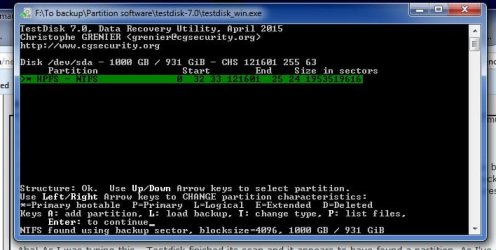
Aha! As I was typing this - Testdisk finished its scan and it appears to have found a partition. As I've not used it before I am not sure of the next step but this looks kind of hopeful!
 

Attachments

  • found.jpg
    found.jpg
    43.9 KB · Views: 1

My Computer My Computer

At a glance

Windows 7 ultimate 64biti7 92012GBMSI R7
Computer type
PC/Desktop
Computer Manufacturer/Model Number
Home Brew
OS
Windows 7 ultimate 64bit
CPU
i7 920
Motherboard
Asus P6 Deluxe
Memory
12GB
Graphics Card(s)
MSI R7
Hard Drives
Crucial M550 512GB SSD
WD 2TB Black
WD 1TB Black
WD 1TB Blue
Toshiba 2TB
Hitachi 1TB
Case
HAF 960
Cooling
Corsair H80 Water
Browser
Firefox
Edit: Grr! I pressed return to look at the partition then backed out and it went to the analyse screen. Have to start the scan all over. I guess the answer is to press 'write' but if it's better to use another tool please advise - at least the partition shows up on a deepscan which I never did with Partition wizard or Easus. I am not sure what's the best / most reliable tool to use although I understand that you guys here tend to recommend Partition Wizard?

Note: I didn't get a directory listing when I pressed return which is not a good sign:
TestDisk Step By Step - CGSecurity
 

My Computer My Computer

At a glance

Windows 7 ultimate 64biti7 92012GBMSI R7
Computer type
PC/Desktop
Computer Manufacturer/Model Number
Home Brew
OS
Windows 7 ultimate 64bit
CPU
i7 920
Motherboard
Asus P6 Deluxe
Memory
12GB
Graphics Card(s)
MSI R7
Hard Drives
Crucial M550 512GB SSD
WD 2TB Black
WD 1TB Black
WD 1TB Blue
Toshiba 2TB
Hitachi 1TB
Case
HAF 960
Cooling
Corsair H80 Water
Browser
Firefox
So it's a double bay drive enclosure? The situation does seem like a big coincidence but a enclosure's issue could have caused the problem.

Yes, this does seem very hopeful, I believe this Step-by-Step should be able to help you:
TestDisk Step By Step - CGSecurity

If not, there are plenty of guides. :)

Good luck!

CK_WD

EDIT: I pressed Send before I could see you have posted again. On other tools I can't be too helpful considering the position I am in. But the others are. :) Yes, Partition Wizard is very much advised here.
 

My Computer My Computer

At a glance

Windows 7 Home Premium x64
Computer type
PC/Desktop
OS
Windows 7 Home Premium x64
So it's a double bay drive enclosure? The situation does seem like a big coincidence but a enclosure's issue could have caused the problem.

Yes, this does seem very hopeful, I believe this Step-by-Step should be able to help you:
TestDisk Step By Step - CGSecurity

EDIT: I pressed Send before I could see you have posted again. On other tools I can't be too helpful considering the position I am in. But the others are. :) Yes, Partition Wizard is very much advised here.

Yes it is a double. I thought I might have maybe not pulled the drawer out enough or it perhaps got knocked in enough to lightly make contact. Unlikely but I'm clutching at straws right now.

REgarding TestDisk and looking at the screen grab vs article.

I had

* HPFS - NTFS

As per the first line with no other partition listings so I might not be able to recover from this as the article uses the other partitions marked

D HPFS - NTFS

after confirming that folders are listed. If I recover the only listed partition it may not work as I expect. Not sure
 

My Computer My Computer

At a glance

Windows 7 ultimate 64biti7 92012GBMSI R7
Computer type
PC/Desktop
Computer Manufacturer/Model Number
Home Brew
OS
Windows 7 ultimate 64bit
CPU
i7 920
Motherboard
Asus P6 Deluxe
Memory
12GB
Graphics Card(s)
MSI R7
Hard Drives
Crucial M550 512GB SSD
WD 2TB Black
WD 1TB Black
WD 1TB Blue
Toshiba 2TB
Hitachi 1TB
Case
HAF 960
Cooling
Corsair H80 Water
Browser
Firefox
NTFS found using backup sector. Block size 4096. How?
Your enclosure seems to have done some funny things.
Please do not give any write command for now.

What other drive do you have in the enclosure? Is it functioning OK?
 

My Computer My Computer

At a glance

Windows 7 Home Premium 32 bit
OS
Windows 7 Home Premium 32 bit
NTFS found using backup sector. Block size 4096. How?
Your enclosure seems to have done some funny things.
Please do not give any write command for now.

What other drive do you have in the enclosure? Is it functioning OK?

Hi, thanks for getting back to me.
I have a hitachi 1TB drive and it's working fine at the moment. I haven't really had any problems with this enclosure .... till now.

My second scan is about 42% of the way through. Please let me know if I should cancel this and switch to Partition Wizard or any other tool, otherwise I'll wait for it to get back to the point where it bombed out.

Edit: I see what you mean.
Is this relevant?
cgsecurity.org ? View topic - Filesystem corrupted, partition OK
 
Last edited:

My Computer My Computer

At a glance

Windows 7 ultimate 64biti7 92012GBMSI R7
Computer type
PC/Desktop
Computer Manufacturer/Model Number
Home Brew
OS
Windows 7 ultimate 64bit
CPU
i7 920
Motherboard
Asus P6 Deluxe
Memory
12GB
Graphics Card(s)
MSI R7
Hard Drives
Crucial M550 512GB SSD
WD 2TB Black
WD 1TB Black
WD 1TB Blue
Toshiba 2TB
Hitachi 1TB
Case
HAF 960
Cooling
Corsair H80 Water
Browser
Firefox
Let the scan finish. I do not want to interrupt it. Once the scan finishes post a screenshot again. And then quit Test Disk. Power off your PC, disconnect that drive take it aside and keep it safely.

Your Toshiba disk in the enclosure is also 1 TB. Is it not? We shall examine that drive to ascertain whether that also shows 4096 bytes/sector size.

Also give me the history of the WD drive you just removed.

Did you format it ever? Wherefrom did it come? and things like that.

We need to go slowly. Atleast I need to.:)
 

My Computer My Computer

At a glance

Windows 7 Home Premium 32 bit
OS
Windows 7 Home Premium 32 bit
The other drive in the enclosure is a Hitachi.
I do however, have a 1TB Toshiba internally attached.

The WD I bought from Amazon in 2013. Original one was faulty got a new replacement. This was initially installed internally and formatted there. It's possible that I set it up as the O/s drive at the time but I can't really remember.

I then bought a 2tb version and moved the 1tb to the external unit where it's been there ever since (at least 18months I'd guess). It's been a backup dive along with the Hitachi and only gets turned on when I need to get at the files or update my backups.

It's in warranty until 09/2018 as it's the Black model with 5 year.

HD sentinel reports this drive as completely healthy with no bad sectors. Smart data is all good from what I can see.

OK. I am at 69% scan - I can stop it as I don't think Testdisk will do anything to the drive unless I tell it to but for now I will do as you say and let it run.

Once I've got the screenshot I'll post it and disconnect the drive.
 

My Computer My Computer

At a glance

Windows 7 ultimate 64biti7 92012GBMSI R7
Computer type
PC/Desktop
Computer Manufacturer/Model Number
Home Brew
OS
Windows 7 ultimate 64bit
CPU
i7 920
Motherboard
Asus P6 Deluxe
Memory
12GB
Graphics Card(s)
MSI R7
Hard Drives
Crucial M550 512GB SSD
WD 2TB Black
WD 1TB Black
WD 1TB Blue
Toshiba 2TB
Hitachi 1TB
Case
HAF 960
Cooling
Corsair H80 Water
Browser
Firefox
It was internally formatted. Do you remember whether you formatted it as an MBR drive or GPT drive?
 

My Computer My Computer

At a glance

Windows 7 Home Premium 32 bit
OS
Windows 7 Home Premium 32 bit
It was internally formatted. Do you remember whether you formatted it as an MBR drive or GPT drive?

Fairly sure it was MBR. I usually just do a quick format via the usual tool and presume the default is MBR. If it ended up GPT I wouldn't actively have chosen it.
 

My Computer My Computer

At a glance

Windows 7 ultimate 64biti7 92012GBMSI R7
Computer type
PC/Desktop
Computer Manufacturer/Model Number
Home Brew
OS
Windows 7 ultimate 64bit
CPU
i7 920
Motherboard
Asus P6 Deluxe
Memory
12GB
Graphics Card(s)
MSI R7
Hard Drives
Crucial M550 512GB SSD
WD 2TB Black
WD 1TB Black
WD 1TB Blue
Toshiba 2TB
Hitachi 1TB
Case
HAF 960
Cooling
Corsair H80 Water
Browser
Firefox
Yep, the default will be MBR and if you had deliberately changed it to GPT you would remember it I suppose.

OK before you remove the drive from the PC, post a screenshot of how that drive looks like in Partition Wizard as well.( You had already posted the Windows Disk Management shot.)
 

My Computer My Computer

At a glance

Windows 7 Home Premium 32 bit
OS
Windows 7 Home Premium 32 bit
Yep, the default will be MBR and if you had deliberately changed it to GPT you would remember it I suppose.

OK before you remove the drive from the PC, post a screenshot of how that drive looks like in Partition Wizard as well.( You had already posted the Windows Disk Management shot.)

Yes I'd remember. I also checked my other drives and they are all MBR.

Nearly done on the Testdisk scan. 94%.

Do you want me to do a quick or full scan for Partition Wizard. I know that even the quick scan on PW took a long time but nothing shows on that - so I'm guessing it should be full.
 

My Computer My Computer

At a glance

Windows 7 ultimate 64biti7 92012GBMSI R7
Computer type
PC/Desktop
Computer Manufacturer/Model Number
Home Brew
OS
Windows 7 ultimate 64bit
CPU
i7 920
Motherboard
Asus P6 Deluxe
Memory
12GB
Graphics Card(s)
MSI R7
Hard Drives
Crucial M550 512GB SSD
WD 2TB Black
WD 1TB Black
WD 1TB Blue
Toshiba 2TB
Hitachi 1TB
Case
HAF 960
Cooling
Corsair H80 Water
Browser
Firefox
No need to do a Quick Scan. Just post the first screen that shows when you launch PW. So you will be posting the TestDisk Screenshot after it finishes and the PW screenshot.Then switch off PC and disconnect that drive.

After disconnecting reboot, plug in your enclosure with only the 1TB Hitachi drive, run PW and post the screenshot to show how your Hitachi drive is seen.

Right click on its Partition > Properties > File System info. Post a screenshot. Close PW and wait for further instructions.
 

My Computer My Computer

At a glance

Windows 7 Home Premium 32 bit
OS
Windows 7 Home Premium 32 bit
Got it.

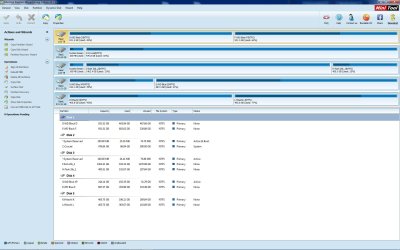
Here's the shot before I reboot. Next will come in a few mins
 

Attachments

  • Pwiz&Testdisk.jpg
    Pwiz&Testdisk.jpg
    224.5 KB · Views: 8

My Computer My Computer

At a glance

Windows 7 ultimate 64biti7 92012GBMSI R7
Computer type
PC/Desktop
Computer Manufacturer/Model Number
Home Brew
OS
Windows 7 ultimate 64bit
CPU
i7 920
Motherboard
Asus P6 Deluxe
Memory
12GB
Graphics Card(s)
MSI R7
Hard Drives
Crucial M550 512GB SSD
WD 2TB Black
WD 1TB Black
WD 1TB Blue
Toshiba 2TB
Hitachi 1TB
Case
HAF 960
Cooling
Corsair H80 Water
Browser
Firefox
.... and here we are with the hitachi external showing.
 

Attachments

  • pw_hitachi.jpg
    pw_hitachi.jpg
    190.1 KB · Views: 4

My Computer My Computer

At a glance

Windows 7 ultimate 64biti7 92012GBMSI R7
Computer type
PC/Desktop
Computer Manufacturer/Model Number
Home Brew
OS
Windows 7 ultimate 64bit
CPU
i7 920
Motherboard
Asus P6 Deluxe
Memory
12GB
Graphics Card(s)
MSI R7
Hard Drives
Crucial M550 512GB SSD
WD 2TB Black
WD 1TB Black
WD 1TB Blue
Toshiba 2TB
Hitachi 1TB
Case
HAF 960
Cooling
Corsair H80 Water
Browser
Firefox
OK, you are using PW old version 8.1.1. If you install the new version it will show whether the drive is MBR or GPT in the Disk Map. Please install the newest version. That shouldn't take much time.

For now right click on the partition K: Hitachi K > Properties > File System info and tell me whether it is 512 or 4096. If in doubt post a screenshot.

I would prefer to see the screenshot taken with the latest version of PW.

I need to tell you again that it is going to be a slow process and in addition due to time zone difference we may need to take a break and continue only the next day. I have another two hours before I retire for the day. We shall do as much as we can in that time and thereafter continue tomorrow.

Your HDD is in good health and so no need to worry about time.
 

My Computer My Computer

At a glance

Windows 7 Home Premium 32 bit
OS
Windows 7 Home Premium 32 bit
Back
Top