
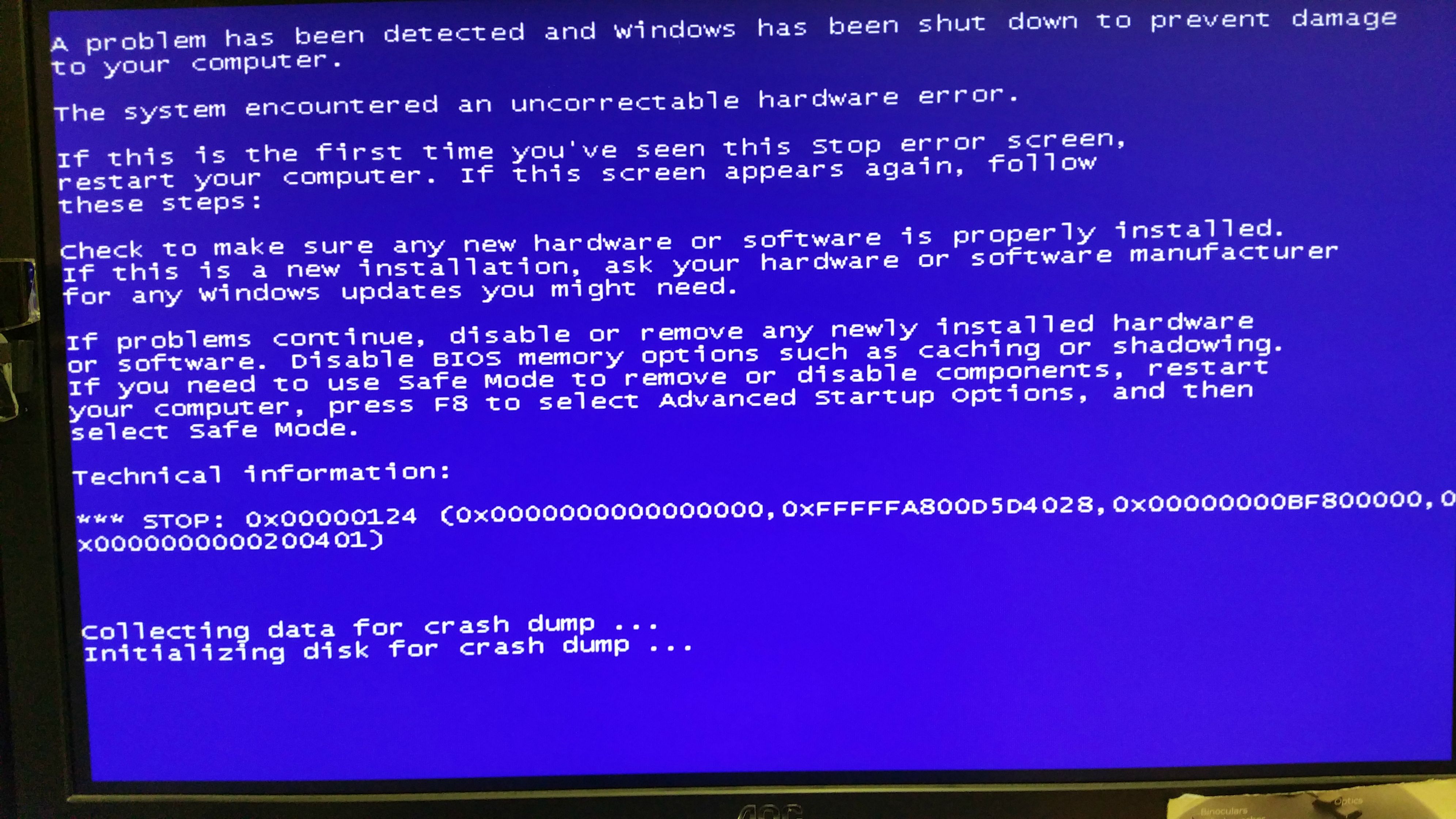
stop 0x00000124 after Windows loads. rinse/repeat.

pauleden

New member
Local time
12:04 AM
Messages
9
Hi all,

I've suddenly got this BSOD loop after Windows GUI loads. It started this morning after the machine had been on for an hour or so, it blue screened and now it's stuck in this BSOD loop.

Windows loads as normal, but seconds after the desktop is visible, it bluescreens. Here's a pic.
BOKDRj8.jpg


The machine is a i7 4970k (was overclocked -overclock removed with no effect) cooled by a Coolermaster H90. Motherboard is a Gigabyte Z97X Gaming 3 with 16 GB of RAM. C drive is a Samsung 830 SSD and there's two other Samsung HHD drives. GPU is a Palit GTX 770. OS is Windows 7 Ulti x64.

BIOS reports CPU temps nice and low, 26C. I've verified all the fans are running.

The motherboard and CPU are quite new, only a month or two old and have been working faultlessly until now. Note that the machine will happily boot into safemode.

I've done the windows memory diagnostic and have run chkdsk on the first the SSD and the first HDD (came back clean). It's currently running on the last HDD.

Any help greatly appreciated. :)

Paul

I
 

My Computer My Computer

At a glance

Windows 7 Ultimate 644790K16GBPalit GTX 770 4GB
Computer type
PC/Desktop
Computer Manufacturer/Model Number
custom build
OS
Windows 7 Ultimate 64
CPU
4790K
Motherboard
Gigabyte Z97X Gaming 3
Memory
16GB
Graphics Card(s)
Palit GTX 770 4GB
Hard Drives
Samsung 830 SSD
Samsung HD203WI
Samsung HD103UJ
Antivirus
Eset Smart Security
Browser
Firefox and IE
Hey Pauleden,

Can you boot into safemode with networking? If you can, follow the link below and post the required files.
http://www.sevenforums.com/bsod-help-support/96879-blue-screen-death-bsod-posting-instructions.html

If you can't get networking to work, download the file in the link above and use a flash drive to open it on the BSOD PC.

Bugcheck 124's are generally hardware faults but could also be driver related. Follow the link below to see if you can troubleshoot it
http://www.sevenforums.com/crash-lockup-debug-how/35349-stop-0x124-what-means-what-try.html
 

My Computer My Computer

At a glance

Dual Boot: Windows 8.1 & Server 2012r2 VMs: K...A10 7700 Kavari SteamRoller8GB DDR3 SDRAM PC3-85001024MB ATI AMD Radeon R7 Graphics
Computer type
PC/Desktop
Computer Manufacturer/Model Number
Custom
OS
Dual Boot: Windows 8.1 & Server 2012r2 VMs: Kali Linux, Backbox, Matriux, Windows 8.1
CPU
A10 7700 Kavari SteamRoller
Motherboard
ASUS A88XM-PLUS (FM2+ )
Memory
8GB DDR3 SDRAM PC3-8500
Graphics Card(s)
1024MB ATI AMD Radeon R7 Graphics
Sound Card
Realtek High Definition Audio
Monitor(s) Displays
Samsung
Hard Drives
SSD Crucial 120gb
WD VelociRaptor 1tb
PSU
Rosewill Gaming 650w
Case
Rosewill Galaxy 2
Internet Speed
55/12
Antivirus
Malwarebytes, MSE, SAS
Browser
FireFox, Chrome
Thanks Gator. Here's the results (running in Windows safemode)

PS, chkdsk still running on last drive. :)
 

My Computer My Computer

At a glance

Windows 7 Ultimate 644790K16GBPalit GTX 770 4GB
Computer type
PC/Desktop
Computer Manufacturer/Model Number
custom build
OS
Windows 7 Ultimate 64
CPU
4790K
Motherboard
Gigabyte Z97X Gaming 3
Memory
16GB
Graphics Card(s)
Palit GTX 770 4GB
Hard Drives
Samsung 830 SSD
Samsung HD203WI
Samsung HD103UJ
Antivirus
Eset Smart Security
Browser
Firefox and IE
Are you sure thats what it produced? DM Log collector should have made a zip file.
 

My Computer My Computer

At a glance

Dual Boot: Windows 8.1 & Server 2012r2 VMs: K...A10 7700 Kavari SteamRoller8GB DDR3 SDRAM PC3-85001024MB ATI AMD Radeon R7 Graphics
Computer type
PC/Desktop
Computer Manufacturer/Model Number
Custom
OS
Dual Boot: Windows 8.1 & Server 2012r2 VMs: Kali Linux, Backbox, Matriux, Windows 8.1
CPU
A10 7700 Kavari SteamRoller
Motherboard
ASUS A88XM-PLUS (FM2+ )
Memory
8GB DDR3 SDRAM PC3-8500
Graphics Card(s)
1024MB ATI AMD Radeon R7 Graphics
Sound Card
Realtek High Definition Audio
Monitor(s) Displays
Samsung
Hard Drives
SSD Crucial 120gb
WD VelociRaptor 1tb
PSU
Rosewill Gaming 650w
Case
Rosewill Galaxy 2
Internet Speed
55/12
Antivirus
Malwarebytes, MSE, SAS
Browser
FireFox, Chrome
Oh, my apologies. Working on a safe mode screen is harder than I thought!

Zip found and attached.
 

My Computer My Computer

At a glance

Windows 7 Ultimate 644790K16GBPalit GTX 770 4GB
Computer type
PC/Desktop
Computer Manufacturer/Model Number
custom build
OS
Windows 7 Ultimate 64
CPU
4790K
Motherboard
Gigabyte Z97X Gaming 3
Memory
16GB
Graphics Card(s)
Palit GTX 770 4GB
Hard Drives
Samsung 830 SSD
Samsung HD203WI
Samsung HD103UJ
Antivirus
Eset Smart Security
Browser
Firefox and IE
Looks like this could possibly be an internal fault in your CPU but we don't really know what it is because its an unclassified error (not publicly documented).

Code:
*******************************************************************************
*                                                                             *
*                        Bugcheck Analysis                                    *
*                                                                             *
*******************************************************************************

Use !analyze -v to get detailed debugging information.

BugCheck 124, {0, fffffa800d984028, bf800000, 200401}

Probably caused by : GenuineIntel

Followup:     MachineOwner
---------

Processing initial command '!analyze -v;r;kv;lmtn;lmtsmn;.bugcheck;!thread'
4: kd> !analyze -v;r;kv;lmtn;lmtsmn;.bugcheck;!thread
*******************************************************************************
*                                                                             *
*                        Bugcheck Analysis                                    *
*                                                                             *
*******************************************************************************
[COLOR=Red]
WHEA_UNCORRECTABLE_ERROR (124)[/COLOR]
A fatal hardware error has occurred. Parameter 1 identifies the type of error
source that reported the error. Parameter 2 holds the address of the
WHEA_ERROR_RECORD structure that describes the error conditon.
Arguments:
Arg1: 0000000000000000, Machine Check Exception
Arg2: [COLOR=Red]fffffa800d984028[/COLOR], Address of the WHEA_ERROR_RECORD structure.
Arg3: 00000000bf800000, High order 32-bits of the MCi_STATUS value.
Arg4: 0000000000200401, Low order 32-bits of the MCi_STATUS value.


Code:
FAILURE_BUCKET_ID:  [COLOR=Red]X64_0x124_GenuineIntel_PROCESSOR_MAE[/COLOR]

BUCKET_ID:  X64_0x124_GenuineIntel_PROCESSOR_MAE

PRIMARY_PROBLEM_CLASS:  X64_0x124_GenuineIntel_PROCESSOR_MAE


Code:
4: kd> !errrec [COLOR=Red]fffffa800d984028[/COLOR]
===============================================================================
Common Platform Error Record @ fffffa800d984028
-------------------------------------------------------------------------------
Record Id     : 01d0aa80b8db2da7
Severity      : Fatal (1)
Length        : 928
Creator       : Microsoft
Notify Type   :[COLOR=Red] Machine Check Exception[/COLOR]
Timestamp     : 6/19/2015 11:12:00 (UTC)
Flags         : 0x00000000

===============================================================================
Section 0     : Processor Generic
-------------------------------------------------------------------------------
Descriptor    @ fffffa800d9840a8
Section       @ fffffa800d984180
Offset        : 344
Length        : 192
Flags         : 0x00000001 Primary
Severity      : Fatal

Proc. Type    : x86/x64
Instr. Set    : x64
Error Type    : [COLOR=Red]Micro-Architectural Error[/COLOR]
Flags         : 0x00
CPU Version   : 0x00000000000306c3
Processor ID  : 0x0000000000000004

===============================================================================
Section 1     : x86/x64 Processor Specific
-------------------------------------------------------------------------------
Descriptor    @ fffffa800d9840f0
Section       @ fffffa800d984240
Offset        : 536
Length        : 128
Flags         : 0x00000000
Severity      : Fatal

Local APIC Id : 0x0000000000000004
CPU Id        : c3 06 03 00 00 08 10 04 - bf fb fa 7f ff fb eb bf
                00 00 00 00 00 00 00 00 - 00 00 00 00 00 00 00 00
                00 00 00 00 00 00 00 00 - 00 00 00 00 00 00 00 00

Proc. Info 0  @ fffffa800d984240

===============================================================================
Section 2     : x86/x64 MCA
-------------------------------------------------------------------------------
Descriptor    @ fffffa800d984138
Section       @ fffffa800d9842c0
Offset        : 664
Length        : 264
Flags         : 0x00000000
Severity      : Fatal

Error         : [COLOR=Red]Internal unclassified (Proc 4 Bank 1)[/COLOR]
  Status      : 0xbf80000000200401
  Address     : 0x00000000fee00000
  Misc.       : 0x0000000000000086

If you have any Gigabyte utilities on the PC please remove them as its possible they could be causing the BSOD.

Try testing your CPU and monitor your temperatures
http://www.sevenforums.com/tutorials/100352-hardware-stress-test-prime95.html
 

My Computer My Computer

At a glance

Dual Boot: Windows 8.1 & Server 2012r2 VMs: K...A10 7700 Kavari SteamRoller8GB DDR3 SDRAM PC3-85001024MB ATI AMD Radeon R7 Graphics
Computer type
PC/Desktop
Computer Manufacturer/Model Number
Custom
OS
Dual Boot: Windows 8.1 & Server 2012r2 VMs: Kali Linux, Backbox, Matriux, Windows 8.1
CPU
A10 7700 Kavari SteamRoller
Motherboard
ASUS A88XM-PLUS (FM2+ )
Memory
8GB DDR3 SDRAM PC3-8500
Graphics Card(s)
1024MB ATI AMD Radeon R7 Graphics
Sound Card
Realtek High Definition Audio
Monitor(s) Displays
Samsung
Hard Drives
SSD Crucial 120gb
WD VelociRaptor 1tb
PSU
Rosewill Gaming 650w
Case
Rosewill Galaxy 2
Internet Speed
55/12
Antivirus
Malwarebytes, MSE, SAS
Browser
FireFox, Chrome
I can't uninstall anything in safemode. Windows installer isn't running.

I did find instructions to do this here on sevenforums and went through the steps there, modifying the registry so that it will allow installer to run, but the service refuses to start.
 

My Computer My Computer

At a glance

Windows 7 Ultimate 644790K16GBPalit GTX 770 4GB
Computer type
PC/Desktop
Computer Manufacturer/Model Number
custom build
OS
Windows 7 Ultimate 64
CPU
4790K
Motherboard
Gigabyte Z97X Gaming 3
Memory
16GB
Graphics Card(s)
Palit GTX 770 4GB
Hard Drives
Samsung 830 SSD
Samsung HD203WI
Samsung HD103UJ
Antivirus
Eset Smart Security
Browser
Firefox and IE

My Computer My Computer

At a glance

Dual Boot: Windows 8.1 & Server 2012r2 VMs: K...A10 7700 Kavari SteamRoller8GB DDR3 SDRAM PC3-85001024MB ATI AMD Radeon R7 Graphics
Computer type
PC/Desktop
Computer Manufacturer/Model Number
Custom
OS
Dual Boot: Windows 8.1 & Server 2012r2 VMs: Kali Linux, Backbox, Matriux, Windows 8.1
CPU
A10 7700 Kavari SteamRoller
Motherboard
ASUS A88XM-PLUS (FM2+ )
Memory
8GB DDR3 SDRAM PC3-8500
Graphics Card(s)
1024MB ATI AMD Radeon R7 Graphics
Sound Card
Realtek High Definition Audio
Monitor(s) Displays
Samsung
Hard Drives
SSD Crucial 120gb
WD VelociRaptor 1tb
PSU
Rosewill Gaming 650w
Case
Rosewill Galaxy 2
Internet Speed
55/12
Antivirus
Malwarebytes, MSE, SAS
Browser
FireFox, Chrome

My Computer My Computer

At a glance

Windows 7 Ultimate 644790K16GBPalit GTX 770 4GB
Computer type
PC/Desktop
Computer Manufacturer/Model Number
custom build
OS
Windows 7 Ultimate 64
CPU
4790K
Motherboard
Gigabyte Z97X Gaming 3
Memory
16GB
Graphics Card(s)
Palit GTX 770 4GB
Hard Drives
Samsung 830 SSD
Samsung HD203WI
Samsung HD103UJ
Antivirus
Eset Smart Security
Browser
Firefox and IE
OK, windows installer sorted.

I ran Intel Processor Diagnostic in safe mode today and it's failing its tests. It's faling when it runs the CPU fequency test.

The report that it can't load drivers may be related to the fact that it's running in safe mode. It says to run IPDT.exe as an administrator, which I did but it still gave the same report.

Netx is sfc /scannow, again, in safemode
 

My Computer My Computer

At a glance

Windows 7 Ultimate 644790K16GBPalit GTX 770 4GB
Computer type
PC/Desktop
Computer Manufacturer/Model Number
custom build
OS
Windows 7 Ultimate 64
CPU
4790K
Motherboard
Gigabyte Z97X Gaming 3
Memory
16GB
Graphics Card(s)
Palit GTX 770 4GB
Hard Drives
Samsung 830 SSD
Samsung HD203WI
Samsung HD103UJ
Antivirus
Eset Smart Security
Browser
Firefox and IE
sfc report.

It finished with "Windows Rescource Protection found corrupt files but was unable to fix some of them."
 

My Computer My Computer

At a glance

Windows 7 Ultimate 644790K16GBPalit GTX 770 4GB
Computer type
PC/Desktop
Computer Manufacturer/Model Number
custom build
OS
Windows 7 Ultimate 64
CPU
4790K
Motherboard
Gigabyte Z97X Gaming 3
Memory
16GB
Graphics Card(s)
Palit GTX 770 4GB
Hard Drives
Samsung 830 SSD
Samsung HD203WI
Samsung HD103UJ
Antivirus
Eset Smart Security
Browser
Firefox and IE
Did you run Intel Processor diag with admin privileges? The report seems to say that you may not have admin rights.

Right-click on the program and click "Run as Administrator"

Let me check out your SFC scan.
 

My Computer My Computer

At a glance

Dual Boot: Windows 8.1 & Server 2012r2 VMs: K...A10 7700 Kavari SteamRoller8GB DDR3 SDRAM PC3-85001024MB ATI AMD Radeon R7 Graphics
Computer type
PC/Desktop
Computer Manufacturer/Model Number
Custom
OS
Dual Boot: Windows 8.1 & Server 2012r2 VMs: Kali Linux, Backbox, Matriux, Windows 8.1
CPU
A10 7700 Kavari SteamRoller
Motherboard
ASUS A88XM-PLUS (FM2+ )
Memory
8GB DDR3 SDRAM PC3-8500
Graphics Card(s)
1024MB ATI AMD Radeon R7 Graphics
Sound Card
Realtek High Definition Audio
Monitor(s) Displays
Samsung
Hard Drives
SSD Crucial 120gb
WD VelociRaptor 1tb
PSU
Rosewill Gaming 650w
Case
Rosewill Galaxy 2
Internet Speed
55/12
Antivirus
Malwarebytes, MSE, SAS
Browser
FireFox, Chrome
Im pretty sure these corrupt files can pretty much be ignored as they were introduced by an update, if i remember correctly.

I'll see if I can get Noel to take a look and confirm/provide a fix.


Code:
2015-06-20 16:18:20, Info                  CSI    00000346 Hashes for file member \SystemRoot\WinSxS\amd64_microsoft-windows-u..ed-telemetry-client_31bf3856ad364e35_6.1.7601.18869_none_fde7d5f71db043ad\utc.app.json do not match actual file [l:24{12}]"utc.app.json" :
  Found: {l:32 b:hxHfXj427JxbVLpmOJKBMMwJ3nfvwV57qrOPwblWU6s=} Expected: {l:32 b:6510UErwHGoFg3sRd3gzh3HSbTceuHem3Rnk0NraKS8=}
2015-06-20 16:18:20, Info                  CSI    00000347 [SR] Cannot repair member file [l:24{12}]"[COLOR=Red]utc.app.json[/COLOR]" of Microsoft-Windows-Unified-Telemetry-Client, Version = 6.1.7601.18869, pA = PROCESSOR_ARCHITECTURE_AMD64 (9), Culture neutral, VersionScope = 1 nonSxS, PublicKeyToken = {l:8 b:31bf3856ad364e35}, Type neutral, TypeName neutral, PublicKey neutral in the store, hash mismatch
2015-06-20 16:18:20, Info                  CSI    00000348 [SR] This component was referenced by [l:162{81}]"Package_250_for_KB3068708~31bf3856ad364e35~amd64~~6.1.1.0.3068708-814_neutral_GDR"
2015-06-20 16:18:20, Info                  CSI    00000349 Hashes for file member \SystemRoot\WinSxS\amd64_microsoft-windows-u..ed-telemetry-client_31bf3856ad364e35_6.1.7601.18869_none_fde7d5f71db043ad\telemetry.ASM-WindowsDefault.json do not match actual file [l:66{33}]"telemetry.ASM-WindowsDefault.json" :
  Found: {l:32 b:rX0CB3J2u+8b88W40OtkWxE6DLvV/cFEMvqhqqbQIlI=} Expected: {l:32 b:EeQJzlVPvq9GNIcA2FEwrOjEeuDam1G+ol3x61gKasQ=}
2015-06-20 16:18:20, Info                  CSI    0000034a [SR] Cannot repair member file [l:66{33}][COLOR=Red]"telemetry.ASM-WindowsDefault.json[/COLOR]" of Microsoft-Windows-Unified-Telemetry-Client, Version = 6.1.7601.18869, pA = PROCESSOR_ARCHITECTURE_AMD64 (9), Culture neutral, VersionScope = 1 nonSxS, PublicKeyToken = {l:8 b:31bf3856ad364e35}, Type neutral, TypeName neutral, PublicKey neutral in the store, hash mismatch
 

My Computer My Computer

At a glance

Dual Boot: Windows 8.1 & Server 2012r2 VMs: K...A10 7700 Kavari SteamRoller8GB DDR3 SDRAM PC3-85001024MB ATI AMD Radeon R7 Graphics
Computer type
PC/Desktop
Computer Manufacturer/Model Number
Custom
OS
Dual Boot: Windows 8.1 & Server 2012r2 VMs: Kali Linux, Backbox, Matriux, Windows 8.1
CPU
A10 7700 Kavari SteamRoller
Motherboard
ASUS A88XM-PLUS (FM2+ )
Memory
8GB DDR3 SDRAM PC3-8500
Graphics Card(s)
1024MB ATI AMD Radeon R7 Graphics
Sound Card
Realtek High Definition Audio
Monitor(s) Displays
Samsung
Hard Drives
SSD Crucial 120gb
WD VelociRaptor 1tb
PSU
Rosewill Gaming 650w
Case
Rosewill Galaxy 2
Internet Speed
55/12
Antivirus
Malwarebytes, MSE, SAS
Browser
FireFox, Chrome
Did you run Intel Processor diag with admin privileges? The report seems to say that you may not have admin rights.

Right-click on the program and click "Run as Administrator"
Yes, for sure. It's tricky in safe mode, but I did do it and got the same result whether it was in admin or not.
 

My Computer My Computer

At a glance

Windows 7 Ultimate 644790K16GBPalit GTX 770 4GB
Computer type
PC/Desktop
Computer Manufacturer/Model Number
custom build
OS
Windows 7 Ultimate 64
CPU
4790K
Motherboard
Gigabyte Z97X Gaming 3
Memory
16GB
Graphics Card(s)
Palit GTX 770 4GB
Hard Drives
Samsung 830 SSD
Samsung HD203WI
Samsung HD103UJ
Antivirus
Eset Smart Security
Browser
Firefox and IE
Make sure you try to remove all Gigabyte utilities.

Code:
gdrv.sys Thu Mar 12 23:22:29 2009 (49B9D175)  
Gigabyte Easy Saver - mobo power utility  driver}http://www.gigabyte.com.tw/Support/Motherboard/Driver_List.aspx 
[url=http://www.carrona.org/drivers/driver.php?id=gdrv.sys]Driver Reference Table - gdrv.sys[/url] 

etdrv.sys Thu Mar  19 22:59:06 2009 (49C3067A) 
Generic Port I/O[br]May be part of  Gigabyte Tools Easy Tune 6 (incompatible with Win7)}Windows Update[br]May be  available from Gigabyte 
[url=http://www.carrona.org/drivers/driver.php?id=etdrv.sys]Driver Reference Table - etdrv.sys[/url]

Code:
AppleCharger.sys Sun Oct 27 21:59:21 2013  (526DC4F9) 
GIGABYTE On/Off Charge driver. See here for details -  http://www.gigabyte.us/MicroSite/185/on-off-charge.htm May cause BSOD on Win7/8 systems - uninstall to test (haven't seen  recently (15Jan2013)}Removal may be necessary. Updates can be found here -  http://www.gigabyte.us/support-downloads/support-downloads.aspx 
[url=http://www.carrona.org/drivers/driver.php?id=AppleCharger.sys]Driver Reference Table - AppleCharger.sys[/url]

Lets try a few things:
1. Remove ESET and install Microsoft Security Essentials. You can choose to go back to ESET after and test but since ESET was mentioned in a crash dump, lets make sure its not it.

Code:
DEFAULT_BUCKET_ID:  WIN7_DRIVER_FAULT

PROCESS_NAME:  ekrn.exe
Remove ESET and install MSE
Microsoft Security Essentials - Microsoft Windows

2. Monitor your CPU Temperatures. Ensure your fans are running properly. Clean the inside of the PC to ensure no dust is accumulating inside

3. Go into your BIOS and reset your BIOS settings to the defaults

4. Run Memtest86+ - Follow the instructions in the tutorial. Run for at least 8 passes or until you find any errors. Stop the test and move onto the next step if you have ANY errors

http://www.sevenforums.com/tutorials/105647-ram-test-memtest86.html

5. Try a clean boot
http://www.sevenforums.com/tutorial...ation-conflicts-performing-clean-startup.html

If all of the above fails, your CPU is likely faulty.
 

My Computer My Computer

At a glance

Dual Boot: Windows 8.1 & Server 2012r2 VMs: K...A10 7700 Kavari SteamRoller8GB DDR3 SDRAM PC3-85001024MB ATI AMD Radeon R7 Graphics
Computer type
PC/Desktop
Computer Manufacturer/Model Number
Custom
OS
Dual Boot: Windows 8.1 & Server 2012r2 VMs: Kali Linux, Backbox, Matriux, Windows 8.1
CPU
A10 7700 Kavari SteamRoller
Motherboard
ASUS A88XM-PLUS (FM2+ )
Memory
8GB DDR3 SDRAM PC3-8500
Graphics Card(s)
1024MB ATI AMD Radeon R7 Graphics
Sound Card
Realtek High Definition Audio
Monitor(s) Displays
Samsung
Hard Drives
SSD Crucial 120gb
WD VelociRaptor 1tb
PSU
Rosewill Gaming 650w
Case
Rosewill Galaxy 2
Internet Speed
55/12
Antivirus
Malwarebytes, MSE, SAS
Browser
FireFox, Chrome
Yep - the CBS errors are the result of MS mis-coding variable files as static ones (KB3068708) - you can either uninstall the update and hide it, or ignore these two fails.
 

My Computer My Computer

At a glance

Win 7 x64 Home Premium (and x86 VirtualBox VM...i3 370M/i7 6500U8GB - finally :)/8GBit's an i3, dude!/dual Intel&nVidia
Computer type
Laptop
Computer Manufacturer/Model Number
Asus K52F or Lenovo B51-80
OS
Win 7 x64 Home Premium (and x86 VirtualBox VM)/Win10
CPU
i3 370M/i7 6500U
Motherboard
Asus/Lenovo
Memory
8GB - finally :)/8GB
Graphics Card(s)
it's an i3, dude!/dual Intel&nVidia
Sound Card
onboard
Monitor(s) Displays
15.6" built-in
Screen Resolution
1366x768/1920x1080
Hard Drives
750GB Seagate internal
Sundry external drives attached to other computers on the local network
1TB SSD on the Lenovo
PSU
n/a
Internet Speed
as much as I can get - usually on a dongle/phone, so <1MB/s
Antivirus
MSE/Defender
Browser
IE11/12/Edge/Chrome/FF(if I must)
Here's an update, and it's some interesting news. I swapped in another CPU and still got the BSOD. Back on the original CPU, a single pass of Memtest also came back clean and a USB live Ubuntu also booted, surfed and ran a few applications with no problem. Also, a BIOS default reset was done although as I expected, it didn't help.

So I've been looking into software / Windows issues. None really showed themselves, so I did remove the Gigabyte apps, MSE and Eset, still got the BSOD as the final Windows GUI loads.

I'll be honest, I didn't go for the clean startup, I went straight for a repair install of Windows and so far the machine is behaving itself. I've done all the critical updates. I will run the IPDT again to be on the safe side before getting all my stuff back from windows.old this evening and then see what's come back easily and what will need to be reinstalled.

I want to thank you guys, you've been very helpful and very quick with your advice. I'm very grateful and I'll post back in a day or so once everything has had a chance to soak.
 

My Computer My Computer

At a glance

Windows 7 Ultimate 644790K16GBPalit GTX 770 4GB
Computer type
PC/Desktop
Computer Manufacturer/Model Number
custom build
OS
Windows 7 Ultimate 64
CPU
4790K
Motherboard
Gigabyte Z97X Gaming 3
Memory
16GB
Graphics Card(s)
Palit GTX 770 4GB
Hard Drives
Samsung 830 SSD
Samsung HD203WI
Samsung HD103UJ
Antivirus
Eset Smart Security
Browser
Firefox and IE
Back
Top