Solved Drive became Unallocated and not having much luck recoverying

Fully understand and already feel guilty taking up so much of your time. I'm very grateful for the help and whatever speed / time you take is fine with me.

This is what the Hitachi reads but then so do all the other partitions on the 2TB WD / Toshiba and SSD drives. So it looks like it is correct


Sectors per Cluster: 8 (4096 bytes)
Sectors per File Record: 2 (1024 bytes)
Sectors per Index Record: 8 (4096 bytes)
$MFT LCN: 786432
$MFTMirr LCN: 2
 

My Computer My Computer

At a glance

Windows 7 ultimate 64biti7 92012GBMSI R7
Computer type
PC/Desktop
Computer Manufacturer/Model Number
Home Brew
OS
Windows 7 ultimate 64bit
CPU
i7 920
Motherboard
Asus P6 Deluxe
Memory
12GB
Graphics Card(s)
MSI R7
Hard Drives
Crucial M550 512GB SSD
WD 2TB Black
WD 1TB Black
WD 1TB Blue
Toshiba 2TB
Hitachi 1TB
Case
HAF 960
Cooling
Corsair H80 Water
Browser
Firefox
Ok I've installed v9 but don't see any extra information.

I might be getting confused here.
1) If I click on the left (disk icon) > properties
I get disk properties which shows 'Bytes per sector' = 512

2) But if I click on the partition > properties > filesystem info
Then I get 'Sectors per Cluster 8(4096).

So I'm not sure which information applies to Blocksize.

I'll post v9 when I've done the first one
 

Attachments

  • pw9.jpg
    pw9.jpg
    205.1 KB · Views: 4

My Computer My Computer

At a glance

Windows 7 ultimate 64biti7 92012GBMSI R7
Computer type
PC/Desktop
Computer Manufacturer/Model Number
Home Brew
OS
Windows 7 ultimate 64bit
CPU
i7 920
Motherboard
Asus P6 Deluxe
Memory
12GB
Graphics Card(s)
MSI R7
Hard Drives
Crucial M550 512GB SSD
WD 2TB Black
WD 1TB Black
WD 1TB Blue
Toshiba 2TB
Hitachi 1TB
Case
HAF 960
Cooling
Corsair H80 Water
Browser
Firefox
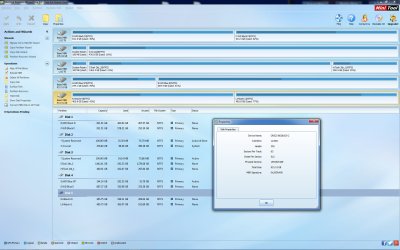
:) You do see some extra Information. See the Disk Map. Below the Disk icons in the disk map it reads "Basic MBR (Disk size)" Earlier versions it is only "Basic (Disk size)" So the disk map will now show whether it is an MBR drive or GPT drive.
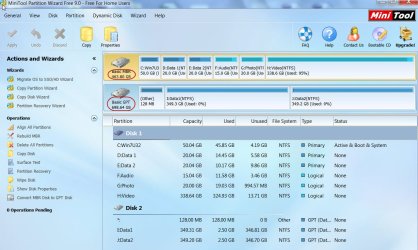
19-06-2015 22-48-44.jpg

I am also getting confused.:D I would think that block size refers to sectors/cluster If so I would think what was indicated by TestDisk as Block size 4096 is correct. (.(It is always confusing terminology when it comes to HDDs the more deeper you dwelve into it the more confused you will become).
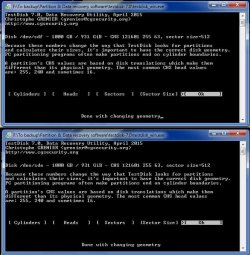
But don't worry. We shall find a way to put it to rest and proceed.

Run TestDisk

1. No log
2.Select your Hitachi 1TB Disk - post screenshot
3.Intel
4.Geometry - post screenshot
Quit Test Disk

Not to get confused now "safely remove" your Hitachi 1 TB drive from the enclosure and keep it aside safely.

Plug in your faulty WD 1 TB drive into the slot where it was originally in the enclosure.

Run TestDisk
1. No log
2.Select your WD 1TB Disk - post screenshot
3.Intel
4.Geometry - post screenshot
Quit Test Disk

If sector size in both are 512 Bytes, we are clear.

Then we shall proceed with TestDisk on the WD 1 TB drive tomorrow.

I shall see the screenshots after another 8 hours tomorrow morning. You can also go to sleep.

NOTE: Do not make any changes to Geometry. Just quit TestDisk without making any changes in both cases.
 
Last edited:

My Computer My Computer

At a glance

Windows 7 Home Premium 32 bit
OS
Windows 7 Home Premium 32 bit
Yes they seem to be identical > top is the WD bottom is Hitachi. So hopefully looking good.
 

Attachments

  • geometry.jpg
    geometry.jpg
    83.3 KB · Views: 23

My Computer My Computer

At a glance

Windows 7 ultimate 64biti7 92012GBMSI R7
Computer type
PC/Desktop
Computer Manufacturer/Model Number
Home Brew
OS
Windows 7 ultimate 64bit
CPU
i7 920
Motherboard
Asus P6 Deluxe
Memory
12GB
Graphics Card(s)
MSI R7
Hard Drives
Crucial M550 512GB SSD
WD 2TB Black
WD 1TB Black
WD 1TB Blue
Toshiba 2TB
Hitachi 1TB
Case
HAF 960
Cooling
Corsair H80 Water
Browser
Firefox
The expolaratory work is over. Confirmed that there is no GPT and the block size 4096 refers to cluster size. (Windows 7 and 8 can read 8sectors (4096 bits at a time))

Now we shall go back to the your post#5 (where we branched off). When you come to the screen you posted there, press P (Capital p+Shift) and check whether your folders/files are listed. If listed copy a few files to a folder on your internal drives ( but not system drives) and check whether everything is OK.

If you encounter any problems post with screenshot.
 

My Computer My Computer

At a glance

Windows 7 Home Premium 32 bit
OS
Windows 7 Home Premium 32 bit
Good morning! :-)

Ok, I'm starting the scan.

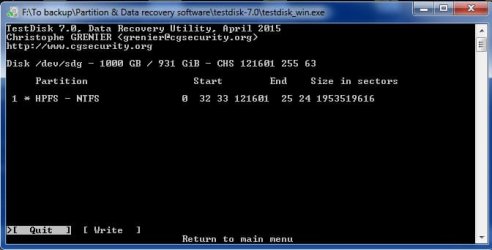
As I remember pressing any of the letters didn't do anything last time perhaps because the only thing listed was:

* HPFS NTFS ....

Where their example shows that some other partitions should show up like

D HPFS NTFS ......

TestDisk Step By Step - CGSecurity

As I understand it the partition marked with *
is the backup copy of the partition information found at the very end of the partition. So it appears that the main copy is damaged so badly it can't even be detected.

What worries me at this stage is that the files I recovered are far from complete. There are quite a lot of files I wanted which are not there so I am thinking the damage is might be too bad.

Anyway not much I can do about it so the scan is 43% at the moment. I'll be back when it's done.
 
Last edited:

My Computer My Computer

At a glance

Windows 7 ultimate 64biti7 92012GBMSI R7
Computer type
PC/Desktop
Computer Manufacturer/Model Number
Home Brew
OS
Windows 7 ultimate 64bit
CPU
i7 920
Motherboard
Asus P6 Deluxe
Memory
12GB
Graphics Card(s)
MSI R7
Hard Drives
Crucial M550 512GB SSD
WD 2TB Black
WD 1TB Black
WD 1TB Blue
Toshiba 2TB
Hitachi 1TB
Case
HAF 960
Cooling
Corsair H80 Water
Browser
Firefox
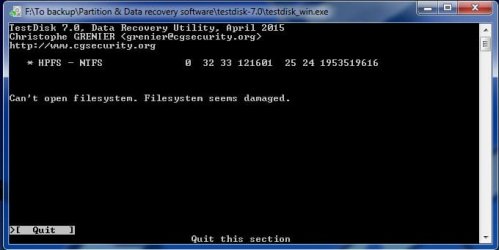
Scan is done but 'P' option leads to this which says filesystem is damaged
 

Attachments

  • DAMAGED.jpg
    DAMAGED.jpg
    25 KB · Views: 17

My Computer My Computer

At a glance

Windows 7 ultimate 64biti7 92012GBMSI R7
Computer type
PC/Desktop
Computer Manufacturer/Model Number
Home Brew
OS
Windows 7 ultimate 64bit
CPU
i7 920
Motherboard
Asus P6 Deluxe
Memory
12GB
Graphics Card(s)
MSI R7
Hard Drives
Crucial M550 512GB SSD
WD 2TB Black
WD 1TB Black
WD 1TB Blue
Toshiba 2TB
Hitachi 1TB
Case
HAF 960
Cooling
Corsair H80 Water
Browser
Firefox
EDIT: I had written this post before I saw your previous post but still holds.

1. How many partitions did you have on the drive

2. If pressing P, does not do anything (hard for me to believe , it should atleast give some message,) then press Enter to proceed and post the next screen.

My plan of action is as follows:

a. Run Test Disk and check whether it takes us to the write screen. I am assuming you had only a single partition which it shows after a deep scan and we should be able to write it.

b. If it does take us to the screen where we can write the partition table, then we shall quit TestDisk

I would like to examine Sector 0 where the partition table normally exists with bootice and save a copy of it before writing the Partition Table with Test Disk.

If you want you can do this bootice saving first and then run TestDisk to write the Partition Table at sector 0

Bootice: You will install Bootice x86 if your system is 32 bit or booticex64 if your system is 64 bit.

Post a screenshot at Sector 0 so that I can examine what it contains in the Partition Table area and also save it. By default bootice will save it its folder.

Saving with bootice: http://www.sevenforums.com/hardware-devices/310295-lost-partitions.html#post2584426

After writing the partition table with Test Disk, again post a screenshot Sector 0 with bootice and also save it.

Once we have written the Partition Table with TestDisk, we shall restore the NTFS Sector from its backup.

Barring unforeseen events, your drive should get restored. Let us hope so.
 

My Computer My Computer

At a glance

Windows 7 Home Premium 32 bit
OS
Windows 7 Home Premium 32 bit
Couple of things worth tying.

1) Partition recovery :

Try some other partition managers,they are not all the same.

Part Assist might come up with something, worth a go.

Download Free AOMEI Partition Assistant Standard - Magic Partition Manager Freeware

PGuru is an advanced tool . Free version partition recovery functions work, but the data recovery stuff only activates when you have a license.

You may find the partition recovery on that will do the job.

Free partition manager, file recovery tool and Windows backup software - PartitionGuru Free


2) If you are unable to recover the partition, then you can try data recovery:

Recuva is worth a go.
 

My Computers My Computers

  • At a glance

    7 X64i5 84002x8gb 3200mhz
    Computer type
    PC/Desktop
    OS
    7 X64
    CPU
    i5 8400
    Motherboard
    gigabyte b365m ds3h
    Memory
    2x8gb 3200mhz
    Hard Drives
    various
    PSU
    pure power 11 400w cm
    Case
    Coolermaster
    Cooling
    cryorig m9i
  • At a glance

    7x64g54008gb ddr4 2400
    Computer type
    PC/Desktop
    OS
    7x64
    CPU
    g5400
    Motherboard
    ga b365m ds3h
    Memory
    8gb ddr4 2400
    PSU
    xfx pro 450w
EDIT: I had written this post before I saw your previous post but still holds.

1. How many partitions did you have on the drive

Just the one - the screen before pressing P is exactly as in post #5
2. If pressing P, does not do anything (hard for me to believe , it should atleast give some message,) then press Enter to proceed and post the next screen.

After pressing P is the screen I posted - Filesystem damaged

My plan of action is as follows:

a. Run Test Disk and check whether it takes us to the write screen. I am assuming you had only a single partition which it shows after a deep scan and we should be able to write it.

Well I am back on the partition screen. If I press ENTER: to continue then I will get two options [write] [quit]. However, last time I did that and then pressed quit I lost the option to go back to the scan screen. I will have to scan again.

b. If it does take us to the screen where we can write the partition table, then we shall quit TestDisk

I would like to examine Sector 0 where the partition table normally exists with bootice and save a copy of it before writing the Partition Table with Test Disk.

If you want you can do this bootice saving first and then run TestDisk to write the Partition Table at sector 0

Bootice: You will install Bootice x86 if your system is 32 bit or booticex64 if your system is 64 bit.

Post a screenshot at Sector 0 so that I can examine what it contains in the Partition Table area and also save it. By default bootice will save it its folder.

Ok so I am going to exit from Testdisk and will install bootice ...
 

Attachments

  • write.jpg
    write.jpg
    24.8 KB · Views: 15

My Computer My Computer

At a glance

Windows 7 ultimate 64biti7 92012GBMSI R7
Computer type
PC/Desktop
Computer Manufacturer/Model Number
Home Brew
OS
Windows 7 ultimate 64bit
CPU
i7 920
Motherboard
Asus P6 Deluxe
Memory
12GB
Graphics Card(s)
MSI R7
Hard Drives
Crucial M550 512GB SSD
WD 2TB Black
WD 1TB Black
WD 1TB Blue
Toshiba 2TB
Hitachi 1TB
Case
HAF 960
Cooling
Corsair H80 Water
Browser
Firefox
Couple of things worth tying.

1) Partition recovery :

Thanks for all those suggestions they may come in useful if we fail to get anywhere, but for now I need to follow jumanji's methods to their conclusion.
 

My Computer My Computer

At a glance

Windows 7 ultimate 64biti7 92012GBMSI R7
Computer type
PC/Desktop
Computer Manufacturer/Model Number
Home Brew
OS
Windows 7 ultimate 64bit
CPU
i7 920
Motherboard
Asus P6 Deluxe
Memory
12GB
Graphics Card(s)
MSI R7
Hard Drives
Crucial M550 512GB SSD
WD 2TB Black
WD 1TB Black
WD 1TB Blue
Toshiba 2TB
Hitachi 1TB
Case
HAF 960
Cooling
Corsair H80 Water
Browser
Firefox
Bootice Sector 0

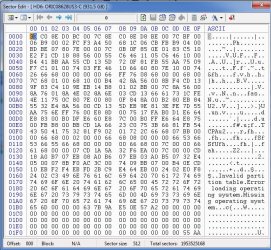
Here is Sector 0 screenshot
 

Attachments

  • sect0.jpg
    sect0.jpg
    125.9 KB · Views: 17

My Computer My Computer

At a glance

Windows 7 ultimate 64biti7 92012GBMSI R7
Computer type
PC/Desktop
Computer Manufacturer/Model Number
Home Brew
OS
Windows 7 ultimate 64bit
CPU
i7 920
Motherboard
Asus P6 Deluxe
Memory
12GB
Graphics Card(s)
MSI R7
Hard Drives
Crucial M550 512GB SSD
WD 2TB Black
WD 1TB Black
WD 1TB Blue
Toshiba 2TB
Hitachi 1TB
Case
HAF 960
Cooling
Corsair H80 Water
Browser
Firefox
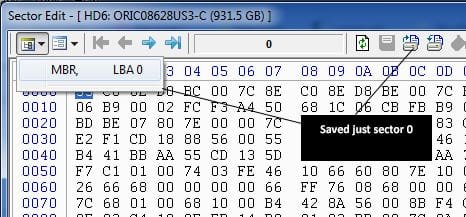
So just to be clear I have one file saved to a .bin file which represents sector 0 only. Is that ok?
 

Attachments

  • sect0i.jpg
    sect0i.jpg
    33.1 KB · Views: 13

My Computer My Computer

At a glance

Windows 7 ultimate 64biti7 92012GBMSI R7
Computer type
PC/Desktop
Computer Manufacturer/Model Number
Home Brew
OS
Windows 7 ultimate 64bit
CPU
i7 920
Motherboard
Asus P6 Deluxe
Memory
12GB
Graphics Card(s)
MSI R7
Hard Drives
Crucial M550 512GB SSD
WD 2TB Black
WD 1TB Black
WD 1TB Blue
Toshiba 2TB
Hitachi 1TB
Case
HAF 960
Cooling
Corsair H80 Water
Browser
Firefox
Yep.

If examining the Sector 0 with bootice reveals that the partition table already exists, then we may skip any attempt to write Partition table with TestDisk and straightaway proceed with restoring the NTFS boot sector from the backup bootsector with TestDisk.

The loss/corruption of primary NTFS boot sector was responsible for PRW not finding any partition.PRW actually goes looking for the NTFS boot sectors and if it finds the NTFS boot sectors it marks them as the beginning of the partition to write the partition table that was lost.

Take your time to familiarise with bootice and if you have any doubts ask for clarifications. For the time being you will only be looking at Sector 0 and saving it. You are not going to write anything to the drive.

In bootice, select your external drive and click on Sector Edit to show the sector map.
 

My Computer My Computer

At a glance

Windows 7 Home Premium 32 bit
OS
Windows 7 Home Premium 32 bit

My Computer My Computer

At a glance

Windows 7 Home Premium 32 bit
OS
Windows 7 Home Premium 32 bit
Yes as per my last screenshot I have already saved the sector to my HD.
So following your previous post I am rescanning with testdisk - and as I understand this time you want me to select write - then post a screenshot of sector 0 with bootice.

Edit: ah ok - I'll back up a bit ... I got ahead a bit - sorry. So you need another screenshot - let me look at your link

The saved file is .bin but 512 bytes
 

My Computer My Computer

At a glance

Windows 7 ultimate 64biti7 92012GBMSI R7
Computer type
PC/Desktop
Computer Manufacturer/Model Number
Home Brew
OS
Windows 7 ultimate 64bit
CPU
i7 920
Motherboard
Asus P6 Deluxe
Memory
12GB
Graphics Card(s)
MSI R7
Hard Drives
Crucial M550 512GB SSD
WD 2TB Black
WD 1TB Black
WD 1TB Blue
Toshiba 2TB
Hitachi 1TB
Case
HAF 960
Cooling
Corsair H80 Water
Browser
Firefox
Nope, I want the full screenshot. Partition Table will be at the end Sector 0. See the screenshot here.

I'm confused it looks like the same as I posted in #32.
 

My Computer My Computer

At a glance

Windows 7 ultimate 64biti7 92012GBMSI R7
Computer type
PC/Desktop
Computer Manufacturer/Model Number
Home Brew
OS
Windows 7 ultimate 64bit
CPU
i7 920
Motherboard
Asus P6 Deluxe
Memory
12GB
Graphics Card(s)
MSI R7
Hard Drives
Crucial M550 512GB SSD
WD 2TB Black
WD 1TB Black
WD 1TB Blue
Toshiba 2TB
Hitachi 1TB
Case
HAF 960
Cooling
Corsair H80 Water
Browser
Firefox
OK, I saw your full screenshot which I missed. Just make sure you had selected the correct drive.

I see that no Partition Table exists. All fields are zero.

We shall go to Test Disk and restore the NTFS Boot sector.

Are you ready for it?

I am not. Will take sometime.
 

My Computer My Computer

At a glance

Windows 7 Home Premium 32 bit
OS
Windows 7 Home Premium 32 bit

My Computer My Computer

At a glance

Windows 7 Ultimate x64 SP1AMD Phenom 2 1090T2x8GB Kingston HyperX Fury Black 1600Mhz Unga...MSI GTX 970 Gaming 4G
Computer type
PC/Desktop
Computer Manufacturer/Model Number
Custom Build
OS
Windows 7 Ultimate x64 SP1
CPU
AMD Phenom 2 1090T
Motherboard
Gigabyte GA-890FXA-UD5
Memory
2x8GB Kingston HyperX Fury Black 1600Mhz Unganged
Graphics Card(s)
MSI GTX 970 Gaming 4G
Sound Card
Realtek On-Board HD 7.1 Audio / Logitech G35
Monitor(s) Displays
3xAcer GD245HQ
Screen Resolution
1920x1080
Hard Drives
Samsung 850 Pro 512GB SSD - OS /
WD Caviar Black SATA 3 - 1 TBx2 - Dynamic RAID 0 /
WD Caviar Green SATA 2 - 640GBx2 - Dynamic RAID 0 /
WD Caviar Green SATA 2 - 640GB - Internal Backup /
Seagate Barracude SATA 3 - 3TB - External Backup/ Sync
PSU
HighPower 1000W
Case
Cooler Master HAF 932
Cooling
Noctua NH-D14
Keyboard
Logitech G19
Mouse
Logitech G500
Internet Speed
100/4 Mbit Cable (100GB quota)
Antivirus
ZoneAlarm Extreme Security / MBAM Pro / MBAE Free / SAS Free
Browser
IE 11 - Firefox - Chrome
Other Info
Logitech F710/ G27/ G940/ Z5500 // TrackIR 5 // Nvidia 3D Surround Vision
Yep file size 512 bytes. I corrected.

I think you are racing.:)

What exactly are you doing now with TestDisk? Have you stopped it or still scanning?
 

My Computer My Computer

At a glance

Windows 7 Home Premium 32 bit
OS
Windows 7 Home Premium 32 bit
Back
Top