Solved KB2952664 installed "automatically" after uninstalling certain updates

angelbeats96

New member
Member
VIP
Local time
6:31 PM
Messages
101
KB2952664 installed "automatically" after uninstalling certain updates

Hello,

Recently I've been troubleshooting random hangs which one of the solution was to uninstall the following updates if I had any of them installed:
- KB2952664
- KB2990214
- KB3035583
I had KB2952664 and KB2990214 installed on 6th of April 2015 which after creating an restore point I successfully uninstalled them via control panel.

When I checked the installed update, those updates were gone for good. However I've noticed two significant changes after uninstalling:
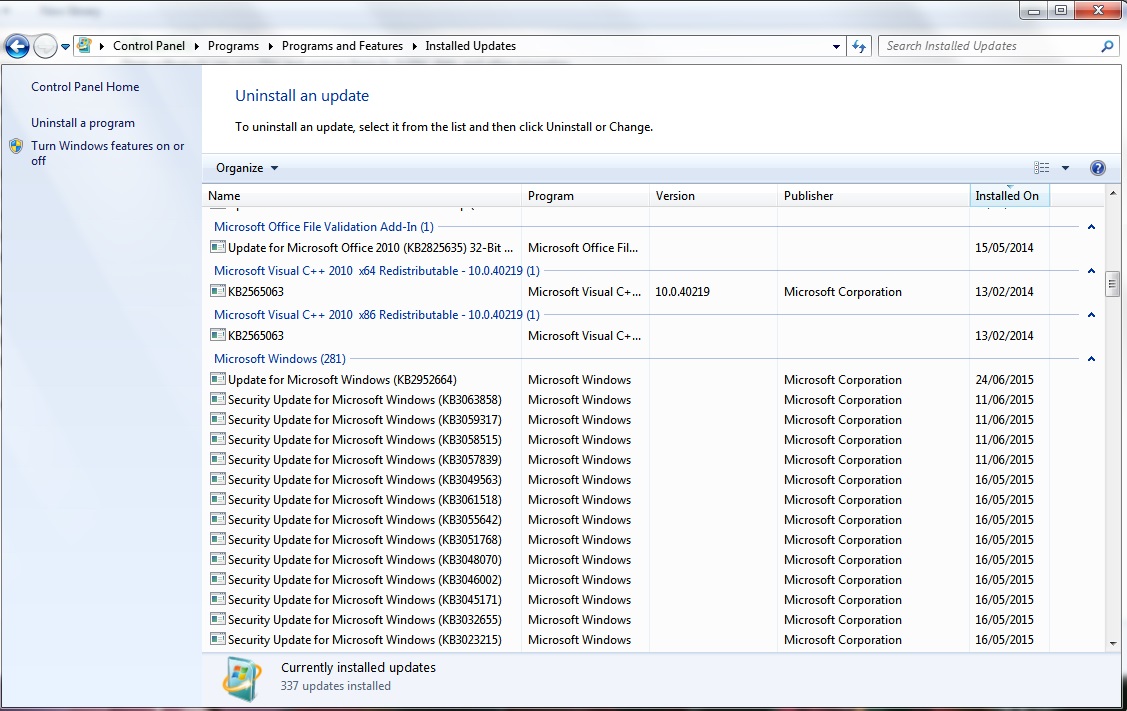
- KB2952664 has been installed right after the uninstalling process. I'm not sure when it was exactly installed (before or after restart). It's been dated as today (23rd of June 2015) which it shows up on the installed updates
- When I checked the "Windows update" tab it says I've never checked for any updates nor installed one. The update history and hidden updates has been wiped out as well.

For the second point, I was able to check for updates which brought back all the hidden updates (I kept running the scans until there were no updates found).

As for the first point I don't know what caused to install KB2952664 again automatically. I've tried uninstalling this freshly installed update however it's still there listed on the installed updates. I'm not sure how to check if the uninstalling has been successful or not but the process was smooth (no endless waits or errors popped during the process) as well as two restore point has been created: one for the initial removal (dated 6th of April) and the other one for the newly installed KB2952664 (dated today).

As a result is there a way to fix this "problem" or better yet, remove KB2952664 completely?


P.S For the second point I've mentioned above, is that normal occurrence? It's weird that everything has been wiped out like that in windows update after uninstalling the initial updates.
 

My Computer My Computer

OS
Windows 7 Ultimate x64
How did you actually do the uninstall of KB2952664? using Control Panel>Installed Updates, or the WUSA command?
Try using the following command in an Elevated Command Prompt:


wusa /uninstall /kb:2952664

reboot once it's finished, then do a Check for Updates, and hide the KB when it's found again.
 

My Computer My Computer

Computer type
Laptop
Computer Manufacturer/Model Number
Asus K52F or Lenovo B51-80
OS
Win 7 x64 Home Premium (and x86 VirtualBox VM)/Win10
CPU
i3 370M/i7 6500U
Motherboard
Asus/Lenovo
Memory
8GB - finally :)/8GB
Graphics Card(s)
it's an i3, dude!/dual Intel&nVidia
Sound Card
onboard
Monitor(s) Displays
15.6" built-in
Screen Resolution
1366x768/1920x1080
Hard Drives
750GB Seagate internal
Sundry external drives attached to other computers on the local network
1TB SSD on the Lenovo
PSU
n/a
Internet Speed
as much as I can get - usually on a dongle/phone, so <1MB/s
Antivirus
MSE/Defender
Browser
IE11/12/Edge/Chrome/FF(if I must)
How did you actually do the uninstall of KB2952664? using Control Panel>Installed Updates, or the WUSA command?
Try using the following command in an Elevated Command Prompt:


wusa /uninstall /kb:2952664

reboot once it's finished, then do a Check for Updates, and hide the KB when it's found again.

Hey Noel sorry if I'm causing you any troubles for asking questions again.

I've used "control Panel>installed" method.

I just tried wusa method though it produced the same result. The update was "installed" just now as well as restore point was created for this uninstall process.
sAIpW5b.jpg
 

My Computer My Computer

OS
Windows 7 Ultimate x64
OK - let's see if we can work out what's happening - it shouldn't be reinstalling in that way.

Pleasefollow the WindowsUpdate Posting Instructions and postthe requested data


If thefile is too large (8MB compressed), remove the older CBSPersist cab files untilthe final file is below the limit - you can always post them separately afterzipping them. (the forum doesn't allow the upload of bare CAB files, for anumber of reasons)


Pleasealso post the C:\Windows\windowsudpate.log file


My Computer My Computer

Computer type
Laptop
Computer Manufacturer/Model Number
Asus K52F or Lenovo B51-80
OS
Win 7 x64 Home Premium (and x86 VirtualBox VM)/Win10
CPU
i3 370M/i7 6500U
Motherboard
Asus/Lenovo
Memory
8GB - finally :)/8GB
Graphics Card(s)
it's an i3, dude!/dual Intel&nVidia
Sound Card
onboard
Monitor(s) Displays
15.6" built-in
Screen Resolution
1366x768/1920x1080
Hard Drives
750GB Seagate internal
Sundry external drives attached to other computers on the local network
1TB SSD on the Lenovo
PSU
n/a
Internet Speed
as much as I can get - usually on a dongle/phone, so <1MB/s
Antivirus
MSE/Defender
Browser
IE11/12/Edge/Chrome/FF(if I must)
OK - let's see if we can work out what's happening - it shouldn't be reinstalling in that way.

SURT ran successfully, SFC detected no violations and there are no error messages in Windows update.

I've attached sfc and windowsUpdate log though for CBS, the file is too big to upload it here. The latest CBSpersist cab file (CbsPersist_20150623175641.log) is 9.67MB and when I uncompressed and compressed into .zip it's still 9.10MB.
As such I've uploaded it on mediafire. I'm not sure if I'm allowed to post links from external file storage site though if there's a way to reduce the size please let me know so that I can upload it here directly. The .zip file uploaded in mediafire includes the whole folder of "CBS" excluding the older CBSpersist cab files.
 

Attachments

My Computer My Computer

OS
Windows 7 Ultimate x64
Please post the C:\Windwos\Logs\CBS\CheckSUR.log file - CheckSUR doesn't advertise its results well enough :)
I really also need the full CBS.log rather than just the SFCDetails extracts, since it carries a lot more load than just that. - please upload it to a fileshare site (preferably OneDrive or DropBox), and post a link.


According to the windowsupdate.log file, KB2952664 hasn't been reinstalled at all (at least by WU) - since before the start of the current log on 2nd June.
 

My Computer My Computer

Computer type
Laptop
Computer Manufacturer/Model Number
Asus K52F or Lenovo B51-80
OS
Win 7 x64 Home Premium (and x86 VirtualBox VM)/Win10
CPU
i3 370M/i7 6500U
Motherboard
Asus/Lenovo
Memory
8GB - finally :)/8GB
Graphics Card(s)
it's an i3, dude!/dual Intel&nVidia
Sound Card
onboard
Monitor(s) Displays
15.6" built-in
Screen Resolution
1366x768/1920x1080
Hard Drives
750GB Seagate internal
Sundry external drives attached to other computers on the local network
1TB SSD on the Lenovo
PSU
n/a
Internet Speed
as much as I can get - usually on a dongle/phone, so <1MB/s
Antivirus
MSE/Defender
Browser
IE11/12/Edge/Chrome/FF(if I must)
Please post the C:\Windwos\Logs\CBS\CheckSUR.log file - CheckSUR doesn't advertise its results well enough :)
I really also need the full CBS.log rather than just the SFCDetails extracts, since it carries a lot more load than just that. - please upload it to a fileshare site (preferably OneDrive or DropBox), and post a link.


According to the windowsupdate.log file, KB2952664 hasn't been reinstalled at all (at least by WU) - since before the start of the current log on 2nd June.

Here's the new link from OneDrive: https://onedrive.live.com/redir?resid=F2A00002D5D7B19F!135&authkey=!AGh0nxhAqy7d6ds&ithint=file,zip

The zip contains everything in "CBS" file (including CheckSUR.log and CBS.log) except for older CBSpersist files.
 

My Computer My Computer

OS
Windows 7 Ultimate x64
Thanks - unfortunately, it's not very informative, as there are NO errors in any of the CBS data, and the CheckSUR scans are (mostly) clear as well.
I do see that you have Kaspersky installed - perhaps that is interfering? try switching it off before uninstalling the update once again (make sure that you set it to stay off on the reboot! - switch it back on manually after the reboot is complete)
 

My Computer My Computer

Computer type
Laptop
Computer Manufacturer/Model Number
Asus K52F or Lenovo B51-80
OS
Win 7 x64 Home Premium (and x86 VirtualBox VM)/Win10
CPU
i3 370M/i7 6500U
Motherboard
Asus/Lenovo
Memory
8GB - finally :)/8GB
Graphics Card(s)
it's an i3, dude!/dual Intel&nVidia
Sound Card
onboard
Monitor(s) Displays
15.6" built-in
Screen Resolution
1366x768/1920x1080
Hard Drives
750GB Seagate internal
Sundry external drives attached to other computers on the local network
1TB SSD on the Lenovo
PSU
n/a
Internet Speed
as much as I can get - usually on a dongle/phone, so <1MB/s
Antivirus
MSE/Defender
Browser
IE11/12/Edge/Chrome/FF(if I must)
Thanks - unfortunately, it's not very informative, as there are NO errors in any of the CBS data, and the CheckSUR scans are (mostly) clear as well.
I do see that you have Kaspersky installed - perhaps that is interfering? try switching it off before uninstalling the update once again (make sure that you set it to stay off on the reboot! - switch it back on manually after the reboot is complete)

This is weird... I've just tried both method (control panel and wusa) with Kaspersky turned off (before and after restart) and yet it was reinstalled again:
v8MshQY.jpg


As usual two restore points was created so there's no doubt it was successfully uninstalled for both method.
 

My Computer My Computer

OS
Windows 7 Ultimate x64
Try this -
Reinstall KB3035583, then uninstall KB2952664 and then uninstall KB 3035583, and hide them both
 

My Computer My Computer

Computer type
Laptop
Computer Manufacturer/Model Number
Asus K52F or Lenovo B51-80
OS
Win 7 x64 Home Premium (and x86 VirtualBox VM)/Win10
CPU
i3 370M/i7 6500U
Motherboard
Asus/Lenovo
Memory
8GB - finally :)/8GB
Graphics Card(s)
it's an i3, dude!/dual Intel&nVidia
Sound Card
onboard
Monitor(s) Displays
15.6" built-in
Screen Resolution
1366x768/1920x1080
Hard Drives
750GB Seagate internal
Sundry external drives attached to other computers on the local network
1TB SSD on the Lenovo
PSU
n/a
Internet Speed
as much as I can get - usually on a dongle/phone, so <1MB/s
Antivirus
MSE/Defender
Browser
IE11/12/Edge/Chrome/FF(if I must)
Try this -
Reinstall KB3035583, then uninstall KB2952664 and then uninstall KB 3035583, and hide them both

Nope, it doesn't work.

Installed 3035583 and then I tried to uninstall 2952665 via both methods as well as enabling/disabling Kaspersky as well. Though it doesn't work as I can see 2952665 still being listed on the Windows update.
On the other hand, I was able to uninstall 3035583 again via control panel.

With that being said, I've noticed two interesting points after performing these actions:
- 2952665 is still listed on the installed updates right after the uninstall process/restart
- Unlike any other Windows update, 2952665 doesn't prompt a pop up window saying it needs to restart the computer. Also after restarting there's no "reconfiguring Windows" screen just before the desktop shows up.
With the point two, I find this confusing as the installation of 2952665 produced no errors - meaning I can see the install bar filling up to the end and the window disappearing.
 

My Computer My Computer

OS
Windows 7 Ultimate x64
There's quite a few updates that don't require a reboot to complete the install - it's just that there are enough that do, that make it a likelihood that you'll have to reboot after most batches of updates.
 

My Computer My Computer

Computer type
Laptop
Computer Manufacturer/Model Number
Asus K52F or Lenovo B51-80
OS
Win 7 x64 Home Premium (and x86 VirtualBox VM)/Win10
CPU
i3 370M/i7 6500U
Motherboard
Asus/Lenovo
Memory
8GB - finally :)/8GB
Graphics Card(s)
it's an i3, dude!/dual Intel&nVidia
Sound Card
onboard
Monitor(s) Displays
15.6" built-in
Screen Resolution
1366x768/1920x1080
Hard Drives
750GB Seagate internal
Sundry external drives attached to other computers on the local network
1TB SSD on the Lenovo
PSU
n/a
Internet Speed
as much as I can get - usually on a dongle/phone, so <1MB/s
Antivirus
MSE/Defender
Browser
IE11/12/Edge/Chrome/FF(if I must)
There's quite a few updates that don't require a reboot to complete the install - it's just that there are enough that do, that make it a likelihood that you'll have to reboot after most batches of updates.

I see... So there's no way to remove 2952664 whatsoever? Is there any other solutions I could try?
 

My Computer My Computer

OS
Windows 7 Ultimate x64

My Computer My Computer

Computer type
Laptop
Computer Manufacturer/Model Number
Asus K52F or Lenovo B51-80
OS
Win 7 x64 Home Premium (and x86 VirtualBox VM)/Win10
CPU
i3 370M/i7 6500U
Motherboard
Asus/Lenovo
Memory
8GB - finally :)/8GB
Graphics Card(s)
it's an i3, dude!/dual Intel&nVidia
Sound Card
onboard
Monitor(s) Displays
15.6" built-in
Screen Resolution
1366x768/1920x1080
Hard Drives
750GB Seagate internal
Sundry external drives attached to other computers on the local network
1TB SSD on the Lenovo
PSU
n/a
Internet Speed
as much as I can get - usually on a dongle/phone, so <1MB/s
Antivirus
MSE/Defender
Browser
IE11/12/Edge/Chrome/FF(if I must)

My Computer My Computer

OS
Windows 7 Ultimate x64
None of them will uninstall anything - you'll simply lose the Updates History log, but all updates will still be installed, and visible in the Installed Updates listing.

Try with Option 2 first - if you get the same result, try it with Option 3
 

My Computer My Computer

Computer type
Laptop
Computer Manufacturer/Model Number
Asus K52F or Lenovo B51-80
OS
Win 7 x64 Home Premium (and x86 VirtualBox VM)/Win10
CPU
i3 370M/i7 6500U
Motherboard
Asus/Lenovo
Memory
8GB - finally :)/8GB
Graphics Card(s)
it's an i3, dude!/dual Intel&nVidia
Sound Card
onboard
Monitor(s) Displays
15.6" built-in
Screen Resolution
1366x768/1920x1080
Hard Drives
750GB Seagate internal
Sundry external drives attached to other computers on the local network
1TB SSD on the Lenovo
PSU
n/a
Internet Speed
as much as I can get - usually on a dongle/phone, so <1MB/s
Antivirus
MSE/Defender
Browser
IE11/12/Edge/Chrome/FF(if I must)
None of them will uninstall anything - you'll simply lose the Updates History log, but all updates will still be installed, and visible in the Installed Updates listing.

Try with Option 2 first - if you get the same result, try it with Option 3

Finally! I was able to get rid of it by using Option 2 with control panel method. 2952664 was gone for good as it's missing from the list:
SKC17Jx.jpg


With that being said when I tried checking for updates, 2952664 or any other similar updates didn't come out. I also tried between restarts/shut downs however it doesn't show up whatsoever.

Is this some kind of bugs from Windows update? I initially thought my Windows update files were corrupted but as you know everything seems to be okay.
 

My Computer My Computer

OS
Windows 7 Ultimate x64
I think it was a minor corruption of the SoftwareDistribution folder that caused your problem - or possibly a registry error.

Hopefully, it won't recur (It's the only time I've seen this problem!)

Good luck!
 

My Computer My Computer

Computer type
Laptop
Computer Manufacturer/Model Number
Asus K52F or Lenovo B51-80
OS
Win 7 x64 Home Premium (and x86 VirtualBox VM)/Win10
CPU
i3 370M/i7 6500U
Motherboard
Asus/Lenovo
Memory
8GB - finally :)/8GB
Graphics Card(s)
it's an i3, dude!/dual Intel&nVidia
Sound Card
onboard
Monitor(s) Displays
15.6" built-in
Screen Resolution
1366x768/1920x1080
Hard Drives
750GB Seagate internal
Sundry external drives attached to other computers on the local network
1TB SSD on the Lenovo
PSU
n/a
Internet Speed
as much as I can get - usually on a dongle/phone, so <1MB/s
Antivirus
MSE/Defender
Browser
IE11/12/Edge/Chrome/FF(if I must)
I think it was a minor corruption of the SoftwareDistribution folder that caused your problem - or possibly a registry error.

Hopefully, it won't recur (It's the only time I've seen this problem!)

Good luck!

Alright though I'm a bit worried about 2952664 not showing up in the update section. The fact that it just disappeared like that seems unnatural.
 

My Computer My Computer

OS
Windows 7 Ultimate x64
It may have been superceded by another update - don't worry about it.
 

My Computer My Computer

Computer type
Laptop
Computer Manufacturer/Model Number
Asus K52F or Lenovo B51-80
OS
Win 7 x64 Home Premium (and x86 VirtualBox VM)/Win10
CPU
i3 370M/i7 6500U
Motherboard
Asus/Lenovo
Memory
8GB - finally :)/8GB
Graphics Card(s)
it's an i3, dude!/dual Intel&nVidia
Sound Card
onboard
Monitor(s) Displays
15.6" built-in
Screen Resolution
1366x768/1920x1080
Hard Drives
750GB Seagate internal
Sundry external drives attached to other computers on the local network
1TB SSD on the Lenovo
PSU
n/a
Internet Speed
as much as I can get - usually on a dongle/phone, so <1MB/s
Antivirus
MSE/Defender
Browser
IE11/12/Edge/Chrome/FF(if I must)
Back
Top