Solved Opening Device Manager

markaz

New member
Power User
VIP
Local time
6:23 AM
Messages
168
Location
Peoria, AZ
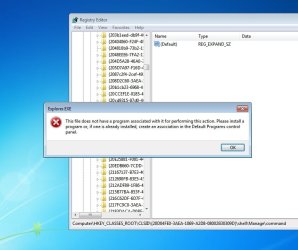
When I try to open Device Manager from either Desktop > Computer or Start Menu > Computer I get the following:

hJXkEV.jpg


Tried associating different programs with no succss.
 

My Computer My Computer

At a glance

Windows 7 Home Premium x64AMD A6-6400K APU8.0GB DDR3-1600Radeon Onboard Graphics
Computer type
PC/Desktop
Computer Manufacturer/Model Number
Custom
OS
Windows 7 Home Premium x64
CPU
AMD A6-6400K APU
Motherboard
Gigabyte F2A88XM-D3H
Memory
8.0GB DDR3-1600
Graphics Card(s)
Radeon Onboard Graphics
Sound Card
Realtek High Def
Monitor(s) Displays
Acer K242HQL
Screen Resolution
1920x1080
Hard Drives
Samsung 850 EVO SSD 250GB
PSU
Corsair 430W
Case
Silverstone PS-08
Cooling
Enermax fans (120mm-intake, 80mm-exhaust)
Keyboard
Logitech K360
Mouse
Logitech M305 Cordless Optical
Internet Speed
Download 60.19Mbps Upload 6.71Mbps
Antivirus
AVG
Browser
Iron Version 51.0.2700.0 (64-bit)
Run a sfc check

in command prompt

sfc /scannow
 

My Computer My Computer

At a glance

Windows 10 Pro x64Intel Core i7 6700KGSkill TridentZ RGB 16GB 3600 16-16-16-36EVGA GTX 980 Ti SC x2
Computer type
PC/Desktop
Computer Manufacturer/Model Number
Skylake Special #666
OS
Windows 10 Pro x64
CPU
Intel Core i7 6700K
Motherboard
Asus Sabertooth Z170 Mark 1
Memory
GSkill TridentZ RGB 16GB 3600 16-16-16-36
Graphics Card(s)
EVGA GTX 980 Ti SC x2
Sound Card
Realtek High Definition
Monitor(s) Displays
AOC G2460PG
Screen Resolution
1920 x 1080 144Hz
Hard Drives
Samsung 860 Pro 256GB, Seagate Barracuda 4TB x2
PSU
EVGA 1000 P2, EVGA White Custom Braided Cables
Case
Corsair Vengeance C70 Gunmetal Black
Cooling
Corsair H100i v2, Corsair ML120 x2, Thermal Grizzly Kryonaut
Keyboard
Logitech G910 Orion Spectrum
Mouse
Logitech G700s
Internet Speed
Verizon Fios Quantum Gateway 75/75
Antivirus
Windows Defender, Malwarebytes Free 3.8.3
Browser
Chrome
Other Info
Corsair SP120 x4, LG Blu-ray Drive, Durabrand HT-395 100 Watt Dolby Digital Amp, Corsair H2100 Wireless 7.1 Headset

My Computer My Computer

At a glance

Windows 10 Pro X64Intel Quad Core i7-4770 @ 3.4Ghz16.0GB PC3-12800 DDR3 SDRAM 1600 MHzIntel Integrated HD Graphics
Computer type
PC/Desktop
Computer Manufacturer/Model Number
Lenovo IdeaCenter 450
OS
Windows 10 Pro X64
CPU
Intel Quad Core i7-4770 @ 3.4Ghz
Memory
16.0GB PC3-12800 DDR3 SDRAM 1600 MHz
Graphics Card(s)
Intel Integrated HD Graphics
Sound Card
Realtek HD Audio
Monitor(s) Displays
HP 22" LCD
Screen Resolution
1680 x 1050
Hard Drives
250GB Samsung EVO SATA-3 SSD
2TB Seagate ST2000DM001 SATA-2
1.5TB Seagate ST3150041AS SATA
Keyboard
Dell USB
Mouse
Lenovo USB
Internet Speed
Cable via Road Runner 3MB Upload, 30MB Download
Antivirus
Windows Defender, MBAM Pro, MBAE
Browser
Seamonkey
Other Info
UEFI/GPT
PLDS DVD-RW DH16AERSH

My Computer My Computer

At a glance

Windows 7 Home Premium x64AMD A6-6400K APU8.0GB DDR3-1600Radeon Onboard Graphics
Computer type
PC/Desktop
Computer Manufacturer/Model Number
Custom
OS
Windows 7 Home Premium x64
CPU
AMD A6-6400K APU
Motherboard
Gigabyte F2A88XM-D3H
Memory
8.0GB DDR3-1600
Graphics Card(s)
Radeon Onboard Graphics
Sound Card
Realtek High Def
Monitor(s) Displays
Acer K242HQL
Screen Resolution
1920x1080
Hard Drives
Samsung 850 EVO SSD 250GB
PSU
Corsair 430W
Case
Silverstone PS-08
Cooling
Enermax fans (120mm-intake, 80mm-exhaust)
Keyboard
Logitech K360
Mouse
Logitech M305 Cordless Optical
Internet Speed
Download 60.19Mbps Upload 6.71Mbps
Antivirus
AVG
Browser
Iron Version 51.0.2700.0 (64-bit)
Try run (Win+R): devmgr.msc
Or right click computer - manage (is this the one you have tried?)

Edited: not in cmd but with win+R
 

My Computer My Computer

At a glance

Windows 7 Ultimate x64 SP1AMD Phenom 2 1090T2x8GB Kingston HyperX Fury Black 1600Mhz Unga...MSI GTX 970 Gaming 4G
Computer type
PC/Desktop
Computer Manufacturer/Model Number
Custom Build
OS
Windows 7 Ultimate x64 SP1
CPU
AMD Phenom 2 1090T
Motherboard
Gigabyte GA-890FXA-UD5
Memory
2x8GB Kingston HyperX Fury Black 1600Mhz Unganged
Graphics Card(s)
MSI GTX 970 Gaming 4G
Sound Card
Realtek On-Board HD 7.1 Audio / Logitech G35
Monitor(s) Displays
3xAcer GD245HQ
Screen Resolution
1920x1080
Hard Drives
Samsung 850 Pro 512GB SSD - OS /
WD Caviar Black SATA 3 - 1 TBx2 - Dynamic RAID 0 /
WD Caviar Green SATA 2 - 640GBx2 - Dynamic RAID 0 /
WD Caviar Green SATA 2 - 640GB - Internal Backup /
Seagate Barracude SATA 3 - 3TB - External Backup/ Sync
PSU
HighPower 1000W
Case
Cooler Master HAF 932
Cooling
Noctua NH-D14
Keyboard
Logitech G19
Mouse
Logitech G500
Internet Speed
100/4 Mbit Cable (100GB quota)
Antivirus
ZoneAlarm Extreme Security / MBAM Pro / MBAE Free / SAS Free
Browser
IE 11 - Firefox - Chrome
Other Info
Logitech F710/ G27/ G940/ Z5500 // TrackIR 5 // Nvidia 3D Surround Vision
Try run (Win+R): devmgr.msc
Or right click computer - manage (is this the one you have tried?)

Edited: not in cmd but with win+R

SNoGEj.jpg


If I run devmgmt.msc Device Manager will open. Also, if I click on Device Manager in Control Panel it will open. The issue is right clicking Computer from the dektop and start menu.
 

My Computer My Computer

At a glance

Windows 7 Home Premium x64AMD A6-6400K APU8.0GB DDR3-1600Radeon Onboard Graphics
Computer type
PC/Desktop
Computer Manufacturer/Model Number
Custom
OS
Windows 7 Home Premium x64
CPU
AMD A6-6400K APU
Motherboard
Gigabyte F2A88XM-D3H
Memory
8.0GB DDR3-1600
Graphics Card(s)
Radeon Onboard Graphics
Sound Card
Realtek High Def
Monitor(s) Displays
Acer K242HQL
Screen Resolution
1920x1080
Hard Drives
Samsung 850 EVO SSD 250GB
PSU
Corsair 430W
Case
Silverstone PS-08
Cooling
Enermax fans (120mm-intake, 80mm-exhaust)
Keyboard
Logitech K360
Mouse
Logitech M305 Cordless Optical
Internet Speed
Download 60.19Mbps Upload 6.71Mbps
Antivirus
AVG
Browser
Iron Version 51.0.2700.0 (64-bit)
Yes yes, my bad, you got the correct one. I will see if I can find anything new when I start up my PC.

In the meanwhile check the shortcut in start menu please.
 

My Computer My Computer

At a glance

Windows 7 Ultimate x64 SP1AMD Phenom 2 1090T2x8GB Kingston HyperX Fury Black 1600Mhz Unga...MSI GTX 970 Gaming 4G
Computer type
PC/Desktop
Computer Manufacturer/Model Number
Custom Build
OS
Windows 7 Ultimate x64 SP1
CPU
AMD Phenom 2 1090T
Motherboard
Gigabyte GA-890FXA-UD5
Memory
2x8GB Kingston HyperX Fury Black 1600Mhz Unganged
Graphics Card(s)
MSI GTX 970 Gaming 4G
Sound Card
Realtek On-Board HD 7.1 Audio / Logitech G35
Monitor(s) Displays
3xAcer GD245HQ
Screen Resolution
1920x1080
Hard Drives
Samsung 850 Pro 512GB SSD - OS /
WD Caviar Black SATA 3 - 1 TBx2 - Dynamic RAID 0 /
WD Caviar Green SATA 2 - 640GBx2 - Dynamic RAID 0 /
WD Caviar Green SATA 2 - 640GB - Internal Backup /
Seagate Barracude SATA 3 - 3TB - External Backup/ Sync
PSU
HighPower 1000W
Case
Cooler Master HAF 932
Cooling
Noctua NH-D14
Keyboard
Logitech G19
Mouse
Logitech G500
Internet Speed
100/4 Mbit Cable (100GB quota)
Antivirus
ZoneAlarm Extreme Security / MBAM Pro / MBAE Free / SAS Free
Browser
IE 11 - Firefox - Chrome
Other Info
Logitech F710/ G27/ G940/ Z5500 // TrackIR 5 // Nvidia 3D Surround Vision
Well, here is one problem. You are having issue with Computer Management and not Device Manager.

Try (if fail move to next):
Win+R - compmgmt.msc
Browse to C:\Windows\System32 and double click compmgmt.msc

See if it is the same, or working. I will search some while you do the test.
 

My Computer My Computer

At a glance

Windows 7 Ultimate x64 SP1AMD Phenom 2 1090T2x8GB Kingston HyperX Fury Black 1600Mhz Unga...MSI GTX 970 Gaming 4G
Computer type
PC/Desktop
Computer Manufacturer/Model Number
Custom Build
OS
Windows 7 Ultimate x64 SP1
CPU
AMD Phenom 2 1090T
Motherboard
Gigabyte GA-890FXA-UD5
Memory
2x8GB Kingston HyperX Fury Black 1600Mhz Unganged
Graphics Card(s)
MSI GTX 970 Gaming 4G
Sound Card
Realtek On-Board HD 7.1 Audio / Logitech G35
Monitor(s) Displays
3xAcer GD245HQ
Screen Resolution
1920x1080
Hard Drives
Samsung 850 Pro 512GB SSD - OS /
WD Caviar Black SATA 3 - 1 TBx2 - Dynamic RAID 0 /
WD Caviar Green SATA 2 - 640GBx2 - Dynamic RAID 0 /
WD Caviar Green SATA 2 - 640GB - Internal Backup /
Seagate Barracude SATA 3 - 3TB - External Backup/ Sync
PSU
HighPower 1000W
Case
Cooler Master HAF 932
Cooling
Noctua NH-D14
Keyboard
Logitech G19
Mouse
Logitech G500
Internet Speed
100/4 Mbit Cable (100GB quota)
Antivirus
ZoneAlarm Extreme Security / MBAM Pro / MBAE Free / SAS Free
Browser
IE 11 - Firefox - Chrome
Other Info
Logitech F710/ G27/ G940/ Z5500 // TrackIR 5 // Nvidia 3D Surround Vision
In the meanwhile check the shortcut in start menu please.
Right clicking Computer > Manage in the start menu will not open Device Manager. Of course when I click on Properties for Computer in start menu the System item in Contol Panel opens which contains the link to Device Manager and that works OK. The sole problem is right clicking Computer > Manage.
 

My Computer My Computer

At a glance

Windows 7 Home Premium x64AMD A6-6400K APU8.0GB DDR3-1600Radeon Onboard Graphics
Computer type
PC/Desktop
Computer Manufacturer/Model Number
Custom
OS
Windows 7 Home Premium x64
CPU
AMD A6-6400K APU
Motherboard
Gigabyte F2A88XM-D3H
Memory
8.0GB DDR3-1600
Graphics Card(s)
Radeon Onboard Graphics
Sound Card
Realtek High Def
Monitor(s) Displays
Acer K242HQL
Screen Resolution
1920x1080
Hard Drives
Samsung 850 EVO SSD 250GB
PSU
Corsair 430W
Case
Silverstone PS-08
Cooling
Enermax fans (120mm-intake, 80mm-exhaust)
Keyboard
Logitech K360
Mouse
Logitech M305 Cordless Optical
Internet Speed
Download 60.19Mbps Upload 6.71Mbps
Antivirus
AVG
Browser
Iron Version 51.0.2700.0 (64-bit)
Well, here is one problem. You are having issue with Computer Management and not Device Manager.

Try (if fail move to next):
Win+R - compmgmt.msc
Browse to C:\Windows\System32 and double click compmgmt.msc

See if it is the same, or working. I will search some while you do the test.
Computer Management opens when compmgmt.msc is run and it also opens by double clicking compmgmt.msc in System32.
 

My Computer My Computer

At a glance

Windows 7 Home Premium x64AMD A6-6400K APU8.0GB DDR3-1600Radeon Onboard Graphics
Computer type
PC/Desktop
Computer Manufacturer/Model Number
Custom
OS
Windows 7 Home Premium x64
CPU
AMD A6-6400K APU
Motherboard
Gigabyte F2A88XM-D3H
Memory
8.0GB DDR3-1600
Graphics Card(s)
Radeon Onboard Graphics
Sound Card
Realtek High Def
Monitor(s) Displays
Acer K242HQL
Screen Resolution
1920x1080
Hard Drives
Samsung 850 EVO SSD 250GB
PSU
Corsair 430W
Case
Silverstone PS-08
Cooling
Enermax fans (120mm-intake, 80mm-exhaust)
Keyboard
Logitech K360
Mouse
Logitech M305 Cordless Optical
Internet Speed
Download 60.19Mbps Upload 6.71Mbps
Antivirus
AVG
Browser
Iron Version 51.0.2700.0 (64-bit)
Open regedit and browse to (you can search - CTRL+F - for {20D04FE0-3AEA-1069-A2D8-08002B30309D})

HKEY_CLASSES_ROOT\CLSID\{20D04FE0-3AEA-1069-A2D8-08002B30309D}\shell\Manage\command

see if Data field for (Default) is: %SystemRoot%\system32\CompMgmtLauncher.exe
 

My Computer My Computer

At a glance

Windows 7 Ultimate x64 SP1AMD Phenom 2 1090T2x8GB Kingston HyperX Fury Black 1600Mhz Unga...MSI GTX 970 Gaming 4G
Computer type
PC/Desktop
Computer Manufacturer/Model Number
Custom Build
OS
Windows 7 Ultimate x64 SP1
CPU
AMD Phenom 2 1090T
Motherboard
Gigabyte GA-890FXA-UD5
Memory
2x8GB Kingston HyperX Fury Black 1600Mhz Unganged
Graphics Card(s)
MSI GTX 970 Gaming 4G
Sound Card
Realtek On-Board HD 7.1 Audio / Logitech G35
Monitor(s) Displays
3xAcer GD245HQ
Screen Resolution
1920x1080
Hard Drives
Samsung 850 Pro 512GB SSD - OS /
WD Caviar Black SATA 3 - 1 TBx2 - Dynamic RAID 0 /
WD Caviar Green SATA 2 - 640GBx2 - Dynamic RAID 0 /
WD Caviar Green SATA 2 - 640GB - Internal Backup /
Seagate Barracude SATA 3 - 3TB - External Backup/ Sync
PSU
HighPower 1000W
Case
Cooler Master HAF 932
Cooling
Noctua NH-D14
Keyboard
Logitech G19
Mouse
Logitech G500
Internet Speed
100/4 Mbit Cable (100GB quota)
Antivirus
ZoneAlarm Extreme Security / MBAM Pro / MBAE Free / SAS Free
Browser
IE 11 - Firefox - Chrome
Other Info
Logitech F710/ G27/ G940/ Z5500 // TrackIR 5 // Nvidia 3D Surround Vision
I could reproduce your issue in a Virtual OS.

Comp Mgmt problem.jpg

If you can't seem to get it working download and run the reg file attached.

Some more testing and this corrects the right click Computer but not the Start Menu - Administrative Tools shortcut, will look further
 

Attachments

My Computer My Computer

At a glance

Windows 7 Ultimate x64 SP1AMD Phenom 2 1090T2x8GB Kingston HyperX Fury Black 1600Mhz Unga...MSI GTX 970 Gaming 4G
Computer type
PC/Desktop
Computer Manufacturer/Model Number
Custom Build
OS
Windows 7 Ultimate x64 SP1
CPU
AMD Phenom 2 1090T
Motherboard
Gigabyte GA-890FXA-UD5
Memory
2x8GB Kingston HyperX Fury Black 1600Mhz Unganged
Graphics Card(s)
MSI GTX 970 Gaming 4G
Sound Card
Realtek On-Board HD 7.1 Audio / Logitech G35
Monitor(s) Displays
3xAcer GD245HQ
Screen Resolution
1920x1080
Hard Drives
Samsung 850 Pro 512GB SSD - OS /
WD Caviar Black SATA 3 - 1 TBx2 - Dynamic RAID 0 /
WD Caviar Green SATA 2 - 640GBx2 - Dynamic RAID 0 /
WD Caviar Green SATA 2 - 640GB - Internal Backup /
Seagate Barracude SATA 3 - 3TB - External Backup/ Sync
PSU
HighPower 1000W
Case
Cooler Master HAF 932
Cooling
Noctua NH-D14
Keyboard
Logitech G19
Mouse
Logitech G500
Internet Speed
100/4 Mbit Cable (100GB quota)
Antivirus
ZoneAlarm Extreme Security / MBAM Pro / MBAE Free / SAS Free
Browser
IE 11 - Firefox - Chrome
Other Info
Logitech F710/ G27/ G940/ Z5500 // TrackIR 5 // Nvidia 3D Surround Vision
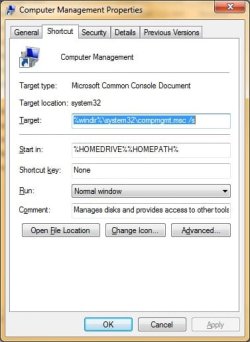
Also check shortcut properties for Start Menu:
- Browse to C:\ProgramData\Microsoft\Windows\Start Menu\Programs\Administrative Tools
- right click Computer Management and select properties
- compare with the one I attached below

comp mgmt properties.jpg

If this also doesn't work:
- Browse to C:\Windows\System32, right click compmgmt.msc and select "Send to: Desktop (create shortcut)".
- On desktop rename the shortcut to "Computer Management".
- Cut and paste in "C:\ProgramData\Microsoft\Windows\Start Menu\Programs\Administrative Tools"
- overwrite if it asks
 

My Computer My Computer

At a glance

Windows 7 Ultimate x64 SP1AMD Phenom 2 1090T2x8GB Kingston HyperX Fury Black 1600Mhz Unga...MSI GTX 970 Gaming 4G
Computer type
PC/Desktop
Computer Manufacturer/Model Number
Custom Build
OS
Windows 7 Ultimate x64 SP1
CPU
AMD Phenom 2 1090T
Motherboard
Gigabyte GA-890FXA-UD5
Memory
2x8GB Kingston HyperX Fury Black 1600Mhz Unganged
Graphics Card(s)
MSI GTX 970 Gaming 4G
Sound Card
Realtek On-Board HD 7.1 Audio / Logitech G35
Monitor(s) Displays
3xAcer GD245HQ
Screen Resolution
1920x1080
Hard Drives
Samsung 850 Pro 512GB SSD - OS /
WD Caviar Black SATA 3 - 1 TBx2 - Dynamic RAID 0 /
WD Caviar Green SATA 2 - 640GBx2 - Dynamic RAID 0 /
WD Caviar Green SATA 2 - 640GB - Internal Backup /
Seagate Barracude SATA 3 - 3TB - External Backup/ Sync
PSU
HighPower 1000W
Case
Cooler Master HAF 932
Cooling
Noctua NH-D14
Keyboard
Logitech G19
Mouse
Logitech G500
Internet Speed
100/4 Mbit Cable (100GB quota)
Antivirus
ZoneAlarm Extreme Security / MBAM Pro / MBAE Free / SAS Free
Browser
IE 11 - Firefox - Chrome
Other Info
Logitech F710/ G27/ G940/ Z5500 // TrackIR 5 // Nvidia 3D Surround Vision
Thanks for all of your efforts, GokAy. Went to the registry Key you posted and the value data was already present. But your post got me to thinking about a thread I posted a while back and the fix had to do with a registry item called lnkfile. Seeing as how the .msc file works properly and the issue I'm having has to do with the Manage link accessed when right clicking Computer, I did more investigating at Sevenforums about link files and lo and behold found this: http://www.sevenforums.com/tutorials/78815-manage-fix-file-does-not-have-program-associated.html. Brink already addressed my problem in this tutorial! Making a long story short you will see that a portion of the fix is what you posted. Because my registry already had HKEY_CLASSES_ROOT\CLSID\{20D04FE0-3AEA-1069-A2D8-08002B30309D}\shell\Manage\command %SystemRoot%\system32\CompMgmtLauncher.exe I tried adding the string value "IsShortcut" to the lnkfile key. VOILA! I can now launch Device Manager when right clicking Computer > Manage.

Thanks again for everything.
 

My Computer My Computer

At a glance

Windows 7 Home Premium x64AMD A6-6400K APU8.0GB DDR3-1600Radeon Onboard Graphics
Computer type
PC/Desktop
Computer Manufacturer/Model Number
Custom
OS
Windows 7 Home Premium x64
CPU
AMD A6-6400K APU
Motherboard
Gigabyte F2A88XM-D3H
Memory
8.0GB DDR3-1600
Graphics Card(s)
Radeon Onboard Graphics
Sound Card
Realtek High Def
Monitor(s) Displays
Acer K242HQL
Screen Resolution
1920x1080
Hard Drives
Samsung 850 EVO SSD 250GB
PSU
Corsair 430W
Case
Silverstone PS-08
Cooling
Enermax fans (120mm-intake, 80mm-exhaust)
Keyboard
Logitech K360
Mouse
Logitech M305 Cordless Optical
Internet Speed
Download 60.19Mbps Upload 6.71Mbps
Antivirus
AVG
Browser
Iron Version 51.0.2700.0 (64-bit)
Oh heh, I did find that tutorial while searching for your issue but haven't noticed one of the screenshots (which is the same as yours). Glad you sorted it out! :)
 

My Computer My Computer

At a glance

Windows 7 Ultimate x64 SP1AMD Phenom 2 1090T2x8GB Kingston HyperX Fury Black 1600Mhz Unga...MSI GTX 970 Gaming 4G
Computer type
PC/Desktop
Computer Manufacturer/Model Number
Custom Build
OS
Windows 7 Ultimate x64 SP1
CPU
AMD Phenom 2 1090T
Motherboard
Gigabyte GA-890FXA-UD5
Memory
2x8GB Kingston HyperX Fury Black 1600Mhz Unganged
Graphics Card(s)
MSI GTX 970 Gaming 4G
Sound Card
Realtek On-Board HD 7.1 Audio / Logitech G35
Monitor(s) Displays
3xAcer GD245HQ
Screen Resolution
1920x1080
Hard Drives
Samsung 850 Pro 512GB SSD - OS /
WD Caviar Black SATA 3 - 1 TBx2 - Dynamic RAID 0 /
WD Caviar Green SATA 2 - 640GBx2 - Dynamic RAID 0 /
WD Caviar Green SATA 2 - 640GB - Internal Backup /
Seagate Barracude SATA 3 - 3TB - External Backup/ Sync
PSU
HighPower 1000W
Case
Cooler Master HAF 932
Cooling
Noctua NH-D14
Keyboard
Logitech G19
Mouse
Logitech G500
Internet Speed
100/4 Mbit Cable (100GB quota)
Antivirus
ZoneAlarm Extreme Security / MBAM Pro / MBAE Free / SAS Free
Browser
IE 11 - Firefox - Chrome
Other Info
Logitech F710/ G27/ G940/ Z5500 // TrackIR 5 // Nvidia 3D Surround Vision
Back
Top