Cooling fan replacement advice for HP Pavilion dv6-6093ex notebook

Hadramawt

New member
Local time
2:52 AM
Messages
177
Hi,


When starting the computer, the following error appears on the screen:

The system has detected that a cooling fan is not operating correctly.
Continued operation is not recommended and may cause unpredictable behavior that could result in random shutdown, data loss or possible system damage. The system will shut down in 15 seconds. To prevent shutdown and continue operation, press the Enter key now.

I followed all steps in this document to fix this error, except the final one which is replacement.

Code:
This document pertains to HP and Compaq notebook PCs.

When starting the computer, the following error appears on the screen:

The system has detected that a cooling fan is not operating correctly.
Continued operation is not recommended and may cause unpredictable behavior that could result in random shutdown, data loss or possible system damage. The system will shut down in 15 seconds. To prevent shutdown and continue operation, press the Enter key now. 

System Fan (90b)
In addition to this error, the system fan may spin faster and become louder.This error indicates that a problem exists related to the heat removal system. One of two possible events is occurring:
.The system fan is not spinning or not spinning properly.
.The temperature inside the case is too high and the fan cannot spin fast enough to remove the heat.
This error message occurs to help prevent costly damage to the computer.

To fix this error, use the following steps:
1. If you notice that the system fan spins and is blowing warm air from the computer,clean the exterior vents to remove dust buildup by blowing air through the vent openings. Do this while the computer is off. Dust can accumulate inside the vent opening and around internal cooling components, preventing the removal of heat.After dust has been removed, try turning on the computer to see if the error goes away.if not, continue to the next step.

For more information on reducing heat inside your computer, see Reducing Heat Inside the PC .2. 

Perform a hard reset. Performing a hard reset can reset recorded thermal values in memory and enable you to use the computer again — even if only for a short time to access and save any important files before service. For information on performing a hard reset, see Use Hard Reset to Resolve Hardware and Software Issues .

3. In some cases, updating the BIOS may help prevent this error from occurring. For information on how to update your BIOS, see Updating the BIOS .

4. Have the computer serviced to clean internal components and replace the system fan if necessary. Ensure that the following items are addressed during servicing:

.Thoroughly remove dust from all internal cooling components.
.Ensure that wires from the system and CPU fans are connected to the motherboard securely.

The spare parts need care when purchasing since they must be compatible with my HP
Product name: HP Pavilion dv6-6093ex Entertainment Notebook PC support).
Product number: LM610EA#A2N


I was told by HP forum member that my notebook's 'Cooling Fan/CPU fan/heatsink' should be replaced with this HP

Spare part number: 641477-001
Discription: Cooling Fan/CPU fan/heatsink (For use only with computer models equipped with a graphics subsystem with 1024-MB discrete memory.


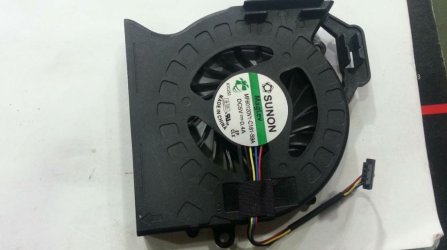
However, this information written on a sticker on the Cooling Fan/CPU fan/heatsink' sent by a person claiming that he is computer technician.

Sunon
MagLev
MF6100V1-Q032-G99
P/N:0HFMH9 Rev-A00
DC---0.4A
4BR01FAW10 3A EP
6.4CFM KCL


When I have made comparison between the information on the Cooling Fan sent by that computer technician, and the information on the Cooling Fan in my 'HP Pavilion dv6 Notebook PC-Maintenance and Service Guide)c02842252 below, I found there is no relevance at all between the two cooling fans.
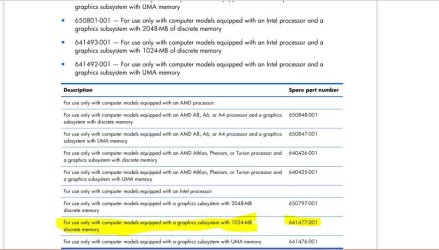
Cooling Fan,CPU fan,heatsink.JPG

There is no spar part number typed on the fan sent by that person.:confused:


Also, When I tried taking apart the first parts of my notebook, such as 'service cover', optical drive, and HDD, I found each of them have an HP spare part number printed on it.
Although I didn't get to the cooling fan, it could have an HP spare part number printed on it.


Since removing the defective cooling fan and replacing it with the new one will be more difficult to change as many parts of the Notebook have to be removed to get to it.
So, My questions are as follows:

Firstly: do think that I can go ahead to install that new fan. I don't want to try to take apart all the parts of my notebook, and when getting to it, and while installing the new cooling fan above, I'll face it isn't compatible or not working well.

Secondly: the new fan sent by that person is only single cooling fan, and there are no other parts, such as thermal material, so why is it said in the final step of To fix this error 'Thoroughly remove dust from all internal cooling components. as long as the fan is only a part?

Finally: I have read in the maintenance guide 'The fan is controlled by a temperature sensor and is designed to turn on automatically when high temperature conditions exist'. So, this is applied for any cooling fan?
 

My Computer My Computer

At a glance

Windows 7 Home Premium 64BitIntel Core i5, 2.3GHzDDR3- 6GBIntel Graphics Family, Radeon HD 6770M
Computer type
Laptop
Computer Manufacturer/Model Number
HP, Pavilion
OS
Windows 7 Home Premium 64Bit
CPU
Intel Core i5, 2.3GHz
Motherboard
Hewlett-Packard- Model 1657
Memory
DDR3- 6GB
Graphics Card(s)
Intel Graphics Family, Radeon HD 6770M
Hard Drives
Toshiba 700GB
Antivirus
Microsot Secuirty Eessentials
Browser
MS IE, Google Chrom, and FireFox
I would say the components are (in order): thermal compound - heatsink and then the fan

You would need thermal compound too. And an appropriate cleaning solution to remove previous compound.

I wouldn't know how handy you are, do you end up with spare screws when you try fixing stuff? :p

Any fan is operated like that, some differences apply depending on fan specs and controlling hardware.
 

My Computer My Computer

At a glance

Windows 7 Ultimate x64 SP1AMD Phenom 2 1090T2x8GB Kingston HyperX Fury Black 1600Mhz Unga...MSI GTX 970 Gaming 4G
Computer type
PC/Desktop
Computer Manufacturer/Model Number
Custom Build
OS
Windows 7 Ultimate x64 SP1
CPU
AMD Phenom 2 1090T
Motherboard
Gigabyte GA-890FXA-UD5
Memory
2x8GB Kingston HyperX Fury Black 1600Mhz Unganged
Graphics Card(s)
MSI GTX 970 Gaming 4G
Sound Card
Realtek On-Board HD 7.1 Audio / Logitech G35
Monitor(s) Displays
3xAcer GD245HQ
Screen Resolution
1920x1080
Hard Drives
Samsung 850 Pro 512GB SSD - OS /
WD Caviar Black SATA 3 - 1 TBx2 - Dynamic RAID 0 /
WD Caviar Green SATA 2 - 640GBx2 - Dynamic RAID 0 /
WD Caviar Green SATA 2 - 640GB - Internal Backup /
Seagate Barracude SATA 3 - 3TB - External Backup/ Sync
PSU
HighPower 1000W
Case
Cooler Master HAF 932
Cooling
Noctua NH-D14
Keyboard
Logitech G19
Mouse
Logitech G500
Internet Speed
100/4 Mbit Cable (100GB quota)
Antivirus
ZoneAlarm Extreme Security / MBAM Pro / MBAE Free / SAS Free
Browser
IE 11 - Firefox - Chrome
Other Info
Logitech F710/ G27/ G940/ Z5500 // TrackIR 5 // Nvidia 3D Surround Vision
I would say the components are (in order): thermal compound - heatsink and then the fan

You would need thermal compound too. And an appropriate cleaning solution to remove previous compound.

I wouldn't know how handy you are, do you end up with spare screws when you try fixing stuff? :p

Any fan is operated like that, some differences apply depending on fan specs and controlling hardware.


Thank you so much indeed,
Could anyone please take some of his precious time out to go through the entire post below, and reply to me?


I really have never ever took apart my notebook.
Also, I have not yet taken apart my notebook. I've only tried taking apart the service cover, and then optical drive, after that HDD. However, after that I sopped continuing taking apart since I have noticed ALL my parts(service cover, optical drive, HDD,....) have a sticker on which an HP spare number is printed. So, I didn't continue taking apart the rest of the parts since I am not satisfied with the cooling fan to be in-place the detective one since it doesn't have any HP spare part number printed on it.
The merchant insists on saying that cooling fan below is compatible with my HP notebook, although I don't see any HP spare part number printed on it.


Only this information printed on your cooling fan.
Sunon
MagLev
MF6100V1-Q032-G99
P/N:0HFMH9 Rev-A00
DC---0.4A
4BR01FAW10 3A EP
6.4CFM KCL


However, this information printed on my defective cooling fan
HP Spare part number: 641477-001

My questions are::

Firstly: do you think I can go ahead with installing the cooling fan shown below, although there is no HP spare part Number is printed on it.

secondly: could you please let me see the 'thermal compound', and 'heatsink'
I only have seen 'cooling fan' as it is shown below?

Cooling fan1.JPG
Cooling fan2.JPG

Finally: I have read in the maintenance guide 'The fan is controlled by a temperature sensor and is designed to turn on automatically when high temperature conditions exist'. So, this is applied for any cooling fan?


PS. if I would find a video to how take apart HP Pavilion dv6-6093ex notebook, it would be much better.
 
Last edited:

My Computer My Computer

At a glance

Windows 7 Home Premium 64BitIntel Core i5, 2.3GHzDDR3- 6GBIntel Graphics Family, Radeon HD 6770M
Computer type
Laptop
Computer Manufacturer/Model Number
HP, Pavilion
OS
Windows 7 Home Premium 64Bit
CPU
Intel Core i5, 2.3GHz
Motherboard
Hewlett-Packard- Model 1657
Memory
DDR3- 6GB
Graphics Card(s)
Intel Graphics Family, Radeon HD 6770M
Hard Drives
Toshiba 700GB
Antivirus
Microsot Secuirty Eessentials
Browser
MS IE, Google Chrom, and FireFox
Could anyone please take some of his precious time out and read and reply to my final post?
 

My Computer My Computer

At a glance

Windows 7 Home Premium 64BitIntel Core i5, 2.3GHzDDR3- 6GBIntel Graphics Family, Radeon HD 6770M
Computer type
Laptop
Computer Manufacturer/Model Number
HP, Pavilion
OS
Windows 7 Home Premium 64Bit
CPU
Intel Core i5, 2.3GHz
Motherboard
Hewlett-Packard- Model 1657
Memory
DDR3- 6GB
Graphics Card(s)
Intel Graphics Family, Radeon HD 6770M
Hard Drives
Toshiba 700GB
Antivirus
Microsot Secuirty Eessentials
Browser
MS IE, Google Chrom, and FireFox
here is the service manual. looks like they are using thermo pads not paste would need to get the right kit depending on what processor and graphic sub system you have part numbers are on page 90 of the service manual for thermo kit and fan/heatsink. http://h10032.www1.hp.com/ctg/Manual/c02842252
 

My Computer My Computer

At a glance

win 10
Computer type
PC/Desktop
Computer Manufacturer/Model Number
dell xps 9000
OS
win 10
here is the service manual. looks like they are using thermo pads not paste would need to get the right kit depending on what processor and graphic sub system you have part numbers are on page 90 of the service manual for thermo kit and fan/heatsink. http://h10032.www1.hp.com/ctg/Manual/c02842252

Thanks a lot,

Firstly: Although there is no HP spare part number printed on the cooling fan above, the merchant(who claims that he is a computer technician) insists on saying that it will be compatible with my notebook.

Even if the fan posted its image before had been installed very well, then maybe it wouldn't function very well as it is supposed since there is no HP spare part number printed on it, which means that it is not specified for HP Notebooks. When taking apart(removing the first parts, such as HDD, optical drive, and so on), I found ALL my parts have a sticker on which an HP spare number is printed.

Finally: Do you think I would need 'heatsink' and 'thermal compound' too? And an appropriate cleaning solution to remove previous compound. I am expecting that I will only need to replace the fan.
 

My Computer My Computer

At a glance

Windows 7 Home Premium 64BitIntel Core i5, 2.3GHzDDR3- 6GBIntel Graphics Family, Radeon HD 6770M
Computer type
Laptop
Computer Manufacturer/Model Number
HP, Pavilion
OS
Windows 7 Home Premium 64Bit
CPU
Intel Core i5, 2.3GHz
Motherboard
Hewlett-Packard- Model 1657
Memory
DDR3- 6GB
Graphics Card(s)
Intel Graphics Family, Radeon HD 6770M
Hard Drives
Toshiba 700GB
Antivirus
Microsot Secuirty Eessentials
Browser
MS IE, Google Chrom, and FireFox
hi like i said in my post above the you need to use the part number from the manual choose the one that for your processor and graphic sub system. if you check the part numbers in google it will show it comes with the heat sink and fan assembly they are not seperate things. plus it shows it using thermal pads not thermo paste they are two differnt things. the best thing to do is take it laptop apart down to the fan heatsink assembly it could have the part number on it. then you will know for sure if fan is seperate from the heat sink.
 

My Computer My Computer

At a glance

win 10
Computer type
PC/Desktop
Computer Manufacturer/Model Number
dell xps 9000
OS
win 10
I guess my post has mislead the OP, so sorry for that. Although it wasn't wrong, it seems to be not your case!

Please do as oscer adviced.
 

My Computer My Computer

At a glance

Windows 7 Ultimate x64 SP1AMD Phenom 2 1090T2x8GB Kingston HyperX Fury Black 1600Mhz Unga...MSI GTX 970 Gaming 4G
Computer type
PC/Desktop
Computer Manufacturer/Model Number
Custom Build
OS
Windows 7 Ultimate x64 SP1
CPU
AMD Phenom 2 1090T
Motherboard
Gigabyte GA-890FXA-UD5
Memory
2x8GB Kingston HyperX Fury Black 1600Mhz Unganged
Graphics Card(s)
MSI GTX 970 Gaming 4G
Sound Card
Realtek On-Board HD 7.1 Audio / Logitech G35
Monitor(s) Displays
3xAcer GD245HQ
Screen Resolution
1920x1080
Hard Drives
Samsung 850 Pro 512GB SSD - OS /
WD Caviar Black SATA 3 - 1 TBx2 - Dynamic RAID 0 /
WD Caviar Green SATA 2 - 640GBx2 - Dynamic RAID 0 /
WD Caviar Green SATA 2 - 640GB - Internal Backup /
Seagate Barracude SATA 3 - 3TB - External Backup/ Sync
PSU
HighPower 1000W
Case
Cooler Master HAF 932
Cooling
Noctua NH-D14
Keyboard
Logitech G19
Mouse
Logitech G500
Internet Speed
100/4 Mbit Cable (100GB quota)
Antivirus
ZoneAlarm Extreme Security / MBAM Pro / MBAE Free / SAS Free
Browser
IE 11 - Firefox - Chrome
Other Info
Logitech F710/ G27/ G940/ Z5500 // TrackIR 5 // Nvidia 3D Surround Vision
hi like i said in my post above the you need to use the part number from the manual choose the one that for your processor and graphic sub system. if you check the part numbers in google it will show it comes with the heat sink and fan assembly they are not seperate things. plus it shows it using thermal pads not thermo paste they are two differnt things. the best thing to do is take it laptop apart down to the fan heatsink assembly it could have the part number on it. then you will know for sure if fan is seperate from the heat sink.

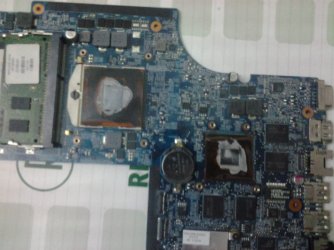
Firstly: If you see the images of my system board you will see there are no thermal pads at all. So I think I will need to apply new thermal compound on the top of processor and on the graphics subsystem


Secondly: there are old thermal compound on the processor and on the heatsink section that services it. Also, on the top of graphics subsyste m and on the heatsink section that services it.
2015-07-11 21.31.55.jpg

2015-07-11 21.41.24.jpg

2015-07-11 21.21.19.jpg


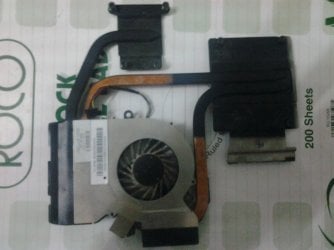
Thirdly: while removing the old fan from the heatsink, I found there was thermal tape which was torn. That material is easy o be torn. Can l find another one to reuse. Screen shot below

2015-07-11 21.44.06.jpg
2015-07-11 21.52.04.jpg


Finally: I was advised to clean the old fan with a paint thiner which is a liquid used to thiner paint-based oil and their use. I can clean the entire old fan and heatsink assemply with that material.
 

My Computer My Computer

At a glance

Windows 7 Home Premium 64BitIntel Core i5, 2.3GHzDDR3- 6GBIntel Graphics Family, Radeon HD 6770M
Computer type
Laptop
Computer Manufacturer/Model Number
HP, Pavilion
OS
Windows 7 Home Premium 64Bit
CPU
Intel Core i5, 2.3GHz
Motherboard
Hewlett-Packard- Model 1657
Memory
DDR3- 6GB
Graphics Card(s)
Intel Graphics Family, Radeon HD 6770M
Hard Drives
Toshiba 700GB
Antivirus
Microsot Secuirty Eessentials
Browser
MS IE, Google Chrom, and FireFox
In addituon tom first post, i would like to to determine where the thermal tape which was torn while removing old fan from heatsink. The thermal tape is in the final screen shot, in particular in the thing/ object shown in the left side of the very top end in the screen shot below
366169d1437133996t-cooling-fan-replacement-advice-hp-pavilion-dv6-6093ex-notebook-2015-07-11-21.52.04.jpg
 

My Computer My Computer

At a glance

Windows 7 Home Premium 64BitIntel Core i5, 2.3GHzDDR3- 6GBIntel Graphics Family, Radeon HD 6770M
Computer type
Laptop
Computer Manufacturer/Model Number
HP, Pavilion
OS
Windows 7 Home Premium 64Bit
CPU
Intel Core i5, 2.3GHz
Motherboard
Hewlett-Packard- Model 1657
Memory
DDR3- 6GB
Graphics Card(s)
Intel Graphics Family, Radeon HD 6770M
Hard Drives
Toshiba 700GB
Antivirus
Microsot Secuirty Eessentials
Browser
MS IE, Google Chrom, and FireFox
Back
Top