Solved Convert MBR to GTP

Mitch656

New member
Power User
VIP
Local time
10:55 AM
Messages
722
Location
Australia
Hi,
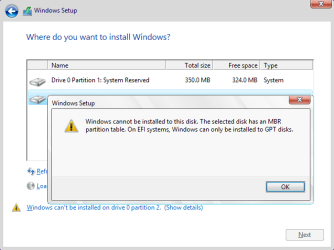
I'm trying to install Windows 10 TP, but every time I do I get the message that windows cant be installed on a MBR disk.

Is it possible to partition the drive and then make the partition a gtp drive?

As the other half of my drive has my windows 7 install and I don't want to loose that

Thanks :)
 

My Computer My Computer

At a glance

Windows 7 Professional 64bitIntel Core i5 - 2500K @ 3.30GHz4GB DDR3EVGA Nvidia GeForce GT 740 2GB DDR3
Computer type
PC/Desktop
Computer Manufacturer/Model Number
Custom Build
OS
Windows 7 Professional 64bit
CPU
Intel Core i5 - 2500K @ 3.30GHz
Motherboard
Gigabyte Z77-HD3
Memory
4GB DDR3
Graphics Card(s)
EVGA Nvidia GeForce GT 740 2GB DDR3
Screen Resolution
1680 x 1050
Hard Drives
1T Samaung HD/ 1T toshiba external drive/ 1T western digital external drive/ 2T seagate external drive/ 250gb samaung SSD
PSU
Antec 430W
Keyboard
Microsoft Wireless Keyboard 800
Mouse
Microsoft Wireless Mouse 1000
Antivirus
AVG
Browser
Internet Explorer
You can`t convert it then.

There`s no reason you can`t install 10 to a MBR drive.

You don`t want to install 10 on the same drive anyway.

How did you prepare the W10 installer ?
 

My Computer My Computer

At a glance

Windows 10 Pro x64Intel Core i7 6700KGSkill TridentZ RGB 16GB 3600 16-16-16-36EVGA GTX 980 Ti SC x2
Computer type
PC/Desktop
Computer Manufacturer/Model Number
Skylake Special #666
OS
Windows 10 Pro x64
CPU
Intel Core i7 6700K
Motherboard
Asus Sabertooth Z170 Mark 1
Memory
GSkill TridentZ RGB 16GB 3600 16-16-16-36
Graphics Card(s)
EVGA GTX 980 Ti SC x2
Sound Card
Realtek High Definition
Monitor(s) Displays
AOC G2460PG
Screen Resolution
1920 x 1080 144Hz
Hard Drives
Samsung 860 Pro 256GB, Seagate Barracuda 4TB x2
PSU
EVGA 1000 P2, EVGA White Custom Braided Cables
Case
Corsair Vengeance C70 Gunmetal Black
Cooling
Corsair H100i v2, Corsair ML120 x2, Thermal Grizzly Kryonaut
Keyboard
Logitech G910 Orion Spectrum
Mouse
Logitech G700s
Internet Speed
Verizon Fios Quantum Gateway 75/75
Antivirus
Windows Defender, Malwarebytes Free 3.8.3
Browser
Chrome
Other Info
Corsair SP120 x4, LG Blu-ray Drive, Durabrand HT-395 100 Watt Dolby Digital Amp, Corsair H2100 Wireless 7.1 Headset
You can`t convert it then.

There`s no reason you can`t install 10 to a MBR drive.

You don`t want to install 10 on the same drive anyway.

How did you prepare the W10 installer ?
I always get this error message
Windows cannot be installed on this disk. The selected disk has an MBR partition table. On EFI systems, Windows can only installed on GPT disks.


I simply Partition my SSD and created an ISO DVD to install it, and when I sleeved the partition drive I get that error.


Did some googling and it said to boot using the UEFI option and if I selected it correctly it still didn't work
 

My Computer My Computer

At a glance

Windows 7 Professional 64bitIntel Core i5 - 2500K @ 3.30GHz4GB DDR3EVGA Nvidia GeForce GT 740 2GB DDR3
Computer type
PC/Desktop
Computer Manufacturer/Model Number
Custom Build
OS
Windows 7 Professional 64bit
CPU
Intel Core i5 - 2500K @ 3.30GHz
Motherboard
Gigabyte Z77-HD3
Memory
4GB DDR3
Graphics Card(s)
EVGA Nvidia GeForce GT 740 2GB DDR3
Screen Resolution
1680 x 1050
Hard Drives
1T Samaung HD/ 1T toshiba external drive/ 1T western digital external drive/ 2T seagate external drive/ 250gb samaung SSD
PSU
Antec 430W
Keyboard
Microsoft Wireless Keyboard 800
Mouse
Microsoft Wireless Mouse 1000
Antivirus
AVG
Browser
Internet Explorer
I always get this error message
Windows cannot be installed on this disk. The selected disk has an MBR partition table. On EFI systems, Windows can only installed on GPT disks.

As the other half of my drive has my windows 7 install and I don't want to loose that.

If you want to use MBR (Master Boot Record) partition table, then boot from the Windows installation media in Legacy BIOS Boot Mode.

Quote from this post: UEFI Boot Mode (installing using the GPT partition style) and Legacy BIOS Boot Mode (installing using the MBR partition style). -> link

   Tip
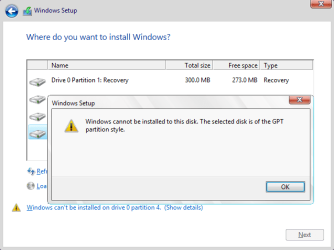
Error message when you boot from the Windows installation media in Legacy BIOS Boot Mode:

Windows cannot be installed to this disk. The selected disk is of the GPT partition style. (see screenshot below)

That is because Windows can only be installed to MBR disk in Legacy BIOS Boot Mode, but you plan to install Windows on a GPT disk.

- Boot from the Windows installation media in UEFI Boot Mode, so you can use GPT (GUID Partition Table).
- But if you want to use MBR (Master Boot Record) partition table, then delete all partitions on the disk.

Windows cannot be installed to this disk. The selected disk is of the GPT partition style.png

Error message when you boot from the Windows installation media in UEFI Boot Mode:

Windows cannot be installed to this disk. The selected disk has an MBR partition table. On EFI systems, Windows can only be installed to GPT disks. (see screenshot below)

That is because Windows can only be installed to GPT disk in UEFI Boot Mode, but you plan to install Windows on an MBR disk.

- Delete all partitions on the disk, so you can use GPT (GUID Partition Table).
- But if you want to use MBR (Master Boot Record) partition table, then boot from the Windows installation media in Legacy BIOS Boot Mode.

Windows cannot be installed on this disk. The selected disk has an MBR partition table.png
 
Last edited:

My Computer My Computer

At a glance

Windows 8.1/10 x64Intel Core i5-3230M8 GBIntel HD Graphics 4000
Computer type
Laptop
Computer Manufacturer/Model Number
Lenovo IdeaPad G580
OS
Windows 8.1/10 x64
CPU
Intel Core i5-3230M
Memory
8 GB
Graphics Card(s)
Intel HD Graphics 4000
Antivirus
Windows Defender, EMET, standard user account
Browser
Internet Explorer
Hey Mitch. Long time no see.

The error means you're booting the installer as a UEFI DVD. It expects to see a GPT formatted disk which is the only way UEFI installs, but you have Win7 on an older MBR disk so it generate the error.

This should be resolved by booting into the disk as a legacy device. You'll notice your BIOS boot menu will be similar to this:

11344d1353009078-downgrade-windows-8-windows-7-a-windows-8-downgrade-006-sb.png

In the case of the above menu, instead of choosing the second UEFI DVD choice you'd choose the fourth one for DVD/CD. Look for a similar difference in your Boot Menu key when you tap it at boot with the Win7 DVD in drive.

If in doubt post back a picture of the Boot menu choices.
 
Hey Mitch. Long time no see.

The error means you're booting the installer as a UEFI DVD. It expects to see a GPT formatted disk which is the only way UEFI installs, but you have Win7 on an older MBR disk so it generate the error.

This should be resolved by booting into the disk as a legacy device. You'll notice your BIOS boot menu will be similar to this:

11344d1353009078-downgrade-windows-8-windows-7-a-windows-8-downgrade-006-sb.png

In the case of the above menu, instead of choosing the second UEFI DVD choice you'd choose the fourth one for DVD/CD. Look for a similar difference in your Boot Menu key when you tap it at boot with the Win7 DVD in drive.

If in doubt post back a picture of the Boot menu choices.


Thanks Greg.
It's worked.

I tried P1 which took me straight to Windows 7 desktop, but I had a P2 options and am now instailling the TP.

Thanks a lot :)
 

My Computer My Computer

At a glance

Windows 7 Professional 64bitIntel Core i5 - 2500K @ 3.30GHz4GB DDR3EVGA Nvidia GeForce GT 740 2GB DDR3
Computer type
PC/Desktop
Computer Manufacturer/Model Number
Custom Build
OS
Windows 7 Professional 64bit
CPU
Intel Core i5 - 2500K @ 3.30GHz
Motherboard
Gigabyte Z77-HD3
Memory
4GB DDR3
Graphics Card(s)
EVGA Nvidia GeForce GT 740 2GB DDR3
Screen Resolution
1680 x 1050
Hard Drives
1T Samaung HD/ 1T toshiba external drive/ 1T western digital external drive/ 2T seagate external drive/ 250gb samaung SSD
PSU
Antec 430W
Keyboard
Microsoft Wireless Keyboard 800
Mouse
Microsoft Wireless Mouse 1000
Antivirus
AVG
Browser
Internet Explorer
Glad it helped pupster. ;)

Enjoy Windows 10. I've been using it since October. It seems faster and more stable. Some of the apps are good and can be grouped on the right side of the start menu to give you live updates on your Mail, People, Weather, News, Skype, and a ny Others You like.
 
Back
Top