VMWare Player (Free) - a couple of questions

Bellzemos

New member
Member
VIP
Local time
11:42 AM
Messages
183
Hello!

I'm pretty new to virtualization and have a couple of questions, I hope you'll be able to help me get started with VMWare Playe Free.

1. How much of a performance boost will I get if I enable the hardware virtualization support in BIOS of my laptop? Would that have any (negative) impact whatsoever on my system when I'm NOT running VMWare Player?

2. When dedicating RAM for a virtual OS - is that only per session or constant? I have a 6 GB RAM laptop, will I "lose" 1 GB only when I'm running Windows XP in VMWare Player (if I dedicate 1 GB to XP) or will I always have only 5 GB available to my base OS (Windows 7)? Will I regain back that 1 GB when I quit the VMWare player? What about other resources (CPU, GPU etc.)?

3. Is there any performance impact on my laptop WHATSOEVER when VMWare Player is NOT running? I use my laptop for audio production so I'd need ALL available resources when I'm not playing with VMWare Player.

4. Can I install Apple OS-es in the Player? I know I can install Linux distributions and Windows. What about phone OS-es (like iOS and Android), are those supported too?

5. Can I load a pre-made system image into the Player and run it just as I would normally run it on my base system? I use Macrium Reflet Free for system imaging and backup.

6. Security - how secure is VMWare Player Free? If I get infected or change some settings, can this in any way reflect in the base system? Even hardcore stuff like rootkits or whatever there is?

Thank you for taking your time and helping me out, I really appreciate it!
 

My Computer My Computer

At a glance

Windows 7 Ultimate x64 SP1
OS
Windows 7 Ultimate x64 SP1
I use Workstation 11, but Player is much the same -

1. You need HV set to run a x64 guest. Has no impact on system when not using VMware.
2. RAM is per session, so if you allocate 2GB for guest and your system normally uses 3GB, when you fire up VMware total RAM used goes up to 5GB. At end of session RAM goes back to 3GB.
3. No - there's a few VM process still there when not running using 0 % cpu and maybe 30MB RAM.
4. Apple - yes but it's not as easy as others. I downloaded a pre-built OSX image once and it ran OK. Phones - don't know.
5. don't know
6. AFAIK VMware runs like a sandbox, so any virus etc is contained. In fact I often try out potentially dodgy stuff in a W7 VMware.

BTW re W10 - although the tech prev runs ok in VMware, initial checks seem to point to the W7 > W10 upgrade not working on VMware due the VM gfx not being up to spec - I'm still looking at that one.
 

My Computer My Computer

At a glance

W10 Pro x64, W7 Pro x64 in VMwarei7 2600K @ 4.4GHz8GB Mushkin @ 1600MHzNvidia GTX 750 Ti
Computer type
PC/Desktop
Computer Manufacturer/Model Number
self build
OS
W10 Pro x64, W7 Pro x64 in VMware
CPU
i7 2600K @ 4.4GHz
Motherboard
MSI Z68A-GD80
Memory
8GB Mushkin @ 1600MHz
Graphics Card(s)
Nvidia GTX 750 Ti
Monitor(s) Displays
27" Benq + 27" LG
Screen Resolution
1080p
Hard Drives
500GB 850 Evo SSD + 3 * 2TB Seagate
PSU
EVGA 650 GS modular
Case
Antec 300
Cooling
Seidon 120V v2
Internet Speed
62/18 Mbps
Antivirus
Defender (W10) + MSE (W7)
Browser
Firefox
Yeah, I think VMWare Player is a simplified version fo VMWare Workstation.

1. Any OS that I will be running in VMWare Player I won't dedicate more than 2 GB of RAM to. So it would make sense to install a 32-bit version of any OS. So, if I understand you correctly, I would only benefit from enabling HV in BIOS if I would be running 64-bit OS in VMWare Player? Then I guess there's no point in enabling HV since I'll be only running 32-bit systems? Or did I misunderstood you?

2. Huh, OK, so in the host OS I'd see the (fake, made up) RAM actually increase? But in reality those 2 GB would be taken off my real RAM. And when I turn off VMWare Player I get all my RAM back to my host OS? That sounds good.

3. Interesting, why do those processes have to be active when the VMWare Player is not in use?

4. OK, I guess I'll have to try and see.

5. OK.

6. So there aren't any breakouts possible into the host system? It's absolutely separated? That sounds almost too great to be true. :)

Thank you for all the help and the tip on the Windows 10.
 

My Computer My Computer

At a glance

Windows 7 Ultimate x64 SP1
OS
Windows 7 Ultimate x64 SP1
1. correct
3. lots of progs leave small stuff running even when not in use

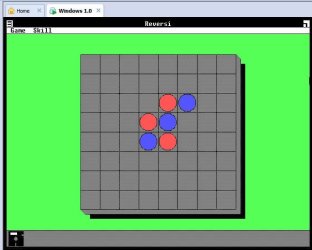
VMware is a load of fun - I also have old Windows versions in VM eg 3.11, 95, 98 etc. See snip of Reversi on Windows 1.0

reversi.jpg
 

My Computer My Computer

At a glance

W10 Pro x64, W7 Pro x64 in VMwarei7 2600K @ 4.4GHz8GB Mushkin @ 1600MHzNvidia GTX 750 Ti
Computer type
PC/Desktop
Computer Manufacturer/Model Number
self build
OS
W10 Pro x64, W7 Pro x64 in VMware
CPU
i7 2600K @ 4.4GHz
Motherboard
MSI Z68A-GD80
Memory
8GB Mushkin @ 1600MHz
Graphics Card(s)
Nvidia GTX 750 Ti
Monitor(s) Displays
27" Benq + 27" LG
Screen Resolution
1080p
Hard Drives
500GB 850 Evo SSD + 3 * 2TB Seagate
PSU
EVGA 650 GS modular
Case
Antec 300
Cooling
Seidon 120V v2
Internet Speed
62/18 Mbps
Antivirus
Defender (W10) + MSE (W7)
Browser
Firefox
4. Running any Apple OS on non Apple hardware is a violation of Apple's EULA. Running the OS in a virtual environment is permissible only if the host is an Apple computer.
6. Operating systems running under VMWare run in a virtual environment and are cut off from the host. But if the host and client operating systems share a drive, such as with a network connection, there is a possibility that this could be exploited by malware. Malware has become VERY sophisticated in recent years so other attacks cannot be entirely ruled out. VMWare is a popular product and well known to malware authors.
 

My Computer My Computer

At a glance

Windows 7 Pro 64 bitXeon W35208 GBNvidia Geforce 210
Computer type
PC/Desktop
Computer Manufacturer/Model Number
HP
OS
Windows 7 Pro 64 bit
CPU
Xeon W3520
Memory
8 GB
Graphics Card(s)
Nvidia Geforce 210
Thank you both!

1. Correct - you mean correct as there is no sense enabling VT-x in BIOS if I'll only be running 32-bit guest systems? OK, I will keep it disabled then.

4. OK, I see.

6. I will keep that in mind. But if I practice safe use in the guest OS (like in the host OS) nothing bad will happen, right? :)

Again, thanx!
 

My Computer My Computer

At a glance

Windows 7 Ultimate x64 SP1
OS
Windows 7 Ultimate x64 SP1
1. Hardware virtualization was designed to optimize the performance of programs like VMWare. While not necessary it will benefit the performance of any virtualized OS, including 32 bit. If not enabled VMWare will have to perform it's functions in software and that will cause a performance hit. There really is no downside to enabling it and I am not certain why the option is even provided. Turning it off would be useful to developers writing software like VMWare that must accommodate CPUs that do not support it. I understand it is enabled by default on the Mac.

6. It is difficult for malware to cross the boundaries of a virtualized environment but no wise individual would assume it is impossible. Malware authors have no doubt looked into the possibility.
 

My Computer My Computer

At a glance

Windows 7 Pro 64 bitXeon W35208 GBNvidia Geforce 210
Computer type
PC/Desktop
Computer Manufacturer/Model Number
HP
OS
Windows 7 Pro 64 bit
CPU
Xeon W3520
Memory
8 GB
Graphics Card(s)
Nvidia Geforce 210
BTW re W10 - although the tech prev runs ok in VMware, initial checks seem to point to the W7 > W10 upgrade not working on VMware due the VM gfx not being up to spec - I'm still looking at that one.

That is a none issue. Simply remove the VMWare tools before upgrading to Windows 10 and reinstall the VMWare tools on the new Windows 10 upgrade :)
 

My Computer My Computer

At a glance

Windows 7 x64 Ultimate and numerous virtual m...AMD FX-8350 Vishera 32nm Technology @ 4.2 GHz...G Skill 32.0GB Dual-Channel DDR3 @ 1204MHz (1...EVGA GeForce GTX 960 4GB Super SC ACX 2.0+ wi...
Computer type
PC/Desktop
Computer Manufacturer/Model Number
Bluethunder II
OS
Windows 7 x64 Ultimate and numerous virtual machines
CPU
AMD FX-8350 Vishera 32nm Technology @ 4.2 GHz default
Motherboard
ASUSTeK COMPUTER INC. SABERTOOTH 990FX R2.0 (Socket 942)
Memory
G Skill 32.0GB Dual-Channel DDR3 @ 1204MHz (11-13-13-31)
Graphics Card(s)
EVGA GeForce GTX 960 4GB Super SC ACX 2.0+ with Back Plate
Sound Card
Creative X-Fi Titanium HD Audiophile PCIe
Monitor(s) Displays
LG L227WTG x 3
Screen Resolution
1680 x 1050 16:10
Hard Drives
238GB Samsung850 PRO SATA Disk Device (SSD)
1863GB Seagate ST2000DM 001-1CH164 (SATA)
1397GB Seagate ST1500DL 003-9VT16L(SATA)
466GB Western Digital WDC WD50 03AZEX-00K1GA0 (SATA) x 2
932GB Seagate ST310005 28AS SATA Disk Device (SATA)
PSU
Enermax Revolution87+ 1000 Watts Gold Certified Power Supply
Case
Rocketfish Full Tower
Cooling
Cooler Master Hyper 212 EVO Push Pull 120mm Fans
Keyboard
Logitech K740
Mouse
Logitech G100S Laser LED + Logitech Gamepad F310
Internet Speed
500 mbs down and 30mbs up
Antivirus
Malwarebytes Pro & Avast and MSE on certain Virtual Machines
Browser
Firefox (Main) Chrome, Internet Explorer (Back Up)
Other Info
Logitech X 230 2.1 Stereo System and 5.1 Yamaha RX V2090
B&W DM6 Monitor Speakers + Center and Surround Speakers
Using Mouse Without Borders (Google it)
VMWare tools enhance the experience of using VMWare Player, right? I should install that then. Thank you both. :)
 

My Computer My Computer

At a glance

Windows 7 Ultimate x64 SP1
OS
Windows 7 Ultimate x64 SP1
VMWare tools should be a part of any normal VMWare installation. You should install them unless you have a compelling reason not to.
 

My Computer My Computer

At a glance

Windows 7 Pro 64 bitXeon W35208 GBNvidia Geforce 210
Computer type
PC/Desktop
Computer Manufacturer/Model Number
HP
OS
Windows 7 Pro 64 bit
CPU
Xeon W3520
Memory
8 GB
Graphics Card(s)
Nvidia Geforce 210
VMWare Tools is essentially installing the drivers for the emulated hardware for the Guest OS you are using. You need to install VMWare Tools for each VM you create.
 

My Computer My Computer

At a glance

W10 Pro desktop, W11 laptop, W11 Pro tablet (...3.7Ghz 8700K i7, i7-11800H, i7-1065G716G desktop, 16G laptop, 4G tabletAMD Radeon RX580, RTX 3060, Intel Iris Plus
Computer type
PC/Desktop
Computer Manufacturer/Model Number
Home Built desktop, Dell G15 5511 Gaming laptop,MS Surface Pro 7 tablet
OS
W10 Pro desktop, W11 laptop, W11 Pro tablet (all 64-bit)
CPU
3.7Ghz 8700K i7, i7-11800H, i7-1065G7
Motherboard
ASUS TUF Z370-Pro Gaming in desktop
Memory
16G desktop, 16G laptop, 4G tablet
Graphics Card(s)
AMD Radeon RX580, RTX 3060, Intel Iris Plus
Sound Card
High Definition Audio (Built-in to mobo)
Monitor(s) Displays
Samsung U32J59 32" (2x), 15.6", 12"
Screen Resolution
3840x2160, 3840x2160, 1920x1080, 2160x1440
Hard Drives
500G SSD for OS; 2T, 10T & 15T HDDs for Data on Desktop, 1TB SSD laptop, 128G SSD tablet.
PSU
Corsair CX 750M
Case
Antec 100
Cooling
CM 212+
Keyboard
IBM Model M - used continuously since 1986
Mouse
Microsoft Pro IntelliMouse
Internet Speed
400M down 8M up
Antivirus
Windows Defender
Browser
FireFox
Other Info
Built my first computer (8Mhz 8088cpu, 640K RAM, 20MB HDD, 2 360K floppy drives) in 1985 and have been building them for myself, relatives and friends ever since.
@ Indianantone - I think you may be right about VMware Tools and W7 > W10 upgrade. In a W7 VM, I uninstalled VMware Tools via control panel and the white W10 upgrade icon re-appeared. When I opened the Get Windows 10 box and clicked the top left '3 bars' icon and 'check your pc' it still said gfx not supported, so I guess the jury's still out on this one. We'll see on July 29.

@ Bellzemos - VMware Tools adds a bit more functionality esp the ability to drag n drop stuff from host to guest desktop.
 

My Computer My Computer

At a glance

W10 Pro x64, W7 Pro x64 in VMwarei7 2600K @ 4.4GHz8GB Mushkin @ 1600MHzNvidia GTX 750 Ti
Computer type
PC/Desktop
Computer Manufacturer/Model Number
self build
OS
W10 Pro x64, W7 Pro x64 in VMware
CPU
i7 2600K @ 4.4GHz
Motherboard
MSI Z68A-GD80
Memory
8GB Mushkin @ 1600MHz
Graphics Card(s)
Nvidia GTX 750 Ti
Monitor(s) Displays
27" Benq + 27" LG
Screen Resolution
1080p
Hard Drives
500GB 850 Evo SSD + 3 * 2TB Seagate
PSU
EVGA 650 GS modular
Case
Antec 300
Cooling
Seidon 120V v2
Internet Speed
62/18 Mbps
Antivirus
Defender (W10) + MSE (W7)
Browser
Firefox
Yes of course it will say the graphics are not supported. You just uninstalled them :)
Windows 10 works perfectly on VMWare Workstaion or Player once you install the VMWare tools specifically for Windows 10.
 

My Computer My Computer

At a glance

Windows 7 x64 Ultimate and numerous virtual m...AMD FX-8350 Vishera 32nm Technology @ 4.2 GHz...G Skill 32.0GB Dual-Channel DDR3 @ 1204MHz (1...EVGA GeForce GTX 960 4GB Super SC ACX 2.0+ wi...
Computer type
PC/Desktop
Computer Manufacturer/Model Number
Bluethunder II
OS
Windows 7 x64 Ultimate and numerous virtual machines
CPU
AMD FX-8350 Vishera 32nm Technology @ 4.2 GHz default
Motherboard
ASUSTeK COMPUTER INC. SABERTOOTH 990FX R2.0 (Socket 942)
Memory
G Skill 32.0GB Dual-Channel DDR3 @ 1204MHz (11-13-13-31)
Graphics Card(s)
EVGA GeForce GTX 960 4GB Super SC ACX 2.0+ with Back Plate
Sound Card
Creative X-Fi Titanium HD Audiophile PCIe
Monitor(s) Displays
LG L227WTG x 3
Screen Resolution
1680 x 1050 16:10
Hard Drives
238GB Samsung850 PRO SATA Disk Device (SSD)
1863GB Seagate ST2000DM 001-1CH164 (SATA)
1397GB Seagate ST1500DL 003-9VT16L(SATA)
466GB Western Digital WDC WD50 03AZEX-00K1GA0 (SATA) x 2
932GB Seagate ST310005 28AS SATA Disk Device (SATA)
PSU
Enermax Revolution87+ 1000 Watts Gold Certified Power Supply
Case
Rocketfish Full Tower
Cooling
Cooler Master Hyper 212 EVO Push Pull 120mm Fans
Keyboard
Logitech K740
Mouse
Logitech G100S Laser LED + Logitech Gamepad F310
Internet Speed
500 mbs down and 30mbs up
Antivirus
Malwarebytes Pro & Avast and MSE on certain Virtual Machines
Browser
Firefox (Main) Chrome, Internet Explorer (Back Up)
Other Info
Logitech X 230 2.1 Stereo System and 5.1 Yamaha RX V2090
B&W DM6 Monitor Speakers + Center and Surround Speakers
Using Mouse Without Borders (Google it)
Windows 10 works perfectly on VMWare Workstaion or Player once you install the VMWare tools specifically for Windows 10.

How do you know W10 final works perfectly on the upgrade path ?

You must be referring to W10 TP (since actual W10 not released yet). My experience >

installed W10 TP on VM Workstation with VMware Tools - runs OK

on a W7 VM with VMware Tools > W10 upgrade not available - said VM gfx not up to spec

uninstalled VMware tools on W7 > white upgrade box re-appears (but says gfx still not up to spec) > jury still out

all this ^ tried on VMware Player, Workstation 10 and 11
 

My Computer My Computer

At a glance

W10 Pro x64, W7 Pro x64 in VMwarei7 2600K @ 4.4GHz8GB Mushkin @ 1600MHzNvidia GTX 750 Ti
Computer type
PC/Desktop
Computer Manufacturer/Model Number
self build
OS
W10 Pro x64, W7 Pro x64 in VMware
CPU
i7 2600K @ 4.4GHz
Motherboard
MSI Z68A-GD80
Memory
8GB Mushkin @ 1600MHz
Graphics Card(s)
Nvidia GTX 750 Ti
Monitor(s) Displays
27" Benq + 27" LG
Screen Resolution
1080p
Hard Drives
500GB 850 Evo SSD + 3 * 2TB Seagate
PSU
EVGA 650 GS modular
Case
Antec 300
Cooling
Seidon 120V v2
Internet Speed
62/18 Mbps
Antivirus
Defender (W10) + MSE (W7)
Browser
Firefox
Windows 10 works perfectly on VMWare Workstaion or Player once you install the VMWare tools specifically for Windows 10.

How do you know W10 final works perfectly on the upgrade path ?

You must be referring to W10 TP (since actual W10 not released yet). My experience >

installed W10 TP on VM Workstation with VMware Tools - runs OK

on a W7 VM with VMware Tools > W10 upgrade not available - said VM gfx not up to spec

uninstalled VMware tools on W7 > white upgrade box re-appears (but says gfx still not up to spec) > jury still out all this ^ tried on VMware Player, Workstation 10 and 11

Ok carry on with your doubt but you will not have any issues.
 

My Computer My Computer

At a glance

Windows 7 x64 Ultimate and numerous virtual m...AMD FX-8350 Vishera 32nm Technology @ 4.2 GHz...G Skill 32.0GB Dual-Channel DDR3 @ 1204MHz (1...EVGA GeForce GTX 960 4GB Super SC ACX 2.0+ wi...
Computer type
PC/Desktop
Computer Manufacturer/Model Number
Bluethunder II
OS
Windows 7 x64 Ultimate and numerous virtual machines
CPU
AMD FX-8350 Vishera 32nm Technology @ 4.2 GHz default
Motherboard
ASUSTeK COMPUTER INC. SABERTOOTH 990FX R2.0 (Socket 942)
Memory
G Skill 32.0GB Dual-Channel DDR3 @ 1204MHz (11-13-13-31)
Graphics Card(s)
EVGA GeForce GTX 960 4GB Super SC ACX 2.0+ with Back Plate
Sound Card
Creative X-Fi Titanium HD Audiophile PCIe
Monitor(s) Displays
LG L227WTG x 3
Screen Resolution
1680 x 1050 16:10
Hard Drives
238GB Samsung850 PRO SATA Disk Device (SSD)
1863GB Seagate ST2000DM 001-1CH164 (SATA)
1397GB Seagate ST1500DL 003-9VT16L(SATA)
466GB Western Digital WDC WD50 03AZEX-00K1GA0 (SATA) x 2
932GB Seagate ST310005 28AS SATA Disk Device (SATA)
PSU
Enermax Revolution87+ 1000 Watts Gold Certified Power Supply
Case
Rocketfish Full Tower
Cooling
Cooler Master Hyper 212 EVO Push Pull 120mm Fans
Keyboard
Logitech K740
Mouse
Logitech G100S Laser LED + Logitech Gamepad F310
Internet Speed
500 mbs down and 30mbs up
Antivirus
Malwarebytes Pro & Avast and MSE on certain Virtual Machines
Browser
Firefox (Main) Chrome, Internet Explorer (Back Up)
Other Info
Logitech X 230 2.1 Stereo System and 5.1 Yamaha RX V2090
B&W DM6 Monitor Speakers + Center and Surround Speakers
Using Mouse Without Borders (Google it)
Hi again, thank you all for the help.

I have another quesition. I have installed VMWare Player Free and it works excellent but I'd like to disable it's four services which are on all the time, even when not needed.

I have set them from automatic to manual. Will I experience problems because of it? I tried running VMWare Player now and the services stay off - they don't start?! But VMWare seemed to work OK anyway... I'm confused.

What do you think?
 

My Computer My Computer

At a glance

Windows 7 Ultimate x64 SP1
OS
Windows 7 Ultimate x64 SP1
I would leave well alone unless they are causing an issue on your PC. VMWare probably have a good reason for those services running such as updates etc.
 

My Computer My Computer

At a glance

Windows 7 x64 Ultimate and numerous virtual m...AMD FX-8350 Vishera 32nm Technology @ 4.2 GHz...G Skill 32.0GB Dual-Channel DDR3 @ 1204MHz (1...EVGA GeForce GTX 960 4GB Super SC ACX 2.0+ wi...
Computer type
PC/Desktop
Computer Manufacturer/Model Number
Bluethunder II
OS
Windows 7 x64 Ultimate and numerous virtual machines
CPU
AMD FX-8350 Vishera 32nm Technology @ 4.2 GHz default
Motherboard
ASUSTeK COMPUTER INC. SABERTOOTH 990FX R2.0 (Socket 942)
Memory
G Skill 32.0GB Dual-Channel DDR3 @ 1204MHz (11-13-13-31)
Graphics Card(s)
EVGA GeForce GTX 960 4GB Super SC ACX 2.0+ with Back Plate
Sound Card
Creative X-Fi Titanium HD Audiophile PCIe
Monitor(s) Displays
LG L227WTG x 3
Screen Resolution
1680 x 1050 16:10
Hard Drives
238GB Samsung850 PRO SATA Disk Device (SSD)
1863GB Seagate ST2000DM 001-1CH164 (SATA)
1397GB Seagate ST1500DL 003-9VT16L(SATA)
466GB Western Digital WDC WD50 03AZEX-00K1GA0 (SATA) x 2
932GB Seagate ST310005 28AS SATA Disk Device (SATA)
PSU
Enermax Revolution87+ 1000 Watts Gold Certified Power Supply
Case
Rocketfish Full Tower
Cooling
Cooler Master Hyper 212 EVO Push Pull 120mm Fans
Keyboard
Logitech K740
Mouse
Logitech G100S Laser LED + Logitech Gamepad F310
Internet Speed
500 mbs down and 30mbs up
Antivirus
Malwarebytes Pro & Avast and MSE on certain Virtual Machines
Browser
Firefox (Main) Chrome, Internet Explorer (Back Up)
Other Info
Logitech X 230 2.1 Stereo System and 5.1 Yamaha RX V2090
B&W DM6 Monitor Speakers + Center and Surround Speakers
Using Mouse Without Borders (Google it)
Back
Top