
Solved Icon floating above all other windows, unable to remove

musdem

New member
Local time
9:28 AM
Messages
6
I was playing GTA V with fraps on to see the framerate then when I changed the graphical settings and reset the game with fraps still on this icon apeared in the bottom right corner of my screen. This is not my monitor doing this and it floats over all windows and the snip tool and the print screen button can't pick it up so I had to take a picture with my phone. I have attached the picture to the thread. I both logged out and reset the machine, nothing removed the icon. Is there a way to get rid of this or to find out what is causing this? Thanks in advance!
 

Attachments
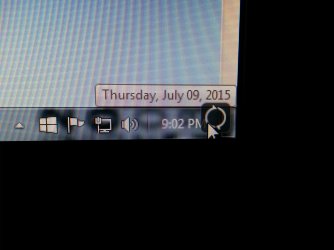
  • IMG_20150709_210243.jpg
    IMG_20150709_210243.jpg
    932.7 KB · Views: 1

My Computer My Computer

At a glance

Windows 7 Ultimate 64 bit
Computer type
PC/Desktop
Computer Manufacturer/Model Number
custom build
OS
Windows 7 Ultimate 64 bit
Hi welcome to the forum.

i would check the settings on the monitor itself maybe something got activated by mistake.
 

My Computer My Computer

At a glance

win 10
Computer type
PC/Desktop
Computer Manufacturer/Model Number
dell xps 9000
OS
win 10
possibly right click a select delete?
 

My Computer My Computer

At a glance

Windows 7 Ultimate 32 bit,Chromium OS, window...not sure2.00GBintel inside pentium 4,Vision AMD
Computer type
PC/Desktop
Computer Manufacturer/Model Number
Dell,Samsung,Compaq,oracle virtualbox
OS
Windows 7 Ultimate 32 bit,Chromium OS, windows server 2008 32bit
CPU
not sure
Motherboard
not sure
Memory
2.00GB
Graphics Card(s)
intel inside pentium 4,Vision AMD
Monitor(s) Displays
MAG Innovision
Keyboard
onn RF wireless
Mouse
onn RF wireless
Antivirus
Avast!
Browser
Google Chrome
As I said in the post this is not my monitor, I checked by booting into linux, besides it can't be my monitor as the mouse isn't behind it.
 

My Computer My Computer

At a glance

Windows 7 Ultimate 64 bit
Computer type
PC/Desktop
Computer Manufacturer/Model Number
custom build
OS
Windows 7 Ultimate 64 bit

My Computer My Computer

At a glance

Windows 7 Ultimate 64 bit
Computer type
PC/Desktop
Computer Manufacturer/Model Number
custom build
OS
Windows 7 Ultimate 64 bit
try a restore point to a couple days back
 

My Computer My Computer

At a glance

win 10
Computer type
PC/Desktop
Computer Manufacturer/Model Number
dell xps 9000
OS
win 10
try a restore point to a couple days back
That's a last resort I was going to use if I couldn't find an answer, but thanks.
 

My Computer My Computer

At a glance

Windows 7 Ultimate 64 bit
Computer type
PC/Desktop
Computer Manufacturer/Model Number
custom build
OS
Windows 7 Ultimate 64 bit
You could tick on it and see what happens.

Right tick on it and look at properties and see what it belongs to.

Anytime something gets on my systems without me knowing about it I do security scans to see if I picked up something without my knowledge.

It appears to be something try to load itself.
 

My Computer My Computer

At a glance

Windows 10 Pro. 64/ version 1709 Windows 7 Pr...Intel i7-6800K @ 4.3Corsair Platinum 16 gig @2400EVGA GTX 1070 OC
Computer type
PC/Desktop
Computer Manufacturer/Model Number
Home made Desktop
OS
Windows 10 Pro. 64/ version 1709 Windows 7 Pro/64
CPU
Intel i7-6800K @ 4.3
Motherboard
ASUS X-99 Deluxe II
Memory
Corsair Platinum 16 gig @2400
Graphics Card(s)
EVGA GTX 1070 OC
Monitor(s) Displays
Asus 27" LED LCD/VE278Q
Screen Resolution
1920-1080 or 1280-720 HDMI
Hard Drives
INTEL SSD 730-240 Gb Sata 3.0/
PSU
EVGA Platium 1200W
Case
Phanteks Luxe Tempered Glass 8 fans/ one radiator
Cooling
XSPC/ Water Cooled CPU
Keyboard
Das 4 Professional
Mouse
Logitech M705/MX Anywhere 2-S
Internet Speed
100 mbits
Antivirus
Microsoft Security Essentials/ Malwarebytes Premium 3.0/ SAS
Browser
I.E. 11 default/Firefox/ ISP Time Warner Cable/Spectrum
Other Info
LG BluRay Burner/
Sound system-KLipsch-THX/
Icy Dock ssd Hot Swap bays.
You could tick on it and see what happens.

Right tick on it and look at properties and see what it belongs to.

Anytime something gets on my systems without me knowing about it I do security scans to see if I picked up something without my knowledge.

It appears to be something try to load itself.

I guess this is my fault for forgetting to put this in the post... I can't click on it at all and the scan picked up nothing, but thanks!
 

My Computer My Computer

At a glance

Windows 7 Ultimate 64 bit
Computer type
PC/Desktop
Computer Manufacturer/Model Number
custom build
OS
Windows 7 Ultimate 64 bit

My Computer My Computer

At a glance

Windows 10 Pro X64Intel Quad Core i7-4770 @ 3.4Ghz16.0GB PC3-12800 DDR3 SDRAM 1600 MHzIntel Integrated HD Graphics
Computer type
PC/Desktop
Computer Manufacturer/Model Number
Lenovo IdeaCenter 450
OS
Windows 10 Pro X64
CPU
Intel Quad Core i7-4770 @ 3.4Ghz
Memory
16.0GB PC3-12800 DDR3 SDRAM 1600 MHz
Graphics Card(s)
Intel Integrated HD Graphics
Sound Card
Realtek HD Audio
Monitor(s) Displays
HP 22" LCD
Screen Resolution
1680 x 1050
Hard Drives
250GB Samsung EVO SATA-3 SSD
2TB Seagate ST2000DM001 SATA-2
1.5TB Seagate ST3150041AS SATA
Keyboard
Dell USB
Mouse
Lenovo USB
Internet Speed
Cable via Road Runner 3MB Upload, 30MB Download
Antivirus
Windows Defender, MBAM Pro, MBAE
Browser
Seamonkey
Other Info
UEFI/GPT
PLDS DVD-RW DH16AERSH
i have read this from another forum: he has somewhat like your problem.

Just got rid of it!
Turns out it was the icon for a recording device called ShadowPlay that is a software for my videocard. The symbol was for it being turned off and I had to go in and manually disable it.


I am not putting the link here. maybe that site is not permitted here.
 

My Computer My Computer

At a glance

Windows 7 Pro 32bitDual Core
Computer type
PC/Desktop
Computer Manufacturer/Model Number
HP
OS
Windows 7 Pro 32bit
CPU
Dual Core
Antivirus
Trend Micro
did you try to undo the graphical settings that you made?
 

My Computer My Computer

At a glance

win 10
Computer type
PC/Desktop
Computer Manufacturer/Model Number
dell xps 9000
OS
win 10
i have read this from another forum: he has somewhat like your problem.

Just got rid of it!
Turns out it was the icon for a recording device called ShadowPlay that is a software for my videocard. The symbol was for it being turned off and I had to go in and manually disable it.


I am not putting the link here. maybe that site is not permitted here.
This works! Thank you so much this was beyond annoying to deal with.
 

My Computer My Computer

At a glance

Windows 7 Ultimate 64 bit
Computer type
PC/Desktop
Computer Manufacturer/Model Number
custom build
OS
Windows 7 Ultimate 64 bit
glad you have it fixed
 

My Computer My Computer

At a glance

win 10
Computer type
PC/Desktop
Computer Manufacturer/Model Number
dell xps 9000
OS
win 10
i have read this from another forum: he has somewhat like your problem.

Just got rid of it!
Turns out it was the icon for a recording device called ShadowPlay that is a software for my videocard. The symbol was for it being turned off and I had to go in and manually disable it.


I am not putting the link here. maybe that site is not permitted here.
This works! Thank you so much this was beyond annoying to deal with.

I was very glad that helped you. :D:D
 

My Computer My Computer

At a glance

Windows 7 Pro 32bitDual Core
Computer type
PC/Desktop
Computer Manufacturer/Model Number
HP
OS
Windows 7 Pro 32bit
CPU
Dual Core
Antivirus
Trend Micro
Back
Top