My ATI radeon 200 stops working when I restart

tylar112

New member
Member
Local time
9:18 AM
Messages
51
:mad:

Im running windows 7 (obviously) 64 bit. and my ATI driver was working fine, and the aero themes were working
until one day when I restarted, and my aero themes stopped working!
when I right clicked on my desktop and click >Personalize. and click the troubleshoot link at the bottom, that says,
"Troubleshoot problems with transparency and other Aero effects"
it tells me that my video card was not compatable with aero themes, and I should update it.

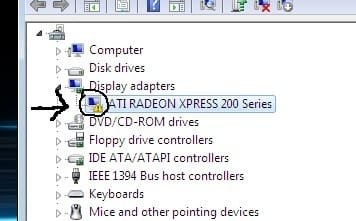
But when I go to my Device Manager, it tells me that my driver IS up to date

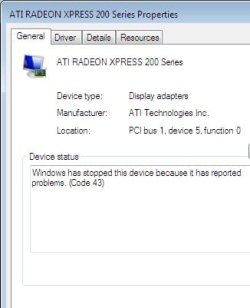
when I right click on the driver and go to Properties it says
"Windows has stopped this device because it has reported problems. (Code 43)"

I've tried EVERYTHING.
i've searched every thing on google, i've searched for people who are having the same problem, but nothing works

I have the latest download from the ATI site, and IT WORKS, untill I restart.
its like a never ending cycle.
I dont want to have to reinstall the update everytime I use my computer

I really dont want to do a clean install, because I really really dont want to have to load all my programs again, and move everything to its original folders and ect.

ANYTHING at this point is helpful

Just leave a reply if you want to know anymore info
I really hope someone can help me


thank you! :)
 

Attachments

  • ATI2.jpg
    ATI2.jpg
    15.6 KB · Views: 114
  • ATI 1.jpg
    ATI 1.jpg
    14.2 KB · Views: 26

My Computer My Computer

At a glance

Windows 7 Home Premium x64Genuine Intel(R) CPU U7300 @ 1.30GHz4.00 GigsMobile Intel(R) 4 Series Express Chipset Family
Computer Manufacturer/Model Number
Asus UL50A/UL50Ag Series
OS
Windows 7 Home Premium x64
CPU
Genuine Intel(R) CPU U7300 @ 1.30GHz
Memory
4.00 Gigs
Graphics Card(s)
Mobile Intel(R) 4 Series Express Chipset Family
Sound Card
Realtek High Definition Audio
Monitor(s) Displays
Generic PnP Monitor
Screen Resolution
1366 x 768 - 60Hz
Hard Drives
500 Gigs
Internet Speed
Slow as hell.
This should be fairly easy to fix. Google for how to completely clean your system of all ATI drivers and remnants. Do so. Also uninstall the current driver through device manager.

Right click Computer in the start menu and choose properties. Click advanced system settings. Hardware tab. Device installation settings. Choose no and never install. Click save changes.

Reboot a few times and ensure that you are now only using the standard vga driver. If so, now install the latest download that you say works.
 

My Computer My Computer

At a glance

7600.20510 x86P4 550 3.4 GHz HT running at 3.5 GHzOCZ 2 GB(2x1GB) DDR400mHz running @ 414 mHzHIS Radeon HD 3850 IceQ 3 Turbo HDMI Dual DL-...
Computer Manufacturer/Model Number
self built
OS
7600.20510 x86
CPU
P4 550 3.4 GHz HT running at 3.5 GHz
Motherboard
MSI PM8M3-V (MS-7211 v1.x) Micro-ATX mainboard
Memory
OCZ 2 GB(2x1GB) DDR400mHz running @ 414 mHz
Graphics Card(s)
HIS Radeon HD 3850 IceQ 3 Turbo HDMI Dual DL-DVI AGP
Sound Card
MOTU Traveler firewire studio interface 192 kHz 24 bit
Monitor(s) Displays
22" widescreen Acer X223W LCD, 17" Compaq P75 CRT
Screen Resolution
1680x1050 and 1280x1024
Hard Drives
SATA I x2 WD, 400 GB and 120 GB, SATA 2 WD Caviar Black 1 TB
PSU
350W generic
Case
Cybertronpc, it glows blue
Cooling
stock cpu fan, Ice-Q 3 gpu and system, many case fans
Keyboard
Logitch Classical Keyboard 200
Mouse
Logitech Mediaplay cordless
Internet Speed
1792/448 kbits/sec
Other Info
SATA II PCI fake RAID adapter, 1 GB Readyboost, original ATI Remote Wonder (even works with WMC perfectly), Logitech Rumblepad 2 game controller x2
Thanks for the reply torrentg!
I've uninstalled everything and im down to only using the VGA driver
But I cant seem to install the ATI driver correctly.

during the ATI setup, it installs everything into "C:\ATI"
but when I go to Device Manager, and right click and click update, I browse for the ATI folder, then click next it tells me,

"Windows has determined the driver software for your device is up to date.
Standard VGA Graphics Adapter"

I've restarted a few times, but the aero themes have not came back.
Before, all I had to do was run the setup, then restart, and the aero themes would just magically appear, but it was not permanent

Can you please explain to me what I should do?

Thank you so much
 

My Computer My Computer

At a glance

Windows 7 Home Premium x64Genuine Intel(R) CPU U7300 @ 1.30GHz4.00 GigsMobile Intel(R) 4 Series Express Chipset Family
Computer Manufacturer/Model Number
Asus UL50A/UL50Ag Series
OS
Windows 7 Home Premium x64
CPU
Genuine Intel(R) CPU U7300 @ 1.30GHz
Memory
4.00 Gigs
Graphics Card(s)
Mobile Intel(R) 4 Series Express Chipset Family
Sound Card
Realtek High Definition Audio
Monitor(s) Displays
Generic PnP Monitor
Screen Resolution
1366 x 768 - 60Hz
Hard Drives
500 Gigs
Internet Speed
Slow as hell.
Go to the same screen you have in screenshot 1 that you uploaded. Change the tab to details. Then change the dropdown box to the next value which is hardware ids.

In the lines that show up, what are the four digits to the right of dev_? Take note of that.

Now go into C:\ATI folder to the one with the .infs. Open the first one when alphabetically listing contents, with notepad. Hit ctrl+f and type in those 4 digits from before. See if your exact card is listed amongst the others. If ctrl+f doesn't find an exact match, it's not and we can edit it to be correct.

Make sure you're starting with the correct download from ATI's site to begin with, that they're recommending for your mobile card.

Edit: Rereading your post - have you already tried installing by running the setup.exe in C:\ATI, or not?
 

My Computer My Computer

At a glance

7600.20510 x86P4 550 3.4 GHz HT running at 3.5 GHzOCZ 2 GB(2x1GB) DDR400mHz running @ 414 mHzHIS Radeon HD 3850 IceQ 3 Turbo HDMI Dual DL-...
Computer Manufacturer/Model Number
self built
OS
7600.20510 x86
CPU
P4 550 3.4 GHz HT running at 3.5 GHz
Motherboard
MSI PM8M3-V (MS-7211 v1.x) Micro-ATX mainboard
Memory
OCZ 2 GB(2x1GB) DDR400mHz running @ 414 mHz
Graphics Card(s)
HIS Radeon HD 3850 IceQ 3 Turbo HDMI Dual DL-DVI AGP
Sound Card
MOTU Traveler firewire studio interface 192 kHz 24 bit
Monitor(s) Displays
22" widescreen Acer X223W LCD, 17" Compaq P75 CRT
Screen Resolution
1680x1050 and 1280x1024
Hard Drives
SATA I x2 WD, 400 GB and 120 GB, SATA 2 WD Caviar Black 1 TB
PSU
350W generic
Case
Cybertronpc, it glows blue
Cooling
stock cpu fan, Ice-Q 3 gpu and system, many case fans
Keyboard
Logitch Classical Keyboard 200
Mouse
Logitech Mediaplay cordless
Internet Speed
1792/448 kbits/sec
Other Info
SATA II PCI fake RAID adapter, 1 GB Readyboost, original ATI Remote Wonder (even works with WMC perfectly), Logitech Rumblepad 2 game controller x2
Okay, the hardware ID is, 5A61
thats for the VGA drive, because I dont have the ATI 200 anymore because we uninstalled it before, so thats the only driver I can get to.

Im not sure if it was a typo or not, but windows doesn't find anything with ".infs."
So instead I tried ".inf"

I hope Im looking in the right place for the .inf


I went to

C:\ATI
> Support
> 9-9_vista64_win7_64_dd_ccc_wdm_enu
> Then went to the top of the window, and typed in the search box ".inf"

the first one to pop up is a folder called "W76A_INF"
and then the first document, NOT in the W76A_IN folder, is "AtiHDAud.inf"

Heres a screenshot,

http://i37.tinypic.com/xpo6ew.jpg

I opened "AtiHDAud.inf" with notepad, and searched for my hardare ID, "5A61 "
and it didn't find anything


Also, Im not exactly sure or how to find out if im using the correct download for my "mobile card"
 

My Computer My Computer

At a glance

Windows 7 Home Premium x64Genuine Intel(R) CPU U7300 @ 1.30GHz4.00 GigsMobile Intel(R) 4 Series Express Chipset Family
Computer Manufacturer/Model Number
Asus UL50A/UL50Ag Series
OS
Windows 7 Home Premium x64
CPU
Genuine Intel(R) CPU U7300 @ 1.30GHz
Memory
4.00 Gigs
Graphics Card(s)
Mobile Intel(R) 4 Series Express Chipset Family
Sound Card
Realtek High Definition Audio
Monitor(s) Displays
Generic PnP Monitor
Screen Resolution
1366 x 768 - 60Hz
Hard Drives
500 Gigs
Internet Speed
Slow as hell.
Try installing the driver in compatibility mode with vista 64bit - i checked the site -your card is supported with vista but not W7- when you install both the vista and w7 driver install its going to install the w7 driver, so to get around this do the following, and see if it works -

To install a driver OR program in compatibility mode - right click the setup.exe file - click properties - click compatibility - check run in compatibility with vista/xp etc - check run as administrator - leave the rest blank. Start setup.exe and install.

If this doesnt work you could try an earlier vista driver or even xp driver, and use compatibility mode with the respective OS to insure it installs - compatibility mode lets older drivers written for prior OS's to install.

If you know it was working at some stage, and you let windows update install a later driver, and it stopped to function properly you could of rolled back the driver to the previous version in device manager, but you would of needed to check optional hardware updates in windows update for this to occur, and you may have already ruined that way of fixing it by uninstalling the driver - but you could try system restore back to when it was working - you might be confronted with a situation where the driver needs reinstalling, so i would do as i originally outlined - use compatibility mode with the current vista w7 driver - hopefully this will install the vista version of the driver or find an earlier vista driver in a standalone package or an xp driver. I guess you have tried installing the original driver that worked for a while, so we wont deal with that unless your trying to install the latest w7 driver.
Drivers can be found here - below is the 9.8 driver - try to install it in compatibility mode with vista or find an earlier version
ATI Catalystâ„¢ Legacy Display Driver

Earlier drivers -
Previous Catalystâ„¢ Drivers
 
Last edited:

My Computer My Computer

At a glance

XP, Vista, W7 64bit Home PremiumIntel Core Duo 6850 3.0 ghz @ 3.7 ghz4GB Corsair DDR 2 PC-6400Ati 4870 1ghz
OS
XP, Vista, W7 64bit Home Premium
CPU
Intel Core Duo 6850 3.0 ghz @ 3.7 ghz
Motherboard
Asus P5E
Memory
4GB Corsair DDR 2 PC-6400
Graphics Card(s)
Ati 4870 1ghz
Sound Card
Supreme FX 11
Monitor(s) Displays
View Sonic VX1962wm
Screen Resolution
1680 X1050
Hard Drives
3 Seagate Sata Drives 160gb 250gb 500gb
PSU
Thermaltake 600 watt
Case
NZXT Alpha
Cooling
3X120cm Fans
Keyboard
Microsoft Digital Media Pro Keyboard
Mouse
Microsoft Wheel Mouse Optical
Internet Speed
1.5Mb to 8Mb/384k
Try installing the driver in compatibility mode with vista 64bit - i checked the site -your card is supported with vista but not W7- when you install both the vista and w7 driver install its going to install the w7 driver, so to get around this do the following, and see if it works -

To install a driver OR program in compatibility mode - right click the setup.exe file - click properties - click compatibility - check run in compatibility with vista/xp etc - check run as administrator - leave the rest blank. Start setup.exe and install.

If this doesnt work you could try an earlier vista driver or even xp driver, and use compatibility mode with the respective OS to insure it installs - compatibility mode lets older drivers written for prior OS's to install.

If you know it was working at some stage, and you let windows update install a later driver, and it stopped to function properly you could of rolled back the driver to the previous version in device manager, but you would of needed to check optional hardware updates in windows update for this to occur, and you may have already ruined that way of fixing it by uninstalling the driver - but you could try system restore back to when it was working - you might be confronted with a situation where the driver needs reinstalling, so i would do as i originally outlined - use compatibility mode with the current vista w7 driver - hopefully this will install the vista version of the driver or find an earlier vista driver in a standalone package or an xp driver. I guess you have tried installing the original driver that worked for a while, so we wont deal with that unless your trying to install the latest w7 driver.
Drivers can be found here - below is the 9.8 driver - try to install it in compatibility mode with vista or find an earlier version
ATI Catalyst™ Legacy Display Driver

Earlier drivers -
Previous Catalyst™ Drivers


Thank you for the reply
but for some reason when I did all of that, it reinstalled my ATI 200 driver :shock:

And its still not working

when I restarted windows after I installed it, I get a box that pops up saying,

no ATI graphics driver is installed, or the ATI driver
is not functioning properly. Please install the ATI driver appropriate for your ATI hardware
 

My Computer My Computer

At a glance

Windows 7 Home Premium x64Genuine Intel(R) CPU U7300 @ 1.30GHz4.00 GigsMobile Intel(R) 4 Series Express Chipset Family
Computer Manufacturer/Model Number
Asus UL50A/UL50Ag Series
OS
Windows 7 Home Premium x64
CPU
Genuine Intel(R) CPU U7300 @ 1.30GHz
Memory
4.00 Gigs
Graphics Card(s)
Mobile Intel(R) 4 Series Express Chipset Family
Sound Card
Realtek High Definition Audio
Monitor(s) Displays
Generic PnP Monitor
Screen Resolution
1366 x 768 - 60Hz
Hard Drives
500 Gigs
Internet Speed
Slow as hell.
Firstly. try restoring the PC back to when it was working properly.
You can always reinstall the OS as a last resort if you feel you have tried all other options, its weird - perhaps something you installed recently has effected it - I don't know - but one gain from reinstalling the OS would be you would know there is nothing wrong if it works again.
First thing to do when you get it up and working would be to backup your hard drive. and you can then restore it if it reoccurs.
To try and prevent it you can set automatic updates to download updates, but ask for permission to install, then you can scrutinise the updates before installing - also you could set restore points when installing anything that might effect the stability of the pc.
 

My Computer My Computer

At a glance

XP, Vista, W7 64bit Home PremiumIntel Core Duo 6850 3.0 ghz @ 3.7 ghz4GB Corsair DDR 2 PC-6400Ati 4870 1ghz
OS
XP, Vista, W7 64bit Home Premium
CPU
Intel Core Duo 6850 3.0 ghz @ 3.7 ghz
Motherboard
Asus P5E
Memory
4GB Corsair DDR 2 PC-6400
Graphics Card(s)
Ati 4870 1ghz
Sound Card
Supreme FX 11
Monitor(s) Displays
View Sonic VX1962wm
Screen Resolution
1680 X1050
Hard Drives
3 Seagate Sata Drives 160gb 250gb 500gb
PSU
Thermaltake 600 watt
Case
NZXT Alpha
Cooling
3X120cm Fans
Keyboard
Microsoft Digital Media Pro Keyboard
Mouse
Microsoft Wheel Mouse Optical
Internet Speed
1.5Mb to 8Mb/384k
Oh dang!

So basically what I did was, Uninstall everything that had to do with ATI and its stupidness, by going to the Add or remove programs. and right clicked on the ATI Install Manager, and clicked "Change" then when to "Uninstall ALL ATI components, then I used a program called Driver Cleaner, to remove anything else that had to do with ATI, then I used a program called CCleaner to remove registry, Then I restarted, and went to Device Manager, right clicked on "VGA standard" and clicked Update, then click "Search automatically for updated software" restarted again, and BOOM. It was back!

Im afraid to restart :confused:

thank you everyone for your help!
Ill let you know what happens when I restart
Thanks again! :D
 

My Computer My Computer

At a glance

Windows 7 Home Premium x64Genuine Intel(R) CPU U7300 @ 1.30GHz4.00 GigsMobile Intel(R) 4 Series Express Chipset Family
Computer Manufacturer/Model Number
Asus UL50A/UL50Ag Series
OS
Windows 7 Home Premium x64
CPU
Genuine Intel(R) CPU U7300 @ 1.30GHz
Memory
4.00 Gigs
Graphics Card(s)
Mobile Intel(R) 4 Series Express Chipset Family
Sound Card
Realtek High Definition Audio
Monitor(s) Displays
Generic PnP Monitor
Screen Resolution
1366 x 768 - 60Hz
Hard Drives
500 Gigs
Internet Speed
Slow as hell.
WELL done, dont forget to set up a restore point if you are up and running when you restart.:party:
 

My Computer My Computer

At a glance

XP, Vista, W7 64bit Home PremiumIntel Core Duo 6850 3.0 ghz @ 3.7 ghz4GB Corsair DDR 2 PC-6400Ati 4870 1ghz
OS
XP, Vista, W7 64bit Home Premium
CPU
Intel Core Duo 6850 3.0 ghz @ 3.7 ghz
Motherboard
Asus P5E
Memory
4GB Corsair DDR 2 PC-6400
Graphics Card(s)
Ati 4870 1ghz
Sound Card
Supreme FX 11
Monitor(s) Displays
View Sonic VX1962wm
Screen Resolution
1680 X1050
Hard Drives
3 Seagate Sata Drives 160gb 250gb 500gb
PSU
Thermaltake 600 watt
Case
NZXT Alpha
Cooling
3X120cm Fans
Keyboard
Microsoft Digital Media Pro Keyboard
Mouse
Microsoft Wheel Mouse Optical
Internet Speed
1.5Mb to 8Mb/384k
Oh dang!

So basically what I did was, Uninstall everything that had to do with ATI and its stupidness, by going to the Add or remove programs. and right clicked on the ATI Install Manager, and clicked "Change" then when to "Uninstall ALL ATI components, then I used a program called Driver Cleaner, to remove anything else that had to do with ATI, then I used a program called CCleaner to remove registry, Then I restarted, and went to Device Manager, right clicked on "VGA standard" and clicked Update, then click "Search automatically for updated software" restarted again, and BOOM. It was back!

Im afraid to restart :confused:

thank you everyone for your help!
Ill let you know what happens when I restart
Thanks again! :D
Good one. Please inform us if that indeed did fix your issues, and thank you for placing the info that may have fixed this, to also help others.
 

My Computer My Computer

At a glance

Windows 7 PRO x64Phenom II 1090T @ 4.00GHz8gb DDR31x ATI Diamond 5850
OS
Windows 7 PRO x64
CPU
Phenom II 1090T @ 4.00GHz
Motherboard
Crosshair IV Formula
Memory
8gb DDR3
Graphics Card(s)
1x ATI Diamond 5850
Monitor(s) Displays
50in HDTV (HDMI)
Screen Resolution
1080P
Hard Drives
2x 1TB barracuda
1x 1TB WD Black
1x 2TB WD
1x OCZ Vertex 2 40GB
PSU
1000w Xion
Case
Armor+ VH6000BWS
Cooling
W/C
Internet Speed
60Mbps down, 7 up
Here it goes!
Im going to restart and hope to god everything is working!


Edit
Okay so, I restarted, and!.... It didnt work :shock:
the aero themes stopped working again. BUT
since I created a system restore point before I restarted, tada!
Its back
Its weird because, when I did the system restore, I got a message box saying "system restore did not work successfully, you system files were not changed"
But its working :huh:

I think something may be wrong with my video card, or computer
If it continues to happen, I think Id rather live without it working, then go to geek squad and pay $200 or more!

Ill be sure to post back if I figure something out!
 
Last edited:

My Computer My Computer

At a glance

Windows 7 Home Premium x64Genuine Intel(R) CPU U7300 @ 1.30GHz4.00 GigsMobile Intel(R) 4 Series Express Chipset Family
Computer Manufacturer/Model Number
Asus UL50A/UL50Ag Series
OS
Windows 7 Home Premium x64
CPU
Genuine Intel(R) CPU U7300 @ 1.30GHz
Memory
4.00 Gigs
Graphics Card(s)
Mobile Intel(R) 4 Series Express Chipset Family
Sound Card
Realtek High Definition Audio
Monitor(s) Displays
Generic PnP Monitor
Screen Resolution
1366 x 768 - 60Hz
Hard Drives
500 Gigs
Internet Speed
Slow as hell.
Your card isnt properly suppported by W7, and your system is unstable as a result - you should try installing a earlier driver in compatibility mode with vista - 9.3
Previous Catalyst™ Drivers
 

My Computer My Computer

At a glance

XP, Vista, W7 64bit Home PremiumIntel Core Duo 6850 3.0 ghz @ 3.7 ghz4GB Corsair DDR 2 PC-6400Ati 4870 1ghz
OS
XP, Vista, W7 64bit Home Premium
CPU
Intel Core Duo 6850 3.0 ghz @ 3.7 ghz
Motherboard
Asus P5E
Memory
4GB Corsair DDR 2 PC-6400
Graphics Card(s)
Ati 4870 1ghz
Sound Card
Supreme FX 11
Monitor(s) Displays
View Sonic VX1962wm
Screen Resolution
1680 X1050
Hard Drives
3 Seagate Sata Drives 160gb 250gb 500gb
PSU
Thermaltake 600 watt
Case
NZXT Alpha
Cooling
3X120cm Fans
Keyboard
Microsoft Digital Media Pro Keyboard
Mouse
Microsoft Wheel Mouse Optical
Internet Speed
1.5Mb to 8Mb/384k
Thank you Whest for the reply!
It was actually working really good!
I even restarted several times and it was still working.

but its not working anymore..
I think I give up!

Is there anyway that I can change the color of the taskbar? and start menu, ect.
even though I dont have aero themes

thats half the reason I really want my aero themes to work :(
I love the transparent windows and such, also, when you hover over programs on the taskbar, it has a little preview window

But I've seriously tried, EVERYTHING.
I dont know what else I can do
 

My Computer My Computer

At a glance

Windows 7 Home Premium x64Genuine Intel(R) CPU U7300 @ 1.30GHz4.00 GigsMobile Intel(R) 4 Series Express Chipset Family
Computer Manufacturer/Model Number
Asus UL50A/UL50Ag Series
OS
Windows 7 Home Premium x64
CPU
Genuine Intel(R) CPU U7300 @ 1.30GHz
Memory
4.00 Gigs
Graphics Card(s)
Mobile Intel(R) 4 Series Express Chipset Family
Sound Card
Realtek High Definition Audio
Monitor(s) Displays
Generic PnP Monitor
Screen Resolution
1366 x 768 - 60Hz
Hard Drives
500 Gigs
Internet Speed
Slow as hell.
Back
Top