Currently having irregular, high RAM/Physical memory + CPU usage

SavemyPC

New member
Local time
5:34 PM
Messages
10
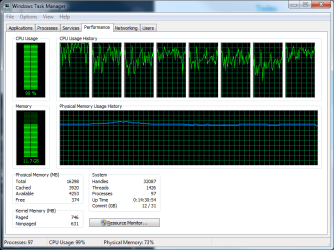
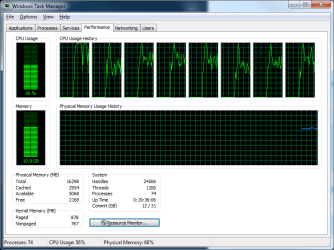
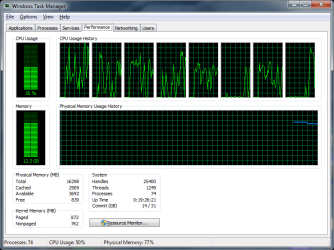
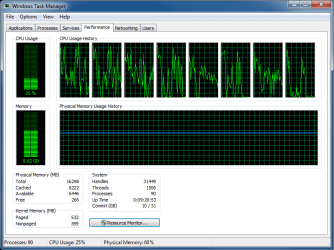
Imgur Here is a album just demonstrating 4 situations that this has occured, notably when this occurs, the only 'demanding' programs are skype, chrome and steam. Surely not enough to warrant this much usage.

My system specs are on my profile, most of these programs occured after installing a cooler, but don't seem to be a ram related problem, as I replaced them already..
I have already tried performance monitor, clearing up start up items, memory diagnostics.

Please help me ! Much appreciated.
 

Attachments
  • prob.png
    prob.png
    56.8 KB · Views: 1
  • vlc 23.png
    vlc 23.png
    65.9 KB · Views: 1
  • vlc skype.png
    vlc skype.png
    59.4 KB · Views: 1
  • while sc2.png
    while sc2.png
    78.7 KB · Views: 3
Last edited:

My Computer

Computer type
PC/Desktop
OS
Windows 7 Ultimate 64 bit
CPU
AMD 8350 Bulldozer OC (4.82 Ghz)
Motherboard
Asus Sabertooth 990fx r2.0
Memory
8GB x 2 (16GB) HyperX 1886 Mhz
Graphics Card(s)
Nvidia GTX 770 OC 2GB
Hard Drives
1tb + 500gb
Antivirus
None
Browser
Chrome
I'm not sure that I'll be able to help you find the offending app(s), but maybe I can help you to post those images in a way that more members will see them. Some members are not comfortable visiting image hosting websites. The steps in this tutorial should let you post the images as attachments to your post: http://www.sevenforums.com/tutorials/9733-screenshots-files-upload-post-seven-forums.html

Step 10 thru 12 show how to place the image inline so that you can have text above and/or below the image. Otherwise, the images will appear at the end of the text in your posts.

You might want to post screenshots of Resource Monitor - the Memory tab and the CPU tab.


If you get bored, I would be interested in the results of a WDO scan.
What is Windows Defender Offline? - Windows Help
The scan will probably need to run overnight.
 

My Computer

Computer type
Laptop
Computer Manufacturer/Model Number
Employer provided Dell Latitude
OS
W7 Pro SP1 64bit
CPU
i7
Memory
8GB
Graphics Card(s)
Intel HD Graphics
Hard Drives
crappy SSD
Antivirus
Employer mandated Symantec Endpoint Protection
Browser
Pale Moon 64bit, IE11 64bit & Chrome 64bit
Your
Processes are very high.
Your Paged and Non Paged are also very high.


Please show this from your computer.

Start Ups.JPG

Services.JPG
 

My Computer

Computer type
PC/Desktop
Computer Manufacturer/Model Number
Home made Desktop
OS
Windows 10 Pro. 64/ version 1709 Windows 7 Pro/64
CPU
Intel i7-6800K @ 4.3
Motherboard
ASUS X-99 Deluxe II
Memory
Corsair Platinum 16 gig @2400
Graphics Card(s)
EVGA GTX 1070 OC
Monitor(s) Displays
Asus 27" LED LCD/VE278Q
Screen Resolution
1920-1080 or 1280-720 HDMI
Hard Drives
INTEL SSD 730-240 Gb Sata 3.0/
PSU
EVGA Platium 1200W
Case
Phanteks Luxe Tempered Glass 8 fans/ one radiator
Cooling
XSPC/ Water Cooled CPU
Keyboard
Das 4 Professional
Mouse
Logitech M705/MX Anywhere 2-S
Internet Speed
100 mbits
Antivirus
Microsoft Security Essentials/ Malwarebytes Premium 3.0/ SAS
Browser
I.E. 11 default/Firefox/ ISP Time Warner Cable/Spectrum
Other Info
LG BluRay Burner/
Sound system-KLipsch-THX/
Icy Dock ssd Hot Swap bays.
It may be worth binning Chrome and using IE or Firefox for a while, I'm noticing a lot of issues including BSODs lately that are solved by uninstalling Chrome. Disabling hardware acceleration does help in some instances but Chrome does seem to screw up some systems in crazy ways and I'm no nearer figuring out what the issue is. Some people run Chrome without issue I daresay but it may well be worth removing it from the equation even if just for testing purposes.
 

My Computer

Computer type
PC/Desktop
Computer Manufacturer/Model Number
Custom Build
OS
W7 Pro x64 SP1 | W10 Pro IP x64 | W8.1 Pro x64 VM | Linux Mint VM
CPU
i7-4790k @ 4GHz (4.4GHz Boost)
Motherboard
ASUS Sabertooth Z87 (BIOS Rev 2004)
Memory
16GB DDR3 Kingston HyperX Fury @ 1600MHz CL 9-9-9-27
Graphics Card(s)
EVGA GTX 980 Classified
Sound Card
Realtek Onboard
Monitor(s) Displays
Samsung S27D390
Screen Resolution
1920 x 1080
Hard Drives
240GB Intel 520 Series SSD |
Samsung 850 EVO 120GB SSD |
2TB WD Caviar Black |
2TB WD Caviar Green
PSU
Corsair HX850-80 Gold Modular
Case
Cooler Master Silencio 650
Cooling
Corsair H80i w/2 x Corsair SP120 | 2 x 120mm Noctua NF-S12B
Keyboard
Microsoft Sidewinder X4
Mouse
Gigabyte M6900 optical
Internet Speed
152mb
Antivirus
F-Secure
Browser
Firefox 38.0
Other Info
Backup Rig: Win 7 Pro 64-bit | AMD A10-5800k | ASUS F2A85-V Pro | 8GB Samsung DDR3 @1600MHz | 120GB Toshiba SDD | 2TB Seagate HDD | Cooler Master Silencio 550
I use Chrome only for a 2nd Gmail account. No issues with that, but that's about all I do with it.
 

My Computer

Computer type
PC/Desktop
Computer Manufacturer/Model Number
Custom Build
OS
Windows 7 Ultimate x64 SP1
CPU
AMD Phenom 2 1090T
Motherboard
Gigabyte GA-890FXA-UD5
Memory
2x8GB Kingston HyperX Fury Black 1600Mhz Unganged
Graphics Card(s)
MSI GTX 970 Gaming 4G
Sound Card
Realtek On-Board HD 7.1 Audio / Logitech G35
Monitor(s) Displays
3xAcer GD245HQ
Screen Resolution
1920x1080
Hard Drives
Samsung 850 Pro 512GB SSD - OS /
WD Caviar Black SATA 3 - 1 TBx2 - Dynamic RAID 0 /
WD Caviar Green SATA 2 - 640GBx2 - Dynamic RAID 0 /
WD Caviar Green SATA 2 - 640GB - Internal Backup /
Seagate Barracude SATA 3 - 3TB - External Backup/ Sync
PSU
HighPower 1000W
Case
Cooler Master HAF 932
Cooling
Noctua NH-D14
Keyboard
Logitech G19
Mouse
Logitech G500
Internet Speed
100/4 Mbit Cable (100GB quota)
Antivirus
ZoneAlarm Extreme Security / MBAM Pro / MBAE Free / SAS Free
Browser
IE 11 - Firefox - Chrome
Other Info
Logitech F710/ G27/ G940/ Z5500 // TrackIR 5 // Nvidia 3D Surround Vision
It may be worth binning Chrome and using IE or Firefox for a while, I'm noticing a lot of issues including BSODs lately that are solved by uninstalling Chrome. Disabling hardware acceleration does help in some instances but Chrome does seem to screw up some systems in crazy ways and I'm no nearer figuring out what the issue is. Some people run Chrome without issue I daresay but it may well be worth removing it from the equation even if just for testing purposes.

Your
Processes are very high.
Your Paged and Non Paged are also very high.


Please show this from your computer.

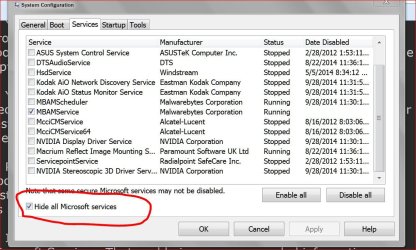
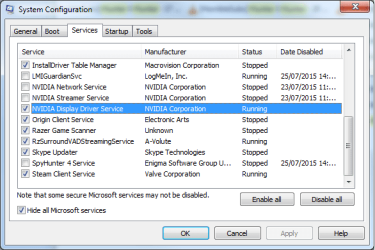
View attachment 366875

View attachment 366876

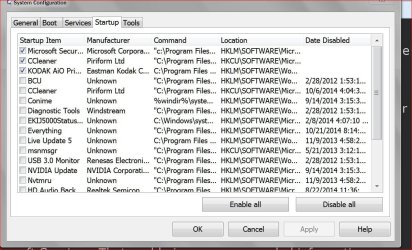
The Msconfigs you asked for are attached. What do you mean by ''Paged and Non-paged" btw? I unistalled Chrome to see if it could be memory leaking somehow.
 

Attachments

  • 2.png
    2.png
    48.9 KB · Views: 66
  • 1.png
    1.png
    58.7 KB · Views: 68

My Computer

Computer type
PC/Desktop
OS
Windows 7 Ultimate 64 bit
CPU
AMD 8350 Bulldozer OC (4.82 Ghz)
Motherboard
Asus Sabertooth 990fx r2.0
Memory
8GB x 2 (16GB) HyperX 1886 Mhz
Graphics Card(s)
Nvidia GTX 770 OC 2GB
Hard Drives
1tb + 500gb
Antivirus
None
Browser
Chrome

My Computer

Computer type
Laptop
Computer Manufacturer/Model Number
Employer provided Dell Latitude
OS
W7 Pro SP1 64bit
CPU
i7
Memory
8GB
Graphics Card(s)
Intel HD Graphics
Hard Drives
crappy SSD
Antivirus
Employer mandated Symantec Endpoint Protection
Browser
Pale Moon 64bit, IE11 64bit & Chrome 64bit

My Computer

Computer type
PC/Desktop
OS
Windows 7 Ultimate 64 bit
CPU
AMD 8350 Bulldozer OC (4.82 Ghz)
Motherboard
Asus Sabertooth 990fx r2.0
Memory
8GB x 2 (16GB) HyperX 1886 Mhz
Graphics Card(s)
Nvidia GTX 770 OC 2GB
Hard Drives
1tb + 500gb
Antivirus
None
Browser
Chrome
~~~
Alright, any ideas on where I should start? I haven't installed any recently
I would start with the scan mentioned in post #2.
I like to use a USB flash drive.
 

My Computer

Computer type
Laptop
Computer Manufacturer/Model Number
Employer provided Dell Latitude
OS
W7 Pro SP1 64bit
CPU
i7
Memory
8GB
Graphics Card(s)
Intel HD Graphics
Hard Drives
crappy SSD
Antivirus
Employer mandated Symantec Endpoint Protection
Browser
Pale Moon 64bit, IE11 64bit & Chrome 64bit
Just what I thought.
Look at my post #3 again. You will see that I have very few things running in the background and you have masses running.

Make sure you keep all active security programs checked. In my opinion the rest don't need checked.

To explain.
Every thing that is checked will start at boot and run in the background whether you use them or not. A big waste of resources.

Unchecked programs still lets you or your system use them when needed.
Example:

Lets say you have Office installed. If you have it checked in msconfig Office will run in the background even when you are not using it.
Unchecked it will only run when you want to use it. Just tick on the program or it's icon and presto it is running. When you close Office it will go back to doing nothing.

Please note that you will have to do your updates manually. Which is the way I do updates.
 

My Computer

Computer type
PC/Desktop
Computer Manufacturer/Model Number
Home made Desktop
OS
Windows 10 Pro. 64/ version 1709 Windows 7 Pro/64
CPU
Intel i7-6800K @ 4.3
Motherboard
ASUS X-99 Deluxe II
Memory
Corsair Platinum 16 gig @2400
Graphics Card(s)
EVGA GTX 1070 OC
Monitor(s) Displays
Asus 27" LED LCD/VE278Q
Screen Resolution
1920-1080 or 1280-720 HDMI
Hard Drives
INTEL SSD 730-240 Gb Sata 3.0/
PSU
EVGA Platium 1200W
Case
Phanteks Luxe Tempered Glass 8 fans/ one radiator
Cooling
XSPC/ Water Cooled CPU
Keyboard
Das 4 Professional
Mouse
Logitech M705/MX Anywhere 2-S
Internet Speed
100 mbits
Antivirus
Microsoft Security Essentials/ Malwarebytes Premium 3.0/ SAS
Browser
I.E. 11 default/Firefox/ ISP Time Warner Cable/Spectrum
Other Info
LG BluRay Burner/
Sound system-KLipsch-THX/
Icy Dock ssd Hot Swap bays.
I finished scanning with Windows Defender and didn't find anything. What should I do now?
 

My Computer

Computer type
PC/Desktop
OS
Windows 7 Ultimate 64 bit
CPU
AMD 8350 Bulldozer OC (4.82 Ghz)
Motherboard
Asus Sabertooth 990fx r2.0
Memory
8GB x 2 (16GB) HyperX 1886 Mhz
Graphics Card(s)
Nvidia GTX 770 OC 2GB
Hard Drives
1tb + 500gb
Antivirus
None
Browser
Chrome
Read post #10 and uncheck things like I explained.
Reboot and see how things work.

Now if you don't want to uncheck the items just say so.
 

My Computer

Computer type
PC/Desktop
Computer Manufacturer/Model Number
Home made Desktop
OS
Windows 10 Pro. 64/ version 1709 Windows 7 Pro/64
CPU
Intel i7-6800K @ 4.3
Motherboard
ASUS X-99 Deluxe II
Memory
Corsair Platinum 16 gig @2400
Graphics Card(s)
EVGA GTX 1070 OC
Monitor(s) Displays
Asus 27" LED LCD/VE278Q
Screen Resolution
1920-1080 or 1280-720 HDMI
Hard Drives
INTEL SSD 730-240 Gb Sata 3.0/
PSU
EVGA Platium 1200W
Case
Phanteks Luxe Tempered Glass 8 fans/ one radiator
Cooling
XSPC/ Water Cooled CPU
Keyboard
Das 4 Professional
Mouse
Logitech M705/MX Anywhere 2-S
Internet Speed
100 mbits
Antivirus
Microsoft Security Essentials/ Malwarebytes Premium 3.0/ SAS
Browser
I.E. 11 default/Firefox/ ISP Time Warner Cable/Spectrum
Other Info
LG BluRay Burner/
Sound system-KLipsch-THX/
Icy Dock ssd Hot Swap bays.
I finished scanning with Windows Defender and didn't find anything. What should I do now?
Just to be clear: you scanned with Windows Defender Offline. Correct? Not the Windows Defender that is built into Windows 7.

If the scan was with WDO. Thank you for taking the time to do that.

Please follow Layback Bear's advice.
 

My Computer

Computer type
Laptop
Computer Manufacturer/Model Number
Employer provided Dell Latitude
OS
W7 Pro SP1 64bit
CPU
i7
Memory
8GB
Graphics Card(s)
Intel HD Graphics
Hard Drives
crappy SSD
Antivirus
Employer mandated Symantec Endpoint Protection
Browser
Pale Moon 64bit, IE11 64bit & Chrome 64bit
Read post #10 and uncheck things like I explained.
Reboot and see how things work.

Now if you don't want to uncheck the items just say so.

Yes I had already done this, sorry should have said :). There were a couple of services that were important, as on boot, my computer was very slow for some reason, so I ticked some Asus services, which probably related to my motherboard. Atm I haven't had a CPU/RAM Spike, so not sure if unistalling chrome did it, or some of the services, hypothetically let's say it's not fixed, what should I try next?
 

My Computer

Computer type
PC/Desktop
OS
Windows 7 Ultimate 64 bit
CPU
AMD 8350 Bulldozer OC (4.82 Ghz)
Motherboard
Asus Sabertooth 990fx r2.0
Memory
8GB x 2 (16GB) HyperX 1886 Mhz
Graphics Card(s)
Nvidia GTX 770 OC 2GB
Hard Drives
1tb + 500gb
Antivirus
None
Browser
Chrome
I finished scanning with Windows Defender and didn't find anything. What should I do now?
Just to be clear: you scanned with Windows Defender Offline. Correct? Not the Windows Defender that is built into Windows 7.

If the scan was with WDO. Thank you for taking the time to do that.

Please follow Layback Bear's advice.

Sorry for double posting, I suck at formatting, Yes I actually used both versions and came up empty. Does Windows Defender look for more than Malware? As I don't think it's a malware related problem.
 

My Computer

Computer type
PC/Desktop
OS
Windows 7 Ultimate 64 bit
CPU
AMD 8350 Bulldozer OC (4.82 Ghz)
Motherboard
Asus Sabertooth 990fx r2.0
Memory
8GB x 2 (16GB) HyperX 1886 Mhz
Graphics Card(s)
Nvidia GTX 770 OC 2GB
Hard Drives
1tb + 500gb
Antivirus
None
Browser
Chrome
If it is ok now, then start enabling them few at a time, reboot and wait until you are certain it is ok. Go on like this until you find the culprit - then you can make an informed decision about it.
 

My Computer

Computer type
PC/Desktop
Computer Manufacturer/Model Number
Custom Build
OS
Windows 7 Ultimate x64 SP1
CPU
AMD Phenom 2 1090T
Motherboard
Gigabyte GA-890FXA-UD5
Memory
2x8GB Kingston HyperX Fury Black 1600Mhz Unganged
Graphics Card(s)
MSI GTX 970 Gaming 4G
Sound Card
Realtek On-Board HD 7.1 Audio / Logitech G35
Monitor(s) Displays
3xAcer GD245HQ
Screen Resolution
1920x1080
Hard Drives
Samsung 850 Pro 512GB SSD - OS /
WD Caviar Black SATA 3 - 1 TBx2 - Dynamic RAID 0 /
WD Caviar Green SATA 2 - 640GBx2 - Dynamic RAID 0 /
WD Caviar Green SATA 2 - 640GB - Internal Backup /
Seagate Barracude SATA 3 - 3TB - External Backup/ Sync
PSU
HighPower 1000W
Case
Cooler Master HAF 932
Cooling
Noctua NH-D14
Keyboard
Logitech G19
Mouse
Logitech G500
Internet Speed
100/4 Mbit Cable (100GB quota)
Antivirus
ZoneAlarm Extreme Security / MBAM Pro / MBAE Free / SAS Free
Browser
IE 11 - Firefox - Chrome
Other Info
Logitech F710/ G27/ G940/ Z5500 // TrackIR 5 // Nvidia 3D Surround Vision
If it is ok now, then start enabling them few at a time, reboot and wait until you are certain it is ok. Go on like this until you find the culprit - then you can make an informed decision about it.
Okay sure, but what if turns out that it was just chrome, should I just never use chrome again xD?
 

My Computer

Computer type
PC/Desktop
OS
Windows 7 Ultimate 64 bit
CPU
AMD 8350 Bulldozer OC (4.82 Ghz)
Motherboard
Asus Sabertooth 990fx r2.0
Memory
8GB x 2 (16GB) HyperX 1886 Mhz
Graphics Card(s)
Nvidia GTX 770 OC 2GB
Hard Drives
1tb + 500gb
Antivirus
None
Browser
Chrome
You can try running CCleaner for files and registry and try installing again, may be that install went bad. If still no good, try again when they release a new version.
 

My Computer

Computer type
PC/Desktop
Computer Manufacturer/Model Number
Custom Build
OS
Windows 7 Ultimate x64 SP1
CPU
AMD Phenom 2 1090T
Motherboard
Gigabyte GA-890FXA-UD5
Memory
2x8GB Kingston HyperX Fury Black 1600Mhz Unganged
Graphics Card(s)
MSI GTX 970 Gaming 4G
Sound Card
Realtek On-Board HD 7.1 Audio / Logitech G35
Monitor(s) Displays
3xAcer GD245HQ
Screen Resolution
1920x1080
Hard Drives
Samsung 850 Pro 512GB SSD - OS /
WD Caviar Black SATA 3 - 1 TBx2 - Dynamic RAID 0 /
WD Caviar Green SATA 2 - 640GBx2 - Dynamic RAID 0 /
WD Caviar Green SATA 2 - 640GB - Internal Backup /
Seagate Barracude SATA 3 - 3TB - External Backup/ Sync
PSU
HighPower 1000W
Case
Cooler Master HAF 932
Cooling
Noctua NH-D14
Keyboard
Logitech G19
Mouse
Logitech G500
Internet Speed
100/4 Mbit Cable (100GB quota)
Antivirus
ZoneAlarm Extreme Security / MBAM Pro / MBAE Free / SAS Free
Browser
IE 11 - Firefox - Chrome
Other Info
Logitech F710/ G27/ G940/ Z5500 // TrackIR 5 // Nvidia 3D Surround Vision
...Does Windows Defender look for more than Malware? As I don't think it's a malware related problem.
Windows Defender looks for malware. Windows Defender Offline is pretty much Microsoft Security Essentials... so, it looks for virus/trojan/root kit files. There are infections that will not show up when scanned while Windows is running. These infections hide from all of the lists that we look at within Windows (e.g. Task Manager, Resource Monitor, msconfig...). So, you see why it helps to know if some infection is driving your CPU usage high. That said, WDO might have missed something. There are infections that go undetected for years.
 

My Computer

Computer type
Laptop
Computer Manufacturer/Model Number
Employer provided Dell Latitude
OS
W7 Pro SP1 64bit
CPU
i7
Memory
8GB
Graphics Card(s)
Intel HD Graphics
Hard Drives
crappy SSD
Antivirus
Employer mandated Symantec Endpoint Protection
Browser
Pale Moon 64bit, IE11 64bit & Chrome 64bit
UPDATE: While my RAM/CPU problem appears to be fixed, I'm still determining the culprit. Firefox appears to be running very slowly/laggy compared to my usual chrome experience.
 

My Computer

Computer type
PC/Desktop
OS
Windows 7 Ultimate 64 bit
CPU
AMD 8350 Bulldozer OC (4.82 Ghz)
Motherboard
Asus Sabertooth 990fx r2.0
Memory
8GB x 2 (16GB) HyperX 1886 Mhz
Graphics Card(s)
Nvidia GTX 770 OC 2GB
Hard Drives
1tb + 500gb
Antivirus
None
Browser
Chrome
Back
Top