Physical Memory/CPU Usage showing high

hameeds4

New member
Local time
8:07 AM
Messages
2
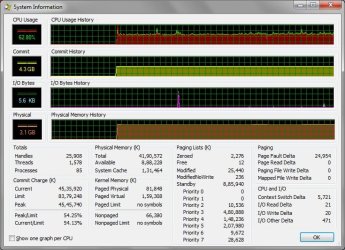
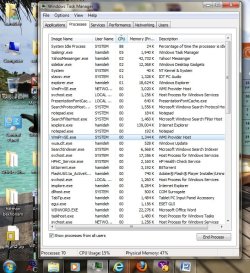
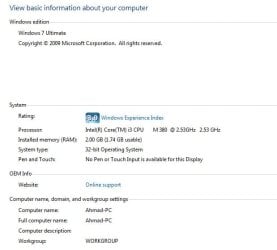
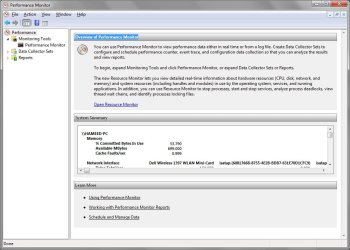
I am using Windows 7, with 4GB ram. My physical memory usage goes high upto 3.5Gig even when i use very less applications.

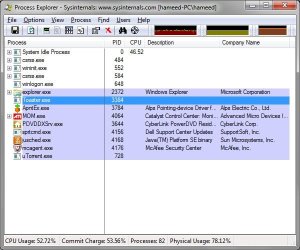
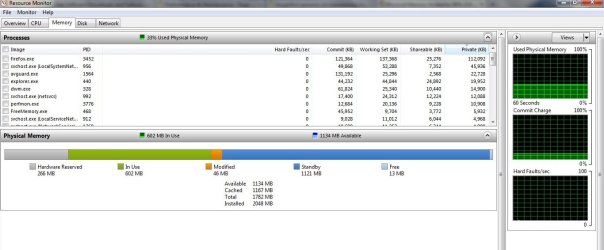
I have monitored using both Performance Monitor (Perfmon.exe) and Process Explorer.
All applications shows the same including my Task Manager/Wdws Gadgets.

My system is normal, but curious to know the reason.

Attached is for reference

Thanks in advance
 

Attachments
  • performance monitor.jpg
    performance monitor.jpg
    83.7 KB · Views: 1,338
  • Process Explorer.jpg
    Process Explorer.jpg
    48.6 KB · Views: 1,814
  • System Information.jpg
    System Information.jpg
    80.6 KB · Views: 1,726
  • task manager.jpg
    task manager.jpg
    85.8 KB · Views: 2,433

My Computer

OS
Windows 7
You are doing anything but running less applications. I can see a dozen different applications that can the cause or contributing factor. Java for instance, does it need to be running? All that stuff under "Toaster.exe" do they need to be running?
 

My Computer

Computer type
PC/Desktop
Computer Manufacturer/Model Number
Alienware Aurora ALX R4
OS
Windows 10 Pro (x64)
CPU
Intel Core i7-3930K (3.2GHz - 4.5GHz)
Motherboard
Alienware Aurora-R4 x79
Memory
4x Samsung 4GB PC3-12800 DDR3 (16GB 1600MHz)
Graphics Card(s)
Nvidia Geforce GTX 690
Sound Card
SteelSeries Siberia Elite
Monitor(s) Displays
Dell UltraSharp U3011
Screen Resolution
2560x1600
Hard Drives
Samsung 850 Pro 256 GB, Seagate 1TB Desktop Hybrid HDD, 2x Western Digital 4TB Green HDD
PSU
875W Some Dell PSU <.<
Case
Alienware Aurora ALX
Cooling
Custom Liquid Cooling (EK CPU & GPU blocks) dual EK 480RAD
Keyboard
Logitech G710+ Mechanical
Mouse
Logitech G700s
Internet Speed
Verizon Fios (50 mbps average)
Other Info
Server: Intel NUC D54250WYK: i5-4250U, 16GB, 256 GB mSATA, Windows Server 2012 R2
You're also running two instances of Google Chrome. That's going to eat up available memory.
 

My Computer

Computer Manufacturer/Model Number
Me
OS
Windows 7 32-bit
CPU
AMD Phenom Quad Core 9750 2.4GHz
Motherboard
ASUS M4A785-M
Memory
Corsair XMS2 4GB(2x2GB) DDR2
Graphics Card(s)
XFX ATi Radeon HD 4350 1GB DDR3
Screen Resolution
1024x768
Hard Drives
Seagate Barracuda 750GB
PSU
Ultra 650W Power Supply
Case
NZXT Tempest
Cooling
6 Case Fans(2x140mm,3x120mm,1x80mm)
I just wanted to add for more clearance

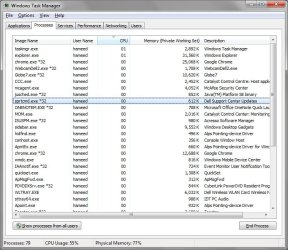
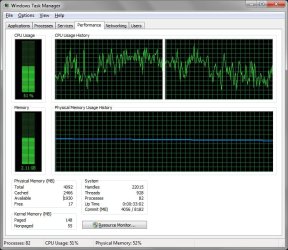
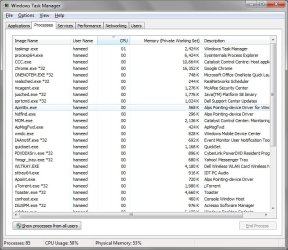
There are no processes running, still i get more CPU usage and more Physical memory usage.

See attached
 

Attachments

  • Performance_tsk.jpg
    Performance_tsk.jpg
    89.4 KB · Views: 1,275
  • Processes_tsk.jpg
    Processes_tsk.jpg
    84.9 KB · Views: 1,539

My Computer

OS
Windows 7
I see 82 processes in the first, and 85 in the second screenshot.
 

My Computer

Computer Manufacturer/Model Number
Me
OS
Windows 7 32-bit
CPU
AMD Phenom Quad Core 9750 2.4GHz
Motherboard
ASUS M4A785-M
Memory
Corsair XMS2 4GB(2x2GB) DDR2
Graphics Card(s)
XFX ATi Radeon HD 4350 1GB DDR3
Screen Resolution
1024x768
Hard Drives
Seagate Barracuda 750GB
PSU
Ultra 650W Power Supply
Case
NZXT Tempest
Cooling
6 Case Fans(2x140mm,3x120mm,1x80mm)
Not even showing process from all users.
 

My Computer

Computer type
PC/Desktop
Computer Manufacturer/Model Number
Alienware Aurora ALX R4
OS
Windows 10 Pro (x64)
CPU
Intel Core i7-3930K (3.2GHz - 4.5GHz)
Motherboard
Alienware Aurora-R4 x79
Memory
4x Samsung 4GB PC3-12800 DDR3 (16GB 1600MHz)
Graphics Card(s)
Nvidia Geforce GTX 690
Sound Card
SteelSeries Siberia Elite
Monitor(s) Displays
Dell UltraSharp U3011
Screen Resolution
2560x1600
Hard Drives
Samsung 850 Pro 256 GB, Seagate 1TB Desktop Hybrid HDD, 2x Western Digital 4TB Green HDD
PSU
875W Some Dell PSU <.<
Case
Alienware Aurora ALX
Cooling
Custom Liquid Cooling (EK CPU & GPU blocks) dual EK 480RAD
Keyboard
Logitech G710+ Mechanical
Mouse
Logitech G700s
Internet Speed
Verizon Fios (50 mbps average)
Other Info
Server: Intel NUC D54250WYK: i5-4250U, 16GB, 256 GB mSATA, Windows Server 2012 R2
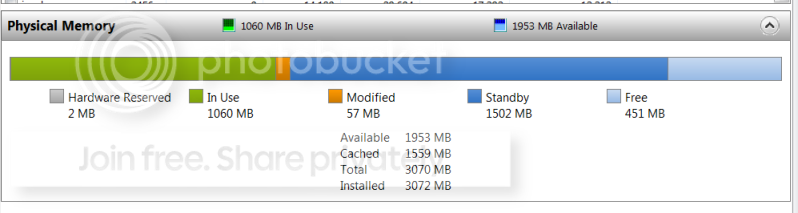
It is hard to work with your screenshots. For Process Monitor, it would be useful to see the colored bar under Memory tab - like this:

2010-03-01_163855.png


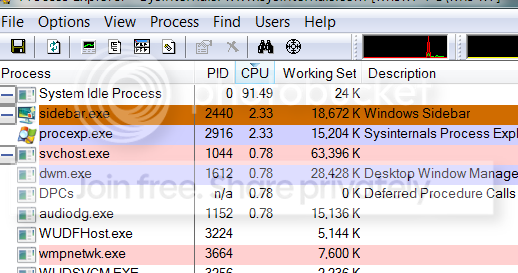
For Process Explorer, you need to show all the CPU intensive processes on top by double clicking on "CPU". Like this:

2010-03-01_1641.png
 

My Computer

Computer Manufacturer/Model Number
HP, Dell, Gateway, Toshiba - 4 laptops and 2 desktops
OS
Vista, Windows7, Mint Mate, Zorin, Windows 8
CPU
from 1.6GHz Duo to i7
Monitor(s) Displays
2x HP w2207
Hard Drives
5x HDD, 7x SSD, 12x Externals
Keyboard
with trackball - no mices
Mouse
Trackball mice
Internet Speed
DSL 6000
Just to reiterate....you have 85 processes running. To put things into perspective, I have 43 running. You have way too much junk running in the background. I think it might be best to do some house cleaning.

I know it's nice to have certain things running in the background and or running in the tray, but it's such a horrible habit to get into. Nothing needs to be running in the background. At most your anti-virus software and any of the required Windows services. Anything else is simply bloating the operating system. If you're unsure of what a specific task is in the taskmanager I'm sure we can help you out so you can bring that 85 down to a much lower more manageable number.

Right off the bat here's a list of things that don't need to be running:

ONENOTEM.EXE
realsched.exe
jusched.exe
sprtcmd.exe
quickset.exe
PDVDDXSrv.exe
uTorrent.exe
Toaster.exe

That's 8 processes that are eating away at your RAM and CPU usage. Obviously if you're downloading something in uTorrent it needs to be running. But if you're not downloading anything, close it. Nothing listed above is crucial for the system to run and all of it is easily reloaded when another piece of software might need it.
 

My Computer

Computer type
PC/Desktop
Computer Manufacturer/Model Number
Custom Build
OS
Windows 7
CPU
AMD Phenom II X4 955 Black Edition
Motherboard
MSI 870A-G54
Memory
8GB
Graphics Card(s)
PNY XLR8 GeForce GTX 460 1024MB GDDR5
Monitor(s) Displays
2 x 24"
Agreed, 85 is way too much junk. You should have under 50 processes, give or take 5. Poor 7.:cry:
 

My Computer

Computer Manufacturer/Model Number
Sony Vaio Z46GDU
OS
Windows 7 Ultimate x86-64
CPU
[email protected] 1066MHz FSB
Motherboard
Sony branded
Memory
6GB DDR3 1066MHz
Graphics Card(s)
9300M GS 256MB Dedicated (Speed) + Intel4500MHD (Stamina)
Sound Card
Realtek HD Audio
Monitor(s) Displays
13.1' WXGA
Screen Resolution
1600x900
Hard Drives
320GB 7200RPM w/ 16MB cache
Internet Speed
1MB/s
cpu usage

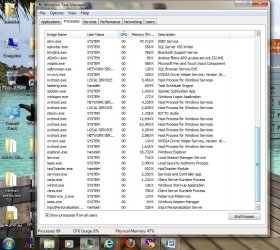
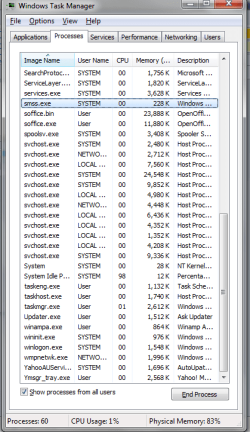
would you plz tell me which of these processes are unnessecarry?
my CPU usage goes too high frequently.specially when i watch a movie or clip with KMplayer or GOMplayer.
I uploaded pictures of processes in task manager

thank you in advance
 

Attachments

  • Untitled1.jpg
    Untitled1.jpg
    128.2 KB · Views: 409
  • Untitled.jpg
    Untitled.jpg
    117.7 KB · Views: 803

My Computer

Computer Manufacturer/Model Number
HP
OS
windows 7-32bit
Memory
4
I cannot see anything unusual in your processes. With 88% idle, there is not much load on your CPU.
 

My Computer

Computer Manufacturer/Model Number
HP, Dell, Gateway, Toshiba - 4 laptops and 2 desktops
OS
Vista, Windows7, Mint Mate, Zorin, Windows 8
CPU
from 1.6GHz Duo to i7
Monitor(s) Displays
2x HP w2207
Hard Drives
5x HDD, 7x SSD, 12x Externals
Keyboard
with trackball - no mices
Mouse
Trackball mice
Internet Speed
DSL 6000
but why the cpu usage goes up to 100% and my laptop becomes hot, when i play a movie with my players.
 

My Computer

Computer Manufacturer/Model Number
HP
OS
windows 7-32bit
Memory
4
In the picture you posted, the processes that are active use only very little CPU time (all together 12%). You have to either post a picture of Task Manager when the CPU is 100% active or tell us which processes use the CPU. Without this information we only guess.

The heat can have many causes. Laptops do heat up a lot more than desktops because of the cramped quaters. I suggest you measure the temperature with e.g. Core Temp so that we have exact numbers. Then we can tell you whether the temps are critical or within the norm.
 

My Computer

Computer Manufacturer/Model Number
HP, Dell, Gateway, Toshiba - 4 laptops and 2 desktops
OS
Vista, Windows7, Mint Mate, Zorin, Windows 8
CPU
from 1.6GHz Duo to i7
Monitor(s) Displays
2x HP w2207
Hard Drives
5x HDD, 7x SSD, 12x Externals
Keyboard
with trackball - no mices
Mouse
Trackball mice
Internet Speed
DSL 6000
I measured the temperature and it's usually between 45-50 degress centigerad. once it reached to 60 when my cpu usage was high.
when i watch movies and mu cpu usage goes to 100, the player uses most cpu. and laptop gets stuck and i can do nothing, only forget watching movie. even when i close the player and wait for the cpu usage to decrease, it will again increase if i play the movie. it doesnt always happen though. only sometimes specially when i forward and backward movies or when i watch short clips that i have to open and close player every 5-6 minutes.
and sometimes cpu usages goes to 100 and most cpu is used by windows explorer. windows sometimes alert me that windows explorer is not working and i have to restart it. it happens very often like every day.
thank you
 

My Computer

Computer Manufacturer/Model Number
HP
OS
windows 7-32bit
Memory
4

My Computer

Computer Manufacturer/Model Number
HP, Dell, Gateway, Toshiba - 4 laptops and 2 desktops
OS
Vista, Windows7, Mint Mate, Zorin, Windows 8
CPU
from 1.6GHz Duo to i7
Monitor(s) Displays
2x HP w2207
Hard Drives
5x HDD, 7x SSD, 12x Externals
Keyboard
with trackball - no mices
Mouse
Trackball mice
Internet Speed
DSL 6000
Free Ram is very less

My (Acer Aspire 5742)system is showing only few MB free ram in resource monitor.

My system some times dont respond when i am working in Excel 2010. my curser takes lot of time to shift from one cell to second cell.
 

Attachments

  • Computer information.jpg
    Computer information.jpg
    27.1 KB · Views: 134
  • Resource Monitor.jpg
    Resource Monitor.jpg
    86.5 KB · Views: 326
Last edited:

My Computer

OS
Windows 7 Ultimate 32bit
My (Acer Aspire 5742)system is showing only few MB free ram in resource monitor.

My system some times dont respond when i am working in Excel 2010. my curser takes lot of time to shift from one cell to second cell.

Umm...there is nothing wrong with your RAM usage. Free is suppose to be as little as possible, taking up by the darker blue called Standby.
 

My Computer

Computer type
PC/Desktop
Computer Manufacturer/Model Number
Alienware Aurora ALX R4
OS
Windows 10 Pro (x64)
CPU
Intel Core i7-3930K (3.2GHz - 4.5GHz)
Motherboard
Alienware Aurora-R4 x79
Memory
4x Samsung 4GB PC3-12800 DDR3 (16GB 1600MHz)
Graphics Card(s)
Nvidia Geforce GTX 690
Sound Card
SteelSeries Siberia Elite
Monitor(s) Displays
Dell UltraSharp U3011
Screen Resolution
2560x1600
Hard Drives
Samsung 850 Pro 256 GB, Seagate 1TB Desktop Hybrid HDD, 2x Western Digital 4TB Green HDD
PSU
875W Some Dell PSU <.<
Case
Alienware Aurora ALX
Cooling
Custom Liquid Cooling (EK CPU & GPU blocks) dual EK 480RAD
Keyboard
Logitech G710+ Mechanical
Mouse
Logitech G700s
Internet Speed
Verizon Fios (50 mbps average)
Other Info
Server: Intel NUC D54250WYK: i5-4250U, 16GB, 256 GB mSATA, Windows Server 2012 R2
My (Acer Aspire 5742)system is showing only few MB free ram in resource monitor.

My system some times dont respond when i am working in Excel 2010. my curser takes lot of time to shift from one cell to second cell.
That is the best situation you can have - all your RAM is being used. Everything that is blue is so called "available" RAM and can be populated with programs if required. But as long as nobody claims that RAM, it is used for caching (the dark blue part).
 

My Computer

Computer Manufacturer/Model Number
HP, Dell, Gateway, Toshiba - 4 laptops and 2 desktops
OS
Vista, Windows7, Mint Mate, Zorin, Windows 8
CPU
from 1.6GHz Duo to i7
Monitor(s) Displays
2x HP w2207
Hard Drives
5x HDD, 7x SSD, 12x Externals
Keyboard
with trackball - no mices
Mouse
Trackball mice
Internet Speed
DSL 6000
please help me too

i think that I am also encountering the same problem. so many processes in record but only one or 2 is running. please let me know what are those which i don't need and how to terminate them permanently. and some guidelines to avoid future encounter with them again. thanks in advance for those who will reply and more power

PS:
i only have 1 application running and that is chrome with only 1 tab. ;(
 

Attachments

  • 1.png
    1.png
    26.4 KB · Views: 147
  • 2.png
    2.png
    22.9 KB · Views: 137

My Computer

OS
windows 7 32 bit
Back
Top