Solved Mute Sound Icon Box suddenly flashing on desktop - can't turn off!

meltie

New member
Local time
3:21 PM
Messages
30
All,

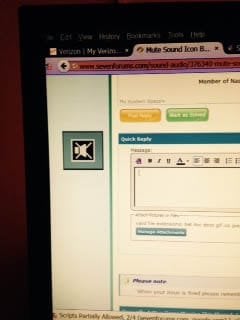
Can someone please help me figure out how to turn off the icon that suddenly started flashing randomly on the left side of my desktop? It is a box with a speaker with an "X" through it. It flashes vertically up and down the left side of my monitor.

My OS is: Windows 7 Home Premium 64-bit
Sound: Confused on this.
Speakers are: VIA High Definition Audio
Sound Card: AMD Catalyst Control
Under this Control Center, says "Audio" Default Audio Device

I was playing a game. Had it on "pause". Went back to it and hit resume with my mouse. Then this flashing mute sound box appeared.

I didn't hit any hot keys that I am aware of and the sound is still functional when I test it.

The Icon in my toolbar does not show "muted" and I have sound.

Did a System Restore. No change. This is extremely annoying.

I'm sure it's probably something simple, but I can't figure it out.

Thank you in advance for your help.

MJ
 

My Computer My Computer

At a glance

Vista Home Premium 64-bitNVidia 900 series
Computer Manufacturer/Model Number
HP m8530f
OS
Vista Home Premium 64-bit
Graphics Card(s)
NVidia 900 series
Monitor(s) Displays
ASUS VE 205
VIA is your regular PC sound. The AMD is ONLY for HDMI audio.

That must be something that a program, most likely the game, caused. Check the game for options.
 

My Computer My Computer

At a glance

Windows 10 64 bitIntel i7 6700K16GB Corsair DominatorIntel CPU Graphics
Computer type
PC/Desktop
Computer Manufacturer/Model Number
My Own Build
OS
Windows 10 64 bit
CPU
Intel i7 6700K
Motherboard
ASUS ROG Maximus VIII Hero
Memory
16GB Corsair Dominator
Graphics Card(s)
Intel CPU Graphics
Sound Card
RealTek
Monitor(s) Displays
27" Dell S2719dgf
Screen Resolution
2560X1440
Hard Drives
1 TB Samsung 850 EVO SSD for Win 10 Pro
500GB Samsung 850 EVO SSD for Win 10 Insider
2 TB drive for backup
PSU
EVGA Supernova 750G2
Case
BeQuiet Silent Base 600
Cooling
Deepcool Captain 120EX
Keyboard
Microsoft Wireless 2000
Mouse
Microsoft wireless
Internet Speed
100 MB/sec (Cable)
Antivirus
Microsoft Defender and Malwarebytes
Browser
Edge/Firefox
Other Info
Cakewalk (Sonar) by BandLab and Studio One 4.1 Pro recording studio software. MOTU 896Mk3 Hybrid recording interface, Frontier Tranzport wireless control unit, Behringer X-Touch Control Surface.
Five USB connected optical drives for CD Audio production using Nero BurningROM
Thank you for the clarification.

I thought about the game causing it. I checked the game for options. It's a very simple game. Options are: Music On/Off, Sound FX On/Off, Full Screen On/Off

Turned all off and nothing happened. I rebooted with all Options "off". Still nothing happened.

I could try uninstalling the game?? The odd thing is, is that it is doing this whether the game is running or not.

I'm wondering if the game caused a glitch somewhere else? Or, I inadvertently hit something on the keyboard. I don't think I did.

Not sure what to do now. Any other thoughts?

Thanks again, in advance, for your help.
 

My Computer My Computer

At a glance

Vista Home Premium 64-bitNVidia 900 series
Computer Manufacturer/Model Number
HP m8530f
OS
Vista Home Premium 64-bit
Graphics Card(s)
NVidia 900 series
Monitor(s) Displays
ASUS VE 205
OK - I went in and uninstalled the game. Then rebooted.

No change. Icon still flashing. It starts flashing during boot up and continues regardless of what game or program I am utilizing.

This is a Big Fish game and it does run through the Big Fish Game Manager. Could the Game Manager be causing this? Went in there as well and turned off sound options. The interesting thing is that regardless of whether that box is checked or not, the sound has now disappeared from the Game Manager. Should I uninstall that and reinstall it?

Thoughts please.

Thanks
 

My Computer My Computer

At a glance

Vista Home Premium 64-bitNVidia 900 series
Computer Manufacturer/Model Number
HP m8530f
OS
Vista Home Premium 64-bit
Graphics Card(s)
NVidia 900 series
Monitor(s) Displays
ASUS VE 205

My Computer My Computer

At a glance

Windows 10 64 bitIntel i7 6700K16GB Corsair DominatorIntel CPU Graphics
Computer type
PC/Desktop
Computer Manufacturer/Model Number
My Own Build
OS
Windows 10 64 bit
CPU
Intel i7 6700K
Motherboard
ASUS ROG Maximus VIII Hero
Memory
16GB Corsair Dominator
Graphics Card(s)
Intel CPU Graphics
Sound Card
RealTek
Monitor(s) Displays
27" Dell S2719dgf
Screen Resolution
2560X1440
Hard Drives
1 TB Samsung 850 EVO SSD for Win 10 Pro
500GB Samsung 850 EVO SSD for Win 10 Insider
2 TB drive for backup
PSU
EVGA Supernova 750G2
Case
BeQuiet Silent Base 600
Cooling
Deepcool Captain 120EX
Keyboard
Microsoft Wireless 2000
Mouse
Microsoft wireless
Internet Speed
100 MB/sec (Cable)
Antivirus
Microsoft Defender and Malwarebytes
Browser
Edge/Firefox
Other Info
Cakewalk (Sonar) by BandLab and Studio One 4.1 Pro recording studio software. MOTU 896Mk3 Hybrid recording interface, Frontier Tranzport wireless control unit, Behringer X-Touch Control Surface.
Five USB connected optical drives for CD Audio production using Nero BurningROM
When I used "print screen", the Icon didn't show up in the image. Sooo, I actually had to take a photo of it to upload it. Hope this worked okay. The box is translucent.

I also tried resetting my monitor, thinking maybe that was the issue. No go.
Icon Box Image.jpg
 

My Computer My Computer

At a glance

Vista Home Premium 64-bitNVidia 900 series
Computer Manufacturer/Model Number
HP m8530f
OS
Vista Home Premium 64-bit
Graphics Card(s)
NVidia 900 series
Monitor(s) Displays
ASUS VE 205
Issue solved. After over a week of trying to troubleshoot this issue and then finally reaching out to you guys, I happened upon a thread for Samsung LED TV/Monitors this afternoon that described this exact thing. Although that thread didn't solve my problem, it led me to the answer. While messing around with the settings on the monitor described in the thread, I noticed the icon wasn't on the screen. As soon as I exited, it was back. Soooo, on a lark, I unplugged my Samsung monitor. It was as simple as that!! Icon has disappeared.

I'm really irked about this, not only because I wasted everyone's time here, but also because I was preparing to exercise my last option, which was to reimage my system!! Can you imagine if I had done that. I would have lost 2 months of upgrades for nothing! (shame on me for not imaging the system once a month, as I should). Still, it never crossed my mind that it was the monitor?? I never touched the frappin' monitor! I was really happy to find the "fix", but am still livid about this. Very stressful to me when something goes wrong with the system. Sorry, just needed to vent for a moment.

In any case, wanted to extend many thanks to Fireberd, who was helping me work through this issue.

As usual, everyone here has always been wonderful in helping myself and others. Truly appreciate it!

Posting the fix here in case anyone else runs across this bizaare occurrence.

Thank you again

Meltie
 

My Computer My Computer

At a glance

Vista Home Premium 64-bitNVidia 900 series
Computer Manufacturer/Model Number
HP m8530f
OS
Vista Home Premium 64-bit
Graphics Card(s)
NVidia 900 series
Monitor(s) Displays
ASUS VE 205
Issue solved. I unplugged my Samsung monitor. It was as simple as that!! Icon has disappeared. Meltie
The monitor that was doing this is a Samsung. Also tried the menu & no luck. Unplugging it fixed it. By the way, you should backup more often. I clone daily on my Linux machine & keep a week's worth. Not much changes on my Windows 7 & 8 since I had to take them offline, but I still keep clones. Still use them for a lot of things. Microsoft already bricked updates for 8 if you had a 7th generation Intel. Never going to install 10.
 

My Computer My Computer

At a glance

Windows 7 Ultimate x64 & Windows 8.1 ProIntel 7th generation Kaby Lake32 GBOnboard graphics
Computer type
PC/Desktop
Computer Manufacturer/Model Number
Built myself
OS
Windows 7 Ultimate x64 & Windows 8.1 Pro
CPU
Intel 7th generation Kaby Lake
Motherboard
Fatal1ty Z270 Gaming K6
Memory
32 GB
Graphics Card(s)
Onboard graphics
Hard Drives
Crutial MX500
Antivirus
None
Browser
Firefox
Back
Top