flowingfire
New member
- Local time
- 8:48 PM
- Messages
- 12
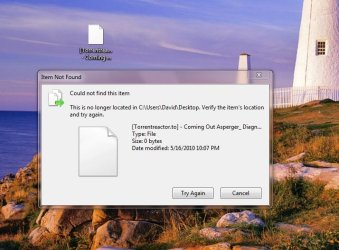
I have an icon on my Windows 7 desktop that won't delete. If I drag it to the Recycle Bin, it does nothing. If I right click and say "delete," it pops-up a dialogue saying the file doesn't exist.
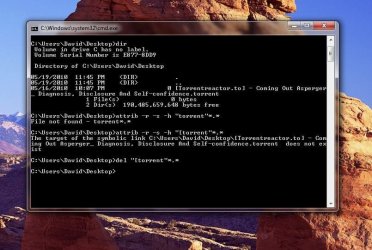
I scanned for viruses. Nothing. I scanned the supposedly non-existing file for viruses. Nothing. I restarted in safe-mode, and tried to delete it. Same problem.
So, if I don't have a virus, I can't delete this icon in safe-mode, and restarting over-and-over doesn't get rid of it, what do I do? I just have an obnoxious icon stuck on my desktop forever.
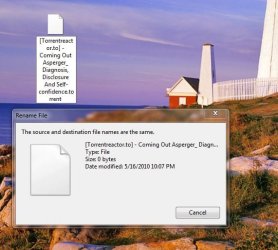
I can't even rename this thing. What happens if I try to rename it, is that it tells me the file doesn't exist, and then pops up dialogue boxes eternally telling me that the source and destination files are the same. I can't ctrl-alt-del out of it, and have to restart to get the stupid windows out of my face.
Any ideas?
I scanned for viruses. Nothing. I scanned the supposedly non-existing file for viruses. Nothing. I restarted in safe-mode, and tried to delete it. Same problem.
So, if I don't have a virus, I can't delete this icon in safe-mode, and restarting over-and-over doesn't get rid of it, what do I do? I just have an obnoxious icon stuck on my desktop forever.
I can't even rename this thing. What happens if I try to rename it, is that it tells me the file doesn't exist, and then pops up dialogue boxes eternally telling me that the source and destination files are the same. I can't ctrl-alt-del out of it, and have to restart to get the stupid windows out of my face.
Any ideas?
Attachments
My Computer
At a glance
Windows 7 UltimateAMD Athlon Dual Core 4400+4 GBNVIDIA GeForce 6150
- Computer Manufacturer/Model Number
- HP Pavilion m7560n
- OS
- Windows 7 Ultimate
- CPU
- AMD Athlon Dual Core 4400+
- Memory
- 4 GB
- Graphics Card(s)
- NVIDIA GeForce 6150
- Monitor(s) Displays
- NEC MultiSync 90GX2
- Hard Drives
- 350 GB WD
500 GB Hitachi