All,
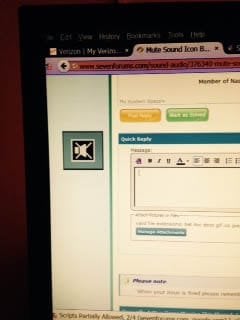
Can someone please help me figure out how to turn off the icon that suddenly started flashing randomly on the left side of my desktop? It is a box with a speaker with an "X" through it. It flashes vertically up and down the left side of my monitor.
My OS is: Windows 7 Home Premium 64-bit
Sound: Confused on this.
Speakers are: VIA High Definition Audio
Sound Card: AMD Catalyst Control
Under this Control Center, says "Audio" Default Audio Device
I was playing a game. Had it on "pause". Went back to it and hit resume with my mouse. Then this flashing mute sound box appeared.
I didn't hit any hot keys that I am aware of and the sound is still functional when I test it.
The Icon in my toolbar does not show "muted" and I have sound.
Did a System Restore. No change. This is extremely annoying.
I'm sure it's probably something simple, but I can't figure it out.
Thank you in advance for your help.
MJ
Can someone please help me figure out how to turn off the icon that suddenly started flashing randomly on the left side of my desktop? It is a box with a speaker with an "X" through it. It flashes vertically up and down the left side of my monitor.
My OS is: Windows 7 Home Premium 64-bit
Sound: Confused on this.
Speakers are: VIA High Definition Audio
Sound Card: AMD Catalyst Control
Under this Control Center, says "Audio" Default Audio Device
I was playing a game. Had it on "pause". Went back to it and hit resume with my mouse. Then this flashing mute sound box appeared.
I didn't hit any hot keys that I am aware of and the sound is still functional when I test it.
The Icon in my toolbar does not show "muted" and I have sound.
Did a System Restore. No change. This is extremely annoying.
I'm sure it's probably something simple, but I can't figure it out.
Thank you in advance for your help.
MJ
My Computer
At a glance
Vista Home Premium 64-bitNVidia 900 series
- Computer Manufacturer/Model Number
- HP m8530f
- OS
- Vista Home Premium 64-bit
- Graphics Card(s)
- NVidia 900 series
- Monitor(s) Displays
- ASUS VE 205