Windows 10 Upgrade Problems Pertaining to System Reserved Partition

Sturmgewehr44

New member
Local time
10:43 AM
Messages
6
Hello! I just joined and look forward to (hopefully) helping others and maybe being helped myself.

My system drive, a Samsung 850 Evo, was cloned from an older SSD a few months ago. Today, I attempted upgrade to Windows 10, since I am eligible (running Windows 7 Pro 64 bit). The taskbar icon, which disappeared, is up again at the time of writing, and I have reserved an upgrade for myself, but I was recommended to just use the 'Media Creation Tool': https://www.microsoft.com/en-us/software-download/windows10

I launched it, it downloaded. Everything went well, until I was notified that my reserved partition could not be updated.

"We couldn't update the system partition"

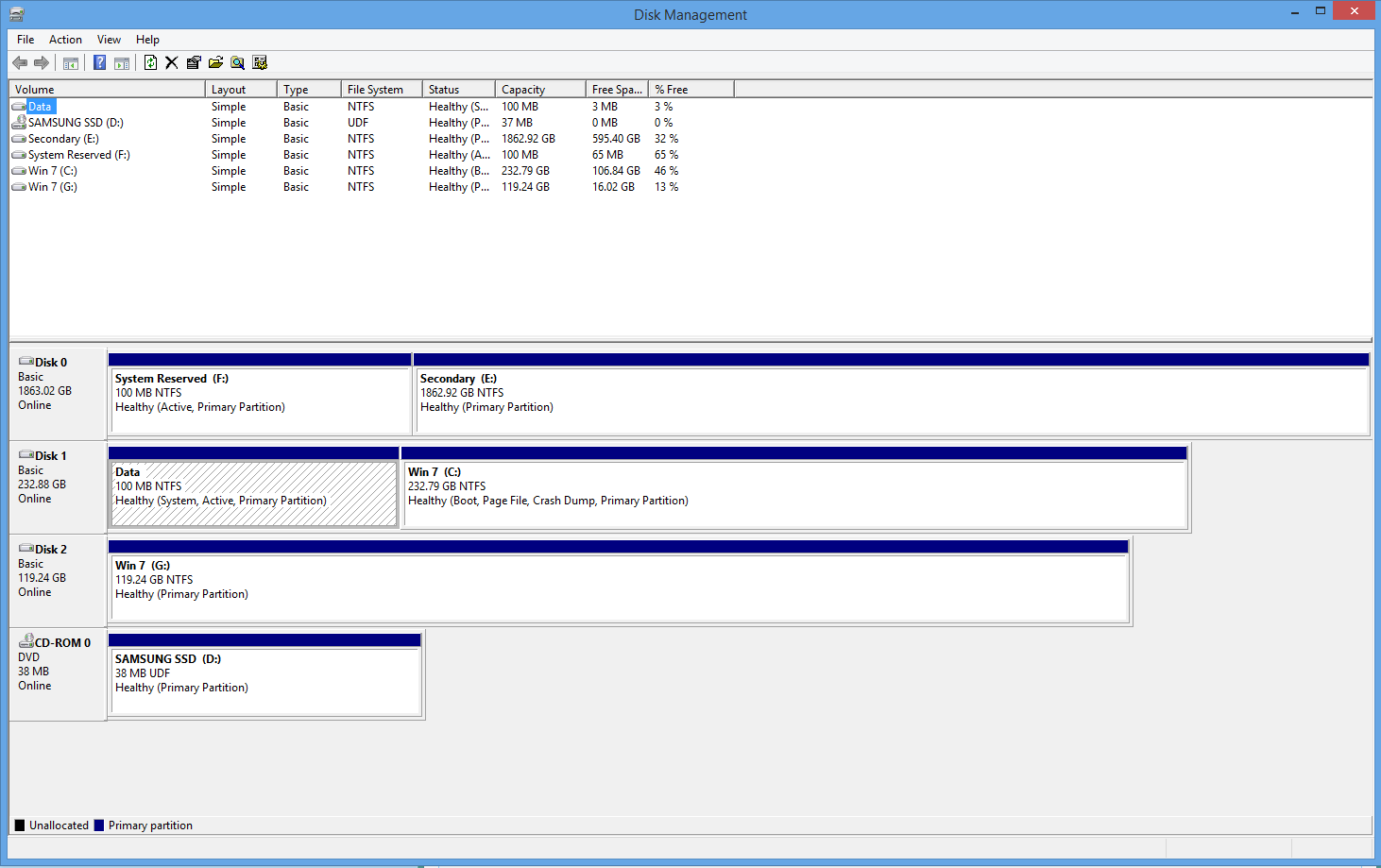
Now, until then I had two reserve partitions. I deleted one (E:, as seen in the picture below), because it was a remnant of an older backup Windows install on one of my HDD, and not an actual, functioning system partition. The system partition in this case, was 'Data' located on my SSD (C:). When I looked in Disk Management to see what could have yielded such an error, I realised that the partition only had 7 MB (7%) of it's storage left. This, in turn, should be the cause of the error(s). I assume part of this lack of system partition space was due to Samsung's Data Migration software, of which I used to clone my old SSD over to my current one. How can I solve all of this??

Picture of Disk Management: http://i.imgur.com/Vu2Ahri.jpg

Thanks if you got this far through my block of text!!

-Sturm
 

My Computer My Computer

At a glance

Windows 10 Pro 64 biti7-4790kCorsair Vengeance 16GB (4x4 1600mhz dual chan...EVGA Geforce GTX 980 Ti 6GB
Computer type
PC/Desktop
Computer Manufacturer/Model Number
Custom
OS
Windows 10 Pro 64 bit
CPU
i7-4790k
Motherboard
Asus Maximus VII Formula
Memory
Corsair Vengeance 16GB (4x4 1600mhz dual channel) DDR3
Graphics Card(s)
EVGA Geforce GTX 980 Ti 6GB
Monitor(s) Displays
Asus VG248QE 144HZ 1080p
Screen Resolution
1920X1080
Hard Drives
WD Caviar Black 1TB (F:)
WD Caviar Black 3TB (G:)
Samsung 850 Evo 250GB (C:)
PSU
OCZ ZX 850W
Case
Coolermaster CM Storm Enforcer
Cooling
Corsair H80i GT
Keyboard
Corsair Vengeance K70
Mouse
Corsair Vengeance M60
Internet Speed
70mbps
Antivirus
Malwarebytes/Microsoft Security Essentials
Browser
Google Chrome
Something has written to the SysRserved partition, possibly some lame imaging program. This often happens when it has a letter. But I see the SysReserved without the letter is now the one that's booting C as signified by the SYstem flag. So it's a mystery, but one which doesn't need any more time wasted on it since SysReserve is totally disposable as we've helped do here countless thousands of times.

So move the Bootmgr - Move to C:\ with EasyBCD - Windows 7 Forums
then delete System Reserved in DIsk Mgmt. Unplug all other hard drives to try the Upgrade again.

I would save a WIN7 backup image externally of C in case you want to roll back and it doesn' t work or has run out of rollback time. We are waiting to see exactly how these things work in real time. Macrium Imaging - Windows 7 Help Forums

A couple of suggestions. Never use an old OS hard drive for data without first deleting its partitions at the minimum or ideally wiping it with Diskpart Clean Command to clear old boot code which can often interfere later.

Secondly, I'd have the OS drive plugged into DISK0 cable so no repairs, reinstall or UPgrade can derail the Boot files to the first-in-order Primary partition as we see happen a lot. That and it's always best to have all other hard drives unplugged during these operations anyway to be safest.

Let us know how you like WIndows 10 and how these things go so we can pass on what you learn. :geek:
 
I am certain the Samsung cloning crap infested the system partition.

However, I am not overall very comfortable with messing with the mbr and boot tables and that sort of stuff.

Is there anyway I can get rid of the junk in the system partition without getting rid of it altogether?

I have a backup image from two-three months ago of C:

I think I mentioned it OP, but I got rid of the placebo system reserve (E:) partition. It was for some old install a few years back.

Why is the system partitions even needed? Do I lose access to anything by getting rid of the partitioned 100MB? Is it more stable to do away with it?

Edit: Looking at the bootmgr migration steps, it does not look too complicated. Instructions are a bit simple for my blood. Do you mind spelling it out for me? I'm sorry that I'm a little slow, lol.

Oh, and I'm not aiming at a clean install, I plan on doing the lazy route, just the simple upgrade. Would disabling Sata connections to drives temporarily be ideal in this case?
 

My Computer My Computer

At a glance

Windows 10 Pro 64 biti7-4790kCorsair Vengeance 16GB (4x4 1600mhz dual chan...EVGA Geforce GTX 980 Ti 6GB
Computer type
PC/Desktop
Computer Manufacturer/Model Number
Custom
OS
Windows 10 Pro 64 bit
CPU
i7-4790k
Motherboard
Asus Maximus VII Formula
Memory
Corsair Vengeance 16GB (4x4 1600mhz dual channel) DDR3
Graphics Card(s)
EVGA Geforce GTX 980 Ti 6GB
Monitor(s) Displays
Asus VG248QE 144HZ 1080p
Screen Resolution
1920X1080
Hard Drives
WD Caviar Black 1TB (F:)
WD Caviar Black 3TB (G:)
Samsung 850 Evo 250GB (C:)
PSU
OCZ ZX 850W
Case
Coolermaster CM Storm Enforcer
Cooling
Corsair H80i GT
Keyboard
Corsair Vengeance K70
Mouse
Corsair Vengeance M60
Internet Speed
70mbps
Antivirus
Malwarebytes/Microsoft Security Essentials
Browser
Google Chrome
You can disable the other hard drives in BIOS set up, but it's easier to just reach in and pull the data cables off of each while power down.

I don't know how to make the steps any simpler than in the tutorial. It makes no difference whether you have the system reserved or not.

The manual method we use is to Mark C partition active in disk management, power down to boot into 7 disc or repair CD to run start up repair three separate times.
 
I just followed those steps. Haven't rebooted yet.

The 100MB partition is still appearing in Disk Management. IS this normal? EasyBCD said it was copied to C: successfully.

Should I just get rid of the 'Data' partition now?
 

My Computer My Computer

At a glance

Windows 10 Pro 64 biti7-4790kCorsair Vengeance 16GB (4x4 1600mhz dual chan...EVGA Geforce GTX 980 Ti 6GB
Computer type
PC/Desktop
Computer Manufacturer/Model Number
Custom
OS
Windows 10 Pro 64 bit
CPU
i7-4790k
Motherboard
Asus Maximus VII Formula
Memory
Corsair Vengeance 16GB (4x4 1600mhz dual channel) DDR3
Graphics Card(s)
EVGA Geforce GTX 980 Ti 6GB
Monitor(s) Displays
Asus VG248QE 144HZ 1080p
Screen Resolution
1920X1080
Hard Drives
WD Caviar Black 1TB (F:)
WD Caviar Black 3TB (G:)
Samsung 850 Evo 250GB (C:)
PSU
OCZ ZX 850W
Case
Coolermaster CM Storm Enforcer
Cooling
Corsair H80i GT
Keyboard
Corsair Vengeance K70
Mouse
Corsair Vengeance M60
Internet Speed
70mbps
Antivirus
Malwarebytes/Microsoft Security Essentials
Browser
Google Chrome
Why wouldn't the 100mb still be there? I said once C boots and holds System Active flags then you can delete it in Disk Mgmt.

Then post back another screenshot. This time attach it using blue Manage Attachments button in reply box.
 
Hi I have the same problem as him, just wanna know if the steps you providing should be the same for windows 8.1? And if this thread is a good solution aswell. https://www.reddit.com/r/Windows10/comments/3a6znd/we_couldnt_update_the_system_reserved_partition/
2de7491c6ecde3186a47131df9d36dd1.png
 

My Computer My Computer

At a glance

windows 8.1 64
Computer type
PC/Desktop
OS
windows 8.1 64
Why wouldn't the 100mb still be there? I said once C boots and holds System Active flags then you can delete it in Disk Mgmt.

Then post back another screenshot. This time attach it using blue Manage Attachments button in reply box.
It's done. I deleted that partition. It was given a letter and C: became the system partition, as expected. I just wanted to verifiy that it had no further uses.

I'm running Windows 10 Pro 64 bit now. It is pretty good so far. I never really learned how to use Windows 8 or 8.1 so some components I'm not very used to, but so far it is exciting and fun and easy to navigate!

On a side note, should most of my drivers (motherboard, wireless adapter, etc.) be updated automatically? They all work fine, I just get some weird start up errors for my Asus PCE-AC68 wireless adapter software. It works fine otherwise. I just needed to reinstall the latest Nvidia driver and everything is great. Should everything else driver wise be alright though (I also needed to reinstall my headset drivers, I was missing sound briefly).

Anyway, thanks so much for assisting me with this! If I didn't sign up and post here, I would've still been confusing myself over all these errors. Thanks again!

~Sturm
 

My Computer My Computer

At a glance

Windows 10 Pro 64 biti7-4790kCorsair Vengeance 16GB (4x4 1600mhz dual chan...EVGA Geforce GTX 980 Ti 6GB
Computer type
PC/Desktop
Computer Manufacturer/Model Number
Custom
OS
Windows 10 Pro 64 bit
CPU
i7-4790k
Motherboard
Asus Maximus VII Formula
Memory
Corsair Vengeance 16GB (4x4 1600mhz dual channel) DDR3
Graphics Card(s)
EVGA Geforce GTX 980 Ti 6GB
Monitor(s) Displays
Asus VG248QE 144HZ 1080p
Screen Resolution
1920X1080
Hard Drives
WD Caviar Black 1TB (F:)
WD Caviar Black 3TB (G:)
Samsung 850 Evo 250GB (C:)
PSU
OCZ ZX 850W
Case
Coolermaster CM Storm Enforcer
Cooling
Corsair H80i GT
Keyboard
Corsair Vengeance K70
Mouse
Corsair Vengeance M60
Internet Speed
70mbps
Antivirus
Malwarebytes/Microsoft Security Essentials
Browser
Google Chrome
Type Windows update in start search box to see if your Important or Optionals need goosing. Wait to see what drivers 10 wants before importing any.

Type Troubleshoot in Start Search box to run Network and wireless Troubleshooters.

Did 10 configure a Dual Boot With 7? If not install EasyBCD to 10 to add 7 by drive letter. Let us see Disk Mgmt.
 
I don't know. Is Windows 10 supposed to dual boot with 7?

That could explain why I have 20GBs on the Windows 10 install and another 20 on top of that for old Windows 7.

Should my motherboard drivers/etc. work okay? It seems like it, but cannot know for sure at this point. All games and apps appear to work without a hitch.
 

My Computer My Computer

At a glance

Windows 10 Pro 64 biti7-4790kCorsair Vengeance 16GB (4x4 1600mhz dual chan...EVGA Geforce GTX 980 Ti 6GB
Computer type
PC/Desktop
Computer Manufacturer/Model Number
Custom
OS
Windows 10 Pro 64 bit
CPU
i7-4790k
Motherboard
Asus Maximus VII Formula
Memory
Corsair Vengeance 16GB (4x4 1600mhz dual channel) DDR3
Graphics Card(s)
EVGA Geforce GTX 980 Ti 6GB
Monitor(s) Displays
Asus VG248QE 144HZ 1080p
Screen Resolution
1920X1080
Hard Drives
WD Caviar Black 1TB (F:)
WD Caviar Black 3TB (G:)
Samsung 850 Evo 250GB (C:)
PSU
OCZ ZX 850W
Case
Coolermaster CM Storm Enforcer
Cooling
Corsair H80i GT
Keyboard
Corsair Vengeance K70
Mouse
Corsair Vengeance M60
Internet Speed
70mbps
Antivirus
Malwarebytes/Microsoft Security Essentials
Browser
Google Chrome
Did you do the free Upgrade from Windows 7 to Windows 10? If so then the windows.old or Recovery folder within 10 now is the entire old Windows 7 install in case you decide within 30 days to roll it back, which choice is at Settings>Recovery or the bootable System Recovery options menu now.

BTW you also have the ability to always go back to Windows 7 using its Product key for reinstall or if you have a backup image. Then you can go back to Windows 10 again at any time which activation is now coded to your hardware.

It would only configure a Dual Boot if you installed it to a separate partition and kept the old Win7 drive plugged in.

I specifically gave you how to check Windows Updates were all installed but you didn't report back and instead asked me another question about drivers which I'd just answered. Please confirm you completed the steps I gave you instead of just asking again.
 
Yes, I did the upgrade.

I see it now. Windows.old.

It seems to have also contain fragments of certain drivers, like the folder that Nvidia drivers would go into.

Is it safe to delete it, or within 30 days (as you mentioned) will it delete itself?

I typed 'Windows Update' into the taskbar and nothing came up. I am not completely used to Windows 10 yet so I do not know where I could find the updater. I checked in the Control Panel and could not find anything either.
 

My Computer My Computer

At a glance

Windows 10 Pro 64 biti7-4790kCorsair Vengeance 16GB (4x4 1600mhz dual chan...EVGA Geforce GTX 980 Ti 6GB
Computer type
PC/Desktop
Computer Manufacturer/Model Number
Custom
OS
Windows 10 Pro 64 bit
CPU
i7-4790k
Motherboard
Asus Maximus VII Formula
Memory
Corsair Vengeance 16GB (4x4 1600mhz dual channel) DDR3
Graphics Card(s)
EVGA Geforce GTX 980 Ti 6GB
Monitor(s) Displays
Asus VG248QE 144HZ 1080p
Screen Resolution
1920X1080
Hard Drives
WD Caviar Black 1TB (F:)
WD Caviar Black 3TB (G:)
Samsung 850 Evo 250GB (C:)
PSU
OCZ ZX 850W
Case
Coolermaster CM Storm Enforcer
Cooling
Corsair H80i GT
Keyboard
Corsair Vengeance K70
Mouse
Corsair Vengeance M60
Internet Speed
70mbps
Antivirus
Malwarebytes/Microsoft Security Essentials
Browser
Google Chrome
You can delete it, but as Greg mentioned if you would like to downgrade back to Windows 7 for any reason you will need this folder. It is our understanding at this time is that the folder will be deleted after 30 days in Windows 10 has passed. After that, you can't downgrade but would need to either restore from a backup (you should have had imaged Windows 7 prior to the upgrade) or a clean install.

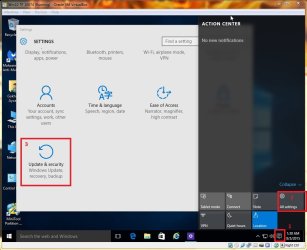
Type "Windows Update" in the search box, not taskbar.

Or:

windows 10 update.jpg
 

My Computer My Computer

At a glance

Windows 7 Ultimate x64 SP1AMD Phenom 2 1090T2x8GB Kingston HyperX Fury Black 1600Mhz Unga...MSI GTX 970 Gaming 4G
Computer type
PC/Desktop
Computer Manufacturer/Model Number
Custom Build
OS
Windows 7 Ultimate x64 SP1
CPU
AMD Phenom 2 1090T
Motherboard
Gigabyte GA-890FXA-UD5
Memory
2x8GB Kingston HyperX Fury Black 1600Mhz Unganged
Graphics Card(s)
MSI GTX 970 Gaming 4G
Sound Card
Realtek On-Board HD 7.1 Audio / Logitech G35
Monitor(s) Displays
3xAcer GD245HQ
Screen Resolution
1920x1080
Hard Drives
Samsung 850 Pro 512GB SSD - OS /
WD Caviar Black SATA 3 - 1 TBx2 - Dynamic RAID 0 /
WD Caviar Green SATA 2 - 640GBx2 - Dynamic RAID 0 /
WD Caviar Green SATA 2 - 640GB - Internal Backup /
Seagate Barracude SATA 3 - 3TB - External Backup/ Sync
PSU
HighPower 1000W
Case
Cooler Master HAF 932
Cooling
Noctua NH-D14
Keyboard
Logitech G19
Mouse
Logitech G500
Internet Speed
100/4 Mbit Cable (100GB quota)
Antivirus
ZoneAlarm Extreme Security / MBAM Pro / MBAE Free / SAS Free
Browser
IE 11 - Firefox - Chrome
Other Info
Logitech F710/ G27/ G940/ Z5500 // TrackIR 5 // Nvidia 3D Surround Vision
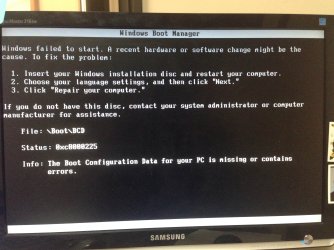
I had the same problem as OP, did all the steps provided by gregrocker, but it did not work. It got through all the installation of Win 10 (which is much further than I had gotten after trying several other techniques), but upon reboot got this screen...?

I assume I should download the Win10 ISO to create a Win10 boot disc and try to recover from there, and will start that process now, but seeing if there are any other thoughts?

any help appreciated, thanks!
 

Attachments

  • IMG_2746.JPG
    IMG_2746.JPG
    677.5 KB · Views: 0

My Computer My Computer

At a glance

Win7 Home Prem 64-bit
Computer type
PC/Desktop
OS
Win7 Home Prem 64-bit
Hard Drives
Samsung 850 EVO 250GB
WD Caviar Black 1TB

My Computer My Computer

At a glance

Windows 7 Ultimate x64 SP1AMD Phenom 2 1090T2x8GB Kingston HyperX Fury Black 1600Mhz Unga...MSI GTX 970 Gaming 4G
Computer type
PC/Desktop
Computer Manufacturer/Model Number
Custom Build
OS
Windows 7 Ultimate x64 SP1
CPU
AMD Phenom 2 1090T
Motherboard
Gigabyte GA-890FXA-UD5
Memory
2x8GB Kingston HyperX Fury Black 1600Mhz Unganged
Graphics Card(s)
MSI GTX 970 Gaming 4G
Sound Card
Realtek On-Board HD 7.1 Audio / Logitech G35
Monitor(s) Displays
3xAcer GD245HQ
Screen Resolution
1920x1080
Hard Drives
Samsung 850 Pro 512GB SSD - OS /
WD Caviar Black SATA 3 - 1 TBx2 - Dynamic RAID 0 /
WD Caviar Green SATA 2 - 640GBx2 - Dynamic RAID 0 /
WD Caviar Green SATA 2 - 640GB - Internal Backup /
Seagate Barracude SATA 3 - 3TB - External Backup/ Sync
PSU
HighPower 1000W
Case
Cooler Master HAF 932
Cooling
Noctua NH-D14
Keyboard
Logitech G19
Mouse
Logitech G500
Internet Speed
100/4 Mbit Cable (100GB quota)
Antivirus
ZoneAlarm Extreme Security / MBAM Pro / MBAE Free / SAS Free
Browser
IE 11 - Firefox - Chrome
Other Info
Logitech F710/ G27/ G940/ Z5500 // TrackIR 5 // Nvidia 3D Surround Vision
Back
Top