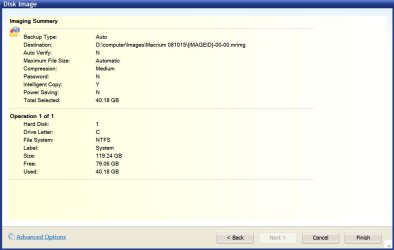
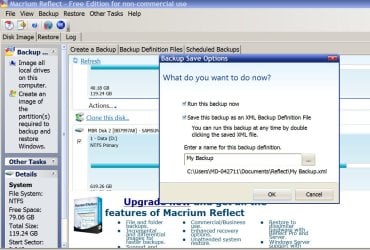
[FONT="]I'm using Macrium Reflect 6.0.753.0 (Free) 64 bit.[/FONT]
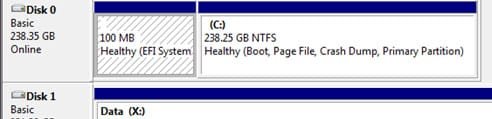
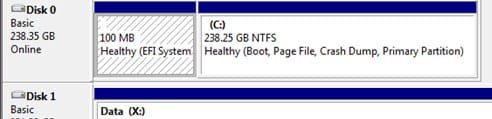
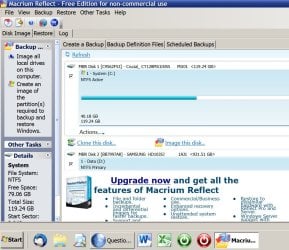
[FONT="]First, please note that my SSD drive C: has two partitions.[/FONT]
[FONT="]With your help and after reading some help files and Macrium’s tutorial, I have had some success in testing my ability to make and restore my C: drive.[/FONT]
[FONT="]
[/FONT]
[FONT="]
WHAT I DID (I started at a slightly different point than ignatzatronic did at post no. 14 but the result is, I think, the same.) I Right Clicked on a system image of C: which I made with Macrium Reflect (free) and chose Explore Image. I loaded the image to an external HD because (obviously) I didn't want to risk overwriting my C: drive.) (I avoid the word "restored" because my real C: drive was not restored). [/FONT]
[FONT="]
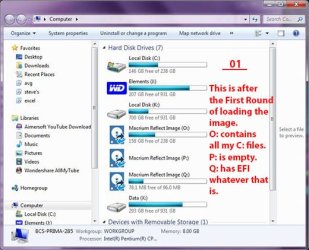
RESULTS After the loading I could see three more drives: O:, P: and Q:, one for each of the THREE partitions (Macrium found a third) on C: (Image01). P was described as "inaccessible) (Image02 shows other messages). All my C: drive folders were listed in the new O: drive(two Program folders, Intel, Users, Windows etc.). In Program Files I could run and use Adobe Photoshop CS6; InDesign CS6; Bridge and also Lightroom, and the few other simple programs and personal files I keep on C:. Programs (x86) opened as well, with, for example, Thunderbird opening and I could run it and see the Address Book was complete. I am sure all the programs I ran were running from the loaded version of C: because while running each produced a copy of their icon on the Task Bar at the right-hand end (the originals are all at the left hand end), and I could hear the external HD exercising. However, MS Office components (Word etc.) failed to open (just the activity pointer going round until it stopped[/FONT]
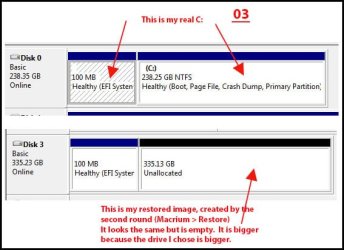
[FONT="]After restarting the computer I entered a second round by repeating the above but instead chose Restore after Right Clicking on the same System Image. This went through the same stages as in the first round, ending as before with the 12 minute process of assembling the files for O: (the window with two long progress bars at the bottom) but immediately it started the activity lights on the external HD and on the computer were off and when I tried to open O: the drive would not respond and Start > Computer did not show it. One time I had a struggle to re-format it because Disc Management at first did not find it but the second time there was a healthy drive in Disc Management that looked like an empty C drive (that is, two partitions). (Image03)[/FONT]
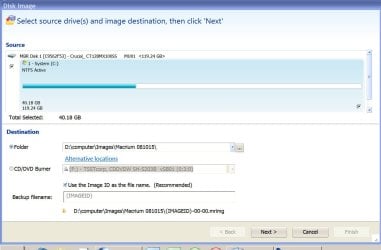
[FONT="]I have gone through the procedures for both rounds a countless number of times with minor changes (and in creating the image itself I sometimes selected only the first and third of the three partitions that Macrium found).[/FONT]
[FONT="]CONCLUSION[/FONT][FONT="]I succeeded in making an image, also in the first round (above) I succeeded in producing a disc (O[FONT="]: )[/FONT] with all my C: files but MS Office failed to run. The second round was a failure. Consequently, although the test was on an external HD rather than by overwriting and booting on C:, I have not been able to confirm that Macrium and I would be able actually to restore a failed C: so I must continue to rely on Windows Backup and restore system (although I have read that its image does not include everything on the C: drive.)But I would like to master Macrium.[/FONT]
[FONT="]Here is an oddity. Disc Management shows my C: having two partitions while Macrium thought I have three partitions, the extra one being empty and when asked to format it, it would not.[/FONT]
[FONT="]QUESTIONS[/FONT]
[FONT="]Q1. Why does Macrium add a third partition to its C:?[/FONT]
[FONT="]I expected to get a disc copy working as well as looking exactly like my C: drive. It is good that it failed early and not after I had overwritten my C: drive if I had done a real restore of my C: This does not give me confidence.[/FONT]
[FONT="]Q2. Why was the attempt to create a drive in the second round a complete failure(Macrium > Restore rather than > Explore).[/FONT]
[FONT="]Q3. Why did Microsoft Office components not work (Word etc.)?
Help appreciated on how I can produce a restoreable copy of my imaged C: drive which will run all programs etc.[/FONT]
[FONT="]
[/FONT]
[FONT="] Thanks. [/FONT]