Solved Moving a downloaded zip file to Documents

chas2

New member
Local time
9:23 AM
Messages
5
How do I move a downloaded zip file to my Documents directory? I know very little about computer software, so please write step-by-step directions. :confused:
 

My Computer My Computer

Computer type
PC/Desktop
Computer Manufacturer/Model Number
Dell, Inspiron 560, Svc. Tag: B26QJQ1, Mfg. Date: 20110616
OS
windows 7 home premium 64 bit os
CPU
Pentium (R) Dual-Core CPU E5800 @ 3.20GHz 3.20GHz
Memory
(RAM) 4.00 GB
Monitor(s) Displays
Dell LCD, Model: IN2020mf
Hard Drives
Local Disk (C:)
Mouse
Dell MS111-p hardwire
Internet Speed
1.42 Mbps
Antivirus
Iolo System Mechanic
Browser
Internet explorer, Yahoo, Google
Hi and welcome to SevenForums,
Right click the folder and click on Copy,
Go to where you want it and right click and Paste.
 

My Computer My Computer

Computer type
PC/Desktop
Computer Manufacturer/Model Number
Custom assembled by me :}
OS
Win-7-Pro64bit 7-H-Prem-64bit
CPU
i7-5930K 2nd i9-9940x both water blocked VRM's too
Motherboard
ASUS SABERTOOTH X99 2nd ASUS x299 Apex
Memory
Trident-z 3200C14 2nd Trident-z 3600C16
Graphics Card(s)
EVGA 1080ti ftw3 2nd Titan Xp both water blocked
Sound Card
Built-in Realtek
Monitor(s) Displays
1-AOC G2460PG 24"G-Sync 144Hz/ 2nd 1-ASUS VG248QE 24" 144Hz
Screen Resolution
1920 x 1080 144Hz
Hard Drives
2-Samsung M.2 Evo & Evo Plus
2-Samsung 850 EVO 500GB SSD's/ 3-2.5 W.D. Black 1tb-&3-1tb/3-3.5 WD Black 1tb hdd's
PSU
EVGA SuperNOVA 1000-P2 2nd 1200-P2
Case
2-Corsair Obsidian Series 450D Black ATX Mid Tower
Cooling
Custom water loops
Keyboard
Logitech G710+/ 2nd Logitech G910
Mouse
2-RedDragon M901 Perdition 16400 dpi Gaming mouse = wired
Internet Speed
Comcast Ping 19ms 89.31mbps download speed 6.12mbps upload
Antivirus
Malwarebytes Pro/ Superantispyware Pro
Browser
FireFox & Pale moon
Other Info
2nd ASUS X299 Apex/Intel i9-9940x with Custom water loop/7H-Prem-x64/Corsair 450D case/Ram Trident-z 3600C16 4x8gb / Samsung970Evo plus 500gb SSD/Dual ssd EZ swap evo/PSU EVGA SuperNova 1200w-P2 80+Platinum/GPU Titan Xp /8-ML-140 on push-pull on 2-280GTX rads
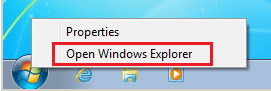
Right click on the Start orb and select Open Windows Explorer on the context menu.

1.PNG


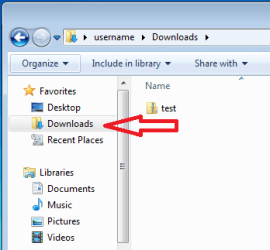
Once the Explorer window opens, select Downloads in the left pane.

2.PNG


Right click on the ZIP file of interest and select Cut on the context menu.

3.png


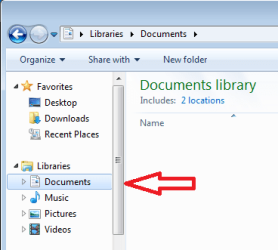
Select Documents in the left pane of the Explorer window.

4.PNG


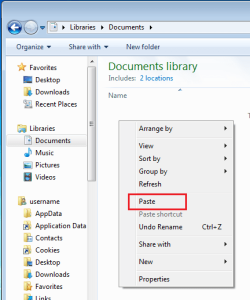
Right click in an empty spot in the right pane and select Paste on the context menu.

5.png


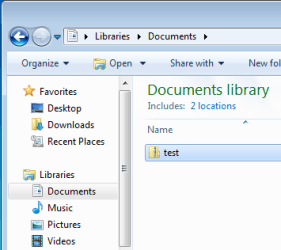
The end result should look something like this.

6.PNG
 

My Computer My Computer

Computer type
Laptop
Computer Manufacturer/Model Number
Employer provided Dell Latitude
OS
W7 Pro SP1 64bit
CPU
i7
Memory
8GB
Graphics Card(s)
Intel HD Graphics
Hard Drives
crappy SSD
Antivirus
Employer mandated Symantec Endpoint Protection
Browser
Pale Moon 64bit, IE11 64bit & Chrome 64bit
UsernameIssues, that is what I call a great set of instructions!!!!!
 

My Computer My Computer

Computer type
PC/Desktop
Computer Manufacturer/Model Number
Lenovo IdeaCenter 450
OS
Windows 10 Pro X64
CPU
Intel Quad Core i7-4770 @ 3.4Ghz
Memory
16.0GB PC3-12800 DDR3 SDRAM 1600 MHz
Graphics Card(s)
Intel Integrated HD Graphics
Sound Card
Realtek HD Audio
Monitor(s) Displays
HP 22" LCD
Screen Resolution
1680 x 1050
Hard Drives
250GB Samsung EVO SATA-3 SSD
2TB Seagate ST2000DM001 SATA-2
1.5TB Seagate ST3150041AS SATA
Keyboard
Dell USB
Mouse
Lenovo USB
Internet Speed
Cable via Road Runner 3MB Upload, 30MB Download
Antivirus
Windows Defender, MBAM Pro, MBAE
Browser
Seamonkey
Other Info
UEFI/GPT
PLDS DVD-RW DH16AERSH
UsernameIssues, that is what I call a great set of instructions!!!!!
Thanks. I hope that chas2's Windows (file) Explorer is setup close to what is shown (hidden file extensions).
 

My Computer My Computer

Computer type
Laptop
Computer Manufacturer/Model Number
Employer provided Dell Latitude
OS
W7 Pro SP1 64bit
CPU
i7
Memory
8GB
Graphics Card(s)
Intel HD Graphics
Hard Drives
crappy SSD
Antivirus
Employer mandated Symantec Endpoint Protection
Browser
Pale Moon 64bit, IE11 64bit & Chrome 64bit
UNI: Thanks for the great graphics. Success!

chas2
 

My Computer My Computer

Computer type
PC/Desktop
Computer Manufacturer/Model Number
Dell, Inspiron 560, Svc. Tag: B26QJQ1, Mfg. Date: 20110616
OS
windows 7 home premium 64 bit os
CPU
Pentium (R) Dual-Core CPU E5800 @ 3.20GHz 3.20GHz
Memory
(RAM) 4.00 GB
Monitor(s) Displays
Dell LCD, Model: IN2020mf
Hard Drives
Local Disk (C:)
Mouse
Dell MS111-p hardwire
Internet Speed
1.42 Mbps
Antivirus
Iolo System Mechanic
Browser
Internet explorer, Yahoo, Google
Hi,
Careful with cutting files,
If you accidently copy something before you paste the first cut it's gone.

Copy and paste is the most reliable
After confirming the files are there
Delete the other location,

But items in the Downloads folder can stay there indefinitely without issue

You should Extract all in the downloads folder then move those files to where you want them to be
Or in the extra all dialog you have an opportunity to point to a specific location no cut or coping necessary ;)
 

My Computer My Computer

Computer type
PC/Desktop
Computer Manufacturer/Model Number
Custom assembled by me :}
OS
Win-7-Pro64bit 7-H-Prem-64bit
CPU
i7-5930K 2nd i9-9940x both water blocked VRM's too
Motherboard
ASUS SABERTOOTH X99 2nd ASUS x299 Apex
Memory
Trident-z 3200C14 2nd Trident-z 3600C16
Graphics Card(s)
EVGA 1080ti ftw3 2nd Titan Xp both water blocked
Sound Card
Built-in Realtek
Monitor(s) Displays
1-AOC G2460PG 24"G-Sync 144Hz/ 2nd 1-ASUS VG248QE 24" 144Hz
Screen Resolution
1920 x 1080 144Hz
Hard Drives
2-Samsung M.2 Evo & Evo Plus
2-Samsung 850 EVO 500GB SSD's/ 3-2.5 W.D. Black 1tb-&3-1tb/3-3.5 WD Black 1tb hdd's
PSU
EVGA SuperNOVA 1000-P2 2nd 1200-P2
Case
2-Corsair Obsidian Series 450D Black ATX Mid Tower
Cooling
Custom water loops
Keyboard
Logitech G710+/ 2nd Logitech G910
Mouse
2-RedDragon M901 Perdition 16400 dpi Gaming mouse = wired
Internet Speed
Comcast Ping 19ms 89.31mbps download speed 6.12mbps upload
Antivirus
Malwarebytes Pro/ Superantispyware Pro
Browser
FireFox & Pale moon
Other Info
2nd ASUS X299 Apex/Intel i9-9940x with Custom water loop/7H-Prem-x64/Corsair 450D case/Ram Trident-z 3600C16 4x8gb / Samsung970Evo plus 500gb SSD/Dual ssd EZ swap evo/PSU EVGA SuperNova 1200w-P2 80+Platinum/GPU Titan Xp /8-ML-140 on push-pull on 2-280GTX rads
ThrashZone,
Please help me to understand what you are saying:

> Careful with cutting files,
> If you accidentally copy something before you paste the first cut, it's gone.
Clipboard operation #1 = cut the test.zip file from Downloads folder
Clipboard operation #2 = "accidentally copy something"
The only thing that is gone is the info in the clipboard from #1.
The "cut" is cancelled and the test.zip file stays in the Downloads folder.


> Copy and paste is the most reliable
Clipboard operation #1 = "copy" the test.zip file from Downloads folder
Clipboard operation #2 = "accidentally copy something"
The only thing that is gone is the info in the clipboard from #1.
The first "copy" is cancelled and the test.zip file stays in the Downloads folder.

It seems to me that the exact same thing is "gone" in the cut/paste scenario and the copy/paste scenario.


> After confirming the files are there
> Delete the other location,
Windows does this conformation during a cut/paste operation. The original file is not deleted if the cut/paste operation fails. Also, in the specific example of moving the test.zip file from Downloads to Documents, the file itself is probably not going to be moved. Just the file's metadata is changed in the Master File Table. It took 12 minutes for me to copy/paste a VDI file. It took less than a second to cut/paste that same file.

 

My Computer My Computer

Computer type
Laptop
Computer Manufacturer/Model Number
Employer provided Dell Latitude
OS
W7 Pro SP1 64bit
CPU
i7
Memory
8GB
Graphics Card(s)
Intel HD Graphics
Hard Drives
crappy SSD
Antivirus
Employer mandated Symantec Endpoint Protection
Browser
Pale Moon 64bit, IE11 64bit & Chrome 64bit
Cut, Paste, etc

Thanks for the follow up message, excellent advice.:D
 

My Computer My Computer

Computer type
PC/Desktop
Computer Manufacturer/Model Number
Dell, Inspiron 560, Svc. Tag: B26QJQ1, Mfg. Date: 20110616
OS
windows 7 home premium 64 bit os
CPU
Pentium (R) Dual-Core CPU E5800 @ 3.20GHz 3.20GHz
Memory
(RAM) 4.00 GB
Monitor(s) Displays
Dell LCD, Model: IN2020mf
Hard Drives
Local Disk (C:)
Mouse
Dell MS111-p hardwire
Internet Speed
1.42 Mbps
Antivirus
Iolo System Mechanic
Browser
Internet explorer, Yahoo, Google
Yep,
Well all I can say is I leave zip files in the downloads folder.

If I want it else where I use Extract all and point it where I want it to be,

If it's a program I extract all to the downloads folder and run the setup.exe

So moving/ cutting zip folders +- I don't do I also rarely copy and paste unless it's from one computer to another with home group sharing.

Copy and paste/ drag and drop is all just another way
But we have no idea what type of files are in the zipped folder or why anyone would want to use and move a zip folder ?
It really doesn't save that much disk space and could hamper security programs from scanning it.
Oh no another can of worms :p
 

My Computer My Computer

Computer type
PC/Desktop
Computer Manufacturer/Model Number
Custom assembled by me :}
OS
Win-7-Pro64bit 7-H-Prem-64bit
CPU
i7-5930K 2nd i9-9940x both water blocked VRM's too
Motherboard
ASUS SABERTOOTH X99 2nd ASUS x299 Apex
Memory
Trident-z 3200C14 2nd Trident-z 3600C16
Graphics Card(s)
EVGA 1080ti ftw3 2nd Titan Xp both water blocked
Sound Card
Built-in Realtek
Monitor(s) Displays
1-AOC G2460PG 24"G-Sync 144Hz/ 2nd 1-ASUS VG248QE 24" 144Hz
Screen Resolution
1920 x 1080 144Hz
Hard Drives
2-Samsung M.2 Evo & Evo Plus
2-Samsung 850 EVO 500GB SSD's/ 3-2.5 W.D. Black 1tb-&3-1tb/3-3.5 WD Black 1tb hdd's
PSU
EVGA SuperNOVA 1000-P2 2nd 1200-P2
Case
2-Corsair Obsidian Series 450D Black ATX Mid Tower
Cooling
Custom water loops
Keyboard
Logitech G710+/ 2nd Logitech G910
Mouse
2-RedDragon M901 Perdition 16400 dpi Gaming mouse = wired
Internet Speed
Comcast Ping 19ms 89.31mbps download speed 6.12mbps upload
Antivirus
Malwarebytes Pro/ Superantispyware Pro
Browser
FireFox & Pale moon
Other Info
2nd ASUS X299 Apex/Intel i9-9940x with Custom water loop/7H-Prem-x64/Corsair 450D case/Ram Trident-z 3600C16 4x8gb / Samsung970Evo plus 500gb SSD/Dual ssd EZ swap evo/PSU EVGA SuperNova 1200w-P2 80+Platinum/GPU Titan Xp /8-ML-140 on push-pull on 2-280GTX rads
Zips

Love the added info-thanks again.:D
 

My Computer My Computer

Computer type
PC/Desktop
Computer Manufacturer/Model Number
Dell, Inspiron 560, Svc. Tag: B26QJQ1, Mfg. Date: 20110616
OS
windows 7 home premium 64 bit os
CPU
Pentium (R) Dual-Core CPU E5800 @ 3.20GHz 3.20GHz
Memory
(RAM) 4.00 GB
Monitor(s) Displays
Dell LCD, Model: IN2020mf
Hard Drives
Local Disk (C:)
Mouse
Dell MS111-p hardwire
Internet Speed
1.42 Mbps
Antivirus
Iolo System Mechanic
Browser
Internet explorer, Yahoo, Google
Thanks it always makes for an interesting discussion :)
Lots of ways to skin a cat ;)
 

My Computer My Computer

Computer type
PC/Desktop
Computer Manufacturer/Model Number
Custom assembled by me :}
OS
Win-7-Pro64bit 7-H-Prem-64bit
CPU
i7-5930K 2nd i9-9940x both water blocked VRM's too
Motherboard
ASUS SABERTOOTH X99 2nd ASUS x299 Apex
Memory
Trident-z 3200C14 2nd Trident-z 3600C16
Graphics Card(s)
EVGA 1080ti ftw3 2nd Titan Xp both water blocked
Sound Card
Built-in Realtek
Monitor(s) Displays
1-AOC G2460PG 24"G-Sync 144Hz/ 2nd 1-ASUS VG248QE 24" 144Hz
Screen Resolution
1920 x 1080 144Hz
Hard Drives
2-Samsung M.2 Evo & Evo Plus
2-Samsung 850 EVO 500GB SSD's/ 3-2.5 W.D. Black 1tb-&3-1tb/3-3.5 WD Black 1tb hdd's
PSU
EVGA SuperNOVA 1000-P2 2nd 1200-P2
Case
2-Corsair Obsidian Series 450D Black ATX Mid Tower
Cooling
Custom water loops
Keyboard
Logitech G710+/ 2nd Logitech G910
Mouse
2-RedDragon M901 Perdition 16400 dpi Gaming mouse = wired
Internet Speed
Comcast Ping 19ms 89.31mbps download speed 6.12mbps upload
Antivirus
Malwarebytes Pro/ Superantispyware Pro
Browser
FireFox & Pale moon
Other Info
2nd ASUS X299 Apex/Intel i9-9940x with Custom water loop/7H-Prem-x64/Corsair 450D case/Ram Trident-z 3600C16 4x8gb / Samsung970Evo plus 500gb SSD/Dual ssd EZ swap evo/PSU EVGA SuperNova 1200w-P2 80+Platinum/GPU Titan Xp /8-ML-140 on push-pull on 2-280GTX rads
ThrashZone,
Please help me to understand what you are saying:

> Careful with cutting files,
> If you accidentally copy something before you paste the first cut, it's gone.
Clipboard operation #1 = cut the test.zip file from Downloads folder
Clipboard operation #2 = "accidentally copy something"
The only thing that is gone is the info in the clipboard from #1.
The "cut" is cancelled and the test.zip file stays in the Downloads folder.


> Copy and paste is the most reliable
Clipboard operation #1 = "copy" the test.zip file from Downloads folder
Clipboard operation #2 = "accidentally copy something"
The only thing that is gone is the info in the clipboard from #1.
The first "copy" is cancelled and the test.zip file stays in the Downloads folder.

It seems to me that the exact same thing is "gone" in the cut/paste scenario and the copy/paste scenario.


> After confirming the files are there
> Delete the other location,
Windows does this conformation during a cut/paste operation. The original file is not deleted if the cut/paste operation fails. Also, in the specific example of moving the test.zip file from Downloads to Documents, the file itself is probably not going to be moved. Just the file's metadata is changed in the Master File Table. It took 12 minutes for me to copy/paste a VDI file. It took less than a second to cut/paste that same file.

I have seen cut/paste operations fail, and Windows deletes the original, and the "pasted" is corrupted. I have no idea how, as like you said, the file never actually moves, but i've seen it happen. I guess the metadata was corrupted or something.
 

My Computer My Computer

Computer type
PC/Desktop
Computer Manufacturer/Model Number
Medion Erazer (note to self: insert model number) - with custom additions
OS
Windows 10 Pro x64
CPU
Intel Core i5 7400 @ 3.00GHz
Motherboard
OEM supllied with PC
Memory
8GB 2133Mhz DDR4 (OEM supplied)
Graphics Card(s)
Gygabyte Windforce GTX 1050Ti (Factory Overclocked)
Sound Card
Realtek
Monitor(s) Displays
Acer Al1980 + HKC
Screen Resolution
1360*768(HKC) / 1280*1024(Acer)
Hard Drives
1TB Toshiba
1TB WD Caviar Green
120GB Samsung Evo 840
PSU
OEM supplied (no power rating on case)
Case
OEM Supplied
Cooling
Stock
Keyboard
Logitech Wireless
Mouse
Logitect Wireless
Internet Speed
40Mb/s Down 10Mb/s Up
Antivirus
Defender
Browser
Firefox
If you are seeing corruption like that, then you risk the same corruption to the metadata for the copied file too. You would need to copy/paste, verify that the copy is good/accessible - then delete the original. That would be pretty safe, if you have the time.

I'm not attempting to argue against copy/paste/check/delete. I'm just saying that cut/paste and drag/drop are pretty much the same for the file move being discussed. (Cut/paste uses the OS clipboard. Drag/drop does not seem to use the OS clipboard.) I drag/drop dozens of times each day. I usually use "right-click drag" so that the Move option is available when dealing with network drives. I've yet to lose a file or folder - even if the network goes down during the move (which I tested just for this thread). But with Windows, I'm sure that file loss during a move happens from time to time to someone :-(
 

My Computer My Computer

Computer type
Laptop
Computer Manufacturer/Model Number
Employer provided Dell Latitude
OS
W7 Pro SP1 64bit
CPU
i7
Memory
8GB
Graphics Card(s)
Intel HD Graphics
Hard Drives
crappy SSD
Antivirus
Employer mandated Symantec Endpoint Protection
Browser
Pale Moon 64bit, IE11 64bit & Chrome 64bit
Oh yea right click drag and drop is my favorite :)
It has Cancel on it if I drop to the wrong location ;)
 

My Computer My Computer

Computer type
PC/Desktop
Computer Manufacturer/Model Number
Custom assembled by me :}
OS
Win-7-Pro64bit 7-H-Prem-64bit
CPU
i7-5930K 2nd i9-9940x both water blocked VRM's too
Motherboard
ASUS SABERTOOTH X99 2nd ASUS x299 Apex
Memory
Trident-z 3200C14 2nd Trident-z 3600C16
Graphics Card(s)
EVGA 1080ti ftw3 2nd Titan Xp both water blocked
Sound Card
Built-in Realtek
Monitor(s) Displays
1-AOC G2460PG 24"G-Sync 144Hz/ 2nd 1-ASUS VG248QE 24" 144Hz
Screen Resolution
1920 x 1080 144Hz
Hard Drives
2-Samsung M.2 Evo & Evo Plus
2-Samsung 850 EVO 500GB SSD's/ 3-2.5 W.D. Black 1tb-&3-1tb/3-3.5 WD Black 1tb hdd's
PSU
EVGA SuperNOVA 1000-P2 2nd 1200-P2
Case
2-Corsair Obsidian Series 450D Black ATX Mid Tower
Cooling
Custom water loops
Keyboard
Logitech G710+/ 2nd Logitech G910
Mouse
2-RedDragon M901 Perdition 16400 dpi Gaming mouse = wired
Internet Speed
Comcast Ping 19ms 89.31mbps download speed 6.12mbps upload
Antivirus
Malwarebytes Pro/ Superantispyware Pro
Browser
FireFox & Pale moon
Other Info
2nd ASUS X299 Apex/Intel i9-9940x with Custom water loop/7H-Prem-x64/Corsair 450D case/Ram Trident-z 3600C16 4x8gb / Samsung970Evo plus 500gb SSD/Dual ssd EZ swap evo/PSU EVGA SuperNova 1200w-P2 80+Platinum/GPU Titan Xp /8-ML-140 on push-pull on 2-280GTX rads
cat skinning

"...lots of ways...": That is precisely why it is so difficult to learn these computers! TOO many ways! Thanks again for your help - great instructions and graphics.:confused:

chas2
 

My Computer My Computer

Computer type
PC/Desktop
Computer Manufacturer/Model Number
Dell, Inspiron 560, Svc. Tag: B26QJQ1, Mfg. Date: 20110616
OS
windows 7 home premium 64 bit os
CPU
Pentium (R) Dual-Core CPU E5800 @ 3.20GHz 3.20GHz
Memory
(RAM) 4.00 GB
Monitor(s) Displays
Dell LCD, Model: IN2020mf
Hard Drives
Local Disk (C:)
Mouse
Dell MS111-p hardwire
Internet Speed
1.42 Mbps
Antivirus
Iolo System Mechanic
Browser
Internet explorer, Yahoo, Google
Back
Top