Some websites are not opened at all

Hadramawt

New member
Local time
5:31 PM
Messages
177
Some websites are not displayed at all

Hi,
First of all:If there were a problem with my Internet network, then all websites wouldn't be opened.
I have been facing the probelm with all browsers I have been using 'Firefox, MS IE, and Google Chrome'
Last-night I have been opening any websites without any problems. However, today afternoon, I began to face the problem. So, if it were a virus, then I would be facing this problem last-night as well. I have been using MlawareBytes AntiMalware, and MS security Essential
However, I have noticed some websites are not opened, such as 'hotmail.com', 'Yahoo.com', https://www.adobe.com/go/flash-player-updatesMSN.com - Hotmail, Outlook, Skype, Bing, Latest News, Photos & Videos.

When trying to type those websites in address bar, then I encounter 'This page cannot be displayed'
Sometimes 'This webpage is not available ERR_CONNECTION_TIMED_OUT'

Also, some other programs installed on my PC, and when those programs need to be updated, then they prompt me to update them. So, when I chose update them, there is anwhich needs their

However, all google products, such as google.com, gmail.com, youtube.com, and so on are opened well.
Also, others such as sevenforums.com, and so on are opened well.

I have ADSL with a speed of 512Kbps
I have tried checking my cables and rebooting my routers, modems.
Could you please let me know why this happens.:confused:
 
Last edited:

My Computer My Computer

Computer type
Laptop
Computer Manufacturer/Model Number
HP, Pavilion
OS
Windows 7 Home Premium 64Bit
CPU
Intel Core i5, 2.3GHz
Motherboard
Hewlett-Packard- Model 1657
Memory
DDR3- 6GB
Graphics Card(s)
Intel Graphics Family, Radeon HD 6770M
Hard Drives
Toshiba 700GB
Antivirus
Microsot Secuirty Eessentials
Browser
MS IE, Google Chrom, and FireFox
Could you please reply to me?
I tried clearing the cach of DSN, but the same issue continues.

1- Open CMD as adminstrator.
2- type ipconfig /flushdns
 

My Computer My Computer

Computer type
Laptop
Computer Manufacturer/Model Number
HP, Pavilion
OS
Windows 7 Home Premium 64Bit
CPU
Intel Core i5, 2.3GHz
Motherboard
Hewlett-Packard- Model 1657
Memory
DDR3- 6GB
Graphics Card(s)
Intel Graphics Family, Radeon HD 6770M
Hard Drives
Toshiba 700GB
Antivirus
Microsot Secuirty Eessentials
Browser
MS IE, Google Chrom, and FireFox
Could anyone please take some of his precious time out to really read my posts and address this problem? I am quite anxious to know what might be causing the problem. Last-night I was opening any website without any problems. However, I only today have faced this problem. It still persists. This is strange. I am not posting you in this forum from my same internet network, and the same computer. However, other websites, such as Microsoft websites, Hotmail, Skype, and so on are not opened at all. Also, some others, such as adobe.com, other forums.

Sometimes this error shows me while opening some websites.

This webpage is not available

ERR_CONNECTION_TIMED_OUT
ReloadHide details
Google Chrome could not load the webpage because ar.wikipedia.org took too long to respond. The website may be down, or you may be experiencing issues with your Internet connection.
Check your Internet connection
Check any cables and reboot any routers, modems, or other network devices you may be using.
Allow Chrome to access the network in your firewall or antivirus settings.
If it is already listed as a program allowed to access the network, try removing it from the list and adding it again.
If you use a proxy server...
Check your proxy settings or contact your network administrator to make sure the proxy server is working. If you don't believe you should be using a proxy server: Go to the Chrome menu > Settings > Show advanced settings... > Change proxy settings... > LAN Settings and deselect "Use a proxy server for your LAN".


I am not using any proxy at all.
 
Last edited:

My Computer My Computer

Computer type
Laptop
Computer Manufacturer/Model Number
HP, Pavilion
OS
Windows 7 Home Premium 64Bit
CPU
Intel Core i5, 2.3GHz
Motherboard
Hewlett-Packard- Model 1657
Memory
DDR3- 6GB
Graphics Card(s)
Intel Graphics Family, Radeon HD 6770M
Hard Drives
Toshiba 700GB
Antivirus
Microsot Secuirty Eessentials
Browser
MS IE, Google Chrom, and FireFox
Could anyone please tell me why all websites today are opened well without any problems at all?
I have not done anything!!!!!!!!!!!!!!!!!.
Could anyone tell me if google websites are more reliable than other websites since they were been still opened even while I was facing the problem of displaying other websites?

Also, could anyone tell me if there are a problem with internet network in my country, then some websites would still be opened? This is strange.
 

My Computer My Computer

Computer type
Laptop
Computer Manufacturer/Model Number
HP, Pavilion
OS
Windows 7 Home Premium 64Bit
CPU
Intel Core i5, 2.3GHz
Motherboard
Hewlett-Packard- Model 1657
Memory
DDR3- 6GB
Graphics Card(s)
Intel Graphics Family, Radeon HD 6770M
Hard Drives
Toshiba 700GB
Antivirus
Microsot Secuirty Eessentials
Browser
MS IE, Google Chrom, and FireFox
It may have been a temporary problem with your set DNS servers. Try changing them to another one if it happens again.
 

My Computer My Computer

Computer type
PC/Desktop
Computer Manufacturer/Model Number
Custom Build
OS
Windows 7 Ultimate x64 SP1
CPU
AMD Phenom 2 1090T
Motherboard
Gigabyte GA-890FXA-UD5
Memory
2x8GB Kingston HyperX Fury Black 1600Mhz Unganged
Graphics Card(s)
MSI GTX 970 Gaming 4G
Sound Card
Realtek On-Board HD 7.1 Audio / Logitech G35
Monitor(s) Displays
3xAcer GD245HQ
Screen Resolution
1920x1080
Hard Drives
Samsung 850 Pro 512GB SSD - OS /
WD Caviar Black SATA 3 - 1 TBx2 - Dynamic RAID 0 /
WD Caviar Green SATA 2 - 640GBx2 - Dynamic RAID 0 /
WD Caviar Green SATA 2 - 640GB - Internal Backup /
Seagate Barracude SATA 3 - 3TB - External Backup/ Sync
PSU
HighPower 1000W
Case
Cooler Master HAF 932
Cooling
Noctua NH-D14
Keyboard
Logitech G19
Mouse
Logitech G500
Internet Speed
100/4 Mbit Cable (100GB quota)
Antivirus
ZoneAlarm Extreme Security / MBAM Pro / MBAE Free / SAS Free
Browser
IE 11 - Firefox - Chrome
Other Info
Logitech F710/ G27/ G940/ Z5500 // TrackIR 5 // Nvidia 3D Surround Vision
It may have been a temporary problem with your set DNS servers. Try changing them to another one if it happens again.

Thanks a lot,

1- A temporary problem with my set DNS servers could let me open all google websites? If so, then they are more reliable than other websites since I have not faced a problem with them and they opened well even while I was facing the problem of displaying other websites(while I might be facing a problem with setting my DNS servers as you said)?

2- Now ALL websites are opened well without doing anything except running clearing the cach of DNS by that command, but as said, after running that command 'ipconfig /flushdns' many times day after day, the problem didn't disappear immediately, which maybe means that command was not the one which solved the problem.

3- Could tell how to change DNS servers to another one if the problem happens again? I always use the default setup of the DNS servers, I have never ever changed DNS servers at all.
 

My Computer My Computer

Computer type
Laptop
Computer Manufacturer/Model Number
HP, Pavilion
OS
Windows 7 Home Premium 64Bit
CPU
Intel Core i5, 2.3GHz
Motherboard
Hewlett-Packard- Model 1657
Memory
DDR3- 6GB
Graphics Card(s)
Intel Graphics Family, Radeon HD 6770M
Hard Drives
Toshiba 700GB
Antivirus
Microsot Secuirty Eessentials
Browser
MS IE, Google Chrom, and FireFox
Google websites are not more reliable, it may have been that your DNS (ISP assigned?) server had issues with other DNS servers. Some reading https://en.wikipedia.org/wiki/Domain_Name_System which all start with the invisible dot (.) at the end of whatever we write in browser https://en.wikipedia.org/wiki/Root_name_server.

"ipconfig /flushdns" only clears the DNS cache, doesn't change the DNS server being queried and won't help if router or the queried DNS servers have issues. Rebooting the router and changing the DNS server to something else helps here.

Things to try in such issues:
- Restart router/modem
- Change DNS server
- flushdns
 

My Computer My Computer

Computer type
PC/Desktop
Computer Manufacturer/Model Number
Custom Build
OS
Windows 7 Ultimate x64 SP1
CPU
AMD Phenom 2 1090T
Motherboard
Gigabyte GA-890FXA-UD5
Memory
2x8GB Kingston HyperX Fury Black 1600Mhz Unganged
Graphics Card(s)
MSI GTX 970 Gaming 4G
Sound Card
Realtek On-Board HD 7.1 Audio / Logitech G35
Monitor(s) Displays
3xAcer GD245HQ
Screen Resolution
1920x1080
Hard Drives
Samsung 850 Pro 512GB SSD - OS /
WD Caviar Black SATA 3 - 1 TBx2 - Dynamic RAID 0 /
WD Caviar Green SATA 2 - 640GBx2 - Dynamic RAID 0 /
WD Caviar Green SATA 2 - 640GB - Internal Backup /
Seagate Barracude SATA 3 - 3TB - External Backup/ Sync
PSU
HighPower 1000W
Case
Cooler Master HAF 932
Cooling
Noctua NH-D14
Keyboard
Logitech G19
Mouse
Logitech G500
Internet Speed
100/4 Mbit Cable (100GB quota)
Antivirus
ZoneAlarm Extreme Security / MBAM Pro / MBAE Free / SAS Free
Browser
IE 11 - Firefox - Chrome
Other Info
Logitech F710/ G27/ G940/ Z5500 // TrackIR 5 // Nvidia 3D Surround Vision
Google websites are not more reliable, it may have been that your DNS (ISP assigned?) server had issues with other DNS servers. Some reading https://en.wikipedia.org/wiki/Domain_Name_System which all start with the invisible dot (.) at the end of whatever we write in browser https://en.wikipedia.org/wiki/Root_name_server.

"ipconfig /flushdns" only clears the DNS cache, doesn't change the DNS server being queried and won't help if router or the queried DNS servers have issues. Rebooting the router and changing the DNS server to something else helps here.

Things to try in such issues:
- Restart router/modem
- Change DNS server
- flushdns


Thanks a lot,
As said, I have never ever tried to Change DNS server settings at all. So, you think the mistake in changing them can do another difficult issue?


You think that is a good guide of How to change DNS Servers in Windows 7
 

My Computer My Computer

Computer type
Laptop
Computer Manufacturer/Model Number
HP, Pavilion
OS
Windows 7 Home Premium 64Bit
CPU
Intel Core i5, 2.3GHz
Motherboard
Hewlett-Packard- Model 1657
Memory
DDR3- 6GB
Graphics Card(s)
Intel Graphics Family, Radeon HD 6770M
Hard Drives
Toshiba 700GB
Antivirus
Microsot Secuirty Eessentials
Browser
MS IE, Google Chrom, and FireFox

My Computer My Computer

Computer type
PC/Desktop
Computer Manufacturer/Model Number
Custom Build
OS
Windows 7 Ultimate x64 SP1
CPU
AMD Phenom 2 1090T
Motherboard
Gigabyte GA-890FXA-UD5
Memory
2x8GB Kingston HyperX Fury Black 1600Mhz Unganged
Graphics Card(s)
MSI GTX 970 Gaming 4G
Sound Card
Realtek On-Board HD 7.1 Audio / Logitech G35
Monitor(s) Displays
3xAcer GD245HQ
Screen Resolution
1920x1080
Hard Drives
Samsung 850 Pro 512GB SSD - OS /
WD Caviar Black SATA 3 - 1 TBx2 - Dynamic RAID 0 /
WD Caviar Green SATA 2 - 640GBx2 - Dynamic RAID 0 /
WD Caviar Green SATA 2 - 640GB - Internal Backup /
Seagate Barracude SATA 3 - 3TB - External Backup/ Sync
PSU
HighPower 1000W
Case
Cooler Master HAF 932
Cooling
Noctua NH-D14
Keyboard
Logitech G19
Mouse
Logitech G500
Internet Speed
100/4 Mbit Cable (100GB quota)
Antivirus
ZoneAlarm Extreme Security / MBAM Pro / MBAE Free / SAS Free
Browser
IE 11 - Firefox - Chrome
Other Info
Logitech F710/ G27/ G940/ Z5500 // TrackIR 5 // Nvidia 3D Surround Vision
An incorrect DNS setting will cause issues, yes.

I haven't checked that guide you linked, we have one of our own :)
http://www.sevenforums.com/tutorials/15037-dns-addressing-how-change-windows-7-a.html


Thank you so much indeed for your continual replies.

On the internet, there is a very wide variety of tutorials for how to change DNS settings. However, what are very important for me are these points below::::

1- according on what we enter sequence in the preferred DNS server boxes since I think here might be the mistake.
In that guide you have linked is said:
In the Preferred DNS server boxes enter this sequence: 208.67.222.222

In the Alternate DNS server boxes enter this sequence: 208.67.220.220

2- Do you think that obtaining DNS sever address automatically is much better than manually use specified DNS server addresses? If so, or even not, then if I have now set manually specified DNS sever addressees while I no longer have any problem with my network with automatically DNS server addresses, then the performance would be much higher.

3- One more question about that tutorial you have linked its link is why that publisher changes 'DNS server settings' of a Local Area Connection instead of a Wireless Network Connection, although it looks from the screen shot that s/he is connected to a Wireless Network Connection and not a Local Area Connection.
I am expecting that I must be selecting the adapter to which I am connected to change DNS server settings.
In my case, I am always connected wirelessly to my Wireless Router. And sometimes I get connected via a wired cable to my router. So, I think, in my case, I must select 'a Wireless Network Connection'

4- You said below "Google websites are not more reliable, it may have been that your DNS (ISP assigned?) server had issues with other DNS servers". So, You meant that my ISP who assigned Google websites to be not affected by that DNS server problem. If so, who is my DNS server? My ISP is YemenNet corporation.

Google websites are not more reliable, it may have been that your DNS (ISP assigned?) server had issues with other DNS servers. Some reading https://en.wikipedia.org/wiki/Domain_Name_System which all start with the invisible dot (.) at the end of whatever we write in browser https://en.wikipedia.org/wiki/Root_name_serve
 
Last edited:

My Computer My Computer

Computer type
Laptop
Computer Manufacturer/Model Number
HP, Pavilion
OS
Windows 7 Home Premium 64Bit
CPU
Intel Core i5, 2.3GHz
Motherboard
Hewlett-Packard- Model 1657
Memory
DDR3- 6GB
Graphics Card(s)
Intel Graphics Family, Radeon HD 6770M
Hard Drives
Toshiba 700GB
Antivirus
Microsot Secuirty Eessentials
Browser
MS IE, Google Chrom, and FireFox
1- It doesn't matter the sequence as long as they are from the same DNS provider. Those servers are both from OpenDNS, you can change the order no problems. The DNS client (your PC) will ask the first DNS server in list to make a name resolution, if that one can't answer for whatever reason (once a timeout has been reached) it will ask the second in the list. You can even have much more DNS servers (just not from that interface) if you click the Advanced button and switch to DNS tab.

2- Keep automatic or set manually: depends on your ISP I believe. My ISP servers are usually good working but I do sometimes change to manual if I feel/think ISP servers are not working great that day.

3- Wireless or Wired doesn't change anything with respect to networking, it is the same setting, same interface.

4- When you set DNS to automatic what IP does it get for DNS servers? (ipconfig -all in cmd will show everything) DNS system is distributed (a server asks another one upstream when it can't resolve a query itself, the link I gave earlier describes this in detail). It is possible (temporarily) that your DNS server was unable to resolve some other sites but was working ok for Google services. Simply changing DNS servers usually fix this kind of problems.
 

My Computer My Computer

Computer type
PC/Desktop
Computer Manufacturer/Model Number
Custom Build
OS
Windows 7 Ultimate x64 SP1
CPU
AMD Phenom 2 1090T
Motherboard
Gigabyte GA-890FXA-UD5
Memory
2x8GB Kingston HyperX Fury Black 1600Mhz Unganged
Graphics Card(s)
MSI GTX 970 Gaming 4G
Sound Card
Realtek On-Board HD 7.1 Audio / Logitech G35
Monitor(s) Displays
3xAcer GD245HQ
Screen Resolution
1920x1080
Hard Drives
Samsung 850 Pro 512GB SSD - OS /
WD Caviar Black SATA 3 - 1 TBx2 - Dynamic RAID 0 /
WD Caviar Green SATA 2 - 640GBx2 - Dynamic RAID 0 /
WD Caviar Green SATA 2 - 640GB - Internal Backup /
Seagate Barracude SATA 3 - 3TB - External Backup/ Sync
PSU
HighPower 1000W
Case
Cooler Master HAF 932
Cooling
Noctua NH-D14
Keyboard
Logitech G19
Mouse
Logitech G500
Internet Speed
100/4 Mbit Cable (100GB quota)
Antivirus
ZoneAlarm Extreme Security / MBAM Pro / MBAE Free / SAS Free
Browser
IE 11 - Firefox - Chrome
Other Info
Logitech F710/ G27/ G940/ Z5500 // TrackIR 5 // Nvidia 3D Surround Vision
1- It doesn't matter the sequence as long as they are from the same DNS provider. Those servers are both from OpenDNS, you can change the order no problems. The DNS client (your PC) will ask the first DNS server in list to make a name resolution, if that one can't answer for whatever reason (once a timeout has been reached) it will ask the second in the list. You can even have much more DNS servers (just not from that interface) if you click the Advanced button and switch to DNS tab.

Thank you very much indeed for your quite excellent explanation.

I am perplexed in particular when you said It doesn't matter the sequence of DNS server addresses to be entered in the Preferred/alternative DNS server boxes. My ISP is not in the area where OpenDNS is used. As far as I know that OpenDNS is linked some areas in the world and not worldwide. So, I think entering sequence of my DNS sever addresses should not be guessed. As a result, I insist on knowing as to which I can enter the sequence. If you look at my screen shots below, perhaps you will know.


4- When you set DNS to automatic what IP does it get for DNS servers? (ipconfig -all in cmd will show everything) DNS system is distributed (a server asks another one upstream when it can't resolve a query itself, the link I gave earlier describes this in detail). It is possible (temporarily) that your DNS server was unable to resolve some other sites but was working ok for Google services. Simply changing DNS servers usually fix this kind of problems.


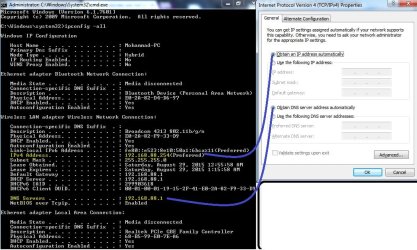
The settings of running the command 'ipconfig -all'.jpg
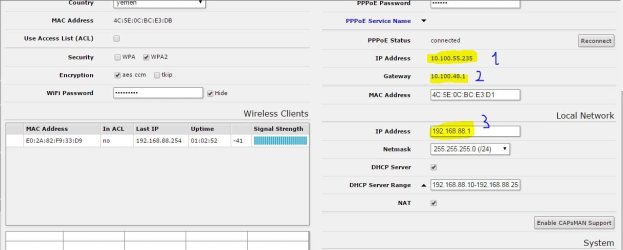
WebFig at 192.168.88.1.JPG

1- As I said before OpenDNS is not used in my Area. So, What DNS provider do you think is mine? Is my MikrTik router is my DNS provider???

2- If you would be saying that my automatically DNS server address is '192.168.88.1', I would be saying this is the admin ip address of my MikroTik router with which I can access to the WebFig of my router. As a result, this DNS sever address doesn't do anything with my ISP. However, it is related to my Router manufacturer.

3- I have linked between 'automatic DNS severer address' in the left and right parts in the first screen shot shot above to let you see that the DNS server address '192.168.88.1' is not the automatic DNS severer address since it was not obtained automatically. However, it was prepared by the factory who made the router since I have known it even before running the command 'ipconfig'. It was written on the package cover of the Mirotik router.

3- I'm stumped by the results of ipconfig command, and the typing in '192.168.88.1' in the address bar. So, If you have made a comparison between the the first and second screen shots above, you will be finding out in the first screen shot that
IPv4: 192.168.88.254
Default Gateway: 192.168.88.1
DNS servers: 192.168.88.1


However, in settings in the second screen shot above was gotten by typing '192.168.88.1' in the address bar.
IP Address: 10.100.55.235
Gateway: 10.100.48.1
IP Address: 192.168.88.1

*What are the IP addresses in the second screen shot for?
*Why are the Gateway results different in the two screen shots?
 
Last edited:

My Computer My Computer

Computer type
Laptop
Computer Manufacturer/Model Number
HP, Pavilion
OS
Windows 7 Home Premium 64Bit
CPU
Intel Core i5, 2.3GHz
Motherboard
Hewlett-Packard- Model 1657
Memory
DDR3- 6GB
Graphics Card(s)
Intel Graphics Family, Radeon HD 6770M
Hard Drives
Toshiba 700GB
Antivirus
Microsot Secuirty Eessentials
Browser
MS IE, Google Chrom, and FireFox

My Computer My Computer

Computer type
PC/Desktop
Computer Manufacturer/Model Number
Built 2/11/2011
OS
Windows 7 Pro-x64
CPU
i7-2600 3.4GHz - 3.8GHz Turbo
Motherboard
Intel DH67BL-B3
Memory
8Gb - 2x4GB, Muskin 991770 PC3-1333
Graphics Card(s)
Integrated Intel HD 2000
Sound Card
Integrated Intel 10.1 HD, RealTek ALC892
Monitor(s) Displays
Asus LCD VH222H, Haier HL24XSL2a
Screen Resolution
1920x1080, 1920x1080
Hard Drives
Crucial SSD C300-128Gb,
Western Digital WD5002AALX - 500Gb,
Western Digital WD7501AALS - 750Gb
PSU
Seasonic 650W 80+ Gold Modular
Case
Rosewill Defender
Cooling
Stock CPU, Four 120mm case fans, PCH fan added
Keyboard
Logitech EX100 Y-RBH94 Wireless
Mouse
Logitech EX100 M-RCE95 Wireless
Internet Speed
3.0/1.5 Mbs
Antivirus
Microsoft Security Essentials
Browser
Microsoft Internet Explorer 11
Other Info
Antec Veris Premier-Multimedia IR Station,
Cyber Accoustics-3602 Speakers,
AFT XM-5U Card Reader,
Hauppauge TV-HVR-2250,
Sony LX300 USB Turntable
For your new questions:
1- You can use OpenDNS from anywhere on the globe. What might happen is that if you are too far away from those servers, the replies will take longer. This happens on your first query and any subsequent ones to already queried sites will be read from the cache. Your router is set as the DNS server, yes but it is still relaying your DNS queries to your ISP's DNS servers. Some routers don't have a DNS server of their own and assign the ISP servers directly via DHCP (my cable modem/router for example assign ISP servers instead of the router).

2- See answer 1, it is still asking the ISP servers. Open your router management interface and look for a DNS page/section. It should be telling you which DNS servers are set.

3- It is hard to say much without seeing the router interface but that is indeed the automatic DNS server, as said above. When you say automatic it means that the PC gets it automatically regardless of if you set a manual DNS server or get it from ISP on the router. Mind you some of these settings are not available for all router models.

4- Nothing surprising in those network settings. It looks like your ISP is using NAT (Network Address Translation) instead of assigning proper Internet IPs. 10.0.0.0 network is another private IP range just like 192.168.0.0 network.

Your PC is getting an IP address of 192.168.88.254 from the DHCP server of router. And router's LAN interface is set as 192.168.88.1, so your PC's gateway is also 192.168.88.1.

Whereas the external interface of your router (WAN) gets the IP from your ISP's DHCP server, and is assigned 10.100.55.235 and the ISP router on the other side has an IP address of 10.100.48.1 (gateway).

So, when your PC needs to reach an IP address unknown to it, it sends the packets to its gateway which is your router. Then the router "routes" the packet to the gateway of the ISP. That router then sends the packets to the next router etc.

Try running in cmd:
Code:
tracert [URL="http://www.google.com"]www.google.com[/URL]
this will show you all the routers that the packets will pass through until www.google.com is reached. (The routers for which the ICMP echo - which is the reply from ping command - has been closed will not reply back so a time out will occur, resulting in a asterisk char *)

For example mine looks like this, yours will be different:
Code:
C:\Users\Gokhan>tracert [URL="http://www.google.com"]www.google.com[/URL]
Tracing route to [URL="http://www.google.com"]www.google.com[/URL] [216.58.213.36]
over a maximum of 30 hops:
  1     *       <1 ms    71 ms  192.168.0.1
  2     *        *        *     Request timed out.
  3     *        *        *     Request timed out.
  4    14 ms     9 ms     9 ms  172.25.43.25
  5     *       13 ms    10 ms  212.156.38.21.static.turktelekom.com.tr [212.156.38.21]
  6     *        *        *     Request timed out.
  7     *        *        *     Request timed out.
  8     *        *        *     Request timed out.
  9     *       63 ms     *     72.14.197.174
 10    61 ms    61 ms    61 ms  209.85.245.23
 11    71 ms    61 ms    62 ms  216.239.48.38
 12    64 ms    63 ms    57 ms  66.249.95.66
 13    57 ms    58 ms    58 ms  64.233.175.184
 14    59 ms    59 ms    59 ms  216.239.41.129
 15    72 ms    64 ms    64 ms  ber01s15-in-f4.1e100.net [216.58.213.36]
Trace complete.
 

My Computer My Computer

Computer type
PC/Desktop
Computer Manufacturer/Model Number
Custom Build
OS
Windows 7 Ultimate x64 SP1
CPU
AMD Phenom 2 1090T
Motherboard
Gigabyte GA-890FXA-UD5
Memory
2x8GB Kingston HyperX Fury Black 1600Mhz Unganged
Graphics Card(s)
MSI GTX 970 Gaming 4G
Sound Card
Realtek On-Board HD 7.1 Audio / Logitech G35
Monitor(s) Displays
3xAcer GD245HQ
Screen Resolution
1920x1080
Hard Drives
Samsung 850 Pro 512GB SSD - OS /
WD Caviar Black SATA 3 - 1 TBx2 - Dynamic RAID 0 /
WD Caviar Green SATA 2 - 640GBx2 - Dynamic RAID 0 /
WD Caviar Green SATA 2 - 640GB - Internal Backup /
Seagate Barracude SATA 3 - 3TB - External Backup/ Sync
PSU
HighPower 1000W
Case
Cooler Master HAF 932
Cooling
Noctua NH-D14
Keyboard
Logitech G19
Mouse
Logitech G500
Internet Speed
100/4 Mbit Cable (100GB quota)
Antivirus
ZoneAlarm Extreme Security / MBAM Pro / MBAE Free / SAS Free
Browser
IE 11 - Firefox - Chrome
Other Info
Logitech F710/ G27/ G940/ Z5500 // TrackIR 5 // Nvidia 3D Surround Vision
2- See answer 1, it is still asking the ISP servers. Open your router management interface and look for a DNS page/section. It should be telling you which DNS servers are set.


Thank you so much indeed,

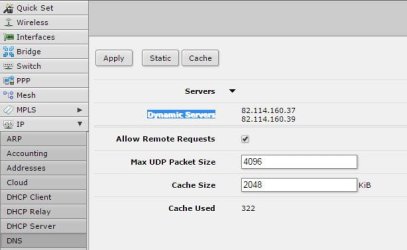
The Dynamic DNS Servers of my router management interface are:
Dynamic DNS Servers of my  router management interface.JPG


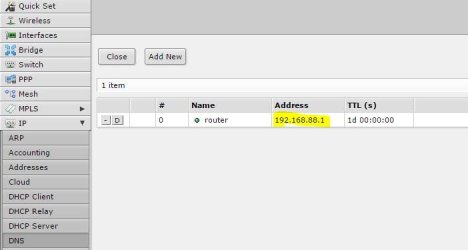
When pressing on the 'static' button, then the DNS Servers of my router management interface are as follows:
The Static DNS Servers of my  router management interface.JPG

So, which DNS servers are set? I don't see the automatic DNS server. All what I have been seen are :
Dynamic DNS Servers:
82.114.160.37
82.114.160.39

And when pressing on 'static' button, then the address '192.168.88.1' is shown.


So, when your PC needs to reach an IP address unknown to it, it sends the packets to its gateway which is your router. Then the router "routes" the packet to the gateway of the ISP. That router then sends the packets to the next router etc.

Try running in cmd:
Code:
tracert [URL="http://www.google.com"]www.google.com[/URL]
this will show you all the routers that the packets will pass through until www.google.com is reached. (The routers for which the ICMP echo - which is the reply from ping command - has been closed will not reply back so a time out will occur, resulting in a asterisk char *)

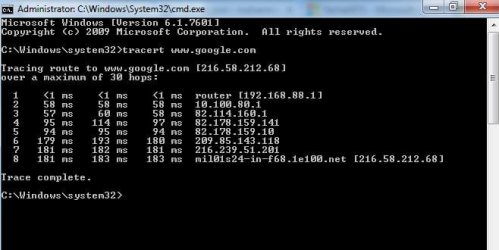
I have run the CMD as an admin, then I run the command.

This is shown

The result of running the command 'tracert wee.google.com-.JPG

While it is out of my topic here, but for my curiosity, how could you copy the result of running the command 'tracert Google' in your 'cmd' ? I have seen that you have pasted the result of running the command tracert 'www.google.com' as a code or and not as screen shot? The command 'tracert Google' transfer the result to your account at 'google.com'. So, you have copied from there. Or what else is there?
 

My Computer My Computer

Computer type
Laptop
Computer Manufacturer/Model Number
HP, Pavilion
OS
Windows 7 Home Premium 64Bit
CPU
Intel Core i5, 2.3GHz
Motherboard
Hewlett-Packard- Model 1657
Memory
DDR3- 6GB
Graphics Card(s)
Intel Graphics Family, Radeon HD 6770M
Hard Drives
Toshiba 700GB
Antivirus
Microsot Secuirty Eessentials
Browser
MS IE, Google Chrom, and FireFox
~~~While it is out of my topic here, but for my curiosity, how could you copy the result of running the command 'tracert Google' in your 'cmd' ? I have seen that you have pasted the result of running the command tracert 'www.google.com' as a code or and not as screen shot? The command 'tracert Google' transfer the result to your account at 'google.com'. So, you have copied from there. Or what else is there?
Right click in the blue title bar.
Select Properties from the context Menu.

Once the Properties dialog box opens...
...select (if need be) the tab named Options.

On the right side of the dialog box...
...put a check beside Quick Edit Mode.


Before leaving the Properties dialog box...
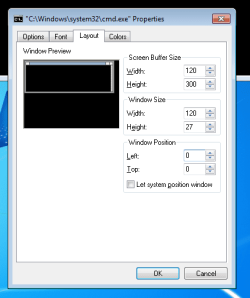
...make the tab named Layout look like this:

cmd.PNG

"OK" your way out. I think that the settings are stored with the shortcut that started the cmd window. If you start another cmd window via other means, you might need to repeat the settings.

You should now be able to Click and Drag your mouse to highlight some or all of the text in the command prompt window. Once the text of interest has been highlighted, release the left mouse click that was used to select the text and press the right mouse click one time. That puts the info into the Windows clipboard. Paste it as desired.

If you need to paste info from the Windows clipboard into a command prompt window, just right click inside the command prompt window.

The Quick Edit Mode also allows you to drag/drop a file from Windows (file) Explorer* into the command prompt window. Doing this should paste the path to the file into the command prompt window. If that path has a space in it, the paste operation will automatically add quotes around the path.

*this does not work if the command prompt window is running as admin and Windows (file) Explorer is running in the normal mode (with the User Account Control turned on). This process isolation is a good example of part of the Windows security model. If you operate with the UAC turned off, you lose a lot of those security features.
 

My Computer My Computer

Computer type
Laptop
Computer Manufacturer/Model Number
Employer provided Dell Latitude
OS
W7 Pro SP1 64bit
CPU
i7
Memory
8GB
Graphics Card(s)
Intel HD Graphics
Hard Drives
crappy SSD
Antivirus
Employer mandated Symantec Endpoint Protection
Browser
Pale Moon 64bit, IE11 64bit & Chrome 64bit
Hmm, the quick edit mode is interesting, didn't know about it. I use the conventional method:

Right click anywhere on the cmd window and select "Mark", then left click select the portion to be copied (it will highlight in White). Once done, click right click once anywhere in the highlighted space. It is copied to clipboard now, you can paste anywhere.

I use CODE tag so the text looks readable.

Now coming to DNS issue: Dynamic DNS is something else, it is used to make your servers reachable with a meaningful DNS name when you have a dynamic IP (hence it changes every once in a while).

Every router has its settings under a different name so I can't guide you directly there to the DNS settings. You have to check those pages. 192.168.88.1 is your router, apparently it is querying another DNS server.
 

My Computer My Computer

Computer type
PC/Desktop
Computer Manufacturer/Model Number
Custom Build
OS
Windows 7 Ultimate x64 SP1
CPU
AMD Phenom 2 1090T
Motherboard
Gigabyte GA-890FXA-UD5
Memory
2x8GB Kingston HyperX Fury Black 1600Mhz Unganged
Graphics Card(s)
MSI GTX 970 Gaming 4G
Sound Card
Realtek On-Board HD 7.1 Audio / Logitech G35
Monitor(s) Displays
3xAcer GD245HQ
Screen Resolution
1920x1080
Hard Drives
Samsung 850 Pro 512GB SSD - OS /
WD Caviar Black SATA 3 - 1 TBx2 - Dynamic RAID 0 /
WD Caviar Green SATA 2 - 640GBx2 - Dynamic RAID 0 /
WD Caviar Green SATA 2 - 640GB - Internal Backup /
Seagate Barracude SATA 3 - 3TB - External Backup/ Sync
PSU
HighPower 1000W
Case
Cooler Master HAF 932
Cooling
Noctua NH-D14
Keyboard
Logitech G19
Mouse
Logitech G500
Internet Speed
100/4 Mbit Cable (100GB quota)
Antivirus
ZoneAlarm Extreme Security / MBAM Pro / MBAE Free / SAS Free
Browser
IE 11 - Firefox - Chrome
Other Info
Logitech F710/ G27/ G940/ Z5500 // TrackIR 5 // Nvidia 3D Surround Vision
~~~While it is out of my topic here, but for my curiosity, how could you copy the result of running the command 'tracert Google' in your 'cmd' ? I have seen that you have pasted the result of running the command tracert 'www.google.com' as a code or and not as screen shot? The command 'tracert Google' transfer the result to your account at 'google.com'. So, you have copied from there. Or what else is there?
Right click in the blue title bar.
Select Properties from the context Menu.

Once the Properties dialog box opens...
...select (if need be) the tab named Options.

On the right side of the dialog box...
...put a check beside Quick Edit Mode.


Before leaving the Properties dialog box...
...make the tab named Layout look like this:

View attachment 370634

"OK" your way out. I think that the settings are stored with the shortcut that started the cmd window. If you start another cmd window via other means, you might need to repeat the settings.

You should now be able to Click and Drag your mouse to highlight some or all of the text in the command prompt window. Once the text of interest has been highlighted, release the left mouse click that was used to select the text and press the right mouse click one time. That puts the info into the Windows clipboard. Paste it as desired.

If you need to paste info from the Windows clipboard into a command prompt window, just right click inside the command prompt window.

The Quick Edit Mode also allows you to drag/drop a file from Windows (file) Explorer* into the command prompt window. Doing this should paste the path to the file into the command prompt window. If that path has a space in it, the paste operation will automatically add quotes around the path.

*this does not work if the command prompt window is running as admin and Windows (file) Explorer is running in the normal mode (with the User Account Control turned on). This process isolation is a good example of part of the Windows security model. If you operate with the UAC turned off, you lose a lot of those security features.

Hmm, the quick edit mode is interesting, didn't know about it. I use the conventional method:

Right click anywhere on the cmd window and select "Mark", then left click select the portion to be copied (it will highlight in White). Once done, click right click once anywhere in the highlighted space. It is copied to clipboard now, you can paste anywhere.

I use CODE tag so the text looks readable.

Thank you both of you very much indeed,
That's been very interesting.
Do you have any comprehensive guide to learn more about using CMD.
Code:
Microsoft Windows [Version 6.1.7601]
Copyright (c) 2009 Microsoft Corporation.  All rights reserved.

C:\Windows\system32>tracert www.google.com

Tracing route to www.google.com [216.58.209.228]
over a maximum of 30 hops:

  1     1 ms     3 ms    <1 ms  router [192.168.88.1]
  2  2505 ms   796 ms   849 ms  10.100.176.1
  3   823 ms   766 ms   902 ms  82.114.160.1
  4   785 ms   875 ms   769 ms  82.178.159.141
  5   747 ms   683 ms   539 ms  82.178.159.10
  6   885 ms   748 ms     *     209.85.143.118
  7   816 ms   838 ms   816 ms  72.14.232.78
  8   705 ms   779 ms   694 ms  216.239.40.210
  9   708 ms   807 ms   732 ms  216.239.40.182
 10   871 ms   876 ms   735 ms  216.239.42.36
 11   719 ms     *      750 ms  72.14.239.230
 12   841 ms     *      857 ms  209.85.250.171
 13   727 ms   901 ms   694 ms  lhr08s05-in-f4.1e100.net [216.58.209.228]

Trace complete.

C:\Windows\system32>

Code:
Microsoft Windows [Version 6.1.7601]
Copyright (c) 2009 Microsoft Corporation.  All rights reserved.

D:\Users\Mohammad>tracert www.google.com

Tracing route to www.google.com [216.58.209.228]
over a maximum of 30 hops:

  1     1 ms    <1 ms    <1 ms  router [192.168.88.1]
  2   722 ms   715 ms   691 ms  10.100.176.1
  3  2026 ms   822 ms   743 ms  82.114.160.1
  4   792 ms   743 ms   744 ms  82.178.159.141
  5  2943 ms     *      770 ms  82.178.159.10
  6   815 ms   795 ms   796 ms  209.85.143.118
  7     *     2365 ms   851 ms  72.14.232.78
  8   866 ms   873 ms   851 ms  209.85.243.108
  9   838 ms   878 ms   831 ms  74.125.37.150
 10   993 ms   669 ms   870 ms  216.239.41.101
 11   906 ms     *     1818 ms  72.14.239.230
 12   864 ms   851 ms   850 ms  209.85.250.171
 13   848 ms   795 ms   823 ms  lhr08s05-in-f228.1e100.net [216.58.209.228]

Trace complete.

D:\Users\Mohammad>

I think that the settings are stored with the shortcut that started the cmd window. If you start another cmd window via other means, you might need to repeat the settings.
I didn't have to repeat the settings again if I would start another cmd window.
 

My Computer My Computer

Computer type
Laptop
Computer Manufacturer/Model Number
HP, Pavilion
OS
Windows 7 Home Premium 64Bit
CPU
Intel Core i5, 2.3GHz
Motherboard
Hewlett-Packard- Model 1657
Memory
DDR3- 6GB
Graphics Card(s)
Intel Graphics Family, Radeon HD 6770M
Hard Drives
Toshiba 700GB
Antivirus
Microsot Secuirty Eessentials
Browser
MS IE, Google Chrom, and FireFox
Now coming to DNS issue: Dynamic DNS is something else, it is used to make your servers reachable with a meaningful DNS name when you have a dynamic IP (hence it changes every once in a while).

Every router has its settings under a different name so I can't guide you directly there to the DNS settings. You have to check those pages. 192.168.88.1 is your router, apparently it is querying another DNS server.


Thanks a lot,
So, those two screen shots posted before didn't tell you which DNS servers are set in my router?
I believe as frustrated as I cannot be able to explain things in plain language.


You answered below my question ::: - If you would be saying that my automatic DNS server address is '192.168.88.1', I would be saying this is the admin ip address of my MikroTik router with which I can access to the WebFig of my router. As a result, this DNS sever address doesn't do anything with my ISP. However, it is related to my Router manufacturer.

2- See answer 1, it is still asking the ISP servers. Open your router management interface and look for a DNS page/section. It should be telling you which DNS servers are set.


I concluded from those two screen shots that the Dynamic DNS Servers of my router management interface are: (first screen shot posted before)
Dynamic DNS Servers:
82.114.160.37
82.114.160.39


When pressing on the 'static' button, then the DNS Servers of my router management interface are as follows (second screen shot posted before). DNS Server address '192.168.88.1' is shown.


As a result, which DNS servers are set? I don't see the automatic DNS server. All what I have been seen are :
Dynamic DNS Servers:
82.114.160.37
82.114.160.39

And when pressing on 'static' button, then the address '192.168.88.1' is shown.
 

My Computer My Computer

Computer type
Laptop
Computer Manufacturer/Model Number
HP, Pavilion
OS
Windows 7 Home Premium 64Bit
CPU
Intel Core i5, 2.3GHz
Motherboard
Hewlett-Packard- Model 1657
Memory
DDR3- 6GB
Graphics Card(s)
Intel Graphics Family, Radeon HD 6770M
Hard Drives
Toshiba 700GB
Antivirus
Microsot Secuirty Eessentials
Browser
MS IE, Google Chrom, and FireFox
I can't say anything definitive as all routers have their own wording for stuff. I would need to see for myself. Normally Dynamic DNS is used for something else - https://en.wikipedia.org/wiki/Dynamic_DNS.

In cmd, try:
Code:
nslookup
server 82.114.160.37
google.com
If it returns the IP addresses then it is a DNS server you are probably connected to.
 

My Computer My Computer

Computer type
PC/Desktop
Computer Manufacturer/Model Number
Custom Build
OS
Windows 7 Ultimate x64 SP1
CPU
AMD Phenom 2 1090T
Motherboard
Gigabyte GA-890FXA-UD5
Memory
2x8GB Kingston HyperX Fury Black 1600Mhz Unganged
Graphics Card(s)
MSI GTX 970 Gaming 4G
Sound Card
Realtek On-Board HD 7.1 Audio / Logitech G35
Monitor(s) Displays
3xAcer GD245HQ
Screen Resolution
1920x1080
Hard Drives
Samsung 850 Pro 512GB SSD - OS /
WD Caviar Black SATA 3 - 1 TBx2 - Dynamic RAID 0 /
WD Caviar Green SATA 2 - 640GBx2 - Dynamic RAID 0 /
WD Caviar Green SATA 2 - 640GB - Internal Backup /
Seagate Barracude SATA 3 - 3TB - External Backup/ Sync
PSU
HighPower 1000W
Case
Cooler Master HAF 932
Cooling
Noctua NH-D14
Keyboard
Logitech G19
Mouse
Logitech G500
Internet Speed
100/4 Mbit Cable (100GB quota)
Antivirus
ZoneAlarm Extreme Security / MBAM Pro / MBAE Free / SAS Free
Browser
IE 11 - Firefox - Chrome
Other Info
Logitech F710/ G27/ G940/ Z5500 // TrackIR 5 // Nvidia 3D Surround Vision
Back
Top