Clean install windows 7 cant detect graphic card!

KrmLaaz

New member
Local time
3:17 AM
Messages
16
Location
Holland
Hi guys, i've been struggeling for a while now with a clean install of windows 7.

First of all it was a pain to install all the drivers of the Dell recource dvd. But okay with most the drivers in place i was trying to look for my discrete onboard Nvidia Geforce 525m video card in device manager. But i just can NOT find it, not in hardware and devices or in the Device manager. I've searched hours and hours how to fix this but just cant seem to understand.

It does see the intel Family HD display adapter but nothing in the range of a nvdia or geforce. My motherboard has been replaced a while ago but at that time the Nvidia worked, it seems like computer forgot its total existence.

Any Suggestions? I'm feeling pretty fatigued about this right now.
 

My Computer My Computer

At a glance

Windows 7 Home Premium 64bit????
Computer type
Laptop
Computer Manufacturer/Model Number
dell
OS
Windows 7 Home Premium 64bit
CPU
?
Motherboard
?
Memory
?
Graphics Card(s)
??
Hard Drives
Sata 500gb
Antivirus
-
Browser
Chrome
Hi Welcome to Seven Forums ... You need to go to the Dell Website and Download the Drivers from there ...

The reason being the Drivers you have on the DVD are more than likely out of Date ...


Start with the Chipset Drivers ... Also Post your Model Number please ...


And we shall take things from there ...
 

My Computer My Computer

At a glance

windows 7 home 64bitINTEL-CORE I716GB
Computer Manufacturer/Model Number
W530-3630QM1
OS
windows 7 home 64bit
CPU
INTEL-CORE I7
Memory
16GB
Hard Drives
750GB
Browser
Chrome
hi there!

Yes thats what i did after i installed the wifi ethernet and some basic drivers.

I entered my model number and updated all drivers i could from the dell website.

I have a dell inspiron N5110 with 6 gb ram and intel core i7 2,20hz.

Edit: Inspiron 15R N5110 is the model
 

My Computer My Computer

At a glance

Windows 7 Home Premium 64bit????
Computer type
Laptop
Computer Manufacturer/Model Number
dell
OS
Windows 7 Home Premium 64bit
CPU
?
Motherboard
?
Memory
?
Graphics Card(s)
??
Hard Drives
Sata 500gb
Antivirus
-
Browser
Chrome
If you have Installed both the Chipset Drivers and Rebooted ...

Then Go into your BIOS and see if the GPU is enabled ...
 

My Computer My Computer

At a glance

windows 7 home 64bitINTEL-CORE I716GB
Computer Manufacturer/Model Number
W530-3630QM1
OS
windows 7 home 64bit
CPU
INTEL-CORE I7
Memory
16GB
Hard Drives
750GB
Browser
Chrome
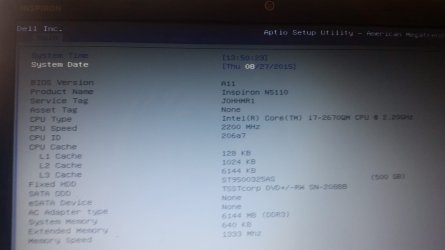
Hi, i think its enabled? Here's a picture of the bios menu.

I really am not an expert in these matters.. I understand most things but i just cant seem to figure out problems..
 

Attachments

  • 20150827_135416.jpg
    20150827_135416.jpg
    96 KB · Views: 3

My Computer My Computer

At a glance

Windows 7 Home Premium 64bit????
Computer type
Laptop
Computer Manufacturer/Model Number
dell
OS
Windows 7 Home Premium 64bit
CPU
?
Motherboard
?
Memory
?
Graphics Card(s)
??
Hard Drives
Sata 500gb
Antivirus
-
Browser
Chrome
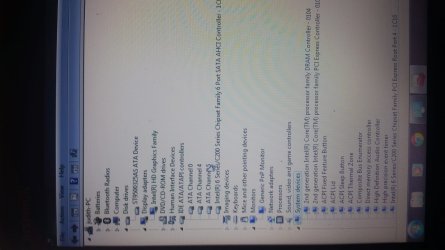
Another picture from my device manager just in case:
 

Attachments

  • 2.jpg
    2.jpg
    275.3 KB · Views: 4

My Computer My Computer

At a glance

Windows 7 Home Premium 64bit????
Computer type
Laptop
Computer Manufacturer/Model Number
dell
OS
Windows 7 Home Premium 64bit
CPU
?
Motherboard
?
Memory
?
Graphics Card(s)
??
Hard Drives
Sata 500gb
Antivirus
-
Browser
Chrome
If you have Installed both the Chipset Drivers and Rebooted ...

Then Go into your BIOS and see if the GPU is enabled ...

Been trying to get to understand how to do it, but you mean there are multiple chipset drivers?

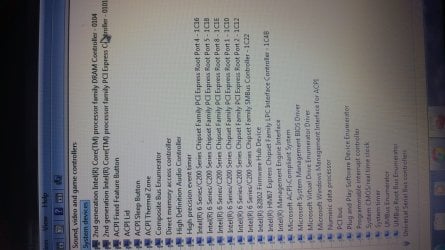
Edit: including picture of system devices.
 

Attachments

  • 3.jpg
    3.jpg
    392.7 KB · Views: 2

My Computer My Computer

At a glance

Windows 7 Home Premium 64bit????
Computer type
Laptop
Computer Manufacturer/Model Number
dell
OS
Windows 7 Home Premium 64bit
CPU
?
Motherboard
?
Memory
?
Graphics Card(s)
??
Hard Drives
Sata 500gb
Antivirus
-
Browser
Chrome
When you go into the Bios you need to go to the Advanced Tab to see if it is Enabled ...

You do have all the Chipset Drivers Installed ...


I have really bad eye sight and can not see your first Screenshot clearly ...
 

My Computer My Computer

At a glance

windows 7 home 64bitINTEL-CORE I716GB
Computer Manufacturer/Model Number
W530-3630QM1
OS
windows 7 home 64bit
CPU
INTEL-CORE I7
Memory
16GB
Hard Drives
750GB
Browser
Chrome
Im sorry for those pictures then, will try to do my best.

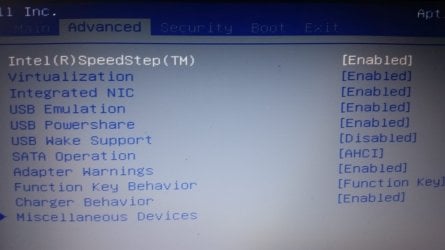
Everything i can find under Advanced is enabled. Here is another picture to confirm.

Im desperate...:(
 

Attachments

  • 4.jpg
    4.jpg
    156.4 KB · Views: 1

My Computer My Computer

At a glance

Windows 7 Home Premium 64bit????
Computer type
Laptop
Computer Manufacturer/Model Number
dell
OS
Windows 7 Home Premium 64bit
CPU
?
Motherboard
?
Memory
?
Graphics Card(s)
??
Hard Drives
Sata 500gb
Antivirus
-
Browser
Chrome
Hello KrmLaaz,

The information you are looking for could be in "Advanced -> Miscellaneous Devices".
Have you tried downloading and installing GeForce drivers from nVidia website directly?
If you try installing, the setup utility will give an error, saying there are no GeForce devices present or install successfully and it should appear in your device manager. Here is direct link to the latest driver for your card (64-bit version) http://uk.download.nvidia.com/Windows/355.60/355.60-notebook-win8-win7-64bit-international-whql.exe

Let us know of any results.
 

My Computer My Computer

At a glance

Windows 7 Professional 64-bitIntel Core i5-4670 LGA11508GBGeForce GTX 1060 GIGABYTE GV-N1060G1 GAMING-6GD
Computer type
PC/Desktop
Computer Manufacturer/Model Number
Custom
OS
Windows 7 Professional 64-bit
CPU
Intel Core i5-4670 LGA1150
Memory
8GB
Graphics Card(s)
GeForce GTX 1060 GIGABYTE GV-N1060G1 GAMING-6GD
PSU
Enermax Platimax EPM600 AWT 600W 80 Plus Platinum
Other Info
For history:
GPU: Asus GeForce GTS450 ENGTS450/DI/1GD5
Hi Xenoid!
Thans for the information ive already tried installing with the driver from the nvidia website. It said couldnt find any compatible hardware. I will try again with the link youve given me.

Under miss devices there are 2 subs. Both considering an Usb. :-(

I found something about reflashing the bios? Im very wary with that so preferable I wont do It.

Can i give u guys any other information?
 

My Computer My Computer

At a glance

Windows 7 Home Premium 64bit????
Computer type
Laptop
Computer Manufacturer/Model Number
dell
OS
Windows 7 Home Premium 64bit
CPU
?
Motherboard
?
Memory
?
Graphics Card(s)
??
Hard Drives
Sata 500gb
Antivirus
-
Browser
Chrome
"reflashing the bios" means updating it with newest version from manufacturer. In order to do so, you would have to download it first. Sometimes it helps to solve certain problems with new hardware and may help in your case too, but I would suggest it as last resort. You could, however, reset BIOS defaults in your "Exit" menu, if you haven't tried that.

If GeForce driver setup utility could not find the device, then it's either disabled, not functioning or missing.
I am more familiar with desktop computers, but I know some notebook models have discrete video cards permanently attached for some reasons. If your old motherboard had it permanently attached, maybe your new motherboard doesn't have one. I am sorry, I couldn't understand whether it was working after motherboard replacement or only before.
In desktop computers, sometimes, cleaning and wiping the card slot helps. If you are uncertain about doing it yourself, you should ask someone you know, who can do it. A friend of mine had problem with memory not working and simple cleaning helped in his case.
 

My Computer My Computer

At a glance

Windows 7 Professional 64-bitIntel Core i5-4670 LGA11508GBGeForce GTX 1060 GIGABYTE GV-N1060G1 GAMING-6GD
Computer type
PC/Desktop
Computer Manufacturer/Model Number
Custom
OS
Windows 7 Professional 64-bit
CPU
Intel Core i5-4670 LGA1150
Memory
8GB
Graphics Card(s)
GeForce GTX 1060 GIGABYTE GV-N1060G1 GAMING-6GD
PSU
Enermax Platimax EPM600 AWT 600W 80 Plus Platinum
Other Info
For history:
GPU: Asus GeForce GTS450 ENGTS450/DI/1GD5
Hi, and thanks again! Sadly reseting the bios settings didnt do much. The situation was as this. The original laptop w7 did recognize. Nvidia panel was there and so was the Intel One. I wanted to do a clean install because the laptop was full of bloatware and installed programs that made it relativly Slow. The first installation went wrong for a reason I dont know. I thought the laptop was ready to throw away. But I tried reinstalling again and it went alright. Although I couldnt recover to my old settings anymore. I had alot of faulty messages, But After I updated Windows update manually the laptop installed almost 280 updates. Then I install all Dell drivers the Dell website wanted me to with Dell system detect. After all this i still didnt understand why my discrete Nvidia gt 525m 1gb couldnt be found.. and here i Am.. so it DID work before clean installing.
 

My Computer My Computer

At a glance

Windows 7 Home Premium 64bit????
Computer type
Laptop
Computer Manufacturer/Model Number
dell
OS
Windows 7 Home Premium 64bit
CPU
?
Motherboard
?
Memory
?
Graphics Card(s)
??
Hard Drives
Sata 500gb
Antivirus
-
Browser
Chrome
Ive done some other checks also. Such as a cdhdsk(?) Sfc scannow and a full malware check with anti malware and tried alot of Microsoft fix it's. The motherboard was changed 1 year ago by Dell so I cant imagine that that is benig faulty.
 

My Computer My Computer

At a glance

Windows 7 Home Premium 64bit????
Computer type
Laptop
Computer Manufacturer/Model Number
dell
OS
Windows 7 Home Premium 64bit
CPU
?
Motherboard
?
Memory
?
Graphics Card(s)
??
Hard Drives
Sata 500gb
Antivirus
-
Browser
Chrome
There is a certain way to test if it's software or hardware issue by running Linux Live and if it cannot see your GeForce video card, then most likely it is dead and was the reason your first installation failed.
You will require empty flash drive 4 GB or larger, Linux Live USB Creator for Windows and any Linux CD you like. I recommend Linux Mint Xfce for it's small size (1.5 GB) and windows-like design.
If you going to try this here is detailed instruction:
1) Download LiLi and Linux, prepare empty flash drive
2) Install and run Linux Live USB Creator
3) Select your flash drive, Linux ISO file, check "Format the key in FAT32" and configure other options to your liking or leave them as they are
4) Click the lightning icon and your live key will be created
5) Launch your Dell computer using flash drive as boot device
6) Select Start Linux Mint option from menu
7) Configure internet connection in order to download device manager tool
7.1) Start -> Settings -> Connection Manager -> Add
8) Press "Start -> System -> Software Manager" type "sysinfo" and hit Enter, double-click "sysinfo" tool and press "Install" button
9) Press "Start -> System -> Sysinfo" to run the tool and select "Hardware -> Graphic card"

All your video cards should be in the list. If your GeForce missing, then it's hardware issue. Most likely, it means it's dead.

P.S.: By all means, I am not advertising Linux or recommending it's use instead of Windows, but using it as tool to find solution.
 

My Computer My Computer

At a glance

Windows 7 Professional 64-bitIntel Core i5-4670 LGA11508GBGeForce GTX 1060 GIGABYTE GV-N1060G1 GAMING-6GD
Computer type
PC/Desktop
Computer Manufacturer/Model Number
Custom
OS
Windows 7 Professional 64-bit
CPU
Intel Core i5-4670 LGA1150
Memory
8GB
Graphics Card(s)
GeForce GTX 1060 GIGABYTE GV-N1060G1 GAMING-6GD
PSU
Enermax Platimax EPM600 AWT 600W 80 Plus Platinum
Other Info
For history:
GPU: Asus GeForce GTS450 ENGTS450/DI/1GD5
Hey again and really wow, thanks for the information :-)

Im so desperate i would try anything.. its just, i've been working on this windows 7 for almost 3 days now, including searching for drivers and understanding a laptop in general. So i have 2 more questions.

1. If i would do this Linux install, can i do it aside windows 7? Like running a dual OS boot or something? So if the graphic card is still not found i can just continue on the windows 7?

2. If i go to system in device manager there are a couple things i dont understand. PCI slots that have no name to it? Or just named Generic.

And also, if it isnt too much (sorry guys!) the dell driver page suggest i install AMD drivers and i already did that 3 times? It keeps not recognizing any Amd or (ATI??) software. Really am in the blue here:zip:

The graphics card is one thats connected with the motherboard, if that is failing, wouldnt the pc in general be failing? Its fast as lighting though..

Thanks in advance guys!
 

My Computer My Computer

At a glance

Windows 7 Home Premium 64bit????
Computer type
Laptop
Computer Manufacturer/Model Number
dell
OS
Windows 7 Home Premium 64bit
CPU
?
Motherboard
?
Memory
?
Graphics Card(s)
??
Hard Drives
Sata 500gb
Antivirus
-
Browser
Chrome
The method I described will not affect your windows installation at all. Answering your questions:
1) It will run directly from your flash drive and will not affect your current Windows installation. You may boot from Windows after removing flash drive and you can use it like before.
2) These devices either do not require specific drivers or don't have any installed and default windows driver is used. In device properties you should be able to locate driver provided by Microsoft. For example, generic driver is used for any USB drive you connect.

ATI or AMD driver is used for ATI and AMD video cards, just like GeForce driver for nVidia video cards. Unfortunately, I do not know why DELL suggest it's installation. Could be simple mistake by program.

In computer with 2 video cards, when one is failing, another is used, if drivers for both are installed and both are enabled. Most modern notebooks have 2 and use them depending on situation. For example, when you browsing internet - integrated card is used and when you play games, more powerful discrete card used instead. Some desktop computers support this technology too.
 

My Computer My Computer

At a glance

Windows 7 Professional 64-bitIntel Core i5-4670 LGA11508GBGeForce GTX 1060 GIGABYTE GV-N1060G1 GAMING-6GD
Computer type
PC/Desktop
Computer Manufacturer/Model Number
Custom
OS
Windows 7 Professional 64-bit
CPU
Intel Core i5-4670 LGA1150
Memory
8GB
Graphics Card(s)
GeForce GTX 1060 GIGABYTE GV-N1060G1 GAMING-6GD
PSU
Enermax Platimax EPM600 AWT 600W 80 Plus Platinum
Other Info
For history:
GPU: Asus GeForce GTS450 ENGTS450/DI/1GD5
Well Xenoid, thanks for all the big info again. I will download and try it, hopefully i can make it tonight.

The weird thing is that alot of the Dell inspiron R15 N5110 have AMD catalyst or something installed. (from what i see browsing the web).

Well i will update you guys as soon as possible!
 

My Computer My Computer

At a glance

Windows 7 Home Premium 64bit????
Computer type
Laptop
Computer Manufacturer/Model Number
dell
OS
Windows 7 Home Premium 64bit
CPU
?
Motherboard
?
Memory
?
Graphics Card(s)
??
Hard Drives
Sata 500gb
Antivirus
-
Browser
Chrome
Hi, im back. Last post for tonight gotta sleep. :-)

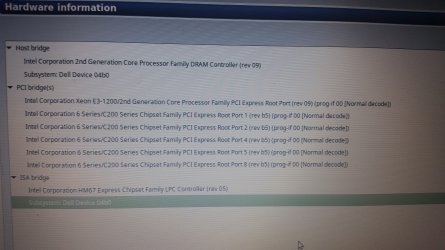
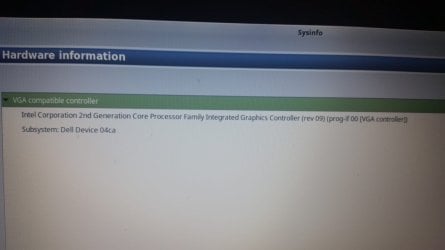
So i've tried the linux startup and checked through sysinfo. All i got was a VGA compatible controller with under that a intel corporation 2nd generation core processor famility integrated graphics controller (Rev 09) ( Prog-if00 [VGA-controller].

Subsystem: Dell device 04ca.

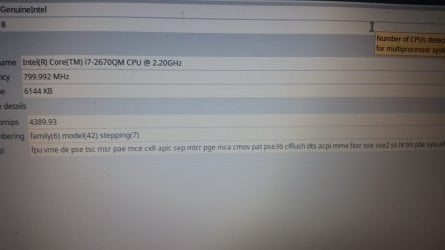
Well here are some pictures i took.

I also got some new info i didnt know it would matter, for a while now my AC adapter for the N5110 (130W) isnt functioning as it should. Its plugged in but NOT charging. Ive checked if charging was disabled in bios but it was enabled. The Adapter doesnt get recognized in the bios but my other dell charger does, but thats a 85W ( i think ) so its not good enough.


I really hope the nvidia chip isnt broken or anything, they just replaced it last year!

Well thanks again, i really really do appreciate this help. (And linux looks kinda awesome.)
 

Attachments

  • 5.jpg
    5.jpg
    311.1 KB · Views: 1
  • 6.jpg
    6.jpg
    121.1 KB · Views: 1
  • 7.jpg
    7.jpg
    187.4 KB · Views: 1

My Computer My Computer

At a glance

Windows 7 Home Premium 64bit????
Computer type
Laptop
Computer Manufacturer/Model Number
dell
OS
Windows 7 Home Premium 64bit
CPU
?
Motherboard
?
Memory
?
Graphics Card(s)
??
Hard Drives
Sata 500gb
Antivirus
-
Browser
Chrome
It is looking as if the Motherboard has become faulty again ....
 

My Computer My Computer

At a glance

windows 7 home 64bitINTEL-CORE I716GB
Computer Manufacturer/Model Number
W530-3630QM1
OS
windows 7 home 64bit
CPU
INTEL-CORE I7
Memory
16GB
Hard Drives
750GB
Browser
Chrome
Back
Top