How2 make my computer, Windows and Browsers stop thinking I'm Chinese

pintree3

Mich
Member
VIP
Local time
2:40 AM
Messages
394
Location
Canada
My computer was bought in Canada, my OS is USA, My keyboard along with my Language Settings are US. In other words ALL English, North America, except for my time zone (which could be any country). I have arrived in China and though nothing has changed all is Chinese. If I go to eBay.com. or google.com, Yahoo.com or wherever it turns into Chinese. Obviously it is reading my ISP but is there anywhere around this (Besides VPN setting at a different country)?

BTW, though I had added Chinese as a 2nd keyboard setting while still in Canada when I reboot it now goes to Chinese 1st as a default, even though my settings show English US as the first, top one, and as the default. It did not do this while I was back home.

My current OS is Windows 10
 

My Computer My Computer

At a glance

Windows 7 Home Premium 64Intel Core i5 760 @ 2800MHz12288MBAMD Radeon HD 7800 Series
Computer type
PC/Desktop
Computer Manufacturer/Model Number
OEM Designed by me :-)
OS
Windows 7 Home Premium 64
CPU
Intel Core i5 760 @ 2800MHz
Motherboard
Asus P7P55D-E LX
Memory
12288MB
Graphics Card(s)
AMD Radeon HD 7800 Series
Sound Card
ASUS Xonar DG
Monitor(s) Displays
ViewSonic VX2453 Series, HDMI 1080p Full HD
Screen Resolution
1920X1080
Hard Drives
Samsung SSD 840 EVO 250GB& two others
PSU
Tagan BZ Series, TG800-BZ 800W
Keyboard
Logitech MK250
Mouse
Logitech M310
Internet Speed
toppest, mostest :-) <-- bad, but fun English
Browser
Firefox, Crrome, IE
If you ask this over at Windows 10 Forums you will get better help.

That sounds like something Kari would know about.
 

My Computer My Computer

At a glance

Win 10 Pro x64Intel I5-2500K @3.3GHz16GB G.Skill Ripjaws X (4x4GB)EVGA GeForce 750 Ti SC 2GB
Computer type
PC/Desktop
Computer Manufacturer/Model Number
Self Built
OS
Win 10 Pro x64
CPU
Intel I5-2500K @3.3GHz
Motherboard
Asrock P67 Extreme4
Memory
16GB G.Skill Ripjaws X (4x4GB)
Graphics Card(s)
EVGA GeForce 750 Ti SC 2GB
Sound Card
ASUS Xonar DG 5.1 Channels 24-bit 96KHz PCI Interface Sound
Monitor(s) Displays
auria eq2367
Screen Resolution
1920 x 1080
Hard Drives
250GB Samsung 850 EVO SSD
1TB WD Blue
1TB Hitachi
PSU
SeaSonic X 650W 80 Plus Gold
Case
Corsair Obsidian 750D
Cooling
Corsair H60, Three 140mm case fans
Keyboard
Logitech Wireless Keyboard K520
Mouse
Logitech Wireless Mouse M310
Internet Speed
Wave Broadband ~ 100 dn 5 up
Antivirus
Windows Defender, Malwarebytes Premium
Browser
Edge, IE11, Chrome
Other Info
Laptop specs: HP g7-1365dx /
CPU: AMD A6-3420M APU with Radeon(tm) HD Graphics /
RAM: Crucial 8Gb (2x4Gb) /
SSD: Crucial M4-CT128M4SSD2 ATA Device/ FW 000F /
GFX: AMD Radeon HD 6520G /
OS: Windows 10 Pro x64
My computer was bought in Canada, my OS is USA, My keyboard along with my Language Settings are US. In other words ALL English, North America, except for my time zone (which could be any country). I have arrived in China and though nothing has changed all is Chinese. If I go to eBay.com. or google.com, Yahoo.com or wherever it turns into Chinese. Obviously it is reading my ISP but is there anywhere around this (Besides VPN setting at a different country)?

BTW, though I had added Chinese as a 2nd keyboard setting while still in Canada when I reboot it now goes to Chinese 1st as a default, even though my settings show English US as the first, top one, and as the default. It did not do this while I was back home.

My current OS is Windows 10

I am from Finland, living in Germany, using Windows in English with Finnish keyboard layout. I know what you are talking about, it's frustrating. I have sent MS feedback about this countless times. With today's technology changing this behavior should be easy; when I browse the web or use any online services, they should check three things and offer the services accordingly in my preferred language:
  1. What is the computer location set by user?
  2. What is the display language set by the user?
  3. What is the language and location in browser set by the user?
But, as we know this is not the case. Microsoft, Google, Yahoo and whatnot, they all assume for instance in my case that because my IP is a German one, I must prefer German language as if they could not believe that someone currently located in Germany speaks any other language. They totally ignore my settings. It is as if these sites and services could not even think that someone lives and works in another country instead of his native country. A German IP must mean a German user, according to them.

There is no perfect solution for this but you can get the system pretty much to acknowledge your main language doing all I have listed below. In this example I am making my PC with a German IP to be as much British as possible, you can just change the location references to your Canadian or US ones. I am doing this for Windows itself, Bing and Google.


 Windows 10

In Windows Settings, check that your location is set to what you want to and if other languages have been installed that your main language is the top most on the list. When OK, click the Additional date, time & regional settings link at the bottom:
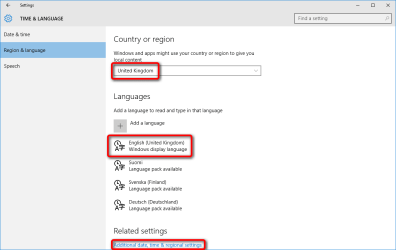
2015-08-28_11h43_55.png

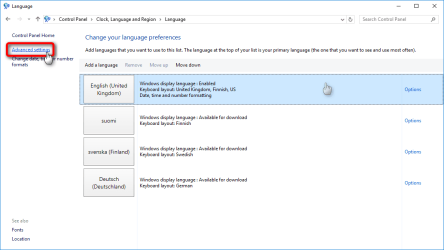
Click Language:

2015-08-28_11h46_55.png

Click Advanced settings:

2015-08-28_11h47_42.png

Override both Display language and Input method defaults with those you'd prefer, unselect both selections under Switching input methods, and select Don't let websites access my language list. Save the settings:

2015-08-28_11h49_36.png


 Bing

Always sign in to Bing. Open the Settings:

2015-08-28_11h51_55.png

Set your preferred location and language, save the settings:
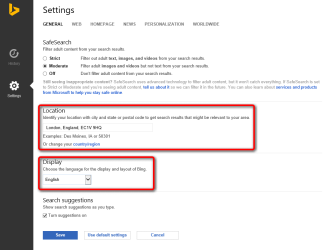
2015-08-28_11h53_53.png


 Google

As with Bing, always sign in to Google. Use the URL http://www.google.com/ncr for Google to get a global Google.com site instead of a localized one. The /ncr at the end of the URL overrides the IP based use of a localized Google.

Open the Settings (bottom right):
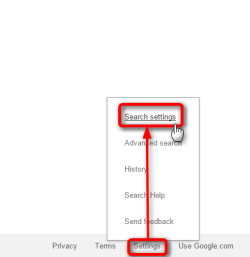
2015-08-28_11h56_16.png

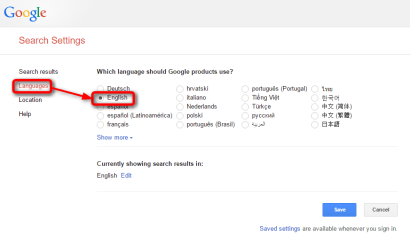
Set the language:

2015-08-28_11h57_25.png

Set the location:

2015-08-28_12h12_17.png

In some cases Google does not let you to change the location to other than locations in the country of your IP. In that case there's a workaround. Open Google Maps (be sure to be signed in!), type any location to search bar and search that location on the map. Now click Get directions and click Home:
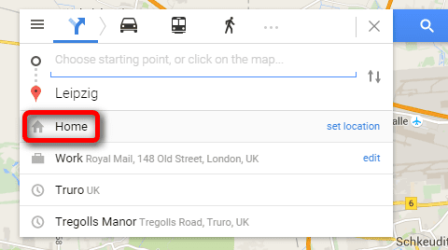
2015-08-28_12h09_25.png

Enter your preferred address and hit Enter, I am using here the address of the headquarters of Royal Mail in London:
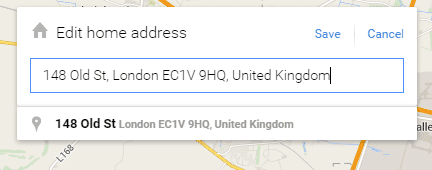
2015-08-28_12h11_11.png

Repeat the above for Work address; search any location, click Get directions, enter a Work address as you entered the Home address. In my case I use the same address on both.

Go back to Google settings, you can now set the location as you'd prefer.

That's it. It's not perfect but as good as you can get :)

Kari
 
Last edited:

My Computer My Computer

At a glance

Windows 10 Pro x64 EN-GB1.6 GHz Intel Core i7-720QM Processor6 GBATI Mobility Radeon HD 5850 Graphics
Computer type
Laptop
Computer Manufacturer/Model Number
HP ENVY 17-1150eg
OS
Windows 10 Pro x64 EN-GB
CPU
1.6 GHz Intel Core i7-720QM Processor
Memory
6 GB
Graphics Card(s)
ATI Mobility Radeon HD 5850 Graphics
Sound Card
Beats sound system with integrated subwoofer
Monitor(s) Displays
17" laptop display, 22" LED and 32" Full HD TV through HDMI
Screen Resolution
1600*900 (1), 1920*1080 (2&3)
Hard Drives
Internal: 2 x 500 GB SATA Hard Disk Drive 7200 rpm
External: 2TB for backups, 3TB USB3 network drive for media
Cooling
As Envy runs a bit warm, I have it on a Cooler Master pad
Keyboard
Logitech diNovo Media Desktop Laser (bluetooth)
Mouse
Logitech Performance Mouse MX
Internet Speed
50/10 Mbps VDSL
Antivirus
Windows Defender 4.3.9431.0
Browser
Maxthon 3.5.2., IE11
Back
Top