
Intel ME Firmware 8.1.65.1586 (1,5Mo)

NoN

New member
Guru
Gold Member
VIP
Local time
6:18 PM
Messages
4,101
Location
LostInSpace, Vol15 - Cool It
I do not know where to put that on the forums threads, i guess it is hardware (motherboard) matter.

I would like to share a tool for updating the Intel ME Firmware version that does appears in the Asus motherboard UEFI Bios, in the General tab.

It's been a while this 1,5Mb firmware hasn't been updated and this is an opportunity to do it very easily.

This, with the MEtool.exe from Asus using the "Intel Firmware Update Utility" v8.1.40.1456 (FWUpdLcl64.exe) in a Windows environment (not in DoS!) for your convenience.

I've packaged in the attached file, the tool as Intel ME 8.1.65.1586 [1.5Mb] - MEtool_FW.zip, converted inside as "Data.BIN" ("ME8_1.5M_Production.bin" from July 27, 2015)

All you'll have to do to update the Intel ME firmware is to launch as Admin the MEtool.exe inside the folder while you're on Desktop and reboot.
You can check whenever in the Bios setting too, the new version that appear.

Version History:
Intel ME Firmware Versions 8.x history for 1.5MB for Consumer Systems (Hxx, Mxx, Xxx, Zxx), For Intel Chipset 7-Series systems which come with Intel ME firmware v8.x:

8.1.65.1586
- First ME FW 8.1 version to be released to support ME Software V11.0 for the Windows 10 launch.

8.1.52.1496
- (Fix ) When the DNS infrastructure for the end of the FQDN when with a little PKI configuration failed .

8.1.51.1471
- [ Important ] Added support for Windows 8.1.

8.1.40.1416
- ( New) Added support for CAM (Continuous Aware Mode) wireless redirection session.
- ( New ) Updated Intel WiDi is HDCP to version 2.1
- ( New ) link protection will host connection and reconnection time reduced from 5 seconds to 3 seconds .
- (Fix ) security vulnerabilities.

8.1.30.1350
- (Fix ) LMSService enhanced security features .

8.1.20.1336
- ( New) Added support for Microsoft Windows XP Professional x64 Edition.
- Unable to establish TLS session ( correction ) using TLS1.1 version.
- (Fix ) sent via special parameter WS-MAN command will trigger a firmware exception.
- (Fix ) ME update some system configuration error . ( Delete ' from the update ME error recovery ' part of the text . )

8.1.2.1318
- ( New) Added ' error from the update ME Recovery' section.
- ( New) Added support for Microsoft Windows 7, Windows XP.

8.1.10.1286
-Intial support for Windows 8.


This firmware could be useful for the ones that are upgrading to Windows 10 as it does provide support for the New OS + bug fixes, and support for the latest "Intel Management Engine Interface (MEI)" version 11.x.x.xxxx on Intel Chipset 7 series (Panther point)

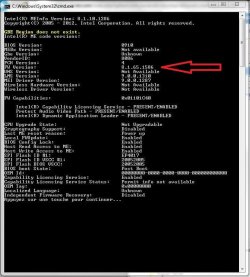
On attached screenshot you can see this latest firmware version on my Z77 motherboard successfully updated, but i'm still with latest official 8.1 Intel MEI driver version 9.0.0.1287 because i'm still using Windows 7 at the moment.
 

Attachments
Last edited:

My Computer My Computer

At a glance

Windows 7 Professional SP1 - x64 [Non-UEFI Boot]Ivy Bridge Core i5 3570K (Delidded)G.Skill "Ares" DDR3 PC3-12800 - 1600MHz (16Gb)Asus Dual-RX480-O4G
Computer type
PC/Desktop
Computer Manufacturer/Model Number
Custom Build
OS
Windows 7 Professional SP1 - x64 [Non-UEFI Boot]
CPU
Ivy Bridge Core i5 3570K (Delidded)
Motherboard
Asus P8Z77-V LE PLUS
Memory
G.Skill "Ares" DDR3 PC3-12800 - 1600MHz (16Gb)
Graphics Card(s)
Asus Dual-RX480-O4G
Sound Card
Creative Sound Blaster Z w/5.1 sound system
Monitor(s) Displays
Asus IPS 23"
Screen Resolution
16/9
Hard Drives
Internal:
500Go Sata 6Gb/s (x2)
500Go Sata 3Gb/s (x2)
SSD 60Go Sata 6Gb/s
PSU
In Win C 900W Series 80+ Platinum
Case
Thermaltake Chaser A71
Cooling
Custom Water Cooling Loop
Keyboard
Cooler Master QuickFire XTi
Mouse
Razer Imperator 2012 (4G)
Antivirus
MSE
Browser
IE 11.0.xxx Rtm
Other Info
"Raid0" with Intel Smart Response Technology (HDD/SSD)
Thank you NoN. All updated now. :)
 

My Computer My Computer

At a glance

64-bit Windows 11 Pro for WorkstationsIntel i7-8700K OC'd to 5 GHz64 GB (4x16GB) G.SKILL TridentZ RGB DDR4 3600...ASUS ROG-STRIX-GTX1080TI-O11G-GAMING
Computer type
PC/Desktop
Computer Manufacturer/Model Number
Self built custom
OS
64-bit Windows 11 Pro for Workstations
CPU
Intel i7-8700K OC'd to 5 GHz
Motherboard
ASUS ROG Maximus XI Formula Z390
Memory
64 GB (4x16GB) G.SKILL TridentZ RGB DDR4 3600 MHz
Graphics Card(s)
ASUS ROG-STRIX-GTX1080TI-O11G-GAMING
Sound Card
Integrated
Monitor(s) Displays
2 x Samsung Odyssey G7 27"
Screen Resolution
2560x1440
Hard Drives
1TB Samsung 990 PRO M.2,
4TB Samsung 990 PRO PRO M.2,
TerraMaster F8 SSD Plus NAS
PSU
Seasonic Prime Titanium 850W
Case
Thermaltake Core P3
Cooling
Corsair Hydro H115i
Keyboard
Logitech wireless K800
Mouse
Logitech MX Master 4
Internet Speed
2 Gb/s Download and 100 Mb/s Upload
Antivirus
Malwarebyte Anti-Malware Premium
Browser
Google Chrome
Other Info
Logitech Z625 speaker system,
Logitech BRIO 4K Pro webcam,
HP Color LaserJet Pro MFP M477fdn,
APC SMART-UPS RT 1000 XL - SURT1000XLI,
Galaxy S23 Plus phone
Thank you NoN. All updated now. :)

Great....so you still have a 7 series (Panther point system) around!

I thought you had upgraded your motherboard since...

I'm trying also to troubleshoot my upgrade path to Windows 10 with Black Screen, there's something that block the graphics card drivers PCI-e and the iGpu on my Z77 board.

By the Way, i had the time to have a look at the device manager when i was shortly in Windows 10 and the Intel Chipset Device Software where at v10.1.1.9. When i rolled back to Windows 7 they were back at v9.3.0.1029.

It is also safe to upgrade on a Windows 7 OS those v10.1.1.9 Intel .INF, or latest known i'm using v10.1.1.11 Intel .INF.

I can attach those two if needed. Just tell me.
 

My Computer My Computer

At a glance

Windows 7 Professional SP1 - x64 [Non-UEFI Boot]Ivy Bridge Core i5 3570K (Delidded)G.Skill "Ares" DDR3 PC3-12800 - 1600MHz (16Gb)Asus Dual-RX480-O4G
Computer type
PC/Desktop
Computer Manufacturer/Model Number
Custom Build
OS
Windows 7 Professional SP1 - x64 [Non-UEFI Boot]
CPU
Ivy Bridge Core i5 3570K (Delidded)
Motherboard
Asus P8Z77-V LE PLUS
Memory
G.Skill "Ares" DDR3 PC3-12800 - 1600MHz (16Gb)
Graphics Card(s)
Asus Dual-RX480-O4G
Sound Card
Creative Sound Blaster Z w/5.1 sound system
Monitor(s) Displays
Asus IPS 23"
Screen Resolution
16/9
Hard Drives
Internal:
500Go Sata 6Gb/s (x2)
500Go Sata 3Gb/s (x2)
SSD 60Go Sata 6Gb/s
PSU
In Win C 900W Series 80+ Platinum
Case
Thermaltake Chaser A71
Cooling
Custom Water Cooling Loop
Keyboard
Cooler Master QuickFire XTi
Mouse
Razer Imperator 2012 (4G)
Antivirus
MSE
Browser
IE 11.0.xxx Rtm
Other Info
"Raid0" with Intel Smart Response Technology (HDD/SSD)
It's the same old x79 motherboard in my specs running Windows 10. I'm looking to upgrade to Skylake probably towards the end of this year or early next year though.

I suppose you could uninstall the graphics driver before upgrading to see if it may be successful. I'm surprised it didn't get flagged when Windows Setup checks for compatibility.

Sure, I'll take the chipset drivers. I'm still at 10.0.27.
 

My Computer My Computer

At a glance

64-bit Windows 11 Pro for WorkstationsIntel i7-8700K OC'd to 5 GHz64 GB (4x16GB) G.SKILL TridentZ RGB DDR4 3600...ASUS ROG-STRIX-GTX1080TI-O11G-GAMING
Computer type
PC/Desktop
Computer Manufacturer/Model Number
Self built custom
OS
64-bit Windows 11 Pro for Workstations
CPU
Intel i7-8700K OC'd to 5 GHz
Motherboard
ASUS ROG Maximus XI Formula Z390
Memory
64 GB (4x16GB) G.SKILL TridentZ RGB DDR4 3600 MHz
Graphics Card(s)
ASUS ROG-STRIX-GTX1080TI-O11G-GAMING
Sound Card
Integrated
Monitor(s) Displays
2 x Samsung Odyssey G7 27"
Screen Resolution
2560x1440
Hard Drives
1TB Samsung 990 PRO M.2,
4TB Samsung 990 PRO PRO M.2,
TerraMaster F8 SSD Plus NAS
PSU
Seasonic Prime Titanium 850W
Case
Thermaltake Core P3
Cooling
Corsair Hydro H115i
Keyboard
Logitech wireless K800
Mouse
Logitech MX Master 4
Internet Speed
2 Gb/s Download and 100 Mb/s Upload
Antivirus
Malwarebyte Anti-Malware Premium
Browser
Google Chrome
Other Info
Logitech Z625 speaker system,
Logitech BRIO 4K Pro webcam,
HP Color LaserJet Pro MFP M477fdn,
APC SMART-UPS RT 1000 XL - SURT1000XLI,
Galaxy S23 Plus phone
Mine can't find any Intel drivers, old or new.
 

My Computers My Computers

  • At a glance

    Windows 11 ProRyzen 9 5900X32GB G Skill DDR4-3600EVGA RTX 3080 FTW 3 Ultra
    Computer type
    PC/Desktop
    Computer Manufacturer/Model Number
    ALWAYS UNDER CONSTRUCTION
    OS
    Windows 11 Pro
    CPU
    Ryzen 9 5900X
    Motherboard
    Asus X570 Crosshair Viii Hero
    Memory
    32GB G Skill DDR4-3600
    Graphics Card(s)
    EVGA RTX 3080 FTW 3 Ultra
    Sound Card
    On Board/Sennheiser PC37X Headset
    Monitor(s) Displays
    3 X Asus 27"
    Screen Resolution
    2560x1440
    Hard Drives
    2 X 1 TB NVME drives
    PSU
    EVGA 850
    Case
    Phanteks Eclipse P400A
    Cooling
    EVGA 280 AIO
    Keyboard
    Logitech G510s/ Logitech G13
    Mouse
    Logitech G502
    Internet Speed
    24/1
    Antivirus
    ESET/MBAM Pro/SAS Pro
    Browser
    Chrome/ Firefox/ Edge
  • At a glance

    Windows 11 ProIntel Ultra 9 288V32 GB LPDDR5X 8533
    Computer type
    Laptop
    System Manufacturer/Model Number
    Dell 16 Plus
    OS
    Windows 11 Pro
    CPU
    Intel Ultra 9 288V
    Memory
    32 GB LPDDR5X 8533
    Monitor(s) Displays
    16" Mini-LED HDR600 Touch 90 Hz
    Screen Resolution
    2560X1600
    Hard Drives
    1 TB NVME
It's the same old x79 motherboard in my specs running Windows 10. I'm looking to upgrade to Skylake probably towards the end of this year or early next year though.

I suppose you could uninstall the graphics driver before upgrading to see if it may be successful. I'm surprised it didn't get flagged when Windows Setup checks for compatibility.

Sure, I'll take the chipset drivers. I'm still at 10.0.27.

Those boards are workhorse, been a while i haven't looked at your specs, though!...Looking forward too Skylake and a the new LGA board but might do that as a kit upgrade as i can't afford a brand new build.

I've attached v10.1.1.9 and v10.1.1.11 both WHQL...

I'm using since two days the v10.1.1.11...and all is fine (Win 7)

It is better to use -overall command since it does not update the XEON(R) PCI Express Root Port and the SMBus Host Controller, by simply launch the .exe.


Edit:
Yes, Graphic drivers got flagged by Windows Setup...but it won't go through at install!!!

whatever i do, uninstall or let them in place or use the supposed AMD hotfix ones...Intel Graphic drivers doing the same but they've not updated theirs yet with hotfix or newer.

Something to do with PCI-E lane, that's what i'm trying to troubleshoot!
 

Attachments

Last edited:

My Computer My Computer

At a glance

Windows 7 Professional SP1 - x64 [Non-UEFI Boot]Ivy Bridge Core i5 3570K (Delidded)G.Skill "Ares" DDR3 PC3-12800 - 1600MHz (16Gb)Asus Dual-RX480-O4G
Computer type
PC/Desktop
Computer Manufacturer/Model Number
Custom Build
OS
Windows 7 Professional SP1 - x64 [Non-UEFI Boot]
CPU
Ivy Bridge Core i5 3570K (Delidded)
Motherboard
Asus P8Z77-V LE PLUS
Memory
G.Skill "Ares" DDR3 PC3-12800 - 1600MHz (16Gb)
Graphics Card(s)
Asus Dual-RX480-O4G
Sound Card
Creative Sound Blaster Z w/5.1 sound system
Monitor(s) Displays
Asus IPS 23"
Screen Resolution
16/9
Hard Drives
Internal:
500Go Sata 6Gb/s (x2)
500Go Sata 3Gb/s (x2)
SSD 60Go Sata 6Gb/s
PSU
In Win C 900W Series 80+ Platinum
Case
Thermaltake Chaser A71
Cooling
Custom Water Cooling Loop
Keyboard
Cooler Master QuickFire XTi
Mouse
Razer Imperator 2012 (4G)
Antivirus
MSE
Browser
IE 11.0.xxx Rtm
Other Info
"Raid0" with Intel Smart Response Technology (HDD/SSD)
Mine can't find any Intel drivers, old or new.

essenbe, if you have the courage (it's plenty there) ask or browse to this forum HERE for the x99 motherboard. They're quite serious down there!
 

My Computer My Computer

At a glance

Windows 7 Professional SP1 - x64 [Non-UEFI Boot]Ivy Bridge Core i5 3570K (Delidded)G.Skill "Ares" DDR3 PC3-12800 - 1600MHz (16Gb)Asus Dual-RX480-O4G
Computer type
PC/Desktop
Computer Manufacturer/Model Number
Custom Build
OS
Windows 7 Professional SP1 - x64 [Non-UEFI Boot]
CPU
Ivy Bridge Core i5 3570K (Delidded)
Motherboard
Asus P8Z77-V LE PLUS
Memory
G.Skill "Ares" DDR3 PC3-12800 - 1600MHz (16Gb)
Graphics Card(s)
Asus Dual-RX480-O4G
Sound Card
Creative Sound Blaster Z w/5.1 sound system
Monitor(s) Displays
Asus IPS 23"
Screen Resolution
16/9
Hard Drives
Internal:
500Go Sata 6Gb/s (x2)
500Go Sata 3Gb/s (x2)
SSD 60Go Sata 6Gb/s
PSU
In Win C 900W Series 80+ Platinum
Case
Thermaltake Chaser A71
Cooling
Custom Water Cooling Loop
Keyboard
Cooler Master QuickFire XTi
Mouse
Razer Imperator 2012 (4G)
Antivirus
MSE
Browser
IE 11.0.xxx Rtm
Other Info
"Raid0" with Intel Smart Response Technology (HDD/SSD)
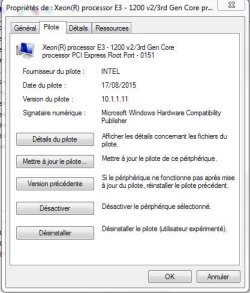
Both those chipset versions failed to install. Oh well.
 

My Computer My Computer

At a glance

64-bit Windows 11 Pro for WorkstationsIntel i7-8700K OC'd to 5 GHz64 GB (4x16GB) G.SKILL TridentZ RGB DDR4 3600...ASUS ROG-STRIX-GTX1080TI-O11G-GAMING
Computer type
PC/Desktop
Computer Manufacturer/Model Number
Self built custom
OS
64-bit Windows 11 Pro for Workstations
CPU
Intel i7-8700K OC'd to 5 GHz
Motherboard
ASUS ROG Maximus XI Formula Z390
Memory
64 GB (4x16GB) G.SKILL TridentZ RGB DDR4 3600 MHz
Graphics Card(s)
ASUS ROG-STRIX-GTX1080TI-O11G-GAMING
Sound Card
Integrated
Monitor(s) Displays
2 x Samsung Odyssey G7 27"
Screen Resolution
2560x1440
Hard Drives
1TB Samsung 990 PRO M.2,
4TB Samsung 990 PRO PRO M.2,
TerraMaster F8 SSD Plus NAS
PSU
Seasonic Prime Titanium 850W
Case
Thermaltake Core P3
Cooling
Corsair Hydro H115i
Keyboard
Logitech wireless K800
Mouse
Logitech MX Master 4
Internet Speed
2 Gb/s Download and 100 Mb/s Upload
Antivirus
Malwarebyte Anti-Malware Premium
Browser
Google Chrome
Other Info
Logitech Z625 speaker system,
Logitech BRIO 4K Pro webcam,
HP Color LaserJet Pro MFP M477fdn,
APC SMART-UPS RT 1000 XL - SURT1000XLI,
Galaxy S23 Plus phone
essenbe & Brink...

I've found that Intel Chipset INF for your board X79 & X99 are better suitable with v10.1.2.9 & v10.1.2.10 WHQL (include release notes) that i'm attaching right now.

-overall command is needed to fully update the device manager.

The others v10.1.1.9 & 11 are for larger product versions. Both should working, though!! At least on mine.

for v10.1.2.10:
Description :
Microsoft Windows* Server 2008 x64
Microsoft Windows* 7
Microsoft Windows* 7 x64
Microsoft Windows* Server 2008 R2 x64
Microsoft Windows* 8
Microsoft Windows* 8 x64
Microsoft Windows* Server 2012 x64
Microsoft Windows* 8.1
Microsoft Windows* 8.1 x64
Microsoft Windows* Server 2012 R2 x64
Microsoft Windows* 10 (only for Intel® Atom™ / Celeron®/ Pentium® Processor)
Microsoft Windows* 10 x64
Microsoft Windows* Server Threshold x64
For:
Intel® Xeon® Processor E5-2600 v3 product family
Intel® Xeon® Processor E5-2600 v4 product family
Intel® C610 series chipset
Intel® C600 series chipset
Intel® Atom™ Processor C2000 product family
Intel® Atom™ Processor S1200 product family
Intel® Xeon® Processor D-1500 product family
Intel® Communications Chipset 8900 Series
Intel® Xeon® processor E3-1200 v5 product family
Intel® Xeon® processor E3-1200 v4 product family
Intel® Xeon® processor E3-1200 v3 product family
Intel® Xeon® processor E3-1200 v2 product family
Intel® C230 series chipset family
Intel® C220 series chipset family
Intel® C210 series chipset family
Release note: Fix issues on USB controller devices 8D2D and 8D26 for Intel® C610 series/X99 chipset.
 

Attachments

Last edited:

My Computer My Computer

At a glance

Windows 7 Professional SP1 - x64 [Non-UEFI Boot]Ivy Bridge Core i5 3570K (Delidded)G.Skill "Ares" DDR3 PC3-12800 - 1600MHz (16Gb)Asus Dual-RX480-O4G
Computer type
PC/Desktop
Computer Manufacturer/Model Number
Custom Build
OS
Windows 7 Professional SP1 - x64 [Non-UEFI Boot]
CPU
Ivy Bridge Core i5 3570K (Delidded)
Motherboard
Asus P8Z77-V LE PLUS
Memory
G.Skill "Ares" DDR3 PC3-12800 - 1600MHz (16Gb)
Graphics Card(s)
Asus Dual-RX480-O4G
Sound Card
Creative Sound Blaster Z w/5.1 sound system
Monitor(s) Displays
Asus IPS 23"
Screen Resolution
16/9
Hard Drives
Internal:
500Go Sata 6Gb/s (x2)
500Go Sata 3Gb/s (x2)
SSD 60Go Sata 6Gb/s
PSU
In Win C 900W Series 80+ Platinum
Case
Thermaltake Chaser A71
Cooling
Custom Water Cooling Loop
Keyboard
Cooler Master QuickFire XTi
Mouse
Razer Imperator 2012 (4G)
Antivirus
MSE
Browser
IE 11.0.xxx Rtm
Other Info
"Raid0" with Intel Smart Response Technology (HDD/SSD)

That v10.1.2.10 did the trick. Thank you. :party:
 

My Computer My Computer

At a glance

64-bit Windows 11 Pro for WorkstationsIntel i7-8700K OC'd to 5 GHz64 GB (4x16GB) G.SKILL TridentZ RGB DDR4 3600...ASUS ROG-STRIX-GTX1080TI-O11G-GAMING
Computer type
PC/Desktop
Computer Manufacturer/Model Number
Self built custom
OS
64-bit Windows 11 Pro for Workstations
CPU
Intel i7-8700K OC'd to 5 GHz
Motherboard
ASUS ROG Maximus XI Formula Z390
Memory
64 GB (4x16GB) G.SKILL TridentZ RGB DDR4 3600 MHz
Graphics Card(s)
ASUS ROG-STRIX-GTX1080TI-O11G-GAMING
Sound Card
Integrated
Monitor(s) Displays
2 x Samsung Odyssey G7 27"
Screen Resolution
2560x1440
Hard Drives
1TB Samsung 990 PRO M.2,
4TB Samsung 990 PRO PRO M.2,
TerraMaster F8 SSD Plus NAS
PSU
Seasonic Prime Titanium 850W
Case
Thermaltake Core P3
Cooling
Corsair Hydro H115i
Keyboard
Logitech wireless K800
Mouse
Logitech MX Master 4
Internet Speed
2 Gb/s Download and 100 Mb/s Upload
Antivirus
Malwarebyte Anti-Malware Premium
Browser
Google Chrome
Other Info
Logitech Z625 speaker system,
Logitech BRIO 4K Pro webcam,
HP Color LaserJet Pro MFP M477fdn,
APC SMART-UPS RT 1000 XL - SURT1000XLI,
Galaxy S23 Plus phone
Mine can't find any Intel drivers, old or new.

essenbe, i think the latest Intel ME firmware for x99 is the v9.1.32.1002 for 9-series systems, but the tool i provided won't work for your board and you will have to use DoS command.

To be more precise look at this dedicated thread: HERE

That v10.1.2.10 did the trick. Thank you. :party:

:D!!!
 

My Computer My Computer

At a glance

Windows 7 Professional SP1 - x64 [Non-UEFI Boot]Ivy Bridge Core i5 3570K (Delidded)G.Skill "Ares" DDR3 PC3-12800 - 1600MHz (16Gb)Asus Dual-RX480-O4G
Computer type
PC/Desktop
Computer Manufacturer/Model Number
Custom Build
OS
Windows 7 Professional SP1 - x64 [Non-UEFI Boot]
CPU
Ivy Bridge Core i5 3570K (Delidded)
Motherboard
Asus P8Z77-V LE PLUS
Memory
G.Skill "Ares" DDR3 PC3-12800 - 1600MHz (16Gb)
Graphics Card(s)
Asus Dual-RX480-O4G
Sound Card
Creative Sound Blaster Z w/5.1 sound system
Monitor(s) Displays
Asus IPS 23"
Screen Resolution
16/9
Hard Drives
Internal:
500Go Sata 6Gb/s (x2)
500Go Sata 3Gb/s (x2)
SSD 60Go Sata 6Gb/s
PSU
In Win C 900W Series 80+ Platinum
Case
Thermaltake Chaser A71
Cooling
Custom Water Cooling Loop
Keyboard
Cooler Master QuickFire XTi
Mouse
Razer Imperator 2012 (4G)
Antivirus
MSE
Browser
IE 11.0.xxx Rtm
Other Info
"Raid0" with Intel Smart Response Technology (HDD/SSD)
Update firmware

Hi

Thx for the firmware, Where did you find it?

i also have am z77 mobo

There is an update to this firmware?
 

My Computer My Computer

At a glance

windows 10
Computer type
PC/Desktop
OS
windows 10
Back
Top