New graphics card - No sound

Juular

New member
Local time
9:35 AM
Messages
7
I've recently purchased a new graphics card, an NVIDIA GeForce GTX 960 and have been unable to get any sound on my PC since. I've tested my boxes, they're working fine when connected to my smartphone.

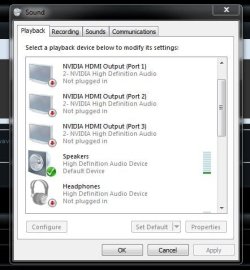
When I look up my installed audio devices, there are the NVIDIA HDMI Output Port 0 through 4, none of which are plugged in, then there are Realtek speakers, once again, not plugged in, lastly there's a Realtek Digital Output, which is set as default device.

My Bose speakers aren't detected at all. I've checked multiple times now, to be absolutely certain, they are plugged into the right port.

Any help would be absolutely amazing.
 

My Computer My Computer

At a glance

Windows 7 Ultimate x64Intel(R) Core i7-3820 CPU @ 3.60GHz24 GB RAM over 6 slotsNVIDIA GeForce GTX 960
Computer type
PC/Desktop
Computer Manufacturer/Model Number
Custom build
OS
Windows 7 Ultimate x64
CPU
Intel(R) Core i7-3820 CPU @ 3.60GHz
Motherboard
MSI X79A-GD45 (8D) (MS-7760) 2.0
Memory
24 GB RAM over 6 slots
Graphics Card(s)
NVIDIA GeForce GTX 960
Hard Drives
Corsair Force 3 SSD (for system)
Samsung HD103SJ (for storage)
Antivirus
AVG/Wise Care 365
Browser
Chrome
Hi:

Disclaimer: I am just a home user, not an expert.

I had a similar symptom (no sound output) after a recent glitch that necessitated a hard shutdown.
When I rebooted, there was no audio output.

TMALSS, extensive hardware diagnostics (via F12 on this Dell box, Dell Audio diagnostics, etc.) and via device manager (including removing and reinstalling my audio devices) --> No joy, even though everything checked out OK and the tests from device manager showed that the speakers/audio were communicating with the computer, speakers were functional, etc.

On a screen-share remote session with Dell, the tech actually had a logical approach to troubleshooting.

The eventual solution was simply to DISABLE the NVidia HDMI output in device manager, as it was somehow clashing with/blocking the Realtek sound output.
The NVidia HDMI output -- which was not previously in use -- had somehow "re-enabled" itself when I rebooted after the hard shut down.

I have had no further issues for several weeks.

Caveat: I never had an issue with the system seeing any of the hardware or peripherals, including my speakers. So YMMV.

Just a thought,

MM
 

My Computer My Computer

At a glance

OEM Windows 7 Ult (x64) SP1Intel Core-i7 3770 @ 3.4 GHz16 GB DDR3 SDRAM @ 1333 MHzNVidia GeForce GT620 1 GB
Computer type
PC/Desktop
Computer Manufacturer/Model Number
Dell Studio XPS 8500
OS
OEM Windows 7 Ult (x64) SP1
CPU
Intel Core-i7 3770 @ 3.4 GHz
Motherboard
"Dell" branded
Memory
16 GB DDR3 SDRAM @ 1333 MHz
Graphics Card(s)
NVidia GeForce GT620 1 GB
Sound Card
THX TruStudio PC
Monitor(s) Displays
Dell U2410 Full HD
Hard Drives
2.0 TB SATA2 @ 7200 RPM
PSU
350W
Keyboard
MS 4000 Ergon - Wired
Mouse
Logitech Anywhere MX
Internet Speed
Cable HSI w/Turbo (router)
Antivirus
KIS-MBAM Premium-MBAE Premium
Browser
Fx (current version); IE
Other Info
And a Win7/64 Pro laptop; And a Win10/64 Pro desktop.
I just tried this and it doesn't help. Disabled the HDMI output, restarted my PC, still no sound. Seems my issue has to be solved differently. Thanks anyway.
 

My Computer My Computer

At a glance

Windows 7 Ultimate x64Intel(R) Core i7-3820 CPU @ 3.60GHz24 GB RAM over 6 slotsNVIDIA GeForce GTX 960
Computer type
PC/Desktop
Computer Manufacturer/Model Number
Custom build
OS
Windows 7 Ultimate x64
CPU
Intel(R) Core i7-3820 CPU @ 3.60GHz
Motherboard
MSI X79A-GD45 (8D) (MS-7760) 2.0
Memory
24 GB RAM over 6 slots
Graphics Card(s)
NVIDIA GeForce GTX 960
Hard Drives
Corsair Force 3 SSD (for system)
Samsung HD103SJ (for storage)
Antivirus
AVG/Wise Care 365
Browser
Chrome
Bummer.

Same symptom, different disease.:(

I assume you made the Realtek Audio the default, have run basic hardware diagnostics, and have checked everything in device manager, including drivers?

If all of that checks out, then I'm afraid I'll have to defer to those far more knowledgeable than I.

Sorry I couldn't help.
I hope you get it fixed.

MM
 

My Computer My Computer

At a glance

OEM Windows 7 Ult (x64) SP1Intel Core-i7 3770 @ 3.4 GHz16 GB DDR3 SDRAM @ 1333 MHzNVidia GeForce GT620 1 GB
Computer type
PC/Desktop
Computer Manufacturer/Model Number
Dell Studio XPS 8500
OS
OEM Windows 7 Ult (x64) SP1
CPU
Intel Core-i7 3770 @ 3.4 GHz
Motherboard
"Dell" branded
Memory
16 GB DDR3 SDRAM @ 1333 MHz
Graphics Card(s)
NVidia GeForce GT620 1 GB
Sound Card
THX TruStudio PC
Monitor(s) Displays
Dell U2410 Full HD
Hard Drives
2.0 TB SATA2 @ 7200 RPM
PSU
350W
Keyboard
MS 4000 Ergon - Wired
Mouse
Logitech Anywhere MX
Internet Speed
Cable HSI w/Turbo (router)
Antivirus
KIS-MBAM Premium-MBAE Premium
Browser
Fx (current version); IE
Other Info
And a Win7/64 Pro laptop; And a Win10/64 Pro desktop.
Thanks for the help again, MoxieMomma. I could really use some help here, smart people from the internet. A PC without sound is like cookies without chocolate, it's just not satisfactory.
 

My Computer My Computer

At a glance

Windows 7 Ultimate x64Intel(R) Core i7-3820 CPU @ 3.60GHz24 GB RAM over 6 slotsNVIDIA GeForce GTX 960
Computer type
PC/Desktop
Computer Manufacturer/Model Number
Custom build
OS
Windows 7 Ultimate x64
CPU
Intel(R) Core i7-3820 CPU @ 3.60GHz
Motherboard
MSI X79A-GD45 (8D) (MS-7760) 2.0
Memory
24 GB RAM over 6 slots
Graphics Card(s)
NVIDIA GeForce GTX 960
Hard Drives
Corsair Force 3 SSD (for system)
Samsung HD103SJ (for storage)
Antivirus
AVG/Wise Care 365
Browser
Chrome
Someone? Anyone? I'm normally quite the patient kind, but a PC without sound is rather frustrating, so any help would be amazing.

Also, if more info is needed, or anything from my part, I may have to be instructed what exactly it is you need me to do.
 

My Computer My Computer

At a glance

Windows 7 Ultimate x64Intel(R) Core i7-3820 CPU @ 3.60GHz24 GB RAM over 6 slotsNVIDIA GeForce GTX 960
Computer type
PC/Desktop
Computer Manufacturer/Model Number
Custom build
OS
Windows 7 Ultimate x64
CPU
Intel(R) Core i7-3820 CPU @ 3.60GHz
Motherboard
MSI X79A-GD45 (8D) (MS-7760) 2.0
Memory
24 GB RAM over 6 slots
Graphics Card(s)
NVIDIA GeForce GTX 960
Hard Drives
Corsair Force 3 SSD (for system)
Samsung HD103SJ (for storage)
Antivirus
AVG/Wise Care 365
Browser
Chrome
Have you updated the Realtek drivers, if not grab them from your motherboards support download page.

And how about the Graphics Card, have you updated it since you plugged it in?
 

My Computer My Computer

At a glance

Windows 7 Home Premiumi5-3570k16 GB DDR3 G Skill SniperGIGABYTE GeForce GTX 970 GV-N970WF3OC-4GD
Computer type
PC/Desktop
Computer Manufacturer/Model Number
Custom build
OS
Windows 7 Home Premium
CPU
i5-3570k
Motherboard
ASUS Sabertooth z77
Memory
16 GB DDR3 G Skill Sniper
Graphics Card(s)
GIGABYTE GeForce GTX 970 GV-N970WF3OC-4GD
Monitor(s) Displays
ASUS ROG PG278Q
Screen Resolution
2560x1440@60Hz/120Hz/144Hz
Hard Drives
56GB KINGSTON SVP200S37A60G
512GB Crucial MX100
1863GB Seagate ST2000DM001-1CH164
2795GB Seagate ST3000DM001-9YN166
PSU
Corsair GS800
Case
Storm Trooper Stryker White
Keyboard
Logitech G910 Orion Spark
Mouse
Logitech G502
Antivirus
MSE
Browser
Firefox/Chrome
Other Info
Logitech G633
Logitech Mouse Matt
The "Speakers" need to be set as the default playback device, not the digital.

The HDMI will not affect the sound unless an HDMI cable is plugged in, then Windows will change the default playback device to the HDMI. When the HDMI cable is unplugged from the PC it will switch back to Speakers.
 

My Computer My Computer

At a glance

Windows 10 64 bitIntel i7 6700K16GB Corsair DominatorIntel CPU Graphics
Computer type
PC/Desktop
Computer Manufacturer/Model Number
My Own Build
OS
Windows 10 64 bit
CPU
Intel i7 6700K
Motherboard
ASUS ROG Maximus VIII Hero
Memory
16GB Corsair Dominator
Graphics Card(s)
Intel CPU Graphics
Sound Card
RealTek
Monitor(s) Displays
27" Dell S2719dgf
Screen Resolution
2560X1440
Hard Drives
1 TB Samsung 850 EVO SSD for Win 10 Pro
500GB Samsung 850 EVO SSD for Win 10 Insider
2 TB drive for backup
PSU
EVGA Supernova 750G2
Case
BeQuiet Silent Base 600
Cooling
Deepcool Captain 120EX
Keyboard
Microsoft Wireless 2000
Mouse
Microsoft wireless
Internet Speed
100 MB/sec (Cable)
Antivirus
Microsoft Defender and Malwarebytes
Browser
Edge/Firefox
Other Info
Cakewalk (Sonar) by BandLab and Studio One 4.1 Pro recording studio software. MOTU 896Mk3 Hybrid recording interface, Frontier Tranzport wireless control unit, Behringer X-Touch Control Surface.
Five USB connected optical drives for CD Audio production using Nero BurningROM
My apologies for a late response, I just needed a few days to get out of a particularly nasty flu.

Have you updated the Realtek drivers, if not grab them from your motherboards support download page.

And how about the Graphics Card, have you updated it since you plugged it in?
All of my drivers are up-to-date. Regardless, I would get notifications whenever newer drivers are available, and immediately install them.
The "Speakers" need to be set as the default playback device, not the digital.

The HDMI will not affect the sound unless an HDMI cable is plugged in, then Windows will change the default playback device to the HDMI. When the HDMI cable is unplugged from the PC it will switch back to Speakers.

If you mean in the back of my PC, I don't have anything to connect a HDMI cable to, the only external sound device connected to my PC is my speaker set.
 

My Computer My Computer

At a glance

Windows 7 Ultimate x64Intel(R) Core i7-3820 CPU @ 3.60GHz24 GB RAM over 6 slotsNVIDIA GeForce GTX 960
Computer type
PC/Desktop
Computer Manufacturer/Model Number
Custom build
OS
Windows 7 Ultimate x64
CPU
Intel(R) Core i7-3820 CPU @ 3.60GHz
Motherboard
MSI X79A-GD45 (8D) (MS-7760) 2.0
Memory
24 GB RAM over 6 slots
Graphics Card(s)
NVIDIA GeForce GTX 960
Hard Drives
Corsair Force 3 SSD (for system)
Samsung HD103SJ (for storage)
Antivirus
AVG/Wise Care 365
Browser
Chrome
Do you have the sound coming out of the right device ?
 

Attachments

  • Capture.JPG
    Capture.JPG
    37.1 KB · Views: 17

My Computer My Computer

At a glance

Windows 10 Pro x64Intel Core i7 6700KGSkill TridentZ RGB 16GB 3600 16-16-16-36EVGA GTX 980 Ti SC x2
Computer type
PC/Desktop
Computer Manufacturer/Model Number
Skylake Special #666
OS
Windows 10 Pro x64
CPU
Intel Core i7 6700K
Motherboard
Asus Sabertooth Z170 Mark 1
Memory
GSkill TridentZ RGB 16GB 3600 16-16-16-36
Graphics Card(s)
EVGA GTX 980 Ti SC x2
Sound Card
Realtek High Definition
Monitor(s) Displays
AOC G2460PG
Screen Resolution
1920 x 1080 144Hz
Hard Drives
Samsung 860 Pro 256GB, Seagate Barracuda 4TB x2
PSU
EVGA 1000 P2, EVGA White Custom Braided Cables
Case
Corsair Vengeance C70 Gunmetal Black
Cooling
Corsair H100i v2, Corsair ML120 x2, Thermal Grizzly Kryonaut
Keyboard
Logitech G910 Orion Spectrum
Mouse
Logitech G700s
Internet Speed
Verizon Fios Quantum Gateway 75/75
Antivirus
Windows Defender, Malwarebytes Free 3.8.3
Browser
Chrome
Other Info
Corsair SP120 x4, LG Blu-ray Drive, Durabrand HT-395 100 Watt Dolby Digital Amp, Corsair H2100 Wireless 7.1 Headset
Album

I took a picture of the back of my tower, as well as a screenshot of the playback devices in both my sound tab and in the device manager. This is what my computer finds, no matter which of the 6 ports in the back I plug my boxes into.

There's no audio whatsoever.

My tower is quite old, much older than any of my other hardware, perhaps this is part of the problem?
 

My Computer My Computer

At a glance

Windows 7 Ultimate x64Intel(R) Core i7-3820 CPU @ 3.60GHz24 GB RAM over 6 slotsNVIDIA GeForce GTX 960
Computer type
PC/Desktop
Computer Manufacturer/Model Number
Custom build
OS
Windows 7 Ultimate x64
CPU
Intel(R) Core i7-3820 CPU @ 3.60GHz
Motherboard
MSI X79A-GD45 (8D) (MS-7760) 2.0
Memory
24 GB RAM over 6 slots
Graphics Card(s)
NVIDIA GeForce GTX 960
Hard Drives
Corsair Force 3 SSD (for system)
Samsung HD103SJ (for storage)
Antivirus
AVG/Wise Care 365
Browser
Chrome
The audio cable goes in the green port.

You only use those other ports if you have individual cables for a 5.1 sound system.

What sound system are you using, please post a link.
 

My Computer My Computer

At a glance

Windows 10 Pro x64Intel Core i7 6700KGSkill TridentZ RGB 16GB 3600 16-16-16-36EVGA GTX 980 Ti SC x2
Computer type
PC/Desktop
Computer Manufacturer/Model Number
Skylake Special #666
OS
Windows 10 Pro x64
CPU
Intel Core i7 6700K
Motherboard
Asus Sabertooth Z170 Mark 1
Memory
GSkill TridentZ RGB 16GB 3600 16-16-16-36
Graphics Card(s)
EVGA GTX 980 Ti SC x2
Sound Card
Realtek High Definition
Monitor(s) Displays
AOC G2460PG
Screen Resolution
1920 x 1080 144Hz
Hard Drives
Samsung 860 Pro 256GB, Seagate Barracuda 4TB x2
PSU
EVGA 1000 P2, EVGA White Custom Braided Cables
Case
Corsair Vengeance C70 Gunmetal Black
Cooling
Corsair H100i v2, Corsair ML120 x2, Thermal Grizzly Kryonaut
Keyboard
Logitech G910 Orion Spectrum
Mouse
Logitech G700s
Internet Speed
Verizon Fios Quantum Gateway 75/75
Antivirus
Windows Defender, Malwarebytes Free 3.8.3
Browser
Chrome
Other Info
Corsair SP120 x4, LG Blu-ray Drive, Durabrand HT-395 100 Watt Dolby Digital Amp, Corsair H2100 Wireless 7.1 Headset
The audio cable goes in the green port.

You only use those other ports if you have individual cables for a 5.1 sound system.

What sound system are you using, please post a link.

I'm using these boxes, if that's what you're asking for.

This is what my computer finds, no matter which of the 6 ports in the back I plug my boxes into.

There's no audio whatsoever.
And yes, the boxes do work. I am using them daily with my phone so I can at least use Spotify.
 

My Computer My Computer

At a glance

Windows 7 Ultimate x64Intel(R) Core i7-3820 CPU @ 3.60GHz24 GB RAM over 6 slotsNVIDIA GeForce GTX 960
Computer type
PC/Desktop
Computer Manufacturer/Model Number
Custom build
OS
Windows 7 Ultimate x64
CPU
Intel(R) Core i7-3820 CPU @ 3.60GHz
Motherboard
MSI X79A-GD45 (8D) (MS-7760) 2.0
Memory
24 GB RAM over 6 slots
Graphics Card(s)
NVIDIA GeForce GTX 960
Hard Drives
Corsair Force 3 SSD (for system)
Samsung HD103SJ (for storage)
Antivirus
AVG/Wise Care 365
Browser
Chrome
Back
Top