RAM - Test with Memtest86+

How to Test and Diagnose RAM Issues with Memtest86+

Contents


Part 1: Preparing the Media
Method 1: With a USB Memory Stick


1. Download the latest version of the "Auto-installer for USB Key (Win 9x/2k/xp/7)" from this link: Memtest86+ - Advanced Memory Diagnostic Tool


2. Plug in an empty USB key drive. Size is no concern, as the actual files take up 180 KB of space.​

3. Go into the .zip folder you downloaded, and double-click on the .exe file inside.​

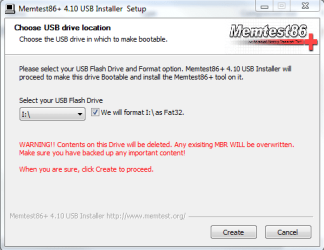
4. Follow the setup utility. To reduce the risk of problems, it is advised to format the drive.​

installer.PNG


Method 2: With a CD

1. Download the latest version of the "Precompiled Boot ISO (.zip) from this link: Memtest86+ - Advanced Memory Diagnostic Tool

You want the "Precompiled Boot ISO (.zip)".​

2. Open the .zip file you downloaded, and then drag the .ISO file inside onto the Desktop.​


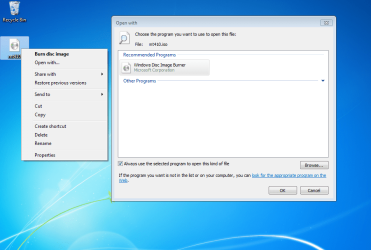
3. Right-click on the ISO, and select Open with>Windows Disc Image Burner.open with.PNG
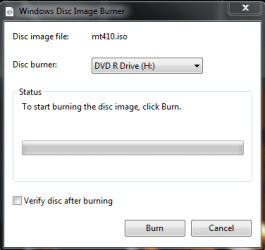
4. Insert a blank CD into the CD drive, and make sure the correct Disc burner is selected.abt2burn.PNG
5. Click on "Burn".

Now the CD is ready to use.


Part 2: Testing

1. With the CD in the drive, or the USB key inserted, reboot your computer. If Memtest does not automatically boot, go into the BIOS and change the CD drive or USB drive to be the first to boot.​

2. Memtest will immediately start testing as soon as it boots. No attendance is needed.​


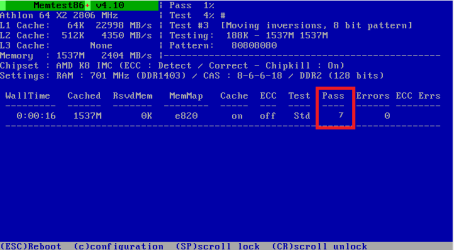
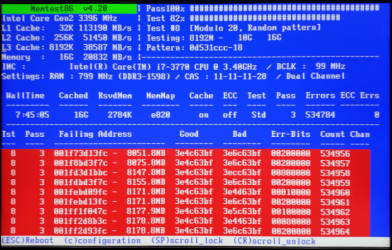
3. Let it run until at least 8 passes are completed, or errors are found (whichever comes first). The longer you run it, the better.Capture.PNG
Seven passes will take several hours, depending on your amount of RAM. It is advised to leave it running overnight.


Part 3: If You Have Errors:


The goal is to test all the RAM sticks and all the motherboard slots.​


Check your motherboard manual to ensure the RAM sticks are in the recommended motherboard slots. Some motherboards have very specific slots required for the number of RAM sticks installed.​


If you get errors, stop the test and continue with the next step.​


user108345_pic7120_1390783159.png


1. Remove all but one stick of RAM from your computer (this will be RAM stick #1), and run Memtest86 again, for 7 passes.​
Be sure to note the RAM stick, use a piece of tape with a number, and note the motherboard slot.
If this stick passes the test then go to step #3.


2. If RAM stick #1 has errors, repeat the test with RAM stick #2 in the same motherboard slot.​
If RAM stick #2 passes, this indicates that RAM stick #1 may be bad. If you want to be absolutely sure, re-test RAM stick #1 in another known good slot.
If RAM stick #2 has errors, this indicates another possible bad RAM stick, a possible motherboard slot failure or inadequate settings.
3. Test the next stick of RAM (stick #2) in the next motherboard slot.If this RAM stick has errors repeat step #2 using a known good stick if possible, or another stick.
If this RAM stick has no errors and both sticks failed in slot#1, test RAM stick #1 in this slot.
4. If you find a stick that passes the test, test it in all the other motherboard slots.


If Part 2 testing shows errors, and all tests in Part 3 show errors, you will need to test the RAM sticks in another computer and/or test other RAM in your computer to identify the problem.​


In this way, you can identify whether it is a bad stick of RAM, a bad motherboard, or incompatibility between the sticks.​


Thanks to Dave76 for his assistance in this part.​


   Note
While the same concept is completely valid for other operating systems, a different image burner will be needed. A good free program is ImgBurn.


Last edited by a moderator:
no, normally it does not run. It DID run until it was given to me and I'm in the process of fixing the issue but I'm running out of ideas.
 

My Computer

Computer type
PC/Desktop
Computer Manufacturer/Model Number
Alienware area 51
OS
Windows 7 Ultimate 64
CPU
intel quad
Motherboard
?
Memory
8GB
Graphics Card(s)
GeForce
Hard Drives
?
Antivirus
?
Browser
?
I have 4 RAM sticks. I placed RAM stick #1 in slot #1 took around 8 hours to get the 7 pass count with no errors, then I placed the stick #2 in the slot #2, removing the stick #1. Another 8 hours to 7 pass count with no errors. Same thing to sitck #3 on slot #3. When i got to stick #4 in slot #4 got a bunch of errors in less than 5 mins. Sitck #1 is now running test in slot #4. Do I need to wait for the 7 pass count to make sure that the problem is not the slot? Or can I wait for 1 or 2 passes and place sitck #4 in one of the other slots?
 

My Computer

Computer type
PC/Desktop
Computer Manufacturer/Model Number
Custom build
OS
Microsoft Windows 7 Ultimate 64-bit 7601 Multiprocessor Free Service Pack 1
CPU
AMD FX(tm)-8350 Eight-Core Processor
Motherboard
Gigabyte Technology Co., Ltd. GA-990XA-UD3
Memory
16,00 GB
Graphics Card(s)
NVIDIA GeForce GTX 580
Sound Card
NVIDIA High Definition Audio
Screen Resolution
1680 x 1050 x 32 bits (4294967296 colors) @ 59 Hz
Hard Drives
WDC WD15EADS-00P8B0 ATA Device
PSU
LC8850 V2.2 - Arkangel
Case
NZXT Phantom 410 Series CA-PH410-W1 White Steel
Cooling
Corsair H100
Keyboard
Lifetch Basic
Mouse
Anker CG100
Internet Speed
100Mb/s Download and 20Mb/s Upload
Antivirus
Microsoft Security Essentials
Browser
Chrome
You should run each stick in each slot for 7-8 passes. If errors always occur with the same slot, the board is bad. If one stick has errors in all slots it is bad.

When you see any error you can stop the test, it is pointless to go further. :)
 

My Computer

Computer type
PC/Desktop
Computer Manufacturer/Model Number
Home Built Desktop By DataTech
OS
Windows 7 Ultimate X64 SP1
CPU
Intel i5-2550K, Differing ~4.4-4.8GHz No built in GPU
Motherboard
ASUS P8Z68-V PRO/GEN3
Memory
16GB G.Skill Sniper 1866MHz @ 2133MHz 2x8GB
Graphics Card(s)
ASUS GTX650TIB-DC2OC-2GD5, (650TI Boost)
Sound Card
Onboard Realtek 5-1
Monitor(s) Displays
Samsung P2570HD
Screen Resolution
1920x1080
Hard Drives
Samsung 840 Pro 256GB SSD for OS, 500GB Seagate Constellation (Enterprise drive) for Data
PSU
Corsair HX650W
Case
Inwin Dragon Rider
Cooling
Hyper 212 EVO w/two Noctua fans, push-pull, @1300 RPM
Keyboard
E-Z Eyes, bright yellow keys with large characters
Mouse
steelseries SENSEI Laser Pro Gaming
Internet Speed
48-51Mbs Mbs down, 11 Mbs up Xfinity Cable
Antivirus
Norton Internet Security 2013
Browser
IE 10, Opera, Pale Moon if needed
Other Info
4 case fans, LG BluRay-RE, ASUS DVD-RW, Mr. Fusion power supply, 1.21 gigawatts.
Ok, so 1 RAM stick isn't working well (in my case, "stick #4"). All sticks are identical, same brand, same speed, everything is the same(4gb). Is it worth having all 3 sticks installed or since it's dual channel memory configuration board should I just have 2 sticks installed?
 

My Computer

Computer type
PC/Desktop
Computer Manufacturer/Model Number
Custom build
OS
Microsoft Windows 7 Ultimate 64-bit 7601 Multiprocessor Free Service Pack 1
CPU
AMD FX(tm)-8350 Eight-Core Processor
Motherboard
Gigabyte Technology Co., Ltd. GA-990XA-UD3
Memory
16,00 GB
Graphics Card(s)
NVIDIA GeForce GTX 580
Sound Card
NVIDIA High Definition Audio
Screen Resolution
1680 x 1050 x 32 bits (4294967296 colors) @ 59 Hz
Hard Drives
WDC WD15EADS-00P8B0 ATA Device
PSU
LC8850 V2.2 - Arkangel
Case
NZXT Phantom 410 Series CA-PH410-W1 White Steel
Cooling
Corsair H100
Keyboard
Lifetch Basic
Mouse
Anker CG100
Internet Speed
100Mb/s Download and 20Mb/s Upload
Antivirus
Microsoft Security Essentials
Browser
Chrome
Hello Alivefd,

If you were to leave 3 sticks installed, you would have 12 GB of RAM, but it would be running in single channel mode since that one channel only has 1 stick.

If 8GB of RAM will work for now, then it would give you better performance until you can replace the bad stick with an identical one to have all 4 back in.

Hope this helps, :)
Shawn
 

My Computer

Computer type
PC/Desktop
Computer Manufacturer/Model Number
Self built custom
OS
64-bit Windows 11 Pro for Workstations
CPU
Intel i7-8700K OC'd to 5 GHz
Motherboard
ASUS ROG Maximus XI Formula Z390
Memory
64 GB (4x16GB) G.SKILL TridentZ RGB DDR4 3600 MHz
Graphics Card(s)
ASUS ROG-STRIX-GTX1080TI-O11G-GAMING
Sound Card
Integrated
Monitor(s) Displays
2 x Samsung Odyssey G7 27"
Screen Resolution
2560x1440
Hard Drives
1TB Samsung 990 PRO M.2,
4TB Samsung 990 PRO PRO M.2,
TerraMaster F8 SSD Plus NAS
PSU
Seasonic Prime Titanium 850W
Case
Thermaltake Core P3
Cooling
Corsair Hydro H115i
Keyboard
Logitech wireless K800
Mouse
Logitech MX Master 4
Internet Speed
2 Gb/s Download and 100 Mb/s Upload
Antivirus
Malwarebyte Anti-Malware Premium
Browser
Google Chrome
Other Info
Logitech Z625 speaker system,
Logitech BRIO 4K Pro webcam,
HP Color LaserJet Pro MFP M477fdn,
APC SMART-UPS RT 1000 XL - SURT1000XLI,
Galaxy S23 Plus phone
Thanks :)
 

My Computer

Computer type
PC/Desktop
Computer Manufacturer/Model Number
Custom build
OS
Microsoft Windows 7 Ultimate 64-bit 7601 Multiprocessor Free Service Pack 1
CPU
AMD FX(tm)-8350 Eight-Core Processor
Motherboard
Gigabyte Technology Co., Ltd. GA-990XA-UD3
Memory
16,00 GB
Graphics Card(s)
NVIDIA GeForce GTX 580
Sound Card
NVIDIA High Definition Audio
Screen Resolution
1680 x 1050 x 32 bits (4294967296 colors) @ 59 Hz
Hard Drives
WDC WD15EADS-00P8B0 ATA Device
PSU
LC8850 V2.2 - Arkangel
Case
NZXT Phantom 410 Series CA-PH410-W1 White Steel
Cooling
Corsair H100
Keyboard
Lifetch Basic
Mouse
Anker CG100
Internet Speed
100Mb/s Download and 20Mb/s Upload
Antivirus
Microsoft Security Essentials
Browser
Chrome
You're welcome. :)
 

My Computer

Computer type
PC/Desktop
Computer Manufacturer/Model Number
Self built custom
OS
64-bit Windows 11 Pro for Workstations
CPU
Intel i7-8700K OC'd to 5 GHz
Motherboard
ASUS ROG Maximus XI Formula Z390
Memory
64 GB (4x16GB) G.SKILL TridentZ RGB DDR4 3600 MHz
Graphics Card(s)
ASUS ROG-STRIX-GTX1080TI-O11G-GAMING
Sound Card
Integrated
Monitor(s) Displays
2 x Samsung Odyssey G7 27"
Screen Resolution
2560x1440
Hard Drives
1TB Samsung 990 PRO M.2,
4TB Samsung 990 PRO PRO M.2,
TerraMaster F8 SSD Plus NAS
PSU
Seasonic Prime Titanium 850W
Case
Thermaltake Core P3
Cooling
Corsair Hydro H115i
Keyboard
Logitech wireless K800
Mouse
Logitech MX Master 4
Internet Speed
2 Gb/s Download and 100 Mb/s Upload
Antivirus
Malwarebyte Anti-Malware Premium
Browser
Google Chrome
Other Info
Logitech Z625 speaker system,
Logitech BRIO 4K Pro webcam,
HP Color LaserJet Pro MFP M477fdn,
APC SMART-UPS RT 1000 XL - SURT1000XLI,
Galaxy S23 Plus phone
I have been running memtest over night and have noticed it is only going up to test #10 should it be going to test #11? I am trying to figure out if I have bad ram or is something else is causing my BSoD of Page Fualt in non paged area.
 

My Computer

Computer type
PC/Desktop
OS
Windows 7 Professional 64bit
Monitor(s) Displays
Hansss-G HZ251
Hello there! I am on vacation and my laptop has went through a BSOD for some reason and I can't log on to Windows. I have made a forum here: http://www.sevenforums.com/bsod-help-support/349751-bsod-vacation-cannot-log-windows.html. Out of the 3 options given to me by Arc, Memtest86+ is my only option remaining. However, it didn't go out right for some reason. Here's the full text from the forum I made:

Well my parents just bought a new flash drive (in considering that the tutorial said "Plug in an empty USB key drive",) downloaded the Auto-Installer for USB Key link as said in the tutorial, double clicked the file in the zip folder, reached the choose USB drive location and noticed something wrong. It doesn't display in which directory the USB is at (C:, D:, E:, etc.) and it wouldn't let me choose the directory where it is at. The flash drive my parents bought is a SanDisk Cruzer Glide 4GB which already has some files related to it on it. Can you tell me what's going on?

Since I made the forum in the BSOD help section, I assumed that I would not get a response from what I said which is not related to the section. So that's why I posted a response here since what I said would be related to the topic in which I'm explaining. If you've read the forum I made the link of above, you can see that I'm on vacation so I have no time to waste. I will be leaving my hotel tomorrow morning and will be stopping at some relatives' house sometime in the afternoon which hopefully I can fix my issue there. If not, I'll better yet do It by Saturday evening or Sunday morning (the hotel I'm at in North Carolina is 14 hours away from my home in Indiana, the relatives' house is 5 hours away from the hotel.) With that said, this BSOD occurred at the worst time yet. I expect a response immediately, hopefully before I go to bed. I can trust you guys while I'm here!:D
 

My Computer

Computer type
Laptop
Computer Manufacturer/Model Number
HP Envy Dv7-7223cl
OS
Windows 10 Pro 64-Bit
CPU
AMD A8-4500M APU
Motherboard
I dunno, System Information won't tell me :P
Memory
8 GB
Graphics Card(s)
AMD Radeon HD Graphics 1.90 GHz
Sound Card
AMD High Definition Audio Device
Monitor(s) Displays
AMD Radeon HD 7640G
Screen Resolution
1600x900
Hard Drives
Hitachi HTS547575A9E384 ATA Device
PSU
HP/Compaq R33030 Charger
Case
Swiss Gear 17"
Cooling
HP CoolSense
Keyboard
Standard PS/2 Keyboard
Mouse
Microsoft Basic Optical Mouse v2.0
Internet Speed
135.0 Mbps
Antivirus
Microsoft Security Essentials
Browser
Internet Explorer 11, Google Chrome, Mozilla Firefox
Other Info
My spiritual successor to the Toshiba Satellite L645D-S2025 (my first laptop which died of mismanagement primarily involving food :( )
Hi guys, I just have a quick question. I'll be away for more then a day and I will run Memtest86+ while I'm going to be gone and I'm curious if Memtest86+ can save the test results in a file or if there is any report after rebooting back to Windows at all?
 

My Computer

Computer type
PC/Desktop
Computer Manufacturer/Model Number
Custom build
OS
Windows 7 Professional x64 SP1
CPU
Intel Core 2 Quad Q6600 @ 2.40GHz
Motherboard
ASUSTeK P5K
Memory
OCZ DDR2 6 GB (2x1 GB + 2x2 GB)
Graphics Card(s)
Radeon HD 5800 Series 1024 MB
Sound Card
Realtek High Definition Audio
Monitor(s) Displays
Samsung SyncMaster 206BW
Screen Resolution
1680x1050
Hard Drives
256 Samsung SSD
1 TB Samsung HDD
Antivirus
Microsoft Security Essentials
Browser
Firefox (always updated)
No....MemTest86+ will just keep running until you stop it.
 

My Computer

Computer type
PC/Desktop
Computer Manufacturer/Model Number
Golden Mk. I.4
OS
Windows 10 Pro x64 ; Xubuntu x64
CPU
Intel i7 860 @ 2.80 GHz O/C'ed to 4.0GHz
Motherboard
Gigabyte P55A-UD3R Rev.1. Award BIOS F13
Memory
16GB Corsair Vengance DDR3 @ 661 MHz Dual Channel (9-9-9-24)
Graphics Card(s)
EVGA NVidia GTX 560 1024MB
Sound Card
Realtek Integrated
Monitor(s) Displays
Dual Samsung SyncMaster 2494HS
Screen Resolution
1920*1080 and 1920*1080
Hard Drives
1*Samsung 840 EVO 120GB SSD;
1*OCZ Vertex 2 60GB SSD;
2*Samsung F3 SpinPoint 1TB in RAID0;
1*Samsung F1 SpinPoint 1TB;
2*Western Digital 1TB External USB 3.0
1*Western Digital 500GB External USB 3.0
1*Seagate 500GB External USB 2.0
PSU
Thermaltake ToughPower QFan 750W
Case
Thermaltake Element S VK60001W2Z
Cooling
Corsair H60 Water Cooling, 2*230mm and 2*80mm case fans
Keyboard
Logitech G110
Mouse
Logitech MX518
Thank you for your reply. Ran the test for 38 hours (I can't remember how many passes but quite a lot) and no errors. :)
 

My Computer

Computer type
PC/Desktop
Computer Manufacturer/Model Number
Custom build
OS
Windows 7 Professional x64 SP1
CPU
Intel Core 2 Quad Q6600 @ 2.40GHz
Motherboard
ASUSTeK P5K
Memory
OCZ DDR2 6 GB (2x1 GB + 2x2 GB)
Graphics Card(s)
Radeon HD 5800 Series 1024 MB
Sound Card
Realtek High Definition Audio
Monitor(s) Displays
Samsung SyncMaster 206BW
Screen Resolution
1680x1050
Hard Drives
256 Samsung SSD
1 TB Samsung HDD
Antivirus
Microsoft Security Essentials
Browser
Firefox (always updated)
Hello,

I downloaded the from your url Auto-installer for USB Key (Win 9x/2k/xp/7) *NEW!*

I created USB bootable version as described. I find the following files in USB

Code:
04/14/2010  03:31 AM                73 syslinux.cfg
08/23/2013  08:52 AM           150,024 mt86plus
04/14/2010  03:17 AM             1,397 Readme.txt
03/03/2010  06:09 AM            18,339 Copying
               4 File(s)        169,833 bytes

I have win 7 64bit has booting issues. Review my thread

Win 7: Black screen on boot up, before login screen?

I did changes the BOIS to boot from USB. The above created bootable USB is not working in my laptop.

What could I do to make this work?

Thanks for helping.
 

My Computer

Computer type
Laptop
Computer Manufacturer/Model Number
Lenovo IdeaPad Z580, x64-based PC
OS
Win 7 64 bit, 6.1.7601 Service Pack 1 Build 7601
CPU
1 Processor(s) Installed. [01]: Intel64 Family 6 Model 58 St
Memory
8,056 MB
Graphics Card(s)
Intel HD 4000
Antivirus
Windows Security Essential
Browser
FireFox, Chrome
I am just wondering if mention should be made that the slots themselves and therefore by association the motherboard may also be faulty / bad ??

I have found that some sticks may show up as bad in a particular slot ie slot #1 yet not in another ie slot #2 - it then narrows down the search for the source of the failing memory. It is then apparent that slot #1 is at fault.
 

My Computer

Computer type
PC/Desktop
Computer Manufacturer/Model Number
Own build (new) Desk1 / Asus ROG Win 7 / Desk2 1st build
OS
Desk1 7 Home Prem / Desk2 10 Pro / Main lap Asus ROG 10 Pro 2 laptop Toshiba 7 Pro Asus P2520 7 & 10
CPU
Desk1 i5 3750K / Laptop i7 GTX 860M / Desk2 i5 2500
Motherboard
Desk1 Asus P877-V / Desk2 Gigabyte H67 UD3H / Laptop ?
Memory
Desk1 8GB (1866) / Desk2 16GB (1333) / Laptop 8Gb DDR3
Graphics Card(s)
Desk 1& 2NVidia GTX 650 & Laptops on board Intel
Sound Card
Desk 1 & 2 -XONAR DG Realtek High Def audio Laptop
Monitor(s) Displays
Desk 1 Benq HD 2450 / Desk2 Philips 24" / Laptop 17.5"
Screen Resolution
1920x1080 D1 & D2 & Laptop 1
Hard Drives
Desk1 Samsung 120GB 830 SSD
Asus ROG 256GB 850 Pro SSD
Desk2 Samsung 840 256 SSD
Toshiba 120GB EVO
PSU
Desk 1 Corsair HX 1050/ Laptop ? / Desk 2 Corsair HX 650
Case
Desk 1 Cooler HAF XM ? Toshiba laptop / Desk2 Coolermaster
Cooling
Fans on all Desk1 -2 Desk2 - all Coolermasters 5 Laptop ?
Keyboard
Desk 1 MS Sidewinder X6 Desk 2 MS Sidewinder X 4
Mouse
Desk 1&2 - Gigabyte MS 900 gamer - laptop - Logitec wireless
Internet Speed
ADSL2+
Other Info
One other Desktop (tester) and spare Toshba laptop both with SSD's
Running Kaspersky 2016 ISS on all machines config'd identically
Logitec audio stereo systems on each machine (x3)
Canon MG5250MFC
Router/modem TP-Link running WPA2SK
I am just wondering if mention should be made that the slots themselves and therefore by association the motherboard may also be faulty / bad ??

I have found that some sticks may show up as bad in a particular slot ie slot #1 yet not in another ie slot #2 - it then narrows down the search for the source of the failing memory. It is then apparent that slot #1 is at fault.
Thats already described in the tutorial John.
 

My Computer

Computer type
PC/Desktop
Computer Manufacturer/Model Number
Golden Mk. I.4
OS
Windows 10 Pro x64 ; Xubuntu x64
CPU
Intel i7 860 @ 2.80 GHz O/C'ed to 4.0GHz
Motherboard
Gigabyte P55A-UD3R Rev.1. Award BIOS F13
Memory
16GB Corsair Vengance DDR3 @ 661 MHz Dual Channel (9-9-9-24)
Graphics Card(s)
EVGA NVidia GTX 560 1024MB
Sound Card
Realtek Integrated
Monitor(s) Displays
Dual Samsung SyncMaster 2494HS
Screen Resolution
1920*1080 and 1920*1080
Hard Drives
1*Samsung 840 EVO 120GB SSD;
1*OCZ Vertex 2 60GB SSD;
2*Samsung F3 SpinPoint 1TB in RAID0;
1*Samsung F1 SpinPoint 1TB;
2*Western Digital 1TB External USB 3.0
1*Western Digital 500GB External USB 3.0
1*Seagate 500GB External USB 2.0
PSU
Thermaltake ToughPower QFan 750W
Case
Thermaltake Element S VK60001W2Z
Cooling
Corsair H60 Water Cooling, 2*230mm and 2*80mm case fans
Keyboard
Logitech G110
Mouse
Logitech MX518
Thats already described in the tutorial John.

Ok Colin I had not seen that before:o
 

My Computer

Computer type
PC/Desktop
Computer Manufacturer/Model Number
Own build (new) Desk1 / Asus ROG Win 7 / Desk2 1st build
OS
Desk1 7 Home Prem / Desk2 10 Pro / Main lap Asus ROG 10 Pro 2 laptop Toshiba 7 Pro Asus P2520 7 & 10
CPU
Desk1 i5 3750K / Laptop i7 GTX 860M / Desk2 i5 2500
Motherboard
Desk1 Asus P877-V / Desk2 Gigabyte H67 UD3H / Laptop ?
Memory
Desk1 8GB (1866) / Desk2 16GB (1333) / Laptop 8Gb DDR3
Graphics Card(s)
Desk 1& 2NVidia GTX 650 & Laptops on board Intel
Sound Card
Desk 1 & 2 -XONAR DG Realtek High Def audio Laptop
Monitor(s) Displays
Desk 1 Benq HD 2450 / Desk2 Philips 24" / Laptop 17.5"
Screen Resolution
1920x1080 D1 & D2 & Laptop 1
Hard Drives
Desk1 Samsung 120GB 830 SSD
Asus ROG 256GB 850 Pro SSD
Desk2 Samsung 840 256 SSD
Toshiba 120GB EVO
PSU
Desk 1 Corsair HX 1050/ Laptop ? / Desk 2 Corsair HX 650
Case
Desk 1 Cooler HAF XM ? Toshiba laptop / Desk2 Coolermaster
Cooling
Fans on all Desk1 -2 Desk2 - all Coolermasters 5 Laptop ?
Keyboard
Desk 1 MS Sidewinder X6 Desk 2 MS Sidewinder X 4
Mouse
Desk 1&2 - Gigabyte MS 900 gamer - laptop - Logitec wireless
Internet Speed
ADSL2+
Other Info
One other Desktop (tester) and spare Toshba laptop both with SSD's
Running Kaspersky 2016 ISS on all machines config'd identically
Logitec audio stereo systems on each machine (x3)
Canon MG5250MFC
Router/modem TP-Link running WPA2SK
When MemTest starts press c (configuration) select Full Memory Range, and then let it run.

For VRAM: use Video Memory Stress Test:
This is a Windows version, but a n FDD version also exists that can be run from a bootable USB.
 

My Computer

Computer type
PC/Desktop
Computer Manufacturer/Model Number
Custom Build
OS
Windows 10 Pro x64
CPU
Core2Quad Q9550 @2.83GHz (o/c @3.82GHz)
Motherboard
ASUS P5K Premium WiFi
Memory
8GB (4x2GB DDR2)
Graphics Card(s)
ASUS ROG STRIX GTX1050 Ti O4G Gaming
Sound Card
Creative Soundblaster X-Fi Platinum
Monitor(s) Displays
ACER ED273WIDX 27"
Screen Resolution
1920 x 1080
Hard Drives
SAMSUNG SSD 840 Series 120GB
SAMSUNG 500GB SATA 7200 rpm
2xWD Velociraptor 150GB 10000 rpm
PSU
600W
Case
CoolerMaster Centurion
Cooling
Cooler Master V8
Keyboard
VPRO V700
Mouse
Logitech G602
Antivirus
Norton IS
Browser
Firefox x64
Back
Top