Hello -
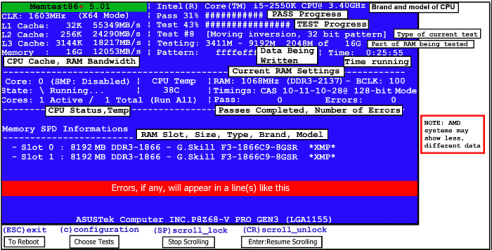
I recently bought 30 Kingston KTD-DM8400C6/2G DIMMs (used), and am testing them using MEMTEST86+ V4.20 from Hirens HBCD V15.2 download CD. I am using a Dell 755 SFF with 4 DIMM slots, testing 8Gb at a
pass. Takes about an hour & fifteen minutes for each pass.
I have never tested 8Gb at once before, and noted something curious. In processing the tests, there
are five memory ranges presented, as follows:
1. 184K - 2048M 8051M (2047.816M ttl)
2. 2048M - 3061M 8051M (1013M ttl)
3. 4096M - 6144M 8051M (2048M ttl)
4. 6144M - 8192M 8051M (2048M ttl)
5. 8192M - 9088M 8051M ( 896M ttl)
Questions:
1. I assume that 0K - 184K is where the program is loaded, hence unmovable?
2. What is the significance of the 8051M number?
3. Why does Range 2 stop at 3061M, which yields only a 1013M span?
4. What is Range 5 all about? Is there memory beyond 8192M (apparently)?
At first I thought that adding the spans of Ranges 2 and 5 might produce a 2048 number but it
doesn't - only adds up to 1909M.
5. So, is there a gap in memory with Range 2 that is NOT being tested - 1035M?
6. I tried to run the 'Windows Memory Diagnostic' test on the 15.2 CD, but it hollered about the
total of 8Gb memory - said it's Momma wouldn't let it play with anything bigger than 4Gb, so I
didn't get to watch the spinning bars.
I did run the Memory Diagnostics in Win7 (MUCH shorter test time than Memtest86), and the DIMMs passed (finally got the Task Bar popup message after logging back in), but you don't get a movie while it's working, so I reckon you just have to take their word for it that they passed.
Pls adv. Thx
Fred
I recently bought 30 Kingston KTD-DM8400C6/2G DIMMs (used), and am testing them using MEMTEST86+ V4.20 from Hirens HBCD V15.2 download CD. I am using a Dell 755 SFF with 4 DIMM slots, testing 8Gb at a
pass. Takes about an hour & fifteen minutes for each pass.
I have never tested 8Gb at once before, and noted something curious. In processing the tests, there
are five memory ranges presented, as follows:
1. 184K - 2048M 8051M (2047.816M ttl)
2. 2048M - 3061M 8051M (1013M ttl)
3. 4096M - 6144M 8051M (2048M ttl)
4. 6144M - 8192M 8051M (2048M ttl)
5. 8192M - 9088M 8051M ( 896M ttl)
Questions:
1. I assume that 0K - 184K is where the program is loaded, hence unmovable?
2. What is the significance of the 8051M number?
3. Why does Range 2 stop at 3061M, which yields only a 1013M span?
4. What is Range 5 all about? Is there memory beyond 8192M (apparently)?
At first I thought that adding the spans of Ranges 2 and 5 might produce a 2048 number but it
doesn't - only adds up to 1909M.
5. So, is there a gap in memory with Range 2 that is NOT being tested - 1035M?
6. I tried to run the 'Windows Memory Diagnostic' test on the 15.2 CD, but it hollered about the
total of 8Gb memory - said it's Momma wouldn't let it play with anything bigger than 4Gb, so I
didn't get to watch the spinning bars.
I did run the Memory Diagnostics in Win7 (MUCH shorter test time than Memtest86), and the DIMMs passed (finally got the Task Bar popup message after logging back in), but you don't get a movie while it's working, so I reckon you just have to take their word for it that they passed.
Pls adv. Thx
Fred
My Computer
At a glance
Windows 7 Professional x32bitIntel Core 2 Quad Q66004GbNvidia GeForce 880GTX
- Computer type
- PC/Desktop
- Computer Manufacturer/Model Number
- Dell XPS720
- OS
- Windows 7 Professional x32bit
- CPU
- Intel Core 2 Quad Q6600
- Motherboard
- Dell OYU822 A00
- Memory
- 4Gb
- Graphics Card(s)
- Nvidia GeForce 880GTX
- Hard Drives
- Seagate ST3750640AS 750Gb (3)
- PSU
- 750 watt
- Case
- Tower
- Cooling
- Multiple fans
- Antivirus
- NIS