Solved Help to create a regular LAN to share drives/folders - not Home

GokAy, I thought this may have been the issue too, or part of it, but after trying so many things which still didn't work, I started to think of a corrupted file somewhere. After a while of reading reams of posts and tutorials, I became so confused with it all, I just had to call in help. That's where we are now and thanks to you and Pyprohly I see the possability of it becoming resolved. Then I can get back to my work :-)
 

My Computer My Computer

At a glance

Win 7 Pro 32 and 64 versions2.5 up4 to 8Nividia and AMD
Computer type
PC/Desktop
Computer Manufacturer/Model Number
Custom Builds but also Surface Pro 3, Dells Desk and HP laptop
OS
Win 7 Pro 32 and 64 versions
CPU
2.5 up
Motherboard
Different types
Memory
4 to 8
Graphics Card(s)
Nividia and AMD
Hard Drives
From 60GB to 2 TB
Antivirus
Avast Free
Browser
Firefox latest
I have left the folders as shown in your script until you tell me I can take put the folders back into the root of the drives as they were.
If that's how you'd like your folders arranged, please do so now as the first step in the following procedure:
  1. Structure the folders you want to share to wherever you like and however you wish on your machine, no matter if it's on the root of a drive or placed down in the deepest of directories, move what you want to your liking now. You can forget that tech guy's folder arrangement suggestions too.
  2. As to tidy everything up, I recommend you delete all of your shares and start from scratch. You can open an Elevated Command Prompt and use the command 'net share' to list all shares on the machine. To delete a share use the Command Prompt you may run the commmand,
    Code:
    net share "ShareName" /d
  3. Now that the tidying is done, tell us here what paths are to be shared, and what the path's share name is to be, as a csv-like list,
E.g.
Code:
ShareName, Path
"Webmain Internet", "F:\Webmain Internet"
"Webmain AUDIO", "J:\"
"Webmain Graphics 1, "L:\"
"Webmain Graphics 2", "L:\Webmain Graphics"
"Webmain Programs", "I:\Webmain Progs"
[COLOR=silver]...[/COLOR]
[COLOR=silver]e.t.c.[/COLOR]
Make sure you type the paths correctly.

After completing the above, I'll write two batch scripts for you: one that creates all the shares for you, and the other one will set some NTFS permissions straight.

I can think of permissions was not propagated properly, so you couldn't access the sub folders.

Does this script give an idea of such fine detail?
It does not reveal the permissions of subfolders, not that that's relevant right now anyway.
 

My Computer My Computer

At a glance

Windows 10, Windows 8.1 Pro, Windows 7 Profes...
Computer type
PC/Desktop
OS
Windows 10, Windows 8.1 Pro, Windows 7 Professional, OS X El Capitan
I don't have access to a computer at the moment, so forgive me if I am wrong :)

It seems you have given Everyone full control on Admin shares (the ones that have $ at their end).
These should only have an admin account with access, and hidden when browsed to that PC.

Try adding a $ at the end of drive letter in the address bar of explorer. So from another PC, open the address \\webmain-IP-address\c$
It should ask for a username/password (credentials), enter the admin account of webmain if different. If all your users are same across PCs then perhaps you won't be asked.

This can still fail for any reason I have not thought of so don't get discouraged if it fails.
 

My Computer My Computer

At a glance

Windows 7 Ultimate x64 SP1AMD Phenom 2 1090T2x8GB Kingston HyperX Fury Black 1600Mhz Unga...MSI GTX 970 Gaming 4G
Computer type
PC/Desktop
Computer Manufacturer/Model Number
Custom Build
OS
Windows 7 Ultimate x64 SP1
CPU
AMD Phenom 2 1090T
Motherboard
Gigabyte GA-890FXA-UD5
Memory
2x8GB Kingston HyperX Fury Black 1600Mhz Unganged
Graphics Card(s)
MSI GTX 970 Gaming 4G
Sound Card
Realtek On-Board HD 7.1 Audio / Logitech G35
Monitor(s) Displays
3xAcer GD245HQ
Screen Resolution
1920x1080
Hard Drives
Samsung 850 Pro 512GB SSD - OS /
WD Caviar Black SATA 3 - 1 TBx2 - Dynamic RAID 0 /
WD Caviar Green SATA 2 - 640GBx2 - Dynamic RAID 0 /
WD Caviar Green SATA 2 - 640GB - Internal Backup /
Seagate Barracude SATA 3 - 3TB - External Backup/ Sync
PSU
HighPower 1000W
Case
Cooler Master HAF 932
Cooling
Noctua NH-D14
Keyboard
Logitech G19
Mouse
Logitech G500
Internet Speed
100/4 Mbit Cable (100GB quota)
Antivirus
ZoneAlarm Extreme Security / MBAM Pro / MBAE Free / SAS Free
Browser
IE 11 - Firefox - Chrome
Other Info
Logitech F710/ G27/ G940/ Z5500 // TrackIR 5 // Nvidia 3D Surround Vision
Also browse to shares of webmain with another PC and then on webmain, right click Computer and manage. Expand shares and then sessions. What user is shown to be connected? If it doesn't show go into one of the shared folders.
 

My Computer My Computer

At a glance

Windows 7 Ultimate x64 SP1AMD Phenom 2 1090T2x8GB Kingston HyperX Fury Black 1600Mhz Unga...MSI GTX 970 Gaming 4G
Computer type
PC/Desktop
Computer Manufacturer/Model Number
Custom Build
OS
Windows 7 Ultimate x64 SP1
CPU
AMD Phenom 2 1090T
Motherboard
Gigabyte GA-890FXA-UD5
Memory
2x8GB Kingston HyperX Fury Black 1600Mhz Unganged
Graphics Card(s)
MSI GTX 970 Gaming 4G
Sound Card
Realtek On-Board HD 7.1 Audio / Logitech G35
Monitor(s) Displays
3xAcer GD245HQ
Screen Resolution
1920x1080
Hard Drives
Samsung 850 Pro 512GB SSD - OS /
WD Caviar Black SATA 3 - 1 TBx2 - Dynamic RAID 0 /
WD Caviar Green SATA 2 - 640GBx2 - Dynamic RAID 0 /
WD Caviar Green SATA 2 - 640GB - Internal Backup /
Seagate Barracude SATA 3 - 3TB - External Backup/ Sync
PSU
HighPower 1000W
Case
Cooler Master HAF 932
Cooling
Noctua NH-D14
Keyboard
Logitech G19
Mouse
Logitech G500
Internet Speed
100/4 Mbit Cable (100GB quota)
Antivirus
ZoneAlarm Extreme Security / MBAM Pro / MBAE Free / SAS Free
Browser
IE 11 - Firefox - Chrome
Other Info
Logitech F710/ G27/ G940/ Z5500 // TrackIR 5 // Nvidia 3D Surround Vision
Hi.. From Comp Management - Webmain..

Share Name Folder Path Type # Client Connections Description
ADMIN$ C:\Windows Windows 0 Remote Admin
C$ C:\ Windows 0 Default share
E$ E:\ Windows 0 Default share
F F:\ Windows 0
F$ F:\ Windows 0 Default share
From Photos-265 Bubs XP N:\From Photos-265 Bubs XP Windows 0
H$ H:\ Windows 0 Default share
I$ I:\ Windows 0 Default share
IPC$ Windows 0 Remote IPC
J$ J:\ Windows 0 Default share
K$ K:\ Windows 0 Default share
L$ L:\ Windows 0 Default share
M$ M:\ Windows 0 Default share
N Photos 2TB Ext N:\ Windows 0 Backup Photos from Bub and also all recent photos - NOT ARCHIVE
N$ N:\ Windows 0 Default share
print$ C:\Windows\system32\spool\drivers Windows 0 Printer Drivers
Public C:\Users\David\Dropbox\Public Windows 0 Public Sahing
Users C:\Users Windows 0
Webmain C C:\ Windows 0
Webmain Photos ext N:\ Windows 0 Photos
WebMain-Audio J:\ Windows 0
Webmain-Graphics L:\ Windows 0
Webmain-Photos M:\ Windows 0 All Photos
WebMain-Progs I:\ Windows 0
Webmain-USBEXT M:\ Windows 0 Seagate 2TB Ext
WebMain-Video K:\ Windows 0
WebMain-Word H:\ Windows 0

After Lenovo attempt to access Webmain this is Sessions Webmain.

User Computer Type # Open Files Connected Time Idle Time Guest
Guest lenovo2 Windows 6 00:03:27 00:01:55 No
 
Last edited:

My Computer My Computer

At a glance

Win 7 Pro 32 and 64 versions2.5 up4 to 8Nividia and AMD
Computer type
PC/Desktop
Computer Manufacturer/Model Number
Custom Builds but also Surface Pro 3, Dells Desk and HP laptop
OS
Win 7 Pro 32 and 64 versions
CPU
2.5 up
Motherboard
Different types
Memory
4 to 8
Graphics Card(s)
Nividia and AMD
Hard Drives
From 60GB to 2 TB
Antivirus
Avast Free
Browser
Firefox latest
Hi.. From Comp Management - Webmain..
[...]
Just to confirm, no shares currently exist on the machine Webmain now, correct? I'm going to use that list you've provided to write a script that will create all the shares in one go. Make sure the none of the shares exist.

Also, would you prefer "WebMain" or "Webmain" for share names? There's a bit of an inconsistency.
 

My Computer My Computer

At a glance

Windows 10, Windows 8.1 Pro, Windows 7 Profes...
Computer type
PC/Desktop
OS
Windows 10, Windows 8.1 Pro, Windows 7 Professional, OS X El Capitan
Hi, Sorry just got this..

I have not done the delete shares yet from Command. Just moved all files from the foldesr I created in each drive back to the root. Now done.

The Managemnt text above shows what is currently there.

Yes WebMain.. with cap M

Do I need to delete anything shown on the list above ?

Thanks

oz


ADDED..

Just unticked 'Share this folder' from..

Webmain-Internet
Webmain-Word
Webmain-Progs
Webmain-Aufio
Webmain-Videio
Webmain-Graphics

Do I ned to do this from the exts n: and M: which have been no problem ?
 
Last edited:

My Computer My Computer

At a glance

Win 7 Pro 32 and 64 versions2.5 up4 to 8Nividia and AMD
Computer type
PC/Desktop
Computer Manufacturer/Model Number
Custom Builds but also Surface Pro 3, Dells Desk and HP laptop
OS
Win 7 Pro 32 and 64 versions
CPU
2.5 up
Motherboard
Different types
Memory
4 to 8
Graphics Card(s)
Nividia and AMD
Hard Drives
From 60GB to 2 TB
Antivirus
Avast Free
Browser
Firefox latest
Delete your shares. All of them.

Except for the "Users" share (this share comes default with the install). And you can ignore the shares that have a trailing "$" symbol too (if you delete them they'll just recreate themselves after a boot).


Edit:
Do I ned to do this from the exts n: and M: which have been no problem ?
Yes, delete the shares associated with N and M drives too. I would like to fix everything in one go.

You may choose delete the shares from the Command Prompt, or you may simply untick the 'Share this folder' checkbox on the shared folder's share properties tab.
 

My Computer My Computer

At a glance

Windows 10, Windows 8.1 Pro, Windows 7 Profes...
Computer type
PC/Desktop
OS
Windows 10, Windows 8.1 Pro, Windows 7 Professional, OS X El Capitan
Okay unshared everything showing in Explorer tree under Computer except Local Disk C:
 

My Computer My Computer

At a glance

Win 7 Pro 32 and 64 versions2.5 up4 to 8Nividia and AMD
Computer type
PC/Desktop
Computer Manufacturer/Model Number
Custom Builds but also Surface Pro 3, Dells Desk and HP laptop
OS
Win 7 Pro 32 and 64 versions
CPU
2.5 up
Motherboard
Different types
Memory
4 to 8
Graphics Card(s)
Nividia and AMD
Hard Drives
From 60GB to 2 TB
Antivirus
Avast Free
Browser
Firefox latest
Alight, here's the final list of shares to be created. Please make sure this list is correct.

Code:
"ShareName", "Path", "Description"
"F",                  "F:\", "" 
"From Photos-265 Bubs XP", "N:\From Photos-265 Bubs XP", "" 
"N Photos 2TB Ext",   "N:\", "Backup Photos from Bub and also all recent photos - NOT ARCHIVE"
"Public",             "C:\Users\David\Dropbox\Public", "Public Sahing"
"WebMain C",          "C:\", ""
"WebMain Photos ext", "N:\", "Photos"
"WebMain-Audio",      "J:\", ""
"WebMain-Graphics",   "L:\", ""
"WebMain-Photos",     "M:\", "All Photos"
"WebMain-Progs",      "I:\", ""
"WebMain-USBEXT",     "M:\", "Seagate 2TB Ext"
"WebMain-Video",      "K:\", "" 
"WebMain-Word",       "H:\", ""
If you wish to make multiple changes, please edit this list and post back here the corrected version.

(btw, I believe you've made a spelling mistake in the description for the Public share: "Public Sahing". Should it be "Public Sharing" instead?)


Also, while you're at it, would you be able to copy-paste here the output of the command,
Code:
net share
Just so you and I can double check that no shares have been missed.
 

My Computer My Computer

At a glance

Windows 10, Windows 8.1 Pro, Windows 7 Profes...
Computer type
PC/Desktop
OS
Windows 10, Windows 8.1 Pro, Windows 7 Professional, OS X El Capitan
Yes it looks correct except I see "F" which I think should be..

WebMain-Internet (It is the F drive) and I do need C Drive

Also The externals just need to have 1 share each

N:\Backup Ext 1
M:\Photos Ext 2

Yes the spelling should be 'Sharing'.


Microsoft Windows [Version 6.1.7601]
Copyright (c) 2009 Microsoft Corporation. All rights reserved.

C:\Users\David>net share

Share name Resource Remark

-------------------------------------------------------------------------------
ADMIN$ C:\Windows Remote Admin
C$ C:\ Default share
E$ E:\ Default share
F$ F:\ Default share
H$ H:\ Default share
print$ C:\Windows\system32\spool\drivers
Printer Drivers
I$ I:\ Default share
IPC$ Remote IPC
J$ J:\ Default share
K$ K:\ Default share
L$ L:\ Default share
M$ M:\ Default share
N$ N:\ Default share
Public C:\Users\David\Dropbox\Public Public Sahing
Users C:\Users
Webmain C C:\
HP OfficeJet G95
169.254.116.185 Spooled HP OfficeJet G95
USE Xerox Phaser 6250DP PS
192.168.0.20_1 Spooled old - 192.168.0.20
Xerox Mobile Express Driver
Xerox Mobile Expres... Spooled USE Xerox Mobile Express Driver
Xerox Phaser 6250DP PS
192.168.0.20 Spooled Xerox Phaser 6250 Port 20
Xerox Phaser 6250DP PS Old
192.168.0.20 Spooled Original Phaser 6250
The command completed successfully.


C:\Users\David>
 

My Computer My Computer

At a glance

Win 7 Pro 32 and 64 versions2.5 up4 to 8Nividia and AMD
Computer type
PC/Desktop
Computer Manufacturer/Model Number
Custom Builds but also Surface Pro 3, Dells Desk and HP laptop
OS
Win 7 Pro 32 and 64 versions
CPU
2.5 up
Motherboard
Different types
Memory
4 to 8
Graphics Card(s)
Nividia and AMD
Hard Drives
From 60GB to 2 TB
Antivirus
Avast Free
Browser
Firefox latest
As I have guessed you are using a guest account to access shares. Should be no problem with everyone group but it is somehow problematic in your case. I would enable password protected sharing and use the actual admin account, that should solve the issue.

Usually the only thing that may stop a share is a firewall.
 

My Computer My Computer

At a glance

Windows 7 Ultimate x64 SP1AMD Phenom 2 1090T2x8GB Kingston HyperX Fury Black 1600Mhz Unga...MSI GTX 970 Gaming 4G
Computer type
PC/Desktop
Computer Manufacturer/Model Number
Custom Build
OS
Windows 7 Ultimate x64 SP1
CPU
AMD Phenom 2 1090T
Motherboard
Gigabyte GA-890FXA-UD5
Memory
2x8GB Kingston HyperX Fury Black 1600Mhz Unganged
Graphics Card(s)
MSI GTX 970 Gaming 4G
Sound Card
Realtek On-Board HD 7.1 Audio / Logitech G35
Monitor(s) Displays
3xAcer GD245HQ
Screen Resolution
1920x1080
Hard Drives
Samsung 850 Pro 512GB SSD - OS /
WD Caviar Black SATA 3 - 1 TBx2 - Dynamic RAID 0 /
WD Caviar Green SATA 2 - 640GBx2 - Dynamic RAID 0 /
WD Caviar Green SATA 2 - 640GB - Internal Backup /
Seagate Barracude SATA 3 - 3TB - External Backup/ Sync
PSU
HighPower 1000W
Case
Cooler Master HAF 932
Cooling
Noctua NH-D14
Keyboard
Logitech G19
Mouse
Logitech G500
Internet Speed
100/4 Mbit Cable (100GB quota)
Antivirus
ZoneAlarm Extreme Security / MBAM Pro / MBAE Free / SAS Free
Browser
IE 11 - Firefox - Chrome
Other Info
Logitech F710/ G27/ G940/ Z5500 // TrackIR 5 // Nvidia 3D Surround Vision
Tell it to the csv, Ozstar.

Edit the below csv file and post it back here. I'm not sure where the paths "N:\Backup Ext 1" and "M:\Photos Ext 2" are to go.
Code:
"ShareName", "Path", "Description"
"Public",             "C:\Users\David\Dropbox\Public", "Public Sharing"
"WebMain C",          "C:\", ""
"WebMain-Internet"    "F:\", "" 
"WebMain-Word",       "H:\", ""
"WebMain-Progs",      "I:\", ""
"WebMain-Audio",      "J:\", ""
"WebMain-Video",      "K:\", "" 
"WebMain-Graphics",   "L:\", ""
"WebMain-Photos",     "M:\", "All Photos"
"WebMain-USBEXT",     "M:\", "Seagate 2TB Ext"
"From Photos-265 Bubs XP", "N:\From Photos-265 Bubs XP", "" 
"N Photos 2TB Ext",   "N:\", "Backup Photos from Bub and also all recent photos - NOT ARCHIVE"
"WebMain Photos ext", "N:\", "Photos"

Also, Ozstar, a shared folder still exists: "WebMain C" at "C:\".
 

My Computer My Computer

At a glance

Windows 10, Windows 8.1 Pro, Windows 7 Profes...
Computer type
PC/Desktop
OS
Windows 10, Windows 8.1 Pro, Windows 7 Professional, OS X El Capitan
I don't have access to a computer at the moment, so forgive me if I am wrong :)
Forgiven.

It appears that Admin Shares always display as Everyone having Full access.

Try adding a $ at the end of drive letter in the address bar of explorer. So from another PC, open the address \\webmain-IP-address\c$
It should ask for a username/password (credentials), enter the admin account of webmain if different. If all your users are same across PCs then perhaps you won't be asked.
Windows will always prompt for credentials when accessing Admin Shares. It's similar to UAC, however you only need to enter credentials once per user session when accessing Admin Shares.

As I have guessed you are using a guest account to access shares.
Where does exactly does Ozstar state he is using a guest account? Ozstar said in his post 1 that he is the only one using his shares. It'd be silly to use a guest account.

Should be no problem with everyone group but it is somehow problematic in your case.
I guess I didn't make it clear, but it's definitely the NTFS permissions that are holding Ozstar back from having full access to his shares.
 

My Computer My Computer

At a glance

Windows 10, Windows 8.1 Pro, Windows 7 Profes...
Computer type
PC/Desktop
OS
Windows 10, Windows 8.1 Pro, Windows 7 Professional, OS X El Capitan
Pyprohyl, valid points.

I got guest account bit from last part of post #25 - this is the session info:
User Computer Type # Open Files Connected Time Idle Time Guest
Guest lenovo2 Windows 6 00:03:27 00:01:55 No

Anyway, having a guest access with everyone as I said shouldn't be an issue as long as both share and NTFS permissions allow Everyone (which include the guest account).

What I wonder at the moment, is inheritance. If sometime in the past inheritance was broken, then it won't allow access to sub folders even if you give full control to drive root.

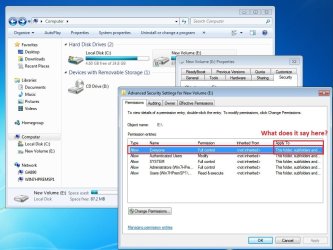
Oz, can you please right click one of the non-working shared drives and go into properties - security - advanced - see if Everyone has full control on "This folder, subfolders and files"? If files only, you will only see E and can't get in. If This folder, you will get in E but not to subfolders.

Also, maybe a good idea to actually check one of the sub folder's NTFS permissions, whether it has Everyone full control.

I hope this is making sense, somewhat lost at the moment. Since I can't make if this is the case for Oz.

Notice the differences:
01 - Advanced NTFS.jpg

02 - Advanced NTFS this folder only.jpg

03 - Advance NTFS files only.jpg
 

My Computer My Computer

At a glance

Windows 7 Ultimate x64 SP1AMD Phenom 2 1090T2x8GB Kingston HyperX Fury Black 1600Mhz Unga...MSI GTX 970 Gaming 4G
Computer type
PC/Desktop
Computer Manufacturer/Model Number
Custom Build
OS
Windows 7 Ultimate x64 SP1
CPU
AMD Phenom 2 1090T
Motherboard
Gigabyte GA-890FXA-UD5
Memory
2x8GB Kingston HyperX Fury Black 1600Mhz Unganged
Graphics Card(s)
MSI GTX 970 Gaming 4G
Sound Card
Realtek On-Board HD 7.1 Audio / Logitech G35
Monitor(s) Displays
3xAcer GD245HQ
Screen Resolution
1920x1080
Hard Drives
Samsung 850 Pro 512GB SSD - OS /
WD Caviar Black SATA 3 - 1 TBx2 - Dynamic RAID 0 /
WD Caviar Green SATA 2 - 640GBx2 - Dynamic RAID 0 /
WD Caviar Green SATA 2 - 640GB - Internal Backup /
Seagate Barracude SATA 3 - 3TB - External Backup/ Sync
PSU
HighPower 1000W
Case
Cooler Master HAF 932
Cooling
Noctua NH-D14
Keyboard
Logitech G19
Mouse
Logitech G500
Internet Speed
100/4 Mbit Cable (100GB quota)
Antivirus
ZoneAlarm Extreme Security / MBAM Pro / MBAE Free / SAS Free
Browser
IE 11 - Firefox - Chrome
Other Info
Logitech F710/ G27/ G940/ Z5500 // TrackIR 5 // Nvidia 3D Surround Vision
Good Morning.

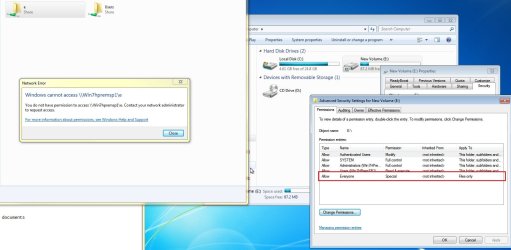
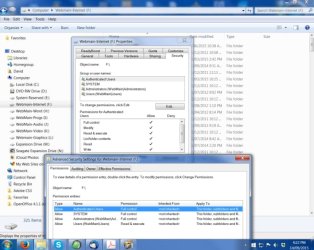
I have checked the Security Permissions on all drives on WebMain and none show 'everyone'.See image.

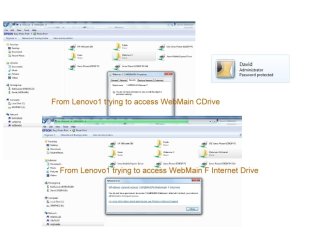
I also went to Lenovo2 and tried to connect to WebMain Cdrive and got the 'You do not have Permission to view etc'

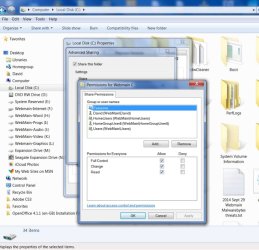
I then went to WebMain and shared the F Internet folder with everyone permissions and tried again from Lenovo2.

I got the panel.. Windows cannot access also in the image below.

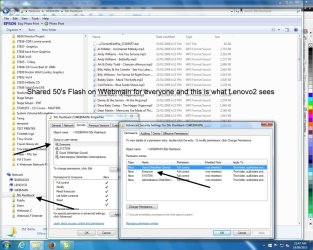
Then Shared a sub folder in Internet.. 50's Flashback with Everyone. The image below shows what Lenovo2 sees. Seems like the sub folders work okay.

oz

Pyprohly, I have to go out now but will fix the file when I get back.. maybe 2 hours.. Thnx
 

Attachments

  • 3 joined in 1.jpg
    3 joined in 1.jpg
    59.4 KB · Views: 2
  • Lenovo2 to Webmain 50s flash- everyone.jpg
    Lenovo2 to Webmain 50s flash- everyone.jpg
    124.6 KB · Views: 2
Last edited:

My Computer My Computer

At a glance

Win 7 Pro 32 and 64 versions2.5 up4 to 8Nividia and AMD
Computer type
PC/Desktop
Computer Manufacturer/Model Number
Custom Builds but also Surface Pro 3, Dells Desk and HP laptop
OS
Win 7 Pro 32 and 64 versions
CPU
2.5 up
Motherboard
Different types
Memory
4 to 8
Graphics Card(s)
Nividia and AMD
Hard Drives
From 60GB to 2 TB
Antivirus
Avast Free
Browser
Firefox latest
You have to edit Security settings from Webmain PC, not from another one. And do it from Computer not Network. You can't change/view settings you don't have access/permissions to.

Can you post images of the advanced security settings of C and another non-working drive please? That is; on Webmain, open Explorer - expand Computer on left pane - right click C on left pane - properties - security - advanced (screenshot). Also screenshot another non-working one.
 

My Computer My Computer

At a glance

Windows 7 Ultimate x64 SP1AMD Phenom 2 1090T2x8GB Kingston HyperX Fury Black 1600Mhz Unga...MSI GTX 970 Gaming 4G
Computer type
PC/Desktop
Computer Manufacturer/Model Number
Custom Build
OS
Windows 7 Ultimate x64 SP1
CPU
AMD Phenom 2 1090T
Motherboard
Gigabyte GA-890FXA-UD5
Memory
2x8GB Kingston HyperX Fury Black 1600Mhz Unganged
Graphics Card(s)
MSI GTX 970 Gaming 4G
Sound Card
Realtek On-Board HD 7.1 Audio / Logitech G35
Monitor(s) Displays
3xAcer GD245HQ
Screen Resolution
1920x1080
Hard Drives
Samsung 850 Pro 512GB SSD - OS /
WD Caviar Black SATA 3 - 1 TBx2 - Dynamic RAID 0 /
WD Caviar Green SATA 2 - 640GBx2 - Dynamic RAID 0 /
WD Caviar Green SATA 2 - 640GB - Internal Backup /
Seagate Barracude SATA 3 - 3TB - External Backup/ Sync
PSU
HighPower 1000W
Case
Cooler Master HAF 932
Cooling
Noctua NH-D14
Keyboard
Logitech G19
Mouse
Logitech G500
Internet Speed
100/4 Mbit Cable (100GB quota)
Antivirus
ZoneAlarm Extreme Security / MBAM Pro / MBAE Free / SAS Free
Browser
IE 11 - Firefox - Chrome
Other Info
Logitech F710/ G27/ G940/ Z5500 // TrackIR 5 // Nvidia 3D Surround Vision
Hi,

Here are the WebMain CDrive and F Drive Advanced Permissions.

Thanks
 

Attachments

  • Webmain CDrive Permissions.jpg
    Webmain CDrive Permissions.jpg
    69.5 KB · Views: 2
  • Webmain FDRive Permissions.jpg
    Webmain FDRive Permissions.jpg
    63.2 KB · Views: 2

My Computer My Computer

At a glance

Win 7 Pro 32 and 64 versions2.5 up4 to 8Nividia and AMD
Computer type
PC/Desktop
Computer Manufacturer/Model Number
Custom Builds but also Surface Pro 3, Dells Desk and HP laptop
OS
Win 7 Pro 32 and 64 versions
CPU
2.5 up
Motherboard
Different types
Memory
4 to 8
Graphics Card(s)
Nividia and AMD
Hard Drives
From 60GB to 2 TB
Antivirus
Avast Free
Browser
Firefox latest
I feel like I have been talking to empty corners :p

You can't browse a shared folder (even if it is shared to you) if you don't have NTFS (security) permissions. Since you are accessing the PC as a Guest and Everyone (which includes the Guest account) is not given any NTFS permissions to C, you can't enter it.

Did you get my Private Message the other day by the way?
 

My Computer My Computer

At a glance

Windows 7 Ultimate x64 SP1AMD Phenom 2 1090T2x8GB Kingston HyperX Fury Black 1600Mhz Unga...MSI GTX 970 Gaming 4G
Computer type
PC/Desktop
Computer Manufacturer/Model Number
Custom Build
OS
Windows 7 Ultimate x64 SP1
CPU
AMD Phenom 2 1090T
Motherboard
Gigabyte GA-890FXA-UD5
Memory
2x8GB Kingston HyperX Fury Black 1600Mhz Unganged
Graphics Card(s)
MSI GTX 970 Gaming 4G
Sound Card
Realtek On-Board HD 7.1 Audio / Logitech G35
Monitor(s) Displays
3xAcer GD245HQ
Screen Resolution
1920x1080
Hard Drives
Samsung 850 Pro 512GB SSD - OS /
WD Caviar Black SATA 3 - 1 TBx2 - Dynamic RAID 0 /
WD Caviar Green SATA 2 - 640GBx2 - Dynamic RAID 0 /
WD Caviar Green SATA 2 - 640GB - Internal Backup /
Seagate Barracude SATA 3 - 3TB - External Backup/ Sync
PSU
HighPower 1000W
Case
Cooler Master HAF 932
Cooling
Noctua NH-D14
Keyboard
Logitech G19
Mouse
Logitech G500
Internet Speed
100/4 Mbit Cable (100GB quota)
Antivirus
ZoneAlarm Extreme Security / MBAM Pro / MBAE Free / SAS Free
Browser
IE 11 - Firefox - Chrome
Other Info
Logitech F710/ G27/ G940/ Z5500 // TrackIR 5 // Nvidia 3D Surround Vision
Hi,

No I didn't get any PM and just looked and nothing there.

Yes I understand that what you say but why has this been okay for the years I have had 7 on and now it changes?

I have always only gone into Shares and shared everyone and it worked for all boxes on the LAN to access each other. Simple.

This now, is the only box that no one can access drives,folders. I have done nothing to it just one day it stopped allowing access. Maybe an Update ?

Anyhow, please where do I go now to get it correct ?

I will do the file for Pyprohly nowthat I am back.

Thanks
 

My Computer My Computer

At a glance

Win 7 Pro 32 and 64 versions2.5 up4 to 8Nividia and AMD
Computer type
PC/Desktop
Computer Manufacturer/Model Number
Custom Builds but also Surface Pro 3, Dells Desk and HP laptop
OS
Win 7 Pro 32 and 64 versions
CPU
2.5 up
Motherboard
Different types
Memory
4 to 8
Graphics Card(s)
Nividia and AMD
Hard Drives
From 60GB to 2 TB
Antivirus
Avast Free
Browser
Firefox latest
Back
Top