
atomicody
New member
Persistent "This Computer is not running Genuine Windows" popup
Hi, I've been trying to figure out why it is that I've been getting this popup here:
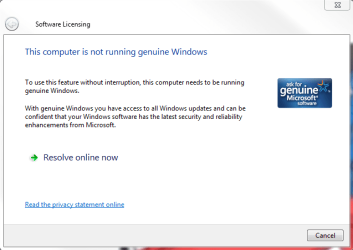
When I do in fact have a key entered and at a previous point in time Windows was registered as Genuine - and was fully functional. In fact, I still have the ability to change my wallpaper, and the watermark that would appear in the bottom right corner about Windows not being genuine has disappeared, but now this is happening. The above pictured popup will only appear when I try launching Microsoft/Windows related softwares, like Paint, or Windows Photo Viewer, etc.. so everytime I want to open a photo, this problem persists and is very annoying.
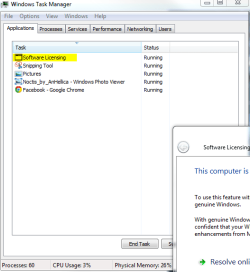
Out of sheer frustration and a bit of ignorance with what to do, I looked up and researched what practical and quick ways there are to rid myself of (at the time, the black wallpaper, watermark, AND popup I'm dealing with now)-- because I don't understand why, with a Windows Key, any of this should be happening at all. And so I'd performed a few tasks including what one tutorial showed, to use Command Prompt and use the command slmgr -rearm , and this actually cleared up these persistent watermarks and activation errors. A program named RemoveWAT also fixed some issues, and the problem was gone for awhile. Now I've run into what seems to be a unique issue. I'm getting the above pop up, but when I view the actual window's associated Application name and process, they aren't the same as what is shown in other people's screenshots on other forums--- for the same issue. This is what I'm shown:
_____________________________
And the associated process:
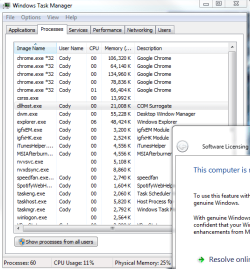
This wasn't the case before. The "Application" name for the window/popup wasn't that. And neither was the process "dllhost". Either way though, I wish to find a way to stop this Window from popping up. Can anyone point me in the right direction?
Hi, I've been trying to figure out why it is that I've been getting this popup here:
When I do in fact have a key entered and at a previous point in time Windows was registered as Genuine - and was fully functional. In fact, I still have the ability to change my wallpaper, and the watermark that would appear in the bottom right corner about Windows not being genuine has disappeared, but now this is happening. The above pictured popup will only appear when I try launching Microsoft/Windows related softwares, like Paint, or Windows Photo Viewer, etc.. so everytime I want to open a photo, this problem persists and is very annoying.
Out of sheer frustration and a bit of ignorance with what to do, I looked up and researched what practical and quick ways there are to rid myself of (at the time, the black wallpaper, watermark, AND popup I'm dealing with now)-- because I don't understand why, with a Windows Key, any of this should be happening at all. And so I'd performed a few tasks including what one tutorial showed, to use Command Prompt and use the command slmgr -rearm , and this actually cleared up these persistent watermarks and activation errors. A program named RemoveWAT also fixed some issues, and the problem was gone for awhile. Now I've run into what seems to be a unique issue. I'm getting the above pop up, but when I view the actual window's associated Application name and process, they aren't the same as what is shown in other people's screenshots on other forums--- for the same issue. This is what I'm shown:
_____________________________
And the associated process:
This wasn't the case before. The "Application" name for the window/popup wasn't that. And neither was the process "dllhost". Either way though, I wish to find a way to stop this Window from popping up. Can anyone point me in the right direction?
(Microsoft Genuine Advantage Diagnostic Tool Report Below)
Code:
Diagnostic Report (1.9.0027.0):
-----------------------------------------
Windows Validation Data-->

Validation Code: 0
Cached Online Validation Code: N/A, hr = 0xc004f012
Windows Product Key: *****-*****-TQGX8-C8B9B-BGXFF
Windows Product Key Hash: zwm29/2Er/jco/UzoZnol3s8ds4=
Windows Product ID: 00426-065-1031097-86416
Windows Product ID Type: 5
Windows License Type: Retail
Windows OS version: 6.1.7601.2.00010100.1.0.001
ID: {B4E1EFB3-0407-4044-A149-EE2D132C97A8}(1)
Is Admin: Yes
TestCab: 0x0
LegitcheckControl ActiveX: N/A, hr = 0x80070002
Signed By: N/A, hr = 0x80070002
Product Name: Windows 7 Ultimate
Architecture: 0x00000009
Build lab: 7601.win7sp1_gdr.150316-1654
TTS Error:
Validation Diagnostic:
Resolution Status: N/A

Vista WgaER Data-->
ThreatID(s): N/A, hr = 0x80070002
Version: N/A, hr = 0x80070002

Windows XP Notifications Data-->
Cached Result: N/A, hr = 0x80070002
File Exists: No
Version: N/A, hr = 0x80070002
WgaTray.exe Signed By: N/A, hr = 0x80070002
WgaLogon.dll Signed By: N/A, hr = 0x80070002

OGA Notifications Data-->
Cached Result: N/A, hr = 0x80070002
Version: N/A, hr = 0x80070002
OGAExec.exe Signed By: N/A, hr = 0x80070002
OGAAddin.dll Signed By: N/A, hr = 0x80070002

OGA Data-->
Office Status: 109 N/A
OGA Version: N/A, 0x80070002
Signed By: N/A, hr = 0x80070002
Office Diagnostics: 025D1FF3-364-80041010_025D1FF3-229-80041010_025D1FF3-230-1_025D1FF3-517-80040154_025D1FF3-237-80040154_025D1FF3-238-2_025D1FF3-244-80070002_025D1FF3-258-3

Browser Data-->
Proxy settings: N/A
User Agent: Mozilla/4.0 (compatible; MSIE 8.0; Win32)
Default Browser: C:\Program Files (x86)\Google\Chrome\Application\chrome.exe
Download signed ActiveX controls: Prompt
Download unsigned ActiveX controls: Disabled
Run ActiveX controls and plug-ins: Allowed
Initialize and script ActiveX controls not marked as safe: Disabled
Allow scripting of Internet Explorer Webbrowser control: Disabled
Active scripting: Allowed
Script ActiveX controls marked as safe for scripting: Allowed

File Scan Data-->
File Mismatch: C:\Windows\system32\wat\watadminsvc.exe[Hr = 0x80070003]
File Mismatch: C:\Windows\system32\wat\npwatweb.dll[Hr = 0x80070003]
File Mismatch: C:\Windows\system32\wat\watux.exe[Hr = 0x80070003]
File Mismatch: C:\Windows\system32\wat\watweb.dll[Hr = 0x80070003]
File Mismatch: C:\Windows\system32\slui.exe[Hr = 0x80070002]
File Mismatch: C:\Windows\system32\systemcpl.dll[6.1.7600.16385], Hr = 0x800b0100
File Mismatch: C:\Windows\system32\user32.dll[6.1.7600.16385], Hr = 0x800b0100

Other data-->
Office Details: <GenuineResults><MachineData><UGUID>{B4E1EFB3-0407-4044-A149-EE2D132C97A8}</UGUID><Version>1.9.0027.0</Version><OS>6.1.7601.2.00010100.1.0.001</OS><Architecture>x64</Architecture><PKey>*****-*****-*****-*****-BGXFF</PKey><PID>00426-065-1031097-86416</PID><PIDType>5</PIDType><SID>S-1-5-21-2376651299-1901029748-308516103</SID><SYSTEM><Manufacturer>Gigabyte Technology Co., Ltd.</Manufacturer><Model>Z97X-SLI</Model></SYSTEM><BIOS><Manufacturer>American Megatrends Inc.</Manufacturer><Version>F7</Version><SMBIOSVersion major="2" minor="7"/><Date>20141017000000.000000+000</Date></BIOS><HWID>9E043807018400F4</HWID><UserLCID>0409</UserLCID><SystemLCID>0409</SystemLCID><TimeZone>Eastern Standard Time(GMT-05:00)</TimeZone><iJoin>0</iJoin><SBID><stat>3</stat><msppid></msppid><name></name><model></model></SBID><OEM/><GANotification/></MachineData><Software><Office><Result>109</Result><Products/><Applications/></Office></Software></GenuineResults>

Spsys.log Content: 0x80070002

Licensing Data-->
Input Error: Can not find script file "C:\Windows\system32\slmgr.vbs".

Windows Activation Technologies-->
HrOffline: 0x00000000
HrOnline: 0xC004C533
HealthStatus: 0x0000000000000000
Event Time Stamp: 5:26:2015 23:37
ActiveX: Not Registered - 0x80040154
Admin Service: Not Registered - 0x80040154
HealthStatus Bitmask Output:


HWID Data-->
HWID Hash Current: MgAAAAEAAgABAAIAAAADAAAAAQABAAEAln0+rZBSnC1G1FSQSB/E3v6I2KV6OfxvyPY=

OEM Activation 1.0 Data-->
N/A

OEM Activation 2.0 Data-->
BIOS valid for OA 2.0: yes, but no SLIC table
Windows marker version: N/A
OEMID and OEMTableID Consistent: N/A
BIOS Information:
  ACPI Table Name	OEMID Value	OEMTableID Value
  APIC			ALASKA		A M I
  FACP			ALASKA		A M I
  HPET			ALASKA		A M I
  MCFG			ALASKA		A M I
  FPDT			ALASKA		A M I
  SSDT			Ther_R		Ther_Rvp
  SSDT			Ther_R		Ther_Rvp
  SSDT			Ther_R		Ther_Rvp
  SSDT			Ther_R		Ther_Rvp
  SSDT			Ther_R		Ther_Rvp
  DMAR			INTEL 		BDW
My Computer
- Computer type
- PC/Desktop
- Computer Manufacturer/Model Number
- Custom Build
- OS
- Windows 7 Ultimate 64-Bit
- CPU
- I5 4690k @ 3.5 GHz
- Motherboard
- Gigabyte Z97X-SLI
- Memory
- 8 GB Crucial Ballistix Tactical RAM running at 1866 MHz
- Graphics Card(s)
- 4 GB NVIDIA GeForce GTX 970 [Zotac]
- Screen Resolution
- 1920x1080 & 1280x720
- Hard Drives
- 120 GB ocz Vertex 3 SSD
1 TB WD Black HDD
1 TB WD My Passport Ultra External
- PSU
- OCZ ZS Series 750W 80+ Bronze
- Case
- Antec 902
- Browser
- Google Chrome

 I am not sure, but I would hope I don't have to purchase a retail activation code at this point.


