IE 10 forgets all history

XP VM User

New member
Member
VIP
Local time
4:14 AM
Messages
279
Hi Everyone!

Real short question (then ask me for the details).

IE 10 running on my Windows Professional x64 system. (downgraded last year from IE11 upon advice from here).

Now a mystery!

All my history has vanished! The lines and dates and weeks are "there" but are all null sets of data... nothing is being saved except the "new" history from the date of the loss (about a week ago).

I tried to solve it myself.... found a competiting web site here (Tom's Hardware) ::::
"Internet Explorer / Keeps Deleting My History"

http://www.google.com/url?sa=t&rct=...y.html&usg=AFQjCNFsF8R6gRaTX73nh84Axz13HUNsXQ

I TRIED what they did ... same results Zero! Zip Nothing!

History works again, but any day, any moment now, I might lose all of it again..and I need to keep consulting older pages I don't need or want to have to bookmark every page I visit!

How to prevent this? (Did Virus Check/Malwarebytes too check all ok).

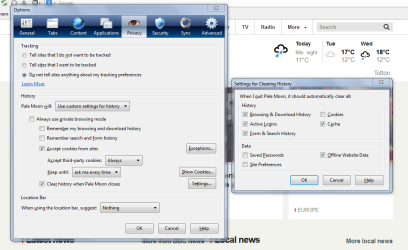
Photo of it here:
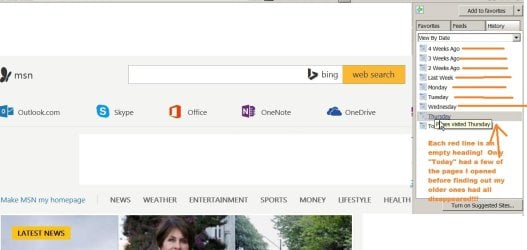
W7 IE 10 Fogets all history 1 PS20801.jpg

Any more details? Just ask me!

Thanks for reading a short cry for help!

XP VM USER

P.S. I'm trying to do my monthly backup save (first day of month) but..... I'm afriad I'll be saving whatever error is causing this History loss problem with the save of the entire HDD! So need to know before I do another Macrium / AEOMI Save (Great big thanks to everyone here who helped me learn about these and how to use them!!)
 

My Computer My Computer

At a glance

Windows7 Professional 64bitIntel(R) Core (TM) i5 CPU M 430 @2.27 Ghz8.0 GB
Computer type
Laptop
Computer Manufacturer/Model Number
SONY VAIO VPCS111FM
OS
Windows7 Professional 64bit
CPU
Intel(R) Core (TM) i5 CPU M 430 @2.27 Ghz
Memory
8.0 GB
Hard Drives
Seagate 500GB Momentus
Cooling
Internal fan
Mouse
Logitech bluetooth trackball
Browser
Pale Moon Browser for x64
Hi,
Open ie10 and use gear symbol on the top right and Manage add-ons,
Toolbars and extensions section,
Then on the bottom left column switch to Show all add-ons and take some screen shots,

Use Clean boot,
http://www.sevenforums.com/tutorial...ation-conflicts-performing-clean-startup.html
Click Start and type in the search box,
msconfig
Click on the suggestion on top or hit the Enter key,
Go to the Startup section and take some screen shots for a complete list,
Go to the Services section and on the bottom left Check the box to Hide All Microsoft services,
Repeat the screen shots,
See the links above my signature on how to take and upload screen shots here,
Cheers.
 

My Computer My Computer

At a glance

Win-7-Pro64bit 7-H-Prem-64biti7-5930K 2nd i9-9940x both water blocked VRM'...Trident-z 3200C14 2nd Trident-z 3600C16EVGA 1080ti ftw3 2nd Titan Xp both water blocked
Computer type
PC/Desktop
Computer Manufacturer/Model Number
Custom assembled by me :}
OS
Win-7-Pro64bit 7-H-Prem-64bit
CPU
i7-5930K 2nd i9-9940x both water blocked VRM's too
Motherboard
ASUS SABERTOOTH X99 2nd ASUS x299 Apex
Memory
Trident-z 3200C14 2nd Trident-z 3600C16
Graphics Card(s)
EVGA 1080ti ftw3 2nd Titan Xp both water blocked
Sound Card
Built-in Realtek
Monitor(s) Displays
1-AOC G2460PG 24"G-Sync 144Hz/ 2nd 1-ASUS VG248QE 24" 144Hz
Screen Resolution
1920 x 1080 144Hz
Hard Drives
2-Samsung M.2 Evo & Evo Plus
2-Samsung 850 EVO 500GB SSD's/ 3-2.5 W.D. Black 1tb-&3-1tb/3-3.5 WD Black 1tb hdd's
PSU
EVGA SuperNOVA 1000-P2 2nd 1200-P2
Case
2-Corsair Obsidian Series 450D Black ATX Mid Tower
Cooling
Custom water loops
Keyboard
Logitech G710+/ 2nd Logitech G910
Mouse
2-RedDragon M901 Perdition 16400 dpi Gaming mouse = wired
Internet Speed
Comcast Ping 19ms 89.31mbps download speed 6.12mbps upload
Antivirus
Malwarebytes Pro/ Superantispyware Pro
Browser
FireFox & Pale moon
Other Info
2nd ASUS X299 Apex/Intel i9-9940x with Custom water loop/7H-Prem-x64/Corsair 450D case/Ram Trident-z 3600C16 4x8gb / Samsung970Evo plus 500gb SSD/Dual ssd EZ swap evo/PSU EVGA SuperNova 1200w-P2 80+Platinum/GPU Titan Xp /8-ML-140 on push-pull on 2-280GTX rads
Quick reply to ThrashZone:

Thanks so much... will do all and repost your message with screenshots by each request!

Cheers back to you in The Republic of Texas!
 

My Computer My Computer

At a glance

Windows7 Professional 64bitIntel(R) Core (TM) i5 CPU M 430 @2.27 Ghz8.0 GB
Computer type
Laptop
Computer Manufacturer/Model Number
SONY VAIO VPCS111FM
OS
Windows7 Professional 64bit
CPU
Intel(R) Core (TM) i5 CPU M 430 @2.27 Ghz
Memory
8.0 GB
Hard Drives
Seagate 500GB Momentus
Cooling
Internal fan
Mouse
Logitech bluetooth trackball
Browser
Pale Moon Browser for x64
Hi,
No problem look forward to it :)
Cheers.
 

My Computer My Computer

At a glance

Win-7-Pro64bit 7-H-Prem-64biti7-5930K 2nd i9-9940x both water blocked VRM'...Trident-z 3200C14 2nd Trident-z 3600C16EVGA 1080ti ftw3 2nd Titan Xp both water blocked
Computer type
PC/Desktop
Computer Manufacturer/Model Number
Custom assembled by me :}
OS
Win-7-Pro64bit 7-H-Prem-64bit
CPU
i7-5930K 2nd i9-9940x both water blocked VRM's too
Motherboard
ASUS SABERTOOTH X99 2nd ASUS x299 Apex
Memory
Trident-z 3200C14 2nd Trident-z 3600C16
Graphics Card(s)
EVGA 1080ti ftw3 2nd Titan Xp both water blocked
Sound Card
Built-in Realtek
Monitor(s) Displays
1-AOC G2460PG 24"G-Sync 144Hz/ 2nd 1-ASUS VG248QE 24" 144Hz
Screen Resolution
1920 x 1080 144Hz
Hard Drives
2-Samsung M.2 Evo & Evo Plus
2-Samsung 850 EVO 500GB SSD's/ 3-2.5 W.D. Black 1tb-&3-1tb/3-3.5 WD Black 1tb hdd's
PSU
EVGA SuperNOVA 1000-P2 2nd 1200-P2
Case
2-Corsair Obsidian Series 450D Black ATX Mid Tower
Cooling
Custom water loops
Keyboard
Logitech G710+/ 2nd Logitech G910
Mouse
2-RedDragon M901 Perdition 16400 dpi Gaming mouse = wired
Internet Speed
Comcast Ping 19ms 89.31mbps download speed 6.12mbps upload
Antivirus
Malwarebytes Pro/ Superantispyware Pro
Browser
FireFox & Pale moon
Other Info
2nd ASUS X299 Apex/Intel i9-9940x with Custom water loop/7H-Prem-x64/Corsair 450D case/Ram Trident-z 3600C16 4x8gb / Samsung970Evo plus 500gb SSD/Dual ssd EZ swap evo/PSU EVGA SuperNova 1200w-P2 80+Platinum/GPU Titan Xp /8-ML-140 on push-pull on 2-280GTX rads
A question already!

So how come this window does not have a "maximize" button? I seem to have so many (I did not ask for so many!!!) add ons, that I'd need over 10 screen shots to show it all... very limited view in the viewfinder in the window... any way to enlarge them?

Should I copy and paste them to a larger Word Pad page? Does that still show what you need to see?

Thanks!
 

My Computer My Computer

At a glance

Windows7 Professional 64bitIntel(R) Core (TM) i5 CPU M 430 @2.27 Ghz8.0 GB
Computer type
Laptop
Computer Manufacturer/Model Number
SONY VAIO VPCS111FM
OS
Windows7 Professional 64bit
CPU
Intel(R) Core (TM) i5 CPU M 430 @2.27 Ghz
Memory
8.0 GB
Hard Drives
Seagate 500GB Momentus
Cooling
Internal fan
Mouse
Logitech bluetooth trackball
Browser
Pale Moon Browser for x64
Hi,
You can paste in a Paint image file instead of a document would better for us here to see them all,
Use Snipping tool instead of typical screen captures that way you can drag over a section with the rectangular selection tool option,
How to Use the Snipping Tool in Vista

But yep that's why you should keep track of them and prevent a lot of freeloader add-ons ;)
 

My Computer My Computer

At a glance

Win-7-Pro64bit 7-H-Prem-64biti7-5930K 2nd i9-9940x both water blocked VRM'...Trident-z 3200C14 2nd Trident-z 3600C16EVGA 1080ti ftw3 2nd Titan Xp both water blocked
Computer type
PC/Desktop
Computer Manufacturer/Model Number
Custom assembled by me :}
OS
Win-7-Pro64bit 7-H-Prem-64bit
CPU
i7-5930K 2nd i9-9940x both water blocked VRM's too
Motherboard
ASUS SABERTOOTH X99 2nd ASUS x299 Apex
Memory
Trident-z 3200C14 2nd Trident-z 3600C16
Graphics Card(s)
EVGA 1080ti ftw3 2nd Titan Xp both water blocked
Sound Card
Built-in Realtek
Monitor(s) Displays
1-AOC G2460PG 24"G-Sync 144Hz/ 2nd 1-ASUS VG248QE 24" 144Hz
Screen Resolution
1920 x 1080 144Hz
Hard Drives
2-Samsung M.2 Evo & Evo Plus
2-Samsung 850 EVO 500GB SSD's/ 3-2.5 W.D. Black 1tb-&3-1tb/3-3.5 WD Black 1tb hdd's
PSU
EVGA SuperNOVA 1000-P2 2nd 1200-P2
Case
2-Corsair Obsidian Series 450D Black ATX Mid Tower
Cooling
Custom water loops
Keyboard
Logitech G710+/ 2nd Logitech G910
Mouse
2-RedDragon M901 Perdition 16400 dpi Gaming mouse = wired
Internet Speed
Comcast Ping 19ms 89.31mbps download speed 6.12mbps upload
Antivirus
Malwarebytes Pro/ Superantispyware Pro
Browser
FireFox & Pale moon
Other Info
2nd ASUS X299 Apex/Intel i9-9940x with Custom water loop/7H-Prem-x64/Corsair 450D case/Ram Trident-z 3600C16 4x8gb / Samsung970Evo plus 500gb SSD/Dual ssd EZ swap evo/PSU EVGA SuperNova 1200w-P2 80+Platinum/GPU Titan Xp /8-ML-140 on push-pull on 2-280GTX rads
First Step Done

Hi,
Open ie10 and use gear symbol on the top right and Manage add-ons,
Toolbars and extensions section,
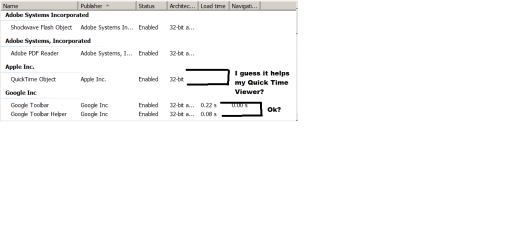
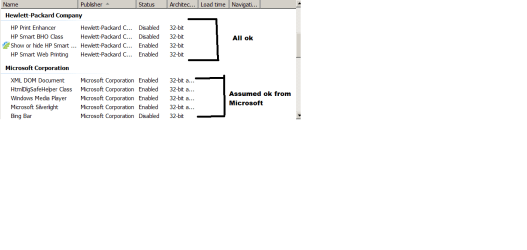
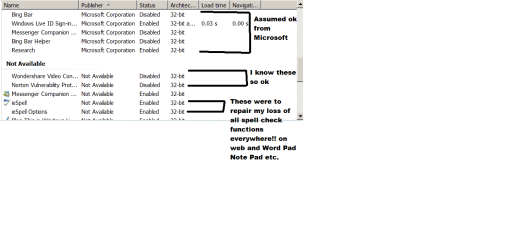
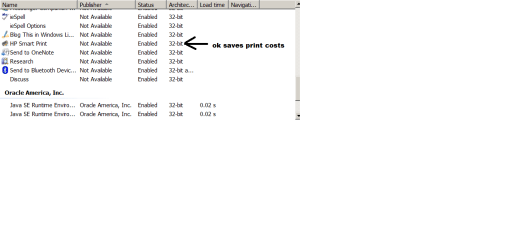
Then on the bottom left column switch to Show all add-ons and take some screen shots,

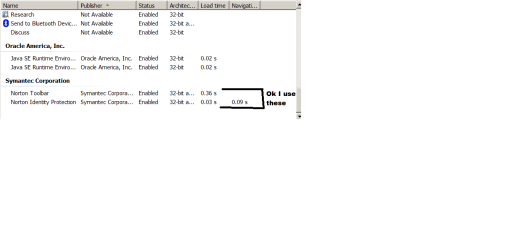
Finally got it done! It was slow work but better than many little screen captures and copying and pasting those here!

I think its 5 Paint pictures to list them all:
I made comments right on the paint picture about the extensions and why I left most of them there when IE10 keeps asking me to "manage" extensions.....

Windows 7 IE10 Forgets Extensions 1.png

Windows 7 IE10 Forgets Extensions 2.png

Windows 7 IE10 Forgets Extensions 3.png

Windows 7 IE10 Forgets Extensions 4.png

Windows 7 IE10 Forgets Extensions 5.png


Now I'll work on the clean boot and following the msconfig instructions above and do those screen shots (I've done those here before---so I know they fit in a few shots so I won't take as long learning how to use snippet tool)

Thanks again!
 
Last edited:

My Computer My Computer

At a glance

Windows7 Professional 64bitIntel(R) Core (TM) i5 CPU M 430 @2.27 Ghz8.0 GB
Computer type
Laptop
Computer Manufacturer/Model Number
SONY VAIO VPCS111FM
OS
Windows7 Professional 64bit
CPU
Intel(R) Core (TM) i5 CPU M 430 @2.27 Ghz
Memory
8.0 GB
Hard Drives
Seagate 500GB Momentus
Cooling
Internal fan
Mouse
Logitech bluetooth trackball
Browser
Pale Moon Browser for x64
Hi,
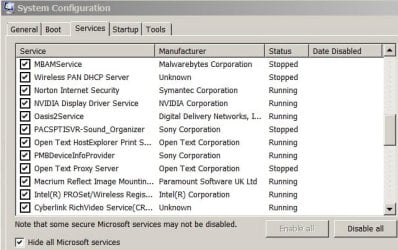
Most likely cause is either Norton
Java from Oracle can most likely be uninstalled nobody needs the security hole ware.
 

My Computer My Computer

At a glance

Win-7-Pro64bit 7-H-Prem-64biti7-5930K 2nd i9-9940x both water blocked VRM'...Trident-z 3200C14 2nd Trident-z 3600C16EVGA 1080ti ftw3 2nd Titan Xp both water blocked
Computer type
PC/Desktop
Computer Manufacturer/Model Number
Custom assembled by me :}
OS
Win-7-Pro64bit 7-H-Prem-64bit
CPU
i7-5930K 2nd i9-9940x both water blocked VRM's too
Motherboard
ASUS SABERTOOTH X99 2nd ASUS x299 Apex
Memory
Trident-z 3200C14 2nd Trident-z 3600C16
Graphics Card(s)
EVGA 1080ti ftw3 2nd Titan Xp both water blocked
Sound Card
Built-in Realtek
Monitor(s) Displays
1-AOC G2460PG 24"G-Sync 144Hz/ 2nd 1-ASUS VG248QE 24" 144Hz
Screen Resolution
1920 x 1080 144Hz
Hard Drives
2-Samsung M.2 Evo & Evo Plus
2-Samsung 850 EVO 500GB SSD's/ 3-2.5 W.D. Black 1tb-&3-1tb/3-3.5 WD Black 1tb hdd's
PSU
EVGA SuperNOVA 1000-P2 2nd 1200-P2
Case
2-Corsair Obsidian Series 450D Black ATX Mid Tower
Cooling
Custom water loops
Keyboard
Logitech G710+/ 2nd Logitech G910
Mouse
2-RedDragon M901 Perdition 16400 dpi Gaming mouse = wired
Internet Speed
Comcast Ping 19ms 89.31mbps download speed 6.12mbps upload
Antivirus
Malwarebytes Pro/ Superantispyware Pro
Browser
FireFox & Pale moon
Other Info
2nd ASUS X299 Apex/Intel i9-9940x with Custom water loop/7H-Prem-x64/Corsair 450D case/Ram Trident-z 3600C16 4x8gb / Samsung970Evo plus 500gb SSD/Dual ssd EZ swap evo/PSU EVGA SuperNova 1200w-P2 80+Platinum/GPU Titan Xp /8-ML-140 on push-pull on 2-280GTX rads
Was a short reply---got longer

Hi ThrashZone!

Still working on the Clean boot information---had to wait until weekend to get enough time to do it without messing up those instructions.

Thanks for the opinion about Norton and Java...

I've used Norton "forever" and I know it causes problems, but again it does lots of virus checks and disk operations in background, not bothering me---and still with its green Safe Site notes, warns me about sites I should not click on, and virus checks all my downloads automatically (In case I forget to scan---which a lot of other programs you have to actively request the scan and they cost too).... So I'm sorta stuck with my Norton and troubles it causes... Don't they know about this too??

And Java....why is it so used everywhere by all the developers/coders on the internet? If I'm not up to date I get warnings that I can't view something because of Java is out of date or security certificate is missing on it or etc etc always difficult I know... But if I just get rid of it... what then? How will I see the little "feedback request" on sites that is rotating because it uses Java? etc etc?? How do others live without Java?

(I know its spoofed too--I only download updates from the original site and when my Java icon prompts me to update---there are too many places that pop up (despite my pop up blockers!) and say your Java or Adobe or Windows Viewer is out of date just "click" here and everything will be ok!) (I'm aware its all a fake!)

Thanks... Let me get you more information from the clean boot so we once and for all can fix this problem....

It is related I'm certain to my other consistent problem with IE (10 and 11) that those tool menus marked "Reopen last closed window" or "Reopen last browsing session" are grayed out on my menu all the time...They did work once, but never again! So lets concentrate and work on the History memory---I've stopped using IE 10 and am using other less useful browsers until we fix the problem as its really annoying when I lose so many sites that I've searched for and found and am working on them...

Thanks for reading what was to have been a short message....
 

My Computer My Computer

At a glance

Windows7 Professional 64bitIntel(R) Core (TM) i5 CPU M 430 @2.27 Ghz8.0 GB
Computer type
Laptop
Computer Manufacturer/Model Number
SONY VAIO VPCS111FM
OS
Windows7 Professional 64bit
CPU
Intel(R) Core (TM) i5 CPU M 430 @2.27 Ghz
Memory
8.0 GB
Hard Drives
Seagate 500GB Momentus
Cooling
Internal fan
Mouse
Logitech bluetooth trackball
Browser
Pale Moon Browser for x64
> I've used Norton "forever" and I know it causes problems,......
> its green Safe Site notes, warns me about sites I should not click on.....
Those Safe Site warnings are pretty useless.


> And Java....why is it so used everywhere by all the developers/coders on the internet?
> If I'm not up to date I get warnings that I can't view something because of Java is out of date...
Please uninstall Java and post a link to a website that gives you problems/warnings about Java. You can always install Java again if we find that it is really needed.


> How do others live without Java?
I uninstalled Java many years ago. I also uninstalled it from the computers that I support. No users have asked for it back.
 

My Computer My Computer

At a glance

W7 Pro SP1 64biti78GBIntel HD Graphics
Computer type
Laptop
Computer Manufacturer/Model Number
Employer provided Dell Latitude
OS
W7 Pro SP1 64bit
CPU
i7
Memory
8GB
Graphics Card(s)
Intel HD Graphics
Hard Drives
crappy SSD
Antivirus
Employer mandated Symantec Endpoint Protection
Browser
Pale Moon 64bit, IE11 64bit & Chrome 64bit
Uninstalled Java--to see if there is any improvement

Hi UsernameIssues:

Thanks for your advice....

> And Java....why is it so used everywhere by all the developers/coders on the internet?
> If I'm not up to date I get warnings that I can't view something because of Java is out of date...
Please uninstall Java and post a link to a website that gives you problems/warnings about Java. You can always install Java again if we find that it is really needed.


> How do others live without Java?
I uninstalled Java many years ago. I also uninstalled it from the computers that I support. No users have asked for it back.
Seems easy enough...

Uninstalled Java 8 Update 31 (Installed just this year 1-27-15)

What did you mean by " and post a link to a website that gives you problems/warnings about Java"??

I Post? Or You'll post here as you know the site?

Or Should I just Google it?

Confused...

Oh, I'll give you Reputation points just holding off to see if computer melts down or something bad first ok? Not expecting much to occur...but who knows? Everyone's PC has so many different interacting programs...

Thanks again!

(May be something else but Pale Moon has also forgotten some of its history and only used it a few days....maybe I don't remember how many windows/tabs I had open... Will try it again before detailing a report here)
 

My Computer My Computer

At a glance

Windows7 Professional 64bitIntel(R) Core (TM) i5 CPU M 430 @2.27 Ghz8.0 GB
Computer type
Laptop
Computer Manufacturer/Model Number
SONY VAIO VPCS111FM
OS
Windows7 Professional 64bit
CPU
Intel(R) Core (TM) i5 CPU M 430 @2.27 Ghz
Memory
8.0 GB
Hard Drives
Seagate 500GB Momentus
Cooling
Internal fan
Mouse
Logitech bluetooth trackball
Browser
Pale Moon Browser for x64
You said this:

~~~
And Java....why is it so used everywhere by all the developers/coders on the internet? If I'm not up to date I get warnings that I can't view something because of Java is out of date or security certificate is missing on it or etc etc always difficult I know... But if I just get rid of it... what then? How will I see the little "feedback request" on sites that is rotating because it uses Java? etc etc?? How do others live without Java?
~~~
Now that Java is no longer install on your computer. Just surf the way that you normally surf. If you get warnings that are because of Java, then please post a link to the website that you were visiting when you saw those warnings.
 

My Computer My Computer

At a glance

W7 Pro SP1 64biti78GBIntel HD Graphics
Computer type
Laptop
Computer Manufacturer/Model Number
Employer provided Dell Latitude
OS
W7 Pro SP1 64bit
CPU
i7
Memory
8GB
Graphics Card(s)
Intel HD Graphics
Hard Drives
crappy SSD
Antivirus
Employer mandated Symantec Endpoint Protection
Browser
Pale Moon 64bit, IE11 64bit & Chrome 64bit
Hi,
How often is Norton set to scan ?
 

My Computer My Computer

At a glance

Win-7-Pro64bit 7-H-Prem-64biti7-5930K 2nd i9-9940x both water blocked VRM'...Trident-z 3200C14 2nd Trident-z 3600C16EVGA 1080ti ftw3 2nd Titan Xp both water blocked
Computer type
PC/Desktop
Computer Manufacturer/Model Number
Custom assembled by me :}
OS
Win-7-Pro64bit 7-H-Prem-64bit
CPU
i7-5930K 2nd i9-9940x both water blocked VRM's too
Motherboard
ASUS SABERTOOTH X99 2nd ASUS x299 Apex
Memory
Trident-z 3200C14 2nd Trident-z 3600C16
Graphics Card(s)
EVGA 1080ti ftw3 2nd Titan Xp both water blocked
Sound Card
Built-in Realtek
Monitor(s) Displays
1-AOC G2460PG 24"G-Sync 144Hz/ 2nd 1-ASUS VG248QE 24" 144Hz
Screen Resolution
1920 x 1080 144Hz
Hard Drives
2-Samsung M.2 Evo & Evo Plus
2-Samsung 850 EVO 500GB SSD's/ 3-2.5 W.D. Black 1tb-&3-1tb/3-3.5 WD Black 1tb hdd's
PSU
EVGA SuperNOVA 1000-P2 2nd 1200-P2
Case
2-Corsair Obsidian Series 450D Black ATX Mid Tower
Cooling
Custom water loops
Keyboard
Logitech G710+/ 2nd Logitech G910
Mouse
2-RedDragon M901 Perdition 16400 dpi Gaming mouse = wired
Internet Speed
Comcast Ping 19ms 89.31mbps download speed 6.12mbps upload
Antivirus
Malwarebytes Pro/ Superantispyware Pro
Browser
FireFox & Pale moon
Other Info
2nd ASUS X299 Apex/Intel i9-9940x with Custom water loop/7H-Prem-x64/Corsair 450D case/Ram Trident-z 3600C16 4x8gb / Samsung970Evo plus 500gb SSD/Dual ssd EZ swap evo/PSU EVGA SuperNova 1200w-P2 80+Platinum/GPU Titan Xp /8-ML-140 on push-pull on 2-280GTX rads
Palemoon has its own history section too.

As its happening here to, it sounds like you have another history cleaner operating.

Are you running any optimiser programmes.
 

Attachments

  • pmdata.PNG
    pmdata.PNG
    46.1 KB · Views: 0

My Computer My Computer

At a glance

W7 home premium 32bit/W7HP 64bit/w10 tp insid...E5300 dual core3gbNvidia Geforce 7100 Nforce 630i
Computer type
PC/Desktop
Computer Manufacturer/Model Number
medionl/Aspire 6930G/acer x55a
OS
W7 home premium 32bit/W7HP 64bit/w10 tp insider ring
CPU
E5300 dual core
Motherboard
medion MS7366
Memory
3gb
Graphics Card(s)
Nvidia Geforce 7100 Nforce 630i
Monitor(s) Displays
avixc
Internet Speed
n (isp resticted to 72)
Antivirus
mse/pands
Browser
palemoon
Other Info
Belkin Fd7050 n USB using Railink RT2870 drivers, more upto date
Results of screen shots under clean booting

Hi ThrashZone and others!

Finally got it done (had other problems to fix and now I'm back to the IE 10 "Forgetting" history problem.

You posted (post #2 above):
 

Use Clean boot,

http://www.sevenforums.com/tutorials/179159-troubleshoot-application-conflicts-performing-clean-startup.html

Click Start and type in the search box,

msconfig

Click on the suggestion on top or hit the Enter key,

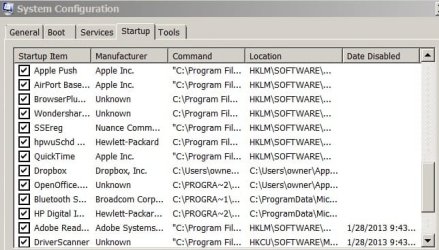
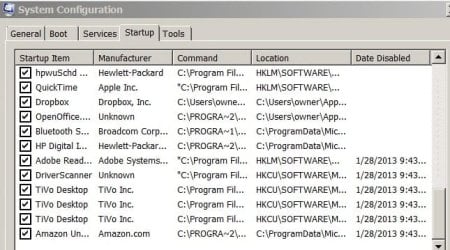
Go to the Startup section and take some screen shots for a complete list,

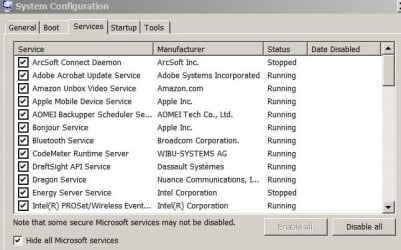
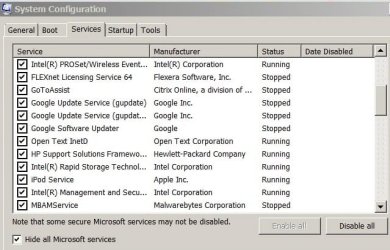
Go to the Services section and on the bottom left Check the box to Hide All Microsoft services,

Repeat the screen shots,

See the links above my signature on how to take and upload screen shots here,

Cheers.


And my reply is below with screen shots hopefully for each request:

(I still don't know if I did this correctly or not!)

Use Clean boot,


http://www.sevenforums.com/tutorials/179159-troubleshoot-application-conflicts-performing-clean-startup.html


Click Start and type in the search box,

msconfig

Click on the suggestion on top or hit the Enter key,

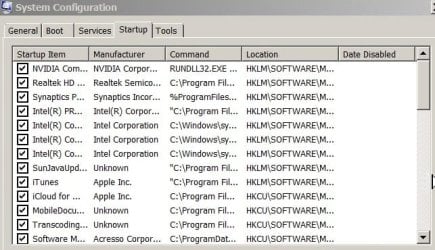
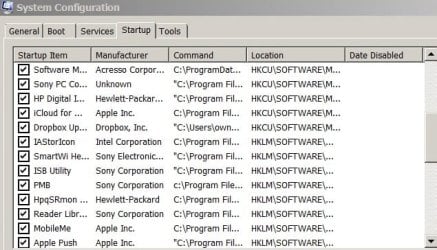
Go to the Startup section and take some screen shots for a complete list,

Win 7 Forum IE 10 Forgets msconfig results 1 PS21147.jpg


Win 7 Forum IE 10 Forgets msconfig results 2 PS21148.jpg


Win 7 Forum IE 10 Forgets msconfig results 3 PS21149.jpg


Win 7 Forum IE 10 Forgets msconfig results 4 PS21150.jpg


Win 7 Forum IE 10 Forgets msconfig results 5 PS21151.jpg


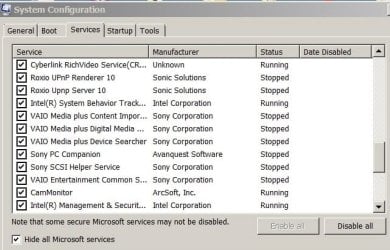
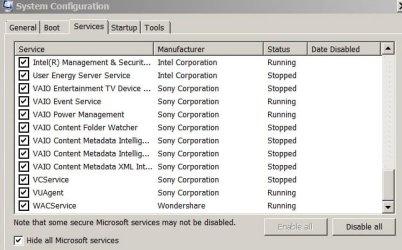
Go to the Services section and on the bottom left Check the box to Hide All Microsoft services,

Repeat the screen shots,

See the links above my signature on how to take and upload screen shots here,

Win 7 Forum IE 10 Forgets msconfig results 6 PS21152---.jpg


Win 7 Forum IE 10 Forgets msconfig results 7 PS21153.jpg


Win 7 Forum IE 10 Forgets msconfig results 8 PS21154.jpg


Win 7 Forum IE 10 Forgets msconfig results 9 PS21155.jpg


Win 7 Forum IE 10 Forgets msconfig results 10 PS21156.jpg


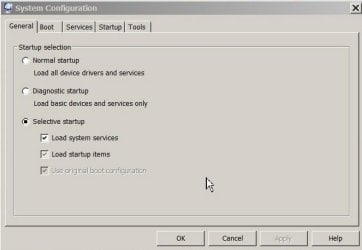
One other unusual item: Some other have helped me over the years do this by remote access or in person in a store.... someone , (not me!) somewhere had the button set for "selective set up" for some other reason, to cure another problem and I guess I was never told to remove it from that setting ....as it will bring back some other problem (i.e. the VM won't work or something like that) (by the by... VM under Windows 7 won't work as I just used it or tried to use it this past 2 weeks and it refuses to turn on! maybe its related to something interfering with IE 10 problem of "forgetting"?? What do you think? (Here is screenshot of the settings as I found them when I went into this section) :

Win 7 Forum IE 10 Forgets msconfig results 11 PS21157.jpg


Hope this helps you diagnose which one(s) are to be removed (even if late in posting)

Thanks again for all who read this!

XP VM USER
 

My Computer My Computer

At a glance

Windows7 Professional 64bitIntel(R) Core (TM) i5 CPU M 430 @2.27 Ghz8.0 GB
Computer type
Laptop
Computer Manufacturer/Model Number
SONY VAIO VPCS111FM
OS
Windows7 Professional 64bit
CPU
Intel(R) Core (TM) i5 CPU M 430 @2.27 Ghz
Memory
8.0 GB
Hard Drives
Seagate 500GB Momentus
Cooling
Internal fan
Mouse
Logitech bluetooth trackball
Browser
Pale Moon Browser for x64
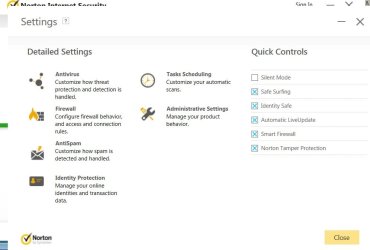
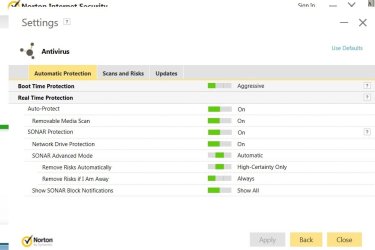
Reply about the Norton frequency of scans

Hi ThrashZone!

Thanks for your reply---I just posted reply from your posting #2, so here is my reply from your recent post #13 where you asked:

How often is Norton set to scan ?
(Some weird reason this posts in two lines sorry)


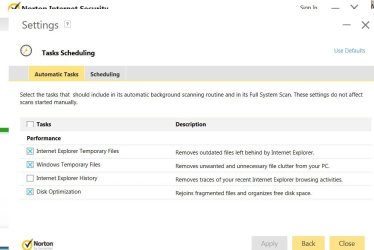
Norton Screenshots:

Win 7 Forum IE 10 Forgets Norton Schedule 1 PS21183.jpg

Win 7 Forum IE 10 Forgets Norton Schedule 2 PS21184.jpg

Win 7 Forum IE 10 Forgets Norton Schedule 3 PS21185.jpg

Win 7 Forum IE 10 Forgets Norton Schedule 4 PS21186.jpg


Hope this helps (and I don't touch it.... Norton people set it all for me by remote control! That way I know I'm not fooling around with something that can backfire if I set it to wrong settings).

XP VM USER
 

My Computer My Computer

At a glance

Windows7 Professional 64bitIntel(R) Core (TM) i5 CPU M 430 @2.27 Ghz8.0 GB
Computer type
Laptop
Computer Manufacturer/Model Number
SONY VAIO VPCS111FM
OS
Windows7 Professional 64bit
CPU
Intel(R) Core (TM) i5 CPU M 430 @2.27 Ghz
Memory
8.0 GB
Hard Drives
Seagate 500GB Momentus
Cooling
Internal fan
Mouse
Logitech bluetooth trackball
Browser
Pale Moon Browser for x64
Hi and thanks for posting the info great job :)

There was a reporting Norton after a full scan will remove history is why I asked
Even though the option is unchecked I would test using the weekly setting instead of the automatic (recommended) setting

Quite a lot of items on startup Sun Java I would uninstall completely also Bonjour and all of the Apply crapware if you don't use it all of the stuff comes prepackaged with iTunes which is all anyone really uses if they have iTunes.
 

My Computer My Computer

At a glance

Win-7-Pro64bit 7-H-Prem-64biti7-5930K 2nd i9-9940x both water blocked VRM'...Trident-z 3200C14 2nd Trident-z 3600C16EVGA 1080ti ftw3 2nd Titan Xp both water blocked
Computer type
PC/Desktop
Computer Manufacturer/Model Number
Custom assembled by me :}
OS
Win-7-Pro64bit 7-H-Prem-64bit
CPU
i7-5930K 2nd i9-9940x both water blocked VRM's too
Motherboard
ASUS SABERTOOTH X99 2nd ASUS x299 Apex
Memory
Trident-z 3200C14 2nd Trident-z 3600C16
Graphics Card(s)
EVGA 1080ti ftw3 2nd Titan Xp both water blocked
Sound Card
Built-in Realtek
Monitor(s) Displays
1-AOC G2460PG 24"G-Sync 144Hz/ 2nd 1-ASUS VG248QE 24" 144Hz
Screen Resolution
1920 x 1080 144Hz
Hard Drives
2-Samsung M.2 Evo & Evo Plus
2-Samsung 850 EVO 500GB SSD's/ 3-2.5 W.D. Black 1tb-&3-1tb/3-3.5 WD Black 1tb hdd's
PSU
EVGA SuperNOVA 1000-P2 2nd 1200-P2
Case
2-Corsair Obsidian Series 450D Black ATX Mid Tower
Cooling
Custom water loops
Keyboard
Logitech G710+/ 2nd Logitech G910
Mouse
2-RedDragon M901 Perdition 16400 dpi Gaming mouse = wired
Internet Speed
Comcast Ping 19ms 89.31mbps download speed 6.12mbps upload
Antivirus
Malwarebytes Pro/ Superantispyware Pro
Browser
FireFox & Pale moon
Other Info
2nd ASUS X299 Apex/Intel i9-9940x with Custom water loop/7H-Prem-x64/Corsair 450D case/Ram Trident-z 3600C16 4x8gb / Samsung970Evo plus 500gb SSD/Dual ssd EZ swap evo/PSU EVGA SuperNova 1200w-P2 80+Platinum/GPU Titan Xp /8-ML-140 on push-pull on 2-280GTX rads
I wouldn't remove all of apple software just what you don't use. I think Itunes requires Quicktime to be installed. Quicktime doesn't require itunes to be installed.
 

My Computer My Computer

At a glance

W10 32 bit, XUbuntu 18.xx 64 bitIntel(R) Celeron(R) CPU G1620T @ 2.40GHz, 240...4GBIntel HD graphics
Computer type
PC/Desktop
Computer Manufacturer/Model Number
Dell All in one Inspiron 2020
OS
W10 32 bit, XUbuntu 18.xx 64 bit
CPU
Intel(R) Celeron(R) CPU G1620T @ 2.40GHz, 2400 Mhz
Motherboard
Dell
Memory
4GB
Graphics Card(s)
Intel HD graphics
Sound Card
High Definition Audio Device
Monitor(s) Displays
20 inch Screen
Screen Resolution
W7=1280 x 720 & Linux Mint Xfce=1360 x 768
Hard Drives
500 GB hard drive
Keyboard
Usb
Mouse
Usb
Internet Speed
High-Speed
Antivirus
MSE
Browser
Main Browser Firefox
Other Info
I have done a clean install of Windows 7 using Dell re-installation disk (Dell sent me one). I also use Free Macrium reflect backup and restore.
Sorry for the delay. If "Task scheduling" is set to "Automatic" then Norton will decide when to run. Please uncheck "Internet Explorer Temporary file" clean up to see if that helps. Let me know if you need more info.

Praveen
Norton Support
 

My Computer My Computer

At a glance

Windows 7 Ultimate x64
Computer type
PC/Desktop
OS
Windows 7 Ultimate x64
Looonngg Posting

Hi Everyone!

Thanks for postings and suggestions (And I WILL get back to torchwood who posted about Pale Moon History---but I need to research it more what he suggested I look into so no posting yet....I didn't forget about you!)

For the rest::ThrashZone and groze

Who said::

There was a reporting Norton after a full scan will remove history is why I asked
Even though the option is unchecked I would test using the weekly setting instead of the automatic (recommended) setting

Quite a lot of items on startup Sun Java I would uninstall completely also Bonjour and all of the Apply crapware if you don't use it all of the stuff comes prepackaged with iTunes which is all anyone really uses if they have iTunes.


I wouldn't remove all of apple software just what you don't use. I think Itunes requires Quicktime to be installed. Quicktime doesn't require itunes to be installed.


I have to write a llloooonnnggg reply sorry.....

I have many Apple devices-----BUT all are old! 11 yr old Powerbook G4 running Tiger 10.4.11

iPad (1!) first week out still only runs 5.0= 5 1/2 yrs old

Which means... how do I do anything in Apple today with so many items that only can be used on modern (Intel based) 6 OS's ahead of mine, computers produced by Apple?

Many answers....

Look at my original User name: XP VM USER..... I use more than XP in VM's I have Leopard, Snow Leopard and trying to get Mountain Lion to run but difficult to get a what is called an .iso clean disk from anywhere and only a computer that is 100% Apple can access the Apple store for a copy! using a pre-installed "Lion" which since the PC does NOT have I can't get Mountain Lion to run (and all this talk about OS's are so old anyway that noone at Apple Help will help me.....and Apple Community I tried! but too slow to assist me step by step on old system with many errors built in over the years.....

SO why all this Apple info on a Windows Seven Forum site? Becuase I have lots of Apple stuff stored and operating on this computer.. I keep the programs I paid for up to date... If someone sends me something to the old TIger that I cant open or use there I have to import it to this PC running Windows 7 x64 and pretend this is an Apple machine and open and use it here

Also (yes I have more) The Apple iPad needed something / someplace "modern" to hold the backup to the iPad.... I can't use my older Windows G4/Tiger computer.... no program ever existed for doing that.... I also can't use my old Tiger laptop as it has only 2 GB free! so forget holding 64 GB (80% full) from iPad... and only item left was this PC (Strange sight in the Apple store way back in 2010... trying to use a PC in store at Genius bar to backup new fangled iPad no one knew how to do it and I could not afford to buy a new Laptop or Desktop Mac! (Still can't afford it!)....

So LOTS of Apple "junk" ware I'm certain of it... but not knowing what or why or "how" to delete/uninstall them---and Apple being of NO help anymore as iOS 5 is too old no longer supported and Tiger too old and not going to help me in running my Leopard/Snow Leopard on the Oracle Virtual Box here (It would not work on the Windows 7 VM so I had to migrate everything to Oracle)..... no wonder I have no time to post here!!! too much work everywhere else...(and of course Apple has a new regulation---they no longer offer any help at all for PC users running Mac OS programs on their PC---they USED to----that is why I never needed to come here for quesitons... I had help on how to do the VM stuff from Apple itself! up until a certain year....

----------------

New posting (added in after I wrote the items above from Praveen of Norton Support


Sorry for the delay. If "Task scheduling" is set to "Automatic" then Norton will decide when to run. Please uncheck "Internet Explorer Temporary file" clean up to see if that helps. Let me know if you need more info.
Praveen

Norton Support


Yes, I don't touch anything ever in Norton..... I have an active account... should I go and use my account to access Norton Support and get someone to do that for me? (SO I don't mess up Norton worse than I could or would do myself?)

Thank you for reading a long posting with no screen shots....

If anyone needs more information, believe me... I have pages and pages of help I had to get over the years to handle the mess I had to do due to lack of income to cover purchasing new equipment/OS's etc both Mac and PC's....

(P.S. Oh one other thing... no one ever instructed me how to "start" Windows Media.... so since it always asks questions like "if you press this button FOREVER Windows Media will control everything on the computer automatically---press this other button to "quit" set up....so I always quit....and run run run to launch Quicktime or other Apple visual media and they are happy not to be the "default" media for a PC so I can always make a choice of what to use every single time I use it...does it make sense why I have so much Apple stuff and keep it up to date?)

XP VM USER
 

My Computer My Computer

At a glance

Windows7 Professional 64bitIntel(R) Core (TM) i5 CPU M 430 @2.27 Ghz8.0 GB
Computer type
Laptop
Computer Manufacturer/Model Number
SONY VAIO VPCS111FM
OS
Windows7 Professional 64bit
CPU
Intel(R) Core (TM) i5 CPU M 430 @2.27 Ghz
Memory
8.0 GB
Hard Drives
Seagate 500GB Momentus
Cooling
Internal fan
Mouse
Logitech bluetooth trackball
Browser
Pale Moon Browser for x64
Back
Top