Can't configure Wifi Router

vasimm12

New member
Local time
4:44 AM
Messages
12
Tried configuring wifi router on my laptop but the login page was not loading.....neither on chrome nor on IE.
Later Successfully configured Router through mobile, i was able to use internet through wifi on my mobile without any problem.
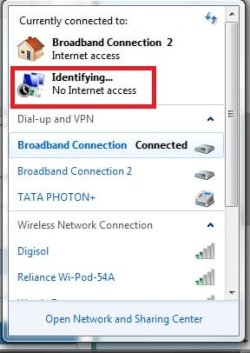
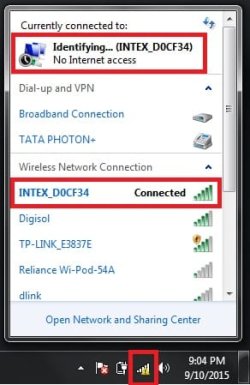
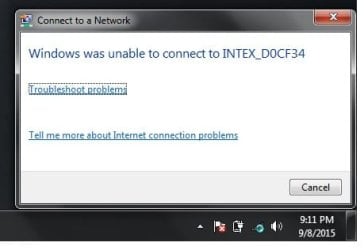
When i again tried to use wifi on laptop it shows following errors. Pls help ...
1.jpg

2.jpg
 

My Computer My Computer

Computer type
Laptop
Computer Manufacturer/Model Number
dell inspiron 1425
OS
windows 7 32 bit
Can you connect with ethernet connection?

Also try Safe Mode with Networking. (http://www.sevenforums.com/tutorials/69585-safe-mode.html)
You can also try a clean startup - http://www.sevenforums.com/tutorial...ation-conflicts-performing-clean-startup.html

Run devmgmt.msc - Is the wireless card (under network adapters) working ok or any issues reported (yellow exclamation or such).
Which security software are you running? AV/Firewall/anti-malware etc.
Do you have Bonjour service (services.msc) installed?
 

My Computer My Computer

Computer type
PC/Desktop
Computer Manufacturer/Model Number
Custom Build
OS
Windows 7 Ultimate x64 SP1
CPU
AMD Phenom 2 1090T
Motherboard
Gigabyte GA-890FXA-UD5
Memory
2x8GB Kingston HyperX Fury Black 1600Mhz Unganged
Graphics Card(s)
MSI GTX 970 Gaming 4G
Sound Card
Realtek On-Board HD 7.1 Audio / Logitech G35
Monitor(s) Displays
3xAcer GD245HQ
Screen Resolution
1920x1080
Hard Drives
Samsung 850 Pro 512GB SSD - OS /
WD Caviar Black SATA 3 - 1 TBx2 - Dynamic RAID 0 /
WD Caviar Green SATA 2 - 640GBx2 - Dynamic RAID 0 /
WD Caviar Green SATA 2 - 640GB - Internal Backup /
Seagate Barracude SATA 3 - 3TB - External Backup/ Sync
PSU
HighPower 1000W
Case
Cooler Master HAF 932
Cooling
Noctua NH-D14
Keyboard
Logitech G19
Mouse
Logitech G500
Internet Speed
100/4 Mbit Cable (100GB quota)
Antivirus
ZoneAlarm Extreme Security / MBAM Pro / MBAE Free / SAS Free
Browser
IE 11 - Firefox - Chrome
Other Info
Logitech F710/ G27/ G940/ Z5500 // TrackIR 5 // Nvidia 3D Surround Vision
i can connect with ethernet connection.

in safe mode....same error
clean start up....same error

wireless card working fine...no issue like exclamation in yellow
security software...none... i use avast anti virus
dont have bonjour service in service.msc

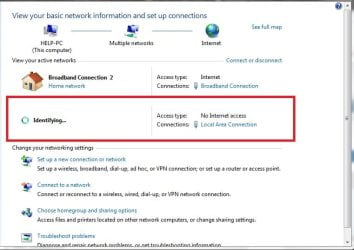
i get no interne access even though connected with LAN
3.jpg
 

My Computer My Computer

Computer type
Laptop
Computer Manufacturer/Model Number
dell inspiron 1425
OS
windows 7 32 bit

My Computer My Computer

Computer type
PC/Desktop
Computer Manufacturer/Model Number
Custom Build
OS
Windows 7 Ultimate x64 SP1
CPU
AMD Phenom 2 1090T
Motherboard
Gigabyte GA-890FXA-UD5
Memory
2x8GB Kingston HyperX Fury Black 1600Mhz Unganged
Graphics Card(s)
MSI GTX 970 Gaming 4G
Sound Card
Realtek On-Board HD 7.1 Audio / Logitech G35
Monitor(s) Displays
3xAcer GD245HQ
Screen Resolution
1920x1080
Hard Drives
Samsung 850 Pro 512GB SSD - OS /
WD Caviar Black SATA 3 - 1 TBx2 - Dynamic RAID 0 /
WD Caviar Green SATA 2 - 640GBx2 - Dynamic RAID 0 /
WD Caviar Green SATA 2 - 640GB - Internal Backup /
Seagate Barracude SATA 3 - 3TB - External Backup/ Sync
PSU
HighPower 1000W
Case
Cooler Master HAF 932
Cooling
Noctua NH-D14
Keyboard
Logitech G19
Mouse
Logitech G500
Internet Speed
100/4 Mbit Cable (100GB quota)
Antivirus
ZoneAlarm Extreme Security / MBAM Pro / MBAE Free / SAS Free
Browser
IE 11 - Firefox - Chrome
Other Info
Logitech F710/ G27/ G940/ Z5500 // TrackIR 5 // Nvidia 3D Surround Vision
tried ur suggested methods... still not solved.
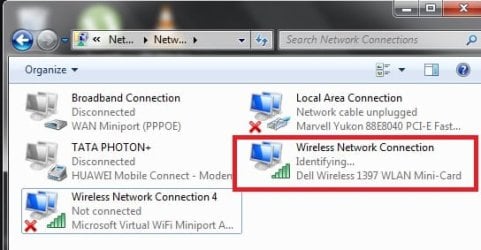
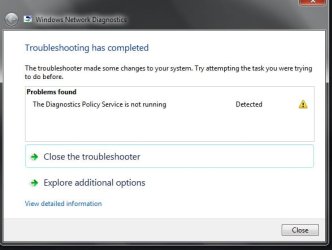
Later deleted wlan mini card adapter and restarted laptop, it connected successfully but still no internet access
5.jpg

4.jpg
 

My Computer My Computer

Computer type
Laptop
Computer Manufacturer/Model Number
dell inspiron 1425
OS
windows 7 32 bit
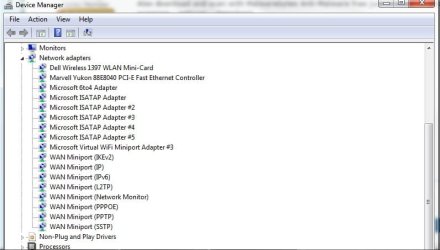
Ok, check one thing please. Open devmgmt.msc (Device Manager). Top Menu - View - Show Hidden Devices. Then expand Network Adapters. Are there more than one Miniport type, as in 2x IP or IPv6 etc.

Is WLAN AutoConfig service started (Automatic). Is the wireless connection configured for auto IP and DNS?

Also download and scan with Malwarebytes Anti-Malware free just in case (enable premium trial and also rootkit scanning - settings - detection).
 

My Computer My Computer

Computer type
PC/Desktop
Computer Manufacturer/Model Number
Custom Build
OS
Windows 7 Ultimate x64 SP1
CPU
AMD Phenom 2 1090T
Motherboard
Gigabyte GA-890FXA-UD5
Memory
2x8GB Kingston HyperX Fury Black 1600Mhz Unganged
Graphics Card(s)
MSI GTX 970 Gaming 4G
Sound Card
Realtek On-Board HD 7.1 Audio / Logitech G35
Monitor(s) Displays
3xAcer GD245HQ
Screen Resolution
1920x1080
Hard Drives
Samsung 850 Pro 512GB SSD - OS /
WD Caviar Black SATA 3 - 1 TBx2 - Dynamic RAID 0 /
WD Caviar Green SATA 2 - 640GBx2 - Dynamic RAID 0 /
WD Caviar Green SATA 2 - 640GB - Internal Backup /
Seagate Barracude SATA 3 - 3TB - External Backup/ Sync
PSU
HighPower 1000W
Case
Cooler Master HAF 932
Cooling
Noctua NH-D14
Keyboard
Logitech G19
Mouse
Logitech G500
Internet Speed
100/4 Mbit Cable (100GB quota)
Antivirus
ZoneAlarm Extreme Security / MBAM Pro / MBAE Free / SAS Free
Browser
IE 11 - Firefox - Chrome
Other Info
Logitech F710/ G27/ G940/ Z5500 // TrackIR 5 // Nvidia 3D Surround Vision
done as u said..
no threats from malwarebytes
wireless config is auto IP
7.jpg

6.jpg
 

My Computer My Computer

Computer type
Laptop
Computer Manufacturer/Model Number
dell inspiron 1425
OS
windows 7 32 bit
Try disabling MS Virtual WiFi Miniport Adapter.
Can you post a screenshot of "Network and Sharing Center" while trying to connect please?
Also Windows Firewall should be working since you don't have a 3rd party one. Open it in Control Panel and disable for both public and private networks.

Don't do this yet. posting so I won't forget :) Download Download Complete Internet Repair - MajorGeeks
 

My Computer My Computer

Computer type
PC/Desktop
Computer Manufacturer/Model Number
Custom Build
OS
Windows 7 Ultimate x64 SP1
CPU
AMD Phenom 2 1090T
Motherboard
Gigabyte GA-890FXA-UD5
Memory
2x8GB Kingston HyperX Fury Black 1600Mhz Unganged
Graphics Card(s)
MSI GTX 970 Gaming 4G
Sound Card
Realtek On-Board HD 7.1 Audio / Logitech G35
Monitor(s) Displays
3xAcer GD245HQ
Screen Resolution
1920x1080
Hard Drives
Samsung 850 Pro 512GB SSD - OS /
WD Caviar Black SATA 3 - 1 TBx2 - Dynamic RAID 0 /
WD Caviar Green SATA 2 - 640GBx2 - Dynamic RAID 0 /
WD Caviar Green SATA 2 - 640GB - Internal Backup /
Seagate Barracude SATA 3 - 3TB - External Backup/ Sync
PSU
HighPower 1000W
Case
Cooler Master HAF 932
Cooling
Noctua NH-D14
Keyboard
Logitech G19
Mouse
Logitech G500
Internet Speed
100/4 Mbit Cable (100GB quota)
Antivirus
ZoneAlarm Extreme Security / MBAM Pro / MBAE Free / SAS Free
Browser
IE 11 - Firefox - Chrome
Other Info
Logitech F710/ G27/ G940/ Z5500 // TrackIR 5 // Nvidia 3D Surround Vision
password

Sounds to me its looking to verify the password.

Roy
 

My Computer My Computer

Computer type
PC/Desktop
Computer Manufacturer/Model Number
medionl/Aspire 6930G/acer x55a
OS
W7 home premium 32bit/W7HP 64bit/w10 tp insider ring
CPU
E5300 dual core
Motherboard
medion MS7366
Memory
3gb
Graphics Card(s)
Nvidia Geforce 7100 Nforce 630i
Monitor(s) Displays
avixc
Internet Speed
n (isp resticted to 72)
Antivirus
mse/pands
Browser
palemoon
Other Info
Belkin Fd7050 n USB using Railink RT2870 drivers, more upto date
I wonder if it is a router issue. Can you try your laptop with another router (both wired and wireless)?
Is the wifi router brand new or previously used? Did you factory reset it if used?
 

My Computer My Computer

Computer type
PC/Desktop
Computer Manufacturer/Model Number
Custom Build
OS
Windows 7 Ultimate x64 SP1
CPU
AMD Phenom 2 1090T
Motherboard
Gigabyte GA-890FXA-UD5
Memory
2x8GB Kingston HyperX Fury Black 1600Mhz Unganged
Graphics Card(s)
MSI GTX 970 Gaming 4G
Sound Card
Realtek On-Board HD 7.1 Audio / Logitech G35
Monitor(s) Displays
3xAcer GD245HQ
Screen Resolution
1920x1080
Hard Drives
Samsung 850 Pro 512GB SSD - OS /
WD Caviar Black SATA 3 - 1 TBx2 - Dynamic RAID 0 /
WD Caviar Green SATA 2 - 640GBx2 - Dynamic RAID 0 /
WD Caviar Green SATA 2 - 640GB - Internal Backup /
Seagate Barracude SATA 3 - 3TB - External Backup/ Sync
PSU
HighPower 1000W
Case
Cooler Master HAF 932
Cooling
Noctua NH-D14
Keyboard
Logitech G19
Mouse
Logitech G500
Internet Speed
100/4 Mbit Cable (100GB quota)
Antivirus
ZoneAlarm Extreme Security / MBAM Pro / MBAE Free / SAS Free
Browser
IE 11 - Firefox - Chrome
Other Info
Logitech F710/ G27/ G940/ Z5500 // TrackIR 5 // Nvidia 3D Surround Vision
Router is brand new, did factory reset too...
used another laptop and facing same limited connectivity issue...
But how come i can configure router through mobile but not through any laptop???
Also i connected my laptop by using wifi hospot on my mobile, it also showed limited connectivity.
IS IT LAPTOP ISSUE OR ROUTER???
 

My Computer My Computer

Computer type
Laptop
Computer Manufacturer/Model Number
dell inspiron 1425
OS
windows 7 32 bit
How is the wireless security set in the router? Are your wireless connections configured to use DHCP?
 

My Computer My Computer

Computer type
PC/Desktop
Computer Manufacturer/Model Number
Custom Build
OS
Windows 7 Ultimate x64 SP1
CPU
AMD Phenom 2 1090T
Motherboard
Gigabyte GA-890FXA-UD5
Memory
2x8GB Kingston HyperX Fury Black 1600Mhz Unganged
Graphics Card(s)
MSI GTX 970 Gaming 4G
Sound Card
Realtek On-Board HD 7.1 Audio / Logitech G35
Monitor(s) Displays
3xAcer GD245HQ
Screen Resolution
1920x1080
Hard Drives
Samsung 850 Pro 512GB SSD - OS /
WD Caviar Black SATA 3 - 1 TBx2 - Dynamic RAID 0 /
WD Caviar Green SATA 2 - 640GBx2 - Dynamic RAID 0 /
WD Caviar Green SATA 2 - 640GB - Internal Backup /
Seagate Barracude SATA 3 - 3TB - External Backup/ Sync
PSU
HighPower 1000W
Case
Cooler Master HAF 932
Cooling
Noctua NH-D14
Keyboard
Logitech G19
Mouse
Logitech G500
Internet Speed
100/4 Mbit Cable (100GB quota)
Antivirus
ZoneAlarm Extreme Security / MBAM Pro / MBAE Free / SAS Free
Browser
IE 11 - Firefox - Chrome
Other Info
Logitech F710/ G27/ G940/ Z5500 // TrackIR 5 // Nvidia 3D Surround Vision
Tried configuring wifi router on my laptop but the login page was not loading.....neither on chrome nor on IE.
Later Successfully configured Router through mobile, i was able to use internet through wifi on my mobile without any problem.
When i again tried to use wifi on laptop it shows following errors. Pls help ...
View attachment 371015

View attachment 371016

Log in to your Router again and change the security type and pass phrase.. and try to connect again, Change your SSID as well..
 

My Computer My Computer

Computer type
PC/Desktop
Computer Manufacturer/Model Number
Dell
OS
Windows 7, 8.1 Dual boot 64 bit
CPU
Core I7
Motherboard
asus
Memory
16 GB
Graphics Card(s)
nVIDIA
Hard Drives
1tb
Antivirus
None
Browser
IE, Chormw
Even Though i connected my Laptop Through LAN, it shows as below... I can use internet without any problem
8.jpg
 

My Computer My Computer

Computer type
Laptop
Computer Manufacturer/Model Number
dell inspiron 1425
OS
windows 7 32 bit
How is the wireless security set in the router? Are your wireless connections configured to use DHCP?

Don't know anything about this....
 

My Computer My Computer

Computer type
Laptop
Computer Manufacturer/Model Number
dell inspiron 1425
OS
windows 7 32 bit
Tried configuring wifi router on my laptop but the login page was not loading.....neither on chrome nor on IE.
Later Successfully configured Router through mobile, i was able to use internet through wifi on my mobile without any problem.
When i again tried to use wifi on laptop it shows following errors. Pls help ...
View attachment 371015

View attachment 371016

Log in to your Router again and change the security type and pass phrase.. and try to connect again, Change your SSID as well..

Please explain how to do this... i cant login router through my laptop
 

My Computer My Computer

Computer type
Laptop
Computer Manufacturer/Model Number
dell inspiron 1425
OS
windows 7 32 bit
Well nothing wireless related in that screenshot.

Are there any other modem/router attached to your network?
Disconnect broadband and use Ethernet (wire) only, remove any other devices. (Just your PC and router).
 

My Computer My Computer

Computer type
PC/Desktop
Computer Manufacturer/Model Number
Custom Build
OS
Windows 7 Ultimate x64 SP1
CPU
AMD Phenom 2 1090T
Motherboard
Gigabyte GA-890FXA-UD5
Memory
2x8GB Kingston HyperX Fury Black 1600Mhz Unganged
Graphics Card(s)
MSI GTX 970 Gaming 4G
Sound Card
Realtek On-Board HD 7.1 Audio / Logitech G35
Monitor(s) Displays
3xAcer GD245HQ
Screen Resolution
1920x1080
Hard Drives
Samsung 850 Pro 512GB SSD - OS /
WD Caviar Black SATA 3 - 1 TBx2 - Dynamic RAID 0 /
WD Caviar Green SATA 2 - 640GBx2 - Dynamic RAID 0 /
WD Caviar Green SATA 2 - 640GB - Internal Backup /
Seagate Barracude SATA 3 - 3TB - External Backup/ Sync
PSU
HighPower 1000W
Case
Cooler Master HAF 932
Cooling
Noctua NH-D14
Keyboard
Logitech G19
Mouse
Logitech G500
Internet Speed
100/4 Mbit Cable (100GB quota)
Antivirus
ZoneAlarm Extreme Security / MBAM Pro / MBAE Free / SAS Free
Browser
IE 11 - Firefox - Chrome
Other Info
Logitech F710/ G27/ G940/ Z5500 // TrackIR 5 // Nvidia 3D Surround Vision
Tried configuring wifi router on my laptop but the login page was not loading.....neither on chrome nor on IE.
Later Successfully configured Router through mobile, i was able to use internet through wifi on my mobile without any problem.
When i again tried to use wifi on laptop it shows following errors. Pls help ...
View attachment 371015

View attachment 371016

Log in to your Router again and change the security type and pass phrase.. and try to connect again, Change your SSID as well..

Please explain how to do this... i cant login router through my laptop
bro through ur cellphone. .... u said it ... u can log in through ur cellphone


Plz also tell me ur router brand
 

My Computer My Computer

Computer type
PC/Desktop
Computer Manufacturer/Model Number
Dell
OS
Windows 7, 8.1 Dual boot 64 bit
CPU
Core I7
Motherboard
asus
Memory
16 GB
Graphics Card(s)
nVIDIA
Hard Drives
1tb
Antivirus
None
Browser
IE, Chormw
Back
Top