
Thumbnails - Enable or Disable - Add to Context Menu

Add "Enable/Disable Thumbnails" to Context Menu in Vista, Windows 7, and Windows 8


   Information
This tutorial will show you how to add or remove Enable/Disable Thumbnails to the desktop, library, and folder window context menu for users to be able to toggle their explorer thumbnail previews on or off with a single click in Vista, Windows 7, and Windows 8.

   Note
When you right click or press and hold on an empty area of your Desktop and click/tap on Enable/Disable Thumbnails, the thumbnail previews will instantly show as turned on or off. You will need to refresh (F5) any other currently opened inactive window to have the thumbnail previews show as on or off.

When you right click or press and hold on an empty area in the main window of a library or folder and click/tap on Enable/Disable Thumbnails, the thumbnail previews will instantly show as turned on or off in that window. You may need to refresh (F5) any other currently opened inactive window to have the thumbnail previews show as on or off.


EXAMPLE: "Enable/Disable Thumbnails" Added to Context Menu
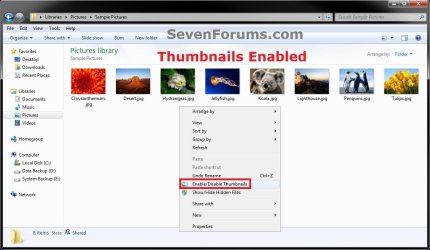
Enabled.jpg

Disabled.jpg


OPTION ONE

To Add "Enable/Disable Thumbnails" to Context Menu


1. Do either step 2 or 3 below for what you would like.


2. To Toggle Thumbnails Enabled or Disabled with Notify Sound Played
NOTE: When you click on the Enable/Disable Thumbnails context menu item using this option, you will hear the notify.wav file play only if Window Media Player is set as the default program for .wav files. If you do not have Window Media Player turned on in Windows Features, then you will get an error instead of the sound playing.
A) Click on the Download button below to download the file below, and go to step 4 below.
NOTE: This includes all "hidden files, folders, or drives" and "hidden protected operating system files".
Add_Enable-Disable_Thumbnails_with_Sound.zip


Download


3. To Toggle Thumbnails Enabled or Disabled without any Sound
NOTE: This option is if you did not want to have the Notify.wav play when you use the Enable/Disable Thumbnails context menu item, or if you get an error from using step 2 since you have Windows Media Player turned off in Windows Features.
A) Click on the Download button below to download the file below, and go to step 4 below.
NOTE: This includes all "hidden files, folders, or drives" and "hidden protected operating system files".
Add_Enable-Disable_Thumbnails.zip


Download


4. Save the .zip file to your desktop.

5. Open the downloaded ZIP file, and extract (drag and drop) both the .reg and .vbs files to your desktop.

6. Right click on the extracted .vbs file, click/tap on Properties, click/tap on the General tab, and unblock it.
NOTE: If you do not see a Unblock button, then the file is already unblocked.

7. Right click on the extracted and unblocked .vbs file on your desktop, and click/tap on Copy.

8. In Windows Explorer, navigate to and open the C:\Windows folder. Right click on an empty area in the C:\Window folder, click/tap on Paste, then click/tap on Continue and Yes (UAC) if prompted. Close the Windows Explorer window.

9. Double click/tap on the extracted .reg file on your desktop to merge it.

10. Click/tap on Run, Yes (UAC-Windows 7/8) or Continue (UAC-Vista), Yes, and OK when prompted.

11. Enable/Disable Thumbnails has now been added to the context menu.

12. You can now delete the downloaded files left on your desktop if you like.


OPTION TWO

To Remove "Enable/Disable Thumbnails" from Context Menu


NOTE: This is the default setting.
1. Click/tap on the Download button below to download the file below, and save it to your desktop.
Remove_Enable-Disable_Thumbnails.reg


Download


2. Double click/tap on the downloaded .reg file to merge it.

3. Click/tap on Run, Yes (UAC-Windows 7/8) or Continue (UAC-Vista), Yes, and OK when prompted.

4. Enable/Disable Thumbnails has now been removed from the context menu.

5. In Windows Explorer, navigate to and open the C:\Windows folder, right click on the file below, click/tap on Delete, and Yes (if prompted).
Toggle-Thumbnails-ON-OFF.vbs

OR

Toggle-Thumbnails-ON-OFF_with_Sound.vbs
6. You can now delete the downloaded reg file if you like.
That's it,
Shawn


Attachments

Last edited:
truly amazing stuff love it thanks for the help matty
 

My Computer My Computer

At a glance

Windows 7 Ultimate 64 Bit Sp1Intel Quad Core Q9650Kingston DDR 3 8GB 1333 MhzGigabyte 5450 1Gb DDR3
Computer type
PC/Desktop
Computer Manufacturer/Model Number
Custom build
OS
Windows 7 Ultimate 64 Bit Sp1
CPU
Intel Quad Core Q9650
Motherboard
Asus P5G41T-MLX
Memory
Kingston DDR 3 8GB 1333 Mhz
Graphics Card(s)
Gigabyte 5450 1Gb DDR3
Sound Card
Mobo Built
Monitor(s) Displays
Dell 24 wm
Screen Resolution
1080 P
Hard Drives
2 Tb Sata Drive
PSU
Coolermatser GX750
Case
Cooler Master Casing
Cooling
Normal
You're welcome Simon. :)
 

My Computer My Computer

At a glance

64-bit Windows 11 Pro for WorkstationsIntel i7-8700K OC'd to 5 GHz64 GB (4x16GB) G.SKILL TridentZ RGB DDR4 3600...ASUS ROG-STRIX-GTX1080TI-O11G-GAMING
Computer type
PC/Desktop
Computer Manufacturer/Model Number
Self built custom
OS
64-bit Windows 11 Pro for Workstations
CPU
Intel i7-8700K OC'd to 5 GHz
Motherboard
ASUS ROG Maximus XI Formula Z390
Memory
64 GB (4x16GB) G.SKILL TridentZ RGB DDR4 3600 MHz
Graphics Card(s)
ASUS ROG-STRIX-GTX1080TI-O11G-GAMING
Sound Card
Integrated
Monitor(s) Displays
2 x Samsung Odyssey G7 27"
Screen Resolution
2560x1440
Hard Drives
1TB Samsung 990 PRO M.2,
4TB Samsung 990 PRO PRO M.2,
TerraMaster F8 SSD Plus NAS
PSU
Seasonic Prime Titanium 850W
Case
Thermaltake Core P3
Cooling
Corsair Hydro H115i
Keyboard
Logitech wireless K800
Mouse
Logitech MX Master 4
Internet Speed
2 Gb/s Download and 100 Mb/s Upload
Antivirus
Malwarebyte Anti-Malware Premium
Browser
Google Chrome
Other Info
Logitech Z625 speaker system,
Logitech BRIO 4K Pro webcam,
HP Color LaserJet Pro MFP M477fdn,
APC SMART-UPS RT 1000 XL - SURT1000XLI,
Galaxy S23 Plus phone
Got this error in Windows7 Ultimate x86. Can you help me? Thanks

C:\WindowsToggle-Thumbnails-ON-OFF.vbs
7
1
Permission denied
800A0046
VBScript run-time error
 

My Computer My Computer

At a glance

Windows 7
OS
Windows 7
Hello Yanez, and welcome to Seven Forums.

Did you unblock the Toggle-Thumbnails-ON-OFF.vbs file before moving it to the C:\Windows folder?
 

My Computer My Computer

At a glance

64-bit Windows 11 Pro for WorkstationsIntel i7-8700K OC'd to 5 GHz64 GB (4x16GB) G.SKILL TridentZ RGB DDR4 3600...ASUS ROG-STRIX-GTX1080TI-O11G-GAMING
Computer type
PC/Desktop
Computer Manufacturer/Model Number
Self built custom
OS
64-bit Windows 11 Pro for Workstations
CPU
Intel i7-8700K OC'd to 5 GHz
Motherboard
ASUS ROG Maximus XI Formula Z390
Memory
64 GB (4x16GB) G.SKILL TridentZ RGB DDR4 3600 MHz
Graphics Card(s)
ASUS ROG-STRIX-GTX1080TI-O11G-GAMING
Sound Card
Integrated
Monitor(s) Displays
2 x Samsung Odyssey G7 27"
Screen Resolution
2560x1440
Hard Drives
1TB Samsung 990 PRO M.2,
4TB Samsung 990 PRO PRO M.2,
TerraMaster F8 SSD Plus NAS
PSU
Seasonic Prime Titanium 850W
Case
Thermaltake Core P3
Cooling
Corsair Hydro H115i
Keyboard
Logitech wireless K800
Mouse
Logitech MX Master 4
Internet Speed
2 Gb/s Download and 100 Mb/s Upload
Antivirus
Malwarebyte Anti-Malware Premium
Browser
Google Chrome
Other Info
Logitech Z625 speaker system,
Logitech BRIO 4K Pro webcam,
HP Color LaserJet Pro MFP M477fdn,
APC SMART-UPS RT 1000 XL - SURT1000XLI,
Galaxy S23 Plus phone
Thanks. I think the file was already unblocked because i didn't find anu Unblock botton.
 

My Computer My Computer

At a glance

Windows 7
OS
Windows 7
Is it working for you now?

If not, then are you logged in as an administrator to be able to move the .vbs file into the C:\Windows folder?
 

My Computer My Computer

At a glance

64-bit Windows 11 Pro for WorkstationsIntel i7-8700K OC'd to 5 GHz64 GB (4x16GB) G.SKILL TridentZ RGB DDR4 3600...ASUS ROG-STRIX-GTX1080TI-O11G-GAMING
Computer type
PC/Desktop
Computer Manufacturer/Model Number
Self built custom
OS
64-bit Windows 11 Pro for Workstations
CPU
Intel i7-8700K OC'd to 5 GHz
Motherboard
ASUS ROG Maximus XI Formula Z390
Memory
64 GB (4x16GB) G.SKILL TridentZ RGB DDR4 3600 MHz
Graphics Card(s)
ASUS ROG-STRIX-GTX1080TI-O11G-GAMING
Sound Card
Integrated
Monitor(s) Displays
2 x Samsung Odyssey G7 27"
Screen Resolution
2560x1440
Hard Drives
1TB Samsung 990 PRO M.2,
4TB Samsung 990 PRO PRO M.2,
TerraMaster F8 SSD Plus NAS
PSU
Seasonic Prime Titanium 850W
Case
Thermaltake Core P3
Cooling
Corsair Hydro H115i
Keyboard
Logitech wireless K800
Mouse
Logitech MX Master 4
Internet Speed
2 Gb/s Download and 100 Mb/s Upload
Antivirus
Malwarebyte Anti-Malware Premium
Browser
Google Chrome
Other Info
Logitech Z625 speaker system,
Logitech BRIO 4K Pro webcam,
HP Color LaserJet Pro MFP M477fdn,
APC SMART-UPS RT 1000 XL - SURT1000XLI,
Galaxy S23 Plus phone
Of course. I have also other vbs script for toggling exstension or file visibility.
And all these works. Only Toggle-Thumbnails-ON-OFF get the error.
In past i have installed the same script in a pc with W7 professional without issues.
 

My Computer My Computer

At a glance

Windows 7
OS
Windows 7
As a test of the .vbs file itself, run the .vbs file on your desktop to see if it will toggle thumbnails on and off for you.
 

My Computer My Computer

At a glance

64-bit Windows 11 Pro for WorkstationsIntel i7-8700K OC'd to 5 GHz64 GB (4x16GB) G.SKILL TridentZ RGB DDR4 3600...ASUS ROG-STRIX-GTX1080TI-O11G-GAMING
Computer type
PC/Desktop
Computer Manufacturer/Model Number
Self built custom
OS
64-bit Windows 11 Pro for Workstations
CPU
Intel i7-8700K OC'd to 5 GHz
Motherboard
ASUS ROG Maximus XI Formula Z390
Memory
64 GB (4x16GB) G.SKILL TridentZ RGB DDR4 3600 MHz
Graphics Card(s)
ASUS ROG-STRIX-GTX1080TI-O11G-GAMING
Sound Card
Integrated
Monitor(s) Displays
2 x Samsung Odyssey G7 27"
Screen Resolution
2560x1440
Hard Drives
1TB Samsung 990 PRO M.2,
4TB Samsung 990 PRO PRO M.2,
TerraMaster F8 SSD Plus NAS
PSU
Seasonic Prime Titanium 850W
Case
Thermaltake Core P3
Cooling
Corsair Hydro H115i
Keyboard
Logitech wireless K800
Mouse
Logitech MX Master 4
Internet Speed
2 Gb/s Download and 100 Mb/s Upload
Antivirus
Malwarebyte Anti-Malware Premium
Browser
Google Chrome
Other Info
Logitech Z625 speaker system,
Logitech BRIO 4K Pro webcam,
HP Color LaserJet Pro MFP M477fdn,
APC SMART-UPS RT 1000 XL - SURT1000XLI,
Galaxy S23 Plus phone
Thanks.
I copied the vsb in the desktop and i run it by contextual menu Open.

First time i got the same error, but i also got a msg that Comodo Antivirus had isolated it in the sandbox.

So I click "don't isolate it anymore" on Comodo msg windows.

Then when i run the script in desktop i get a icons blink but it doesn't toggle icon/thumbnails.

So i moved the vbs script back from desktop to Windows folder
overwriting the old one and now it seem work!

Mysteries!

Thanks for your help!
 
Last edited:

My Computer My Computer

At a glance

Windows 7
OS
Windows 7
Yanez,

Ah, so Comodo was blocking it from running. Glad you got it sorted. :)
 

My Computer My Computer

At a glance

64-bit Windows 11 Pro for WorkstationsIntel i7-8700K OC'd to 5 GHz64 GB (4x16GB) G.SKILL TridentZ RGB DDR4 3600...ASUS ROG-STRIX-GTX1080TI-O11G-GAMING
Computer type
PC/Desktop
Computer Manufacturer/Model Number
Self built custom
OS
64-bit Windows 11 Pro for Workstations
CPU
Intel i7-8700K OC'd to 5 GHz
Motherboard
ASUS ROG Maximus XI Formula Z390
Memory
64 GB (4x16GB) G.SKILL TridentZ RGB DDR4 3600 MHz
Graphics Card(s)
ASUS ROG-STRIX-GTX1080TI-O11G-GAMING
Sound Card
Integrated
Monitor(s) Displays
2 x Samsung Odyssey G7 27"
Screen Resolution
2560x1440
Hard Drives
1TB Samsung 990 PRO M.2,
4TB Samsung 990 PRO PRO M.2,
TerraMaster F8 SSD Plus NAS
PSU
Seasonic Prime Titanium 850W
Case
Thermaltake Core P3
Cooling
Corsair Hydro H115i
Keyboard
Logitech wireless K800
Mouse
Logitech MX Master 4
Internet Speed
2 Gb/s Download and 100 Mb/s Upload
Antivirus
Malwarebyte Anti-Malware Premium
Browser
Google Chrome
Other Info
Logitech Z625 speaker system,
Logitech BRIO 4K Pro webcam,
HP Color LaserJet Pro MFP M477fdn,
APC SMART-UPS RT 1000 XL - SURT1000XLI,
Galaxy S23 Plus phone
For some reason this has stopped working. I tried re-do everything and it's still the same. Wonder if some windows update broke it.
 

My Computer My Computer

At a glance

Windows 7 Home Premium 64bit.
OS
Windows 7 Home Premium 64bit.
For some reason this has stopped working. I tried re-do everything and it's still the same. Wonder if some windows update broke it.

Never mind. It's working again. I was confusing it with another solution using right-clicking on the folder icon.
 

My Computer My Computer

At a glance

Windows 7 Home Premium 64bit.
OS
Windows 7 Home Premium 64bit.
via cmd

Code:
@echo Off
reg query "HKU\S-1-5-19\Environment"
If Not %ERRORLEVEL% EQU 0 (
 cls & echo Schadenfreude..
 pause & exit
)
cls

 echo  Add "Enable/Disable Thumbnails" to Context Menu:
(
 echo Registry = "HKCU\Software\Microsoft\Windows\CurrentVersion\Explorer\Advanced\IconsOnly"
 echo Set Command = CreateObject^("WScript.Shell"^)
 echo Thumbnails = Command.RegRead^(Registry^)
 echo If Thumbnails = 0 Then
 echo Command.RegWrite Registry, 1, "REG_DWORD"
 echo Else
 echo Command.RegWrite Registry, 0, "REG_DWORD"
 echo End If
 echo Command.SendKeys "{F5}"
 echo.
) > %SystemRoot%\Toggle-Thumbnails-ON-OFF.vbs
echo.
reg add "HKCR\Directory\Background\shell\Enable/Disable Thumbnails"             /v "Icon" /d "imageres.dll,-72"                                /f
reg add "HKCR\LibraryFolder\Background\shell\Enable/Disable Thumbnails"         /v "Icon" /d "imageres.dll,-72"                                /f
reg add "HKCR\Directory\Background\shell\Enable/Disable Thumbnails\command"     /ve       /d "WScript C:\Windows\Toggle-Thumbnails-ON-OFF.vbs" /f
reg add "HKCR\LibraryFolder\Background\shell\Enable/Disable Thumbnails\command" /ve       /d "WScript C:\Windows\Toggle-Thumbnails-ON-OFF.vbs" /f
echo.

::  echo  Remove "Enable/Disable Thumbnails" from Context Menu:
:: reg delete "HKCR\Directory\Background\shell\Enable/Disable Thumbnails"     /f
:: reg delete "HKCR\LibraryFolder\Background\shell\Enable/Disable Thumbnails" /f 
:: echo.

pause & exit
 

My Computer My Computer

At a glance

windows7 ultimate x32DualCore Intel Core 2 Duo E8400, 3000 MHz (9 ...4Gb (1x4 DDR2-800 DDR2 SDRAM)NVIDIA GeForce 9600 GT (512 mb)
OS
windows7 ultimate x32
CPU
DualCore Intel Core 2 Duo E8400, 3000 MHz (9 x 333)
Motherboard
ASRock 4Core1333-GLAN (3 PCI,1 PCI-E x16,4 DDR2 DIMM...)
Memory
4Gb (1x4 DDR2-800 DDR2 SDRAM)
Graphics Card(s)
NVIDIA GeForce 9600 GT (512 mb)
Sound Card
onboard
Monitor(s) Displays
lg flatron w2242t
Screen Resolution
1680 x 1050
Hard Drives
WDC WD5000AAJS-00YFA0 ATA Device
PSU
-
Case
-
Cooling
-
Other Info
d-link dir100
Back
Top