Solved Having Trouble Running "System File Checker (SFC)"!

rubyrubyroo

I defy U 2 define me
Guru
Local time
3:01 PM
Messages
1,108
Location
tampa bay area, fl
I really need some help here, guys! What am I doing wrong? I'm unable to run System File Checker (SFC). It generates the following text no matter how I try to execute the command (paraphrasing):


  • SFC is checking the integrity of your system files, this may take a few minutes....
  • (pauses 2-3 seconds)
  • SFC cannot run since System Recovery has repair(s) pending. Please restart the system to allow the repair(s) to complete.
  • (returns control to command prompt)
I can get the exact wording if it would help. Anyway, I have one disk with two partitions, the 100MB boot partition, and a ~450GB system partition; the former is active. I've run the command using every possible switch(es). Since I'm running SPC BECAUSE Windows is not starting up fully, I obviously can't run it from within that Windows environment (Win7 Home Premium 64-bit), but I've run it from the Windows System Recovery command prompt and from a Windows retail installation DVD command prompt window. System Recovery previously stated that it believed the problem was from a driver or system file that was recently installed or became corrupt. After MANY, MANY repeated runs through System Recovery, it now says that it finds no problems and windows loads without problem - but nothing has (outwardly) changed whatsoever. I can't get to login screen, just blackness and the mouse cursor after win-logo screen. No waiting for hours or key-combination will do anything at that point.

So what am I doing wrong? One example of many incarnations of the command I have used would be: SFC /SCANNOW (or: SFC /SCANNOW /OFFWINDIR=D:\Windows /OFFBOOTDIR=C:\).

PLEASE HELP ME! I’m pulling my hair out as you read this sentence!

Thanks!
 

My Computer My Computer

At a glance

MS Windows 7 Home Premium SP1 64-bit (Family ...AMD Phenom II X6: Black Ed 1090T - AM3 / 3.2G...2 dual ch sets OCZ DDR3 PC3-10666 Platinum 13...Onboard
Computer Manufacturer/Model Number
Custom self build - Desktop
OS
MS Windows 7 Home Premium SP1 64-bit (Family Pack Lic.) Upgrade
CPU
AMD Phenom II X6: Black Ed 1090T - AM3 / 3.2GHz / 8MB
Motherboard
Biostar TA790XE3
Memory
2 dual ch sets OCZ DDR3 PC3-10666 Platinum 1333MHz 8GB total
Graphics Card(s)
Onboard
Sound Card
Onboard 5.1 channel HD
Monitor(s) Displays
SyncMaster "Legal-sized" LCD (rotatable)
Screen Resolution
unknown (8.5"x15")? pixels are not known
Hard Drives
HDD1: WD RE3 Enterprize [p/n: WD500ABYS-NDW]
________SATA-II (3Gb/s) 500GB/7200rpm/16MB

HDD2: Deskstar 7K1000.C [p/n: HDS721010CLA332]
________SATA-II (3Gb/s) 1TB/7200rpm/32MB
PSU
Antec 900W mATX 20+4 w/6-8SATA;2MLX;4x6(+2)PCIe[p/n HCG-900]
Case
Mid 10-bay tower - free space design interior & well vented
Cooling
CPU HS cooler, 14.5" Case-sysfan1, dual sysfan2, exhaust
Keyboard
Blue Star Ergonomic - ps/2
Mouse
LED coorded w/v. roller wheel - ps/2
Internet Speed
GbLAN 10/100/1000 & WLAN - on T1 (Peer Network)
Other Info
Harmon-Karden speakers (L,R @ sub)

APC (Lead/Acid Batt backup UPC+Surge protector+etc)

Sony DVD SATA(300) - RW DVD/CD SATA-II(300)
Hello ruby mate try these for starters if you haven't already because it smacks of something untoward


http://www.sevenforums.com/tutorials/433-disk-check.html< if necessary include the /f and /r in the command line as per Option2 - if it will let you

http://www.superantispyware.com/

http://www.malwarebytes.org/products/malwarebytes_free/

http://www.bleepingcomputer.com/download/adwcleaner/

ADW download from bleeping computer delete any rubbish found with themalware scans

(NBIf one is running Kaspersky security it may rant about ADW - just ignore it ordisable Kaspersky while the ADW is being used)

My next course of action would be this if it were my machine Download Kaspersky Rescue Disk 10 you will see that you will need to make a bootable disk or stick (I prefer disk) and set the BIOS to boot from that source.
 

My Computer My Computer

At a glance

Desk1 7 Home Prem / Desk2 10 Pro / Main lap A...Desk1 i5 3750K / Laptop i7 GTX 860M / Desk2 i...Desk1 8GB (1866) / Desk2 16GB (1333) / Laptop...Desk 1& 2NVidia GTX 650 & Laptops on board Intel
Computer type
PC/Desktop
Computer Manufacturer/Model Number
Own build (new) Desk1 / Asus ROG Win 7 / Desk2 1st build
OS
Desk1 7 Home Prem / Desk2 10 Pro / Main lap Asus ROG 10 Pro 2 laptop Toshiba 7 Pro Asus P2520 7 & 10
CPU
Desk1 i5 3750K / Laptop i7 GTX 860M / Desk2 i5 2500
Motherboard
Desk1 Asus P877-V / Desk2 Gigabyte H67 UD3H / Laptop ?
Memory
Desk1 8GB (1866) / Desk2 16GB (1333) / Laptop 8Gb DDR3
Graphics Card(s)
Desk 1& 2NVidia GTX 650 & Laptops on board Intel
Sound Card
Desk 1 & 2 -XONAR DG Realtek High Def audio Laptop
Monitor(s) Displays
Desk 1 Benq HD 2450 / Desk2 Philips 24" / Laptop 17.5"
Screen Resolution
1920x1080 D1 & D2 & Laptop 1
Hard Drives
Desk1 Samsung 120GB 830 SSD
Asus ROG 256GB 850 Pro SSD
Desk2 Samsung 840 256 SSD
Toshiba 120GB EVO
PSU
Desk 1 Corsair HX 1050/ Laptop ? / Desk 2 Corsair HX 650
Case
Desk 1 Cooler HAF XM ? Toshiba laptop / Desk2 Coolermaster
Cooling
Fans on all Desk1 -2 Desk2 - all Coolermasters 5 Laptop ?
Keyboard
Desk 1 MS Sidewinder X6 Desk 2 MS Sidewinder X 4
Mouse
Desk 1&2 - Gigabyte MS 900 gamer - laptop - Logitec wireless
Internet Speed
ADSL2+
Other Info
One other Desktop (tester) and spare Toshba laptop both with SSD's
Running Kaspersky 2016 ISS on all machines config'd identically
Logitec audio stereo systems on each machine (x3)
Canon MG5250MFC
Router/modem TP-Link running WPA2SK
Hiyya John :D!

I knew someone was going to reply eventually, and I am not at all surprised that it was you that did so! I appreciate the reply! And, yes, untoward this situation very much is!


OK now, not to dispute nor disregard your recommended arsenal of software, but returning to my specific question - are you implying that SPC SHOULD HAVE worked under the conditions I mentioned, and therefore it’s your belief that SPC or one of it’s dependencies was damaged by malware or otherwise became corrupt, and that’s why it’s talking back at me in the way it is? I’m sort of weirded out that I can’t run the damn thing somehow, so I would actually welcome the notion. My remaining hope was based on pulling the HDD and hooking it up to another system via USB or preferably an available SATA port, and then executing SFC using a elevated cmd.exe window w/in the other system’s Windows 7 environment. I just have one concern about the whole idea; presently I only have a couple Win7 Pro and one Home version running, and my luck being what it is, they are all 32-bit, while the damaged system/drive is 64-bit. I don’t believe SFC “goes both ways” so to speak! I could be wrong though (Actually that’s just something I say - I’m never wrong!). Furthermore, there is no reason that I can dream up, which would have precluded it from working using my aforementioned technique(s), yet would allow it to work using this method. Can you (or anyone) offer some words of wisdom on these thoughts please!?

Now, to address your advise. CHKDSK: Done and doner. Ran it on day one of “problem” state, and it discovered nothing but one file that had a bad index, and was unrepairable. And since then I’ve run it again, and it says everything is spectacular now. You might want to take a look at my original post to get these and any other details I provided: http://www.sevenforums.com/general-...gs-black-screen-w-mouse-just-prior-logon.html

I have not run SUPERAntiSpyware (SAS) yet, I don’t know that they actually have a bootable version of their scanner available, but I will double check on that matter.

MBAM is installed on that system and was active up until the end. Again, I question if they have a boot-time version of their scanner. I've personally never used it if they do have such a monster. I’ll check their “other tools” section I suppose.


And ADW suffers from the same problem as the rest of them. Correct me if I’m wrong, but there appears to be a trend here! The solutions are effectively “strange loops”, They require me to load them within windows to fix windows which is just plain broke! Now if I had another 64-bit system running Windows 7, I think I could use it to scan the drive - with a big ol’ emphasis on the “if” part! I’m not sure if that was not communicated correctly on my part or an oversight on your side of the pond! Irregardless, I’m pretty much at the same place I was last night, or so it seems.

(And nope, despite your relentless promotion of Kaspersky, I do not use it presently. By the way, how exactly would I disable it, seeing as I’m unable to load windows!?...whoa, Deja Vu!)

Finally, regarding “Kaspersky’s recovery disk” I’m assuming it’s got various tools and anti-malware capabilities that execute from a WinPE framework, no? Are you suggesting it for the use of it’s anti-malware, or another purpose? I’m asking this whilst not knowing much about it. I’ll check it out momentarily...

Thanks for the post, maybe I’m missing something, but at least I’m holding onto some hope with the Kaspersky rescue disk for the moment! Any thoughts!?


(And by the way, I’ll drop you a PM later-on to talk a little more off-topic.)
 

My Computer My Computer

At a glance

MS Windows 7 Home Premium SP1 64-bit (Family ...AMD Phenom II X6: Black Ed 1090T - AM3 / 3.2G...2 dual ch sets OCZ DDR3 PC3-10666 Platinum 13...Onboard
Computer Manufacturer/Model Number
Custom self build - Desktop
OS
MS Windows 7 Home Premium SP1 64-bit (Family Pack Lic.) Upgrade
CPU
AMD Phenom II X6: Black Ed 1090T - AM3 / 3.2GHz / 8MB
Motherboard
Biostar TA790XE3
Memory
2 dual ch sets OCZ DDR3 PC3-10666 Platinum 1333MHz 8GB total
Graphics Card(s)
Onboard
Sound Card
Onboard 5.1 channel HD
Monitor(s) Displays
SyncMaster "Legal-sized" LCD (rotatable)
Screen Resolution
unknown (8.5"x15")? pixels are not known
Hard Drives
HDD1: WD RE3 Enterprize [p/n: WD500ABYS-NDW]
________SATA-II (3Gb/s) 500GB/7200rpm/16MB

HDD2: Deskstar 7K1000.C [p/n: HDS721010CLA332]
________SATA-II (3Gb/s) 1TB/7200rpm/32MB
PSU
Antec 900W mATX 20+4 w/6-8SATA;2MLX;4x6(+2)PCIe[p/n HCG-900]
Case
Mid 10-bay tower - free space design interior & well vented
Cooling
CPU HS cooler, 14.5" Case-sysfan1, dual sysfan2, exhaust
Keyboard
Blue Star Ergonomic - ps/2
Mouse
LED coorded w/v. roller wheel - ps/2
Internet Speed
GbLAN 10/100/1000 & WLAN - on T1 (Peer Network)
Other Info
Harmon-Karden speakers (L,R @ sub)

APC (Lead/Acid Batt backup UPC+Surge protector+etc)

Sony DVD SATA(300) - RW DVD/CD SATA-II(300)
Ok mate well I always go through the unanswered posts because so many get left for even weeks and I think it a bit unfair so that is how I pick up stuff.

Now if I am reading it right none of the scans can be done so that is why I included the Kaspersky rescue disk simply because it runs without involving Windows. It will boot and just do it's own thing at least the last time I used it - it did. Now there are other rescue disks that do the same thing and if the KR does not work then we might try the Bitdefender one at least.

I would if it were my machine be very suspicious that it loops through SFC if that is what I am reading it as and why I suggested the scanners. Now I think SAS and MBAM do have portable versions but have not tried those.

Now unless I have it terribly wrong too isn't the SFC a x86 system tool? if so it should run via a 64bit machine seeing the Windows has the Program files x86 as well as the straight Program files. I don't think it would do any harm anyway if you tried it at least.

Let me know how the KR goes:)
 

My Computer My Computer

At a glance

Desk1 7 Home Prem / Desk2 10 Pro / Main lap A...Desk1 i5 3750K / Laptop i7 GTX 860M / Desk2 i...Desk1 8GB (1866) / Desk2 16GB (1333) / Laptop...Desk 1& 2NVidia GTX 650 & Laptops on board Intel
Computer type
PC/Desktop
Computer Manufacturer/Model Number
Own build (new) Desk1 / Asus ROG Win 7 / Desk2 1st build
OS
Desk1 7 Home Prem / Desk2 10 Pro / Main lap Asus ROG 10 Pro 2 laptop Toshiba 7 Pro Asus P2520 7 & 10
CPU
Desk1 i5 3750K / Laptop i7 GTX 860M / Desk2 i5 2500
Motherboard
Desk1 Asus P877-V / Desk2 Gigabyte H67 UD3H / Laptop ?
Memory
Desk1 8GB (1866) / Desk2 16GB (1333) / Laptop 8Gb DDR3
Graphics Card(s)
Desk 1& 2NVidia GTX 650 & Laptops on board Intel
Sound Card
Desk 1 & 2 -XONAR DG Realtek High Def audio Laptop
Monitor(s) Displays
Desk 1 Benq HD 2450 / Desk2 Philips 24" / Laptop 17.5"
Screen Resolution
1920x1080 D1 & D2 & Laptop 1
Hard Drives
Desk1 Samsung 120GB 830 SSD
Asus ROG 256GB 850 Pro SSD
Desk2 Samsung 840 256 SSD
Toshiba 120GB EVO
PSU
Desk 1 Corsair HX 1050/ Laptop ? / Desk 2 Corsair HX 650
Case
Desk 1 Cooler HAF XM ? Toshiba laptop / Desk2 Coolermaster
Cooling
Fans on all Desk1 -2 Desk2 - all Coolermasters 5 Laptop ?
Keyboard
Desk 1 MS Sidewinder X6 Desk 2 MS Sidewinder X 4
Mouse
Desk 1&2 - Gigabyte MS 900 gamer - laptop - Logitec wireless
Internet Speed
ADSL2+
Other Info
One other Desktop (tester) and spare Toshba laptop both with SSD's
Running Kaspersky 2016 ISS on all machines config'd identically
Logitec audio stereo systems on each machine (x3)
Canon MG5250MFC
Router/modem TP-Link running WPA2SK
I've run Kaspersky RD 10, using the most detailed powerful options available under settings (deep scan), and it located two trojans which were deleted successfully (although they've probably already unloaded their "payload" and done whatever damage they were intended to do, IMO.) Other than that one file that was called a NotAVirus:PotentiallyIllegalSoftware, which means it was some sort of key-generator or cracked program that was recognized as such. I removed that file, although I know what it was (nothing illegal) and located in a dormant deep sub-folder where I personal placed it many years ago. The point is that it seems unlikely related - again, IMO.

Kaspersky took 6 hours to scan <200GB!!! Geez! But I did use the 'registry explorer' s/w it included to look for obvious things that might cause the problem, and while I'm not an expert I pretty much know my way around the registry - and saw nothing suspicious.

I ran Bitdefender, (which is very slow compared to Kaspersky) and it came up empty handed, 100% clean!

The problem still persists, unchanged! :cry:


ICIT2LOL said:
I would if it were my machine be very suspicious that it loops through SFC if
that is what I am reading it as and why I suggested the scanners.

I just wanted to be sure were on the same page here, when you say "loops through", I think you understand me, that it basically starts to look like it's working for about a three seconds, then it gives the message about recovery having pending repairs, and goes back to the command prompt. It's probably just the wording, but I wanted to be clear that there was not any actual "looping", like loss of control to the program where it endlessly runs or anything like that.


ICIT2LOL said:
Now I think SAS and MBAM do have portable versions but have not tried those.

I searched the manufacturer's websites, and personally couldn't locate them. That's really the only place I would D/L it from. I probably looked right past it, so I'm not saying it's not there, only that "these ol' eyes" Couldn't locate them!


ICIT2LOL said:
Now unless I have it terribly wrong too isn't the SFC a x86 system tool? if so
it should run via a 64bit machine

I'm not sure, it's on both systems but I can't compare them according to size even since the one may be corrupted or infected. You're probably right (good call if so!), but that thought in turn leads me to wonder about another potential problem. I don't know the specifics of how SFC works, most importantly how it decides where to locate clean versions of the system files it is analyzing so that it can compare them to the system files your checking and to use for replacing those that are damaged. Windows keeps a separate copy of all these files for such purposes, so there would be a copy of the 64-bit system files on the bad system drive and a copy of 32-bit files on the 32-bit version of windows that is running on the system I hook the bad drive up to. When SFC looks for a fresh copy of a 64-bit file I would expect it goes to the ACTIVELY RUNNING SYSTEM'S system file cashe (like using "%windir%/<whatever>" - but that points to the 32-bit backed-up system files! Maybe I'm wrong, but do you follow my logic at least? If I happen to be right, I may get x86 files written over a great deal of my 64-bit system files! Even if SFC only uses the backed up system files for replacing "damaged" files without using them for comparison purposes, it might overwrite any files that are found to be damaged with the wrong version.

It could be that the /OFFWINDIR switch changes both the windows system disk that is scanned AND where it derives fresh copies from. But then it doesn't make sense that for other people having system file issues where a malware has damaged both the system file AND the backup copy on the system disk, since SFC will just copy the damaged version normally, they are told to run SFC from a command prompt in WinPE off the Windows installation DVD for their version of Windows (where the files are easily found undamaged by SFC). This seems to support my hypothesis. It MAY, or I should say I HOPE it does, check to see if the versions match either when SFC is first run or for each file possibly. Good programming habits suggest that it would do so, but not all windows programs/commands do. I honestly don't know...

By the way, did you get a chance to read my other post (URL above)? It addresses how the problem occurred (long story short, Windows updates were set to prompt me first, and one day after many months of not restarting the computer it didn't prompt me but just decided to close everything and restart to update! 64 updates later and Windows started this!)

What da'ya think?

Thanks for the help! I greatly appreciate any I can get right now!:)
 

My Computer My Computer

At a glance

MS Windows 7 Home Premium SP1 64-bit (Family ...AMD Phenom II X6: Black Ed 1090T - AM3 / 3.2G...2 dual ch sets OCZ DDR3 PC3-10666 Platinum 13...Onboard
Computer Manufacturer/Model Number
Custom self build - Desktop
OS
MS Windows 7 Home Premium SP1 64-bit (Family Pack Lic.) Upgrade
CPU
AMD Phenom II X6: Black Ed 1090T - AM3 / 3.2GHz / 8MB
Motherboard
Biostar TA790XE3
Memory
2 dual ch sets OCZ DDR3 PC3-10666 Platinum 1333MHz 8GB total
Graphics Card(s)
Onboard
Sound Card
Onboard 5.1 channel HD
Monitor(s) Displays
SyncMaster "Legal-sized" LCD (rotatable)
Screen Resolution
unknown (8.5"x15")? pixels are not known
Hard Drives
HDD1: WD RE3 Enterprize [p/n: WD500ABYS-NDW]
________SATA-II (3Gb/s) 500GB/7200rpm/16MB

HDD2: Deskstar 7K1000.C [p/n: HDS721010CLA332]
________SATA-II (3Gb/s) 1TB/7200rpm/32MB
PSU
Antec 900W mATX 20+4 w/6-8SATA;2MLX;4x6(+2)PCIe[p/n HCG-900]
Case
Mid 10-bay tower - free space design interior & well vented
Cooling
CPU HS cooler, 14.5" Case-sysfan1, dual sysfan2, exhaust
Keyboard
Blue Star Ergonomic - ps/2
Mouse
LED coorded w/v. roller wheel - ps/2
Internet Speed
GbLAN 10/100/1000 & WLAN - on T1 (Peer Network)
Other Info
Harmon-Karden speakers (L,R @ sub)

APC (Lead/Acid Batt backup UPC+Surge protector+etc)

Sony DVD SATA(300) - RW DVD/CD SATA-II(300)
I just wanted to be sure were on the same page here, when you say "loops through", I think you understand me, that it basically starts to look like it's working for about a three seconds, then it gives the message about recovery having pending repairs, and goes back to the command prompt.

Yes mate in a nutshell just another way I suppose of saying it is bouncing back to the start up each time.

I am surprised at the time the rescue scans took though KRD has never taken that long with me and the Bitdefender well I not impressed with that either .

Thinking a little left field mate I wonder if the drive is ok see this thread I took part in back in May http://www.sevenforums.com/performance-maintenance/371362-sfc-scannow-wont-run-stuck-win7-logo-screen-2.html

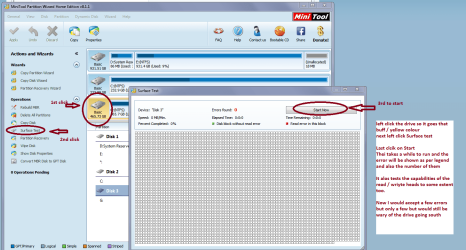
Am also thinking maybe a drive test might not go amiss like Seatools and the surface test via Partition Wizard at very least it would eliminate any problems lying there MiniTool Partition Wizard | Best partition magic alternative for Windows PC and Server see my pic for running it.
 

Attachments

  • MINI TOOL SURFACE 2.PNG
    MINI TOOL SURFACE 2.PNG
    62.3 KB · Views: 2

My Computer My Computer

At a glance

Desk1 7 Home Prem / Desk2 10 Pro / Main lap A...Desk1 i5 3750K / Laptop i7 GTX 860M / Desk2 i...Desk1 8GB (1866) / Desk2 16GB (1333) / Laptop...Desk 1& 2NVidia GTX 650 & Laptops on board Intel
Computer type
PC/Desktop
Computer Manufacturer/Model Number
Own build (new) Desk1 / Asus ROG Win 7 / Desk2 1st build
OS
Desk1 7 Home Prem / Desk2 10 Pro / Main lap Asus ROG 10 Pro 2 laptop Toshiba 7 Pro Asus P2520 7 & 10
CPU
Desk1 i5 3750K / Laptop i7 GTX 860M / Desk2 i5 2500
Motherboard
Desk1 Asus P877-V / Desk2 Gigabyte H67 UD3H / Laptop ?
Memory
Desk1 8GB (1866) / Desk2 16GB (1333) / Laptop 8Gb DDR3
Graphics Card(s)
Desk 1& 2NVidia GTX 650 & Laptops on board Intel
Sound Card
Desk 1 & 2 -XONAR DG Realtek High Def audio Laptop
Monitor(s) Displays
Desk 1 Benq HD 2450 / Desk2 Philips 24" / Laptop 17.5"
Screen Resolution
1920x1080 D1 & D2 & Laptop 1
Hard Drives
Desk1 Samsung 120GB 830 SSD
Asus ROG 256GB 850 Pro SSD
Desk2 Samsung 840 256 SSD
Toshiba 120GB EVO
PSU
Desk 1 Corsair HX 1050/ Laptop ? / Desk 2 Corsair HX 650
Case
Desk 1 Cooler HAF XM ? Toshiba laptop / Desk2 Coolermaster
Cooling
Fans on all Desk1 -2 Desk2 - all Coolermasters 5 Laptop ?
Keyboard
Desk 1 MS Sidewinder X6 Desk 2 MS Sidewinder X 4
Mouse
Desk 1&2 - Gigabyte MS 900 gamer - laptop - Logitec wireless
Internet Speed
ADSL2+
Other Info
One other Desktop (tester) and spare Toshba laptop both with SSD's
Running Kaspersky 2016 ISS on all machines config'd identically
Logitec audio stereo systems on each machine (x3)
Canon MG5250MFC
Router/modem TP-Link running WPA2SK
KRD probably took so long because I selected all the maximum search parameters available from settings. But maybe you've taken that into account already and there is data corruption or rotten sectors!

I'll try the program/application that you've linked to. I trust it too is a bootable version, or so it seems from it's name. :D Thanks for the link and the idea to try the more sophisticated disk scan!

I read through the other post you mentioned, and it's interestingly close to my problem! Differences are clearly present (obviously). CHKDSK has run several times and works fine for me, and my SFC does not "freeze", and finally, my windows logo screen doesn't freeze, the black screen following it does, but with the mouse interrupt still fully functional. While I am amazed at the similarities, I've also noticed these subtle differences between many other posts that hang (or take a tremendous amount of time) at either the logo, black screen w/ or w/o mouse, the logon screen, or just after logon. I'm not sure how closely that is tied to the error's cause (especially if it's something random that's damaged). Because I've seen some that are identical to mine BUT are quickly fixed with last known good config, or safe mode + restart. Just food for thought!

I've attached what may very well be a pertinent log file, especially in light of the fact that the update was the last thing that windows did before this problem started. It only has a little bit of useful data logged towards the end (last 25%) of the file. There is at least one error condition listed, I think I found another error in there as well, but then a few lines refer to the first error as "FATAL". While I don't know all the details of what the information necessarily mean, at least enough to make it useful for me to interpret much from it, the last section of each line is a comment that is pretty readable by the average person. I know there's a line before that that lists where the entry originated (e.g.: AU=Automatic Updater) Most of the numbers are IDs like the process ID is one of them I believe, and so on. Then obviously the date is the first column and the time follows that. So this is a very short time-span, and if you recall I had 64 updates on that day (9/20/15) So only the info from like the last five or so recorded, as I understand it anyway. But, Perhaps you're already well versed in the update log, in which case I'm simply stating a bunch of superfluous information!

Please see if you can make out anything from the file. I going to try to locate the update file(s) it's referring to, especially the erroneous one! But, REALLY, what I'll do with that knowledge I'm unsure, since if the file exists What does that mean or what can I do with it? Pretty much nothing. And if it's absent what does that tell me? Did it not D/L? Did it download and then it has already been used and deleted? Has it been erased by Windows because of the error it detected? I really wouldn't know much more than I do now!

I'll let you know how the drive check goes...
 

My Computer My Computer

At a glance

MS Windows 7 Home Premium SP1 64-bit (Family ...AMD Phenom II X6: Black Ed 1090T - AM3 / 3.2G...2 dual ch sets OCZ DDR3 PC3-10666 Platinum 13...Onboard
Computer Manufacturer/Model Number
Custom self build - Desktop
OS
MS Windows 7 Home Premium SP1 64-bit (Family Pack Lic.) Upgrade
CPU
AMD Phenom II X6: Black Ed 1090T - AM3 / 3.2GHz / 8MB
Motherboard
Biostar TA790XE3
Memory
2 dual ch sets OCZ DDR3 PC3-10666 Platinum 1333MHz 8GB total
Graphics Card(s)
Onboard
Sound Card
Onboard 5.1 channel HD
Monitor(s) Displays
SyncMaster "Legal-sized" LCD (rotatable)
Screen Resolution
unknown (8.5"x15")? pixels are not known
Hard Drives
HDD1: WD RE3 Enterprize [p/n: WD500ABYS-NDW]
________SATA-II (3Gb/s) 500GB/7200rpm/16MB

HDD2: Deskstar 7K1000.C [p/n: HDS721010CLA332]
________SATA-II (3Gb/s) 1TB/7200rpm/32MB
PSU
Antec 900W mATX 20+4 w/6-8SATA;2MLX;4x6(+2)PCIe[p/n HCG-900]
Case
Mid 10-bay tower - free space design interior & well vented
Cooling
CPU HS cooler, 14.5" Case-sysfan1, dual sysfan2, exhaust
Keyboard
Blue Star Ergonomic - ps/2
Mouse
LED coorded w/v. roller wheel - ps/2
Internet Speed
GbLAN 10/100/1000 & WLAN - on T1 (Peer Network)
Other Info
Harmon-Karden speakers (L,R @ sub)

APC (Lead/Acid Batt backup UPC+Surge protector+etc)

Sony DVD SATA(300) - RW DVD/CD SATA-II(300)

Ok now I know why KRD took so long but even so it still was too long in mymind.

Now the updates 64 in one hit seems to be an awful lot and I amwondering what exactly those UD's were and there does seem to be aninordinate number of people having problems after the 10 UD debacle, and my UDhistory there were or are a fair number of failed 10 updates. I very foolishlylet the upgrade UD install on this machine I am on right now and am verytempted to do a clean install so that I can block the darn thing when itcomes. I always set UD's to let me see what there is and then choose what I wantto download, because that way but how you do it is your choice what you use.
I suppose if the worst comes to the worst it might mean a clean install.

Look the listing you sent really mean not a lot to me either it probably would be better to see the history of the latest UD's as I cannot see anything that sticks out obviously. I am wondering to whether it would be good to have a look at the dump files that include the msinfo32, diaxdiag etc

Just a by the by if you have that 10 upgrade KB 3035533 on the machine just be aware it can be uninstalled but if you do what I did as above it embeds itself in the registry under Software > Microsoft > GWX and cannot be removed but the nag and icon in the system tray can be hidden as the nag and icon are very annoying by customizing the system tray and removing the process from Task Manager.


Now as it has you and I a bit at a loss what about asking for some help on this one?? I can post it there if you think it might somewhere.
 

My Computer My Computer

At a glance

Desk1 7 Home Prem / Desk2 10 Pro / Main lap A...Desk1 i5 3750K / Laptop i7 GTX 860M / Desk2 i...Desk1 8GB (1866) / Desk2 16GB (1333) / Laptop...Desk 1& 2NVidia GTX 650 & Laptops on board Intel
Computer type
PC/Desktop
Computer Manufacturer/Model Number
Own build (new) Desk1 / Asus ROG Win 7 / Desk2 1st build
OS
Desk1 7 Home Prem / Desk2 10 Pro / Main lap Asus ROG 10 Pro 2 laptop Toshiba 7 Pro Asus P2520 7 & 10
CPU
Desk1 i5 3750K / Laptop i7 GTX 860M / Desk2 i5 2500
Motherboard
Desk1 Asus P877-V / Desk2 Gigabyte H67 UD3H / Laptop ?
Memory
Desk1 8GB (1866) / Desk2 16GB (1333) / Laptop 8Gb DDR3
Graphics Card(s)
Desk 1& 2NVidia GTX 650 & Laptops on board Intel
Sound Card
Desk 1 & 2 -XONAR DG Realtek High Def audio Laptop
Monitor(s) Displays
Desk 1 Benq HD 2450 / Desk2 Philips 24" / Laptop 17.5"
Screen Resolution
1920x1080 D1 & D2 & Laptop 1
Hard Drives
Desk1 Samsung 120GB 830 SSD
Asus ROG 256GB 850 Pro SSD
Desk2 Samsung 840 256 SSD
Toshiba 120GB EVO
PSU
Desk 1 Corsair HX 1050/ Laptop ? / Desk 2 Corsair HX 650
Case
Desk 1 Cooler HAF XM ? Toshiba laptop / Desk2 Coolermaster
Cooling
Fans on all Desk1 -2 Desk2 - all Coolermasters 5 Laptop ?
Keyboard
Desk 1 MS Sidewinder X6 Desk 2 MS Sidewinder X 4
Mouse
Desk 1&2 - Gigabyte MS 900 gamer - laptop - Logitec wireless
Internet Speed
ADSL2+
Other Info
One other Desktop (tester) and spare Toshba laptop both with SSD's
Running Kaspersky 2016 ISS on all machines config'd identically
Logitec audio stereo systems on each machine (x3)
Canon MG5250MFC
Router/modem TP-Link running WPA2SK
Sorry for the delay, John, but I did run Seagate SeaTools for DOS, using the long diagnostic scan, and it came up error-free. SMART is active and everything is 'within normal levels'. I also ran the Mini Partition Wizard 64-bit surface scan on the whole disk and it produced zero errors, seems like a 100% physically fit HDD!
.
Now the updates 64 in one hit seems to be an awful lot

Yep, I feel confident in saying that's above average! I'll get back to the reason why, just wait one second...


I amwondering what exactly those UD's were

I've been on the edge of my seat wondering about this one too since the first day the error occurred! I'm not one to say that I don't believe in coincidence, but I know they are the exception, not the rule. If my system worked fine for five years and then the first real "incident" that has occurred was during an update, my money is on the update as the causative agent. The real problem is on the other side of causality, namely what were the effects of the screwed up update. I could imagine any number of scenarios here, so unless we can know more about the hows/wheres/whys of that final update process, and how it played out, were kind of walking around blind, working off of symptom analysis rather than a more educated understanding of where it came from.

I always set UD's to let me see what there
is and then choose what I wantto
download, because that way but how you do it is your choice what
you use.

Okay now, I absolutely agree with you on this matter for my own systems (I generally tell others to keep on auto updates unless they seem to be 'computer literate' enough,) AND this is exactly how all of my systems are set too. So, returning to why there were so many (64) updates that day...I'm chalking it up to laziness on my part. The system needs to restart to install the updates and I've always got SO MUCH stuff open that I don't get around to a point that I can shut the computer off for months on end! Dangerous,...Absolutely! It’s not that I’m ignorant to this reality, I know better and have every intention on avoiding updates in the future - but you know how that goes - life get’s in the way after a while and you’ve let your guard down! I'm just interested on getting the "broke" out of the system at this point! Oh, and by the way, I never touched any update related windows or icons that day, IT just decided to shut-down, unannounced, when I was working online....started forcibly shutting down all the apps and probably upwards of 75 browser tabs that were open, and proceeded with the pent-up list of updates!

So this brings me back to wanting to see more information on the updates! So the dump reports you requested (and any other logs or whatever that might prove helpful - I'd sure like to get my hands on the events logs to see the last registered events, and if they are indicative of anything,) but just tell me where to find them or the command line to generate them and I'll gladly upload the DMP/LOG files you requested and whichever others may be of use.

I'm also curious about specifically where/when the boot process is effectively complete. The Windows 7 Logo screen displays and is animated as it normally is, then the black screen that normally flashes between that and the logon, but only for a brief flash, that's where I get stuck with the mouse working. Do any of these things mark the end of the actual "boot" process? I'm asking, because, while I tended to believe it was done executing the boot procedures and windows system logon files had taken control at that point, is my understanding flawed here? Might it be a boot issue of some sort?

My working theory is that the update process I've described above, in some way, be it directly or indirectly, caused damage to some system file(s) or installed an incorrect or incompatible update package, maybe installed something in the wrong order without a prerequisite update or the likes. I also, now, believe that SFC.exe is not damaged or corrupt, nor are any of the auxiliary resources that it may rely on to execute properly. Part of that is based on the cumulative evidence I've seen up to this point, and part is just purely based onprobability. I think that the SFC response I am getting is somewhat "normal" or at least to be expected under the circumstances. I can't get to a command prompt without initiating startup repair/recovery console, and that it places that flag on my system that SFC checks for prior to scanning. It's an endless loop/vicious cycle. I'm only hoping to catch it by some matter of chance one time when that flag for a "pending recovery" is not raised.

Finally, are you at all familiar with DISM.exe (Deployment Image Service & Management tool)? I have come to know that it's capable of a wide array of functions, which include the instillation of drivers from the command line, repairing damaged system file, and releasing the very lock/flag that I'm speaking of on a Windows 7 system. I am curious how promising it is in my situation though, since removing such a flag requires a reboot and then to get back to a command prompt I'm effectively locking myself out of the SFC command all over again.

And as far as that last line (question/statement?) in your post...I’m really not sure what you (seem) to be asking. Seems like it’s about posting somewhere or having someone else help or something along those lines? Whatever brings more intelligent help if that’s what you’re asking, fine by me! If I have misinterpreted the text and your actually quoting a line from Finnegans Wake, then you should consider citing the source! :p
 
Last edited:

My Computer My Computer

At a glance

MS Windows 7 Home Premium SP1 64-bit (Family ...AMD Phenom II X6: Black Ed 1090T - AM3 / 3.2G...2 dual ch sets OCZ DDR3 PC3-10666 Platinum 13...Onboard
Computer Manufacturer/Model Number
Custom self build - Desktop
OS
MS Windows 7 Home Premium SP1 64-bit (Family Pack Lic.) Upgrade
CPU
AMD Phenom II X6: Black Ed 1090T - AM3 / 3.2GHz / 8MB
Motherboard
Biostar TA790XE3
Memory
2 dual ch sets OCZ DDR3 PC3-10666 Platinum 1333MHz 8GB total
Graphics Card(s)
Onboard
Sound Card
Onboard 5.1 channel HD
Monitor(s) Displays
SyncMaster "Legal-sized" LCD (rotatable)
Screen Resolution
unknown (8.5"x15")? pixels are not known
Hard Drives
HDD1: WD RE3 Enterprize [p/n: WD500ABYS-NDW]
________SATA-II (3Gb/s) 500GB/7200rpm/16MB

HDD2: Deskstar 7K1000.C [p/n: HDS721010CLA332]
________SATA-II (3Gb/s) 1TB/7200rpm/32MB
PSU
Antec 900W mATX 20+4 w/6-8SATA;2MLX;4x6(+2)PCIe[p/n HCG-900]
Case
Mid 10-bay tower - free space design interior & well vented
Cooling
CPU HS cooler, 14.5" Case-sysfan1, dual sysfan2, exhaust
Keyboard
Blue Star Ergonomic - ps/2
Mouse
LED coorded w/v. roller wheel - ps/2
Internet Speed
GbLAN 10/100/1000 & WLAN - on T1 (Peer Network)
Other Info
Harmon-Karden speakers (L,R @ sub)

APC (Lead/Acid Batt backup UPC+Surge protector+etc)

Sony DVD SATA(300) - RW DVD/CD SATA-II(300)
My working theory is that the update process I've described above, in some way, be it directly or indirectly, caused damage to some system file(s) or installed an incorrect or incompatible update package, maybe installed something in the wrong order without a prerequisite update or the likes. I also, now, believe that SFC.exe is not damaged or corrupt, nor are any of the auxiliary resources that it may rely on to execute properly.

Yep mate well there has been so many problems just lately it seems and like I said I am pretty sure it is Microsoft and the way they are forcing updates down peoples throats - the 10 ones in particular are very annoying.

Finally, are you at all familiar with DISM.exe
No sorry mate but I can have a look and see what the heck it is though I am no expert when it comes to the inner machinations of the system, especially if it comes to stuff like this https://msdn.microsoft.com/en-us/library/jj980032(v=winembedded.81).aspx


I am really scratching around now as the more I look at it the more I am thinking reinstalling :(

Though one thing did cross my mind and that was a memtest maybe it is involved because it is instrumental in getting the system going after all and though it is a tedious process it is worth eliminating it eh? http://www.sevenforums.com/tutorials/105647-ram-test-memtest86.html don't forget though mate 8 passes;)

The help well if the memtest doesn't come up anything then maybe we can ask
 

My Computer My Computer

At a glance

Desk1 7 Home Prem / Desk2 10 Pro / Main lap A...Desk1 i5 3750K / Laptop i7 GTX 860M / Desk2 i...Desk1 8GB (1866) / Desk2 16GB (1333) / Laptop...Desk 1& 2NVidia GTX 650 & Laptops on board Intel
Computer type
PC/Desktop
Computer Manufacturer/Model Number
Own build (new) Desk1 / Asus ROG Win 7 / Desk2 1st build
OS
Desk1 7 Home Prem / Desk2 10 Pro / Main lap Asus ROG 10 Pro 2 laptop Toshiba 7 Pro Asus P2520 7 & 10
CPU
Desk1 i5 3750K / Laptop i7 GTX 860M / Desk2 i5 2500
Motherboard
Desk1 Asus P877-V / Desk2 Gigabyte H67 UD3H / Laptop ?
Memory
Desk1 8GB (1866) / Desk2 16GB (1333) / Laptop 8Gb DDR3
Graphics Card(s)
Desk 1& 2NVidia GTX 650 & Laptops on board Intel
Sound Card
Desk 1 & 2 -XONAR DG Realtek High Def audio Laptop
Monitor(s) Displays
Desk 1 Benq HD 2450 / Desk2 Philips 24" / Laptop 17.5"
Screen Resolution
1920x1080 D1 & D2 & Laptop 1
Hard Drives
Desk1 Samsung 120GB 830 SSD
Asus ROG 256GB 850 Pro SSD
Desk2 Samsung 840 256 SSD
Toshiba 120GB EVO
PSU
Desk 1 Corsair HX 1050/ Laptop ? / Desk 2 Corsair HX 650
Case
Desk 1 Cooler HAF XM ? Toshiba laptop / Desk2 Coolermaster
Cooling
Fans on all Desk1 -2 Desk2 - all Coolermasters 5 Laptop ?
Keyboard
Desk 1 MS Sidewinder X6 Desk 2 MS Sidewinder X 4
Mouse
Desk 1&2 - Gigabyte MS 900 gamer - laptop - Logitec wireless
Internet Speed
ADSL2+
Other Info
One other Desktop (tester) and spare Toshba laptop both with SSD's
Running Kaspersky 2016 ISS on all machines config'd identically
Logitec audio stereo systems on each machine (x3)
Canon MG5250MFC
Router/modem TP-Link running WPA2SK
See the 2nd post in this thread: Problem running "sfc /scannow" Error :There is a - Microsoft Community

RahulHingonekar replied on

Try as one might and regardless of whether you can boot into Safe Mode or are using the Recovery Console, this error just won’t go away. However, I have found a command finally that overcomes this problem. On a machine that I was working on today, from the Recovery Console command prompt I entered:


dism.exe /image:C:\ /cleanup-image /revertpendingactions


After that, I rebooted the machine into Safe Mode (this particular computer would boot to Safe Mode but is BSODing when booted to normal mode). In Safe Mode, I opened an elevated command prompted and issued the SFC /scannow command and it now runs.

Supposed to fix the error you get when you try to run SFC.
 

My Computer My Computer

At a glance

Windows 10 Pro X64Intel Quad Core i7-4770 @ 3.4Ghz16.0GB PC3-12800 DDR3 SDRAM 1600 MHzIntel Integrated HD Graphics
Computer type
PC/Desktop
Computer Manufacturer/Model Number
Lenovo IdeaCenter 450
OS
Windows 10 Pro X64
CPU
Intel Quad Core i7-4770 @ 3.4Ghz
Memory
16.0GB PC3-12800 DDR3 SDRAM 1600 MHz
Graphics Card(s)
Intel Integrated HD Graphics
Sound Card
Realtek HD Audio
Monitor(s) Displays
HP 22" LCD
Screen Resolution
1680 x 1050
Hard Drives
250GB Samsung EVO SATA-3 SSD
2TB Seagate ST2000DM001 SATA-2
1.5TB Seagate ST3150041AS SATA
Keyboard
Dell USB
Mouse
Lenovo USB
Internet Speed
Cable via Road Runner 3MB Upload, 30MB Download
Antivirus
Windows Defender, MBAM Pro, MBAE
Browser
Seamonkey
Other Info
UEFI/GPT
PLDS DVD-RW DH16AERSH
Re: ICIT2LOL

Yes, John, I did indeed-e-o run Memtest86+ already, using no less than five (5) passes in EVERY possible DIMM-to-socket configuration, as there are two OCZ DDR3 SDRAM sticks installed in two sockets. I've also reseated ALL the connections in the system, and done a thorough "de-dusting!" I've cloned it onto another HDD and it does the exact same thing when I ‘drop that one in’ in place of the original HDD.

I can’t do a Repair Install because I can't get into the Windows OS environment in any of it’s incarnations. And while it probably is of no concern to you or anyone else, it IS a 100% legitimate, retail Windows install that I personally preformed on this custom system - but I have no product key sticker. So, when taken along with the fact that there are unreplaceable (many rather expensive) applications installed on my system, this offers a bit of a problem for the clean install route! BUT, if it DOES come to that,’ are there any scripts that you know of, which would run under the limited cmd.exe environment(s) for which I have access, that could decrypt my original Windows Product Key? I'd really prefer to steer clear of anything I can't READ without decompiling a executable file, IOW no “program” that might be preforming any number of nefarious acts completely unbeknownst to me! It should only take a pretty short script...possibly even a BATCH file (if you can remember those dinosaurs!) to decrypt the key if someone is familiar with the technology.

And as you've described all the update woes of others like myself, I should reemphasize that that is part of the reason I'd like to know what caused this catastrophic failure of my system! Because, I very well may bend over and take the loss of my software and settings, et cetera, figure out my product key, go through the clean reinstall, take the time to pick through my drive for any salvageables, update all the way up to present day - picking through the updates as best as I can, only to get the exact same problem at some point during or right after the whole process! This is another reason why I've been trying to ride out the weeks of going through all of this...Believe me I'd love nothing more than to be done with this system!
 

My Computer My Computer

At a glance

MS Windows 7 Home Premium SP1 64-bit (Family ...AMD Phenom II X6: Black Ed 1090T - AM3 / 3.2G...2 dual ch sets OCZ DDR3 PC3-10666 Platinum 13...Onboard
Computer Manufacturer/Model Number
Custom self build - Desktop
OS
MS Windows 7 Home Premium SP1 64-bit (Family Pack Lic.) Upgrade
CPU
AMD Phenom II X6: Black Ed 1090T - AM3 / 3.2GHz / 8MB
Motherboard
Biostar TA790XE3
Memory
2 dual ch sets OCZ DDR3 PC3-10666 Platinum 1333MHz 8GB total
Graphics Card(s)
Onboard
Sound Card
Onboard 5.1 channel HD
Monitor(s) Displays
SyncMaster "Legal-sized" LCD (rotatable)
Screen Resolution
unknown (8.5"x15")? pixels are not known
Hard Drives
HDD1: WD RE3 Enterprize [p/n: WD500ABYS-NDW]
________SATA-II (3Gb/s) 500GB/7200rpm/16MB

HDD2: Deskstar 7K1000.C [p/n: HDS721010CLA332]
________SATA-II (3Gb/s) 1TB/7200rpm/32MB
PSU
Antec 900W mATX 20+4 w/6-8SATA;2MLX;4x6(+2)PCIe[p/n HCG-900]
Case
Mid 10-bay tower - free space design interior & well vented
Cooling
CPU HS cooler, 14.5" Case-sysfan1, dual sysfan2, exhaust
Keyboard
Blue Star Ergonomic - ps/2
Mouse
LED coorded w/v. roller wheel - ps/2
Internet Speed
GbLAN 10/100/1000 & WLAN - on T1 (Peer Network)
Other Info
Harmon-Karden speakers (L,R @ sub)

APC (Lead/Acid Batt backup UPC+Surge protector+etc)

Sony DVD SATA(300) - RW DVD/CD SATA-II(300)
Re: Ztruker

Hello, Ztruker, and I thank you very much for your help!

Yes, that is precisely the set of switches that I was referring to in my previous post to ICIT2LOL (when I sayed there was a mechanism for DISM.exe to remove this specific flag/lock that SFC is getting hung-up over.) However, the problem is, if you read into the finer details of my issue, I cannot get into Windows in any way, shape or form. If you'll read the quoted text that you sent me, you'll see why the command would not create a so-called 'endless loop' for the individual that posted that message, namely, they COULD load Windows (using Safemode). Thus, the flag/lock is removed when the system is rebooted and THEY never need to enter startup repair/recovery console in order to get a command prompt and then execute SFC, while I, on the other hand, have to do so if I want to have access to any type of command prompt. So the lock/flag is reset at restart by your recommended command, only to be set again before I have any access to anything to be able to run SFC again! That is my intrupretation of the underlying theory...

But, I have no gripes about trying something that has such a low "risk" of harming anything just because it seems that it wouldn't work in the realm of the theoretical though! So I did try it, but kept getting errors. First I mistakenly ran it using "C:\" out of habit, which is actually the boot partition while D:\ is my system drive. It automatically recognized that and ended with an error code (2). Correcting my mistake I tried again and got another error, which I don't remember but was logged somewhere, so I might need to pull that logfile to figure out what's going on. I thought I would try changing the command prompt location to one of the other drives, rather than running it from the "X:\" ramdrive, (who knows why, maybe there's a copy of DISM.exe on the ramdrive and it's acting differently for some reqason!?) and I received another error - a different error ID number each time. And I think I tried to add the /online switch, because I was hoping for anything to work, whether it made sense to me or not - no dice! I tried restarting again and whether I tried to boot to Windows (Normally or Safemode(s)) or booted into startup repair's cmd.exe there was no discernible change to my described problem. SFC just barked the same message back to me when I executed it.

Maybe you could suggest a particular order that you believe to be more likely to get me somewhere. I can boot into the command prompt from the Window 7 installation DVD, system repair/recovery console or using "(F8) - Repair My Computer". I've always been a little unclear as to the difference between the last two methods I just mentioned, but I know the "F8" route asks for a username/password, but getting into the system repair/recovery console before that does not. Clearly there is some difference.

Any thoughts on how I might utilize this tool more effectively in my particular case?

I appreciate your time! :)
 

My Computer My Computer

At a glance

MS Windows 7 Home Premium SP1 64-bit (Family ...AMD Phenom II X6: Black Ed 1090T - AM3 / 3.2G...2 dual ch sets OCZ DDR3 PC3-10666 Platinum 13...Onboard
Computer Manufacturer/Model Number
Custom self build - Desktop
OS
MS Windows 7 Home Premium SP1 64-bit (Family Pack Lic.) Upgrade
CPU
AMD Phenom II X6: Black Ed 1090T - AM3 / 3.2GHz / 8MB
Motherboard
Biostar TA790XE3
Memory
2 dual ch sets OCZ DDR3 PC3-10666 Platinum 1333MHz 8GB total
Graphics Card(s)
Onboard
Sound Card
Onboard 5.1 channel HD
Monitor(s) Displays
SyncMaster "Legal-sized" LCD (rotatable)
Screen Resolution
unknown (8.5"x15")? pixels are not known
Hard Drives
HDD1: WD RE3 Enterprize [p/n: WD500ABYS-NDW]
________SATA-II (3Gb/s) 500GB/7200rpm/16MB

HDD2: Deskstar 7K1000.C [p/n: HDS721010CLA332]
________SATA-II (3Gb/s) 1TB/7200rpm/32MB
PSU
Antec 900W mATX 20+4 w/6-8SATA;2MLX;4x6(+2)PCIe[p/n HCG-900]
Case
Mid 10-bay tower - free space design interior & well vented
Cooling
CPU HS cooler, 14.5" Case-sysfan1, dual sysfan2, exhaust
Keyboard
Blue Star Ergonomic - ps/2
Mouse
LED coorded w/v. roller wheel - ps/2
Internet Speed
GbLAN 10/100/1000 & WLAN - on T1 (Peer Network)
Other Info
Harmon-Karden speakers (L,R @ sub)

APC (Lead/Acid Batt backup UPC+Surge protector+etc)

Sony DVD SATA(300) - RW DVD/CD SATA-II(300)
Memtest86+ already, using no less than five (5) passes in EVERY possible DIMM-to-socket configuration,

Hello Mike mate it reads no less than five passes but the recommended number of passes is at the very least 8 anything less is just not worth running it. I know it is tedious so was it 8 passes??;)

Oh that pic of the bike I wanted to show you
 

Attachments

My Computer My Computer

At a glance

Desk1 7 Home Prem / Desk2 10 Pro / Main lap A...Desk1 i5 3750K / Laptop i7 GTX 860M / Desk2 i...Desk1 8GB (1866) / Desk2 16GB (1333) / Laptop...Desk 1& 2NVidia GTX 650 & Laptops on board Intel
Computer type
PC/Desktop
Computer Manufacturer/Model Number
Own build (new) Desk1 / Asus ROG Win 7 / Desk2 1st build
OS
Desk1 7 Home Prem / Desk2 10 Pro / Main lap Asus ROG 10 Pro 2 laptop Toshiba 7 Pro Asus P2520 7 & 10
CPU
Desk1 i5 3750K / Laptop i7 GTX 860M / Desk2 i5 2500
Motherboard
Desk1 Asus P877-V / Desk2 Gigabyte H67 UD3H / Laptop ?
Memory
Desk1 8GB (1866) / Desk2 16GB (1333) / Laptop 8Gb DDR3
Graphics Card(s)
Desk 1& 2NVidia GTX 650 & Laptops on board Intel
Sound Card
Desk 1 & 2 -XONAR DG Realtek High Def audio Laptop
Monitor(s) Displays
Desk 1 Benq HD 2450 / Desk2 Philips 24" / Laptop 17.5"
Screen Resolution
1920x1080 D1 & D2 & Laptop 1
Hard Drives
Desk1 Samsung 120GB 830 SSD
Asus ROG 256GB 850 Pro SSD
Desk2 Samsung 840 256 SSD
Toshiba 120GB EVO
PSU
Desk 1 Corsair HX 1050/ Laptop ? / Desk 2 Corsair HX 650
Case
Desk 1 Cooler HAF XM ? Toshiba laptop / Desk2 Coolermaster
Cooling
Fans on all Desk1 -2 Desk2 - all Coolermasters 5 Laptop ?
Keyboard
Desk 1 MS Sidewinder X6 Desk 2 MS Sidewinder X 4
Mouse
Desk 1&2 - Gigabyte MS 900 gamer - laptop - Logitec wireless
Internet Speed
ADSL2+
Other Info
One other Desktop (tester) and spare Toshba laptop both with SSD's
Running Kaspersky 2016 ISS on all machines config'd identically
Logitec audio stereo systems on each machine (x3)
Canon MG5250MFC
Router/modem TP-Link running WPA2SK
According to this article: Getting out of a no boot situation after installing updates on Windows 7-2008R2 - The Windows Servicing Guy - Site Home - TechNet Blogs

that will work from a booted DVD or flash drive:

Getting out of a no boot situation after installing updates on Windows 7-2008R2
avatar.jpg
joscon [Microsoft]
15 Oct 2009 6:35 AM

A call we receive from time to time is how to enable the rollback of a hotfix when it appears to be in a hung state. Commonly the symptom is that the user has rebooted and is now stuck at a screen which reads "Completing stage 3 of 3" over and over, with the update never completing.
This occurs for several different reasons, but luckily we have a solution in Windows 7 and 2008 R2 (which releases officially this time next week). Its the /revertpendingactions command that I mentioned in an earlier blog entry. I figured I would discuss its usage quickly here based on a conversation I was having with my co-worker the other day about the command.
First, the command is located in the new DISM tool. To utilize this you must reboot the system into the Windows Recovery Environment by either booting from media or choosing F8 on boot for a Windows 7/2008 R2 installation (WinRE is built into installations now). Once you are in the WinRE environment, choose the command prompt option and switch to the root directory of the Windows installation you are repairing.
The run the following command: DISM /image:<drive letter which holds the Windows directory>\ /cleanup-image /revertpendingactions. A sample command for an installation installed to C:\Windows would be:
DISM /image:C:\ /cleanup-image /revertpendingactions
Once this is done you should see some messaging that says:
Reverting pending actions from the image.... The operation completed. Any revert of pending actions will be attempted after reboot.
Reboot your machine and you will now see a new splash screen that says "Reverting pending actions" with a progress indicator in replacement of the previous "Stage 3 of 3" screens.
 

My Computer My Computer

At a glance

Windows 10 Pro X64Intel Quad Core i7-4770 @ 3.4Ghz16.0GB PC3-12800 DDR3 SDRAM 1600 MHzIntel Integrated HD Graphics
Computer type
PC/Desktop
Computer Manufacturer/Model Number
Lenovo IdeaCenter 450
OS
Windows 10 Pro X64
CPU
Intel Quad Core i7-4770 @ 3.4Ghz
Memory
16.0GB PC3-12800 DDR3 SDRAM 1600 MHz
Graphics Card(s)
Intel Integrated HD Graphics
Sound Card
Realtek HD Audio
Monitor(s) Displays
HP 22" LCD
Screen Resolution
1680 x 1050
Hard Drives
250GB Samsung EVO SATA-3 SSD
2TB Seagate ST2000DM001 SATA-2
1.5TB Seagate ST3150041AS SATA
Keyboard
Dell USB
Mouse
Lenovo USB
Internet Speed
Cable via Road Runner 3MB Upload, 30MB Download
Antivirus
Windows Defender, MBAM Pro, MBAE
Browser
Seamonkey
Other Info
UEFI/GPT
PLDS DVD-RW DH16AERSH
Memtest86+ already, using no less than five (5) passes in EVERY possible DIMM-to-socket configuration,

Hello Mike mate it reads no less than five passes but the recommended number of passes is at the very least 8 anything less is just not worth running it. I know it is tedious so was it 8 passes??;)

Oh that pic of the bike I wanted to show you

Well, I could point out that eight (8) is in fact NOT less than five (5), so the recommended number of passes is in perfect mathematical agreement with my answer, but I won't (sneaky how I got that one in by saying that I wasn't going to say it, huh?!) :p But, in all seriousness, the reason that I wrote it that using that particular wording is because I first ran the memory for five passes before touching the sticks physically. Then I switched the placement of the two memory sticks in the two slots and ran it five times. Then I ran stick one in slot one for five passes, then swapped stick one for stick two (5x again), then repeated individual sticks in second slot (5x each), finally returned them to the the original placement and ran it for five passes. Ergo, the two stick, as they were originally positioned, received 10 passes (and recall: 10>8), while all the other possible stic-to-socket combos were given five (5) passes each. But as "it reads" I was never asked to do the swapping, that's all just above and beyond, as were the additional 3 passes of the memory as it was, right? I'll do more, but I didn't think that this level of factual detail was fully appreciated. More is ALWAYS better in this case, but I think eight is arbitrarily chosen by someone that thinks that eight (8) bit's per byte means that eight passes carries it past the numerical digit threshold in a base ten (decimal) system of probability (which is actually a pretty trivial basis for choosing a threshold.)

I'll run it more in the meantime when I have nothing else I might be trying at the time. The more passes the better my odds of catching a mistake of course. It still seems remarkable that the SDRAM would execute, I don't know, millions of processes maybe, some massive number anyway, and NOT ONCE make a mistake while testing them, only to slip up EVERY SINGLE time I try to boot Windows (specifically), which has to be near the one hundredth time by now I'm sure. If even one of those times it actually did load correctly or get a hair farther than it does now, then I could reasonably say that probability has been demonstrated to be potentially involved and I should run as many passes as it takes maybe! But that's just my way of seeing it. Yeah, I guess you could put me in the opinionated category. So what! What's everybody look at! Go back to what you were all doing!:shock:......:D J/K!


<-----(time-elapse)----->


I've run it eight more times now, which is a total of 18, over twice the recommended number of passes to be used as a minimum. No errors were found with the memory modules.


Oh, and that’s a helluva sweet looking bike from the images you’ve posted, John! I’ll TRY to keep my posts OT as much as I can, by continuing that discussion via PM (ME staying OT... I know...LOL....Ha ha he ho...):roflmao:
 

My Computer My Computer

At a glance

MS Windows 7 Home Premium SP1 64-bit (Family ...AMD Phenom II X6: Black Ed 1090T - AM3 / 3.2G...2 dual ch sets OCZ DDR3 PC3-10666 Platinum 13...Onboard
Computer Manufacturer/Model Number
Custom self build - Desktop
OS
MS Windows 7 Home Premium SP1 64-bit (Family Pack Lic.) Upgrade
CPU
AMD Phenom II X6: Black Ed 1090T - AM3 / 3.2GHz / 8MB
Motherboard
Biostar TA790XE3
Memory
2 dual ch sets OCZ DDR3 PC3-10666 Platinum 1333MHz 8GB total
Graphics Card(s)
Onboard
Sound Card
Onboard 5.1 channel HD
Monitor(s) Displays
SyncMaster "Legal-sized" LCD (rotatable)
Screen Resolution
unknown (8.5"x15")? pixels are not known
Hard Drives
HDD1: WD RE3 Enterprize [p/n: WD500ABYS-NDW]
________SATA-II (3Gb/s) 500GB/7200rpm/16MB

HDD2: Deskstar 7K1000.C [p/n: HDS721010CLA332]
________SATA-II (3Gb/s) 1TB/7200rpm/32MB
PSU
Antec 900W mATX 20+4 w/6-8SATA;2MLX;4x6(+2)PCIe[p/n HCG-900]
Case
Mid 10-bay tower - free space design interior & well vented
Cooling
CPU HS cooler, 14.5" Case-sysfan1, dual sysfan2, exhaust
Keyboard
Blue Star Ergonomic - ps/2
Mouse
LED coorded w/v. roller wheel - ps/2
Internet Speed
GbLAN 10/100/1000 & WLAN - on T1 (Peer Network)
Other Info
Harmon-Karden speakers (L,R @ sub)

APC (Lead/Acid Batt backup UPC+Surge protector+etc)

Sony DVD SATA(300) - RW DVD/CD SATA-II(300)
Welcome back, Ztruker! :) I have tried booting from the Retail Windows Installation DVD (Home Premium, 64 bit) identical to my system, using the command prompt I did the following:

======================================================
Booted from Windows 7 Home Premium 64-bit installation DVD:
======================================================


HDD:
  • Part 1: C: System Reserved (Boot Partition) [Active]
  • Part 2: D: Windows System
DVD:
  • E: (Windows Home Premium 64-bit Installation DVD)
Media card drives (Empty):
  • F:
  • G:
  • H:
  • I:
Flash Drive:
  • J: (for saving log files)
Ramdrive:
  • X: "Boot" (created by WinRE)
======================================================

Code:
Microsoft Windows [Version 6.1.7600]
 
 
X:\Sources>d:
 
D:\>sfc /scannow
 
Beginning system scan.  This process will take some time.
 
 
There is a system repair pending which requires reboot to complete.  
Restart Windows and run sfc again.
 
D:\>notepad.exe
 
D:\>dism /image:D:\ /cleanup-image /revertpendingactions
 
Deployment Image Servicing and Management tool
Version: 6.1.7600.16385
 
Image Version: 6.1.7601.18489
 
The scratch directory size might be insufficient to perform this operation. 
This can cause unexpected behavior.
Use the /ScratchDir option to point to a folder with sufficient scratch space. The recommended size is at least 1024 MB.
 
Reverting pending actions from the image...
 
Error: 0x800f082f
 
An error occurred reverting the pending actions from the image.
For more information, review the log file.
 
The DISM log file can be found at X:\windows\Logs\DISM\dism.log
 
D:\>copy x:\windows\logs\dism\dism.log j:\dism[1].log
        1 file(s) copied.
 
D:\>exit

The log file is, or SHOULD BE attached and named dism[1].log.

I also tried using Windows Advanced Boot Options Menu (using F8 directly following POST). It seems to behave the same way, and neither changed my problem. Here is the second run through...I quickly looked though it and I think it may be the identical results. The disk/partition configuration is identical only the DVD drive is empty this time.

===========================================================
Booted from Windows 7 Home

Premium 64-bit HDD via [F8] >> (Repair Computer) >>(admin acct credentials):
===========================================================

Code:
Microsoft Windows [Version 6.1.7600]
 
 
X:\windows\system32>notepad.exe
 
X:\windows\system32>D:
 
D:\>sfc /scannow
 
Beginning system scan.  This process will take some time.
 
 
There is a system repair pending which requires reboot to complete.  
Restart Windows and run sfc again.
 
D:\>dism /image:D:\ /cleanup-image /revertpendingactions
 
Deployment Image Servicing and Management tool
Version: 6.1.7600.16385
 
Image Version: 6.1.7601.18489
 
The scratch directory size might be insufficient to perform this operation. 
This can cause unexpected behavior.
Use the /ScratchDir option to point to a folder with sufficient scratch space. The recommended size is at least 1024 MB.
 
Reverting pending actions from the image...
 
Error: 0x800f082f
 
An error occurred reverting the pending actions from the image.
For more information, review the log file.
 
The DISM log file can be found at X:\windows\Logs\DISM\dism.log
 
D:\>copy x:\windows\logs\dism\dism.log j:\dism[2].log
        1 file(s) copied.
 
D:\>exit

The log file is attached as dism[2].log...(Hopefully!)

I tried to use the "/ScratchDir" switch a few times (unsaved) and tried to use somewhere on the main HDD system partition (tried both the root and making a new directory) since there is several hundred GB of free space available to no avail. (The total memory installed in the system is 4GB.) I've tried so many ideas that I don't really remember what it replied with...some error code number I think, but I don't think a reason was explicitly given.
 

Attachments

My Computer My Computer

At a glance

MS Windows 7 Home Premium SP1 64-bit (Family ...AMD Phenom II X6: Black Ed 1090T - AM3 / 3.2G...2 dual ch sets OCZ DDR3 PC3-10666 Platinum 13...Onboard
Computer Manufacturer/Model Number
Custom self build - Desktop
OS
MS Windows 7 Home Premium SP1 64-bit (Family Pack Lic.) Upgrade
CPU
AMD Phenom II X6: Black Ed 1090T - AM3 / 3.2GHz / 8MB
Motherboard
Biostar TA790XE3
Memory
2 dual ch sets OCZ DDR3 PC3-10666 Platinum 1333MHz 8GB total
Graphics Card(s)
Onboard
Sound Card
Onboard 5.1 channel HD
Monitor(s) Displays
SyncMaster "Legal-sized" LCD (rotatable)
Screen Resolution
unknown (8.5"x15")? pixels are not known
Hard Drives
HDD1: WD RE3 Enterprize [p/n: WD500ABYS-NDW]
________SATA-II (3Gb/s) 500GB/7200rpm/16MB

HDD2: Deskstar 7K1000.C [p/n: HDS721010CLA332]
________SATA-II (3Gb/s) 1TB/7200rpm/32MB
PSU
Antec 900W mATX 20+4 w/6-8SATA;2MLX;4x6(+2)PCIe[p/n HCG-900]
Case
Mid 10-bay tower - free space design interior & well vented
Cooling
CPU HS cooler, 14.5" Case-sysfan1, dual sysfan2, exhaust
Keyboard
Blue Star Ergonomic - ps/2
Mouse
LED coorded w/v. roller wheel - ps/2
Internet Speed
GbLAN 10/100/1000 & WLAN - on T1 (Peer Network)
Other Info
Harmon-Karden speakers (L,R @ sub)

APC (Lead/Acid Batt backup UPC+Surge protector+etc)

Sony DVD SATA(300) - RW DVD/CD SATA-II(300)
The Offline SFC scan should be using this command:

SFC /SCANNOW /OFFWINDIR=D:\Windows /OFFBOOTDIR=D:\
or
SFC /SCANNOW /OFFWINDIR=C:\Windows /OFFBOOTDIR=C:\

but not a mix of the two ;)

In the Repair environment - what do you get for
DIR C:\Windows\Servicing
and
DIR C:\Windows\winsx*

??
 

My Computer My Computer

At a glance

Win 7 x64 Home Premium (and x86 VirtualBox VM...i3 370M/i7 6500U8GB - finally :)/8GBit's an i3, dude!/dual Intel&nVidia
Computer type
Laptop
Computer Manufacturer/Model Number
Asus K52F or Lenovo B51-80
OS
Win 7 x64 Home Premium (and x86 VirtualBox VM)/Win10
CPU
i3 370M/i7 6500U
Motherboard
Asus/Lenovo
Memory
8GB - finally :)/8GB
Graphics Card(s)
it's an i3, dude!/dual Intel&nVidia
Sound Card
onboard
Monitor(s) Displays
15.6" built-in
Screen Resolution
1366x768/1920x1080
Hard Drives
750GB Seagate internal
Sundry external drives attached to other computers on the local network
1TB SSD on the Lenovo
PSU
n/a
Internet Speed
as much as I can get - usually on a dongle/phone, so <1MB/s
Antivirus
MSE/Defender
Browser
IE11/12/Edge/Chrome/FF(if I must)
Hello NoelDP, thanks for your help!

I have tried that specific combo of switches/parameters, but I will certainly try it again...

C: (system reserved) boot partition (100MB) [ACTIVE]
D: Windows system partition (500GB)

So : SFC /SCANNOW /OFFWINDIR=D:\Windows /OFFBOOTDIR=D:\ I believe you are recommending.

Code:
Microsoft Windows [Version 6.1.7600]


X:\windows\system32>sfc /SCANNOW /OFFWINDIR=d:\windows /OFFBOOTDIR=d:\
 
 
Beginning system scan.  This process will take some time.


There is a system repair pending which requires reboot to complete.  
Restart
Windows and run sfc again.
 
 
X:\>d:
 
 
D:\windows\system32>sfc /SCANNOW /OFFWINDIR=d:\windows /OFFBOOTDIR=d:\
 
 
Beginning system scan.  This process will take some time.


There is a system repair pending which requires reboot to complete.  
Restart
Windows and run sfc again.
 
 
D:\>dir windows\servicing
 Volume in drive D has no 
label.
 Volume Serial Number is 84CE-B3AE
 
 
 Directory of d:\windows\servicing
 
 
10/18/2011  10:31 AM    
<DIR>          
.
10/18/2011  10:31 AM    
<DIR>          
..
07/13/2009  05:40 
PM            19,456 
CbsApi.dll
07/13/2009  05:40 
PM            28,672 
CbsMsg.dll
10/18/2011  10:31 AM    
<DIR>          
Editions
07/13/2009  09:37 PM    
<DIR>          
en-US
01/30/2015  05:27 PM    
<DIR>          
GC64
09/20/2015  07:45 AM    
<DIR>          
Packages
09/20/2015  07:50 AM    
<DIR>          
Sessions
07/13/2009  06:35 PM    
<DIR>          
SQM
11/20/2010  05:25 
AM           194,048 
TrustedInstaller.exe
10/18/2011  09:01 AM    
<DIR>          
Version
07/13/2009  05:41 
PM            12,288 
wrpintapi.dll
 
4 File(s)        254,464 
bytes
 
9 Dir(s)  370,390,466,560 bytes free
 
 
D:\>dir d:\windows\servicing /a:sh
 Volume in drive D has no 
label.
 Volume Serial Number is 84CE-B3AE
 
 
 Directory of d:\windows\servicing
 
 
File Not Found


D:\>dir windows\winsx*
 Volume in drive D has no 
label.
 Volume Serial Number is 84CE-B3AE
 
 
 Directory of d:\windows
 
 
09/20/2015  07:50 AM    
<DIR>          
winsxs
 
0 
File(s)              
0 
bytes
 
1 Dir(s)  370,390,466,560 bytes free
 
 
D:\>dir windows\winsx* /a:sh
 Volume in drive D has no 
label.
 Volume Serial Number is 84CE-B3AE
 
 
 Directory of d:\windows
 
 
File Not Found


D:\>notepad.exe
 
 
D:\>exit

I'm not sure how to avoid the spacing crap since I'm C/P-ing from command prompt (besides manually which is a major pain). So if you are as annoyed by this as I am and know how to make it format more visually-friendly, I'm all ears!

Thanks!:)


ADDITION:

Not sure if this helps but:
Rubyrubyroo said:
I tracked down a single file that was too corrupt to save logged on the first
day when I ran CHKDSK "Microsoft-Windows-OfflineFiles-Package~31bf3856ad364e35~amd64~~6.1.7600.16385.cat".
 
Last edited:

My Computer My Computer

At a glance

MS Windows 7 Home Premium SP1 64-bit (Family ...AMD Phenom II X6: Black Ed 1090T - AM3 / 3.2G...2 dual ch sets OCZ DDR3 PC3-10666 Platinum 13...Onboard
Computer Manufacturer/Model Number
Custom self build - Desktop
OS
MS Windows 7 Home Premium SP1 64-bit (Family Pack Lic.) Upgrade
CPU
AMD Phenom II X6: Black Ed 1090T - AM3 / 3.2GHz / 8MB
Motherboard
Biostar TA790XE3
Memory
2 dual ch sets OCZ DDR3 PC3-10666 Platinum 1333MHz 8GB total
Graphics Card(s)
Onboard
Sound Card
Onboard 5.1 channel HD
Monitor(s) Displays
SyncMaster "Legal-sized" LCD (rotatable)
Screen Resolution
unknown (8.5"x15")? pixels are not known
Hard Drives
HDD1: WD RE3 Enterprize [p/n: WD500ABYS-NDW]
________SATA-II (3Gb/s) 500GB/7200rpm/16MB

HDD2: Deskstar 7K1000.C [p/n: HDS721010CLA332]
________SATA-II (3Gb/s) 1TB/7200rpm/32MB
PSU
Antec 900W mATX 20+4 w/6-8SATA;2MLX;4x6(+2)PCIe[p/n HCG-900]
Case
Mid 10-bay tower - free space design interior & well vented
Cooling
CPU HS cooler, 14.5" Case-sysfan1, dual sysfan2, exhaust
Keyboard
Blue Star Ergonomic - ps/2
Mouse
LED coorded w/v. roller wheel - ps/2
Internet Speed
GbLAN 10/100/1000 & WLAN - on T1 (Peer Network)
Other Info
Harmon-Karden speakers (L,R @ sub)

APC (Lead/Acid Batt backup UPC+Surge protector+etc)

Sony DVD SATA(300) - RW DVD/CD SATA-II(300)
That looks to me like the proper drive should be D:\ .... Try that
 

My Computer My Computer

At a glance

Win 7 x64 Home Premium (and x86 VirtualBox VM...i3 370M/i7 6500U8GB - finally :)/8GBit's an i3, dude!/dual Intel&nVidia
Computer type
Laptop
Computer Manufacturer/Model Number
Asus K52F or Lenovo B51-80
OS
Win 7 x64 Home Premium (and x86 VirtualBox VM)/Win10
CPU
i3 370M/i7 6500U
Motherboard
Asus/Lenovo
Memory
8GB - finally :)/8GB
Graphics Card(s)
it's an i3, dude!/dual Intel&nVidia
Sound Card
onboard
Monitor(s) Displays
15.6" built-in
Screen Resolution
1366x768/1920x1080
Hard Drives
750GB Seagate internal
Sundry external drives attached to other computers on the local network
1TB SSD on the Lenovo
PSU
n/a
Internet Speed
as much as I can get - usually on a dongle/phone, so <1MB/s
Antivirus
MSE/Defender
Browser
IE11/12/Edge/Chrome/FF(if I must)
Back
Top