Solved Pressing on the mouse wheel doesn't do anything

KarolR

New member
Local time
7:13 PM
Messages
33
I have a Lenovo S400 and an M185 Logitech mouse. the wheel works with rotation but pressing it does nothing.
I use this mouse on a WIN 8 computer and i don't remember how i solved it there but it works.
I use it there for pan in different programs but here-nothing.
The Logitech driver doesn't offer action for this, it doesn't refer to it, and it didn't help.
 

My Computer My Computer

Computer type
Laptop
Computer Manufacturer/Model Number
Lenovo Ideapad S400 Model 9630
OS
Microsoft Windows 7 Professional 64-bit 7601 Multiprocessor Free Service Pack 1
CPU
Intel(R) Core(TM) i3-3217U CPU @ 1.80GHz
Motherboard
LENOVO INVALID
Memory
8.00 GB
Graphics Card(s)
(1) Intel(R) HD Graphics 4000 (2) AMD Radeon HD 7400M Seri
Sound Card
(1) Realtek High Definition Audio (2) Intel(R) Display Aud
Screen Resolution
1366 x 768 x 32 bits (4294967296 colors) @ 60 Hz
Hard Drives
SanDisk SDSSDP128G ATA Device
Browser
Chrome
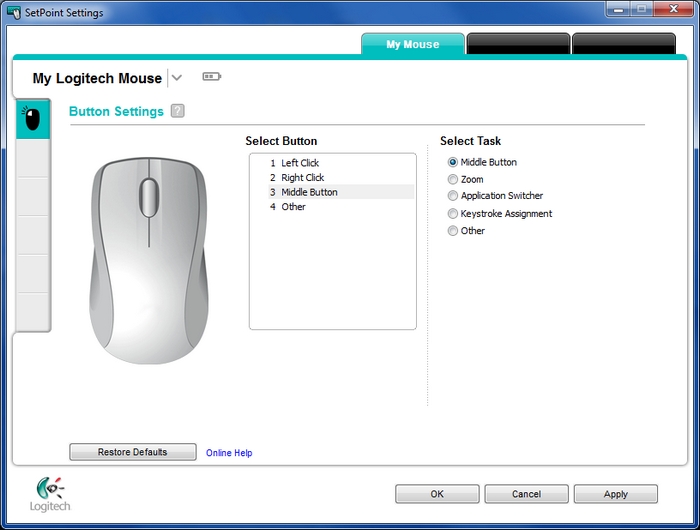
You have installed setpoint and it does not have a window like this that shows your button assignments? SetPoint - Logitech Support
m315-1.jpg
 

My Computer My Computer

Computer type
PC/Desktop
Computer Manufacturer/Model Number
Custom
OS
10 Pro x64
CPU
Ryzen 9 3900X
Motherboard
Asrock x370 Tachi
Memory
64GB(4x16GB) DDR4
Graphics Card(s)
EVGA 1080ti FTW3
Sound Card
ASUS Xonar Essence STX (V4 Bursons), ODAC rev B, NFB-11, O2
Monitor(s) Displays
3xASUS PB278Q/R, Optoma HD142X
Screen Resolution
3x1440p, 1080p
Hard Drives
512GB 850 EVO(OS, Programs)
4TB (Movies)
3TB (Downloads)
3TB (Programs)
1TB HDD (Games)
2x6TB R1 (videos)
PSU
AX760
Case
Fractal Define R5
Cooling
NH-D15S
Keyboard
Massdrop Ctrl with Box Navy's
Mouse
G903, Alioth XXL Mat
Internet Speed
280/40
Antivirus
MBAM, ESET
Browser
Canary 64 Bit
Other Info
I also own a Thinkpad P50 Xeon 4K, X220T, X1C5
I had this window in SetPoint but the middle button press didn't work. also, in this SetPoint window i don't see an option for configuring pressing the button, but only for rotating it.
 

My Computer My Computer

Computer type
Laptop
Computer Manufacturer/Model Number
Lenovo Ideapad S400 Model 9630
OS
Microsoft Windows 7 Professional 64-bit 7601 Multiprocessor Free Service Pack 1
CPU
Intel(R) Core(TM) i3-3217U CPU @ 1.80GHz
Motherboard
LENOVO INVALID
Memory
8.00 GB
Graphics Card(s)
(1) Intel(R) HD Graphics 4000 (2) AMD Radeon HD 7400M Seri
Sound Card
(1) Realtek High Definition Audio (2) Intel(R) Display Aud
Screen Resolution
1366 x 768 x 32 bits (4294967296 colors) @ 60 Hz
Hard Drives
SanDisk SDSSDP128G ATA Device
Browser
Chrome
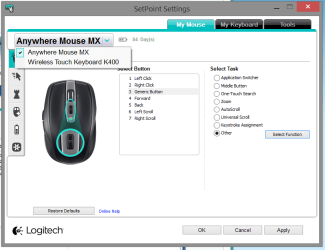
Have you selected the correct mouse in the Setpoint dropdown menu?
 

My Computer My Computer

Computer type
PC/Desktop
Computer Manufacturer/Model Number
Mellon Labs (custom build)
OS
Win 7 Pro x64/Win 10 Pro x64 dual boot
CPU
AMD FX 8350 Vishera @ 4200
Motherboard
ASUS M5A97 R2.0
Memory
16 GB Mushkin Blackline DDR3-2400 @ 1866 (9-10-10-10-31)
Graphics Card(s)
XFX Radeon R9 280 Double D Black Edition
Sound Card
Realtek HD Audio on MB. Sounds great.
Monitor(s) Displays
Acer 24", Acer 22"
Screen Resolution
3840 x 1080
Hard Drives
1 x Mushkin Chronos 120 GB SSD (Win 10)
1 x Samsung 850 EVO 250 GB SSD (Win 7)
1 x WD 1TB SATA Blue
1 x WD 1TB SATA Green
PSU
Corsair TX-750
Case
CoolerMaster HAF 912+
Cooling
Coolermaster Seidon 240M Liquid AIO. 6 case fans
Keyboard
Logitech G710+
Mouse
Logitech G500s
Internet Speed
Much better since I got fiber, but still way overpriced.
Antivirus
MSE, Malware Bytes for scanning
Browser
Firefox
Other Info
Corsair VOID USB headphones.

A Mellon Labs X-1 - LCD Smartie driven system status display.

Brought to you by the letter E
I had this window in SetPoint but the middle button press didn't work. also, in this SetPoint window i don't see an option for configuring pressing the button, but only for rotating it.
For rotating the button?

Have you selected the correct mouse in the Setpoint dropdown menu?

Mellon means this menu by the way. It took me a while to find this menu for myself.
 

Attachments

  • mouse.png
    mouse.png
    46.9 KB · Views: 2

My Computer My Computer

Computer type
PC/Desktop
Computer Manufacturer/Model Number
Custom
OS
10 Pro x64
CPU
Ryzen 9 3900X
Motherboard
Asrock x370 Tachi
Memory
64GB(4x16GB) DDR4
Graphics Card(s)
EVGA 1080ti FTW3
Sound Card
ASUS Xonar Essence STX (V4 Bursons), ODAC rev B, NFB-11, O2
Monitor(s) Displays
3xASUS PB278Q/R, Optoma HD142X
Screen Resolution
3x1440p, 1080p
Hard Drives
512GB 850 EVO(OS, Programs)
4TB (Movies)
3TB (Downloads)
3TB (Programs)
1TB HDD (Games)
2x6TB R1 (videos)
PSU
AX760
Case
Fractal Define R5
Cooling
NH-D15S
Keyboard
Massdrop Ctrl with Box Navy's
Mouse
G903, Alioth XXL Mat
Internet Speed
280/40
Antivirus
MBAM, ESET
Browser
Canary 64 Bit
Other Info
I also own a Thinkpad P50 Xeon 4K, X220T, X1C5
The driver installed with this page: (how do i put the picture that i uploaded here?)
It's the correct mouse but no mention of the press on middle button
 

Attachments

  • M185.JPG
    M185.JPG
    30.5 KB · Views: 2

My Computer My Computer

Computer type
Laptop
Computer Manufacturer/Model Number
Lenovo Ideapad S400 Model 9630
OS
Microsoft Windows 7 Professional 64-bit 7601 Multiprocessor Free Service Pack 1
CPU
Intel(R) Core(TM) i3-3217U CPU @ 1.80GHz
Motherboard
LENOVO INVALID
Memory
8.00 GB
Graphics Card(s)
(1) Intel(R) HD Graphics 4000 (2) AMD Radeon HD 7400M Seri
Sound Card
(1) Realtek High Definition Audio (2) Intel(R) Display Aud
Screen Resolution
1366 x 768 x 32 bits (4294967296 colors) @ 60 Hz
Hard Drives
SanDisk SDSSDP128G ATA Device
Browser
Chrome
The driver installed with this page: (how do i put the picture that i uploaded here?)
It's the correct mouse but no mention of the press on middle button

Instead of selecting middle button pick other and generic and try that.
 

My Computer My Computer

Computer type
PC/Desktop
Computer Manufacturer/Model Number
Custom
OS
10 Pro x64
CPU
Ryzen 9 3900X
Motherboard
Asrock x370 Tachi
Memory
64GB(4x16GB) DDR4
Graphics Card(s)
EVGA 1080ti FTW3
Sound Card
ASUS Xonar Essence STX (V4 Bursons), ODAC rev B, NFB-11, O2
Monitor(s) Displays
3xASUS PB278Q/R, Optoma HD142X
Screen Resolution
3x1440p, 1080p
Hard Drives
512GB 850 EVO(OS, Programs)
4TB (Movies)
3TB (Downloads)
3TB (Programs)
1TB HDD (Games)
2x6TB R1 (videos)
PSU
AX760
Case
Fractal Define R5
Cooling
NH-D15S
Keyboard
Massdrop Ctrl with Box Navy's
Mouse
G903, Alioth XXL Mat
Internet Speed
280/40
Antivirus
MBAM, ESET
Browser
Canary 64 Bit
Other Info
I also own a Thinkpad P50 Xeon 4K, X220T, X1C5
Thank you very much rvcjew, i posted a reply a few days ago but seems it's not recorded.
Your solution worked but i didn't get the page you showed on post #5. i installed a few different, older, versions of the Full Installer of the driver but they all chose, automatically, my mouse, the M185, so i had not the option to choose a mouse.
 

My Computer My Computer

Computer type
Laptop
Computer Manufacturer/Model Number
Lenovo Ideapad S400 Model 9630
OS
Microsoft Windows 7 Professional 64-bit 7601 Multiprocessor Free Service Pack 1
CPU
Intel(R) Core(TM) i3-3217U CPU @ 1.80GHz
Motherboard
LENOVO INVALID
Memory
8.00 GB
Graphics Card(s)
(1) Intel(R) HD Graphics 4000 (2) AMD Radeon HD 7400M Seri
Sound Card
(1) Realtek High Definition Audio (2) Intel(R) Display Aud
Screen Resolution
1366 x 768 x 32 bits (4294967296 colors) @ 60 Hz
Hard Drives
SanDisk SDSSDP128G ATA Device
Browser
Chrome
If you only have one thing on the pc that is logitech (I have a wireless keyboard/trackpad also on that same unifiying receiver that's why it shows two mice) then I think it does not give the drop-down. So it sounds like you got to the correct page and was able to set the button to generic and it solved your problem? If so then you should mark your thread as solved for others to find your solution.
 

My Computer My Computer

Computer type
PC/Desktop
Computer Manufacturer/Model Number
Custom
OS
10 Pro x64
CPU
Ryzen 9 3900X
Motherboard
Asrock x370 Tachi
Memory
64GB(4x16GB) DDR4
Graphics Card(s)
EVGA 1080ti FTW3
Sound Card
ASUS Xonar Essence STX (V4 Bursons), ODAC rev B, NFB-11, O2
Monitor(s) Displays
3xASUS PB278Q/R, Optoma HD142X
Screen Resolution
3x1440p, 1080p
Hard Drives
512GB 850 EVO(OS, Programs)
4TB (Movies)
3TB (Downloads)
3TB (Programs)
1TB HDD (Games)
2x6TB R1 (videos)
PSU
AX760
Case
Fractal Define R5
Cooling
NH-D15S
Keyboard
Massdrop Ctrl with Box Navy's
Mouse
G903, Alioth XXL Mat
Internet Speed
280/40
Antivirus
MBAM, ESET
Browser
Canary 64 Bit
Other Info
I also own a Thinkpad P50 Xeon 4K, X220T, X1C5
Back
Top