Solved Blurry text (and other display quirks) after a clean install

Clairvaux

New member
Pro User
VIP
Local time
12:45 AM
Messages
247
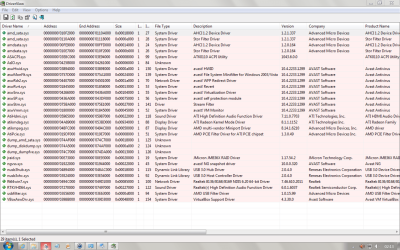
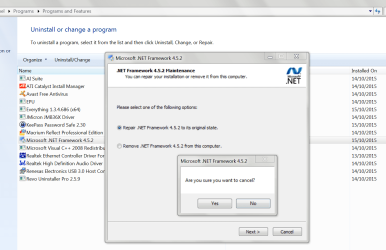
After a clean reinstall by sysprepping along the lines of this tutorial, there are a few instances where some parts of my screen are displayed in a fuzzy manner. Fonts look out of focus, the way they do in a screen grab. The rest of the screen is correct.

Here are two examples :
Capture 1.PNG

Capture 2.PNG

This happens in a small number of dialog boxes of software installers (example #1), but also with the working screen of Driver View, portable version (example #2). Note how the top line of Driver View's screen is rendered correctly.

I suspect either a bad driver or a bad Windows Update. I had some trouble with the latter : Checking Updates getting nowhere, Installing Updates taking ages for a single update, computer forcefully stopped during one install, error not repaired by Microsoft Fixit, Updates uninstalled then reinstalled...

Now my Windows Updates are (seemingly) complete and correct. The computer is just out of Sysprep, with only Windows installed, two user accounts, most drivers in place, almost no application software and data not yet restored.

Windows Update substituted some drivers after I had installed the chipset drivers from Asus' site. During the installation of drivers and Windows Updates, I observed, at one point, the opposite effect from the one I just described : some software installers' dialog boxes would display in-focus fonts, but with a very light, rudimentary font, difficult to read.

On the other hand, the general appearance of Windows has been noticeably enhanced, compared to my previous installation. The fonts are more crispy, the GUI itself seems to have a different, more pleasant look. The graphic driver now installed is an update to the one I had before, but it's not the latest.

Any ideas ?
 
Last edited:

My Computer My Computer

At a glance

Windows 7 Home Premium 64-bit (OEM)AMD Athlon II X4 640 (3 GHz, 4 cores)Patriot 16Gb DDR3 1600 (2 kits of 2)ATI Radeon HD 4290 (integrated)
Computer type
PC/Desktop
Computer Manufacturer/Model Number
Custom build
OS
Windows 7 Home Premium 64-bit (OEM)
CPU
AMD Athlon II X4 640 (3 GHz, 4 cores)
Motherboard
Asus M4A 89 GTD Pro/USB3
Memory
Patriot 16Gb DDR3 1600 (2 kits of 2)
Graphics Card(s)
ATI Radeon HD 4290 (integrated)
Sound Card
AMD + Realtek HD Audio (integrated)
Monitor(s) Displays
Hewlett-Packard ZR2440w (24")
Screen Resolution
1920 x 1200
Hard Drives
Internal : Samsung SSD 860 EVO 250 Gb (system), Seagate Barrcuda 1 Tb (data), Western Digital Caviar Blue 500 Gb (archives).
External (USB) : 2 x 1 Tb 2,5" Seagate Barracuda (backups).
PSU
Corsair VX 450 W
Case
Antec Solo
Cooling
Cooler Master Hyper 212 Plus, 2 Nexus Real Silent Case fans
Keyboard
Cherry KC 1000
Mouse
Logitech M 90
Internet Speed
Fiber, 300 Mbit/s down, 200 Mbit/s up
Antivirus
Microsoft Security Essentials
Browser
Vivaldi, Tor
Other Info
BIOS Date: 07/18/11 Ver: 08.00.15.
Modem-router : provided by ISP
Hi,
You're missing quite a few Visual C++ listings 2010-2012-2013 :/
 

My Computer My Computer

At a glance

Win-7-Pro64bit 7-H-Prem-64biti7-5930K 2nd i9-9940x both water blocked VRM'...Trident-z 3200C14 2nd Trident-z 3600C16EVGA 1080ti ftw3 2nd Titan Xp both water blocked
Computer type
PC/Desktop
Computer Manufacturer/Model Number
Custom assembled by me :}
OS
Win-7-Pro64bit 7-H-Prem-64bit
CPU
i7-5930K 2nd i9-9940x both water blocked VRM's too
Motherboard
ASUS SABERTOOTH X99 2nd ASUS x299 Apex
Memory
Trident-z 3200C14 2nd Trident-z 3600C16
Graphics Card(s)
EVGA 1080ti ftw3 2nd Titan Xp both water blocked
Sound Card
Built-in Realtek
Monitor(s) Displays
1-AOC G2460PG 24"G-Sync 144Hz/ 2nd 1-ASUS VG248QE 24" 144Hz
Screen Resolution
1920 x 1080 144Hz
Hard Drives
2-Samsung M.2 Evo & Evo Plus
2-Samsung 850 EVO 500GB SSD's/ 3-2.5 W.D. Black 1tb-&3-1tb/3-3.5 WD Black 1tb hdd's
PSU
EVGA SuperNOVA 1000-P2 2nd 1200-P2
Case
2-Corsair Obsidian Series 450D Black ATX Mid Tower
Cooling
Custom water loops
Keyboard
Logitech G710+/ 2nd Logitech G910
Mouse
2-RedDragon M901 Perdition 16400 dpi Gaming mouse = wired
Internet Speed
Comcast Ping 19ms 89.31mbps download speed 6.12mbps upload
Antivirus
Malwarebytes Pro/ Superantispyware Pro
Browser
FireFox & Pale moon
Other Info
2nd ASUS X299 Apex/Intel i9-9940x with Custom water loop/7H-Prem-x64/Corsair 450D case/Ram Trident-z 3600C16 4x8gb / Samsung970Evo plus 500gb SSD/Dual ssd EZ swap evo/PSU EVGA SuperNova 1200w-P2 80+Platinum/GPU Titan Xp /8-ML-140 on push-pull on 2-280GTX rads
Do you mean it might be the cause of those fuzzy displays ?

In the meantime, I tried to upgrade to what is available on AMD's website as the "legacy driver" for my no-longer-supported Radeon HD 4290 integrated graphic chip, and which is actually a bunch of different things on top of the display driver by itself.

I now have Microsoft Visual C++ 2010 x64 Redistributable 10.0.30319 installed, with the 2008 version as well (is it normal that both are installed side by side ?). This does not solve the problem. (I opted out of the Catalyst Software Suite. This could not cause the display to disfunction, could it ?)

At some point in the re-install process, I installed from AMD's website what is advertised as the latest "chipset driver" for AMD motherboards (published on July 29, 2015). I think it had Visual C++ 2012 in it. I'm not sure about 2013. This has been reversed now.

I still have those "chipset drivers" at hand, though, and could give them a try. I also have a different, older set of "chipset drivers" from the Asus website, which Asus implies are the most up-to-date for my motherboard (quotation marks again, because this seems to be a very elastic notion). And I also have the original set of "chipset drivers" which came with my motherboard, were installed back in 2010 and did not produce this display bug.

I don't think this is relevant, but just in case : since I don't do games and I don't overclock, I chose to not install, this time, some bits that are on my motherboard's DVD and that Asus calls AMD Overdrive, Asus Turbo V and Asus GPU Boost Driver. I also did a BIOS upgrade in the past, which seemed to work fine before re-install.
 

My Computer My Computer

At a glance

Windows 7 Home Premium 64-bit (OEM)AMD Athlon II X4 640 (3 GHz, 4 cores)Patriot 16Gb DDR3 1600 (2 kits of 2)ATI Radeon HD 4290 (integrated)
Computer type
PC/Desktop
Computer Manufacturer/Model Number
Custom build
OS
Windows 7 Home Premium 64-bit (OEM)
CPU
AMD Athlon II X4 640 (3 GHz, 4 cores)
Motherboard
Asus M4A 89 GTD Pro/USB3
Memory
Patriot 16Gb DDR3 1600 (2 kits of 2)
Graphics Card(s)
ATI Radeon HD 4290 (integrated)
Sound Card
AMD + Realtek HD Audio (integrated)
Monitor(s) Displays
Hewlett-Packard ZR2440w (24")
Screen Resolution
1920 x 1200
Hard Drives
Internal : Samsung SSD 860 EVO 250 Gb (system), Seagate Barrcuda 1 Tb (data), Western Digital Caviar Blue 500 Gb (archives).
External (USB) : 2 x 1 Tb 2,5" Seagate Barracuda (backups).
PSU
Corsair VX 450 W
Case
Antec Solo
Cooling
Cooler Master Hyper 212 Plus, 2 Nexus Real Silent Case fans
Keyboard
Cherry KC 1000
Mouse
Logitech M 90
Internet Speed
Fiber, 300 Mbit/s down, 200 Mbit/s up
Antivirus
Microsoft Security Essentials
Browser
Vivaldi, Tor
Other Info
BIOS Date: 07/18/11 Ver: 08.00.15.
Modem-router : provided by ISP
Hi,
Yep very normal although I have never had a AMD system
View attachment 373750
I really did not notice any fussiness :/

You would actually have to take a picture with a camera to get around a display issue like that.
 
Last edited:

My Computer My Computer

At a glance

Win-7-Pro64bit 7-H-Prem-64biti7-5930K 2nd i9-9940x both water blocked VRM'...Trident-z 3200C14 2nd Trident-z 3600C16EVGA 1080ti ftw3 2nd Titan Xp both water blocked
Computer type
PC/Desktop
Computer Manufacturer/Model Number
Custom assembled by me :}
OS
Win-7-Pro64bit 7-H-Prem-64bit
CPU
i7-5930K 2nd i9-9940x both water blocked VRM's too
Motherboard
ASUS SABERTOOTH X99 2nd ASUS x299 Apex
Memory
Trident-z 3200C14 2nd Trident-z 3600C16
Graphics Card(s)
EVGA 1080ti ftw3 2nd Titan Xp both water blocked
Sound Card
Built-in Realtek
Monitor(s) Displays
1-AOC G2460PG 24"G-Sync 144Hz/ 2nd 1-ASUS VG248QE 24" 144Hz
Screen Resolution
1920 x 1080 144Hz
Hard Drives
2-Samsung M.2 Evo & Evo Plus
2-Samsung 850 EVO 500GB SSD's/ 3-2.5 W.D. Black 1tb-&3-1tb/3-3.5 WD Black 1tb hdd's
PSU
EVGA SuperNOVA 1000-P2 2nd 1200-P2
Case
2-Corsair Obsidian Series 450D Black ATX Mid Tower
Cooling
Custom water loops
Keyboard
Logitech G710+/ 2nd Logitech G910
Mouse
2-RedDragon M901 Perdition 16400 dpi Gaming mouse = wired
Internet Speed
Comcast Ping 19ms 89.31mbps download speed 6.12mbps upload
Antivirus
Malwarebytes Pro/ Superantispyware Pro
Browser
FireFox & Pale moon
Other Info
2nd ASUS X299 Apex/Intel i9-9940x with Custom water loop/7H-Prem-x64/Corsair 450D case/Ram Trident-z 3600C16 4x8gb / Samsung970Evo plus 500gb SSD/Dual ssd EZ swap evo/PSU EVGA SuperNova 1200w-P2 80+Platinum/GPU Titan Xp /8-ML-140 on push-pull on 2-280GTX rads
Thanks. So I understand it's normal to have several versions of Visual C++ installed.

I'm not sure I get your point about fuzziness, however. Do you mean you don't see anything wrong in the screens I have uploaded ?

I have just come across another display problem : comment boxes on blogs just showing a very crude font, nothing like normal. Plus : on one blog, after the comment gets more than a few lines long, the box gets filled with horizontal lines. They disappear when you type into them. Very weird. This, on blogs that I'm very familiar with, so there's definitely something wrong.
 

My Computer My Computer

At a glance

Windows 7 Home Premium 64-bit (OEM)AMD Athlon II X4 640 (3 GHz, 4 cores)Patriot 16Gb DDR3 1600 (2 kits of 2)ATI Radeon HD 4290 (integrated)
Computer type
PC/Desktop
Computer Manufacturer/Model Number
Custom build
OS
Windows 7 Home Premium 64-bit (OEM)
CPU
AMD Athlon II X4 640 (3 GHz, 4 cores)
Motherboard
Asus M4A 89 GTD Pro/USB3
Memory
Patriot 16Gb DDR3 1600 (2 kits of 2)
Graphics Card(s)
ATI Radeon HD 4290 (integrated)
Sound Card
AMD + Realtek HD Audio (integrated)
Monitor(s) Displays
Hewlett-Packard ZR2440w (24")
Screen Resolution
1920 x 1200
Hard Drives
Internal : Samsung SSD 860 EVO 250 Gb (system), Seagate Barrcuda 1 Tb (data), Western Digital Caviar Blue 500 Gb (archives).
External (USB) : 2 x 1 Tb 2,5" Seagate Barracuda (backups).
PSU
Corsair VX 450 W
Case
Antec Solo
Cooling
Cooler Master Hyper 212 Plus, 2 Nexus Real Silent Case fans
Keyboard
Cherry KC 1000
Mouse
Logitech M 90
Internet Speed
Fiber, 300 Mbit/s down, 200 Mbit/s up
Antivirus
Microsoft Security Essentials
Browser
Vivaldi, Tor
Other Info
BIOS Date: 07/18/11 Ver: 08.00.15.
Modem-router : provided by ISP
Graphics card drivers aside - have you tried cleartype text tuner. I always run that on any machine that I use.

http://www.sevenforums.com/tutorials/337-cleartype-text-tuner.html

EDIT:

Also a quick note to say that personally if I need drivers after a fresh install I either grab them from the computer manufacturer's website or else get them from the cloned copy of the drive that I made before a fresh install.
 
Last edited:

My Computer My Computer

At a glance

Microsoft Windows 7 Home Premium 64-bit 7601 ...AMD C-60 APU with Radeon(tm) HD Graphics4.00 GBAMD Radeon HD 6290 Graphics
Computer type
Laptop
Computer Manufacturer/Model Number
ASUS
OS
Microsoft Windows 7 Home Premium 64-bit 7601 Multiprocessor Free Service Pack 1
CPU
AMD C-60 APU with Radeon(tm) HD Graphics
Motherboard
ASUSTeK COMPUTER INC. X501U
Memory
4.00 GB
Graphics Card(s)
AMD Radeon HD 6290 Graphics
Sound Card
(1) AMD High Definition Audio Device (2) Realtek High Defi
Screen Resolution
1366 x 768 x 32 bits (4294967296 colors) @ 60 Hz
Hard Drives
Hitachi HTS545050A7E380 SATA Disk Device
Antivirus
Comodo CIS & FW, SecureAplus App Whitelisting, Threatfire
Browser
Cyberfox 64bit, Opera 64bit, Airfox
Other Info
Spy-The-Spy, HitmanPro.Alert, Norton Connect Safe, MJRegWatcher, BitDefender TrafficLight, Voodoo Shield, Zemana AntiMalware
Thank you, Callender. Yes, I have applied Clear Type, but the display aberration is way beyond what Clear Type is supposed to do (which is really fine-tuning). Click on the screen grabs to see how bad they are.

If anyone can point me to a relevant tutorial about drivers, or if it is more appropriate that I post this issue on a more specialized thread, please tell me.
 

My Computer My Computer

At a glance

Windows 7 Home Premium 64-bit (OEM)AMD Athlon II X4 640 (3 GHz, 4 cores)Patriot 16Gb DDR3 1600 (2 kits of 2)ATI Radeon HD 4290 (integrated)
Computer type
PC/Desktop
Computer Manufacturer/Model Number
Custom build
OS
Windows 7 Home Premium 64-bit (OEM)
CPU
AMD Athlon II X4 640 (3 GHz, 4 cores)
Motherboard
Asus M4A 89 GTD Pro/USB3
Memory
Patriot 16Gb DDR3 1600 (2 kits of 2)
Graphics Card(s)
ATI Radeon HD 4290 (integrated)
Sound Card
AMD + Realtek HD Audio (integrated)
Monitor(s) Displays
Hewlett-Packard ZR2440w (24")
Screen Resolution
1920 x 1200
Hard Drives
Internal : Samsung SSD 860 EVO 250 Gb (system), Seagate Barrcuda 1 Tb (data), Western Digital Caviar Blue 500 Gb (archives).
External (USB) : 2 x 1 Tb 2,5" Seagate Barracuda (backups).
PSU
Corsair VX 450 W
Case
Antec Solo
Cooling
Cooler Master Hyper 212 Plus, 2 Nexus Real Silent Case fans
Keyboard
Cherry KC 1000
Mouse
Logitech M 90
Internet Speed
Fiber, 300 Mbit/s down, 200 Mbit/s up
Antivirus
Microsoft Security Essentials
Browser
Vivaldi, Tor
Other Info
BIOS Date: 07/18/11 Ver: 08.00.15.
Modem-router : provided by ISP
Clairvaux, I am experiencing the same thing. I have no idea what triggered it or exactly when it started. With my poor eyesight I probably didn't notice it until your post. I am looking forward to seeing the cause and solution. I'll keep my fingers crossed.
 

My Computer My Computer

At a glance

Microsoft Windows 7 Ultimate 64-bit 7601 Mult...AMD FX(tm)-6100 Six-Core Processor4.00 GBAMD Radeon HD 6450
Computer type
PC/Desktop
Computer Manufacturer/Model Number
custom build
OS
Microsoft Windows 7 Ultimate 64-bit 7601 Multiprocessor Free Service Pack 1
CPU
AMD FX(tm)-6100 Six-Core Processor
Motherboard
ASUSTeK Computer INC. M5A78L-M LX PLUS
Memory
4.00 GB
Graphics Card(s)
AMD Radeon HD 6450
Sound Card
(1) AMD High Definition Audio Device (2) Realtek High Defi
Monitor(s) Displays
Toshiba 47ZV650U 47" LCD 240Hz
Screen Resolution
1920 x 1080 x 32 bits (4294967296 colors) @ 60 Hz
Hard Drives
(1) HDT722516DLA380 ATA Device (2) Hitachi HDS721025CLA382 ATA Device (3) ST4000VN000-1H4168 ATA Device (4) Generic STORAGE DEVICE USB Device (5) Generic STORAGE DEVICE USB Device (6) Generic STORAGE DEVICE USB Device (7) Generic STORAGE
PSU
Corsair CX430M
Case
WMI (Waste Management Incorporated)
Cooling
Yes, it's very cool.
Keyboard
Bluetooth KB & Mousepad
Internet Speed
Fios 15/5 and it sucks when Verizon is throttling it down
Antivirus
Avast, MSE and Malwarebytes
Browser
Firefox v.41.0.2 and IE 11
Other Info
2 years old and so far this rig still kicks butt
Clairvaux, I just went into display properties and switched to the default Windows Aero theme and all appears normal. I'm leaving it that way for now.
 

My Computer My Computer

At a glance

Microsoft Windows 7 Ultimate 64-bit 7601 Mult...AMD FX(tm)-6100 Six-Core Processor4.00 GBAMD Radeon HD 6450
Computer type
PC/Desktop
Computer Manufacturer/Model Number
custom build
OS
Microsoft Windows 7 Ultimate 64-bit 7601 Multiprocessor Free Service Pack 1
CPU
AMD FX(tm)-6100 Six-Core Processor
Motherboard
ASUSTeK Computer INC. M5A78L-M LX PLUS
Memory
4.00 GB
Graphics Card(s)
AMD Radeon HD 6450
Sound Card
(1) AMD High Definition Audio Device (2) Realtek High Defi
Monitor(s) Displays
Toshiba 47ZV650U 47" LCD 240Hz
Screen Resolution
1920 x 1080 x 32 bits (4294967296 colors) @ 60 Hz
Hard Drives
(1) HDT722516DLA380 ATA Device (2) Hitachi HDS721025CLA382 ATA Device (3) ST4000VN000-1H4168 ATA Device (4) Generic STORAGE DEVICE USB Device (5) Generic STORAGE DEVICE USB Device (6) Generic STORAGE DEVICE USB Device (7) Generic STORAGE
PSU
Corsair CX430M
Case
WMI (Waste Management Incorporated)
Cooling
Yes, it's very cool.
Keyboard
Bluetooth KB & Mousepad
Internet Speed
Fios 15/5 and it sucks when Verizon is throttling it down
Antivirus
Avast, MSE and Malwarebytes
Browser
Firefox v.41.0.2 and IE 11
Other Info
2 years old and so far this rig still kicks butt
Most complaints I've read about font scaling... have been AMD systems cpu and gpu.
 

My Computer My Computer

At a glance

Win-7-Pro64bit 7-H-Prem-64biti7-5930K 2nd i9-9940x both water blocked VRM'...Trident-z 3200C14 2nd Trident-z 3600C16EVGA 1080ti ftw3 2nd Titan Xp both water blocked
Computer type
PC/Desktop
Computer Manufacturer/Model Number
Custom assembled by me :}
OS
Win-7-Pro64bit 7-H-Prem-64bit
CPU
i7-5930K 2nd i9-9940x both water blocked VRM's too
Motherboard
ASUS SABERTOOTH X99 2nd ASUS x299 Apex
Memory
Trident-z 3200C14 2nd Trident-z 3600C16
Graphics Card(s)
EVGA 1080ti ftw3 2nd Titan Xp both water blocked
Sound Card
Built-in Realtek
Monitor(s) Displays
1-AOC G2460PG 24"G-Sync 144Hz/ 2nd 1-ASUS VG248QE 24" 144Hz
Screen Resolution
1920 x 1080 144Hz
Hard Drives
2-Samsung M.2 Evo & Evo Plus
2-Samsung 850 EVO 500GB SSD's/ 3-2.5 W.D. Black 1tb-&3-1tb/3-3.5 WD Black 1tb hdd's
PSU
EVGA SuperNOVA 1000-P2 2nd 1200-P2
Case
2-Corsair Obsidian Series 450D Black ATX Mid Tower
Cooling
Custom water loops
Keyboard
Logitech G710+/ 2nd Logitech G910
Mouse
2-RedDragon M901 Perdition 16400 dpi Gaming mouse = wired
Internet Speed
Comcast Ping 19ms 89.31mbps download speed 6.12mbps upload
Antivirus
Malwarebytes Pro/ Superantispyware Pro
Browser
FireFox & Pale moon
Other Info
2nd ASUS X299 Apex/Intel i9-9940x with Custom water loop/7H-Prem-x64/Corsair 450D case/Ram Trident-z 3600C16 4x8gb / Samsung970Evo plus 500gb SSD/Dual ssd EZ swap evo/PSU EVGA SuperNova 1200w-P2 80+Platinum/GPU Titan Xp /8-ML-140 on push-pull on 2-280GTX rads
I just went into display properties and switched to the default Windows Aero theme and all appears normal.

I tried it. It does not change anything on my system.
 

My Computer My Computer

At a glance

Windows 7 Home Premium 64-bit (OEM)AMD Athlon II X4 640 (3 GHz, 4 cores)Patriot 16Gb DDR3 1600 (2 kits of 2)ATI Radeon HD 4290 (integrated)
Computer type
PC/Desktop
Computer Manufacturer/Model Number
Custom build
OS
Windows 7 Home Premium 64-bit (OEM)
CPU
AMD Athlon II X4 640 (3 GHz, 4 cores)
Motherboard
Asus M4A 89 GTD Pro/USB3
Memory
Patriot 16Gb DDR3 1600 (2 kits of 2)
Graphics Card(s)
ATI Radeon HD 4290 (integrated)
Sound Card
AMD + Realtek HD Audio (integrated)
Monitor(s) Displays
Hewlett-Packard ZR2440w (24")
Screen Resolution
1920 x 1200
Hard Drives
Internal : Samsung SSD 860 EVO 250 Gb (system), Seagate Barrcuda 1 Tb (data), Western Digital Caviar Blue 500 Gb (archives).
External (USB) : 2 x 1 Tb 2,5" Seagate Barracuda (backups).
PSU
Corsair VX 450 W
Case
Antec Solo
Cooling
Cooler Master Hyper 212 Plus, 2 Nexus Real Silent Case fans
Keyboard
Cherry KC 1000
Mouse
Logitech M 90
Internet Speed
Fiber, 300 Mbit/s down, 200 Mbit/s up
Antivirus
Microsoft Security Essentials
Browser
Vivaldi, Tor
Other Info
BIOS Date: 07/18/11 Ver: 08.00.15.
Modem-router : provided by ISP
Cyclops,

Did you refuse the installation, by any chance, of some Windows Updates lately ? (See further down why I'm asking the question.)

I've done a little more testing, to no avail.

1. Uninstalled all drivers and assorted software :

  • Realtek high definition audio driver.
  • Realtek Ethernet driver.
  • Renesas USB 3.0 host controller driver.
  • JM Micron SATA controller driver.
  • All versions of Visual C++ redistributable.
All drivers and assorted software that had been installed by the "chipset driver" package, using the Uninstall function of Catalyst Install Manager :​
  • AMD USB filter driver.
  • AMD app SDK runtime.
  • AMD display driver.
  • HDMI audio driver.
  • AMD SATA AHCI driver.
  • AMD accelerated video transcoding.
  • AMD drag and drop transcoding.
  • AMD media foundation decoders.
  • And Catalyst Install Manager which uninstalled itself.
2. Reinstalled a minimum set of drivers, as close as possible to my original 2010 configuration (which did not have that display problem) :
Original "chipset drivers" found of my motherboard's DVD :​
  • AMD USB filter driver.
  • Catalyst Control Center.
  • ATI Catalyst Install Manager.
  • North Bridge filter driver.
  • ATI display driver.
  • Visual C++ 2008.
  • AMD SATA AHCI driver.
Two other drivers from my motherboard's DVD :
  • Realtek high definition audio.
  • JM Micron SATA controller driver.
And two other drivers, lifted from the Asus website, more up-to-date than on my original configuration, but not necessarily the latest :
  • Realtek Ethernet driver.
  • Renesas USB 3.0 host controller driver.
It would have been better to start from a barebones Windows, install those drivers, then reinstall all Windows updates, but that last part took me so long that I didn't want to do it again.

Now I have exactly the same screens on the same software with the same fuzzy effect (as if it was a picture of the screen and not fonts interpreted as such), with the added irony that the dialog boxes of Catalyst Control Center, the ATI software which is supposed to control my video card, have themselves that out-of-focus effect.

By now, I have tried at least 3 different versions of my display driver, including the original one (at that time, I did not have that problem), and the most up-to-date. The problem is the same in all instances.

So I'm inclined, by now, to think that it's a Windows Updates problem. Either from a bad update which broke something, or from the lack of one : I have hidden half a dozen of them, mostly to prevent the Windows 10 nagware and assorted updates to creep into my system. But I also excluded some telemetry updates, some that seemed as if they could be incompatible with my PC, and others which seemed tailored to solve problems caused by hardware I do not have.
 

My Computer My Computer

At a glance

Windows 7 Home Premium 64-bit (OEM)AMD Athlon II X4 640 (3 GHz, 4 cores)Patriot 16Gb DDR3 1600 (2 kits of 2)ATI Radeon HD 4290 (integrated)
Computer type
PC/Desktop
Computer Manufacturer/Model Number
Custom build
OS
Windows 7 Home Premium 64-bit (OEM)
CPU
AMD Athlon II X4 640 (3 GHz, 4 cores)
Motherboard
Asus M4A 89 GTD Pro/USB3
Memory
Patriot 16Gb DDR3 1600 (2 kits of 2)
Graphics Card(s)
ATI Radeon HD 4290 (integrated)
Sound Card
AMD + Realtek HD Audio (integrated)
Monitor(s) Displays
Hewlett-Packard ZR2440w (24")
Screen Resolution
1920 x 1200
Hard Drives
Internal : Samsung SSD 860 EVO 250 Gb (system), Seagate Barrcuda 1 Tb (data), Western Digital Caviar Blue 500 Gb (archives).
External (USB) : 2 x 1 Tb 2,5" Seagate Barracuda (backups).
PSU
Corsair VX 450 W
Case
Antec Solo
Cooling
Cooler Master Hyper 212 Plus, 2 Nexus Real Silent Case fans
Keyboard
Cherry KC 1000
Mouse
Logitech M 90
Internet Speed
Fiber, 300 Mbit/s down, 200 Mbit/s up
Antivirus
Microsoft Security Essentials
Browser
Vivaldi, Tor
Other Info
BIOS Date: 07/18/11 Ver: 08.00.15.
Modem-router : provided by ISP
Problem solved

OK, problem solved. It was just a matter of ticking a box after all... :)

So, for the benefit of Cyclops, if your problem is the same as mine, and possibly of others :

During this install, I had adjusted Windows text size to 150 % through Control Panel / Appearance and Personalization / Display. (You can also fine-tune this through the link Set Custom Size (DPI) on the left of that screen). This was probably slightly bigger than my previous install. It made me cross the 144 % threshold beyond which some old applications, not designed for high-DPI displays, might lose their marbles and get blurry if you're running Aero (which is my case).

To correct it, click Set Custom Size (DPI), tick the box Use Windows XP style DPI scaling, click OK, log off. Next time you launch these applications, they will display correctly.

See Windows Help / Make the text on your screen larger or smaller / To make text and on-screen items clearer in programs that aren't designed for high DPI.

A similar problem can happen with blurry text in Windows 8 and 10, but the solutions are different. See here and here.
 

My Computer My Computer

At a glance

Windows 7 Home Premium 64-bit (OEM)AMD Athlon II X4 640 (3 GHz, 4 cores)Patriot 16Gb DDR3 1600 (2 kits of 2)ATI Radeon HD 4290 (integrated)
Computer type
PC/Desktop
Computer Manufacturer/Model Number
Custom build
OS
Windows 7 Home Premium 64-bit (OEM)
CPU
AMD Athlon II X4 640 (3 GHz, 4 cores)
Motherboard
Asus M4A 89 GTD Pro/USB3
Memory
Patriot 16Gb DDR3 1600 (2 kits of 2)
Graphics Card(s)
ATI Radeon HD 4290 (integrated)
Sound Card
AMD + Realtek HD Audio (integrated)
Monitor(s) Displays
Hewlett-Packard ZR2440w (24")
Screen Resolution
1920 x 1200
Hard Drives
Internal : Samsung SSD 860 EVO 250 Gb (system), Seagate Barrcuda 1 Tb (data), Western Digital Caviar Blue 500 Gb (archives).
External (USB) : 2 x 1 Tb 2,5" Seagate Barracuda (backups).
PSU
Corsair VX 450 W
Case
Antec Solo
Cooling
Cooler Master Hyper 212 Plus, 2 Nexus Real Silent Case fans
Keyboard
Cherry KC 1000
Mouse
Logitech M 90
Internet Speed
Fiber, 300 Mbit/s down, 200 Mbit/s up
Antivirus
Microsoft Security Essentials
Browser
Vivaldi, Tor
Other Info
BIOS Date: 07/18/11 Ver: 08.00.15.
Modem-router : provided by ISP
Hi
Yep funny 8 and 10 wants every one to increase the fonts instead of the dpi or use the silly magnifier :/
Problem is I want everything increased not just the fonts so the dpi is the easiest to increase.
I believe yes there is a sweet spot I find 130% dpi okay plus adjust page zoom in browser usually 150%
Thanks for the update
Cheers.
 

My Computer My Computer

At a glance

Win-7-Pro64bit 7-H-Prem-64biti7-5930K 2nd i9-9940x both water blocked VRM'...Trident-z 3200C14 2nd Trident-z 3600C16EVGA 1080ti ftw3 2nd Titan Xp both water blocked
Computer type
PC/Desktop
Computer Manufacturer/Model Number
Custom assembled by me :}
OS
Win-7-Pro64bit 7-H-Prem-64bit
CPU
i7-5930K 2nd i9-9940x both water blocked VRM's too
Motherboard
ASUS SABERTOOTH X99 2nd ASUS x299 Apex
Memory
Trident-z 3200C14 2nd Trident-z 3600C16
Graphics Card(s)
EVGA 1080ti ftw3 2nd Titan Xp both water blocked
Sound Card
Built-in Realtek
Monitor(s) Displays
1-AOC G2460PG 24"G-Sync 144Hz/ 2nd 1-ASUS VG248QE 24" 144Hz
Screen Resolution
1920 x 1080 144Hz
Hard Drives
2-Samsung M.2 Evo & Evo Plus
2-Samsung 850 EVO 500GB SSD's/ 3-2.5 W.D. Black 1tb-&3-1tb/3-3.5 WD Black 1tb hdd's
PSU
EVGA SuperNOVA 1000-P2 2nd 1200-P2
Case
2-Corsair Obsidian Series 450D Black ATX Mid Tower
Cooling
Custom water loops
Keyboard
Logitech G710+/ 2nd Logitech G910
Mouse
2-RedDragon M901 Perdition 16400 dpi Gaming mouse = wired
Internet Speed
Comcast Ping 19ms 89.31mbps download speed 6.12mbps upload
Antivirus
Malwarebytes Pro/ Superantispyware Pro
Browser
FireFox & Pale moon
Other Info
2nd ASUS X299 Apex/Intel i9-9940x with Custom water loop/7H-Prem-x64/Corsair 450D case/Ram Trident-z 3600C16 4x8gb / Samsung970Evo plus 500gb SSD/Dual ssd EZ swap evo/PSU EVGA SuperNova 1200w-P2 80+Platinum/GPU Titan Xp /8-ML-140 on push-pull on 2-280GTX rads
You're welcome, ThrashZone. By the way, I found this by searching for blurry text and not fuzzy text. I would adjust the title of the thread accordingly to facilitate further searches, but I'm not sure this is possible.
 

My Computer My Computer

At a glance

Windows 7 Home Premium 64-bit (OEM)AMD Athlon II X4 640 (3 GHz, 4 cores)Patriot 16Gb DDR3 1600 (2 kits of 2)ATI Radeon HD 4290 (integrated)
Computer type
PC/Desktop
Computer Manufacturer/Model Number
Custom build
OS
Windows 7 Home Premium 64-bit (OEM)
CPU
AMD Athlon II X4 640 (3 GHz, 4 cores)
Motherboard
Asus M4A 89 GTD Pro/USB3
Memory
Patriot 16Gb DDR3 1600 (2 kits of 2)
Graphics Card(s)
ATI Radeon HD 4290 (integrated)
Sound Card
AMD + Realtek HD Audio (integrated)
Monitor(s) Displays
Hewlett-Packard ZR2440w (24")
Screen Resolution
1920 x 1200
Hard Drives
Internal : Samsung SSD 860 EVO 250 Gb (system), Seagate Barrcuda 1 Tb (data), Western Digital Caviar Blue 500 Gb (archives).
External (USB) : 2 x 1 Tb 2,5" Seagate Barracuda (backups).
PSU
Corsair VX 450 W
Case
Antec Solo
Cooling
Cooler Master Hyper 212 Plus, 2 Nexus Real Silent Case fans
Keyboard
Cherry KC 1000
Mouse
Logitech M 90
Internet Speed
Fiber, 300 Mbit/s down, 200 Mbit/s up
Antivirus
Microsoft Security Essentials
Browser
Vivaldi, Tor
Other Info
BIOS Date: 07/18/11 Ver: 08.00.15.
Modem-router : provided by ISP
Hi,
I think the title is fine but we can have it evaluated :)
 

My Computer My Computer

At a glance

Win-7-Pro64bit 7-H-Prem-64biti7-5930K 2nd i9-9940x both water blocked VRM'...Trident-z 3200C14 2nd Trident-z 3600C16EVGA 1080ti ftw3 2nd Titan Xp both water blocked
Computer type
PC/Desktop
Computer Manufacturer/Model Number
Custom assembled by me :}
OS
Win-7-Pro64bit 7-H-Prem-64bit
CPU
i7-5930K 2nd i9-9940x both water blocked VRM's too
Motherboard
ASUS SABERTOOTH X99 2nd ASUS x299 Apex
Memory
Trident-z 3200C14 2nd Trident-z 3600C16
Graphics Card(s)
EVGA 1080ti ftw3 2nd Titan Xp both water blocked
Sound Card
Built-in Realtek
Monitor(s) Displays
1-AOC G2460PG 24"G-Sync 144Hz/ 2nd 1-ASUS VG248QE 24" 144Hz
Screen Resolution
1920 x 1080 144Hz
Hard Drives
2-Samsung M.2 Evo & Evo Plus
2-Samsung 850 EVO 500GB SSD's/ 3-2.5 W.D. Black 1tb-&3-1tb/3-3.5 WD Black 1tb hdd's
PSU
EVGA SuperNOVA 1000-P2 2nd 1200-P2
Case
2-Corsair Obsidian Series 450D Black ATX Mid Tower
Cooling
Custom water loops
Keyboard
Logitech G710+/ 2nd Logitech G910
Mouse
2-RedDragon M901 Perdition 16400 dpi Gaming mouse = wired
Internet Speed
Comcast Ping 19ms 89.31mbps download speed 6.12mbps upload
Antivirus
Malwarebytes Pro/ Superantispyware Pro
Browser
FireFox & Pale moon
Other Info
2nd ASUS X299 Apex/Intel i9-9940x with Custom water loop/7H-Prem-x64/Corsair 450D case/Ram Trident-z 3600C16 4x8gb / Samsung970Evo plus 500gb SSD/Dual ssd EZ swap evo/PSU EVGA SuperNova 1200w-P2 80+Platinum/GPU Titan Xp /8-ML-140 on push-pull on 2-280GTX rads
Back
Top