Static pop/crack (split second) as soon as sound plays through speaker

Vinny1001

New member
Member
Local time
4:26 PM
Messages
57
Hi, I have already solved much of my issue, but it still persists. I have the new skylake 6700K, new board, new everything except the same HD's. Everything on my prior system worked 100%, even the speakers. The 5.1 speakers are sitting in the same spot as the old PC, but when these are plugged in, I had constant static pops/cracks whenever the CPU was being used. Even just moving the mouse made it happen.

I solved that by going through MANY options. There is no interference because they work 100% on my old PC in the same exact spot. I tried other speakers I have and it's the same issue, only on the new PC I get that static. I tried using my old 750w psu, and had the same issues. I took the GPU out, ran onboard, same issue. I moved USB cables all away from the audio ports, same issue. Literally everything works on the old pc. I know my speakers are good, the case ports are good. All that is fine. Headphones give no static, ever, in both ports. Speakers, 2.1 and 5.1, give static off in all audio ports.

I solved this by turning off those CPU power saving options in BIOS. It was EIST and all the C1 C5 C7 states. Anyone I saw, I disabled. The static is gone then from the CPU being used.

THE ISSUE NOW:
Well, lets say I'm navigating through windows explorer, clicking through folders. That windows click sound comes up, but along with that static crack/pop. Anytime NO audio is playing, then when audio wants to play, it introduces it with a static pop. Another example, if I go to youtube, and watch a video, there will be a static pop right at the beginning when it wants to start to play the audio. NOTE: As the video plays, the static is ALL gone, from everything. So as I have a youtube video playing, I can click through windows folders and will hear the click and only the click, without the static pop. As soon as the video stops and no sound is playing, the static pops come back as sound starts for the split second.

Any ideas? I'm also ordering a different mobo (Asus) to see.

Yes I have all drivers up-to-date, correctly installed, yes I have the BIOS updated. I also muted any audio ports not being used. I think I did everything. I spent days on researching it and this is where I am. I also bought a replacement mobo (same one) and had the same exact issues.

Could there be some audio setting in bios that I may disable? Not sure. My board is by Gigabyte:
GA-Z170MX-Gaming 5

I'm trying the Asus Maximus Gene VIII matx Z170 tomorrow.

Any help would be great. I've tried basically anything, but clearly am missing something or it's just a fault in their drivers/BIOS. I am running Windows 7 pro 64

Thank you.
 

My Computer My Computer

At a glance

Windows 7 64 bit ProfessionalIntel i7 Skylake 6700kCrucial Ballistix XMP DDR4 16GBNvidia 980 ti 6gb vram by Gigabyte G1
OS
Windows 7 64 bit Professional
CPU
Intel i7 Skylake 6700k
Motherboard
Gigabyte Z170mx Gaming 5
Memory
Crucial Ballistix XMP DDR4 16GB
Graphics Card(s)
Nvidia 980 ti 6gb vram by Gigabyte G1
Monitor(s) Displays
BenQ XL2411
Hard Drives
Samsung 840 120gb, 1TB, 500GB
PSU
Modular 1000w
Case
Fractal Define Mini
Cooling
Seidon 120V Liquid Cooling

My Computer My Computer

At a glance

Windows 10 64 bitIntel i7 6700K16GB Corsair DominatorIntel CPU Graphics
Computer type
PC/Desktop
Computer Manufacturer/Model Number
My Own Build
OS
Windows 10 64 bit
CPU
Intel i7 6700K
Motherboard
ASUS ROG Maximus VIII Hero
Memory
16GB Corsair Dominator
Graphics Card(s)
Intel CPU Graphics
Sound Card
RealTek
Monitor(s) Displays
27" Dell S2719dgf
Screen Resolution
2560X1440
Hard Drives
1 TB Samsung 850 EVO SSD for Win 10 Pro
500GB Samsung 850 EVO SSD for Win 10 Insider
2 TB drive for backup
PSU
EVGA Supernova 750G2
Case
BeQuiet Silent Base 600
Cooling
Deepcool Captain 120EX
Keyboard
Microsoft Wireless 2000
Mouse
Microsoft wireless
Internet Speed
100 MB/sec (Cable)
Antivirus
Microsoft Defender and Malwarebytes
Browser
Edge/Firefox
Other Info
Cakewalk (Sonar) by BandLab and Studio One 4.1 Pro recording studio software. MOTU 896Mk3 Hybrid recording interface, Frontier Tranzport wireless control unit, Behringer X-Touch Control Surface.
Five USB connected optical drives for CD Audio production using Nero BurningROM
Run the free Resplendence Latency Mon. It will probably help or even pinpoint what is causing it.

Resplendence Software - Free Downloads

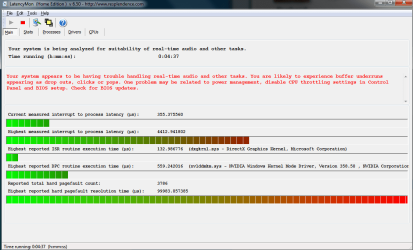
Alright, ran it. it was all good at first for a minute or two, but as soon as I started clicking around, or opening programs (snipping tool even) the "current measured interrupt process latency" would spike up high, then yeah anything basically putting load on the CPU makes it jump up.

I have EIST and the C1 5/6 7 8 options disabled in bios, if those are enabled it gives constant static from even moving the mouse. With those BIOS options disabled, as I've said, I only get a split second of static upon when audio decides to play, and as audio is playing there isn't anymore static.

Also, it appears that on boot up after the computer has been off for awhile, I get no static issues. I am home from work for now and it's been off and I have 0 static, and ran that latency test. But I know after a little bit, the static comes then and is as I've explained it.

Gigabyte suggests to downclock my CPU if it's OC'd. I have it running at default settings from purchasing it off Amazon, it runs at 4GHz (6700k). I shouldn't have to downclock it.. I never messed with any of that.

Any thoughts? I feel like trying the Asus board and if the problem persists on there, THEN I can attempt to downclock, even though I shouldn't have to unless I'm OC'd in a wrong manner or outrageous speed lol. Gigabyte also suggested that the CPU may be faulty, but who knows. I'll try a replacement CPU if downclocking and switching boards doesn't work.

Thanks for the help so far!
 

Attachments

  • LatencyMon.PNG
    LatencyMon.PNG
    32.6 KB · Views: 0

My Computer My Computer

At a glance

Windows 7 64 bit ProfessionalIntel i7 Skylake 6700kCrucial Ballistix XMP DDR4 16GBNvidia 980 ti 6gb vram by Gigabyte G1
OS
Windows 7 64 bit Professional
CPU
Intel i7 Skylake 6700k
Motherboard
Gigabyte Z170mx Gaming 5
Memory
Crucial Ballistix XMP DDR4 16GB
Graphics Card(s)
Nvidia 980 ti 6gb vram by Gigabyte G1
Monitor(s) Displays
BenQ XL2411
Hard Drives
Samsung 840 120gb, 1TB, 500GB
PSU
Modular 1000w
Case
Fractal Define Mini
Cooling
Seidon 120V Liquid Cooling
Aha a Gigabyte motherboard! Do you have the Gigabyte EasyTune (I have V6 on my board) installed? That is a known cause of interrupt problems, clicks, etc. If you have it installed, uninstall it.

I used to have a Gigabyte Z77 motherboard and unknowingly installed the EasyTune. I was getting clicks and dropouts when recording and playing back audio. The DPC Latency Check program was showing spikes in the red. A user that posts on the Cakewalk Sonar forum and also works for a company that builds recording studio PC's helped me with my problem. When he found out I had EasyTune installed he told me it was a known cause and as soon as I uninstalled it (and restarted the PC) the problems were gone.
 

My Computer My Computer

At a glance

Windows 10 64 bitIntel i7 6700K16GB Corsair DominatorIntel CPU Graphics
Computer type
PC/Desktop
Computer Manufacturer/Model Number
My Own Build
OS
Windows 10 64 bit
CPU
Intel i7 6700K
Motherboard
ASUS ROG Maximus VIII Hero
Memory
16GB Corsair Dominator
Graphics Card(s)
Intel CPU Graphics
Sound Card
RealTek
Monitor(s) Displays
27" Dell S2719dgf
Screen Resolution
2560X1440
Hard Drives
1 TB Samsung 850 EVO SSD for Win 10 Pro
500GB Samsung 850 EVO SSD for Win 10 Insider
2 TB drive for backup
PSU
EVGA Supernova 750G2
Case
BeQuiet Silent Base 600
Cooling
Deepcool Captain 120EX
Keyboard
Microsoft Wireless 2000
Mouse
Microsoft wireless
Internet Speed
100 MB/sec (Cable)
Antivirus
Microsoft Defender and Malwarebytes
Browser
Edge/Firefox
Other Info
Cakewalk (Sonar) by BandLab and Studio One 4.1 Pro recording studio software. MOTU 896Mk3 Hybrid recording interface, Frontier Tranzport wireless control unit, Behringer X-Touch Control Surface.
Five USB connected optical drives for CD Audio production using Nero BurningROM
Aha a Gigabyte motherboard! Do you have the Gigabyte EasyTune (I have V6 on my board) installed? That is a known cause of interrupt problems, clicks, etc. If you have it installed, uninstall it.

I used to have a Gigabyte Z77 motherboard and unknowingly installed the EasyTune. I was getting clicks and dropouts when recording and playing back audio. The DPC Latency Check program was showing spikes in the red. A user that posts on the Cakewalk Sonar forum and also works for a company that builds recording studio PC's helped me with my problem. When he found out I had EasyTune installed he told me it was a known cause and as soon as I uninstalled it (and restarted the PC) the problems were gone.

Hey fireberd. Thank you for the help so far and sticking to it already!

So, I just installed my Asus board and well, it's a thousand times better than the other board I just had. All the features and easy of windows installation!! The excitement.

Oh I forgot to mention, on the gigabyte board, if I uninstalled the realtek audio drivers, the static was gone all together, but then I couldn't manage any audio. So I was thinking it had to do with drivers. And now that you're saying this... lol

For the current Asus board: Ok so, all was well, no static, nothing. Everything was normal. I plopped the disc in and installed the drivers, no static. As it was getting to the audio driver... the static appeared again! Only when a sound wants to play, just like before, it pops for a split second. But, see, on this Asus board, I don't get any of that previous constant static that I solved on the GIgabyte board (Where I disabled EIST and the C1 578 power savings in BIOS) So that's neat. Unless this board doesnt have those options even.

Well, for this Asus board, it is using Sonic Studio along with realtek.

Would uninstalling JUST sonic studio potentially help, as what you are stating but a different program?

Thanks!

EDIT: uninstalling that doesn't work. still static pops :( so what can I do? The sound was fine before I installed the drivers, but that leaves me without any audio software or anything.

EDIT2: Yea, I uninstalled the actual realtek drivers, and that does it. But now I can't adjust anything relating to audio :(

Anything else on this? I don't really think this is a fix. Unless it's a legit driver issue that has to be fixed then I guess that's it.
Hmm..
 
Last edited:

My Computer My Computer

At a glance

Windows 7 64 bit ProfessionalIntel i7 Skylake 6700kCrucial Ballistix XMP DDR4 16GBNvidia 980 ti 6gb vram by Gigabyte G1
OS
Windows 7 64 bit Professional
CPU
Intel i7 Skylake 6700k
Motherboard
Gigabyte Z170mx Gaming 5
Memory
Crucial Ballistix XMP DDR4 16GB
Graphics Card(s)
Nvidia 980 ti 6gb vram by Gigabyte G1
Monitor(s) Displays
BenQ XL2411
Hard Drives
Samsung 840 120gb, 1TB, 500GB
PSU
Modular 1000w
Case
Fractal Define Mini
Cooling
Seidon 120V Liquid Cooling
Reading your post, first there will not be any sound without installing some type of sound drivers. You can use the Realtek or use the generic, basic function, Windows installed High Definition Audio Drivers.

You state you uninstalled the Realtek drivers and "that does it". Does that mean you are using the High Definition Audio drivers? or that there is no sound, which would be right since there is no sound driver installed.

Are the sound files you are playing "known good" files? Play a known good audio file and see what you get, such as a commercial audio CD.
 

My Computer My Computer

At a glance

Windows 10 64 bitIntel i7 6700K16GB Corsair DominatorIntel CPU Graphics
Computer type
PC/Desktop
Computer Manufacturer/Model Number
My Own Build
OS
Windows 10 64 bit
CPU
Intel i7 6700K
Motherboard
ASUS ROG Maximus VIII Hero
Memory
16GB Corsair Dominator
Graphics Card(s)
Intel CPU Graphics
Sound Card
RealTek
Monitor(s) Displays
27" Dell S2719dgf
Screen Resolution
2560X1440
Hard Drives
1 TB Samsung 850 EVO SSD for Win 10 Pro
500GB Samsung 850 EVO SSD for Win 10 Insider
2 TB drive for backup
PSU
EVGA Supernova 750G2
Case
BeQuiet Silent Base 600
Cooling
Deepcool Captain 120EX
Keyboard
Microsoft Wireless 2000
Mouse
Microsoft wireless
Internet Speed
100 MB/sec (Cable)
Antivirus
Microsoft Defender and Malwarebytes
Browser
Edge/Firefox
Other Info
Cakewalk (Sonar) by BandLab and Studio One 4.1 Pro recording studio software. MOTU 896Mk3 Hybrid recording interface, Frontier Tranzport wireless control unit, Behringer X-Touch Control Surface.
Five USB connected optical drives for CD Audio production using Nero BurningROM
Reading your post, first there will not be any sound without installing some type of sound drivers. You can use the Realtek or use the generic, basic function, Windows installed High Definition Audio Drivers.

You state you uninstalled the Realtek drivers and "that does it". Does that mean you are using the High Definition Audio drivers? or that there is no sound, which would be right since there is no sound driver installed.

Are the sound files you are playing "known good" files? Play a known good audio file and see what you get, such as a commercial audio CD.

Sorry, I meant in Device Manager I uninstalled the realtek drivers. I had all other audio drivers, and no audio software. I guess I had the HD Audio drivers installed still. But I know that as soon as I installed windows and was at desktop, I had 0 static, and it instantly came back during driver installation from CD.

I got realtek audio drivers from their site, (so no other software would be installed, just realtek) and that if When my 5.1 speakers are on 5.1 settings, is when they have static anytime audio plays (for the first split second). When I switch them to "stereo" the static goes away for the most part. If I listen close enough, it's a minor "tic" but then within 20 minutes of having it on stereo, the static cracks return to how it is.

I just don't get it. The speakers work on my old build in the same exact spot/location, same cabling.

I really hope this can be fixed soon. I'd like to at least know if it's a hardware issue so I can replace ASAP, but I think I eliminated most of it being a hardware issue. Grrr.

Thanks for the help so far! I may install Linux on the new PC and see if I get audio issues, that will help tell me if it's hardware or not, I would think. I'll throw Linux on my HD, not SSD, don't want to hurt her! lol.
 

My Computer My Computer

At a glance

Windows 7 64 bit ProfessionalIntel i7 Skylake 6700kCrucial Ballistix XMP DDR4 16GBNvidia 980 ti 6gb vram by Gigabyte G1
OS
Windows 7 64 bit Professional
CPU
Intel i7 Skylake 6700k
Motherboard
Gigabyte Z170mx Gaming 5
Memory
Crucial Ballistix XMP DDR4 16GB
Graphics Card(s)
Nvidia 980 ti 6gb vram by Gigabyte G1
Monitor(s) Displays
BenQ XL2411
Hard Drives
Samsung 840 120gb, 1TB, 500GB
PSU
Modular 1000w
Case
Fractal Define Mini
Cooling
Seidon 120V Liquid Cooling
I got the same issue on my new and old PC, both of them running on Windows 7 64bit and with a Asus mainboard. Someone can help? Its driving me crazy :(
 

My Computer My Computer

At a glance

Windows7 Home Premium 64bit
Computer type
PC/Desktop
OS
Windows7 Home Premium 64bit
On thing to try. Set the speakers to Stereo. Plug a headset into the GREEN speaker jack and see if you get the same static.

I used to have an ASUS P8Z77 LE Plus motherboard on my recording studio backup system. It had Realtek and never had any problems. The PC had both Win 7 64 bit and Win 8.1 64 bit (dual boot system). The board developed a problem and had to be replaced. The replacement is an ASRock Z77 motherboard with Realtek and no problems.
 

My Computer My Computer

At a glance

Windows 10 64 bitIntel i7 6700K16GB Corsair DominatorIntel CPU Graphics
Computer type
PC/Desktop
Computer Manufacturer/Model Number
My Own Build
OS
Windows 10 64 bit
CPU
Intel i7 6700K
Motherboard
ASUS ROG Maximus VIII Hero
Memory
16GB Corsair Dominator
Graphics Card(s)
Intel CPU Graphics
Sound Card
RealTek
Monitor(s) Displays
27" Dell S2719dgf
Screen Resolution
2560X1440
Hard Drives
1 TB Samsung 850 EVO SSD for Win 10 Pro
500GB Samsung 850 EVO SSD for Win 10 Insider
2 TB drive for backup
PSU
EVGA Supernova 750G2
Case
BeQuiet Silent Base 600
Cooling
Deepcool Captain 120EX
Keyboard
Microsoft Wireless 2000
Mouse
Microsoft wireless
Internet Speed
100 MB/sec (Cable)
Antivirus
Microsoft Defender and Malwarebytes
Browser
Edge/Firefox
Other Info
Cakewalk (Sonar) by BandLab and Studio One 4.1 Pro recording studio software. MOTU 896Mk3 Hybrid recording interface, Frontier Tranzport wireless control unit, Behringer X-Touch Control Surface.
Five USB connected optical drives for CD Audio production using Nero BurningROM
On thing to try. Set the speakers to Stereo. Plug a headset into the GREEN speaker jack and see if you get the same static.

I used to have an ASUS P8Z77 LE Plus motherboard on my recording studio backup system. It had Realtek and never had any problems. The PC had both Win 7 64 bit and Win 8.1 64 bit (dual boot system). The board developed a problem and had to be replaced. The replacement is an ASRock Z77 motherboard with Realtek and no problems.

Hey Hinata, try a lot of what I did to troubleshoot it. Make sure you try everything. if it persists, please start a new thread or search other threads. What will be in this thread is more so after going through almost everything that you can troubleshoot and still having the issue. Not to be rude :P just trying to keep focus.

fireberd, on the other Gigabyte board and this one, no static appeared through headphones, ever. I just don't get how I went through 3 boards, and it's still an issue. hence why i'm thinking it's the drivers, considering as soon as those installed, static appeared. I've used my old PSU which currently works in my old system, without issues, and I still got that static on the new system, so it's not the PSU. GPU seems to work fine - I removed it and used on-board graphics, still had static.

Literally the only part I haven't troubleshooted is replacing the CPU.. but it appears to be fine. Not sure if a faulty CPU would cause audio static ONLY when drivers are installed? Seems funky and unlikely. Everything was fine for the short time until I installed drivers.

Headphones work just fine. That's why I'm thinking it's not a motherboard issue, otherwise anything would be messed up.
 

My Computer My Computer

At a glance

Windows 7 64 bit ProfessionalIntel i7 Skylake 6700kCrucial Ballistix XMP DDR4 16GBNvidia 980 ti 6gb vram by Gigabyte G1
OS
Windows 7 64 bit Professional
CPU
Intel i7 Skylake 6700k
Motherboard
Gigabyte Z170mx Gaming 5
Memory
Crucial Ballistix XMP DDR4 16GB
Graphics Card(s)
Nvidia 980 ti 6gb vram by Gigabyte G1
Monitor(s) Displays
BenQ XL2411
Hard Drives
Samsung 840 120gb, 1TB, 500GB
PSU
Modular 1000w
Case
Fractal Define Mini
Cooling
Seidon 120V Liquid Cooling
Consider this. The sound won't work without drivers. Thus, no drivers, no sound or static.

I'm now leaning to something in your 5.1 speaker system.

I'll be off line most of this afternoon. I have a home recording studio and will doing mixdowns on a CD project for a local singer.
 

My Computer My Computer

At a glance

Windows 10 64 bitIntel i7 6700K16GB Corsair DominatorIntel CPU Graphics
Computer type
PC/Desktop
Computer Manufacturer/Model Number
My Own Build
OS
Windows 10 64 bit
CPU
Intel i7 6700K
Motherboard
ASUS ROG Maximus VIII Hero
Memory
16GB Corsair Dominator
Graphics Card(s)
Intel CPU Graphics
Sound Card
RealTek
Monitor(s) Displays
27" Dell S2719dgf
Screen Resolution
2560X1440
Hard Drives
1 TB Samsung 850 EVO SSD for Win 10 Pro
500GB Samsung 850 EVO SSD for Win 10 Insider
2 TB drive for backup
PSU
EVGA Supernova 750G2
Case
BeQuiet Silent Base 600
Cooling
Deepcool Captain 120EX
Keyboard
Microsoft Wireless 2000
Mouse
Microsoft wireless
Internet Speed
100 MB/sec (Cable)
Antivirus
Microsoft Defender and Malwarebytes
Browser
Edge/Firefox
Other Info
Cakewalk (Sonar) by BandLab and Studio One 4.1 Pro recording studio software. MOTU 896Mk3 Hybrid recording interface, Frontier Tranzport wireless control unit, Behringer X-Touch Control Surface.
Five USB connected optical drives for CD Audio production using Nero BurningROM
Consider this. The sound won't work without drivers. Thus, no drivers, no sound or static.

I'm now leaning to something in your 5.1 speaker system.

I'll be off line most of this afternoon. I have a home recording studio and will doing mixdowns on a CD project for a local singer.
Well, it works perfectly fine with my previous PC, and also, I have some other 2.1 speakers that I use to use on my previous PC that still work fine, but those get the static/audio problems on this too. That's the thing. I've done so much to eliminate what could be causing it.

The latencymon gets a lot of latency in dxgkrnl.sys and ataport.sys

Tried doing some searches on that, doesn't seem that helpful.

Well, I removed realtek audio drivers, and currently am just using windows HD audio, seems to be fine but I've just had it on for 20 minutes or so (lunch break from work).

I hope that goes well for you.

I'm hoping to iron this out soon enough. If the audio issues come back, I'll throw my PC on an HDMI and hook it to the TV and see if the TV gives off the static too. I will also run linux on this too and see.
 

My Computer My Computer

At a glance

Windows 7 64 bit ProfessionalIntel i7 Skylake 6700kCrucial Ballistix XMP DDR4 16GBNvidia 980 ti 6gb vram by Gigabyte G1
OS
Windows 7 64 bit Professional
CPU
Intel i7 Skylake 6700k
Motherboard
Gigabyte Z170mx Gaming 5
Memory
Crucial Ballistix XMP DDR4 16GB
Graphics Card(s)
Nvidia 980 ti 6gb vram by Gigabyte G1
Monitor(s) Displays
BenQ XL2411
Hard Drives
Samsung 840 120gb, 1TB, 500GB
PSU
Modular 1000w
Case
Fractal Define Mini
Cooling
Seidon 120V Liquid Cooling
dxgkrnl.sys relates to NVIDIA and I see you have an NVIDIA video card. If you are up to it, for testing you could remove the NVIDIA card and use the Intel HD Video that is built in the i7 CPU.

ataport.sys, from what I find relates to disk drives. I notice my SATA SSD drives are listed as "ATA Samsung 840 SCSI Disk Drive" for example.

If the Microsoft HD Audio works OK, and disregarding that Latency Mon is showing problems, that goes back to some function that Realtek enables/uses that the generic HD Audio does not. I recall another user that had some sound problems that went away when they use the HD Audio drivers. What the function is???
 

My Computer My Computer

At a glance

Windows 10 64 bitIntel i7 6700K16GB Corsair DominatorIntel CPU Graphics
Computer type
PC/Desktop
Computer Manufacturer/Model Number
My Own Build
OS
Windows 10 64 bit
CPU
Intel i7 6700K
Motherboard
ASUS ROG Maximus VIII Hero
Memory
16GB Corsair Dominator
Graphics Card(s)
Intel CPU Graphics
Sound Card
RealTek
Monitor(s) Displays
27" Dell S2719dgf
Screen Resolution
2560X1440
Hard Drives
1 TB Samsung 850 EVO SSD for Win 10 Pro
500GB Samsung 850 EVO SSD for Win 10 Insider
2 TB drive for backup
PSU
EVGA Supernova 750G2
Case
BeQuiet Silent Base 600
Cooling
Deepcool Captain 120EX
Keyboard
Microsoft Wireless 2000
Mouse
Microsoft wireless
Internet Speed
100 MB/sec (Cable)
Antivirus
Microsoft Defender and Malwarebytes
Browser
Edge/Firefox
Other Info
Cakewalk (Sonar) by BandLab and Studio One 4.1 Pro recording studio software. MOTU 896Mk3 Hybrid recording interface, Frontier Tranzport wireless control unit, Behringer X-Touch Control Surface.
Five USB connected optical drives for CD Audio production using Nero BurningROM
Since you are putting a lot of effort in the issue i will suggest to avoid the issue of electrical interference of your audio and other components altogether by investing a little bit of money into an external soundcard/audio interface.

Get any cheap external usb audio interface, some even come with 5.1.
 

My Computer My Computer

At a glance

win7 Pro Ult 64i7 4790 3,6ghz2x 4gb 1600mhzintel 4600
Computer type
PC/Desktop
Computer Manufacturer/Model Number
Dell Optiplex 9020 SFF
OS
win7 Pro Ult 64
CPU
i7 4790 3,6ghz
Motherboard
idk
Memory
2x 4gb 1600mhz
Graphics Card(s)
intel 4600
Sound Card
Yamaha Steinberg ur12
Monitor(s) Displays
Samsung 2243
Screen Resolution
1080
Hard Drives
Samsung 840 Evo & Samsung 830 Evo
Keyboard
Lenovo Business
Mouse
some cheap Chinese high dpi
Antivirus
Avira
Browser
Chrome & FF
Since you are putting a lot of effort in the issue i will suggest to avoid the issue of electrical interference of your audio and other components altogether by investing a little bit of money into an external soundcard/audio interface.

Get any cheap external usb audio interface, some even come with 5.1.

This will not help him, i got the exact same problem, i also tried a external soundcard, still the same issue. And nobody knows a sulotion for that :(
 

My Computer My Computer

At a glance

Windows7 Home Premium 64bit
Computer type
PC/Desktop
OS
Windows7 Home Premium 64bit
One other issue, that has not been noted so far. Sound is on a shared IRQ with a higher priority device. The higher priority device can "interrupt" the sound and depending on how it does it, it can sound like a drop out or could sound like static.
 

My Computer My Computer

At a glance

Windows 10 64 bitIntel i7 6700K16GB Corsair DominatorIntel CPU Graphics
Computer type
PC/Desktop
Computer Manufacturer/Model Number
My Own Build
OS
Windows 10 64 bit
CPU
Intel i7 6700K
Motherboard
ASUS ROG Maximus VIII Hero
Memory
16GB Corsair Dominator
Graphics Card(s)
Intel CPU Graphics
Sound Card
RealTek
Monitor(s) Displays
27" Dell S2719dgf
Screen Resolution
2560X1440
Hard Drives
1 TB Samsung 850 EVO SSD for Win 10 Pro
500GB Samsung 850 EVO SSD for Win 10 Insider
2 TB drive for backup
PSU
EVGA Supernova 750G2
Case
BeQuiet Silent Base 600
Cooling
Deepcool Captain 120EX
Keyboard
Microsoft Wireless 2000
Mouse
Microsoft wireless
Internet Speed
100 MB/sec (Cable)
Antivirus
Microsoft Defender and Malwarebytes
Browser
Edge/Firefox
Other Info
Cakewalk (Sonar) by BandLab and Studio One 4.1 Pro recording studio software. MOTU 896Mk3 Hybrid recording interface, Frontier Tranzport wireless control unit, Behringer X-Touch Control Surface.
Five USB connected optical drives for CD Audio production using Nero BurningROM
dxgkrnl.sys relates to NVIDIA and I see you have an NVIDIA video card. If you are up to it, for testing you could remove the NVIDIA card and use the Intel HD Video that is built in the i7 CPU.

ataport.sys, from what I find relates to disk drives. I notice my SATA SSD drives are listed as "ATA Samsung 840 SCSI Disk Drive" for example.

If the Microsoft HD Audio works OK, and disregarding that Latency Mon is showing problems, that goes back to some function that Realtek enables/uses that the generic HD Audio does not. I recall another user that had some sound problems that went away when they use the HD Audio drivers. What the function is???


fireberd, I have never had that issue before with a Nvidia card. I know mine is more powerful, so I have already tried removing the GPU and running the PC without it, and I still had the static. I'm not sure if I had lower latency though, because I can't get the onboard VGA intel graphics driver to install, it keeps saying my system isn't supported.. which is weird. they're the drivers from the site, as well as from the disc. I know I get static still because even without a screen, I still heard the static happening.

Since you are putting a lot of effort in the issue i will suggest to avoid the issue of electrical interference of your audio and other components altogether by investing a little bit of money into an external soundcard/audio interface.

Get any cheap external usb audio interface, some even come with 5.1.

Read too much into that without anyone getting it solved that way. I shouldn't have to buy one.

Since you are putting a lot of effort in the issue i will suggest to avoid the issue of electrical interference of your audio and other components altogether by investing a little bit of money into an external soundcard/audio interface.

Get any cheap external usb audio interface, some even come with 5.1.

This will not help him, i got the exact same problem, i also tried a external soundcard, still the same issue. And nobody knows a sulotion for that :(
^ exactly, not worth it. It should work without it. I don't want latency issues at all, period. Never had this issue before.

One other issue, that has not been noted so far. Sound is on a shared IRQ with a higher priority device. The higher priority device can "interrupt" the sound and depending on how it does it, it can sound like a drop out or could sound like static.

Hmm, I'm not sure. I really don't see what else I can do. I talked to some tech people at a store who do this stuff daily and they said everything I've done is what they'd have done. They suggested to test the system OUT of the case - my case is metal, which may interfere, but my previous case is metal and had no issues. I will try it soon.

Also, someone else suggested unplug ALL connections from the front panel of the case to the mobo, except the power switch/reset button/hdd led connections. So I've already tried removing the audio cable from the front panel, but I left the USB 3.0 front panel connected to the mobo. I will try removing that and see.

So next steps are unplug things further, and test system out of the case.

Sorry, I had a long weekend. Thanks for sticking around so far. If all else fails, I am returning everything and waiting for more boards to be released/updated in a month or two and will use the 980ti on my previous build.

I also get a taser like static crack/pop upon boot after post, and on shutdown. You know when you touch someone and a static spark "shocks" them and you actually hear it? It's like that. It sounds like it's coming off the motherboard or the PSU, but will find out more when I remove all from the case to isolate it.
 

My Computer My Computer

At a glance

Windows 7 64 bit ProfessionalIntel i7 Skylake 6700kCrucial Ballistix XMP DDR4 16GBNvidia 980 ti 6gb vram by Gigabyte G1
OS
Windows 7 64 bit Professional
CPU
Intel i7 Skylake 6700k
Motherboard
Gigabyte Z170mx Gaming 5
Memory
Crucial Ballistix XMP DDR4 16GB
Graphics Card(s)
Nvidia 980 ti 6gb vram by Gigabyte G1
Monitor(s) Displays
BenQ XL2411
Hard Drives
Samsung 840 120gb, 1TB, 500GB
PSU
Modular 1000w
Case
Fractal Define Mini
Cooling
Seidon 120V Liquid Cooling
Removing the connection for the front panel headphone/mic jack is a good suggestion that I overlooked. Dell had a problem of noise with a new desktop model. It turned out the routing of the cable for the front panel jacks was causing it. Rerouting the cable corrected it.

I don't recall if you replaced the power supply, but Realtek has (or had) an article on noise and one of the items was a defective power supply can cause it.
 

My Computer My Computer

At a glance

Windows 10 64 bitIntel i7 6700K16GB Corsair DominatorIntel CPU Graphics
Computer type
PC/Desktop
Computer Manufacturer/Model Number
My Own Build
OS
Windows 10 64 bit
CPU
Intel i7 6700K
Motherboard
ASUS ROG Maximus VIII Hero
Memory
16GB Corsair Dominator
Graphics Card(s)
Intel CPU Graphics
Sound Card
RealTek
Monitor(s) Displays
27" Dell S2719dgf
Screen Resolution
2560X1440
Hard Drives
1 TB Samsung 850 EVO SSD for Win 10 Pro
500GB Samsung 850 EVO SSD for Win 10 Insider
2 TB drive for backup
PSU
EVGA Supernova 750G2
Case
BeQuiet Silent Base 600
Cooling
Deepcool Captain 120EX
Keyboard
Microsoft Wireless 2000
Mouse
Microsoft wireless
Internet Speed
100 MB/sec (Cable)
Antivirus
Microsoft Defender and Malwarebytes
Browser
Edge/Firefox
Other Info
Cakewalk (Sonar) by BandLab and Studio One 4.1 Pro recording studio software. MOTU 896Mk3 Hybrid recording interface, Frontier Tranzport wireless control unit, Behringer X-Touch Control Surface.
Five USB connected optical drives for CD Audio production using Nero BurningROM
Removing the connection for the front panel headphone/mic jack is a good suggestion that I overlooked. Dell had a problem of noise with a new desktop model. It turned out the routing of the cable for the front panel jacks was causing it. Rerouting the cable corrected it.

I don't recall if you replaced the power supply, but Realtek has (or had) an article on noise and one of the items was a defective power supply can cause it.

Disconnecting the front panel jacks did NOT solve it.

I have used my previous builds 750W which currently works in my previous build, but gives the static on the new buiild, so the PSU doesn't seem to be the issue.

Also, I noticed now, whenever opening a program fresh from the HD, a static pop comes up, now I'm thinking there's an issue with the RAM. I am using the same HD's as previous build that have never had any issues and aren't that old even. Sigh.

I think I am going to return everything, and just keep the GPU and use it on my previous build, which is an Ivy bridge, so it's not THAT old, i just wanted all the new goodies.

I will remove the mobo later and try to see if static goes away, out of the case, and also I will install Linux on the new build and see if I get the same audio issues.

All in all, I think I will just return everything and see what new stuff comes out towards black friday/cyber monday
 

My Computer My Computer

At a glance

Windows 7 64 bit ProfessionalIntel i7 Skylake 6700kCrucial Ballistix XMP DDR4 16GBNvidia 980 ti 6gb vram by Gigabyte G1
OS
Windows 7 64 bit Professional
CPU
Intel i7 Skylake 6700k
Motherboard
Gigabyte Z170mx Gaming 5
Memory
Crucial Ballistix XMP DDR4 16GB
Graphics Card(s)
Nvidia 980 ti 6gb vram by Gigabyte G1
Monitor(s) Displays
BenQ XL2411
Hard Drives
Samsung 840 120gb, 1TB, 500GB
PSU
Modular 1000w
Case
Fractal Define Mini
Cooling
Seidon 120V Liquid Cooling
Good luck on a new build later. But, I wouldn't use any old parts on the new build except the CD/DVD drives and possibly the hard drive. But, I would do a complete "clean" install with the hard drive - reformat the drive and start over with the installation.

One thing to consider, the new systems are much faster and demanding so new compatible parts are needed. New motherboards have SATA 3 ports for the drives, connecting an old SATA 2 hard drive is sort of defeating the higher SATA 3 speed.
 

My Computer My Computer

At a glance

Windows 10 64 bitIntel i7 6700K16GB Corsair DominatorIntel CPU Graphics
Computer type
PC/Desktop
Computer Manufacturer/Model Number
My Own Build
OS
Windows 10 64 bit
CPU
Intel i7 6700K
Motherboard
ASUS ROG Maximus VIII Hero
Memory
16GB Corsair Dominator
Graphics Card(s)
Intel CPU Graphics
Sound Card
RealTek
Monitor(s) Displays
27" Dell S2719dgf
Screen Resolution
2560X1440
Hard Drives
1 TB Samsung 850 EVO SSD for Win 10 Pro
500GB Samsung 850 EVO SSD for Win 10 Insider
2 TB drive for backup
PSU
EVGA Supernova 750G2
Case
BeQuiet Silent Base 600
Cooling
Deepcool Captain 120EX
Keyboard
Microsoft Wireless 2000
Mouse
Microsoft wireless
Internet Speed
100 MB/sec (Cable)
Antivirus
Microsoft Defender and Malwarebytes
Browser
Edge/Firefox
Other Info
Cakewalk (Sonar) by BandLab and Studio One 4.1 Pro recording studio software. MOTU 896Mk3 Hybrid recording interface, Frontier Tranzport wireless control unit, Behringer X-Touch Control Surface.
Five USB connected optical drives for CD Audio production using Nero BurningROM
Back
Top