Thank you Master Steve, the wise-one! Part of a wise-team, of course!
Well... “Produkey.exe” and any “trustable” software I could locate online or in my archived as programs/apps (anywhere and everywhere) can’t retrieve the Product Key! ProduKey.exe just barked back at me with the action can’t be carried out since the system volume is corrupt (once again). Sometimes, I could execute it through the quasi-Windows 7 OS (WinRE) environment (by typing “notepad.exe.”at the command prompt”, then opening the directory structure (via “open file) and locating the the flash drive (J:\) containing the file Produkey.exe on it then (SHFT)+Rt-Click on the file, and selecting “open as admin” I could get the GUI to open and seemed like I was making headway! It couldn’t find any Product ID’s/Keys/SNs/etc... It really only looked nicer! I know, who cares!
I learned some interesting ways to use “PowerShell” to write a pretty simple script that would work to retrieve a Product Key,.....assuming I could get into Windows, of course! I was trying to mimic the aforementioned script using something more primitive language-wise, even a batch file at one point. It just relies on too many.NET resources that I would have to practically write from scratch, plus things that are necessarily integrated into the Windows OS to get the whole thing to work correctly!! All a huge (seemingly) worthless mess! “Seemingly”, because each step got me (or you / us) one step closer to the right direction inn the end...Ergo, it has value!
So I grabbed the backup registries whilst I was on the computer and saved them to a flash drive (turns out they were “last altered” in 2011”!!! Wow, that’s pretty near time, t=0, for this system!! I’ll just put them aside for a minute to read what you guys have posted since I was last online/awake/home last....
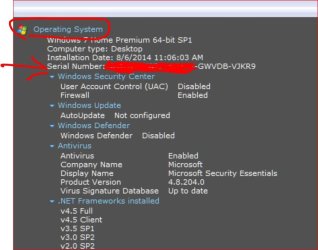
......oh really...the “Serial Number” is the same thing as the “Product Key”! Yes, I do have the so called “SERIAL NUMBER” from AT LEAST a Speccy report dated “10-28-2011”. YEP, five (5) groups of five (5) alphanumeric-digits, separated by four dashes, sure enough looks like the Product-Key to me!

Here I was thinking the S/N was the Product ID or something, and sure enough it was right there all along!! I’m really having a hard time realizing that I almost missed that one,
BRILLIANT SAVE STEVE 
,
and everyone for that matter! Nice connecting-up all of the seemingly random pieces into my most sought after object. The only things I should lose now are a few minor programs here and there that I probably don’t even need, the rest I have either before or have now found all the codes and IDs they will need unless they just try to say the S/W is outdated or something! But I can do a clean “UPGRADE” install now I think!
Funny how it was a “typed report” from Speccy I happened to save when I set up the system, PLANNING ON adding all such reports and appropriate materials (even back-up DVDs during my most ambitious moments) to the binder, slowly, over time.....all these years later...one (1) faded Speccy report remains in the binder one shelf up from the computer area! One solitary hero, ....unwaning ...unwavering!
The “installation date” for the Win7 Home Prem 64-bit SP1 was 10-18-2011, 12:00 (so, I was pretty close with it being a 5-years old system - off by one year- and this is the first actual problem I've ever had with it, so, that’s pretty good! It’s been one of those “
Set it and Forget it” type of systems! At least up until 09/20/2015 anyway!
I’m going to try to do the “UPGRADE” clean install >> Option Four, from the previous post’s link(s). Anyone foresee any problems (it’s going to be installed directly onto a brand new WD 1TB HDD
The fact that the PRODUCT KEY doesn't MATCH any keys from any otherwise identical DVD’s that I have here to install it from doesn’t make any difference , or does it? It came from a “family pack (3-licenses)” DVD (retail) (upgrade) version of Windows 7 64-bit Home Premium (which I now know had SP1 installed at that time, too, thanks to Speccy! But The “family packs” come with a single Product KEY and in my experience you always have to call them up to be given a specific “activation code” from your boxed "product key" during the set-up process. I’m hoping it will not cause a problem when I try to deselect the check-box “Automatically Activate Windows Online” (both times - in option four at least!)
Any thoughts before I take a stab at the whole thing and report back the details (I’ll never leave anyone hanging...for too long anyway!) What’da’chou’ think? Any final comments before I do it?!

Mike



 ...UPDATE!!!)): This way sucks even worse (on my end for sure)! Look at what I'm trying to fix a few subtle errors in! It's like it's going tag-crazy by trying set the font or size after-the-fact and put them everywhere when were almost none before I tried to fix the problem!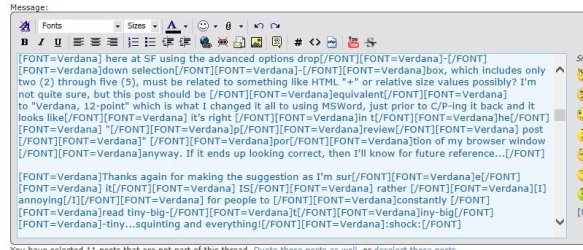


 As I mentioned I just "felt quite obligated to say something" since I would feel that not doing so would be like "turning away" in a sense (even though I was quite sure you didn't mean it in any other way). I have a high internal-standard for my moral compass, and just w/don't stand idly-by when I feel that people are unfairly being dishonored/disrespected or shown less than