
Solved Changed volume partitions and now lost my C: drive

mrtennis27

New member
Local time
1:28 PM
Messages
7
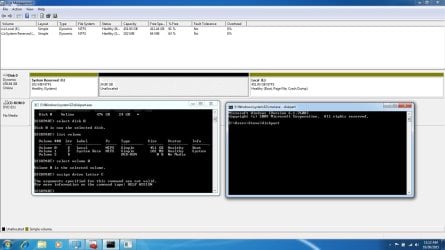
In an effort to remove my drive partitions and to have 1 C: drive like I have always been accustomed to, I messed something up and now have an E: drive and the System Reserved F: drive. I have tried to rename E to C, but I get a Virtual Disk Manager error - "The parameter is incorrect". I also deleted an unallocated drive, but I cannot even combine it with my primary (E) drive. It only gives me the option to "Shrink Volume" and not Expand when I right click on the E: drive.

I also changed the drive to Dynamic, so not sure if that was OK or if there is something I should do to correct that as well?

Please see the screenshot I have attached and let me know what I can do to fix this. Thank you all!
 

Attachments
  • Disk_Management.jpg
    Disk_Management.jpg
    126.1 KB · Views: 11

My Computer My Computer

At a glance

Windows 7 Home Premium 64bitIntel Core i716 GB
Computer type
PC/Desktop
Computer Manufacturer/Model Number
Dell XPS L701X
OS
Windows 7 Home Premium 64bit
CPU
Intel Core i7
Motherboard
Q840 1.87 GHz
Memory
16 GB
Hard Drives
M4-CT512M4SSD2 ATA Device
Sorry I can't help directly here but yet again I would stress to anyone reading this thread to Backup with Macrium Reflect or similar before making any big changes to your system. I would rephase that by saying "Before any changes or updating" BACKUP, BACKUP, BACKUP! Sorry if I am getting boring by keeping on about this!
 

My Computer My Computer

At a glance

Microsoft Windows 7 Home Premium 64-bit 7601 ...Intel(R) Core(TM) i7-3770 CPU @ 3.40GHz8.00 GBIntel(R) HD Graphics 4000
Computer type
PC/Desktop
OS
Microsoft Windows 7 Home Premium 64-bit 7601 Multiprocessor Free Service Pack 1
CPU
Intel(R) Core(TM) i7-3770 CPU @ 3.40GHz
Motherboard
ASUSTeK COMPUTER INC. P8H77-M
Memory
8.00 GB
Graphics Card(s)
Intel(R) HD Graphics 4000
Sound Card
On Board
Monitor(s) Displays
Dell 24"
Screen Resolution
1920 x 1080
Hard Drives
(1) INTEL SSDSC2CT180A3 ATA Device (2) ST500DM002-1BD142 ATA Device (3) WDC WD3200AAKS-75L9A0 ATA Device (4) Generic- Compact Flash USB Device (5) Generic- MS/MS-Pro USB Device (6) Generic- SD/MMC USB Device (7) Generic- SM/xD-Picture USB
PSU
500w Corsair
Case
Cooler Master
Cooling
3 Fans
Keyboard
Logitech MK300
Mouse
Logitech WOM
Internet Speed
75Mb
Antivirus
Norton 360
Browser
Firefox, Opera, IE
As Mitchell said above when you get your disk corrected you need to back up your PC partitions at least weekly. Use this Macrium Reflect Free If you had a backup you could restore the files in 15 minutes and be running. Let's get you going now.

There are quite a few things that need to be changed to get things straight. The first one is to get rid of the Dynamic Disk. That will only cause problems. Read this tutorial and follow it.
http://www.sevenforums.com/tutorials/26829-convert-dynamic-disk-basic-disk.html

Let's get your System Reserved and Boot Files right. Follow this Tutorial.
http://www.sevenforums.com/tutorials/105541-startup-repair-run-3-separate-times.html It is important to run the repair three times as it says.

When you get those two things done, let's see what it looks like then. Post a screen shot of your Disk Management. Be sure and expand the columns so we can read all of the print.
 

My Computer My Computer

At a glance

Windows 7 Home Premium 32-Bit - Build 7600 SP1Intel Core i3-2120 3.30GhzKingston 4 GB DDR3 1333 mhzAMD Radeon HD6670
Computer type
PC/Desktop
Computer Manufacturer/Model Number
Custom Build
OS
Windows 7 Home Premium 32-Bit - Build 7600 SP1
CPU
Intel Core i3-2120 3.30Ghz
Motherboard
Asus P8Z68-V LX Intel Z68 Socket H2 ATX
Memory
Kingston 4 GB DDR3 1333 mhz
Graphics Card(s)
AMD Radeon HD6670
Sound Card
Sound Blaster Audigy SE 24-Bit
Monitor(s) Displays
Asus VE228
Screen Resolution
1440 X 900
Hard Drives
OCZ Vertex 3 120 GB Sata 3 SSD ==
Kingston SH103/S3 120 G Hyper X 120 GB SSD ==
Western Digital 500 GB Caviar Green 7200 RPM ==
PSU
Corsair CX600M == 600 Watt
Case
NZXT Apollo - Silver with Clear Side Panel
Cooling
Three 120 mm Fans
Keyboard
Microsoft Natural 4000
Mouse
Microsoft Custom Optical 3000
Internet Speed
AT&T Fiber Optic Wireless Network
Antivirus
Microsoft Security Essentials
Browser
Chrome
Other Info
120 mm Blue LED Fan -- Three Blue LED Lazer Light Sticks
Yep you destoyed that drive.

As suggested, the 1st thing you have to do is change the disk back to Basic.

Why was C only 24 GB ? Way too small.

If you had the room on E (which you do, 91% free) you could have just used a Partition Wizard Boot CD to expand C and steal space from E.

Bootable Partition Manger | MiniTool Partition Wizard Bootable Edition

You`ll most likely be reinstalling windows, I would 1st make the 24 GB partition at least 200 GB with the above software, then reinstall windows.
 

My Computer My Computer

At a glance

Windows 10 Pro x64Intel Core i7 6700KGSkill TridentZ RGB 16GB 3600 16-16-16-36EVGA GTX 980 Ti SC x2
Computer type
PC/Desktop
Computer Manufacturer/Model Number
Skylake Special #666
OS
Windows 10 Pro x64
CPU
Intel Core i7 6700K
Motherboard
Asus Sabertooth Z170 Mark 1
Memory
GSkill TridentZ RGB 16GB 3600 16-16-16-36
Graphics Card(s)
EVGA GTX 980 Ti SC x2
Sound Card
Realtek High Definition
Monitor(s) Displays
AOC G2460PG
Screen Resolution
1920 x 1080 144Hz
Hard Drives
Samsung 860 Pro 256GB, Seagate Barracuda 4TB x2
PSU
EVGA 1000 P2, EVGA White Custom Braided Cables
Case
Corsair Vengeance C70 Gunmetal Black
Cooling
Corsair H100i v2, Corsair ML120 x2, Thermal Grizzly Kryonaut
Keyboard
Logitech G910 Orion Spectrum
Mouse
Logitech G700s
Internet Speed
Verizon Fios Quantum Gateway 75/75
Antivirus
Windows Defender, Malwarebytes Free 3.8.3
Browser
Chrome
Other Info
Corsair SP120 x4, LG Blu-ray Drive, Durabrand HT-395 100 Watt Dolby Digital Amp, Corsair H2100 Wireless 7.1 Headset
The OP has DELL OEM desktop.

The 24GB Partition is, I presume, the Recovery Partition. The large 450GB partition is his original C drive.

That is how I read the picture.( may be wrong, can't say for sure :D)

Whatever, I do agree he should forthwith convert the dynamic to basic and then post a screenshot of Windows Disk Management.

Rest can be decided based on what the new screenshot shows. Does it resemble what he had earlier before he embarked on this misadventure? OP has to answer.

Has the OP made the recovery disks? When one buys an OEM machine, whether desktop or laptop the first thing to do is to make the recovery disks as outlined in the user manual.
 

My Computer My Computer

At a glance

Windows 7 Home Premium 32 bit
OS
Windows 7 Home Premium 32 bit
Well that`s good and bad, good if he didn`t wipe out windows and converts it back to basic, bad that he wiped out the recovery partition.

mrtennis has not been on in 2 days, so things may have gotten worse.

That`s a shame, it was probably a perfectly working PC, other then the fact that it`s a Dell :banghead:
 

Attachments

  • f7cdb9e31ea922111f38f579d29cbfae.gif
    f7cdb9e31ea922111f38f579d29cbfae.gif
    1,012.2 KB · Views: 32

My Computer My Computer

At a glance

Windows 10 Pro x64Intel Core i7 6700KGSkill TridentZ RGB 16GB 3600 16-16-16-36EVGA GTX 980 Ti SC x2
Computer type
PC/Desktop
Computer Manufacturer/Model Number
Skylake Special #666
OS
Windows 10 Pro x64
CPU
Intel Core i7 6700K
Motherboard
Asus Sabertooth Z170 Mark 1
Memory
GSkill TridentZ RGB 16GB 3600 16-16-16-36
Graphics Card(s)
EVGA GTX 980 Ti SC x2
Sound Card
Realtek High Definition
Monitor(s) Displays
AOC G2460PG
Screen Resolution
1920 x 1080 144Hz
Hard Drives
Samsung 860 Pro 256GB, Seagate Barracuda 4TB x2
PSU
EVGA 1000 P2, EVGA White Custom Braided Cables
Case
Corsair Vengeance C70 Gunmetal Black
Cooling
Corsair H100i v2, Corsair ML120 x2, Thermal Grizzly Kryonaut
Keyboard
Logitech G910 Orion Spectrum
Mouse
Logitech G700s
Internet Speed
Verizon Fios Quantum Gateway 75/75
Antivirus
Windows Defender, Malwarebytes Free 3.8.3
Browser
Chrome
Other Info
Corsair SP120 x4, LG Blu-ray Drive, Durabrand HT-395 100 Watt Dolby Digital Amp, Corsair H2100 Wireless 7.1 Headset
Thanks everyone! I am about to convert from dynamic to basic and will give you an update shortly..
 

My Computer My Computer

At a glance

Windows 7 Home Premium 64bitIntel Core i716 GB
Computer type
PC/Desktop
Computer Manufacturer/Model Number
Dell XPS L701X
OS
Windows 7 Home Premium 64bit
CPU
Intel Core i7
Motherboard
Q840 1.87 GHz
Memory
16 GB
Hard Drives
M4-CT512M4SSD2 ATA Device
I tried to convert to basic using Disk Management, but when I right-click on my E: drive, "Delete Volume" cannot be clicked. When I try to delete volume on the Reserved drive, it allows me to click it, but I get an error that I cannot delete it. I figured out how to get into the System Recovery options at boot, but do I want to attempt to convert from dynamic with the Command Prompt "Clean All" process? My E: drive is my bootable drive, so this scares me..

I made my DVD-rom 1st in my boot order, but with my Windows 7 installation CD in, it just bi-passes it and loads Windows like it was not even in there.. If I wipe out my E drive, I am worried I wont be able to install Windows again.

And I do not have any recovery disks... I dont care about anything on this machine, I am just trying to reset it so that I can start all over!
 

My Computer My Computer

At a glance

Windows 7 Home Premium 64bitIntel Core i716 GB
Computer type
PC/Desktop
Computer Manufacturer/Model Number
Dell XPS L701X
OS
Windows 7 Home Premium 64bit
CPU
Intel Core i7
Motherboard
Q840 1.87 GHz
Memory
16 GB
Hard Drives
M4-CT512M4SSD2 ATA Device
When you insert your Win 7 installation disc do you get a message asking you to "Press any key to load from a CD?" Don't know what you mean when you say "with my Windows 7 installation CD in, it just bi-passes it and loads Windows like it was not even in there." If it loads Windows isn't that what you are trying to do?
 

My Computer My Computer

At a glance

Microsoft Windows 7 Home Premium 64-bit 7601 ...Intel(R) Core(TM) i7-3770 CPU @ 3.40GHz8.00 GBIntel(R) HD Graphics 4000
Computer type
PC/Desktop
OS
Microsoft Windows 7 Home Premium 64-bit 7601 Multiprocessor Free Service Pack 1
CPU
Intel(R) Core(TM) i7-3770 CPU @ 3.40GHz
Motherboard
ASUSTeK COMPUTER INC. P8H77-M
Memory
8.00 GB
Graphics Card(s)
Intel(R) HD Graphics 4000
Sound Card
On Board
Monitor(s) Displays
Dell 24"
Screen Resolution
1920 x 1080
Hard Drives
(1) INTEL SSDSC2CT180A3 ATA Device (2) ST500DM002-1BD142 ATA Device (3) WDC WD3200AAKS-75L9A0 ATA Device (4) Generic- Compact Flash USB Device (5) Generic- MS/MS-Pro USB Device (6) Generic- SD/MMC USB Device (7) Generic- SM/xD-Picture USB
PSU
500w Corsair
Case
Cooler Master
Cooling
3 Fans
Keyboard
Logitech MK300
Mouse
Logitech WOM
Internet Speed
75Mb
Antivirus
Norton 360
Browser
Firefox, Opera, IE
No, it does not ask me to Press any key, etc. It just starts-up into Windows like it supposed to rather than booting to my installation.

The comp seems to be working fine the way it is, but my primary drive is labeled E and I cannot change it to C. Again, everything is working fine like this, however it would be much easier if my hard drive was labeled C like it is supposed to.

I thought that if I reinstalled Windows from boot, it would correct the issue and I could start all over again...
 

My Computer My Computer

At a glance

Windows 7 Home Premium 64bitIntel Core i716 GB
Computer type
PC/Desktop
Computer Manufacturer/Model Number
Dell XPS L701X
OS
Windows 7 Home Premium 64bit
CPU
Intel Core i7
Motherboard
Q840 1.87 GHz
Memory
16 GB
Hard Drives
M4-CT512M4SSD2 ATA Device

My Computer My Computer

At a glance

Windows 10 Pro. 64/ version 1709 Windows 7 Pr...Intel i7-6800K @ 4.3Corsair Platinum 16 gig @2400EVGA GTX 1070 OC
Computer type
PC/Desktop
Computer Manufacturer/Model Number
Home made Desktop
OS
Windows 10 Pro. 64/ version 1709 Windows 7 Pro/64
CPU
Intel i7-6800K @ 4.3
Motherboard
ASUS X-99 Deluxe II
Memory
Corsair Platinum 16 gig @2400
Graphics Card(s)
EVGA GTX 1070 OC
Monitor(s) Displays
Asus 27" LED LCD/VE278Q
Screen Resolution
1920-1080 or 1280-720 HDMI
Hard Drives
INTEL SSD 730-240 Gb Sata 3.0/
PSU
EVGA Platium 1200W
Case
Phanteks Luxe Tempered Glass 8 fans/ one radiator
Cooling
XSPC/ Water Cooled CPU
Keyboard
Das 4 Professional
Mouse
Logitech M705/MX Anywhere 2-S
Internet Speed
100 mbits
Antivirus
Microsoft Security Essentials/ Malwarebytes Premium 3.0/ SAS
Browser
I.E. 11 default/Firefox/ ISP Time Warner Cable/Spectrum
Other Info
LG BluRay Burner/
Sound system-KLipsch-THX/
Icy Dock ssd Hot Swap bays.
I tried to convert to basic using Disk Management, but when I right-click on my E: drive, "Delete Volume" cannot be clicked. When I try to delete volume on the Reserved drive, it allows me to click it, but I get an error that I cannot delete it. I figured out how to get into the System Recovery options at boot, but do I want to attempt to convert from dynamic with the Command Prompt "Clean All" process? My E: drive is my bootable drive, so this scares me..

I made my DVD-rom 1st in my boot order, but with my Windows 7 installation CD in, it just bi-passes it and loads Windows like it was not even in there.. If I wipe out my E drive, I am worried I wont be able to install Windows again.

And I do not have any recovery disks... I dont care about anything on this machine, I am just trying to reset it so that I can start all over!

As was said, we need to see the Disk Management. Post it as you did in your first post. If your disks are still Dynamic, that is the first thing that needs to be changed. ULTRA IMPORTANT. Don't make any more changes until we see the Disk Management.
 

My Computer My Computer

At a glance

Windows 7 Home Premium 32-Bit - Build 7600 SP1Intel Core i3-2120 3.30GhzKingston 4 GB DDR3 1333 mhzAMD Radeon HD6670
Computer type
PC/Desktop
Computer Manufacturer/Model Number
Custom Build
OS
Windows 7 Home Premium 32-Bit - Build 7600 SP1
CPU
Intel Core i3-2120 3.30Ghz
Motherboard
Asus P8Z68-V LX Intel Z68 Socket H2 ATX
Memory
Kingston 4 GB DDR3 1333 mhz
Graphics Card(s)
AMD Radeon HD6670
Sound Card
Sound Blaster Audigy SE 24-Bit
Monitor(s) Displays
Asus VE228
Screen Resolution
1440 X 900
Hard Drives
OCZ Vertex 3 120 GB Sata 3 SSD ==
Kingston SH103/S3 120 G Hyper X 120 GB SSD ==
Western Digital 500 GB Caviar Green 7200 RPM ==
PSU
Corsair CX600M == 600 Watt
Case
NZXT Apollo - Silver with Clear Side Panel
Cooling
Three 120 mm Fans
Keyboard
Microsoft Natural 4000
Mouse
Microsoft Custom Optical 3000
Internet Speed
AT&T Fiber Optic Wireless Network
Antivirus
Microsoft Security Essentials
Browser
Chrome
Other Info
120 mm Blue LED Fan -- Three Blue LED Lazer Light Sticks
So I followed the instructions with Partition Wizard 4.2 and it converted back to Basic just as described! I took a screenshot of Disk Management again, but I figured I would restart before I did anything else. Now I am getting the message: BOOTMGR Missing, Press Ctrl+Alt+Del to restart. I cannot upload that screenshot since it is saved to my desktop. I can hit F-10 to enter the BIOS, but cannot boot into Windows!

Remember, I dont have a rescue disk and was going to create one now, but I do not have any blank DVDs with me at my office.

Now what??
 

My Computer My Computer

At a glance

Windows 7 Home Premium 64bitIntel Core i716 GB
Computer type
PC/Desktop
Computer Manufacturer/Model Number
Dell XPS L701X
OS
Windows 7 Home Premium 64bit
CPU
Intel Core i7
Motherboard
Q840 1.87 GHz
Memory
16 GB
Hard Drives
M4-CT512M4SSD2 ATA Device

My Computer My Computer

At a glance

Windows 7 Home Premium 32-Bit - Build 7600 SP1Intel Core i3-2120 3.30GhzKingston 4 GB DDR3 1333 mhzAMD Radeon HD6670
Computer type
PC/Desktop
Computer Manufacturer/Model Number
Custom Build
OS
Windows 7 Home Premium 32-Bit - Build 7600 SP1
CPU
Intel Core i3-2120 3.30Ghz
Motherboard
Asus P8Z68-V LX Intel Z68 Socket H2 ATX
Memory
Kingston 4 GB DDR3 1333 mhz
Graphics Card(s)
AMD Radeon HD6670
Sound Card
Sound Blaster Audigy SE 24-Bit
Monitor(s) Displays
Asus VE228
Screen Resolution
1440 X 900
Hard Drives
OCZ Vertex 3 120 GB Sata 3 SSD ==
Kingston SH103/S3 120 G Hyper X 120 GB SSD ==
Western Digital 500 GB Caviar Green 7200 RPM ==
PSU
Corsair CX600M == 600 Watt
Case
NZXT Apollo - Silver with Clear Side Panel
Cooling
Three 120 mm Fans
Keyboard
Microsoft Natural 4000
Mouse
Microsoft Custom Optical 3000
Internet Speed
AT&T Fiber Optic Wireless Network
Antivirus
Microsoft Security Essentials
Browser
Chrome
Other Info
120 mm Blue LED Fan -- Three Blue LED Lazer Light Sticks
You are getting that message because there is no Active partition, the 24 GB partition was most likely marked Active (99% positive) and now that it`s unallocated, windows won`t boot.

You need to mark E C whatever it`s called now Active, or windows will never boot. It can be marked Active booting from the install dvd and using Diskpart (pretty technical if you do not know what you`re doing) but simple at the same time.

Marking the system reserved partition might get windows booting because it already has the system files on it.

Running Startup Repair may work, it may not. (Only after a partition has been marked Active)

You only need a CD to create a system repair disc, not a dvd, don`t waste a dvd on that.

Also, the System Reserved partition should not have a letter.
 

My Computer My Computer

At a glance

Windows 10 Pro x64Intel Core i7 6700KGSkill TridentZ RGB 16GB 3600 16-16-16-36EVGA GTX 980 Ti SC x2
Computer type
PC/Desktop
Computer Manufacturer/Model Number
Skylake Special #666
OS
Windows 10 Pro x64
CPU
Intel Core i7 6700K
Motherboard
Asus Sabertooth Z170 Mark 1
Memory
GSkill TridentZ RGB 16GB 3600 16-16-16-36
Graphics Card(s)
EVGA GTX 980 Ti SC x2
Sound Card
Realtek High Definition
Monitor(s) Displays
AOC G2460PG
Screen Resolution
1920 x 1080 144Hz
Hard Drives
Samsung 860 Pro 256GB, Seagate Barracuda 4TB x2
PSU
EVGA 1000 P2, EVGA White Custom Braided Cables
Case
Corsair Vengeance C70 Gunmetal Black
Cooling
Corsair H100i v2, Corsair ML120 x2, Thermal Grizzly Kryonaut
Keyboard
Logitech G910 Orion Spectrum
Mouse
Logitech G700s
Internet Speed
Verizon Fios Quantum Gateway 75/75
Antivirus
Windows Defender, Malwarebytes Free 3.8.3
Browser
Chrome
Other Info
Corsair SP120 x4, LG Blu-ray Drive, Durabrand HT-395 100 Watt Dolby Digital Amp, Corsair H2100 Wireless 7.1 Headset
I made a new copy of my Windows 7 installation CD and was able to reinstall Windows from the boot screen. I selected the partition that already had Windows 7 installed on it and once it completed the install, my problem was solved! I now have my C drive back and now just have to reinstall all of the drivers, etc. to get myself back up and running. Thank you all for the help with this, but I think I should be good to go now.
 

My Computer My Computer

At a glance

Windows 7 Home Premium 64bitIntel Core i716 GB
Computer type
PC/Desktop
Computer Manufacturer/Model Number
Dell XPS L701X
OS
Windows 7 Home Premium 64bit
CPU
Intel Core i7
Motherboard
Q840 1.87 GHz
Memory
16 GB
Hard Drives
M4-CT512M4SSD2 ATA Device
We could have helped you do that 4 days ago, thought you wanted to get your old windows to boot again. :huh:

Post a new shot of disk management if you could.
 

My Computer My Computer

At a glance

Windows 10 Pro x64Intel Core i7 6700KGSkill TridentZ RGB 16GB 3600 16-16-16-36EVGA GTX 980 Ti SC x2
Computer type
PC/Desktop
Computer Manufacturer/Model Number
Skylake Special #666
OS
Windows 10 Pro x64
CPU
Intel Core i7 6700K
Motherboard
Asus Sabertooth Z170 Mark 1
Memory
GSkill TridentZ RGB 16GB 3600 16-16-16-36
Graphics Card(s)
EVGA GTX 980 Ti SC x2
Sound Card
Realtek High Definition
Monitor(s) Displays
AOC G2460PG
Screen Resolution
1920 x 1080 144Hz
Hard Drives
Samsung 860 Pro 256GB, Seagate Barracuda 4TB x2
PSU
EVGA 1000 P2, EVGA White Custom Braided Cables
Case
Corsair Vengeance C70 Gunmetal Black
Cooling
Corsair H100i v2, Corsair ML120 x2, Thermal Grizzly Kryonaut
Keyboard
Logitech G910 Orion Spectrum
Mouse
Logitech G700s
Internet Speed
Verizon Fios Quantum Gateway 75/75
Antivirus
Windows Defender, Malwarebytes Free 3.8.3
Browser
Chrome
Other Info
Corsair SP120 x4, LG Blu-ray Drive, Durabrand HT-395 100 Watt Dolby Digital Amp, Corsair H2100 Wireless 7.1 Headset
mrtennis27

You have been asked 3 times to post Disk Management. We need that so we can see what disk management looks like.

We can't help you stay out of problems if we don't have information.
If we would of had the information sooner we could of helped you to stay away from the problem you had.
 

My Computer My Computer

At a glance

Windows 10 Pro. 64/ version 1709 Windows 7 Pr...Intel i7-6800K @ 4.3Corsair Platinum 16 gig @2400EVGA GTX 1070 OC
Computer type
PC/Desktop
Computer Manufacturer/Model Number
Home made Desktop
OS
Windows 10 Pro. 64/ version 1709 Windows 7 Pro/64
CPU
Intel i7-6800K @ 4.3
Motherboard
ASUS X-99 Deluxe II
Memory
Corsair Platinum 16 gig @2400
Graphics Card(s)
EVGA GTX 1070 OC
Monitor(s) Displays
Asus 27" LED LCD/VE278Q
Screen Resolution
1920-1080 or 1280-720 HDMI
Hard Drives
INTEL SSD 730-240 Gb Sata 3.0/
PSU
EVGA Platium 1200W
Case
Phanteks Luxe Tempered Glass 8 fans/ one radiator
Cooling
XSPC/ Water Cooled CPU
Keyboard
Das 4 Professional
Mouse
Logitech M705/MX Anywhere 2-S
Internet Speed
100 mbits
Antivirus
Microsoft Security Essentials/ Malwarebytes Premium 3.0/ SAS
Browser
I.E. 11 default/Firefox/ ISP Time Warner Cable/Spectrum
Other Info
LG BluRay Burner/
Sound system-KLipsch-THX/
Icy Dock ssd Hot Swap bays.
He's gone guys. He won't backup and will return with problems soon.
 

My Computer My Computer

At a glance

Windows 7 Home Premium 32-Bit - Build 7600 SP1Intel Core i3-2120 3.30GhzKingston 4 GB DDR3 1333 mhzAMD Radeon HD6670
Computer type
PC/Desktop
Computer Manufacturer/Model Number
Custom Build
OS
Windows 7 Home Premium 32-Bit - Build 7600 SP1
CPU
Intel Core i3-2120 3.30Ghz
Motherboard
Asus P8Z68-V LX Intel Z68 Socket H2 ATX
Memory
Kingston 4 GB DDR3 1333 mhz
Graphics Card(s)
AMD Radeon HD6670
Sound Card
Sound Blaster Audigy SE 24-Bit
Monitor(s) Displays
Asus VE228
Screen Resolution
1440 X 900
Hard Drives
OCZ Vertex 3 120 GB Sata 3 SSD ==
Kingston SH103/S3 120 G Hyper X 120 GB SSD ==
Western Digital 500 GB Caviar Green 7200 RPM ==
PSU
Corsair CX600M == 600 Watt
Case
NZXT Apollo - Silver with Clear Side Panel
Cooling
Three 120 mm Fans
Keyboard
Microsoft Natural 4000
Mouse
Microsoft Custom Optical 3000
Internet Speed
AT&T Fiber Optic Wireless Network
Antivirus
Microsoft Security Essentials
Browser
Chrome
Other Info
120 mm Blue LED Fan -- Three Blue LED Lazer Light Sticks
Back
Top