Install Windows 7 to SSD Drive, Selected Disk has MBR Partition Table.

Price1475

New member
Local time
5:41 PM
Messages
12
Hello,

I have a Dell Latitude E6410 that has Windows 7 with a SSD hard drive. I am trying to format the hard drive and reinstall windows 7 home prem. I went into the bios changed boot list option to legacy. The only options I get are Legacy and UEFI. My hard drive is recognized in the bios. I then put my Windows 7 installation disk in and boot to it. When I get to the screen that shows my partitions I select the partition that I want to format and it says

"Windows cannot be installed to this disk.The selected disk has an mbr partition table. On EFI systems, Windows can only be installed to GPT disks.

Windows cannot be installed to this disk. This computer's hardware may not support booting to this disk. Ensure that the disk's controller is enabled in the computer's BIOS menu."
 

My Computer My Computer

At a glance

Windows 7 Home Prem 64 bitIntel i5
Computer type
Laptop
Computer Manufacturer/Model Number
Dell Latitude E6410
OS
Windows 7 Home Prem 64 bit
CPU
Intel i5
Hard Drives
128GB SSD
Is there some reason you do not want to use GPT?
 

My Computer My Computer

At a glance

Windows 7 Home Premium SP1, 64-bitIntel Skylake i5-6600K, not overclocked8 GB HyperX DDR4-2666 (2 x 4 GB)none; graphics are integrated on CPU
Computer type
PC/Desktop
Computer Manufacturer/Model Number
Ignatz Special; 4 speed manual gearbox; factory air conditioning; one of one
OS
Windows 7 Home Premium SP1, 64-bit
CPU
Intel Skylake i5-6600K, not overclocked
Motherboard
AsRock Z170M Extreme 4, micro ATX
Memory
8 GB HyperX DDR4-2666 (2 x 4 GB)
Graphics Card(s)
none; graphics are integrated on CPU
Sound Card
onboard: Realtek ALC1150; external: USB Behringer UF0-202
Monitor(s) Displays
Dell S2340M 23 inch IPS
Screen Resolution
1600 x 900
Hard Drives
System: Crucial MX100 series SSD, 128 GB;
Data: Samsung Spinpoint 103SJ, 1 TB;
Backup: WD Caviar Green WD30EZRX-00D8PB0, 3 TB
PSU
Rosewill SilentNight 500 watt fanless, semi-modular
Case
Antec Solo II
Cooling
Noctua NH-U12S; Noctua F12 intake, Noctua S12A exhaust
Keyboard
Microsoft 200 6JH-00001 USB
Mouse
Dell or Microsoft optical wired; USB
Antivirus
Microsoft Security Essentials and Malwarebytes Premium
Browser
Pale Moon
Other Info
All fans PWM; speeds at idle: CPU circa 500 rpm; intake circa 600 rpm; exhaust circa 600 rpm; CPU temps 27 idle and 47 C load in a warm room (27 C/81 F) when running Intel Extreme Tuning Utility stress test.
"Windows cannot be installed to this disk.The selected disk has an mbr partition table. On EFI systems, Windows can only be installed to GPT disks."

Quote from this post: UEFI Boot Mode (installing using the GPT partition style) and Legacy BIOS Boot Mode (installing using the MBR partition style). -> link

   Tip

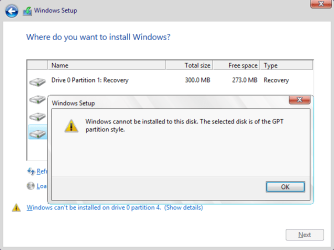
Error message when you boot from the Windows installation media in Legacy BIOS Boot Mode:

Windows cannot be installed to this disk. The selected disk is of the GPT partition style. (see screenshot below)

That is because Windows can only be installed to MBR disk in Legacy BIOS Boot Mode, but you plan to install Windows on a GPT disk.

- Boot from the Windows installation media in UEFI Boot Mode, so you can use GPT (GUID Partition Table).
- But if you want to use MBR (Master Boot Record) partition table, then delete all partitions on the disk.

Windows cannot be installed to this disk. The selected disk is of the GPT partition style.png

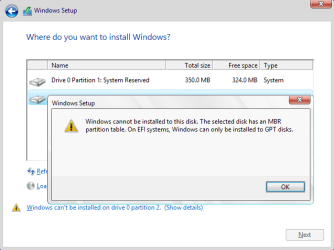
Error message when you boot from the Windows installation media in UEFI Boot Mode:

Windows cannot be installed to this disk. The selected disk has an MBR partition table. On EFI systems, Windows can only be installed to GPT disks. (see screenshot below)

That is because Windows can only be installed to GPT disk in UEFI Boot Mode, but you plan to install Windows on an MBR disk.

- Delete all partitions on the disk, so you can use GPT (GUID Partition Table).
- But if you want to use MBR (Master Boot Record) partition table, then boot from the Windows installation media in Legacy BIOS Boot Mode.

Windows cannot be installed on this disk. The selected disk has an MBR partition table.png
 

My Computer My Computer

At a glance

Windows 8.1/10 x64Intel Core i5-3230M8 GBIntel HD Graphics 4000
Computer type
Laptop
Computer Manufacturer/Model Number
Lenovo IdeaPad G580
OS
Windows 8.1/10 x64
CPU
Intel Core i5-3230M
Memory
8 GB
Graphics Card(s)
Intel HD Graphics 4000
Antivirus
Windows Defender, EMET, standard user account
Browser
Internet Explorer
Yep, just convert the drive to MBR, and you`ll be off and running, I mean installing :)
 

My Computer My Computer

At a glance

Windows 10 Pro x64Intel Core i7 6700KGSkill TridentZ RGB 16GB 3600 16-16-16-36EVGA GTX 980 Ti SC x2
Computer type
PC/Desktop
Computer Manufacturer/Model Number
Skylake Special #666
OS
Windows 10 Pro x64
CPU
Intel Core i7 6700K
Motherboard
Asus Sabertooth Z170 Mark 1
Memory
GSkill TridentZ RGB 16GB 3600 16-16-16-36
Graphics Card(s)
EVGA GTX 980 Ti SC x2
Sound Card
Realtek High Definition
Monitor(s) Displays
AOC G2460PG
Screen Resolution
1920 x 1080 144Hz
Hard Drives
Samsung 860 Pro 256GB, Seagate Barracuda 4TB x2
PSU
EVGA 1000 P2, EVGA White Custom Braided Cables
Case
Corsair Vengeance C70 Gunmetal Black
Cooling
Corsair H100i v2, Corsair ML120 x2, Thermal Grizzly Kryonaut
Keyboard
Logitech G910 Orion Spectrum
Mouse
Logitech G700s
Internet Speed
Verizon Fios Quantum Gateway 75/75
Antivirus
Windows Defender, Malwarebytes Free 3.8.3
Browser
Chrome
Other Info
Corsair SP120 x4, LG Blu-ray Drive, Durabrand HT-395 100 Watt Dolby Digital Amp, Corsair H2100 Wireless 7.1 Headset
How do i convert to mbr? I don't have a problem using GPT. In my bios I can only set to legacy or UEFI.
 

My Computer My Computer

At a glance

Windows 7 Home Prem 64 bitIntel i5
Computer type
Laptop
Computer Manufacturer/Model Number
Dell Latitude E6410
OS
Windows 7 Home Prem 64 bit
CPU
Intel i5
Hard Drives
128GB SSD

My Computer My Computer

At a glance

Windows 7 Home Premium SP1, 64-bitIntel Skylake i5-6600K, not overclocked8 GB HyperX DDR4-2666 (2 x 4 GB)none; graphics are integrated on CPU
Computer type
PC/Desktop
Computer Manufacturer/Model Number
Ignatz Special; 4 speed manual gearbox; factory air conditioning; one of one
OS
Windows 7 Home Premium SP1, 64-bit
CPU
Intel Skylake i5-6600K, not overclocked
Motherboard
AsRock Z170M Extreme 4, micro ATX
Memory
8 GB HyperX DDR4-2666 (2 x 4 GB)
Graphics Card(s)
none; graphics are integrated on CPU
Sound Card
onboard: Realtek ALC1150; external: USB Behringer UF0-202
Monitor(s) Displays
Dell S2340M 23 inch IPS
Screen Resolution
1600 x 900
Hard Drives
System: Crucial MX100 series SSD, 128 GB;
Data: Samsung Spinpoint 103SJ, 1 TB;
Backup: WD Caviar Green WD30EZRX-00D8PB0, 3 TB
PSU
Rosewill SilentNight 500 watt fanless, semi-modular
Case
Antec Solo II
Cooling
Noctua NH-U12S; Noctua F12 intake, Noctua S12A exhaust
Keyboard
Microsoft 200 6JH-00001 USB
Mouse
Dell or Microsoft optical wired; USB
Antivirus
Microsoft Security Essentials and Malwarebytes Premium
Browser
Pale Moon
Other Info
All fans PWM; speeds at idle: CPU circa 500 rpm; intake circa 600 rpm; exhaust circa 600 rpm; CPU temps 27 idle and 47 C load in a warm room (27 C/81 F) when running Intel Extreme Tuning Utility stress test.
When I get to the screen that shows my partitions I select the partition that I want to format and it says

"Windows cannot be installed to this disk. The selected disk has an mbr partition table. On EFI systems, Windows can only be installed to GPT disks."


Delete all partitions on the disk, so you can use GPT (GUID Partition Table).

-or-

If you want to use MBR (Master Boot Record) partition table, then boot from the Windows installation media in Legacy BIOS Boot Mode.
 

My Computer My Computer

At a glance

Windows 8.1/10 x64Intel Core i5-3230M8 GBIntel HD Graphics 4000
Computer type
Laptop
Computer Manufacturer/Model Number
Lenovo IdeaPad G580
OS
Windows 8.1/10 x64
CPU
Intel Core i5-3230M
Memory
8 GB
Graphics Card(s)
Intel HD Graphics 4000
Antivirus
Windows Defender, EMET, standard user account
Browser
Internet Explorer
I created a bootable windows 7 home prem iso on my usb flash drive with Rufus. In my bios I have it set to Legacy. My SSD hard drive is showing up in the bios. I booted from my USB flash drive, when I get to the screen "Where do you want to install Windows" I tried deleting the partitions and it says "failed to delete the selected partition. [Error:0x8007045d]." It also says "Windows cannot be installed to Disk 0 Partition 1 and 2.

Windows cannot be installed to this disk. This computer's hardware may not support booting to this disk. Ensure that the disk's controller is enabled in the computer's BIOS menu.
 

My Computer My Computer

At a glance

Windows 7 Home Prem 64 bitIntel i5
Computer type
Laptop
Computer Manufacturer/Model Number
Dell Latitude E6410
OS
Windows 7 Home Prem 64 bit
CPU
Intel i5
Hard Drives
128GB SSD
Do you have access to any partitioning tools unrelated to that Rufus USB flash drive?

Such as a Partition Wizard bootable disk? Or Gparted? Or Diskpart?
 

My Computer My Computer

At a glance

Windows 7 Home Premium SP1, 64-bitIntel Skylake i5-6600K, not overclocked8 GB HyperX DDR4-2666 (2 x 4 GB)none; graphics are integrated on CPU
Computer type
PC/Desktop
Computer Manufacturer/Model Number
Ignatz Special; 4 speed manual gearbox; factory air conditioning; one of one
OS
Windows 7 Home Premium SP1, 64-bit
CPU
Intel Skylake i5-6600K, not overclocked
Motherboard
AsRock Z170M Extreme 4, micro ATX
Memory
8 GB HyperX DDR4-2666 (2 x 4 GB)
Graphics Card(s)
none; graphics are integrated on CPU
Sound Card
onboard: Realtek ALC1150; external: USB Behringer UF0-202
Monitor(s) Displays
Dell S2340M 23 inch IPS
Screen Resolution
1600 x 900
Hard Drives
System: Crucial MX100 series SSD, 128 GB;
Data: Samsung Spinpoint 103SJ, 1 TB;
Backup: WD Caviar Green WD30EZRX-00D8PB0, 3 TB
PSU
Rosewill SilentNight 500 watt fanless, semi-modular
Case
Antec Solo II
Cooling
Noctua NH-U12S; Noctua F12 intake, Noctua S12A exhaust
Keyboard
Microsoft 200 6JH-00001 USB
Mouse
Dell or Microsoft optical wired; USB
Antivirus
Microsoft Security Essentials and Malwarebytes Premium
Browser
Pale Moon
Other Info
All fans PWM; speeds at idle: CPU circa 500 rpm; intake circa 600 rpm; exhaust circa 600 rpm; CPU temps 27 idle and 47 C load in a warm room (27 C/81 F) when running Intel Extreme Tuning Utility stress test.
Yes....I can get any of these. Which one do you recommend?

Thanks
 

My Computer My Computer

At a glance

Windows 7 Home Prem 64 bitIntel i5
Computer type
Laptop
Computer Manufacturer/Model Number
Dell Latitude E6410
OS
Windows 7 Home Prem 64 bit
CPU
Intel i5
Hard Drives
128GB SSD
Diskpart is probably the simplest, but Partition Wizard has the most features.

If you are simply trying to wipe the disk of ALL partitions, either should work.

I have no personal experience with Gparted.
 

My Computer My Computer

At a glance

Windows 7 Home Premium SP1, 64-bitIntel Skylake i5-6600K, not overclocked8 GB HyperX DDR4-2666 (2 x 4 GB)none; graphics are integrated on CPU
Computer type
PC/Desktop
Computer Manufacturer/Model Number
Ignatz Special; 4 speed manual gearbox; factory air conditioning; one of one
OS
Windows 7 Home Premium SP1, 64-bit
CPU
Intel Skylake i5-6600K, not overclocked
Motherboard
AsRock Z170M Extreme 4, micro ATX
Memory
8 GB HyperX DDR4-2666 (2 x 4 GB)
Graphics Card(s)
none; graphics are integrated on CPU
Sound Card
onboard: Realtek ALC1150; external: USB Behringer UF0-202
Monitor(s) Displays
Dell S2340M 23 inch IPS
Screen Resolution
1600 x 900
Hard Drives
System: Crucial MX100 series SSD, 128 GB;
Data: Samsung Spinpoint 103SJ, 1 TB;
Backup: WD Caviar Green WD30EZRX-00D8PB0, 3 TB
PSU
Rosewill SilentNight 500 watt fanless, semi-modular
Case
Antec Solo II
Cooling
Noctua NH-U12S; Noctua F12 intake, Noctua S12A exhaust
Keyboard
Microsoft 200 6JH-00001 USB
Mouse
Dell or Microsoft optical wired; USB
Antivirus
Microsoft Security Essentials and Malwarebytes Premium
Browser
Pale Moon
Other Info
All fans PWM; speeds at idle: CPU circa 500 rpm; intake circa 600 rpm; exhaust circa 600 rpm; CPU temps 27 idle and 47 C load in a warm room (27 C/81 F) when running Intel Extreme Tuning Utility stress test.
I just downloaded Partition Wizard
 

My Computer My Computer

At a glance

Windows 7 Home Prem 64 bitIntel i5
Computer type
Laptop
Computer Manufacturer/Model Number
Dell Latitude E6410
OS
Windows 7 Home Prem 64 bit
CPU
Intel i5
Hard Drives
128GB SSD
OK; get it on a bootable disk or on a bootable USB stick.
 

My Computer My Computer

At a glance

Windows 7 Home Premium SP1, 64-bitIntel Skylake i5-6600K, not overclocked8 GB HyperX DDR4-2666 (2 x 4 GB)none; graphics are integrated on CPU
Computer type
PC/Desktop
Computer Manufacturer/Model Number
Ignatz Special; 4 speed manual gearbox; factory air conditioning; one of one
OS
Windows 7 Home Premium SP1, 64-bit
CPU
Intel Skylake i5-6600K, not overclocked
Motherboard
AsRock Z170M Extreme 4, micro ATX
Memory
8 GB HyperX DDR4-2666 (2 x 4 GB)
Graphics Card(s)
none; graphics are integrated on CPU
Sound Card
onboard: Realtek ALC1150; external: USB Behringer UF0-202
Monitor(s) Displays
Dell S2340M 23 inch IPS
Screen Resolution
1600 x 900
Hard Drives
System: Crucial MX100 series SSD, 128 GB;
Data: Samsung Spinpoint 103SJ, 1 TB;
Backup: WD Caviar Green WD30EZRX-00D8PB0, 3 TB
PSU
Rosewill SilentNight 500 watt fanless, semi-modular
Case
Antec Solo II
Cooling
Noctua NH-U12S; Noctua F12 intake, Noctua S12A exhaust
Keyboard
Microsoft 200 6JH-00001 USB
Mouse
Dell or Microsoft optical wired; USB
Antivirus
Microsoft Security Essentials and Malwarebytes Premium
Browser
Pale Moon
Other Info
All fans PWM; speeds at idle: CPU circa 500 rpm; intake circa 600 rpm; exhaust circa 600 rpm; CPU temps 27 idle and 47 C load in a warm room (27 C/81 F) when running Intel Extreme Tuning Utility stress test.
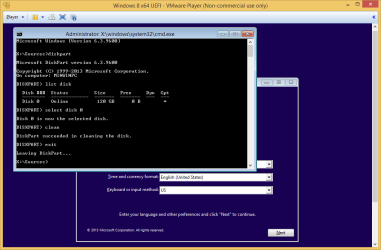
If you cannot delete all the partitions on the Where do you want to install Windows? screen.

- Boot the computer using the Windows 7/8/10 installation media.
- On the first screen, press SHIFT+F10 to bring up the command prompt.
- Run the following commands at the command prompt.

diskpart
list disk (this will give you a listing of the disks on your system)
select disk # (select the disk you want to clean, for example select disk 0)
clean (running the clean command will delete all partitions on the disk)
exit

Even if you are going to use the GPT (GUID Partition Table), you do not need to run the convert gpt command, since you are not creating the partitions at a command prompt.

- Close the command prompt window and continue your Windows installation as usual.

Diskpart.png
 

My Computer My Computer

At a glance

Windows 8.1/10 x64Intel Core i5-3230M8 GBIntel HD Graphics 4000
Computer type
Laptop
Computer Manufacturer/Model Number
Lenovo IdeaPad G580
OS
Windows 8.1/10 x64
CPU
Intel Core i5-3230M
Memory
8 GB
Graphics Card(s)
Intel HD Graphics 4000
Antivirus
Windows Defender, EMET, standard user account
Browser
Internet Explorer
I have a bootable USB with Windows 7 Home Prem. Are you saying to copy the Partition Wizard to this Bootable USB drive? If so, what do I do next?
 

My Computer My Computer

At a glance

Windows 7 Home Prem 64 bitIntel i5
Computer type
Laptop
Computer Manufacturer/Model Number
Dell Latitude E6410
OS
Windows 7 Home Prem 64 bit
CPU
Intel i5
Hard Drives
128GB SSD
I gather you do not know how to get Partition Wizard onto a bootable device of any type.

Therefore, it's probably simpler for you to use Diskpart as described by genet in post 14.

The main thing you have to be concerned with is to operate on the correct disk---not some other disk. The "clean" command in Diskpart should do what you want, but you have to be sure I say sure I say positive that you have selected the disk you want to wipe. If you mistakenly select some other disk, that other disk will be wiped.
 

My Computer My Computer

At a glance

Windows 7 Home Premium SP1, 64-bitIntel Skylake i5-6600K, not overclocked8 GB HyperX DDR4-2666 (2 x 4 GB)none; graphics are integrated on CPU
Computer type
PC/Desktop
Computer Manufacturer/Model Number
Ignatz Special; 4 speed manual gearbox; factory air conditioning; one of one
OS
Windows 7 Home Premium SP1, 64-bit
CPU
Intel Skylake i5-6600K, not overclocked
Motherboard
AsRock Z170M Extreme 4, micro ATX
Memory
8 GB HyperX DDR4-2666 (2 x 4 GB)
Graphics Card(s)
none; graphics are integrated on CPU
Sound Card
onboard: Realtek ALC1150; external: USB Behringer UF0-202
Monitor(s) Displays
Dell S2340M 23 inch IPS
Screen Resolution
1600 x 900
Hard Drives
System: Crucial MX100 series SSD, 128 GB;
Data: Samsung Spinpoint 103SJ, 1 TB;
Backup: WD Caviar Green WD30EZRX-00D8PB0, 3 TB
PSU
Rosewill SilentNight 500 watt fanless, semi-modular
Case
Antec Solo II
Cooling
Noctua NH-U12S; Noctua F12 intake, Noctua S12A exhaust
Keyboard
Microsoft 200 6JH-00001 USB
Mouse
Dell or Microsoft optical wired; USB
Antivirus
Microsoft Security Essentials and Malwarebytes Premium
Browser
Pale Moon
Other Info
All fans PWM; speeds at idle: CPU circa 500 rpm; intake circa 600 rpm; exhaust circa 600 rpm; CPU temps 27 idle and 47 C load in a warm room (27 C/81 F) when running Intel Extreme Tuning Utility stress test.
I understand. I booted to my usb drive that I have win 7 home prem on. I hit Shift + F10. I am now running clean on my disk 0. I will see if this works.
 

My Computer My Computer

At a glance

Windows 7 Home Prem 64 bitIntel i5
Computer type
Laptop
Computer Manufacturer/Model Number
Dell Latitude E6410
OS
Windows 7 Home Prem 64 bit
CPU
Intel i5
Hard Drives
128GB SSD
There is some slight chance that "clean" won't solve your problem.

In that case, go back into Diskpart and use the "clean all" command instead.

"Clean" should complete quickly. "Clean all" might take some time to complete.
 

My Computer My Computer

At a glance

Windows 7 Home Premium SP1, 64-bitIntel Skylake i5-6600K, not overclocked8 GB HyperX DDR4-2666 (2 x 4 GB)none; graphics are integrated on CPU
Computer type
PC/Desktop
Computer Manufacturer/Model Number
Ignatz Special; 4 speed manual gearbox; factory air conditioning; one of one
OS
Windows 7 Home Premium SP1, 64-bit
CPU
Intel Skylake i5-6600K, not overclocked
Motherboard
AsRock Z170M Extreme 4, micro ATX
Memory
8 GB HyperX DDR4-2666 (2 x 4 GB)
Graphics Card(s)
none; graphics are integrated on CPU
Sound Card
onboard: Realtek ALC1150; external: USB Behringer UF0-202
Monitor(s) Displays
Dell S2340M 23 inch IPS
Screen Resolution
1600 x 900
Hard Drives
System: Crucial MX100 series SSD, 128 GB;
Data: Samsung Spinpoint 103SJ, 1 TB;
Backup: WD Caviar Green WD30EZRX-00D8PB0, 3 TB
PSU
Rosewill SilentNight 500 watt fanless, semi-modular
Case
Antec Solo II
Cooling
Noctua NH-U12S; Noctua F12 intake, Noctua S12A exhaust
Keyboard
Microsoft 200 6JH-00001 USB
Mouse
Dell or Microsoft optical wired; USB
Antivirus
Microsoft Security Essentials and Malwarebytes Premium
Browser
Pale Moon
Other Info
All fans PWM; speeds at idle: CPU circa 500 rpm; intake circa 600 rpm; exhaust circa 600 rpm; CPU temps 27 idle and 47 C load in a warm room (27 C/81 F) when running Intel Extreme Tuning Utility stress test.
diskpart clean did not fix my problem.
 

My Computer My Computer

At a glance

Windows 7 Home Prem 64 bitIntel i5
Computer type
Laptop
Computer Manufacturer/Model Number
Dell Latitude E6410
OS
Windows 7 Home Prem 64 bit
CPU
Intel i5
Hard Drives
128GB SSD

My Computer My Computer

At a glance

Windows 7 Home Premium SP1, 64-bitIntel Skylake i5-6600K, not overclocked8 GB HyperX DDR4-2666 (2 x 4 GB)none; graphics are integrated on CPU
Computer type
PC/Desktop
Computer Manufacturer/Model Number
Ignatz Special; 4 speed manual gearbox; factory air conditioning; one of one
OS
Windows 7 Home Premium SP1, 64-bit
CPU
Intel Skylake i5-6600K, not overclocked
Motherboard
AsRock Z170M Extreme 4, micro ATX
Memory
8 GB HyperX DDR4-2666 (2 x 4 GB)
Graphics Card(s)
none; graphics are integrated on CPU
Sound Card
onboard: Realtek ALC1150; external: USB Behringer UF0-202
Monitor(s) Displays
Dell S2340M 23 inch IPS
Screen Resolution
1600 x 900
Hard Drives
System: Crucial MX100 series SSD, 128 GB;
Data: Samsung Spinpoint 103SJ, 1 TB;
Backup: WD Caviar Green WD30EZRX-00D8PB0, 3 TB
PSU
Rosewill SilentNight 500 watt fanless, semi-modular
Case
Antec Solo II
Cooling
Noctua NH-U12S; Noctua F12 intake, Noctua S12A exhaust
Keyboard
Microsoft 200 6JH-00001 USB
Mouse
Dell or Microsoft optical wired; USB
Antivirus
Microsoft Security Essentials and Malwarebytes Premium
Browser
Pale Moon
Other Info
All fans PWM; speeds at idle: CPU circa 500 rpm; intake circa 600 rpm; exhaust circa 600 rpm; CPU temps 27 idle and 47 C load in a warm room (27 C/81 F) when running Intel Extreme Tuning Utility stress test.
Back
Top